<?xml version="1.0" encoding="utf-8"?>
<feed xmlns="http://www.w3.org/2005/Atom">

  <title><![CDATA[Acko.net]]></title>
  <link href="http://acko.net/atom.xml" rel="self"/>
  <link href="http://acko.net/"/>
  <updated>2013-05-22T06:16:31-07:00</updated>
  <id>http://acko.net/</id>
  <author>
    <name><![CDATA[Steven Wittens]]></name>
    
  </author>

  
  <entry>
    <title type="html"><![CDATA[Making MathBox]]></title>
    <link href="http://acko.net/blog/making-mathbox/"/>
    <updated>2012-11-14T00:00:00-08:00</updated>
    <id>http://acko.net/blog/making-mathbox</id>
    <content type="html"><![CDATA[<div class='g8 i2 first'><div class='pad'>

  <h1>Making MathBox</h1>
  <h2>Presentation-Quality Math with Three.js and WebGL</h2>

</div></div><div class='c' /><aside class='g4'><div class='pad tc'>
  <iframe class='mathbox' height='600' src='/files/mathbox/MathBox.js/examples/ProjectiveLine.html?e3391a83' />
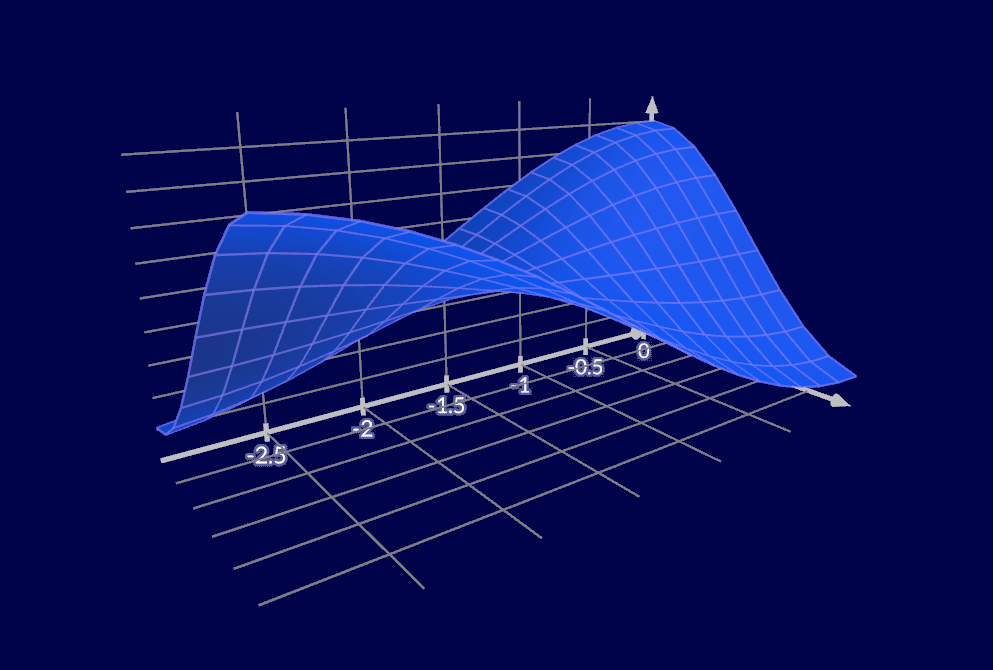
  A fun little graph involving rational functions on the <a href='http://en.wikipedia.org/wiki/Real_projective_line'>real projective line</a>.
</div></aside><div class='g8'><div class='pad'>

  <p>For most of my life, I've found math to be a visual experience. My math scores went from crap to great once I started playing with graphics code, found some demoscene tutorials, and realized I could reason about formulas by picturing the graphs they create. I could apply operators by learning how they morph, shift, turn and fold those graphs and create symmetries. I could remember equations and formulas more easily when I could layer on top the visual relationships they embody. I was less likely to make mistakes when I could augment the boring symbolic manipulation with a mental set of visual cross-checks.</p>

  <p>So, when tasked with holding a conference talk on <a href='http://www.youtube.com/watch?v=ONN3jBly364'>how to make things out of math</a> at <a href='http://www.full-frontal.org'>Full Frontal</a>, I knew the resulting presentation would have to consist of intricate visualizations as the main draw, with whatever I had to say as mere glue to hold it together.</p>

  <p>The problem was, I didn't know of a good tool to do so, and creating animations by hand would probably be too time consuming. With the writings of <a href='http://www.maa.org/devlin/LockhartsLament.pdf'>Paul Lockhart</a> and <a href='http://worrydream.com/KillMath/'>Bret Victor</a> firmly in mind, I also knew I wanted to start blogging more about mathematical concepts in a non-traditional way, showing the principles of calculus, analysis and algebra the way I learnt to see them in my head, rather than through the obscure symbols served up in engineering school.</p>

  <p>So I set out to create that tool, keeping in mind the most important lesson I've picked up as a web developer: one cannot overstate the value in being able to send someone a link and have it just work, right there. It was obvious it would have to be browser-based.</p>

</div></div><aside class='g4 i2 c'><div class='pad'>
  <p class='tc'>
    <a href='http://www.youtube.com/watch?v=ONN3jBly364&amp;list=UUyBAm31tEpZ17hka6ZvVqcg&amp;index=2&amp;feature=plcp'>
    <img alt='Video' src='/files/fullfrontal/video.jpg' style='top: 0' />
    Conference Video
    </a>
  </p>
</div></aside><aside class='g4'><div class='pad'>
  <p class='tc'>
    <a href='http://acko.net/files/fullfrontal/fullfrontal/slides-net/'>
    <img alt='Slides' src='/files/fullfrontal/slides.png' style='top: 0; -webkit-box-shadow: 0 2px 10px rgba(0, 0, 0, .3); -moz-box-shadow: 0 2px 10px rgba(0, 0, 0, .3); box-shadow: 0 2px 10px rgba(0, 0, 0, .3);' />
    Slide Deck
    </a>
  </p>
</div></aside><div class='g8 i2 c'><div class='pad'>

  <h2>Choose your Poison</h2>

  <p>Now, when people think of graphs in a browser, the natural thought is vector graphics and SVG, which quickly leads to <a href='http://d3js.org'>visualization powerhouse d3.js</a>. It really is an amazing piece of tech with a vast library of useful code to accompany it. When I wrapped my head around how d3's enter/exit selections are implemented and how little it actually does to achieve so much, I was blown away. It's just so elegant and simple.</p>

  <p>Unfortunately, d3's core is intricately tied to the DOM through SVG and CSS. And that means ironically that d3 is not really capable of 3D. Additionally, d3 is a power tool that makes no assumptions: it is up to you to choose which visual elements and techniques to use to make your diagrams, and as such it is more like assembly language for graphs than a drop-in tool. These two were show stoppers.</p>

  <p>For one, manually designing layouts, grids, axes, etc. every time is tedious. You should be able to drop in a mathematical expression with as little fanfare as possible and have it come out looking right. This includes sane defaults for transitions and animations.</p>

</div></div><div class='g12'>
  <iframe class='mathbox' height='500' src='/files/mathbox/MathBox.js/examples/Intersections.html?e3391a83' width='960' />
</div><div class='g7'><div class='pad'>

  <p>For another, I've found that, when in doubt, adding an extra dimension always helps. The moment I finally realized that every implicit graph in N dimensions is really just a slice of an explicit one in N+1 dimensions, a ridiculous amount of things clicked together. And it took until years after studying signal processing to at long last discover the 4D picture of complex exponentiation that tied the entire thing together (projected into 3D below): it revealed the famous "magic formula" involving e, i and π to be a meaningless symbological distraction, a pinhole view of a much larger, much more beautiful structure, underpinning every Fourier and Z transform I'd ever encountered.</p>

</div></div><aside class='g5 m1'><div class='pad'>
  <p class='tc'><big>
    e<sup>iπ</sup> = -1
  </big></p>
  <p class='tc'>This particular formula is not that important.</p>

  <p class='tc'><big>
    e<sup>x+iy</sup> = e<sup>x</sup> &middot; e<sup>iy</sup> = e<sup>x</sup> ∠ y
    
  </big></p>
  <p class='tc'>This one is (∠ = rotate by).<br />Unfortunately it has a four dimensional graph.</p>
  
</div></aside><div class='g12'>
  <iframe class='mathbox' height='500' src='/files/mathbox/MathBox.js/examples/ComplexExponentiation.html?e3391a83' width='960' />
</div><div class='g8 i2'><div class='pad'>

  <p>So, WebGL it was, because I needed 3D. Unfortunately that meant the promise of having it just work everywhere was tempered by a lack of browser support, but I would certainly hope that's something we can overcome sooner than later. Dear Apple and Microsoft: get your shit together already. Dear Firefox and Opera: your WebGL performance could be a lot better.</p>

  <h2>Shady Dealings</h2>

  <p>These days I don't really touch WebGL without going through <a href='http://mrdoob.github.com/three.js/'>Three.js</a> first. Three.js is a wonderful, mature engine that contains tons of useful high-level components. At the same time, it also does a great job in just handling the boilerplate of WebGL while not getting in the way of doing some heavy lifting yourself.</p>

  <p>Rendering vector-style graphics with WebGL is not hard, certainly easier than photorealistic 3D. Primitives like lines and points are sized in absolute pixels by default, and with hardware multisampling for anti-aliasing, you get somewhat decent image quality out of it. Though, as is typical for a Web API, we're treated like children and can only cross our fingers and <em>request</em> anti-aliasing politely, hoping it will be available. Meanwhile native developers <a href='http://www.nvidia.com/object/coverage-sampled-aa.html'>have full control</a> over speed and quality and can adjust their strategy to the specific hardware's capabilities. The more things change... And then <a href='http://code.google.com/p/chromium/issues/detail?id=159275'>Chrome decided to disable anti-aliasing altogether</a> due to esoteric security issues with buggy drivers. Bah.</p>

  <p>Now, when rendering with WebGL, you really have two options. One is to just treat it as a dumb output layer, loading or generating all your geometry in JavaScript and rendering it directly in 3D. With the speed of JS engines today, this can get you pretty far.</p>

</div></div><div class='g7'><div class='pad'>
  <p>The second option is to leverage the GPU's own capabilities as much as possible, doing computations in GLSL through so-called vertex and fragment shader programs. These are run for every vertex in a mesh, every pixel being drawn, and have been the main force driving innovation in real-time graphics for the past decade. With the goal of butter-smooth 60fps graphical goodness, this seemed like the better choice.</p>

  <p>Unfortunately, GLSL shaders are rather monolithic things. While you do have the ability to create subroutines, every shader still has to be a stand-alone program with its own main() function. This means you either need to include a shader for every possible combination of operations, or generate shader code dynamically by concatenating pre-made snippets or using #ifdef switches to knock them out. This is the approach taken by Three.js, which results in some <a href='https://github.com/mrdoob/three.js/blob/master/src/renderers/WebGLShaders.js'>very hairy code</a> that is neither easy to read nor easy to maintain.</p>

  <p>Having made a prototype, I knew I wanted to show continuous transitions between various coordinate systems (e.g. polar and spherical), knew I needed to render shaded and unshaded geometry, and knew I would need to slot in specific snippets for things like point sprites, bezier curves/surfaces, dynamic tick marks, and more. Sorting this all out Three.js-style would be a nightmare.</p>

</div></div><aside class='g5'>
<p class='codeblock'>
<code>uniform sampler2D texture;
varying vec2 vUV;

void main() {
  gl_FragColor = texture2D(texture, vUV);
}
</code></p>
<p>
A pixel or fragment shader that looks up a pixel's color in a texture.
</p>
<p class='codeblock'>
<code>uniform mat4 projectionMatrix;
uniform mat4 modelViewMatrix;
attribute vec4 position;
attribute vec2 uv;
varying vec2 vUV;

void main() {
  vUV = uv;

  gl_Position = projectionMatrix
              * modelViewMatrix
              * position;
}
</code>
</p>
<p>
A vertex shader that projects a 3D position into 2D by applying two matrices. It also provides UV coordinates for the texture look up.
</p>
</aside><aside class='g4 c'>
<p style='top: 0;'><img src='/files/mathbox/shadergraph.png' style='width: 93%' /></p>
<p class='codeblock'>
<code>var graph =
  factory
    .snippet('split')
    .group()
      .snippet('top')
    .next()
      .snippet('middle')
    .next()
      .snippet('bottom')
    .combine()
    .snippet('join')
    .end();
</code></p>
<p>
ShaderGraph's factory API lets you build shader chains with very little hassle. In this case, the names refer to IDs of &lt;<strong>script</strong>&gt; tags in the source.
</p>
</aside><div class='g8'><div class='pad'>

  <p>So I wrote a library to solve that problem, called <a href='https://github.com/unconed/ShaderGraph.js'>ShaderGraph.js</a>. It is best described as a smart code-concatenator, a few steps short of writing a full blown compiler. You feed it snippets of GLSL code, each with one or more inputs and outputs, and these get parsed and turned into lego-like building blocks. Each input/output becomes an outlet, and outlets are wired up in a typical dataflow style. Given a graph of connected snippets, it can be compiled back into a program by assembling the subroutines, assigning intermediate variables and constructing an appropriate main() function to invoke them. It also exports a list of all external variables, i.e. GLSL uniforms and attributes, so you can control the program's behavior easily.</p>

  <p>If I'd stopped there however, I'd have just replaced the act of manual code writing with that of manually wiring graphs. So I applied the principle of convention-over-configuration instead: you tell ShaderGraph to connect two snippets, and it will automatically match up outlets by name and type. This is augmented by a chainable factory API, which allows you to pass a partially built graph around. It allows different classes to work together to build shaders, each inserting their own snippets into the processing chain.</p>
  
<p>For example, to render a Bezier surface, the vertex shader is composed of: cubic interpolation, viewport transform (position + tangents), normal calculation and lighting. When transforming to e.g. a polar viewport, the surface normals are seamlessly recalculated. It really works like magic and I can't wait to use this in my next WebGL projects.</p>

</div></div><div class='g8 i2'><div class='pad'>
  
  <h2>Viewports, Primitives and Renderables</h2>

  <p>At its core, Three.js matches pretty directly with WebGL. You can insert objects such as a Mesh, Line or ParticleSystem into your scene, which invokes a specific GL drawing command with high efficiency. As such, I certainly didn't want to reinvent the wheel.</p>

  <p>Hence, MathBox is set up as a sort of scene-manager-within-a-scene-manager. It's a little sandbox that speaks the language of math, allowing you to insert various <em>primitives</em> like curves, vectors, axes and grids. Each of these primitives then instantiates one or more <em>renderables</em>, which simply wrap a native Three.js object and its associated ShaderGraph material. Thus, once instantiated, MathBox gets out of the way and Three.js does the heavy lifting as normal. You can even insert multiple mathboxen into a Three.js scene if you like, mixed in with other objects.</p>

<p><img alt='MathBox Architecture' class='squeeze' src='/files/mathbox/MathBox.js/resources/architecture.png' style='margin-left: -10px;' /></p>

  <p>For example, a vector primitive is rendered as an arrow: it consists of a shaft and an arrowhead, realized as a line segment and a cone. An axis primitive is an arrow as well, but it also has tick marks (specially transformed line segments), and is positioned implicitly just by specifying the axis' direction rather than a start and end point.</p>

  <p>To render curves and surfaces, you can either specify an array of data points or a live expression to be evaluated at every point. This turned out to be essential for the kinds of intricate visualizations I wanted to show, my slides being driven by timed clocks, shared arrays of data points, and live formulas and interpolations. I even fed in data from a physics engine, and it worked perfectly.</p>

  <p>This is all tied together through Viewport objects, which define a specific mapping from a mathematical coordinate space into the 3D world space of Three.js. For example, the default cartesian viewport has the range [–1, 1] in the X, Y and Z directions. Altering the viewport's extents will shift and scale anything rendered within, as well as reflow grids and tick marks on each axis.</p>

  <p>There are two more sophisticated viewport types, polar and spherical, which each apply the relevant coordinate transform, and can transition smoothly to and from cartesian. More viewport types can be added, all that is required is to define an appropriate transformation in JavaScript and GLSL. That said, defining a seamless transition to and from cartesian space is not always easy, particularly if you want to preserve the aspect-ratio through the entire process.</p>

  <h2>Interpolate all the things!</h2>

  <p>Finally, I had to tackle the problem of animation, keeping in mind a tip I learnt from the <a href='http://www.youtube.com/watch?v=4gZ5rsAHMl4'>ever so mindbending Vihart</a>: "If I can draw the point of a sentence, I don't actually need to say the sentence." This applies doubly so for animation: every time you replace a "before" and "after" with a smooth transition, your audience implicitly understands the change rather than having to go look for it.</p>

  <p>Hence, each primitive can be fully animated. Each has a set of options (controlling behavior) and styles (controlling GLSL shaders), and there is a universal animator that can interpolate between arbitrary data types in a smart fashion.</p>

  <p>For example, given a viewport with the XYZ range [[–1, 1], [–1, 1], [–1, 1]], you can tell it to animate to [[0, 2], [0, 1], [–3, 3]], and it just works. The animator will recursively animate each subarray's elements, and any dependent objects like grids and axes will reflow to match the intermediate values. This works for colors, vectors and matrices too. In case of live curves with custom expressions, the animator will invoke both the old and the new, and interpolate between the results.</p>

</div></div><div class='g8 i2'>
  <iframe class='mathbox paged' height='400' src='/files/mathbox/MathBox.js/examples/BezierSurface.html?e3391a83' width='640' />
</div><div class='g8 i2'><div class='pad'>
  <p>However, executing animations manually in code is tedious, particularly in a presentation, where you want to be able to step forward and backward. So I added a Director class whose job it is to coordinate things. All you do is feed it a script of steps (add this object, animate that object). Then, as it applies them, it remembers the previous state of each object and generates an automatic rollback script. It also contains logic to detect rapid navigation, and will hurry up animations appropriately. This avoids that agonizing situation of watching someone skip through their slide deck, playing the same cheesy PowerPoint transitions over and over again.</p>

  <h2>Presenting Naturally</h2>
  
  <p>With MathBox's core working, it was time to build my slides for the conference. After a quick survey, I quickly settled on <a href='http://imakewebthings.com/deck.js/'>deck.js</a> as an HTML5 slidedeck solution that was clean and flexible enough for my purposes. However, while MathBox can be spawned inside any DOM element, it wouldn't work to insert a dozen live WebGL canvases into the presentation. The entire thing would grind to a halt or at least become very choppy.</p>
  
  <p>So instead, I integrated each MathBox graphic as an IFRAME, and added some logic that only loads each IFRAME one slide before it's needed, and unloads it one slide after it's gone off screen. To sync up with the main presentation, all deck.js navigation events were forwarded into each active IFRAME using <em>window.postMessage</em>. With the MathBox Director running inside, this was very easy to do, and meant that I could skip around freely during the talk, without any worries of desynchronization between MathBox and the associated HTML5 overlays.</p>
  
  <p>In fact, I applied a similar principle to this post. To avoid rendering all diagrams simultaneously and spinning up laptop fans more than necessary, each MathBox IFRAME is started as it scrolls into view and stopped once it's gone.</p>
  
  <p>I've also found that having a handheld clicker makes a huge difference while speaking—as it allows you to gesture freely and move around. So, I grabbed the infrared remote code from VLC and built a <a href='https://github.com/unconed/iremotepipe/'>simple bridge</a> from to Cocoa to Node.js to WebSocket to allow the remote to work in a browser. It's a shame Apple's decided to discontinue IR ports on their laptops. I guess I'll have to come up with a BlueTooth-based solution when I upgrade my hardware.</p>

  <h2>Towards MathBox 1.0</h2>

  <p>In its current state, MathBox is still a bit rough. The selection of primitives and viewports is limited, and only includes the ones I needed for my presentation. That said, it is obvious you can already do quite a lot with it, and I couldn't have been happier to hear that all this effort had the desired response at the conference. I wasn't 100% sure whether other people would have the same a-ha moments that I've had, but I'm convinced more than ever that seeing math in motion is essential for honing our intuition about it. MathBox not only makes animated diagrams much easier to make and share, but it also opens the door to making them interactive in the future.</p>

  <p>I plan to continue to evolve MathBox as needed by using it on this site and addressing gaps that come up, though I've already identified a couple of sore points:</p>

  <ul>
  <li><span class='strike'><span>I used tQuery as a boilerplate and because I liked the idea of having a chainable API for this. However, this also means it's currently running off an outdated version of Three.js. I need to look into updating and/or dropping tQuery.</span></span><br />MathBox has been updated to Three.js r53.</li>
  <li><span class='strike'><span>Numeric or text labels are completely unsupported. It should be possible to use my CSS3D renderer for Three.js to layer on beautifully typeset <a href='http://www.mathjax.org'>MathJax</a> formulas, positioning them correctly in 3D on top of the WebGL render.</span></span><br />I've added labeling for axes. I've integrated MathJax, but it's tricky because the typesetting is painfully slow in the middle of a 60fps render. But it's automatically used if MathJax is present.</li>
  <li>All styles have to be specified on a per-object basis. Some form of stylesheet, default styles or class mechanism to allow re-use seems like an obvious next step.</li>
  <li>There are undoubtedly memory leaks, as I was focused first and foremost on getting it to work.</li>
  <li>Expressions that don't change frame-to-frame are still continuously re-evaluated, which is wasteful. There is a <code>live: false</code> flag you can set on objects, but it triggers a few bugs here and there.</li>
  <li><span class='strike'><span>There needs to be a predictable, built-in way of running a clock per slide to sync custom expressions off of. In my presentation I used a hack of clocks that start once first invoked, but this lacks repeatability.</span></span><br />I added a <code>director.clock()</code> method that gives you a clock per slide.</li> 
  </ul>

  <p>Finally, it doesn't take much imagination to imagine a MathBox Editor that would allow you to build diagrams visually rather than having to use code like I did. However, that's a can of worms I'm not going to open by myself, especially because the API is already quite straightforward to use, and the library itself is still a bit in flux. Perhaps this could be done as an extension of the <a href='http://mrdoob.github.com/three.js/editor/'>Three.js editor</a>.</p>

  <p>You can see what MathBox is really capable of in the <a href='http://www.youtube.com/watch?v=ONN3jBly364&amp;list=UUyBAm31tEpZ17hka6ZvVqcg&amp;index=2&amp;feature=plcp'>conference video</a>. I invite you to <a href='https://github.com/unconed/MathBox.js'>play around with MathBox</a> and see what you can make it do. Contributions are welcome, and the architecture is modular enough to allow its functionality to grow for quite some time.</p>

</div></div>]]></content>
  </entry>
  
  <entry>
    <title type="html"><![CDATA[Introducing Facing.me]]></title>
    <link href="http://acko.net/blog/introducing-facing-me/"/>
    <updated>2012-04-25T00:00:00-07:00</updated>
    <id>http://acko.net/blog/introducing-facing-me</id>
    <content type="html"><![CDATA[<div class='g8 i2 first'><div class='pad'>

  <h1>Introducing Facing.me</h1>
  <h2>A unique way to meet people</h2>

</div></div><div class='c' /><aside class='g5'>
  <p class='tc'>
    <img alt='Facing.me' src='/files/fme/facing.me.face.jpg' style='top: 0' />
  </p>
</aside><div class='g7'><div class='pad'>

<p>
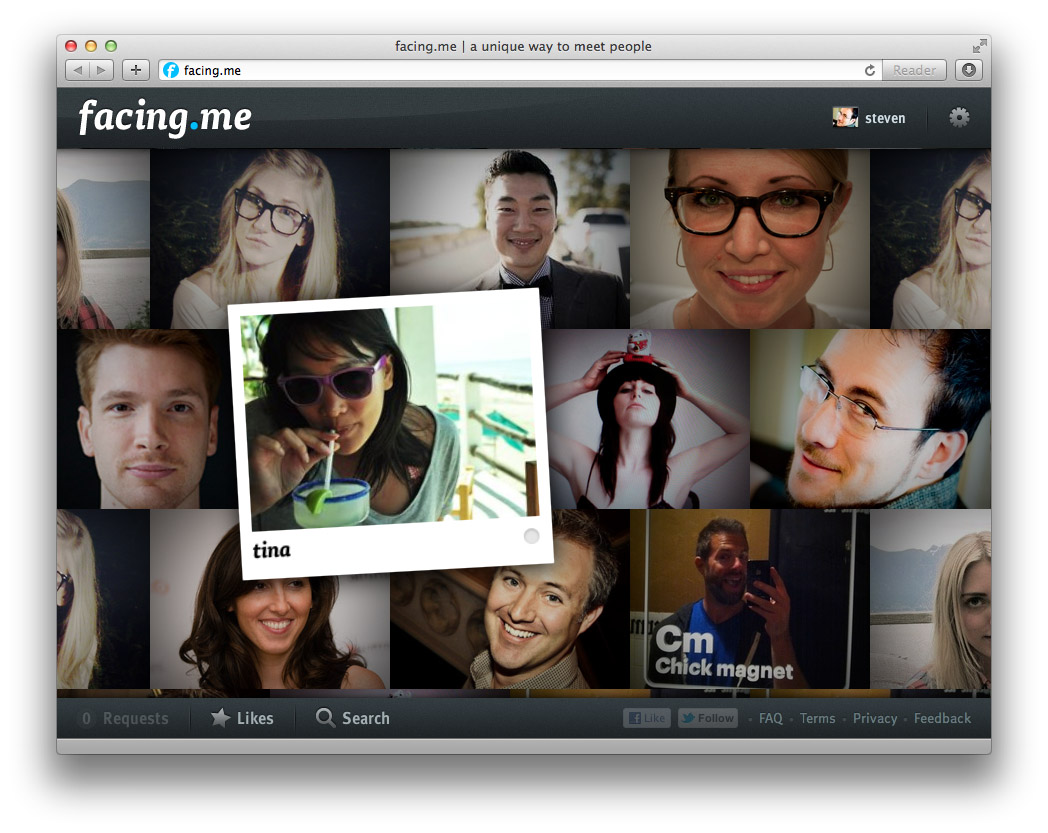
We've been sending out whispers for a while now, but it's finally out: a new web site called <a href='http://facing.me'>Facing.me</a>. Coded and designed by <a href='http://mikejholly.com'>Michael Holly</a>, <a href='http://rosshj.com/'>Ross Howard-Jones</a> and myself, it promises a <em>unique way to meet people online</em>. This would be the point where the obvious question is dropped: wait, what… you built a <em>dating site</em>?</p>

<p>Sort of. Let me explain.</p>

<p>Having spent many years in the web world, we'd all gotten a bit complacent. The web has settled into its comfortable rhythms. Sites and applications can be modelled quickly and coded on your framework of choice. And nowadays, Web 2.0 cred comes baked in: clean URLs, semantic HTML, AJAX, data feeds, APIs, etc. Isn't this what we all wanted?</p>

<p>But the web continues to evolve, and giants are roaming the playground. Sites like Facebook and Twitter hold people's attention with surgical precision, while engines like Google answer your queries with lightning speed. Given that we've all slotted such services into our workflows and indeed lives, it seems only natural that 'indie' developers should keep up. We can't pretend that a 2000-era style web-page-with-ajax-sprinkles is the pinnacle of modern interactive design.</p>

<p>So we set out to try something different.</p>

</div></div><div class='img12'>
  <a href='http://facing.me'><img alt='Facing.me website' src='/files/fme/facing.me.site.jpg' /></a>
</div><!--
<div class="g8 i2 first"><div class="pad">  

</div></div>
--><div class='g6'><div class='pad'>

<h2>A Guy Walks into a Bar...</h2>

<p>If you've managed to score an invite, the first thing you'll see is the wall of faces that loads and fills the screen. The second thing you'll notice—we hope at least—is the lack of everything else.</p>

<p>The metaphor we kept in mind was the idea of walking into a bar, and looking around. If you see someone you like, you can go up to them and strike up a conversation. So that's exactly what the app lets you do, through video chat. You can pan around to see more people, and just keep going. If you're looking for something specific, you can filter your view with a simple "I'm looking for…" dialog.</p>

<p>As you mouse around, you can see who's online, and flip open their profile. If you want to strike up a video chat, it happens right there too. If the person is online, they'll see your request immediately in a popup and can choose to accept or decline after reviewing your profile. If they're offline, they'll see your request next time they visit.</p>

<p>To avoid missed connections, you can 'like' people you're interested in. You'll see (and hear) a notification pop up the moment they're online. You can keep the app open in a background tab and never miss a thing.</p>

<p>Aside from some minor social glue and a few fun little extras for you to discover, that's it. It's our twist on a <em>minimally viable product</em> if you will. Studies have shown that online matching algorithms are a poor predictor for how well people mesh in person. Until you meet face-to-face, you just don't know. We think direct, spontaneous video chat is a better first step rather than endless profile matching and messaging.</p>

</div></div><aside class='g6 m1'>
  <p class='p0'><img alt='Facing.me welcome screen' src='/files/fme/facing.me.start.jpg' /></p>

  <p class='p0'><img alt='Facing.me welcome screen' src='/files/fme/facing.me.profile.jpg' /></p>

  <p class='p0'><img alt='Facing.me notification' src='/files/fme/facing.me.growl.jpg' /></p>

  <p class='p0'><img alt='Facing.me liking' src='/files/fme/facing.me.like.jpg' /></p>
</aside><div class='g8 i2'><div class='pad'>

<h2>Polishing Bacon</h2>

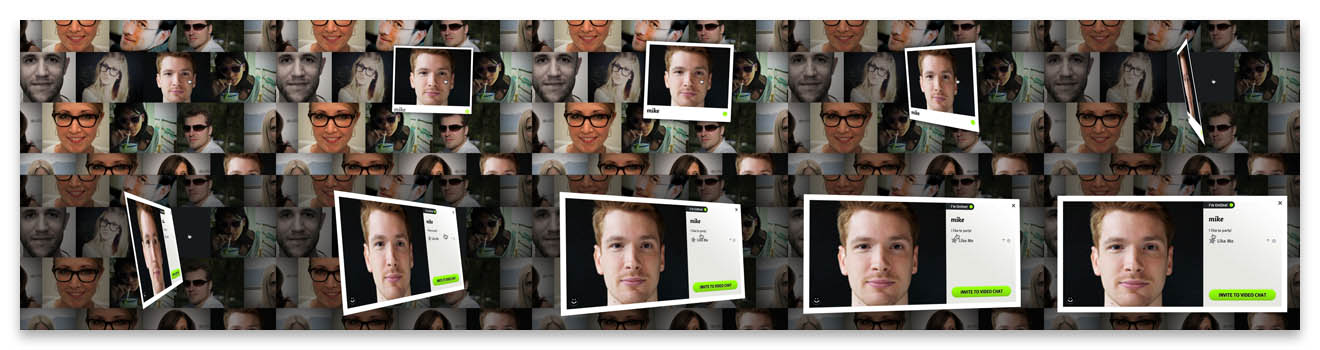
<p>But despite its minimalism, a big aspect of Facing.me is the effort and care we put into it. Our goal was to achieve a level of polish typically reserved for premium iPhone apps and bring it into the browser. We wrapped the whole thing in a crisp design, enhanced with tasteful web fonts. But most importantly, we sought to expose the app's functionality with as little interruption as possible. To do that, we layered on plenty of transitions driven by CSS3 and JavaScript, and stream in data and content as needed.</p>

<p>Based on previous work in custom animations—and <a href='/blog/abusing-jquery-animate-for-fun-and-profit-and-bacon'>bacon</a>—we refined the approach of using jQuery as an animation helper for completely custom transitions. We tell jQuery to animate placeholder properties on orphaned proxy divs, and key off those animations with per-frame code to drive the fancy stuff.</p>

</div></div><div class='img12'>
  <img alt='facing.me animation example' src='/files/fme/transition.jpg' />
</div><div class='g8 i2'><div class='pad'>
<p>As a result, we can have a photo grow a picture frame as you pick it up, and then flip it around to show a person's full profile. This careful choreography involves animating about a dozen CSS properties, including borders, shadows, margins and 3D transforms, all with custom expressions and hand-tuned animation curves. Similar transitions are used for lightbox dialogs.</p>

<p>Throughout all of this, the animations remain eminently manageable. We can interrupt and reverse them at any point, and run multiple copies at the same time, thanks to pervasive use of view controllers. Far from being a useless tech demo, it actually enables us to craft the user experience exactly the way we like it: being able to acknowledge user intentions with intuitive feedback no matter what's going on, and firing off new events and requests without worrying about the internal state. Gone are the fragile jQuery behavior soups of old.</p>

<p>The one downside is that only the newer browsers—i.e. Chrome, Safari and Firefox—get to see everything the way it was intended. And actually the performance in Firefox is still a bit disappointing. IE9 users will have to be satisfied with a crude 2D approximation until IE10 comes out.</p>

</div></div><div class='g8 first'><div class='pad'>

<h2>Rapid Rails and Real-Time Node</h2>

<p>To make all this work effectively on the server-side, we used a dual-mode stack of Rails and Node.js.</p>

<p>The Rails side houses the app's models and controllers, and provides an API for all the client-side JavaScript to do its job. Video chats are handled through Flash and routed through its built-in peer-to-peer functionality.</p>

<p>The node.js component acts as a real-time presence daemon which users connect to over socket.io. It's used to drive the status notifications and to coordinate the video chats. We can exchange any sort of notifications between users with a publish-subscribe model, opening up many interesting avenues for future development.</p>

<p>Overall, this approach has worked out great. Rails' ActiveRecord and the stack around it allowed us to build out functionality quickly and with just the right amount of necessary baggage. We made generous use of Ruby Gems to save time while still maintaining full control.</p>

<p>Node.js's event-driven model adds real-time signalling with no hassle. For the few cases where node.js needs to interface with the Rails database directly, we slot in some manual SQL to take care of that. For everything else, Rails and node.js exchange signed data through the browser.</p>

</div></div><aside class='g4 m1'><div class='pad'>
  <p><img alt='Node.js' src='/files/fme/nodejs.png' /></p>

  <p><img alt='Rails' src='/files/fme/rails.jpg' /></p>
</div></aside><div class='g8 i2 first'><div class='pad'>

<h2>Come Take it for a Spin</h2>

<p>Finally, we also put our heads together and made a promo video, voiced by the lovely <a href='https://twitter.com/t1nah'>Tina Hoang</a>:</p>

</div></div><pre class='markdown-html-error' style='border: solid 3px red; background-color: pink'>REXML could not parse this XML/HTML: 
&lt;div style=&quot;max-width: 854px; width: 100%; margin: 0 auto&quot;&gt;

&lt;!--
&lt;iframe width=&quot;854&quot; height=&quot;480&quot; src=&quot;http://www.youtube.com/embed/Ua67Hf1T7yI?rel=0&quot; frameborder=&quot;0&quot; allowfullscreen&gt;&lt;/iframe&gt;
--&gt;
&lt;iframe src=&quot;http://player.vimeo.com/video/41056588?title=0&amp;amp;byline=0&amp;amp;portrait=0&quot; width=&quot;854&quot; height=&quot;480&quot; frameborder=&quot;0&quot; webkitAllowFullScreen mozallowfullscreen allowFullScreen&gt;&lt;/iframe&gt;

&lt;/div&gt;</pre><div class='g8 i2'><div class='pad'>

<p>Built in our spare time by just 3 guys in a virtual garage, we're pretty proud of the end result. We'd love for you to take it for a spin, so <a href='http://facing.me'>head over to facing.me</a> and grab yourself an invite. There's a feedback form built-in, and any suggestions are welcome.</p>

<p>Discuss on <a href='https://plus.google.com/112457107445031703644/posts/efHMJE1Wxx2'>Google Plus</a>.</p>

</div></div>]]></content>
  </entry>
  
  <entry>
    <title type="html"><![CDATA[This is Your Brain on CSS]]></title>
    <link href="http://acko.net/blog/this-is-your-brain-on-css/"/>
    <updated>2012-02-19T00:00:00-08:00</updated>
    <id>http://acko.net/blog/this-is-your-brain-on-css</id>
    <content type="html"><![CDATA[<div style='display: none'><img alt='' src='/files/mri/cover.jpg' /></div><div class='g8 i2 first'><div class='pad'>

<h1>This is Your Brain on CSS</h1>

<p>First things first: the CSS 3D renderer used to power this site is now <a href='https://github.com/unconed/CSS3D.js'>available on GitHub.com</a>. However, it's still limited to only solid lines and planes. It's also limited to WebKit browsers, as Firefox's CSS 3D support just isn't quite there yet.</p>

<p>
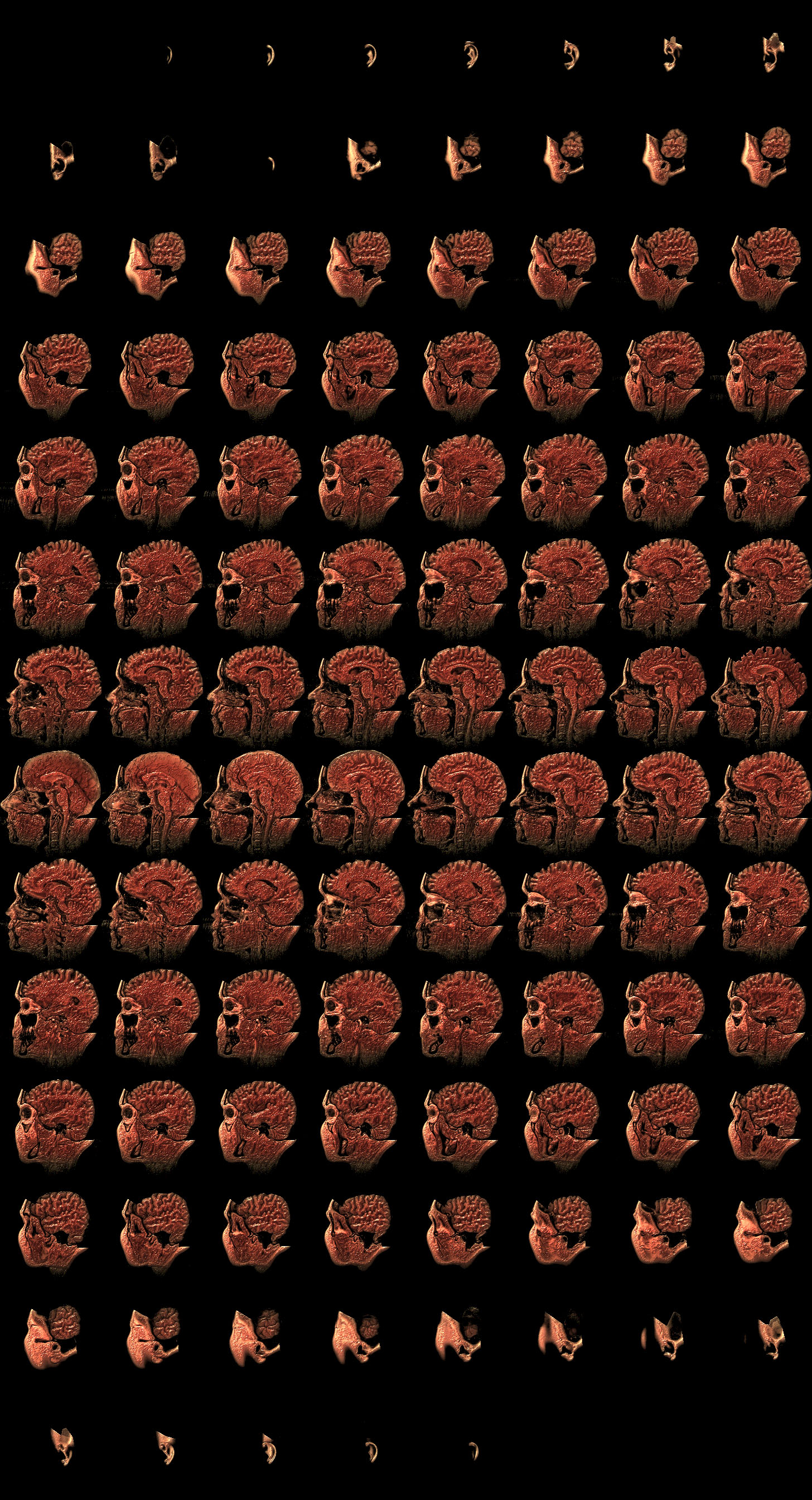
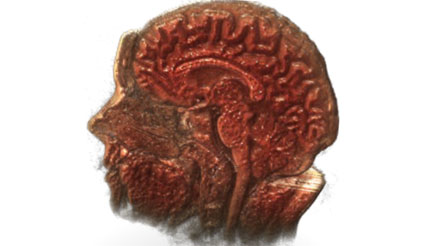
  But CSS 3D is not a one trick pony, and as with many things, what you get out of it depends entirely on what you put in. So here's a disembodied head made out of CSS 3D. It consists of nothing more than a bunch of images stacked up against each other, and integrates perfectly with the existing 3D parallax on this site. Click and drag to rotate, or use the slider to look inside.
</p>

<link href='/files/mri/head.css' media='screen' rel='stylesheet' type='text/css' />

<div id='head-3d'>
  <div class='head-viewport'>
    <div class='CSS3DCamera' data-var='transform'>
      <div class='pedestal'>
        
      </div>
      <div class='VolumetricView' data-var='phi slice' />
    </div>
  </div>
  <div class='Slider' data-var='slice' />
</div>

<p>
  Making the basic effect was actually quite easy. I took an MRI from the <a href='http://graphics.stanford.edu/data/voldata/'>Stanford Volume Data Archive</a> and wrote a small script to turn it into a sheet of CSS sprites. There's <a href='/files/mri/MRbrain-color.jpg'>one file for color</a>, <a href='/files/mri/MRbrain-alpha8.png'>one for opacity</a>, totalling about 2.1 MB. Both files are composited into Canvases and placed in slices into the DOM, offset forward or backwards in 3D. Then there's just some minor logic to rotate the slices in 90 degree increments to follow the camera.
</p>

<p>
  But the slices are rendered as is, and the MRI consists of <a href='/files/mri/MRbrain-alpha8.png'>boring grayscale data</a>. Luckily, I can precompute any amount of shaders and effects I want and just bake them into the slices. I geeked out by applying fake specular lighting, for that 'fresh meat' look, and volumetric obscurance to enhance the sense of depth on the inside. I changed the palette to gory colors based on local density, giving the impression of flesh and bone knitting itself together. Creepy, but cool.
</p>

<p>
  I wrapped it in a custom widget, using straight up CSS rather than Three.js this time. I've wanted to play with <a href='http://worrydream.com/Tangle/'>Tangle.js</a>, so I used that to hook up the camera controls and slider. That's pretty much it. In an ideal world, the jarring transition when rotating would be covered up by a nice transition, but the browsers don't like it.
</p>

</div></div><pre class='markdown-html-error' style='border: solid 3px red; background-color: pink'>REXML could not parse this XML/HTML: 
&lt;script&gt;
setTimeout(function () {
  if ($(&apos;div.css3d-support:visible&apos;).length == 0) return;

    var model = {
      initialize: function () {
        // State
        this.theta = 0.0;
        this.phi = 0.5;
        this.slice = 0;
      },

      update: function () {
        this.transform = &apos;rotateX(&apos;+ -this.theta +&apos;rad) rotateY(&apos;+ this.phi +&apos;rad)&apos;;
      },
    };

    Tangle.classes.CSS3DCamera = {
      initialize: function (element, options, tangle, variables) {
        this.element = element;
        this.$element = $(element);

        var that = this;
        $(element).mousedown(function (event) {
          that.drag = true;
          that.dragLast = that.dragOrigin = { x: event.pageX, y: event.pageY };
          event.preventDefault();
        });
        $(document).mouseup(function (event) {
          that.drag = false;
        });
        $(document).mousemove(function (event) {
          if (!that.drag) return;
          var total = { x: event.pageX - that.dragOrigin.x, y: event.pageY - that.dragOrigin.y },
              delta = { x: event.pageX - that.dragLast.x, y: event.pageY - that.dragLast.y };
          that.dragLast = { x: event.pageX, y: event.pageY };
          mousemove(that.dragOrigin, total, delta);
        });

        function mousemove(origin, total, delta) {
          var phi = tangle.getValue(&apos;phi&apos;) + delta.x * .01,
              theta = Math.min(1, Math.max(-.2, tangle.getValue(&apos;theta&apos;) + delta.y * .01));

          tangle.setValue(&apos;phi&apos;, phi);
          tangle.setValue(&apos;theta&apos;, theta);
        }
      },

      update: function (element, value) {
        this.$element.css({
          WebkitTransform: value,
          MozTransform: value,
          transform: value,
        })
      },
    },

    Tangle.classes.Slider = {
      initialize: function (element, options, tangle, variables) {
        var that = this;

        this.tangle = tangle;
        this.element = element;

        this.$element = $(this.element);
        this.$bar = $(&apos;&lt;div class=&quot;bar&quot;&gt;&apos;).appendTo(this.element);
        this.$handle = $(&apos;&lt;div class=&quot;handle&quot;&gt;&apos;).appendTo(this.element);

        var that = this;
        $(this.element).mousedown(function (event) {
          that.origin = that.$element.offset().left;
          that.width = that.$bar.width();
          that.drag = true;
          return false;
        });
        $(document).mousemove(function (event) {
          if (!that.drag) return;
          tangle.setValue(&apos;slice&apos;, Math.max(0, Math.min(1, (event.pageX - that.origin) / that.width)));
        });
        $(document).mouseup(function () {
          that.drag = false;
        });
      },

      update: function (element, value) {
        this.$handle.css(&apos;left&apos;, (100*value) + &apos;%&apos;);
      },
    },

    Tangle.classes.VolumetricView = {
      initialize: function (element, options, tangle, variables) {
        var that = this;

        this.tangle = tangle;
        this.element = element;
        this.$element = $(element);

        this.width = 364;
        this.height = 384;
        this.depth = 256;

        this.resX = 182;
        this.resY = 192;
        this.slices = 108;
        this.stride = 8;
        this.rows = Math.ceil(this.slices / this.stride);

        this.createSlices();

        var load = 0;
        this.image = new Image();
        this.image.onload = function () {
          if (++load == 2) that.drawSlices(); 
        };

        this.mask = new Image();
        this.mask.onload = function () {
          if (++load == 2) that.drawSlices(); 
        };

//        this.image.src = &apos;data/MRbrain.png&apos;;
        this.image.src = &apos;/files/mri/MRbrain-color.jpg&apos;;
        this.mask.src = &apos;/files/mri/MRbrain-alpha8.png&apos;;
      },

      update: function (element, value) {
        var l = Math.abs(Math.cos(value)) &gt; Math.abs(Math.sin(value));

        if (this.l != l || this.slice != slice) {
          var slice = this.tangle.getValue(&apos;slice&apos;), index, 
              n = (l ? Math.cos(value) : Math.sin(value)) &gt; 0,
              sn = n ? slice : 1 - slice;

          index = +(this.$slicesX.length * sn);

          this.$slicesX.css(&apos;display&apos;, l ? &apos;block&apos; : &apos;none&apos;);
          this.$slicesX
            .slice().css(&apos;opacity&apos;, n ? .95 : .001).end()
            .slice(0, index).css(&apos;opacity&apos;, !n ? .95 : .001).end();

          index = +(this.$slicesZ.length * sn);
  //        this.$slicesZ[!l ? &apos;show&apos; : &apos;hide&apos;]();
          this.$slicesZ.css(&apos;display&apos;, !l ? &apos;block&apos; : &apos;none&apos;);
          this.$slicesZ
            .slice(index).css(&apos;opacity&apos;, n ? .95 : .001).end()
            .slice(0, index).css(&apos;opacity&apos;, !n ? .95 : .001).end();

          this.slice = slice;
          this.l = l;
        }
      },

      createSlices: function () {
        this.$element.empty();
        this.ctxX = [];
        this.ctxZ = [];

        // X slices
        for (var i = 0; i &lt; this.slices; ++i) {
          var z = -((i / this.slices) - .5) * this.depth,
              t = &apos;translateZ(&apos; + z + &apos;px) translateX(70px)&apos;;

          var $canvas = $(&apos;&lt;canvas&gt;&apos;)
              .addClass(&apos;x&apos;)
              .attr(&apos;width&apos;, this.resX)
              .attr(&apos;height&apos;, this.resY)
              .css({
                width: this.width,
                height: this.height,
                WebkitTransform: t,
                MozTransform: t,
                transform: t,
                opacity: 1,
              });

          this.$element.append($canvas);
          this.ctxX.push($canvas[0].getContext(&apos;2d&apos;));
        }

        // Z slices
        for (var i = 0; i &lt; this.resX; ++i) {
          var z = -(this.depth - this.width) / 2,
              x = ((i / this.resX) - .5) * this.width,
              t = &apos;translateX(&apos; + x + &apos;px) translateX(70px) rotateY(90deg) translateZ(&apos; + z + &apos;px)&apos;;

          var $canvas = $(&apos;&lt;canvas&gt;&apos;)
              .addClass(&apos;z&apos;)
              .attr(&apos;width&apos;, this.slices)
              .attr(&apos;height&apos;, this.resY)
              .css({
                width: this.depth,
                height: this.height,
                WebkitTransform: t,
                MozTransform: t,
                transform: t,
                opacity: 0,
              });

          this.$element.append($canvas);
          this.ctxZ.push($canvas[0].getContext(&apos;2d&apos;));
        }

        this.$slicesX = this.$element.find(&apos;canvas.x&apos;);
        this.$slicesZ = this.$element.find(&apos;canvas.z&apos;);
      },

      drawSlices: function () {

        var s = this.stride,
            sl = this.slices,
            r = this.rows,
            w = this.resX,
            h = this.resY,
            img = this.image,
            mask = this.mask,
            ctxX = this.ctxX,
            ctxZ = this.ctxZ;

        var alpha, color;

        // X slices
        this.$slicesX.each(function (i) {
          var c = ctxX[i],
              ox = (i % s) * w, oy = Math.floor(i / s) * h;

          // Draw alpha channel and get pixels
          c.drawImage(mask, ox, oy, w, h, 0, 0, w, h);
          alpha = c.getImageData(0, 0, w, h);

          // Draw color channel and get pixels
          c.drawImage(img, ox, oy, w, h, 0, 0, w, h);
          color = c.getImageData(0, 0, w, h);

          // Copy red to alpha.
          var src = alpha.data, dst = color.data;
          for (var y = 0; y &lt; h; ++y) {
            for (var x = 0; x &lt; w; ++x) {
              var o = (x + y * w) * 4;
              dst[o + 3] = src[o];
            }
          }

          // Draw RGBA.
          c.putImageData(color, 0, 0);
        });

        // Z slices
        this.$slicesZ.each(function (i) {
          var c = ctxZ[i];

          // Render transposed slices as vertical strips.
          for (var j = 0; j &lt; sl; ++j) {
            var ox = (j % s) * w, oy = Math.floor(j / s) * h;

            // Draw alpha channel
            c.drawImage(mask, ox + i, oy, 1, h, j, 0, 1, h);
          }

          // Get pixels
          alpha = c.getImageData(0, 0, w, h);

          // Render transposed slices as vertical strips.
          for (var j = 0; j &lt; sl; ++j) {
            var ox = (j % s) * w, oy = Math.floor(j / s) * h;

            // Draw color channel
            c.drawImage(img, ox + i, oy, 1, h, j, 0, 1, h);
          }
          // Get pixels
          color = c.getImageData(0, 0, w, h);

          // Copy red to alpha.
          var src = alpha.data, dst = color.data;
          for (var y = 0; y &lt; h; ++y) {
            for (var x = 0; x &lt; w; ++x) {
              var o = (x + y * w) * 4;
              dst[o + 3] = src[o];
            }
          }

          // Draw RGBA.
          c.putImageData(color, 0, 0);
        });
      },

    };

    var tangle = new Tangle($(&apos;#head-3d&apos;)[0], model);

}, 200);
&lt;/script&gt;</pre><pre class='markdown-html-error' style='border: solid 3px red; background-color: pink'>REXML could not parse this XML/HTML: 
&lt;script&gt;
//
//  Tangle.js
//  Tangle 0.1.0
//
//  Created by Bret Victor on 5/2/10.
//  (c) 2011 Bret Victor.  MIT open-source license.
//
//  ------ model ------
//
//  var tangle = new Tangle(rootElement, model);
//  tangle.setModel(model);
//
//  ------ variables ------
//
//  var value = tangle.getValue(variableName);
//  tangle.setValue(variableName, value);
//  tangle.setValues({ variableName:value, variableName:value });
//
//  ------ UI components ------
//
//  Tangle.classes.myClass = {
//     initialize: function (element, options, tangle, variable) { ... },
//     update: function (element, value) { ... }
//  };
//  Tangle.formats.myFormat = function (value) { return &quot;...&quot;; };
//

var Tangle = this.Tangle = function (rootElement, modelClass) {

    var tangle = this;
    tangle.element = rootElement;
    tangle.setModel = setModel;
    tangle.getValue = getValue;
    tangle.setValue = setValue;
    tangle.setValues = setValues;

    var _model;
    var _nextSetterID = 0;
    var _setterInfosByVariableName = {};   //  { varName: { setterID:7, setter:function (v) { } }, ... }
    var _varargConstructorsByArgCount = [];


    //----------------------------------------------------------
    //
    // construct

    initializeElements();
    setModel(modelClass);
    return tangle;


    //----------------------------------------------------------
    //
    // elements

    function initializeElements() {
        var elements = rootElement.getElementsByTagName(&quot;*&quot;);
        var interestingElements = [];
        
        // build a list of elements with class or data-var attributes
        
        for (var i = 0, length = elements.length; i &lt; length; i++) {
            var element = elements[i];
            if (element.getAttribute(&quot;class&quot;) || element.getAttribute(&quot;data-var&quot;)) {
                interestingElements.push(element);
            }
        }

        // initialize interesting elements in this list.  (Can&apos;t traverse &quot;elements&quot;
        // directly, because elements is &quot;live&quot;, and views that change the node tree
        // will change elements mid-traversal.)
        
        for (var i = 0, length = interestingElements.length; i &lt; length; i++) {
            var element = interestingElements[i];
            
            var varNames = null;
            var varAttribute = element.getAttribute(&quot;data-var&quot;);
            if (varAttribute) { varNames = varAttribute.split(&quot; &quot;); }

            var views = null;
            var classAttribute = element.getAttribute(&quot;class&quot;);
            if (classAttribute) {
                var classNames = classAttribute.split(&quot; &quot;);
                views = getViewsForElement(element, classNames, varNames);
            }
            
            if (!varNames) { continue; }
            
            var didAddSetter = false;
            if (views) {
                for (var j = 0; j &lt; views.length; j++) {
                    if (!views[j].update) { continue; }
                    addViewSettersForElement(element, varNames, views[j]);
                    didAddSetter = true;
                }
            }
            
            if (!didAddSetter) {
                var formatAttribute = element.getAttribute(&quot;data-format&quot;);
                var formatter = getFormatterForFormat(formatAttribute, varNames);
                addFormatSettersForElement(element, varNames, formatter);
            }
        }
    }
            
    function getViewsForElement(element, classNames, varNames) {   // initialize classes
        var views = null;
        
        for (var i = 0, length = classNames.length; i &lt; length; i++) {
            var clas = Tangle.classes[classNames[i]];
            if (!clas) { continue; }
            
            var options = getOptionsForElement(element);
            var args = [ element, options, tangle ];
            if (varNames) { args = args.concat(varNames); }
            
            var view = constructClass(clas, args);
            
            if (!views) { views = []; }
            views.push(view);
        }
        
        return views;
    }
    
    function getOptionsForElement(element) {   // might use dataset someday
        var options = {};

        var attributes = element.attributes;
        var regexp = /^data-[\w\-]+$/;

        for (var i = 0, length = attributes.length; i &lt; length; i++) {
            var attr = attributes[i];
            var attrName = attr.name;
            if (!attrName || !regexp.test(attrName)) { continue; }
            
            options[attrName.substr(5)] = attr.value;
        }
         
        return options;   
    }
    
    function constructClass(clas, args) {
        if (typeof clas !== &quot;function&quot;) {  // class is prototype object
            var View = function () { };
            View.prototype = clas;
            var view = new View();
            if (view.initialize) { view.initialize.apply(view,args); }
            return view;
        }
        else {  // class is constructor function, which we need to &quot;new&quot; with varargs (but no built-in way to do so)
            var ctor = _varargConstructorsByArgCount[args.length];
            if (!ctor) {
                var ctorArgs = [];
                for (var i = 0; i &lt; args.length; i++) { ctorArgs.push(&quot;args[&quot; + i + &quot;]&quot;); }
                var ctorString = &quot;(function (clas,args) { return new clas(&quot; + ctorArgs.join(&quot;,&quot;) + &quot;); })&quot;;
                ctor = eval(ctorString);   // nasty
                _varargConstructorsByArgCount[args.length] = ctor;   // but cached
            }
            return ctor(clas,args);
        }
    }
    

    //----------------------------------------------------------
    //
    // formatters

    function getFormatterForFormat(formatAttribute, varNames) {
        if (!formatAttribute) { formatAttribute = &quot;default&quot;; }

        var formatter = getFormatterForCustomFormat(formatAttribute, varNames);
        if (!formatter) { formatter = getFormatterForSprintfFormat(formatAttribute, varNames); }
        if (!formatter) { log(&quot;Tangle: unknown format: &quot; + formatAttribute); formatter = getFormatterForFormat(null,varNames); }

        return formatter;
    }
        
    function getFormatterForCustomFormat(formatAttribute, varNames) {
        var components = formatAttribute.split(&quot; &quot;);
        var formatName = components[0];
        if (!formatName) { return null; }
        
        var format = Tangle.formats[formatName];
        if (!format) { return null; }
        
        var formatter;
        var params = components.slice(1);
        
        if (varNames.length &lt;= 1 &amp;&amp; params.length === 0) {  // one variable, no params
            formatter = format;
        }
        else if (varNames.length &lt;= 1) {  // one variable with params
            formatter = function (value) {
                var args = [ value ].concat(params);
                return format.apply(null, args);
            };
        }
        else {  // multiple variables
            formatter = function () {
                var values = getValuesForVariables(varNames);
                var args = values.concat(params);
                return format.apply(null, args);
            };
        }
        return formatter;
    }
    
    function getFormatterForSprintfFormat(formatAttribute, varNames) {
        if (!sprintf || !formatAttribute.test(/\%/)) { return null; }

        var formatter;
        if (varNames.length &lt;= 1) {  // one variable
            formatter = function (value) {
                return sprintf(formatAttribute, value);
            };
        }
        else {
            formatter = function (value) {  // multiple variables
                var values = getValuesForVariables(varNames);
                var args = [ formatAttribute ].concat(values);
                return sprintf.apply(null, args);
            };
        }
        return formatter;
    }

    
    //----------------------------------------------------------
    //
    // setters
    
    function addViewSettersForElement(element, varNames, view) {   // element has a class with an update method
        var setter;
        if (varNames.length &lt;= 1) {
            setter = function (value) { view.update(element, value); };
        }
        else {
            setter = function () {
                var values = getValuesForVariables(varNames);
                var args = [ element ].concat(values);
                view.update.apply(view,args);
            };
        }

        addSetterForVariables(setter, varNames);
    }

    function addFormatSettersForElement(element, varNames, formatter) {  // tangle is injecting a formatted value itself
        var span = null;
        var setter = function (value) {
            if (!span) { 
                span = document.createElement(&quot;span&quot;);
                element.insertBefore(span, element.firstChild);
            }
            span.innerHTML = formatter(value);
        };

        addSetterForVariables(setter, varNames);
    }
    
    function addSetterForVariables(setter, varNames) {
        var setterInfo = { setterID:_nextSetterID, setter:setter };
        _nextSetterID++;

        for (var i = 0; i &lt; varNames.length; i++) {
            var varName = varNames[i];
            if (!_setterInfosByVariableName[varName]) { _setterInfosByVariableName[varName] = []; }
            _setterInfosByVariableName[varName].push(setterInfo);
        }
    }

    function applySettersForVariables(varNames) {
        var appliedSetterIDs = {};  // remember setterIDs that we&apos;ve applied, so we don&apos;t call setters twice
    
        for (var i = 0, ilength = varNames.length; i &lt; ilength; i++) {
            var varName = varNames[i];
            var setterInfos = _setterInfosByVariableName[varName];
            if (!setterInfos) { continue; }
            
            var value = _model[varName];
            
            for (var j = 0, jlength = setterInfos.length; j &lt; jlength; j++) {
                var setterInfo = setterInfos[j];
                if (setterInfo.setterID in appliedSetterIDs) { continue; }  // if we&apos;ve already applied this setter, move on
                appliedSetterIDs[setterInfo.setterID] = true;
                
                setterInfo.setter(value);
            }
        }
    }
    

    //----------------------------------------------------------
    //
    // variables

    function getValue(varName) {
        var value = _model[varName];
        if (value === undefined) { log(&quot;Tangle: unknown variable: &quot; + varName);  return 0; }
        return value;
    }

    function setValue(varName, value) {
        var obj = {};
        obj[varName] = value;
        setValues(obj);
    }

    function setValues(obj) {
        var changedVarNames = [];

        for (var varName in obj) {
            var value = obj[varName];
            var oldValue = _model[varName];
            if (oldValue === undefined) { log(&quot;Tangle: setting unknown variable: &quot; + varName);  continue; }
            if (oldValue === value) { continue; }  // don&apos;t update if new value is the same

            _model[varName] = value;
            changedVarNames.push(varName);
        }
        
        if (changedVarNames.length) {
            applySettersForVariables(changedVarNames);
            updateModel();
        }
    }
    
    function getValuesForVariables(varNames) {
        var values = [];
        for (var i = 0, length = varNames.length; i &lt; length; i++) {
            values.push(getValue(varNames[i]));
        }
        return values;
    }

                    
    //----------------------------------------------------------
    //
    // model

    function setModel(modelClass) {
        var ModelClass = function () { };
        ModelClass.prototype = modelClass;
        _model = new ModelClass;

        updateModel(true);  // initialize and update
    }
    
    function updateModel(shouldInitialize) {
        var ShadowModel = function () {};  // make a shadow object, so we can see exactly which properties changed
        ShadowModel.prototype = _model;
        var shadowModel = new ShadowModel;
        
        if (shouldInitialize) { shadowModel.initialize(); }
        shadowModel.update();
        
        var changedVarNames = [];
        for (var varName in shadowModel) {
            if (!shadowModel.hasOwnProperty(varName)) { continue; }
            if (_model[varName] === shadowModel[varName]) { continue; }
            
            _model[varName] = shadowModel[varName];
            changedVarNames.push(varName);
        }
        
        applySettersForVariables(changedVarNames);
    }


    //----------------------------------------------------------
    //
    // debug

    function log (msg) {
        if (window.console) { window.console.log(msg); }
    }

};  // end of Tangle


//----------------------------------------------------------
//
// components

Tangle.classes = {};
Tangle.formats = {};

Tangle.formats[&quot;default&quot;] = function (value) { return &quot;&quot; + value; };

&lt;/script&gt;</pre>]]></content>
  </entry>
  
  <entry>
    <title type="html"><![CDATA[Making Love to WebKit]]></title>
    <link href="http://acko.net/blog/making-love-to-webkit/"/>
    <updated>2012-01-09T00:00:00-08:00</updated>
    <id>http://acko.net/blog/making-love-to-webkit</id>
    <content type="html"><![CDATA[<div class='g8 i2 first'><div class='pad'>
  <h1>Making Love To WebKit</h1>
  <h2>Parallax, GPUs and Technofetishism</h2>

  <p>
    If the world is going to end in 2012, Acko.net will at least go out in style: I've redesigned. Those of you reading through RSS readers will want to <a href='http://acko.net/'>enter through the front door</a> in a WebKit-browser like Chrome, Safari or even an iPad.
  </p>

  <p class='bubble'>
    The last design was meant to feel spacious, the new design <em>is</em> spacious, thanks to generous use of CSS 3D transforms.
  </p>

  <h3>CSS 3D vs. WebGL</h3>
  
  <p>
    This idea started with an accidental discovery: if you put a CSS perspective on a scrollable &lt;DIV&gt;, then 3D elements inside that &lt;DIV&gt; will retain their perspective while you scroll. This results in smooth, native parallax effects, and makes objects jump out of the page, particularly when using an analog input device with inertial scrolling.
  </p>

  <p>
    This raises the obvious question: how far can you take it? Of course, this only works on WebKit browsers, who currently have the only CSS 3D implementation out of beta, so it's not a viable strategy by itself yet. IE10 and Firefox will be the next browsers to offer it. There's WebGL in Chrome and Firefox that can be used to do similar things, but WebGL is its own sandbox: you can't put DOM elements in there, or use native interaction. And any amount of WebGL rendering in response to e.g. scrolling is going to involve some amount of lag. Still, I wasn't going put a lot of effort into making a CSS 3D-only design without some backup.
  </p>

  <p>
    That's why I actually built the whole thing on top of <a href='https://github.com/mrdoob/three.js/'>Three.js</a>, mrdoob's excellent JavaScript 3D engine. Aside from providing a comprehensive standard library for 3D manipulation, it also lets you swap out the rendering component. Out of the box, it can render to a 2D canvas, a WebGL canvas, or SVG.
  </p>

</div></div><div class='g7'><div class='pad'>

  <h3>The DOM Scenegraph</h3>
  
  <p>
    So I augmented it with a CSS 3D renderer (<a href='https://github.com/unconed/CSS3D.js'>GitHub</a>). It reads out the scene and renders each object using DOM elements, shaped and transformed into the right 3D position, orientation and appearance. They sit ‘in’ the page, and the browser projects and composits them for you. Of course, this only works for simple geometric shapes like lines or rectangles, but luckily that's all I need.
  </p>
  
  <p>
    It would be too slow to have to render out new elements for every frame, so the CSS 3D renderer's elements persist. Moving or rotating an object involves just changing a CSS property. Same for the camera: the entire scene is wrapped in a &lt;DIV&gt; that has its own 3D transform.
  </p>

  <p>
    So it's VRML all over again, but this time, it actually sort of performs. With our browsers being actual 3D engines, it's not a huge leap from here to having a &lt;MESH&gt; tag in HTML6, can-of-worms-factor not withstanding.
  </p>

  <p>
    Having built a quick prototype, I was satisfied with how well it worked, particularly in Safari on OS X, where the cross-pollination from the iPhone's mature tile-based GPU renderer has clearly paid off and there is no lag at all.
  </p>

</div></div><aside class='g5'>
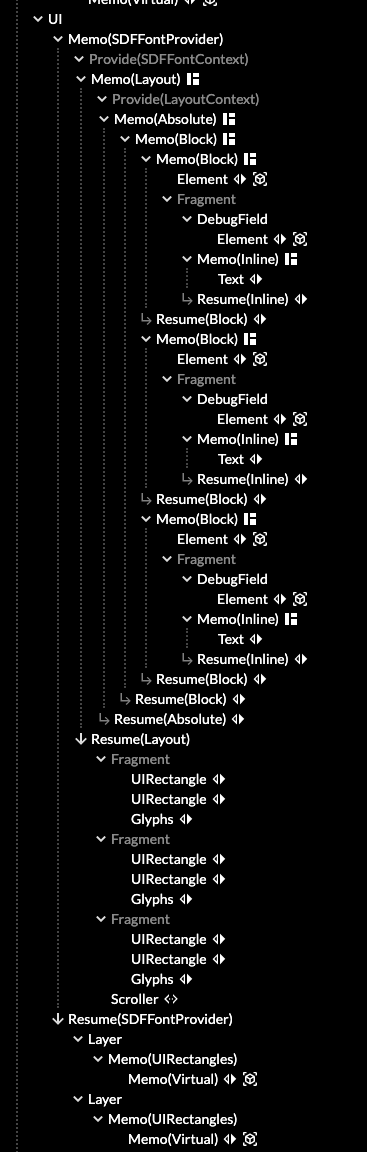
  <p class='m3'><img alt='CSS 3D DOM' src='/files/making-love-to-webkit/dom.png' />The DOM tree of this page. Yup, nasty.</p>
</aside><div class='c' /><aside class='g5'>
  <p class='m3'><img alt='Acko.net old design' src='/files/making-love-to-webkit/old-acko.png' />Previous design (<a href='/tag/acko.net'>Archive</a>)</p>
  <p><img alt='Initial sketch' src='/files/making-love-to-webkit/sketch.jpg' />Initial sketch</p>
  <p><img alt='Initial sketch' src='/files/making-love-to-webkit/editor.png' />Scene editor</p>
</aside><div class='g7'><div class='pad'>

  <h3>
    Design Process
  </h3>

  <p>
    Now all that was needed was a design. Last time I drew out a manual perspective drawing in Illustrator, which was tedious, but still basically came down to designing a flat image. This time, it would have to work in 3D. I started with a quick sketch to get a feel for the perspective, now that it no longer needed to double as a flat frame for the site's content.
  </p>
  
  <p>
    Simple geometric shapes, parallel lines, consistent angles. Simple enough. But if real perspective was involved, I would have to place items so they would look good from multiple angles, and each would need convincing depth and shading. To do this all by hand, typing out coordinates and perpetually refreshing the page, would take forever.
  </p>
  
  <p>
    So instead I built a simple editor to speed up the process. It's super ghetto, and basically just exists to manipulate the colors, positions and orientations of objects in a Three.js scene. It spits out a JSON object describing them, which can then be unserialized again into a scene.
  </p>

  <p>
    This also helped maintain a consistent palette. The colors are built from a few base tints, brightened or darked in linear RGB—i.e. before gamma correction. This ensures even tones and allowed for easy color adjustments.
  </p>

  <p>
    The editor is almost entirely keyboard operated, but with its minimum amount of features I was at least able to place items in 3D, copy/paste objects and see it from any angle or position I wanted. To 'save', I just copied the output into a .JS file, where I could make manual tweaks too if necessary.
  </p>

  <p>
    As for the actual site and content, I wanted to keep it much more sober. Like many others these days, I want to treat blogging more like publishing. That way I can focus on crafting each post more like an article with illustrations and asides rather than just a text blog.
  </p>
    
  <p>
    Hence, while there's a big party upstairs, it's all <a href='http://www.amazon.com/Elements-Typographic-Style-Robert-Bringhurst/dp/0881791326'>typography</a> down below. The font of choice is <a href='http://processtypefoundry.com/fonts/klavika/'>Klavika</a>, a humanist/geometric sans-serif with just the right kind of “Dutch Art Museum Signage” meets “Cyberpunk” I was looking for. The layout is a responsive multi-column grid that collapses down for smaller screens and devices. Finally, a strict vertical rhythm is enforced in the lines to keep everything nice and tidy.
  </p>
  
</div></div><div class='g9'><div class='pad'>
  <h4>Editor</h4>
  <iframe frameborder='0' height='580' src='/load.html' width='680' />
  <p class='m0 l0'>
    <a class='editor-open' href='/editor.html' target='_blank'>Open editor in new window</a>
  </p>
</div></div><div class='g3'><div class='pad'>
  <h4>Controls</h4>
  <ul class='flat'>
    <li><kbd>Click</kbd>+<kbd>Drag</kbd> — Orbit camera</li>

    <li><kbd>Enter</kbd> — New object</li>
    <li><kbd>Space</kbd> — Clone object</li>
    <li><kbd>Backspace</kbd> — Delete object</li>
    <li><kbd>Tab</kbd> / <kbd>Shift</kbd>+<kbd>Tab</kbd><br />Cycle through objects</li>

    <li><kbd>W</kbd><kbd>A</kbd><kbd>S</kbd><kbd>D</kbd>&nbsp; <kbd>Q</kbd><kbd>E</kbd><br />Move object</li>
    <li><kbd>Shift</kbd>+<kbd>W</kbd><kbd>A</kbd><kbd>S</kbd><kbd>D</kbd> &nbsp; <kbd>Q</kbd><kbd>E</kbd><br />Resize object</li>
    <li><kbd>Ctrl</kbd>+<kbd>W</kbd><kbd>A</kbd><kbd>S</kbd><kbd>D</kbd> &nbsp; <kbd>Q</kbd><kbd>E</kbd><br />Move camera</li>

    <li><kbd>[</kbd><kbd>]</kbd> — Lower/raise units</li>
    <li><kbd>Z</kbd><kbd>X</kbd><br />Orbit distance</li>
    <li><kbd>T</kbd>/<kbd>T</kbd>/<kbd>U</kbd><br />Tag/untag/untag all</li>
  </ul>
</div></div><div class='g8 i2'><div class='pad'>
  <h3>She cannae take the power cap'n!</h3>
  <p>
    307 objects later it was finished, and not a single image was used. Unfortunately, as you can see there are tons of glitches in the editor—though some objects only have one side by design, and it works a lot better in a separate window. CSS 3D was never meant to do this, and you often see incorrect depth layering and flickering. Luckily most of these are caused by the floating grid markers and aren't a problem in the final view. The rest was resolved by splitting up objects or dual layering problematic surfaces, but some minor problems remain. Also for some reason, the background &lt;DIV&gt;'s click areas extend beyond their visible area, causing some click layering issues that I had to work around. Text resizing in the browser also leads to breakage, though multi-touch zoom works in Safari.
  </p>
  
  <p>
    Performance in Safari is wonderfully smooth too, but Chrome OS X starts to lag a bit. Luckily the effects are turned off as soon as they go off screen, so any lag should be confined to the top of the page. Finally, there's also a random bug where sometimes the page will refuse to scroll if the mouse is over a 3D object, which is unfortunate, but also near-impossible to reproduce reliably.
  </p>
  
  <p>
    In theory the iPad would perform second, but it has its own issues. The use of page-in-page scrolling disables inertia, but this is entirely beyond my control. The other issue is that sometimes, the iPad will decide to render the page content at lower resolution, making it hard to read. I guess the CSS wizardry confuses its GPU texture management. A refresh usually fixes this.
  </p>
  
  <p>
    I also discovered some funny ways of abusing CSS 3D for weird effects. If you have a WebKit browser, scroll to the top and enter the Konami code for an impressionistic version of the same thing.
  </p>
    
  <p>
    I guess I'm now the proud owner of the first unofficial CSS 3D ‘ACID’ test. I'm eager to see how the next browser handles it. If it ends up being a silly idea in the long run, I can always just switch the output to WebGL, but for now I'm willing to run with it. I put in a universal CSS 3D detector and prefixes for all the major browsers.
  </p>
  
  <p>
    For non-CSS 3D browsers, I simply rendered the header into a static image. It's not as fun without the shifting perspective, but it adds its own kind of optical illusion as you scroll down.
  </p>
  
  <h3>
    Putting it all together
  </h3>
  
  <p>
    To power the site, I got rid of Drupal and replaced it with the nimble <a href='http://jekyllrb.com/'>Jekyll</a>. Hat tip to <a href='http://walkah.net/'>James Walker</a>, who did the same thing just a few days earlier and put all the code on GitHub to learn from.
  </p>
    
  <p>
    I've been really impressed with Jekyll's simple workflow, and though it's all static HTML, it's a refreshing change of pace. And thanks to client-side JS, it doesn't preclude adding interactive elements at all. I can treat my site as just a database of documents retrievable over HTTP, and wrap the logic around that.
  </p>
  
  <p>
    So I created a nice client-side navigator that transitions between pages, using 2D transforms, which also work on Firefox. It uses the HTML5 pushState API and replaces regular links with AJAX requests. Aside from being a faster way to navigate around, it also lets me link up multiple articles in a series elegantly. When you go back to a previous screen, it literally presses the browser's back button, thus avoiding creating a long, useless history trail. You go back exactly the way you came, scrolling back to where you were, just like the real back/forward buttons do. For example, click over to my <a href='/blog/making-worlds-introduction/'>Making Worlds</a> series of posts. You can come back right away.
  </p>
  
  <p>
    I didn't use any libraries or router frameworks for this, simply because I wanted to have done it all myself at least once. As it now says on my <a href='/about'>About page</a>, quoting Feynman: <em>"What I cannot create, I do not understand"</em>. The only way to grok the intricacies of something like browser history state, which we all use every day, is to dive in and replicate it. Otherwise, you'll just take carefully choreographed behavior for granted and your mental model will be incomplete.
  </p>

  <p>
    To keep code size down, I compiled a custom build of Three.js with only the parts I need. I also used YUI compressor to minify the CSS and JS. However, I don't mean to obfuscate the code: the important bits will make their way onto Github soon enough.
  </p>
  
  <p><em>Update: The CSS 3D renderer and editor are now <a href='https://github.com/unconed/CSS3D.js'>available on GitHub</a>.</em></p>
  
  <h3>
    And Done?
  </h3>

  <p>
    I migrated over most of the content and did some house cleaning while I was at it. Most things should be back, but further fixes will be made. I also haven't implemented any commenting solution so far, but I'll be adding it back somehow as soon as I figure something out. In the mean time, there's <a href='https://plus.google.com/112457107445031703644/posts/HDJMgpDRAey'>a Google Plus thread</a>.
  </p>

  <p>
    The final result looks like something that would perhaps once unironically be labeled <strong>The Information Superhighway</strong> in a magazine from the 90s, though with less neon green. I like it.
  </p>

</div></div>]]></content>
  </entry>
  
  <entry>
    <title type="html"><![CDATA[Noir meets web]]></title>
    <link href="http://acko.net/blog/noir-meets-web/"/>
    <updated>2008-10-23T00:00:00-07:00</updated>
    <id>http://acko.net/blog/noir-meets-web</id>
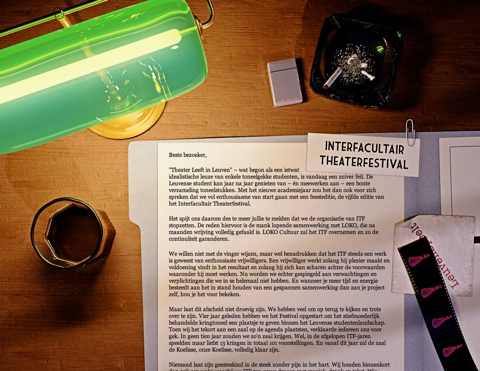
    <content type="html"><![CDATA[<div class='g8 i2 first'><div class='pad'><h1>Noir meets web</h1><p>After 4 years of LeuvenSpeelt.be aka the <em>Interfacultair Theaterfestival</em> at my old university, the organisers are calling it quits. I was their resident web monkey, and designed a <a href='/tag/theater'>new site and poster every year</a>. I always saw these designs as an opportunity to explore unconventional web design, as the sites were low on content and high on marketing — essentially being fancy brochures with a news feed.
</p>

<p>
With a track record of originality, I figured we should end it in style, so I whipped up a new page which explains the reasons for quitting (i.e. the politics) and highlights the work done with a timeline and some photos.
</p>

<p class='tc'>
<a href='/files/leuvenspeelt/2009/index.html'><img alt='' src='/files/leuvenspeelt/itf2009.jpg' /></a>
</p>

<p>
I wanted the reader to get a sense of ambiguity and dread that comes with ending big projects, so for inspiration I looked to Film Noir, known for its mystery and shady morals. The scene is meant to look like the desk of the typical private detective, who is trying to make sense of a case.
</p>

<p>
The end result was pretty close to how I imagined it, though the limitations of the web as a medium required me to tone down the contrast quite a bit for readability. This makes it lose some of the noir-ness, but overall the cohesion of the piece is still right. Because it's just a good-bye page, it probably won't get as much exposure as the previous editions, but it's the thought that counts.
</p>

<p>
I think it's a fitting end to a project that, more than anything else, has taught me about graphical design and style.
</p>

<p>
Tools used: 3D Studio Max (with Mental Ray), Photoshop, TextMate
</p></div></div>]]></content>
  </entry>
  
  <entry>
    <title type="html"><![CDATA[Welcome to the World of Tomorrow!]]></title>
    <link href="http://acko.net/blog/welcome-to-the-world-of-tomorrow/"/>
    <updated>2008-07-20T00:00:00-07:00</updated>
    <id>http://acko.net/blog/welcome-to-the-world-of-tomorrow</id>
    <content type="html"><![CDATA[<div class='g8 i2 first'><div class='pad'><h1>Welcome to the World of Tomorrow!</h1><p><small>(with apologies to <a href='http://en.wikipedia.org/wiki/Futurama'>Matt Groening</a>)</small>
</p>

<p>
After about <a href='/blog/new-design-for-acko-net'>two years</a>, it's time for another make-over of my site.
</p>

<p>
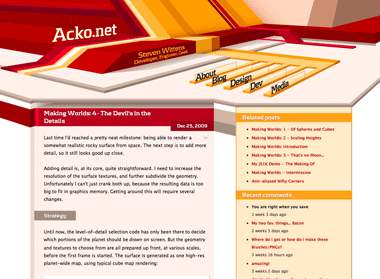
My last design had a relatively quirky look, with a bold red/yellow theme built from various irregular vector shapes. The idea was to step away from the typical mold of rectangular aligned frames on a page. I tried to incorporate some elements of perspective into the page composition, but it ended up being a relatively flat, geometrical theme.
</p>

<p>
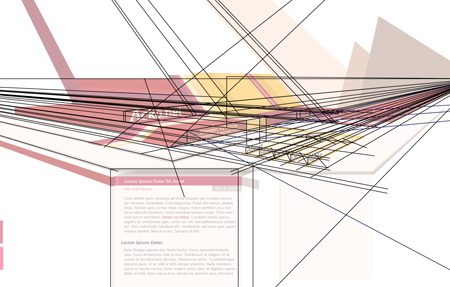
This time I wanted to work on the depth aspect and try to create something that feels spacious. To do this, I based the entire redesign on a two-point perspective. While the content itself is normal 2D markup, it sits in a 3D frame.
</p>

<p>
<img alt='' src='/files/redesign-2008/wirepron.png' title='Some of the guide lines used in the construction process.' /></p>

<p>
<img alt='' src='/files/making-love-to-webkit/old-acko.png' /></p>

<p>
The header image is a regular illustration file (which is 100% manual vector work) and the content is typical HTML/CSS. However there is a twist: the perspective from the header is continued into the content with some simple 3D decorations, created on-demand with Canvas tags and JavaScript (<a href='javascript:void(0);' onclick='highlightCanvases();return false;'>highlight canvases</a>, check out the footer).
</p>

<p>
While this perspective works perfectly near the top, the further down you go, the more vertically stretched the shapes get and it ends up looking weird. To compromise, the projection actually gets more and more isometric the further down you go. This creates an interesting effect when scrolling down.
</p>

<p>
The design also uses various CSS3 methods (@font-face, text-shadow, box-shadow) throughout, and uses sIFR 3 as a fallback for the headline font. Unfortunately CSS3 is still mostly unsupported in the browserscape, so only Safari 3.1 users get the luxury combo of <em>pretty, fast and no Flash</em>. Everyone else will have to suffer through hacks.
</p>

<p>
As a total surprise, the canvas-rocket-science trickery even works in IE6 thanks to Google's <a href='http://excanvas.sourceforge.net/'>ExplorerCanvas</a> library.
</p>

<p>
I'll probably be tweaking it a bit more in the days to come, but feedback is appreciated.
</p>

</div></div>]]></content>
  </entry>
  
</feed>