<?xml version="1.0" encoding="utf-8"?>
<feed xmlns="http://www.w3.org/2005/Atom">

  <title><![CDATA[Acko.net]]></title>
  <link href="https://acko.net/atom.xml" rel="self"/>
  <link href="https://acko.net/"/>
  <updated>2026-03-05T12:10:39+01:00</updated>
  <id>https://acko.net</id>
  <author>
    <name><![CDATA[Steven Wittens]]></name>
    
  </author>

  
  <entry>
    <title type="html"><![CDATA[Shadow DOM]]></title>
    <link href="https://acko.net/blog/shadow-dom/"/>
    <updated>2014-03-24T00:00:00+01:00</updated>
    <id>https://acko.net/blog/shadow-dom</id>
    <content type="html"><![CDATA[<div class="g8 i2 first"><div class="pad">

<h2 class="sub">SVG, CSS, React and Angular</h2>

</div></div>

<div class="c"></div>

<div class="g8 i2"><div class="pad">

<p>For a while now I've been working on MathBox 2. I want to have an environment where you take a bunch of mathematical legos, bind them to data models, draw them, and modify them interactively at scale. Preferably in a web browser.</p>

<p>Unfortunately HTML is crufty, CSS is annoying and the DOM's unwieldy. Hence we now have libraries like <a href="http://facebook.github.io/react/">React</a>. It creates its own virtual DOM just to be able to manipulate the real one—the Agile Bureaucracy design pattern.</p>

<p>The more we can avoid the DOM, the better. But why? And can we fix it?</p>

</div></div>

<div class="c"></div>

<div class="wide mt2">
  <img src="https://acko.net/files/shadowdom/banner.jpg" alt="Netscape" />
</div>

<div class="c"></div>

<aside class="g3 mt2"><div class="pad">
  <p><img src="https://acko.net/files/shadowdom/star.svg" alt="Star" class="flat" /></p>
</div></aside>

<div class="g8 mt3"><div class="pad">

<pre><code class="language-html" tabindex="0">&lt;?xml version="1.0" encoding="utf-8"?&gt;
&lt;!DOCTYPE svg PUBLIC "-//W3C//DTD SVG 1.1//EN" "http://www.w3.org/Graphics/SVG/1.1/DTD/svg11.dtd"&gt;
&lt;svg version="1.1" id="Layer_1" xmlns="http://www.w3.org/2000/svg" xmlns:xlink="http://www.w3.org/1999/xlink" x="0px" y="0px"
  width="400px" height="400px" viewBox="0 0 400 400" enable-background="new 0 0 400 400" xml:space="preserve"&gt;
  &lt;polygon fill="#FDBD10" stroke="#BE1E2D" stroke-width="3" stroke-miterlimit="10" points="357.803,105.593 276.508,202.82 
    343.855,310.18 226.266,262.91 144.973,360.139 153.592,233.697 36.002,186.426 158.918,155.551 167.538,29.109 234.885,136.469 "/&gt;
  &lt;polygon fill="#FDEB10" points="326.982,114.932 259.695,195.408 315.441,284.271 218.109,245.146 150.821,325.623 157.955,220.966 
    60.625,181.838 162.364,156.283 169.499,51.625 225.242,140.488 "/&gt;
&lt;/svg&gt;
</code></pre>
<div class="c"></div>

</div></div>

<div class="g8 i1 cl"><div class="pad">
  
<h2>Dangling Nodes</h2>

<p>Take SVG. Each XML tag is a graphical shape or instruction. Like all XML, the data has to be serialized into tags with attributes made of strings. Large data sets turn into long string attributes to be parsed. Large collections of stuff turn into many separate tags to be iterated over. Neither is really desirable.</p>

<p>It only represents basic operations, so all serious prep work has to be done by the user up front. This is what D3 is used for, generating and managing more complex mappings for you.</p>

<p>When you put SVG into HTML, each element becomes a full DOM node. A simple <code>&lt;tag&gt;</code> with attributes is now a colossal binding between HTML, JS, CSS and native. It's a JavaScript object that pretends to be an XML tag, embedded inside a layout model that takes years to understand fully.</p>

<p>Its namespace mixes metadata with page layout, getters and setters with plain properties, native methods with JS, string shorthands with nested objects, and so on. Guess how many properties the DOM Node Object actually has in total? We'll be generous and count <code>style</code> as one.</p>

<p>A hundred is not even close. A plain <code>&lt;div&gt;</code> doesn't fare much better. Just serializing a chunk of DOM back into its constituent XML is a tricky task once you get into fun stuff like namespaces. Nothing in the DOM is as simple as <code>JSON.stringify</code>. Why does my polygon have a base URI?</p>

<p>We have all these awesome dev tools now, yet we're using them to teach a terrible model to people who don't know any better.</p>

</div></div>

<aside class="g3 mt2"><div class="pad">
  <p><img src="https://acko.net/files/shadowdom/svg-in-dom.png" alt="SVG in DOM" class="s70" /></p>
</div></aside>

<div class="g8 i2"><div class="pad">

<h2>DOM Shader</h2>

<p>In contrast, there's <a href="http://angularjs.org/">Angular</a>. I like it because they've pulled off a very neat trick: convincing people to adopt a whole new DOM by disguising it as HTML.</p>


<pre><code class="language-html" tabindex="1">&lt;body ng-controller="PhoneListCtrl"&gt;
  &lt;ul&gt;
    &lt;li ng-repeat="phone in phones"&gt;
      {{phone.name}}
      &lt;p&gt;{{phone.snippet}}&lt;/p&gt;
    &lt;/li&gt;
  &lt;/ul&gt;
&lt;/body&gt;
</code></pre>
<div class="c"></div>


<p>When you use <code>&lt;input ng-model="foo"&gt;</code> or <code>&lt;my-directive&gt;</code>, you're creating a controller and a scope, entirely separate from the DOM, with their own rules and chain of inheritance. The pseudo-HTML in the source code is merely an initial definition, most of it inert to the browser. Angular parses it out and replaces much of it.</p>

<p>Like React, the browser's live DOM is subsumed and used as a sort of <em>render tree</em>, a generic canvas to be cleverly manipulated to match a given set of views. The real <em>view tree</em> hides in the shadows of JS, where controllers operate on scopes. They only use the DOM to find each other on creation, and then communicate directly. The DOM is mostly there to trigger events, do layout and look pretty. Form controls are the one exception.</p>

</div></div>

<aside class="g3 i1"><div class="pad">
  <p><img src="https://acko.net/files/shadowdom/svg-in-css.png" alt="SVG in CSS" /></p>
</div></aside>

<div class="g8"><div class="pad">

<p>It's a bad fit because the DOM was built for text markup and there's tons of baggage in the form of inline spans, floats, alignment, indentation, etc. Most of these are layout systems disguised as typography, of which CSS now has several.</p>

<p>The whole idea of cascading styles is suspect. In reality, most styles don't actually cascade: paddings and backgrounds are set on individual elements. The inherited ones are almost all about typography: font styles, text justification, writing direction, word wrap, etc.</p>

<p>Think of it this way: why should a table have a font size? Only the <em>text</em> inside the table can have a font size, the table is just a box with layout that contains other <em>boxes</em>. Why don't we write <code>table text { size: 16px; }</code> instead of <code>table { font-size: 16px; }</code>? Text nodes exist today.</p>

<p>Well because that's how HTML's <code>&lt;font&gt;</code> tag worked. Instead of just making a selector for text nodes, they gave all the other elements font properties. They didn't <em>get rid</em> of font tags, they made them invisible and put one inside each DOM node.</p>

</div></div>

<div class="g8 i2 cl"><div class="pad">

<pre><code class="language-html" tabindex="2">&lt;html&gt;&lt;font&gt;
  &lt;body&gt;&lt;font&gt;
    &lt;h1&gt;&lt;font&gt;Hello World&lt;/font&gt;&lt;/h1&gt;
    &lt;p&gt;&lt;font&gt;Welcome to the future.&lt;/font&gt;&lt;/p&gt;
  &lt;/font&gt;&lt;/body&gt;
&lt;/font&gt;&lt;/html&gt;
</code></pre>
<div class="c"></div>

<h2>Unreasonable Behavior</h2>

<p>It was decided the world would be made of <code>block</code> and <code>inline</code> elements—divs and spans—and they saw that it was good, until someone came along and said, hey, so what about my table?</p>

<pre><code class="language-html" tabindex="3">&lt;table&gt;
  &lt;tr&gt;
    &lt;td&gt;Forever&lt;/td&gt;
    &lt;td&gt;Alone&lt;/td&gt;
  &lt;/tr&gt;
&lt;/table&gt;
</code></pre>
<div class="c"></div>

<p>This <code>&lt;table&gt;</code> can't be replicated with CSS 1. Tables require a particular arrangement of children and apply their own box model. It's a directive posing amongst generic markup, just like Angular.</p>

<p>CSS has never been able to deliver on the promise of turning semantic HTML into arbitrary layout. We've always been forced to add extra divs or classes. These are really just attachment points for independent behaviors.</p>

<p>Purists see these as a taint upon otherwise pristine HTML, even though I've never seen someone close a website because the markup was messy. Not all HTML should be semantic. Rather, HTML stripped of its non-semantic parts should remain meaningful to <em>robots</em>.</p>

<p>CSS 2's solution was instead to make <code>&lt;table&gt;</code> invisible too, to go with the invisible <code>&lt;float&gt;</code>, <code>&lt;layer&gt;</code>, <code>&lt;clear&gt;</code> and <code>&lt;frame&gt;</code> tags which we pretended we didn't have. Watch:</p>

</div></div>

<div class="g7 i1 cl"><div class="pad">

<div class="embed"><blockquote>
  <strong>17.2.1 Anonymous table objects</strong><br /><br />

  […] Any table element will automatically generate necessary anonymous table objects around itself, consisting of at least three nested objects corresponding to a 'table'/'inline-table' element, a 'table-row' element, and a 'table-cell' element. Missing elements generate anonymous objects (e.g., anonymous boxes in visual table layout) according to the following rules […]
</blockquote></div>

</div></div>

<div class="g3"><div class="pad">

  <pre><code class="language-css" tabindex="4">.grid {
  display: table;
}
.grid &gt; ul {
  display: table-row;
}
.grid &gt; ul &gt; li {
  display: table-cell;
}
</code></pre>
<div class="c"></div>

<p class="tc"><em>This is called Not Using Tables.</em></p>

</div></div>

<div class="g8 i2 cl"><div class="pad"> 
  
<p>Without typographical styles, <code>block</code> elements start to look very different. They're styled boxes with implied layout constraints. They stack vertically, expand horizontally and shrink wrap vertically. Floated blocks are boxes that stack horizontally, and shrink wrap both ways. Tables are grids of boxes that are locked together.</p>


<p>Just think how much simpler CSS would be if boxes had box styles and text had text styles, instead of all of them having both. Besides, block margins and paddings don't even work the same on inline elements, there's a whole new layout behavior there.</p>

<p>So we do have two kinds of objects, <em>text and boxes</em>, but several different ways of combining them into layout: inline, stacked, nested, absolute, relative, fixed, floated, flex or table. We have optional behaviors like scrollable, draggable, clipped or overflowing.</p>

<p>They're spread across <code>display</code>, <code>position</code>, <code>float</code> and more, only meaningful in some combinations. And presence is mixed in there too. As a result, you can't unhide an element without knowing its display model. This is a giant red flag.</p>

<h2>Thinking with Portals</h2>
  
<p>It should further raise eyebrows that the binary world of <code>inline</code> and <code>block</code> now also includes a hybrid called <code>inline-block</code>.</p>

<p><img src="https://acko.net/files/shadowdom/medium.png" alt="Medium share thing" /></p>

<p>You generally don't need to embed a contact form–or all of Gmail—in the middle of mixed English/Hebrew poetry shaped like a bird. You just don't. To attach something to flowing text, you should insert an anchor point instead and add floating constraints. Links are called <em>anchor tags</em> for a reason. Why did we forget this?</p>

<p>Don't shove your entire widget right between the words. You'd inherit styles, match new selectors and bubble all your events up through the text just for the sake of binding a pair of (x, y) coordinates.</p>

<p>Heck, pointer events, cursors, hover states... these are for interactive elements only. Why isn't that optional, so mouse events wouldn't need to bubble up through inert markup? This would completely avoid the <code>mouseover</code> vs <code>mouseenter</code> problem. What is the point of putting a resize cursor on something that is dead without JavaScript? Pointer events shouldn't fire on inert children, and inert parents shouldn't care about interactive children. It's about boundaries, not hierarchy.</p>

</div></div>

<div class="g8"><div class="pad">

<p>Things like SVG are better used as image tags instead of embedded trees, just slotting into place while ignoring their surroundings. They do need their own tree structure, but there is little reason to graft it onto HTML/CSS, inheriting original sin. The nodes have too little in common. At most you can share the models, not the controllers.</p>

<p>We should be able to manipulate them from the outside, like a <code>&lt;canvas&gt;</code>, but define and load them declaratively, like an image tag.</p>

<p>For that matter, MathML should really be a single inline text tag, optimized for math, not a bunch of tags. Regular text spans are not just "plain text". They are trimmed, joined, bidirectionalized, word wrapped and ellipsified before display. It's a separate embedded layout model that makes up the true, invisible <code>&lt;p&gt;</code> tag. A tag that HTML1 actually sort of got right: as an <em>operator</em>.</p>

<p>We create JavaScript with code, not as <em>abstract syntax trees</em>. Why should I build articles and embedded languages out of enormously nested trees, instead of just typing them out and adding some <em>anchor</em> tags around specific interesting parts? The DOM already inserts invisible text nodes everywhere. We didn't need to wrap all our words in <code>&lt;text&gt;</code> tags by hand just to embiggen one of them. The mutant tree on the right could just look like this:</p>
  
<pre><code class="language-html" tabindex="5">&lt;math&gt;x = (-b &amp;pm; &amp;Sqrt;(b^2 - 4 a c)) / 2a&lt;/math&gt;</code></pre>
<div class="c"></div>

<pre><code class="language-html" tabindex="6">&lt;math&gt;x = (-b &pm; &Sqrt;(b^2 - 4 a c)) / 2a&lt;/math&gt;</code></pre>
<div class="c"></div>

<p class="tc"><em>Wasn't HTML5 supposed to match how people write it? LaTeX exists.</em></p>

<p>And which is easier: defining a hairy new category of pseudo-elements like <code>:first-letter</code> and <code>:first-line</code>… or just telling people to wrap their first letter in a span if they really want to make it giant? It was ridiculous to have this feature in a spec that didn't include tables.</p>

<p>The <code>:first-line</code> problem should be solved differently: you define two <em>separate</em> blocks inside a directive, to spread markup across two children with a content binding. It's no different from flowing text across lines and columns.</p>

</div></div>

<div class="g4 mt1"><div class="pad">

  <pre><code class="language-html" tabindex="7">&lt;mrow&gt;
  &lt;mi&gt;x&lt;/mi&gt;
  &lt;mo&gt;=&lt;/mo&gt;
  &lt;mfrac&gt;
    &lt;mrow&gt;
      &lt;mrow&gt;
        &lt;mo&gt;-&lt;/mo&gt;
        &lt;mi&gt;b&lt;/mi&gt;
      &lt;/mrow&gt;
      &lt;mo&gt;&amp;#xB1;&lt;!--PLUS-MINUS SIGN--&gt;&lt;/mo&gt;
      &lt;msqrt&gt;
        &lt;mrow&gt;
          &lt;msup&gt;
            &lt;mi&gt;b&lt;/mi&gt;
            &lt;mn&gt;2&lt;/mn&gt;
          &lt;/msup&gt;
          &lt;mo&gt;-&lt;/mo&gt;
          &lt;mrow&gt;
            &lt;mn&gt;4&lt;/mn&gt;
            &lt;mo&gt;&amp;#x2062;&lt;!--INVISIBLE TIMES--&gt;&lt;/mo&gt;
            &lt;mi&gt;a&lt;/mi&gt;
            &lt;mo&gt;&amp;#x2062;&lt;!--INVISIBLE TIMES--&gt;&lt;/mo&gt;
            &lt;mi&gt;c&lt;/mi&gt;
          &lt;/mrow&gt;
        &lt;/mrow&gt;
      &lt;/msqrt&gt;
    &lt;/mrow&gt;
    &lt;mrow&gt;
      &lt;mn&gt;2&lt;/mn&gt;
      &lt;mo&gt;&amp;#x2062;&lt;!--INVISIBLE TIMES--&gt;&lt;/mo&gt;
      &lt;mi&gt;a&lt;/mi&gt;
    &lt;/mrow&gt;
  &lt;/mfrac&gt;
&lt;/mrow&gt;
</code></pre>
<div class="c"></div>

<p class="tc"><em>This is the first example in the MathML spec. Really. "Invisible times".</em></p>
</div></div>

<div class="g6 i3"><div class="pad">

<pre><code class="language-html" tabindex="8">&lt;join&gt;
  &lt;box class="first-line"&gt;&lt;/box&gt;
  &lt;box&gt;&lt;/box&gt;
  &lt;content&gt;Hello New World&lt;/content&gt;
&lt;/join&gt;
</code></pre>
<div class="c"></div>

<p class="tc"><em>Would this really be insane?</em></p>

</div></div>

<div class="g8 i2"><div class="pad">

<h2>The Boxed Model</h2>

<p>CSS got it wrong and we're now suffering the consequences. The HTML feature that was ignored in CSS 1 was the thing they should've focused on: tables, which were directives that generated layout. It set us on a path of trying to fake them by piggybacking on supposedly semantic elements, like lipstick on a div. Really we were pigeonholing non-linear layout as a nested styling problem.</p>

<p>Semantic content was a false spectre on the document level. Making our menus out of <code>&lt;ul&gt;</code> and <code>&lt;li&gt;</code> tags did not help impaired users skip to the main article. Adding roman numerals for lists did not help us number our headers and chapters automatically.</p>

<p>View and render trees are supposed to be simple and transparent data structures, the <em>model for</em> and <em>result of</em> layout. This is why absolute positioning is a performance win for mobile: it avoids creating invisible dynamic constraints between things that rarely change. Styles are orthogonal to that, they merely define the shape, not where it goes.</p>

<p>Flash had its flaws, but it worked 15 years ago. Shoving raw SVG or MathML into the DOM—or god forbid XML3D–is a terrible idea. It's like there's an entire class of developers who've now forgotten how fast computers actually are and how memory is supposed to work. A <a href="http://c2.com/cgi/wiki?StringlyTyped">stringly typed</a> kitchen sink is not it.</p>

<p>So I frown when I see people excited about SVG in the browser in the year 2014, making polygons out of CSS 3D or driving divs with React. Yes I know, it's fun and it does work. And Angular shows the web component approach has merit. But we need a way out.</p>

<p>CSS should be limited to style and typography. We can define a real layout system next to it rather than on top of it. The two can combine in something that still includes semantic HTML fragments, but wraps layout as a first class citizen. We shouldn't be afraid to embrace a modular web page made of isolated sections, connected by reference instead of hierarchy.</p>

<p>Not my problem though, I can make better SVGs with WebGL in the meantime. But one can dream.</p>

</div></div>
]]></content>
  </entry>
  
  <entry>
    <title type="html"><![CDATA[Introducing Facing.me]]></title>
    <link href="https://acko.net/blog/introducing-facing-me/"/>
    <updated>2012-04-25T00:00:00+02:00</updated>
    <id>https://acko.net/blog/introducing-facing-me</id>
    <content type="html"><![CDATA[<div class="g8 i2 first"><div class="pad">

  <h2 class="sub">A unique way to meet people</h2>

</div></div>

<div class="c"></div>

<aside class="g5">
  <p class="tc">
    <img style="top: 0" src="/files/fme/facing.me.face.jpg" alt="Facing.me" />
  </p>
</aside>

<div class="g7"><div class="pad">

<p>
We've been sending out whispers for a while now, but it's finally out: a new web site called <a href="http://facing.me">Facing.me</a>. Coded and designed by <a href="http://mikejholly.com">Michael Holly</a>, <a href="http://rosshj.com/">Ross Howard-Jones</a> and myself, it promises a <em>unique way to meet people online</em>. This would be the point where the obvious question is dropped: wait, what… you built a <em>dating site</em>?</p>

<p>Sort of. Let me explain.</p>

<p>Having spent many years in the web world, we'd all gotten a bit complacent. The web has settled into its comfortable rhythms. Sites and applications can be modelled quickly and coded on your framework of choice. And nowadays, Web 2.0 cred comes baked in: clean URLs, semantic HTML, AJAX, data feeds, APIs, etc. Isn't this what we all wanted?</p>

<p>But the web continues to evolve, and giants are roaming the playground. Sites like Facebook and Twitter hold people's attention with surgical precision, while engines like Google answer your queries with lightning speed. Given that we've all slotted such services into our workflows and indeed lives, it seems only natural that 'indie' developers should keep up. We can't pretend that a 2000-era style web-page-with-ajax-sprinkles is the pinnacle of modern interactive design.</p>

<p>So we set out to try something different.</p>

</div></div>

<div class="img12">
  <a href="http://facing.me"><img src="/files/fme/facing.me.site.jpg" alt="Facing.me website" /></a>
</div>

<!--
<div class="g8 i2 first"><div class="pad">  

</div></div>
-->

<div class="g6"><div class="pad">

<h2>A Guy Walks into a Bar...</h2>

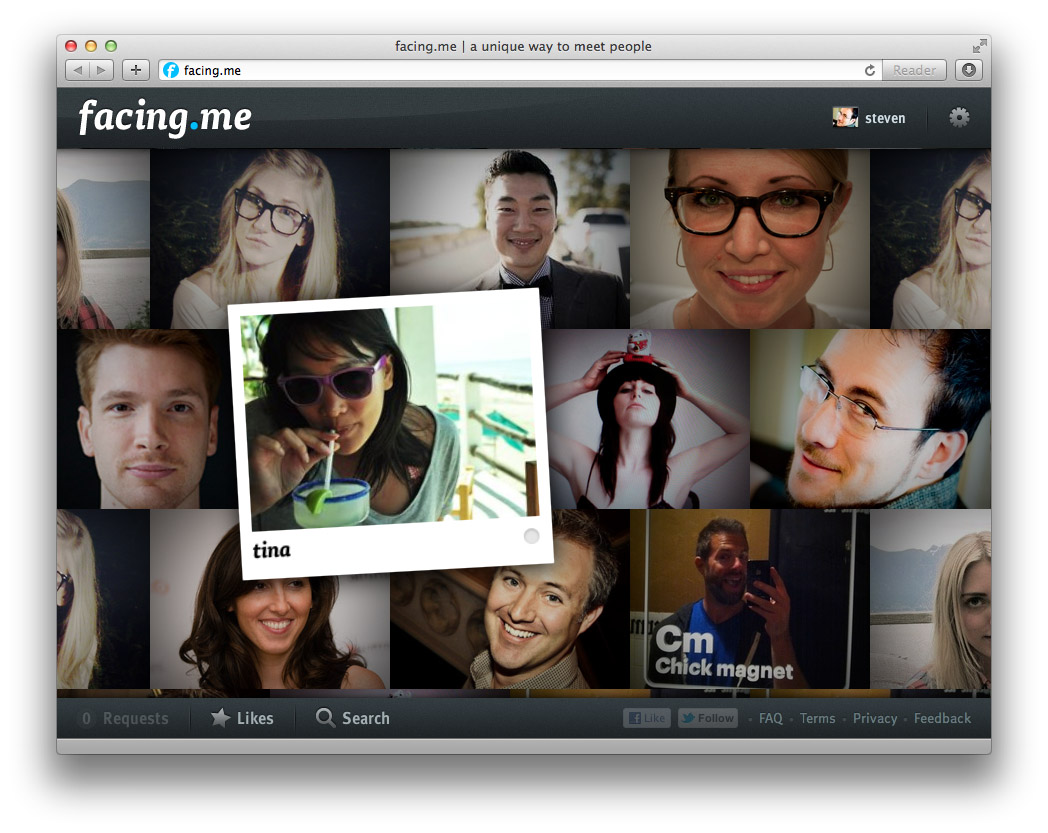
<p>If you've managed to score an invite, the first thing you'll see is the wall of faces that loads and fills the screen. The second thing you'll notice—we hope at least—is the lack of everything else.</p>

<p>The metaphor we kept in mind was the idea of walking into a bar, and looking around. If you see someone you like, you can go up to them and strike up a conversation. So that's exactly what the app lets you do, through video chat. You can pan around to see more people, and just keep going. If you're looking for something specific, you can filter your view with a simple "I'm looking for…" dialog.</p>

<p>As you mouse around, you can see who's online, and flip open their profile. If you want to strike up a video chat, it happens right there too. If the person is online, they'll see your request immediately in a popup and can choose to accept or decline after reviewing your profile. If they're offline, they'll see your request next time they visit.</p>

<p>To avoid missed connections, you can 'like' people you're interested in. You'll see (and hear) a notification pop up the moment they're online. You can keep the app open in a background tab and never miss a thing.</p>

<p>Aside from some minor social glue and a few fun little extras for you to discover, that's it. It's our twist on a <em>minimally viable product</em> if you will. Studies have shown that online matching algorithms are a poor predictor for how well people mesh in person. Until you meet face-to-face, you just don't know. We think direct, spontaneous video chat is a better first step rather than endless profile matching and messaging.</p>

</div></div>

<aside class="g6 m1">
  <p class="p0"><img src="/files/fme/facing.me.start.jpg" alt="Facing.me welcome screen" /></p>

  <p class="p0"><img src="/files/fme/facing.me.profile.jpg" alt="Facing.me welcome screen" /></p>

  <p class="p0"><img src="/files/fme/facing.me.growl.jpg" alt="Facing.me notification" /></p>

  <p class="p0"><img src="/files/fme/facing.me.like.jpg" alt="Facing.me liking" /></p>
</aside>

<div class="g8 i2"><div class="pad">

<h2>Polishing Bacon</h2>

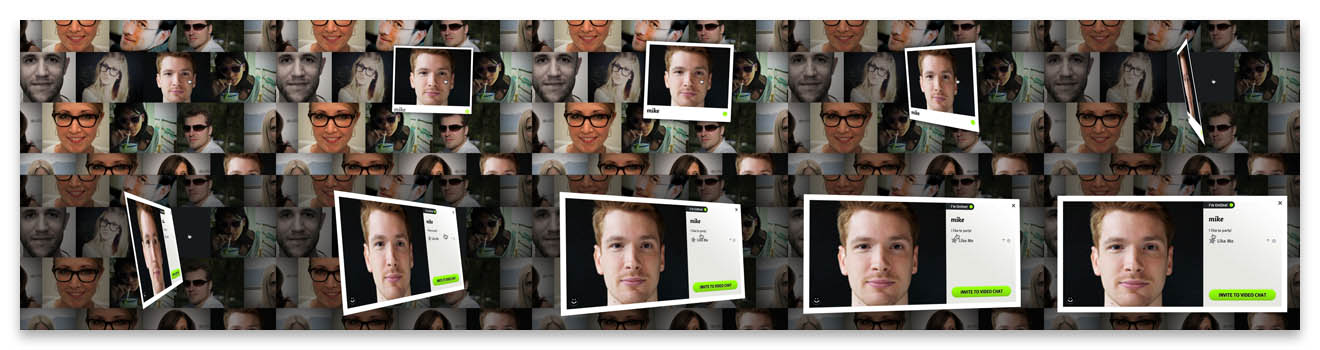
<p>But despite its minimalism, a big aspect of Facing.me is the effort and care we put into it. Our goal was to achieve a level of polish typically reserved for premium iPhone apps and bring it into the browser. We wrapped the whole thing in a crisp design, enhanced with tasteful web fonts. But most importantly, we sought to expose the app's functionality with as little interruption as possible. To do that, we layered on plenty of transitions driven by CSS3 and JavaScript, and stream in data and content as needed.</p>

<p>Based on previous work in custom animations—and <a href="/blog/abusing-jquery-animate-for-fun-and-profit-and-bacon">bacon</a>—we refined the approach of using jQuery as an animation helper for completely custom transitions. We tell jQuery to animate placeholder properties on orphaned proxy divs, and key off those animations with per-frame code to drive the fancy stuff.</p>

</div></div>

<div class="img12">
  <img src="/files/fme/transition.jpg" alt="facing.me animation example" />
</div>

<div class="g8 i2"><div class="pad">
<p>As a result, we can have a photo grow a picture frame as you pick it up, and then flip it around to show a person's full profile. This careful choreography involves animating about a dozen CSS properties, including borders, shadows, margins and 3D transforms, all with custom expressions and hand-tuned animation curves. Similar transitions are used for lightbox dialogs.</p>

<p>Throughout all of this, the animations remain eminently manageable. We can interrupt and reverse them at any point, and run multiple copies at the same time, thanks to pervasive use of view controllers. Far from being a useless tech demo, it actually enables us to craft the user experience exactly the way we like it: being able to acknowledge user intentions with intuitive feedback no matter what's going on, and firing off new events and requests without worrying about the internal state. Gone are the fragile jQuery behavior soups of old.</p>

<p>The one downside is that only the newer browsers—i.e. Chrome, Safari and Firefox—get to see everything the way it was intended. And actually the performance in Firefox is still a bit disappointing. IE9 users will have to be satisfied with a crude 2D approximation until IE10 comes out.</p>

</div></div>

<div class="g8 first"><div class="pad">

<h2>Rapid Rails and Real-Time Node</h2>

<p>To make all this work effectively on the server-side, we used a dual-mode stack of Rails and Node.js.</p>

<p>The Rails side houses the app's models and controllers, and provides an API for all the client-side JavaScript to do its job. Video chats are handled through Flash and routed through its built-in peer-to-peer functionality.</p>

<p>The node.js component acts as a real-time presence daemon which users connect to over socket.io. It's used to drive the status notifications and to coordinate the video chats. We can exchange any sort of notifications between users with a publish-subscribe model, opening up many interesting avenues for future development.</p>

<p>Overall, this approach has worked out great. Rails' ActiveRecord and the stack around it allowed us to build out functionality quickly and with just the right amount of necessary baggage. We made generous use of Ruby Gems to save time while still maintaining full control.</p>

<p>Node.js's event-driven model adds real-time signalling with no hassle. For the few cases where node.js needs to interface with the Rails database directly, we slot in some manual SQL to take care of that. For everything else, Rails and node.js exchange signed data through the browser.</p>

</div></div>

<aside class="g4 m1"><div class="pad">
  <p><img src="/files/fme/nodejs.png" alt="Node.js" /></p>

  <p><img src="/files/fme/rails.jpg" alt="Rails" /></p>
</div></aside>

<div class="g8 i2 first"><div class="pad">

<h2>Come Take it for a Spin</h2>

<p>Finally, we also put our heads together and made a promo video, voiced by the lovely <a href="https://twitter.com/t1nah">Tina Hoang</a>:</p>

</div></div>

<div style="max-width: 854px; width: 100%; margin: 0 auto">

  <iframe src="http://player.vimeo.com/video/41056588?title=0&amp;byline=0&amp;portrait=0" width="854" height="480" frameborder="0" allowfullscreen="allowFullScreen"></iframe>

</div>

<div class="g8 i2"><div class="pad">

<p>Built in our spare time by just 3 guys in a virtual garage, we're pretty proud of the end result. We'd love for you to take it for a spin, so <a href="http://facing.me">head over to facing.me</a> and grab yourself an invite. There's a feedback form built-in, and any suggestions are welcome.</p>

<p>Discuss on <a href="https://plus.google.com/112457107445031703644/posts/efHMJE1Wxx2">Google Plus</a>.</p>

</div></div>
]]></content>
  </entry>
  
  <entry>
    <title type="html"><![CDATA[This is Your Brain on CSS]]></title>
    <link href="https://acko.net/blog/this-is-your-brain-on-css/"/>
    <updated>2012-02-19T00:00:00+01:00</updated>
    <id>https://acko.net/blog/this-is-your-brain-on-css</id>
    <content type="html"><![CDATA[<div style="display: none"><img src="/files/mri/cover.jpg" alt="" /></div>

<div class="g8 i2 first"><div class="pad">

<p>First things first: the CSS 3D renderer used to power <strike>this</strike> <em>the previous</em> site is now <a href="https://github.com/unconed/CSS3D.js">available on GitHub.com</a>. However, it's still limited to only solid lines and planes. It's also limited to WebKit browsers, as Firefox's CSS 3D support just isn't quite there yet.</p>

<p>
  But CSS 3D is not a one trick pony, and as with many things, what you get out of it depends entirely on what you put in. So here's a disembodied head made out of CSS 3D. It consists of nothing more than a bunch of images stacked up against each other, and integrates perfectly with the existing 3D parallax on this site. Click and drag to rotate, or use the slider to look inside.
</p>

<link rel="stylesheet" href="/files/mri/head.css" type="text/css" media="screen" />

<div id="head-3d">
  <div class="head-viewport" style="height: 500px;">
    <div class="CSS3DCamera" data-var="transform">
      <div class="pedestal">
        
      </div>
      <div class="VolumetricView" data-var="phi slice"></div>
    </div>
  </div>
  <div class="Slider" data-var="slice"></div>
</div>

<p>
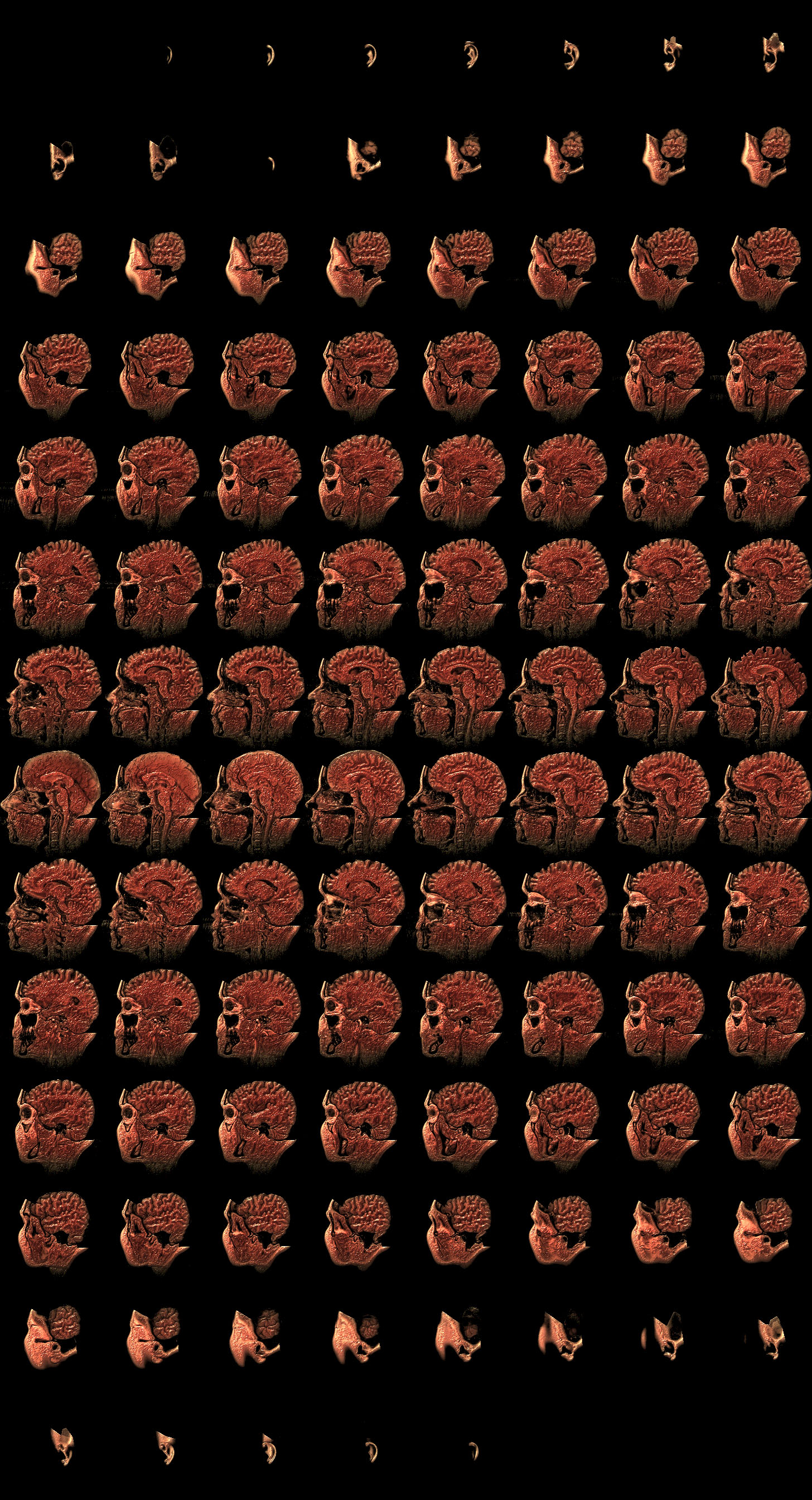
  Making the basic effect was actually quite easy. I took an MRI from the <a href="http://graphics.stanford.edu/data/voldata/">Stanford Volume Data Archive</a> and wrote a small script to turn it into a sheet of CSS sprites. There's <a href="http://acko.net/files/mri/MRbrain-color.jpg">one file for color</a>, <a href="http://acko.net/files/mri/MRbrain-alpha8.png">one for opacity</a>, totalling about 2.1 MB. Both files are composited into Canvases and placed in slices into the DOM, offset forward or backwards in 3D. Then there's just some minor logic to rotate the slices in 90 degree increments to follow the camera.
</p>

<p>
  But the slices are rendered as is, and the MRI consists of <a href="http://acko.net/files/mri/MRbrain-alpha8.png">boring grayscale data</a>. Luckily, I can precompute any amount of shaders and effects I want and just bake them into the slices. I geeked out by applying fake specular lighting, for that 'fresh meat' look, and volumetric obscurance to enhance the sense of depth on the inside. I changed the palette to gory colors based on local density, giving the impression of flesh and bone knitting itself together. Creepy, but cool.
</p>

<p>
  I wrapped it in a custom widget, using straight up CSS rather than Three.js this time. I've wanted to play with <a href="http://worrydream.com/Tangle/">Tangle.js</a>, so I used that to hook up the camera controls and slider. That's pretty much it. In an ideal world, the jarring transition when rotating would be covered up by a nice transition, but the browsers don't like it.
</p>

</div></div>

<script type="text/javascript">
// <!--
Acko.queue(function () {

    var model = {
      initialize: function () {
        // State
        this.theta = 0.0;
        this.phi = 0.5;
        this.slice = 0;
      },

      update: function () {
        this.transform = 'rotateX('+ -this.theta +'rad) rotateY('+ this.phi +'rad)';
      },
    };

    Tangle.classes.CSS3DCamera = {
      initialize: function (element, options, tangle, variables) {
        this.element = element;

        this.element.style.transformStyle = 'preserve-3d';

        var that = this;
        element.addEventListener('mousedown', function (event) {
          that.drag = true;
          that.dragLast = that.dragOrigin = { x: event.pageX, y: event.pageY };
          event.preventDefault();
        });
        document.addEventListener('mouseup', function (event) {
          that.drag = false;
        });
        document.addEventListener('mousemove', function (event) {
          if (!that.drag) return;
          var total = { x: event.pageX - that.dragOrigin.x, y: event.pageY - that.dragOrigin.y },
              delta = { x: event.pageX - that.dragLast.x, y: event.pageY - that.dragLast.y };
          that.dragLast = { x: event.pageX, y: event.pageY };
          mousemove(that.dragOrigin, total, delta);
        });

        function mousemove(origin, total, delta) {
          var phi = tangle.getValue('phi') + delta.x * .01,
              theta = Math.min(1, Math.max(-.2, tangle.getValue('theta') + delta.y * .01));

          tangle.setValue('phi', phi);
          tangle.setValue('theta', theta);
        }
      },

      update: function (element, value) {
        this.element.style.WebkitTransform = value;
        this.element.style.MozTransform = value;
        this.element.style.transform = value;
      },
    },

    Tangle.classes.Slider = {
      initialize: function (element, options, tangle, variables) {
        var that = this;

        this.tangle = tangle;
        this.element = element;

        this.bar = document.createElement('div');
        this.bar.className = 'bar';
        this.element.appendChild(this.bar);

        this.handle = document.createElement('div');
        this.handle.className = 'handle';
        this.element.appendChild(this.handle);

        this.element.addEventListener('mousedown', function (event) {
          var el = this.element, o = 0;
          do {
            o += el.offsetLeft;
            el = el.offsetParent;
          } while (el);

          this.origin = o;
          this.width = this.bar.offsetWidth;
          this.drag = true;
          return false;
        }.bind(this));

        document.addEventListener('mousemove', function (event) {
          if (!that.drag) return;
          tangle.setValue('slice', Math.max(0, Math.min(1, (event.pageX - that.origin) / that.width)));
        });
        document.addEventListener('mouseup', function () {
          that.drag = false;
        });
      },

      update: function (element, value) {
        this.handle.style.left = (100*value) + '%';
      },
    },

    Tangle.classes.VolumetricView = {
      initialize: function (element, options, tangle, variables) {
        var that = this;

        this.tangle = tangle;
        this.element = element;

        this.width = 364;
        this.height = 384;
        this.depth = 256;

        this.resX = 182;
        this.resY = 192;
        this.slices = 108;
        this.stride = 8;
        this.rows = Math.ceil(this.slices / this.stride);

        this.createSlices();

        var load = 0;
        this.image = new Image();
        this.image.onload = function () {
          if (++load == 2) that.drawSlices(); 
        };

        this.mask = new Image();
        this.mask.onload = function () {
          if (++load == 2) that.drawSlices(); 
        };

//        this.image.src = 'data/MRbrain.png';
        this.image.src = '/files/mri/MRbrain-color.jpg';
        this.mask.src = '/files/mri/MRbrain-alpha8.png';
      },

      update: function (element, value) {
        var l = Math.abs(Math.cos(value)) > Math.abs(Math.sin(value));

        if (this.l != l || this.slice != slice) {
          var slice = this.tangle.getValue('slice'), index, 
              n = (l ? Math.cos(value) : Math.sin(value)) > 0,
              sn = n ? slice : 1 - slice;

          index = +(this.slicesX.length * sn);

          var display = l ? 'block' : 'none';
          forEach(this.slicesX, function (el, i) {
            el.style.display = display;

            var opacity;
            if (i >= index) {
              opacity = n ? .95 : .001;
            }
            else {
              opacity = !n ? .95 : .001;
            }

            el.style.opacity = opacity;
          });

          index = +(this.slicesZ.length * sn);

          var display = !l ? 'block' : 'none';
          forEach(this.slicesZ, function (el, i) {
            el.style.display = display;

            var opacity;
            if (i >= index) {
              opacity = n ? .95 : .001;
            }
            else {
              opacity = !n ? .95 : .001;
            }

            el.style.opacity = opacity;
          });

          this.slice = slice;
          this.l = l;
        }
      },

      createSlices: function () {
        this.element.innerHTML = '';
        this.ctxX = [];
        this.ctxZ = [];

        // X slices
        for (var i = 0; i < this.slices; ++i) {
          var z = -((i / this.slices) - .5) * this.depth,
              t = 'translateZ(' + z + 'px) translateX(70px)';

          var canvas = document.createElement('canvas');
          canvas.className = 'x';
          canvas.width = this.resX;
          canvas.height = this.resY;
          canvas.style.width = this.width + 'px';
          canvas.style.height = this.height + 'px';
          canvas.style.WebkitTransform = t;
          canvas.style.MozTransform = t;
          canvas.style.transform = t;
          canvas.style.position = 'absolute';

          this.element.appendChild(canvas);
          this.ctxX.push(canvas.getContext('2d'));
        }

        // Z slices
        for (var i = 0; i < this.resX; ++i) {
          var z = -(this.depth - this.width) / 2,
              x = ((i / this.resX) - .5) * this.width,
              t = 'translateX(' + x + 'px) translateX(70px) rotateY(90deg) translateZ(' + z + 'px)';

          var canvas = document.createElement('canvas');
          canvas.className = 'z';
          canvas.width = this.slices;
          canvas.height = this.resY;
          canvas.style.width = this.depth + 'px';
          canvas.style.height = this.height + 'px';
          canvas.style.WebkitTransform = t;
          canvas.style.MozTransform = t;
          canvas.style.transform = t;
          canvas.style.opacity = 0;
          canvas.style.position = 'absolute';

          this.element.appendChild(canvas);
          this.ctxZ.push(canvas.getContext('2d'));
        }

        this.slicesX = this.element.querySelectorAll('canvas.x');
        this.slicesZ = this.element.querySelectorAll('canvas.z');
      },

      drawSlices: function () {

        var s = this.stride,
            sl = this.slices,
            r = this.rows,
            w = this.resX,
            h = this.resY,
            img = this.image,
            mask = this.mask,
            ctxX = this.ctxX,
            ctxZ = this.ctxZ;

        var alpha, color;

        // X slices
        forEach(this.slicesX, function (slice, i) {
          var c = ctxX[i],
              ox = (i % s) * w, oy = Math.floor(i / s) * h;

          // Draw alpha channel and get pixels
          c.drawImage(mask, ox, oy, w, h, 0, 0, w, h);
          alpha = c.getImageData(0, 0, w, h);

          // Draw color channel and get pixels
          c.drawImage(img, ox, oy, w, h, 0, 0, w, h);
          color = c.getImageData(0, 0, w, h);

          // Copy red to alpha.
          var src = alpha.data, dst = color.data;
          for (var y = 0; y < h; ++y) {
            for (var x = 0; x < w; ++x) {
              var o = (x + y * w) * 4;
              dst[o + 3] = src[o];
            }
          }

          // Draw RGBA.
          c.putImageData(color, 0, 0);
        });

        // Z slices
        forEach(this.slicesZ, function (slice, i) {
          var c = ctxZ[i];

          // Render transposed slices as vertical strips.
          for (var j = 0; j < sl; ++j) {
            var ox = (j % s) * w, oy = Math.floor(j / s) * h;

            // Draw alpha channel
            c.drawImage(mask, ox + i, oy, 1, h, j, 0, 1, h);
          }

          // Get pixels
          alpha = c.getImageData(0, 0, w, h);

          // Render transposed slices as vertical strips.
          for (var j = 0; j < sl; ++j) {
            var ox = (j % s) * w, oy = Math.floor(j / s) * h;

            // Draw color channel
            c.drawImage(img, ox + i, oy, 1, h, j, 0, 1, h);
          }
          // Get pixels
          color = c.getImageData(0, 0, w, h);

          // Copy red to alpha.
          var src = alpha.data, dst = color.data;
          for (var y = 0; y < h; ++y) {
            for (var x = 0; x < w; ++x) {
              var o = (x + y * w) * 4;
              dst[o + 3] = src[o];
            }
          }

          // Draw RGBA.
          c.putImageData(color, 0, 0);
        });
      },

    };

    var tangle = new Tangle(document.querySelector('#head-3d'), model);

}, 200);
// -->
</script>

<script>
// <!--
//
//  Tangle.js
//  Tangle 0.1.0
//
//  Created by Bret Victor on 5/2/10.
//  (c) 2011 Bret Victor.  MIT open-source license.

var Tangle = this.Tangle = function (rootElement, modelClass) {

    var tangle = this;
    tangle.element = rootElement;
    tangle.setModel = setModel;
    tangle.getValue = getValue;
    tangle.setValue = setValue;
    tangle.setValues = setValues;

    var _model;
    var _nextSetterID = 0;
    var _setterInfosByVariableName = {};   //  { varName: { setterID:7, setter:function (v) { } }, ... }
    var _varargConstructorsByArgCount = [];


    //
    // construct

    initializeElements();
    setModel(modelClass);
    return tangle;


    //
    // elements

    function initializeElements() {
        var elements = rootElement.getElementsByTagName("*");
        var interestingElements = [];
        
        // build a list of elements with class or data-var attributes
        
        for (var i = 0, length = elements.length; i < length; i++) {
            var element = elements[i];
            if (element.getAttribute("class") || element.getAttribute("data-var")) {
                interestingElements.push(element);
            }
        }

        // initialize interesting elements in this list.  (Can't traverse "elements"
        // directly, because elements is "live", and views that change the node tree
        // will change elements mid-traversal.)
        
        for (var i = 0, length = interestingElements.length; i < length; i++) {
            var element = interestingElements[i];
            
            var varNames = null;
            var varAttribute = element.getAttribute("data-var");
            if (varAttribute) { varNames = varAttribute.split(" "); }

            var views = null;
            var classAttribute = element.getAttribute("class");
            if (classAttribute) {
                var classNames = classAttribute.split(" ");
                views = getViewsForElement(element, classNames, varNames);
            }
            
            if (!varNames) { continue; }
            
            var didAddSetter = false;
            if (views) {
                for (var j = 0; j < views.length; j++) {
                    if (!views[j].update) { continue; }
                    addViewSettersForElement(element, varNames, views[j]);
                    didAddSetter = true;
                }
            }
            
            if (!didAddSetter) {
                var formatAttribute = element.getAttribute("data-format");
                var formatter = getFormatterForFormat(formatAttribute, varNames);
                addFormatSettersForElement(element, varNames, formatter);
            }
        }
    }
            
    function getViewsForElement(element, classNames, varNames) {   // initialize classes
        var views = null;
        
        for (var i = 0, length = classNames.length; i < length; i++) {
            var clas = Tangle.classes[classNames[i]];
            if (!clas) { continue; }
            
            var options = getOptionsForElement(element);
            var args = [ element, options, tangle ];
            if (varNames) { args = args.concat(varNames); }
            
            var view = constructClass(clas, args);
            
            if (!views) { views = []; }
            views.push(view);
        }
        
        return views;
    }
    
    function getOptionsForElement(element) {   // might use dataset someday
        var options = {};

        var attributes = element.attributes;
        var regexp = /^data-[\w\-]+$/;

        for (var i = 0, length = attributes.length; i < length; i++) {
            var attr = attributes[i];
            var attrName = attr.name;
            if (!attrName || !regexp.test(attrName)) { continue; }
            
            options[attrName.substr(5)] = attr.value;
        }
         
        return options;   
    }
    
    function constructClass(clas, args) {
        if (typeof clas !== "function") {  // class is prototype object
            var View = function () { };
            View.prototype = clas;
            var view = new View();
            if (view.initialize) { view.initialize.apply(view,args); }
            return view;
        }
        else {  // class is constructor function, which we need to "new" with varargs (but no built-in way to do so)
            var ctor = _varargConstructorsByArgCount[args.length];
            if (!ctor) {
                var ctorArgs = [];
                for (var i = 0; i < args.length; i++) { ctorArgs.push("args[" + i + "]"); }
                var ctorString = "(function (clas,args) { return new clas(" + ctorArgs.join(",") + "); })";
                ctor = eval(ctorString);   // nasty
                _varargConstructorsByArgCount[args.length] = ctor;   // but cached
            }
            return ctor(clas,args);
        }
    }
    

    //
    // formatters

    function getFormatterForFormat(formatAttribute, varNames) {
        if (!formatAttribute) { formatAttribute = "default"; }

        var formatter = getFormatterForCustomFormat(formatAttribute, varNames);
        if (!formatter) { formatter = getFormatterForSprintfFormat(formatAttribute, varNames); }
        if (!formatter) { log("Tangle: unknown format: " + formatAttribute); formatter = getFormatterForFormat(null,varNames); }

        return formatter;
    }
        
    function getFormatterForCustomFormat(formatAttribute, varNames) {
        var components = formatAttribute.split(" ");
        var formatName = components[0];
        if (!formatName) { return null; }
        
        var format = Tangle.formats[formatName];
        if (!format) { return null; }
        
        var formatter;
        var params = components.slice(1);
        
        if (varNames.length <= 1 && params.length === 0) {  // one variable, no params
            formatter = format;
        }
        else if (varNames.length <= 1) {  // one variable with params
            formatter = function (value) {
                var args = [ value ].concat(params);
                return format.apply(null, args);
            };
        }
        else {  // multiple variables
            formatter = function () {
                var values = getValuesForVariables(varNames);
                var args = values.concat(params);
                return format.apply(null, args);
            };
        }
        return formatter;
    }
    
    function getFormatterForSprintfFormat(formatAttribute, varNames) {
        if (!sprintf || !formatAttribute.test(/\%/)) { return null; }

        var formatter;
        if (varNames.length <= 1) {  // one variable
            formatter = function (value) {
                return sprintf(formatAttribute, value);
            };
        }
        else {
            formatter = function (value) {  // multiple variables
                var values = getValuesForVariables(varNames);
                var args = [ formatAttribute ].concat(values);
                return sprintf.apply(null, args);
            };
        }
        return formatter;
    }

    
    //
    // setters
    
    function addViewSettersForElement(element, varNames, view) {   // element has a class with an update method
        var setter;
        if (varNames.length <= 1) {
            setter = function (value) { view.update(element, value); };
        }
        else {
            setter = function () {
                var values = getValuesForVariables(varNames);
                var args = [ element ].concat(values);
                view.update.apply(view,args);
            };
        }

        addSetterForVariables(setter, varNames);
    }

    function addFormatSettersForElement(element, varNames, formatter) {  // tangle is injecting a formatted value itself
        var span = null;
        var setter = function (value) {
            if (!span) { 
                span = document.createElement("span");
                element.insertBefore(span, element.firstChild);
            }
            span.innerHTML = formatter(value);
        };

        addSetterForVariables(setter, varNames);
    }
    
    function addSetterForVariables(setter, varNames) {
        var setterInfo = { setterID:_nextSetterID, setter:setter };
        _nextSetterID++;

        for (var i = 0; i < varNames.length; i++) {
            var varName = varNames[i];
            if (!_setterInfosByVariableName[varName]) { _setterInfosByVariableName[varName] = []; }
            _setterInfosByVariableName[varName].push(setterInfo);
        }
    }

    function applySettersForVariables(varNames) {
        var appliedSetterIDs = {};  // remember setterIDs that we've applied, so we don't call setters twice
    
        for (var i = 0, ilength = varNames.length; i < ilength; i++) {
            var varName = varNames[i];
            var setterInfos = _setterInfosByVariableName[varName];
            if (!setterInfos) { continue; }
            
            var value = _model[varName];
            
            for (var j = 0, jlength = setterInfos.length; j < jlength; j++) {
                var setterInfo = setterInfos[j];
                if (setterInfo.setterID in appliedSetterIDs) { continue; }  // if we've already applied this setter, move on
                appliedSetterIDs[setterInfo.setterID] = true;
                
                setterInfo.setter(value);
            }
        }
    }
    

    //
    // variables

    function getValue(varName) {
        var value = _model[varName];
        if (value === undefined) { log("Tangle: unknown variable: " + varName);  return 0; }
        return value;
    }

    function setValue(varName, value) {
        var obj = {};
        obj[varName] = value;
        setValues(obj);
    }

    function setValues(obj) {
        var changedVarNames = [];

        for (var varName in obj) {
            var value = obj[varName];
            var oldValue = _model[varName];
            if (oldValue === undefined) { log("Tangle: setting unknown variable: " + varName);  continue; }
            if (oldValue === value) { continue; }  // don't update if new value is the same

            _model[varName] = value;
            changedVarNames.push(varName);
        }
        
        if (changedVarNames.length) {
            applySettersForVariables(changedVarNames);
            updateModel();
        }
    }
    
    function getValuesForVariables(varNames) {
        var values = [];
        for (var i = 0, length = varNames.length; i < length; i++) {
            values.push(getValue(varNames[i]));
        }
        return values;
    }

                    
    //
    // model

    function setModel(modelClass) {
        var ModelClass = function () { };
        ModelClass.prototype = modelClass;
        _model = new ModelClass;

        updateModel(true);  // initialize and update
    }
    
    function updateModel(shouldInitialize) {
        var ShadowModel = function () {};  // make a shadow object, so we can see exactly which properties changed
        ShadowModel.prototype = _model;
        var shadowModel = new ShadowModel;
        
        if (shouldInitialize) { shadowModel.initialize(); }
        shadowModel.update();
        
        var changedVarNames = [];
        for (var varName in shadowModel) {
            if (!shadowModel.hasOwnProperty(varName)) { continue; }
            if (_model[varName] === shadowModel[varName]) { continue; }
            
            _model[varName] = shadowModel[varName];
            changedVarNames.push(varName);
        }
        
        applySettersForVariables(changedVarNames);
    }


    //
    // debug

    function log (msg) {
        if (window.console) { window.console.log(msg); }
    }

};  // end of Tangle


//
// components

Tangle.classes = {};
Tangle.formats = {};

Tangle.formats["default"] = function (value) { return "" + value; };

// -->
</script>

]]></content>
  </entry>
  
  <entry>
    <title type="html"><![CDATA[CSS Sub-pixel Background Misalignments]]></title>
    <link href="https://acko.net/blog/css-sub-pixel-background-misalignments/"/>
    <updated>2008-11-18T00:00:00+01:00</updated>
    <id>https://acko.net/blog/css-sub-pixel-background-misalignments</id>
    <content type="html"><![CDATA[<div class="g8 i2 first"><div class="pad"><p><em><strong>Update</strong>: and now, IE8 adds even more odd behavior to the mix!</em>
</p>

<p>
A while ago, <a href="http://ejohn.org/blog/sub-pixel-problems-in-css/">John Resig</a> pointed out some issues with sub-pixel positioning in CSS. The problem he used is one of percentage-sized columns inside a container, where the resulting column widths don't round evenly to whole pixels or don't sum to the correct total. His conclusion is that browsers each have their own way of dealing with the problem.
</p>

<p>
I've recently been bumping into a related issue however, that shows the situation is even worse: rounding is inconsistent even inside a single browser.
</p>

<p>
<img class="natural" src="/files/css-misalign/background-misalign.png" alt="Misalignments of backgrounds in CSS" />
</p>

<p>
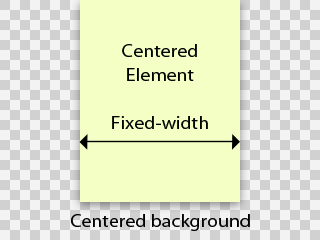
Take the following scenario: a fixed width element that is horizontally centered in a viewport using <code>margin-left:&nbsp;auto;&nbsp;margin-right:&nbsp;auto;</code>. The viewport has a horizontally centered background image, having <code>background-position:&nbsp;50%&nbsp;0</code>. This is an extremely common page structure.
</p>

<p>
You'd logically expect the background image and the element to line up, and move as one when the viewport is resized. However, this is not the case. Depending on the viewport width, the background can be offset one pixel to the left or right. This obviously wreaks havoc on many designs. I decided to investigate this more closely and the results are not pretty.
</p>

<p>
<!--break-->
</p>

<p>
My <a href="/files/css-misalign/index.html">test case</a> consists of the basic structure described above, repeated in a bunch of mini-viewports. Each background image contains a black box of a certain size, and is overlaid with a grey element that covers this box exactly. If the two pieces align, there should be no black peeking through on the sides, and each box should be fully gray.
</p>

<p>
For full coverage, I vary the following parameters:
<ul>
<li>The width of the viewport</li>
<li>The odd/even size of the box/element</li>
<li>Background image is bigger/smaller than the viewport</li>
<li>Background image is padded evenly/unevenly around the box (1px difference). (*)</li>
</ul>
</p>

<p>
I tested this in IE6, IE7, Safari 3.1.2, Firefox 3.0.4 and Opera 9.6.2.
</p>

<p>
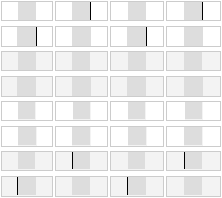
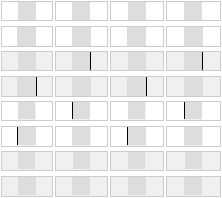
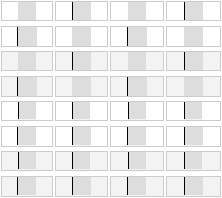
The result is quite baffling: not a single browser out there rounds background image positions the same as element positions, resulting in misalignments. The tell-tale black lines show up in every browser:
</p>

<p>
<strong>IE6 and IE7:</strong>
<img class="natural" src="/files/css-misalign/IE6-7.png" alt="Misalignments of backgrounds in CSS" />
</p>

<p>
<strong>Safari 3.1 and Opera 9.6:</strong>
<img class="natural" src="/files/css-misalign/Safari3.1-Opera9.6.png" alt="Misalignments of backgrounds in CSS" />
</p>

<p>
<strong>Firefox 3.0:</strong>
<img class="natural" src="/files/css-misalign/Firefox3.0.png" alt="Misalignments of backgrounds in CSS" />
</p>

<p>
What's worse is there isn't a single case (across viewport sizes) that is handled consistently between all the browsers. So this CSS technique should in fact be considered broken.
</p>

<p>
Of course this brings up the question: is it really a browser bug or just an implementation quirk? I would argue that at least in the case where the image's width parity matches the element's, you'd expect perfectly matching rounding (i.e. for the first four rows of test cases). The other test cases are more ambiguous, and all you could hope for is consistent behaviour in each browser individually.
</p>

<p>
I wonder why this hasn't been brought up more though. A quick sampling of designers around me shows that they have all encountered this bug, but don't really know a fix and just tweak the design or layout structure to mask the effect.
</p>

<p>
If you really do need to align a background image properly, there is an ugly work-around: place your background image on an additional fixed-width element layered behind the center column. Center the background's element using margins rather than the background image itself, and clip it off at the sides using <code>overflow:&nbsp;hidden</code> on an additional wrapper. This causes the background's position to be rounded the same way as the column on top.
</p>

<p>
<small>(*) Note that there is a choice whether to pad more on the left or on the right. I chose the left. This means that the last 4 rows of test cases are inherently ambiguous: a browser that misaligns all of these in the same fashion is in fact being consistent, just in the opposite direction.</small>
</p>

<p>
</p></div></div>
]]></content>
  </entry>
  
  <entry>
    <title type="html"><![CDATA[Noir meets web]]></title>
    <link href="https://acko.net/blog/noir-meets-web/"/>
    <updated>2008-10-23T00:00:00+02:00</updated>
    <id>https://acko.net/blog/noir-meets-web</id>
    <content type="html"><![CDATA[<div class="g8 i2 first"><div class="pad">
  
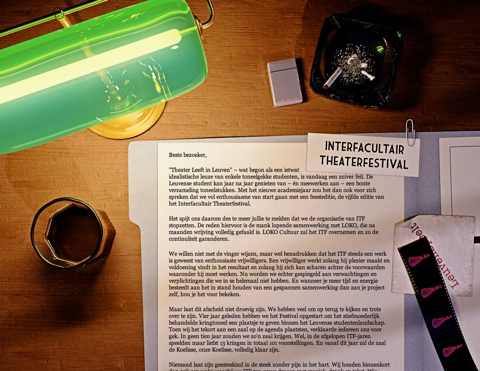
<p>After 4 years of LeuvenSpeelt.be aka the <em>Interfacultair Theaterfestival</em> at my old university, the organisers are calling it quits. I was their resident web monkey, and designed a <a href="/tag/theater">new site and poster every year</a>. I always saw these designs as an opportunity to explore unconventional web design, as the sites were low on content and high on marketing — essentially being fancy brochures with a news feed.
</p>

<p>
With a track record of originality, I figured we should end it in style, so I whipped up a new page which explains the reasons for quitting (i.e. the politics) and highlights the work done with a timeline and some photos.
</p>

<p class="tc">
<a href="/files/leuvenspeelt/2009/index.html"><img class="natural" src="/files/leuvenspeelt/itf2009.jpg" alt="" /></a>
</p>

<p>
I wanted the reader to get a sense of ambiguity and dread that comes with ending big projects, so for inspiration I looked to Film Noir, known for its mystery and shady morals. The scene is meant to look like the desk of the typical private detective, who is trying to make sense of a case.
</p>

<p>
The end result was pretty close to how I imagined it, though the limitations of the web as a medium required me to tone down the contrast quite a bit for readability. This makes it lose some of the noir-ness, but overall the cohesion of the piece is still right. Because it's just a good-bye page, it probably won't get as much exposure as the previous editions, but it's the thought that counts.
</p>

<p>
I think it's a fitting end to a project that, more than anything else, has taught me about graphical design and style.
</p>

<p>
Tools used: 3D Studio Max (with Mental Ray), Photoshop, TextMate
</p></div></div>
]]></content>
  </entry>
  
  <entry>
    <title type="html"><![CDATA[Welcome to the World of Tomorrow!]]></title>
    <link href="https://acko.net/blog/welcome-to-the-world-of-tomorrow/"/>
    <updated>2008-07-20T00:00:00+02:00</updated>
    <id>https://acko.net/blog/welcome-to-the-world-of-tomorrow</id>
    <content type="html"><![CDATA[<div class="g8 i2 first"><div class="pad"><p><small>(with apologies to <a href="http://en.wikipedia.org/wiki/Futurama">Matt Groening</a>)</small>
</p>

<p>
After about <a href="/blog/new-design-for-acko-net">two years</a>, it's time for another make-over of my site.
</p>

<p>
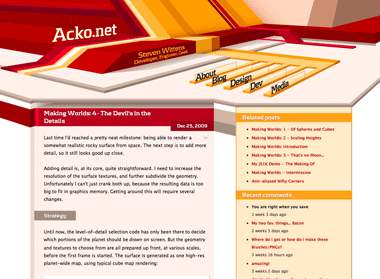
My last design had a relatively quirky look, with a bold red/yellow theme built from various irregular vector shapes. The idea was to step away from the typical mold of rectangular aligned frames on a page. I tried to incorporate some elements of perspective into the page composition, but it ended up being a relatively flat, geometrical theme.
</p>

<p>
This time I wanted to work on the depth aspect and try to create something that feels spacious. To do this, I based the entire redesign on a two-point perspective. While the content itself is normal 2D markup, it sits in a 3D frame.
</p>

<p>
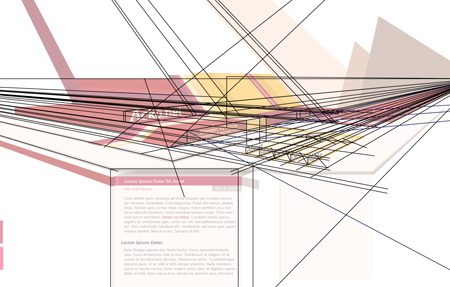
<img class="natural" src="/files/redesign-2008/wirepron.png" title="Some of the guide lines used in the construction process." alt="" /></p>

<p>
<img class="natural" src="/files/making-love-to-webkit/old-acko.png" alt="" /></p>

<p>
The header image is a regular illustration file (which is 100% manual vector work) and the content is typical HTML/CSS. However there is a twist: the perspective from the header is continued into the content with some simple 3D decorations, created on-demand with Canvas tags and JavaScript (<a href="javascript:void(0);" onclick="highlightCanvases();return false;">highlight canvases</a>, check out the footer).
</p>

<p>
While this perspective works perfectly near the top, the further down you go, the more vertically stretched the shapes get and it ends up looking weird. To compromise, the projection actually gets more and more isometric the further down you go. This creates an interesting effect when scrolling down.
</p>

<p>
The design also uses various CSS3 methods (@font-face, text-shadow, box-shadow) throughout, and uses sIFR 3 as a fallback for the headline font. Unfortunately CSS3 is still mostly unsupported in the browserscape, so only Safari 3.1 users get the luxury combo of <em>pretty, fast and no Flash</em>. Everyone else will have to suffer through hacks.
</p>

<p>
As a total surprise, the canvas-rocket-science trickery even works in IE6 thanks to Google's <a href="http://excanvas.sourceforge.net/">ExplorerCanvas</a> library.
</p>

<p>
I'll probably be tweaking it a bit more in the days to come, but feedback is appreciated.
</p>

</div></div>
]]></content>
  </entry>
  
  <entry>
    <title type="html"><![CDATA[OSCMS Talk: Designer Eye for the Geek Guy/Gal]]></title>
    <link href="https://acko.net/blog/oscms-talk-designer-eye-for-the-geek-guy-gal/"/>
    <updated>2007-02-14T00:00:00+01:00</updated>
    <id>https://acko.net/blog/oscms-talk-designer-eye-for-the-geek-guy-gal</id>
    <content type="html"><![CDATA[<div class="g8 i2 first"><div class="pad"><p><em>Update: I've posted the <a href="/blog/design-presentation-slides">presentation slides and a video</a> is available as well.</em>
</p>

<p>
I'll be attending the <a href="http://www.oscms-summit.org">OSCMS conference</a> in Sunnyvale CA at Yahoo next month. Aside from a repeat of my DrupalCon jQuery talk, (though with a bit more examples) I just submitted another proposal for a talk. It's something that I've wanted to do for a while now:
</p>

<blockquote>
<p>
In meetings and lectures across the globe, people are made to endure hideous presentation slides featuring some of the wildest colors, clip art and typography. Many websites are so confusingly laid out, that you get dizzy from the overload of boxes, images or links. And every day, people receive resumés, invoices and ads ... <em>*cue lightning and thunder*</em> set in the Comic Sans font.
</p>

<p>
It's enough to make the average designer's hair turn blue, fall out, morph into a ninja and stab him/her in the eyes.
</p>

<p>
But, all hope is not lost! Contrary to popular belief, graphical design is not some arcane voodoo magic, but a straightforward discipline that values experience, reusability, elegance and good tools just like programming. Just like code, there are plenty of objective ways to measure the quality of a design. However, just like art is subjective, so may two programmers disagree on which implementation is the best. No designer is born with a genetic sense of proportion... it's just that while you were busy writing BASIC code on your C64, they were busy drawing superheroes.
</p>

<p>
I myself am an engineering geek who's never had any sort of formal design or art training, but has earned the title of "design nazi" on numerous occasions.
</p>

<p>
This session will teach geeks some basic principles about graphical design (especially on the web), from a geek perspective. This means we won't talk about "visually balanced design" but "here's a good approach to spacing". Soon, you'll be hearing the oooh's and aaah's when you don your designer hat.
</p>
</blockquote>

<p>
You can vote on the <a href="http://2007.oscms-summit.org/node/340">session page</a> if you're interested.</p></div></div>
]]></content>
  </entry>
  
</feed>