Recently we launched our new product at Strutta, a 'create your own contest site' web service. In each contest, users submit and vote on each other's videos, pictures, songs or writings.
As part of the research we did for the development, we wanted to examine our competition. So, I dove into YouTube to try and figure out some of their ideas and algorithms. For me, this wasn't entirely new: when I posted my Line Rider videos to YouTube, I followed up each video with manual statistics tracking and gained some insight into how a video becomes popular on YouTube. However, that only gave me a very narrow view of the community and its dynamics.
Since then though, things have changed a lot. YouTube now has a public API as well as pre-made libraries to use. With these, it becomes very easy to collect statistics and perform your own analysis. So, armed with Python, I set out to investigate YouTube's ubiquitous 'related videos' feature.
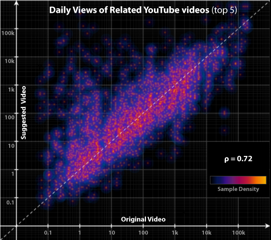
I found it interesting to analyse a big site through their own API rather than screen scraping. Traditionally, one first tries to collect as much data as possible, but the resulting data set can become very unwieldy. In this case, I already had full access and I could focus on exactly which queries I wanted to run, how to aggregate my data, and which measures to focus on.
The results revealed some interesting conclusions. My big write-up can be found on the Strutta Blog, aptly titled Six Degrees of YouTube.
If you found the post helpful, a nod on digg would be appreciated.


Your site is amazing
Hey steven,
Your site is really amazing. Exceptional style. Cool.
I agree. Your design is very nice.
I came looking for a rounded corners tool and was impressed by your site design. I like the 3d look at the top. Just wanted to let you know I was impressed!
--Anthony
Python and the YouTube API
Those are some interesting results. What really grabbed my attention, though, was your mention you used Python to do this. I'm currently learning to code in Python, and being able to look at your code and see how this data was gathered and plotted would be a big help, I think. Any chance you'll make that available?
Found this site through a design blog's great-site-designs-go-look post--think I'll grab the feed and stick around.
Thanks.
Python code
The data gathering was done by doing normal queries using the documented GData interface for Python. The documentation is available on Google's site.
Everything else is just little bits of custom code to slice and dice the data and calculate the right aggregate values. The plotting was done by writing a .csv file and importing it into Mac OS X's built-in Grapher.app. The density plot is just an effect that I simulated by overlaying multiple plots with varying color and opacity.
I zipped up the code I have, feel free to take a look. It's all undocumented and pretty messy though, as this is only a snapshot: I modified each script as needed to generate specific data sets. So some of the code will not make sense now because bits and pieces were copy/pasted around and removed.
re: Python code
Thanks for the info and the code. I appreciate it!
Post new comment