Acko.net
23 Dec 2004

Sprankle Character Map (open-source)

It hit me a while ago that entering characters which are not available on your keyboard or through your IME is much too complicated. Usually it involves opening up some character map, scrolling through hundreds of symbols to find the one you need and copy/pasting it into the application of your choice.

Not very handy. Enter Sprankle Character Map. The idea is to hit a special key combination when typing (WIN + S for Sprankle) which pops up a character map where you are typing. You then type a symbol to find similar characters and choose one from the list using either numbers or arrows + space. Here's how it looks.
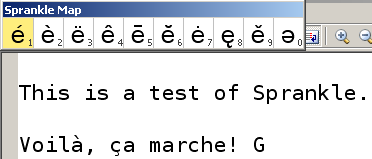
This is just a prototype, but it demonstrates the idea nicely and it's actually pretty usable. Certainly better than firing up a full character map every time.

Notes:

  • Sprankle is a Unicode-application and only runs on Windows 2000/XP.
  • The map appears on top of the current text field. For large, multi-line text fields this is far from ideal. It would be better to have it appear at the current caret position.
  • Sprankle doesn't work on Mozilla Firefox (or other applications that do special keyboard processing). If anyone has an idea on how to fix this, please tell.
  • It might be better to implement Sprankle as a real IME so it integrates completely with the text field. I have no idea how to do this though, but I'm sure MSDN has some documentation about it. The downside would be that it might not work in combination with existing IMEs (e.g. for Japanese).
  • Many of the symbols in the character set are not present in most fonts. Sprankle currently looks for Arial Unicode MS, the universal font that comes with XP and Office.
  • It might be cool to make a JavaScript version of this, so it can be integrated on websites with CMSes like Drupal.
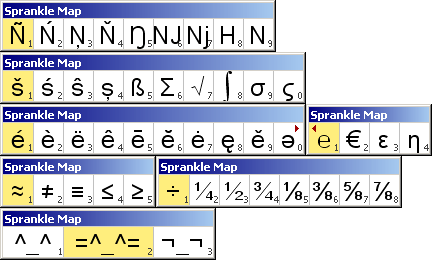
  • You can customize Sprankle's character sets by editing sprankle.txt (UTF-16LE encoded). Right now it covers most of the Latin characters, basic Greek plus some math symbols.

Download Sprankle (source + win32 binary).
Tags:
19 Feb 14:42

Cool tool

This sounds like a handy tool. However, it doesn't work for me on WinXP. After figuring out that the sprankle.txt file must be in the same directory (I initially only extracted the exe) I couldn't get it to insert anything in my editor. It would be nice if mouse-clicking (in addition to space) activated character insertion as well. Of course there's lots of other features you could add as well.

I'd use it if it worked.

19 Feb 14:58

Some apps work, some don't

by Steven

As I said, some applications don't take the keyboard input, some do. I don't know how to fix it, but the program is open-source so someone else can give it a shot.

21 Sep 17:47

Very cool

by Ed

I've been trying to stop using Microsoft Word and switch completely to Wordpad recently. When typing scientific notation, such as superscripts, I've found my self using the Character Map that automatically pops up. I found this program useful, but for a different reason: the character map always gives the wrong font size (13pt)! Sprankle is a lot more convenient, and has a very small memory footprint. Kudos!

02 Mar 05:15

greek fontutilityUnicodeMap

by Anonymous

good idea-

there is one -not drop down and also for greek not sure code its gpl
http://www.russellcottrell.com/greek/utilities/fontutilityUnicodeMap.htm

maybe a plug-in to tinyMCE?

17 Jun 18:24

Works for me, Ŝĕĕ

by Anonymous

I use it in WinXP with UltraEdit, and it works for me. Seems to work okay with NotePad too. I notice that it doesn't work directly with MS Word, but I can cut and paste from NotePad to that, which is still easier than using the Windows Character Map. Don't know what editor you're using, but if your writing involves a lot of special characters, maybe you ought to consider switching to another one.

Post new comment

The content of this field is kept private and will not be shown publicly.
  • Web page addresses and e-mail addresses turn into links automatically.
  • Allowed HTML tags: <a> <b> <dd> <dl> <dt> <i> <li> <ol> <u> <ul> <img> <em> <p> <br> <span> <div> <h2> <h3> <abbr> <small> <table> <tr> <td> <strong> <acronym> <th> <blockquote>
  • Lines and paragraphs break automatically.
  • You may post code using <code>...</code> (generic) or <?php ... ?> (highlighted PHP) tags.

More information about formatting options