Safe String Theory for the Web
One of the major things that really bugs me about the web is how poor the average web programmer handles strings. Here we are, changing the way the world works on top of text based protocols and languages like HTTP, MIME, JavaScript and CSS, yet some of the biggest issues that still plague us are cross-site scripting and mangled text due to aggressive filtering, mismatched encodings or overzealous escaping.
Almost two years ago I said I'd write down some formal notes on how to avoid issues like XSS, but I never actually posted anything. See, once I sat down to actually try and untangle the do's and don'ts, I found it extremely hard to build up a big coherent picture.
But I'm going to try anyway. The text is aimed at people who have had to deal with these issues, who are looking for a bit of formalism to frame their own solutions in.
The Problem
At the most fundamental level, all the issues mentioned above come down to this: you are building a string for output to a client of some sort, and one or more pieces of data you are using is triggering unknown effects, because it has an unexpected meaning to the client.
For example this little PHP snippet, repeated in variations across the web:
<?php print $user->name ?>'s profile
If $user->name contains malicious JavaScript, your users are screwed.
What this really comes down is concatenation of data, or more literally, strings. So with that in mind, let's take a closer look at...
The Humble String
What exactly is a string? It seems like a trivial question, but I really think a lot of people don't really know a good answer to this. Here's mine:
A string is an arbitrary sequence (1) of characters composed from a given character set (2), which acquires meaning when placed in an appropriate context (3).
This definition covers three important aspects of strings:
- They have no intrinsic restrictions on their content.
- They are useless blobs of data unless you know which symbols it represents.
- The represented symbols are meaningless unless you know the context to interpret them in.
This is a much more high-level concept than what you encounter in e.g. C++, where the definition is more akin to:
A string is an arbitrary sequence of bytes/words/dwords, in most cases terminated by a null byte/word/dword.
This latter definition is mostly useless for learning how to deal with strings, because it only describes their form, not their function.
So let's take a closer look at the three points above.
1. Representation of Symbols
They are useless blobs of data unless you know which symbols it represents.
This issue is relatively well known these days and is commonly described as encodings and character sets. A character set is simply a huge, numbered list of characters to draw from; an 'alphabet' like ASCII or Unicode. An encoding is a mechanism for turning characters—i.e. numbers— into sequences of bits. For example, Latin-1 uses one byte per character, and UTF-8 uses 1-4 bytes per character. Theoretically encodings and character sets are independent of each other, but in practice the two terms are used interchangeably to describe one particular pair.
You can't say much about them these days without delving into Unicode. Fortunately, Joel Spolski has already written up a great crash course on Unicode, which explains much better than I could. The main thing to take away is that every legacy character set in use can be converted to Unicode and back again without loss. That makes Unicode the only sensible choice as the internal character set of a program, and on the web.
For the purposes of security though, encodings and character sets are mostly irrelevant, as the problems occur regardless of which you use. All you need to do is be consistent, making sure your code can't get confused about which encoding it's working with. So below, we'll talk about strings above the encoding level, as sequences of known characters. Like so:
String Theory
2. Arbitrary Content
They have no intrinsic restrictions on their content.
The second point seems self-evident, but can be rephrased into an important mantra for coding practices: there are no restrictions on a string's contents except those you enforce yourself. This makes strings fast and efficient, but also a possible carrier of unexpected data.
The typical response to this danger is to apply a strict filtering to any textual inputs your program has and before doing anything else to the data. The idea is to remove anything that may be interpreted later as unwanted mark-up or dangerous code. On the web, this usually means stripping out anything that looks like an HTML tag, doing funky things with ampersands and getting rid of quotes. While this is an approach that is often advocated as an effective and bulletproof solution, it is rather short-sighted and limited in scope, and I strongly oppose it.
This is of course very different from regular input validation, like ensuring a selected value is one of a given list of options, or checking if a given input is numeric and in the accepted range. These are different from regular textual inputs, because the desired result is in fact not a string, but either a more restricted data type (like an integer) or a more abstract reference to an existing, internal object.
To understand why textual strings are such poor candidates for input validation, we need to look at the third point.
3. Different Contexts
The represented symbols are meaningless unless you know the context to interpret them in.
Context, or the lack of it, is essentially the cause of issues such as SQL injection, XSS and HTTP hijacking. And, I think it is exactly because it is so essential to processing strings, that it is often taken as self-evident and forgotten.
Let's go back to our example string:
String Theory
Everyone will see this string represents two English words. That's because people are great at deriving context from free floating pieces of data. However even with natural languages, confusion can arise. Take for example this string:
Bonjour
Is it a French greeting? Sure. But it is also the name used by Apple for its zero-configuration network stack. We can only know which one is meant, by knowing more about the context it is used in.
Now why bother with this trivial exercise? Because the web is all about textual protocols and languages. While people are great at deriving contexts automatically, computers aren't, and generally rely on strict semantics.
Imagine a discussion forum, and people post topics with the following subjects:
<b>OMG!!!</b>
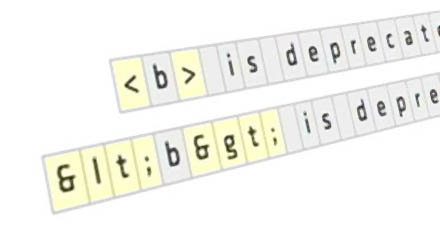
<b> is deprecated
Each string contains the character < in a slightly different context. The first uses it as part of intended bold tags. The second seems to use the same bold tag, but is actually just talking about the tag instead of using it for markup. More formally, we can say the first string is written in an HTML context, the second in a plain-text context.
If we were to try and display these strings in the wrong context, we'd see tags printed when they should be interpreted, or text marked up when it should be shown as is.
Context Conversion
To unify the two strings above, we can convert the plain-text string to HTML without loss of meaning, like so:
<b> is deprecated
<b> is deprecated
This kind of context conversion is commonplace under the term escaping and in this case, will replace any character that has a special meaning in HTML with its escaped equivalent. This ensures the resulting string still means the same thing in the new context.
On the Web, Contexts Happen
Usually, the lesson above of escaping input to HTML-safe text is where the discussion about XSS ends. However, armed with only the knowledge that HTML-special characters must be escaped to be safe, it can be hard to see why in fact you should not just filter all your data on input to ensure it contains none of these pesky characters in the first place. After all, how many people really need to use angle brackets and ampersands anyway?
Well, first of all, I think that's underestimating certain users. The following subject might not be so rare on a message board, yet would be mangled by typical aggressive character stripping:
<_< so sad
More fundamentally though, it implies that there is only one kind of string context used on the web. Nothing could be further from the truth. Let's look at three different, common contexts.
HTML
We take a simple snippet of HTML by itself with some assumed user-generated text in it:
<span title="attribute text">inline text</span>
We look at some different segments of the snippet, and look at what 'forbidden characters' would break or change the semantics of each.
| Snippet | Forbidden | Escaped as |
|---|---|---|
| attribute text | "& | " & |
| inline text | <& | < & |
For example, quotes are disallowed in attribute text values, because otherwise a string with a quote could alter the meaning of the HTML snippet considerably:
<span title="attribute with injected" property="doEvil() ">inline text</a>
Note:
- All ampersands need to be escaped (including those in URLs) for it to validate. HTML's stricter cousin XML will refuse to parse unescaped ampersands as well, and even requires that apostrophes be escaped too.
- XSS attacks do not necessarily involve angle-brackets. In the attribute context, all you need is a " to wreak havoc.
URLs
The situation is more complicated with URLs. The common HTTP URL for example:
http://user:password@host.com/path/?variable=value&foo=bar#
| Snippet | Forbidden | Escaped as |
|---|---|---|
| (all) | <>"#%{}|\^~[]` (and non-printables) | %3C %3E %22 %23 ... |
| user | @: | %40 %3A |
| password | : | %3A |
| host.com | /@ | disallowed |
| path | ? | %3F |
| variable | &= | %26 %3D |
| value | &+ | %26 %2B |
Note:
- Many forget that a + in a query value actually means a space, not a plus.
- Even completely valid URLs can still be malicious, through the
javascript://protocol. - Defined by RFC 1738 and RFC 2616.
MIME Headers
Several protocols such as HTTP and SMTP employ the same mechanism of providing metadata for pieces of content. This includes data such as e-mail subjects, senders, cookie headers or HTTP redirects, likely to contain user-generated data.
  Subject: message subject

  Content-Type: text/html; charset=utf-8
| Snippet | Forbidden | Escaped as |
|---|---|---|
| message subject | CRLF (if not followed by space), ()<>@,;:\"/[]?= + any non-printable | =?UTF-8?B?...?= |
Note:
- CRLF sequences without trailing space start a new field and can be used for header injection.
- Lines should be wrapped at 80 columns with CRLF + space.
- Defined by RFC 2045.
Lolwut?
If the above three tables seem complicated and confusing, that's normal. It should be obvious that each of the three contexts is unique and has its own special range of 'forbidden characters' for user input (and even some sub-contexts). From this perspective, it would be impossible to define a safe input filtering mechanism for text on the web that didn't destroy almost all legitimate content.
You would have to filter or escape only for a single context, which would create a situation where the exact same approach to a problem can be safe in some cases, but unsafe in others, thus promoting bad coding practices. In particular, any framework that has a concept of tainted strings that are auto-escaped has it wrong: it's marking strings as safe/unsafe, when it should be treating them as plain text, unsafe HTML, filtered HTML, MIME value, etc. Whether that happens implicitly through data flow, or explicitly through typing depends on the architecture.
With the selection above, I also ignored other important contexts (notably JS / JSON or SQL). However, the fact that I was able to make my point using only old school Web 1.0 techniques should show how this problem becomes even hairier in today's Web 2.0.
So What Then?
The right way around string incompatibilities is to use appropriate conversions to change content from one context to another without changing its meaning, and do so when outputting text in a particular instance. We already did it above for the plain-text example, but similar conversions can be made in almost every other instance. Most web languages (like PHP) contain pre-built and tested functions for doing this.
Whenever you put strings together, you need to ask yourself what context the strings are in. If they are not the same, an appropriate conversion needs to be made, or you can run into bugs or worse, exploits.
The best way is to mentally color in all your variables by their type: text, HTML, SQL, JS, MIME, etc. You should aim to keep data in the most natural form possible, until right before output. Storing possible XSS code in your database might seem like it's tempting fate, but if you apply proper escaping on the way out, you can be sure that it's safe, no matter where the data comes from or what protocol it's being sent on. It turns out to be a far more paranoid approach than input filtering, because you don't have to trust anything you didn't hardcode.
So, use prepared SQL statements to leave the escaping to your database interface. Make your HTML templates escape dynamic variables implicitly if possible. Never compose JSON manually. Finally, be careful when tying web code into other systems: a Bash command containing a user-supplied filename is a exploit waiting to happen.
For the example snippet at the very beginning, the appropriate fix is:
<?php print htmlspecialchars($user->name) ?>'s profile
The trick is in understanding why that call goes there, and not somewhere else. Ideally however, the framework has been constructed so that context issues simply cannot happen, by passing data through interfaces, and letting well-tested code handle the concatenation for you.
Update: Google's DocType wiki has an excellent section with instructions for escaping for various contexts.