Home

Nokia N73 Review

Jan 31, 2007

Two months ago I got a Nokia N73 hand-me-down from Roland thanks to Nokia's Blogger Relations Program. It's a 'smart phone' with a large 320x240 screen, a 3 megapixel camera and more. Before this, I'd been using an old Nokia 3310 brick (monochrome screen) so this was quite a step up. Still, I wasn't particularly unhappy with my old phone because all I really needed was voice calls and SMS. So I was curious myself to see if I'd actually use all the bells and whistles.
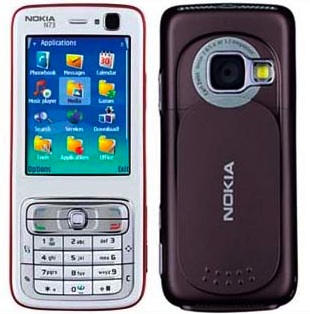
Nokia N73

The good news is that making calls and sending text messages has become easier. The default interface has a quick launch bar to access contacts, text messages and other features. Selecting a contact by typing some letters is fast and accurate, and the big screen is easy to read. I also have no problems using predictive text input thanks to years of SMS'ing, while the improved controls (such as the 4-way stick) make entering symbols easier.

Managing my contacts is now a non-issue. I edit my entire address book in Mac OS X and just sync it to the phone, including everyone's pictures. Plus, with Adium address book syncing, this means that it automatically imports IM icons for contacts that don't yet have a picture. However, I did try editing contacts on the phone itself, and it was way too complicated.

Now, the first phone feature I really enjoyed was the built-in camera. Unlike most camera phones, the N73 has a pretty good camera and lens, with auto-focus and all the works. The phone also has a flip cover, so to take a picture, you just slide open the cover on the back and hold it like a real camera (including holding down the snap button half-way for focus). There is even a button to go straight to your pictures.

However, there is a big annoyance here: it takes 5-7 seconds to open the camera application. This is way too long and makes it impossible to snap spontaneous pictures. Also, in spite of all the technical wizardry, pictures in low-light conditions and at night look very bad and washed out. The pictures it takes are also compressed too much. There's a 1GB memory card in mine, so I really wish I could save images to (near-)lossless JPEG.

View from the office

The second interesting feature was the MP3 player, especially in light of the 1GB of storage which would fit a lot of music. I even found a nice OS X app iTuneMyWalkman that automatically syncs iTunes playlists for me.

However, the phone's music player is simply horrible. The UI makes no use of the N73's buttons: I'd expect to be able to fast forward or backward by holding the stick left/right, and clicking it left/right to go to another song. Instead, you have to press up/down to reach the right on-screen button and then press the stick to push it.

Even more annoying is that leaving the music player stops all playback. If you wish to use the N73 like a real MP3 player, you have to go into a context-menu, scroll down and select "Play in background", then lock the keypad from the main screen every single time. The current behaviour only makes sense if you wish to listen to random audio clips at random moments, which I really don't see myself doing.

To top it all off, there's the fact that you can only use the official Nokia headphones with the N73, because they have a proprietary connector. I already have headphones for my laptop and I don't want to carry another set around.

Next, I've gotten to really like the calendar and the alerts it can provide. However, here I also stick to iCal on OS X and simply sync all my events to the phone. The phone's own calendar input is, again, clunky and cumbersome to use.

After this, I looked at the other capabilities of the phone. A highlight is the included Snakes game, which is in full 3D and features whacky snake action on square and hexagonal grids, even on curved surfaces. I've played it several times while queueing up for various things, and it's fun and easy to pick up. Bonus points for the automatic checkpointing of your progress in the game.

For playing video, the phone uses RealPlayer. Now, I realize this might sound a bit irrational, but I for one don't want anything to do with Real. They have screwed over their users for years on end producing ridiculously crappy players bundled with some of the most insidious spyware and adware seen. But even disregarding that, RealPlayer is a horrible choice as it doesn't play any of the most popular video formats, like DivX or QuickTime. With open-source players like VLC being able to play every format under the sun, there is really no excuse for this.

As for the internet features, I can't try them out because I have no data plan. It's apparently impossible to get an unlimited data plan in Vancouver, unless you get a Hiptop or have connections.

Finally, more small annoyances:

  • The Nokia proprietary connector is almost-symmetrical, which means half of the time I'm trying to plug it in the wrong way.
  • The default setup and some of the applications (like the photo browser) contain annoying plugs for online services and various lame ideas (like Nokia Lifeblog). Most cannot be removed and just get in the way.
  • The phone always complains I unplugged it incorrectly after using the USB data cable. I haven't found any 'right' way to unplug it (and yes, I do unmount/eject the drive in OS X).
  • The phone automatically formats the memory card in an obscure directory tree that mixes user-owned content with system libraries and applications. Images and video are saved in nested subdirectories with a weird numerical format that includes a sequence number and date, but not a single separator character. When was 28012007240.jpg taken?
  • There is an utterly useless second "Quick launch" button that pops up an elaborate directional menu where you can choose up/left/right to pick a command. Of course, all that window dressing means it's actually terribly slow to use. It's an embarrasingly bad waste of a button and cannot be replaced or disabled.
  • The data cable's connector is flaky and will disconnect momentarily if you fiddle with the phone while it's plugged in.
  • The default menu setup is bizzare. Some features are located at the top level, some are inside "Tools", some are inside "Applications", some are inside "Downloads!" (yes, with exclamation mark). Luckily you can rearrange this to your liking.
  • The keyboard is really small vertically, yet there is a lot of wasted space. Bigger buttons would be nice.

After two months, the only thing I've consistently used other than voice calls and SMS is the camera, because it is really good for a phone. All the pictures on my Flickr page since December 1st were taken with the N73. I also listen to music whenever I can, but the MP3 player and proprietary headphones are too cumbersome.

The only part of the N73 that really stands out for me is the phone's form factor. I love that in spite of all its features, it's only as big as a typical phone. It's clearly designed for snapping pictures with and the screen is large and gorgeous. If the data-cable and file system didn't suck so much, I'd probably use it as a USB stick too (or better, if you could mount Bluetooth storage as local, ejectable drives).

Having used this phone, I can clearly see why traditional cellphone makers should fear Apple's iPhone. I've consistenty avoided using the phone's built-in tools like address book and calendar editing, because doing it on my Mac is orders of magnitude easier and faster. From what I've seen, the iPhone changes that. I really wish the iPhone will bring a fresh wave of usability improvements for mobile devices. But, if usability was all that mattered, we wouldn't be seeing so many Windows installs out there either...

Great comments

Feb 05, 2007 Steve Litchfield

Just found this entry via Ring Nokia - thanks for all your observations - I was about to launch into a 'What Nokia can do to improve S60' editorial and you've just given me a few more pointers. I'll make sure to link back here, don't worry.

Steve

Good review

Feb 06, 2007 Alexandre Silva

Hello. I'm a N73 owner myself, and i really liked your kind of approach, going from an old 3310 to a much forward N73.

However there's some points you got it wrong, or to put it better, are not updated.

The MP3 player now works better. With the newest firmwares, you don't need to go to the options, play in background. All you need now (aswell as in the fm radio app) is to push the red (end call) button.

Also, those joystick moving forward commands, etc, are present in the N73 Music Edition...

Finally, you can use the 3.5mm adapter and use your headphones with the phone! :)

Thanks for the review.

Best regards

Thanks, I passed on the message to Nokia people

Feb 06, 2007 Tommi Vilkamo

Hi Steven, and thanks for the insightful review. I promoted it here:
blogs.s60.com/tommi/2007/02/nokia_n73_review_by_a_first-time_s60_user.html
...just to make sure my colleagues here at Nokia see your feedback.

Music player on my N73 had

Feb 06, 2007 Henrikki

Music player on my N73 had shortcuts programmed to the keyboard. Number 5 is play/pause, 6 is skip when pushed once and when pressing down continuously it would go fast forward with the tune your are listening...4 would be skip backwards and so on.

I have updated my N73 to a N73 ME (music edition). The player uses the 5-way joystick to control the player.

Some of your troubles seems to be Mac-related, the support there isn't too good. I have no experience on those. I have no troubles with the cable or the syncing with my windows machine.

It's a big leap to go from 3310 to a N73. Some things are made differently and will take some time to get used to. To get the full potential and understanding, it helps to consult the manual sometimes as well.

nice review

Feb 06, 2007 aholic

i too have been using the N73 for about 2 months and am also using a Mac. here's a few things i'd like to share.

- syncing with Address Book is painless but the note field and nickname on the phone don't get synced to the Mac.

- you can use numeric key 4 & 6 to rewind or fast-forward. 5 & 8 to play/pause/stop the playing music.

- press menu button twice to quickly go from the music player back to the standby screen without going thru the "play in background" route.

- the Music Edition and the Internet Edition have a new music player which use the joystick to control the music. but then, the new player is a memory hog which stays loaded after phone restart.

- after unmounting the drive in OS X, press the hangup button the phone before disconnecting the cable. the error shouldn't pop up anymore.

- the photo numbering: "28012007240.jpg" - ddmmyyyynnn. i believe dd/mm/yyyy is your selected date format. the photos are numbered with the date (in your date format) and then a sequence number which i believe is the number of photos taken.

sorry for the long comment. hope it helps you to enjoy your N73 more.

CL

Just switch to Windows and search around

Feb 06, 2007 Anonymous

Ok, I kinda like this first time user review.

First of all I've been using Nokias smartphone since the 3650. I have the Nokia N73 since 6 months now and I think it is an incredible phone.

Most of the smartphone you can get today are very advanced and very different from a Nokia 3310. You don't get a Nokia N73 for making calls and sending SMS. You get a Nokia N73 if you want to have in your pocket all the time a good digital camera, you want to install java application, you want to access the web and your email, you want to watch videos, you want to upload your blog.

So if your objective is the phone, sms and camera functions The Nokia N73 is not the right phone for you.

The Nokia is working great with Windows, I can synch outlook, contacts, calendar, tasks without any problems. The setup is a piece of cake. Just install the Nokia PC suite.

For the music it is very easy to synch itunes or any other programs with the N73. To have more control on the songs I would recommend you to install the N73 music edition firmware. It is very easy to do, you just need to download a program that will change your N73 product code. As soon as the product code is changed, just plug your N73 to your computer and run the Nokia updater. It will install the new N73 music edition firmware on your N73.

For watching videos, you just need to find online the right format to convert to (MP4). It is very easy with google. You just need to convert your video to the right format that's it. It is very easy to do. You have many forums available. But you need to take time to look for the answer.

To finish I think the N73 is a great smartphone. The only thing missing is the WiFi support. Other than that Nokia did a great job with this killer smartphone. But remember again the Nokia N73 is not for everybody.

Hi Steven, Mostly good

Feb 06, 2007 gman

Hi Steven,
Mostly good review, but a lot of your criticisms aren't really valid and a quick read of the manual would've helped. For eg, your gripe about the music player stopping when you hit exit; hit the menu key twice. This runs the current app in the background. To switch back, press and hold menu for 2s. As for the non-availability of shortcuts, again, the manual would've come to the rescue

If either of the above two prove to be too much of a hassle, then I guess you'll need to install the music edition firmware.

As for realplayer being a poor choice of default player... well, install your own ...it is a smartphone after all :)
(admittedly, no S60 SW comes close to VLC. still...)

Most of your other niggles stand though :)

Manuals and such

Feb 06, 2007 Steven

Sorry if the tone in this blog post was a bit aggressive: I'm a technologist who enjoys using great products, but has no patience for badly designed things. I gave the N73 the benefit of the doubt in any case: I waited 2 months before writing this review, even though most of these issues I discovered within hours of turning on the phone.

I'm very surprised at the attitude I'm seeing here though. I reviewed the N73 from an outsider's point of view yes, but each of my gripes is a valid usability concern. I refuse to accept the limitations that the phone makers and operators have consistently pushed on their customers year after year (data limits, locked down features, DRM, etc).

Specific replies:

  • (to Anonymous) I explained that this N73 literally fell into my lap and I was curious if I'd actually use all the features. I did not actively have a need for a SmartPhone. I did explore the phone's capabilities, and found that I only regularly use the phone/sms/camera because the other features are simply too clunky and inelegant. And even the camera is border-line due to the unacceptable delay.

    I would love to use the other features, but at every point, I feel like the phone is getting in the way. I avoid all the on-phone apps whenever I can, because using Apple iSync along with OS X tools is not just handier, but orders of magnitude faster and easier. And I don't need to install any crappy 3rd party applications either.

    As for me not using the internet-features, I really would love to try them, but there is no unlimited data plan available here for GSM phones that aren't Hiptops. The prices for the limited plans they offer are ridiculous. Dollars per megabyte? What is this, the stone age?

    (PS: I'm an electrical engineer so I am very much aware of the state of modern telecom technology. We all know there is no technical reason for these high prices.)

  • (to aholic) Firmware updates are like game patches: if they are needed to make the product enjoyable and/or usable, then it was broken on release. Besides, apparently this firmware flasher is Windows-only and updating to the N73 Music Edition is not officially supported. Meaning Nokia doesn't think "music player that actually works" is an important enough feature on release?

    I don't want to use an audio adaptor for the headphones. It's a piece of equipment that is only necessary because Nokia made a bad design decision. The 2mm headphone jack has been standard for ages and has been fitted on everything from matchbox sized MP3 players to computers. Why is this so hard?

    Thanks for the USB unmounting tip by the way, but this should be unnecessary. If I unmount the drive in OS X, the phone should be smart enough to realize that. Every other USB mass storage device works like this.

    Finally: my point with the photo naming/numbering was not that I could not figure out when a photo was taken if I looked at the filename closely. The point is that it is impossible to do so at a glance. This makes it hard to find and manage photos, especially when you factor in the extra unnecessary nested directories. The filenames aren't even chronologically sortable.

  • (to Stefan Constantinescu) I used to have trackback enabled, but 99% of it was spam. It is too bothersome to have enabled, sorry.
  • (to gman) Why should I have to install another player just to play some of the most common video formats around? I see the value in being able to add on third-party software, but that's no excuse for having a lousy out-of-the-box experience.

    Also, I get the idea that S60 is really not up to snuff. e.g. I installed DivX player. That leaves me with two separate players, and the phone is apparently not smart enough to use the right player for the right type of file. This is something that should work out of the box, so either S60 is busted, or the DivX player is.

    In any case, even that would be mediocre. What I would expect to happen is that the DivX player component is installed and becomes reusable by the media player. The phone should add file type associations and should do the right thing when I select a file. This is how it works on OS X with QuickTime (and to a lesser degree with DirectShow on Windows). After I install e.g. the Ogg Vorbis components, suddenly all QuickTime-using applications (including iTunes) can read, index and play Ogg files, including all the meta-data.

Regardless, thanks for your comments, all. I honestly didn't expect to get much reads as I'm not a phone blogger.

Well, the music player

Feb 07, 2007 Henrikki

Well, the music player wasn't busted. You don't need to update it to get the shortcut keys or have the other functionalities you mentioned. You just didn't know how to use it...hence RTFM comments..

Sorry to get all technical, but I'm sucker for details being shown correctly..:)

Keypad

Feb 07, 2007 Steven

Sorry, but I don't consider mapping features to arbitrary places on a numerical keypad to be 'functional'. Especially when there is a much better and intuitive control available.

Video

Feb 07, 2007 Steve Litchfield

The video point is an interesting one. Digital video is an *appallingly* complicated area, with more file codecs and containers than we could list here, but the two most common these days are, arguably, Windows Media Video and MPEG-4. Now, under the hood, both of these use variants of the same technology, just as DivX and XviD do. Modern S60 devices will only play files with .mp4 filenames and exactly the 'right' headers, which is a wasted opportunity - I quite agree that more work could be done here to play other subtle variations on the same basic compression technology. And if someone tries to play, say, a WMV file with too high a pixel resolution or bitrate, just pop up a sensible error message rather than simply refusing to play.

Steve, http://3lib.ukonline.co.uk/

Spot on!

Feb 21, 2007 Steve L

I would just like to stand up for your review it is spot on. It's probably worth pointing out that I have an N80, but I recognise all the issues you have raised and a few more.
I would like to congratulate Nokia on the hardware, yes there is the dodgy Pop-Port and the delicate little power plug (on my second adapter already) but to fit all that processing power into such a small box is amazing. But the software really lets it down - I almost sent the phone back it was so frustrating.
As you describe I've really cut back on which applications I use, and the phone is more stable. I still use the Music player occasionally, but even after a firmware update if you leave it paused for too long it won't unpause, sometimes it doesn't fast forward ... intuitive, ergonomic not in my book - but it can be made to work (most of the time).
Ease of use is a key feature and if you need to RTFM to understand that you need to press some button twice to be able to do something else then there is a problem.
Maybe S603rdfp2 or whatever it is called will help - but it will need far more than just wizzy transitions to standup in the new world. Nokia dominated in the early GSM days because of their GUI - they need to translate that into this richer new world or they will loose even more market share to Apple and the traditional competition.

N73 Music Edition

Mar 02, 2007 Nageeb

Nice review here ,,, I passed by chance to read your review , all I want to say is that they really solved all the music listening issues in the new N73 Music Edition ,, it's almost like a real MP3 player , u use the stick to forward , backward , change track , stop , pause , and play ,,,, they also included a 2GB SD card , and a remote control adapter (Nokia Music headset HS-20, AD-41) which has a compatible jack slot so that u can connect any headphone u want and u can control your mobile MP3 player using the remote control , it's really awesome , I've got one and once I put on the headphones , I never need to go back to the set ,,, u can receive and make calls (voice tags) using the remote control they really made it easy to listen ,,, Plus the new updated firmwares have already reduced the time needed for loading the camera application when u open the slide , I advice every Nokia owner to update their sets with the new firmwares occasionally .
Thanks for your efforts and keep the good thing on :) .

to N73 Music Edition by

Mar 07, 2007 Anonymous

to
N73 Music Edition
by Nageeb
yea am a fan of nokia but what the guy said about the n73 is true i really found it very stupid phone even comparing with my previous 6280, abt the music if u exit the music stop. u cant foward or backward through the headset(if someone can sort me out in this matter plz feel free to help out how to use or update the music player or having control just over the headset)
if u call someone then u want to see the number youll have to go back to the contacts because only the name is shown.(this also happens if u got the person names in ur fone. the contact list doesnt show the name and number altogether. is a very slow phone and lack os setting. lets say if u want to to send a txt msg by using the phones number of the person you just called you will have to go back to normal step like menu then message.
well my conclusion i have this phone for few days am taking it back its not pratical nokia is well know for its friendly user phones now its seems like its following motorola who produced pretty phones with a crazy menu or firmware.
i like all the add stuff that comes with n73 but at the end you want the ecessetial stuff like sendin txt, a real nice player not just louderspeaker which is the case of this brick phone yea brick phone admit it is big and large in ya pocket look bad its cool only when u pull it out to inpress people around you. but soon it will be just a nokia phone! sad
mastereve@hotmail.com
feel free

n73 music edition headset

Mar 20, 2007 gtrasi

Hey guys, thanks for ur reviews and inputs.

Now in revieew given by Nageeb, n73 comes with headphones just lik ones in Sony ericcson walkman phones so u can connect ur own 3.2mm jack headphones available since the Walkman was invented..am I correct ???
naggeb has given the model nu for these headphones as "Nokia Music headset HS-20".
but on "http://www.nseries.com/index.html#l=products,n73_music" if u click on Technical Specs for N73ME..the headphones are "Nokia Classic Stereo Headset HS-23"...why is that so ???

Thanks.

So a good choice?

Mar 28, 2007 Dutchy

I have read quite some reviews now and I tend to get the feeling that (with a little work) the N73 is an awesome smartphone. The work then consists of upgrading your firmware to the newest Music Edition version. I hope this solves almost anything because I ordered my N73 just today ;-)

MusicPlayer = OggPlay

Mar 30, 2007 Sune, Denmark

Thanks for the review. The N73 works pretty well together with Mac OS X, although it isn't possible to make direct contact between the address book and the phone for me - iSync works, though.

Regarding the music: I've been using the N73 since last autumn. I'm using the (free) OggPlayer music player, and I'm syncing my pictures and music between phone and mac using iTuneMyWalkman, also freeware.

http://ilari.scheinin.fidisk.fi/itunemywalkman/
http://sourceforge.net/project/showfiles.php?group_id=86146

Enjoy.

Sune, Denmark

Throw it away

Apr 03, 2007 Kexy

I have had my nokia n73 for 5 months now and it has been wonderfull, Infact i couldn't imagine myself using any other phone. As for u steven if u aren't familiar with Hi tech phones like n73 then i suggest u "throw it away" and continue using ur 3310. Because ur review points out to the fact that the phone is higher than ur level right now, so leave this kind of phones for ppl who are up to its level. And again i can't imagine that u were using a "3310" I didn't know people of such mindset existed in the world today.

My apologies

Apr 03, 2007 Steven

I wasn't aware I needed to be admitted to the secret kabal of SmartPhone Elites to use one of these devices. My mistake.

Grow up, please. The usability of a device and its complexity are not strongly correlated. I hack code for a living, but I value elegant design that doesn't get in my way. The N73, for the most part, does.

Nokia N73 Review

Apr 20, 2007 Martin Dev

a good review of nokia n73

re:throw it away

Apr 21, 2007 ron aguilar (Laguna - Philippines)

nice comment there kexy! steven almost got me! im thinkin of switching nokia 6630 to n73 and the post from steven almost melted my fantasy of having n73ME but thanks to the scroll key of my keyboard, i saw you comment on him.thanks!

N73 - Its just not for me

Apr 23, 2007 Anonymous

N73 reeks of PI*S i hate it and i've had it for 2 months now. I find it slow and irritating. I like a smart stylish phone which can actually do stuff right away not seconds later. If you're impatient dont get it! heehee

Have just installed the

Apr 26, 2007 Anonymous

Have just installed the latest firmware update (67MB!). My N73 now goes even slower than it did before (if that is possible).

Unfortunately my N73 regularly freezes and is not interested in doing anything fast. It may be a battery issue, but if not then Nokia should really focus on making something work, rather than adding all the bells and whistles that are a bit unnecessary.

If the phone would go quicker, it would be perfect. Otherwise Nokia, only 2out of 10 I'm afraid.

sms on nokia n73

Apr 29, 2007 andrew

thks for the review and all the info.

I have a brand new nokia n73. just like you before it i had the old 3310.

now the old one used to send the sms in 5 secs. This n73 sometimes takes up to one minute to send a simple sms. I cant understand how such an advanced phone does that. It simply freezes during the sending of an sms.

Can you please help me out? Is there a setting or something which might be wrong with my phone?

regards

andrew

Nice review

May 29, 2007 Edde

I've had my N73 for about 3 months now. You're review is quite accurate - the N73 is a very nice phone but does have it's strange things, which might have been done better. Overall, I do like it a lot though. :)

i bought my n73 just a week

May 30, 2007 rozi

i bought my n73 just a week ago. still a bit akward with it. anyway, how to automatically program the keypad lock? and how do i set ring and message tones?
while the pic quality is good, it takes quite sometime to get the camera into action. i miss my Nokia 6680 which was stolen.

good one steve

Sep 16, 2007 sachit

hi
i am regular user of phone for last 6 months
many of freinds have this phone
and i have not seen many people complaining nowadays
especially after getting their phones updated..
that should be easy as u have gprs as well as internet..

many of glitches nokia have recognised and they seem to correct their faults

i just suggest u just update software and then tell us how many complaints are still there..

it will be very helpful for just phone users like us..
hanks anyway for wonderful review..

Recent comments

Images