Home

Kindle Faux PDF Zoom

Dec 18, 2009

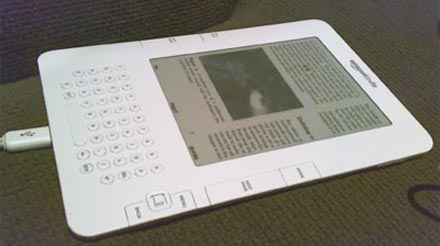
Through the miracle of xmas, I acquired a Kindle. A sleek e-reader, but also a shameless vehicle for Amazon's digital book store. But with the latest firmware installed, they do make for great PDF readers... in theory.
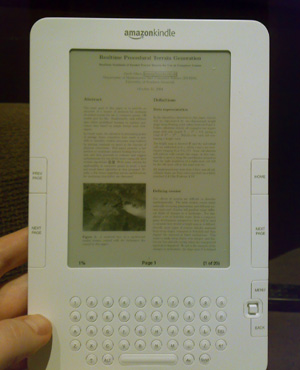
Kindle PDF fail

The good news is that the e-ink display on the Kindle is indeed pretty sweet. It works so well that the screen looks positively fake when it's not changing, as if it was just a display item in a shop somewhere. But the bad news is that the software needs a lot of love.

The included PDF reader for example has no zoom option. All you can do is toggle between portrait and landscape. Either way, normal sized text ends up tiny and barely readable.

Thankfully, we can still do it ourselves. Armed with PyPDF I wrote a simple script that takes a regular A4/Letter PDF and chops each page into four parts. You can pan through the document just by hitting next. Most of the stuff I read these days is academic, in the classic two column paper format, so this orders the sub-pages to match that.

The script is available for download. It requires Python and pyPdf. Usage:

python rekindle.py file.pdf

It will produce file.kindle.pdf. The code doesn't actually look at the contents, it just cuts blindy, so it might need adjustment for certain docs.
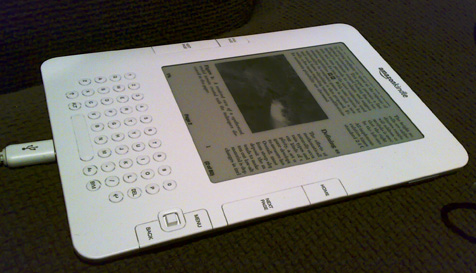
Kindle Zoom

Thanks!

Dec 18, 2009 Claudio

I am thinking of getting an e-book reader myself. Most of the content I will read will be self-scanned pdfs (2 book pages in a A4 landscape page). Good to see your review so I know I can discard the Kindle.

Great pdf rendering and zooming is a must for me.

Thanks,

C.

Neat!

Dec 18, 2009 Karen Wester Newton

But if you could do that so quickly, why couldn't the folks at Amazon write something similar and make it part of the basic Kindle software?

@Karen: Why indeed.

Dec 18, 2009 Steven

Heh, I have many gripes about the Kindle software. It feels like a 0.5 rather than a 2.0, that's for sure.

To solve this problem generally, they'd need to include some smart layout analysis. Not impossible, but I imagine it's not high up on their list. Instead, they've focused e.g. on making sure every single menu contains a "Shop in Kindle Store" link.

Even after all this time,

Dec 18, 2009 Ariane

Even after all this time, you never cease to amaze me with your ability to quickly solve technical problems others simply put up with....

reply

Dec 20, 2009 Karen Wester Newton

@Steven-- you've got that right! I love my Kindle in the same way I love a family member who drinks too much-- i.e., in spite of its flaws and with a hope for better behavior in the future.

How to run script?

Dec 30, 2009 Reggie

Thanks for this script. Being new to Python, how do I Install pyPDF? And when I run the command "python rekindle.py file.pdf", is it run from a Windows command line, or within the Python shell? Thanks.

How to modify for page size?

Jan 20, 2010 BarryTX

Great tool, something much needed. I've been using PDFRead to halve the pdf pages but that still doesn't cut it for many documents. Your rekindler script does. What I need to do is modify it for wider pages, like magazine pages. I figured out how to modify the script to read in rows rather than columns but the magazine pages are trimmed on both left and right edges. I'm guessing this ties back to your comment that the script is for A4/Letter size pages. I would like to modify this to allow for the wider page but I'm not a python programmer and I don't see what needs to be modified. Can you assist? Again, great job.

kindle to appropriate pdf viewer

Jan 27, 2010 cococbing

i solved my problem by 'manually' cropping pages on preview [mac], this can also be done batched.

If the pdf is a scanned book after cropping all left pages and all right pages i used pdf lab to 'interleave' the two documents and spit it out as a single pdf.. . . . .solved

how to run script

Jan 30, 2010 Peter

Thanks for sharing the script!

However, I don't know how to use it. I downloaded pypdf and python and have them installed on my Windows XP PC, but not sure if the .pdf files have to be in a certain directory, and if I am supposed to run the command using MSDOS command prompt or within Python. Can someone post or email step-by-step instructions for dummies?

No zooming for PDF.

Feb 07, 2010 Peng

Zooming (not reflowing of texts) feature is very easy to implement. The reason that Amazon doesn't support this is that Amazon wants you to buy books from them, not to read your PDF documents.

Awesome idea -- now I will probably buy a kindle

Mar 21, 2010 Donna Malayeri

I, too, read a lot of academic papers, and the lack of zoom was worrisome. I think your trick will solve the problem for me, so I may just go and buy a kindle!

how to needed..

Mar 29, 2010 jayme pereira nunes

first of all, thanks for the solution.
as some here, i also have some doubts on how to use it. (sorry in advance, im far from a computer savvy, im just a guy who bought kindle and is now slightly pissed with the lack of pdf functionallity)

i went to;

1- pythong.org downloaded and installed it
2- went to the pypdf downloaded and installed it
3- downloaded your rekindle.txt.py , renamed it to rekindle.py

so i tried both command line and python command line

python rekindle.py file.pdf

but i keep getting the SYNTAX ERROR:INVALID SYNTAX message

could you please help me on what i am doing wrong

thanks

jayme

To those having difficulty

Apr 04, 2010 JJ

To those having difficulty above:

1) Copy the text script file and your .pdf file into the C:\Python26 directory.
2) Rename the text script file to rekindle.py using your Command Prompt (not the Python shell). Make sure you've typed C: (hit enter) and then cd\Python26 before attempting this.
3) Again, using Command Prompt, run the script. I had changed my book to an easy filename beforehand, say "lighthouse.pdf" and ran the following:

python rekindle.py lighthouse.pdf

I hope this works for you - you'll have a filename "lighthouse.kindle" or similar in the C:\Python26 directory.

Thanks for the script - I'll need to do my own tinkering with it for certain books, but it's going to be very useful.

Thanks

Apr 09, 2010 Nate

Thanks for sharing this! I was about to write one myself to solve the same problem - reading academic PDFs on my Kindle. It worked flawlessly!

Mac

Apr 11, 2010 Ann

Hi all,

I got a Kindle recently and was very sad about the inability to read PDFs. I was super excited to find this page, however I have a Mac, and I'm not sure how the commands will differ.

I'm curious as to how to do this no my Mac. I downloaded Python but am not sure where to go from here.

Thanks!

Wow

Apr 13, 2010 Tommy

I know you are really smart guys, but we are not...

You must explain to us by step by step video or screen shot. (both mac and windows users)

What the hell is that ? Really !

@Tommy: Learn

Apr 13, 2010 Steven

I "must" explain in a step-by-step in video?

Really, I have better things to do than make videos for self-entitled internet users afraid to use their brain. Besides, you've already indicated you're not likely to contribute anything useful back: what motivation would I have to help you?

Get out your adventure hat and figure it out yourself. You'll learn something in the process, just like I did.

It's Right There!

Apr 13, 2010 David

Cheers, Steven.

Can anyone imagine what I must be doing wrong for there to be "no such file or directory" ? The pdf is clearly sitting in the Python26 directory.

Never mind.

Apr 14, 2010 David

Alright, never mind.

I just saved the pdf directly into Python26. Works a charm.

so easy

May 16, 2010 Aaron

that little application is so easy to use

i am strapped for time right now and was a little worried about spending hours figuring out something when i have many other balls in the air.

so i thought i would try see where i could get in 30 mins

and hey presto, up and running.....

thank you for awesome app

now when i get a moment in say 8 months time i can figure out the finer points

Perfect!

May 24, 2010 Eva

Thanks so much for posting this - its just what I was hoping to find. It took no more than 15min to get up & running. Now I have no excuse not to read all those papers...

A New Hope lies in the Horizon

Jun 09, 2010 Lucas Ayres

Hello people, there's been an ongoing rumour that a Kindle software update called 2.5 might be delivered at any instant right now (by way of electromagnetic waves) to your Kindle no matter where you are in the world! Some say it will enable viewing *.pdf files just like on acrobat reader and all so we can zoom highlight and all let's wait and see it might happen at any moment for me, hold tight fellas.

Lucas

Thanks

Jun 15, 2010 Simon Leinen

Exactly what I need! Thanks a bunch for this.

Changing subpages

Jul 09, 2010 karan

Thanks! I've been looking at the source code, though, and I'm having a hard time figuring out how to modify this so that it creates two subpages (basically, chops each page in half horizontally) rather than four. Any idea how this could be done?

Thanks!

Jul 12, 2010 Jay

Thanks for this sir, you are awesome!

This will be great for a lot of academic papers.

I've been fooling around with a pdf split into three columns, any chance of creating a script for 3 columns?

@Jay: Make your own

Jul 13, 2010 Steven

As always, code is only provided as-is, and it's up to you to change it to suit your needs.

half-cut version

Aug 03, 2010 jonyii

Hi guys,
I updated the script to cut PDF pages in half (useful for some books). It has an option to rotate cutted parts.

download from:
http://jonyii.lmcity.sk/pdf-halfcut.py

syntax:

python pdf-halfcut.py filename.pdf [rotation_degress_clockwise]
  rotation_degrees_clockwise   must be an increment of 90 deg

example:

python pdf-halfcut.py mybook.pdf 90

Post new comment

Note: all posts containing spam will be removed.
The content of this field is kept private and will not be shown publicly.
  • Web page addresses and e-mail addresses turn into links automatically.
  • Allowed HTML tags: <a> <b> <dd> <dl> <dt> <i> <li> <ol> <u> <ul> <img> <em> <p> <br> <span> <div> <h2> <h3> <abbr> <small> <table> <tr> <td> <strong> <acronym> <th> <blockquote>
  • Lines and paragraphs break automatically.
  • You may post code using <code>...</code> (generic) or <?php ... ?> (highlighted PHP) tags.

More information about formatting options

Recent comments

Images