<?xml version="1.0" encoding="utf-8"?>
<feed xmlns="http://www.w3.org/2005/Atom">

  <title><![CDATA[Acko.net]]></title>
  <link href="https://acko.net/atom.xml" rel="self"/>
  <link href="https://acko.net/"/>
  <updated>2026-03-05T12:10:39+01:00</updated>
  <id>https://acko.net</id>
  <author>
    <name><![CDATA[Steven Wittens]]></name>
    
  </author>

  
  <entry>
    <title type="html"><![CDATA[HTML is Dead, Long Live HTML]]></title>
    <link href="https://acko.net/blog/html-is-dead-long-live-html/"/>
    <updated>2025-08-06T00:00:00+02:00</updated>
    <id>https://acko.net/blog/html-is-dead-long-live-html</id>
    <content type="html"><![CDATA[<div class="g8 i2 first"><div class="pad">
  <h2 class="sub">Rethinking DOM from first principles</h2>
</div></div>

<div class="c"></div>

<p><img src="https://acko.net/files/dom-cruft-2025/cover.jpg" style="position: absolute; left: -5000px; top: 0;" alt="Cover Image" /></p>

<div class="g8 i2"><div class="pad">

<p>Browsers are in a very weird place. While WebAssembly has succeeded, even on the server, the client still feels largely the same as it did <a href="https://acko.net/blog/shadow-dom/" target="_blank">10 years ago</a>.</p>

<p>Enthusiasts will tell you that accessing native web APIs via WASM is a solved problem, with some <a href="https://queue.acm.org/detail.cfm?id=3746174" target="_blank">minimal JS glue</a>.</p>

<p>But the question not asked is why you would want to access the DOM. It's just the only option. So I'd like to explain why it really is time to send the DOM and its assorted APIs off to a farm somewhere, with some ideas on&nbsp;how.</p>

<p>I won't pretend to know everything about browsers. Nobody knows everything anymore, and that's the problem.</p>

</div></div>

<div class="c"></div>

<div class="wide mt2">
  <img src="https://acko.net/files/dom-cruft-2025/netscape-upside-down.jpg" alt="Netscape or something" />
</div>

<div class="c"></div>

<div class="g8 i2 mt2"><div class="pad">

<h2 class="mt2">The 'Document' Model</h2>

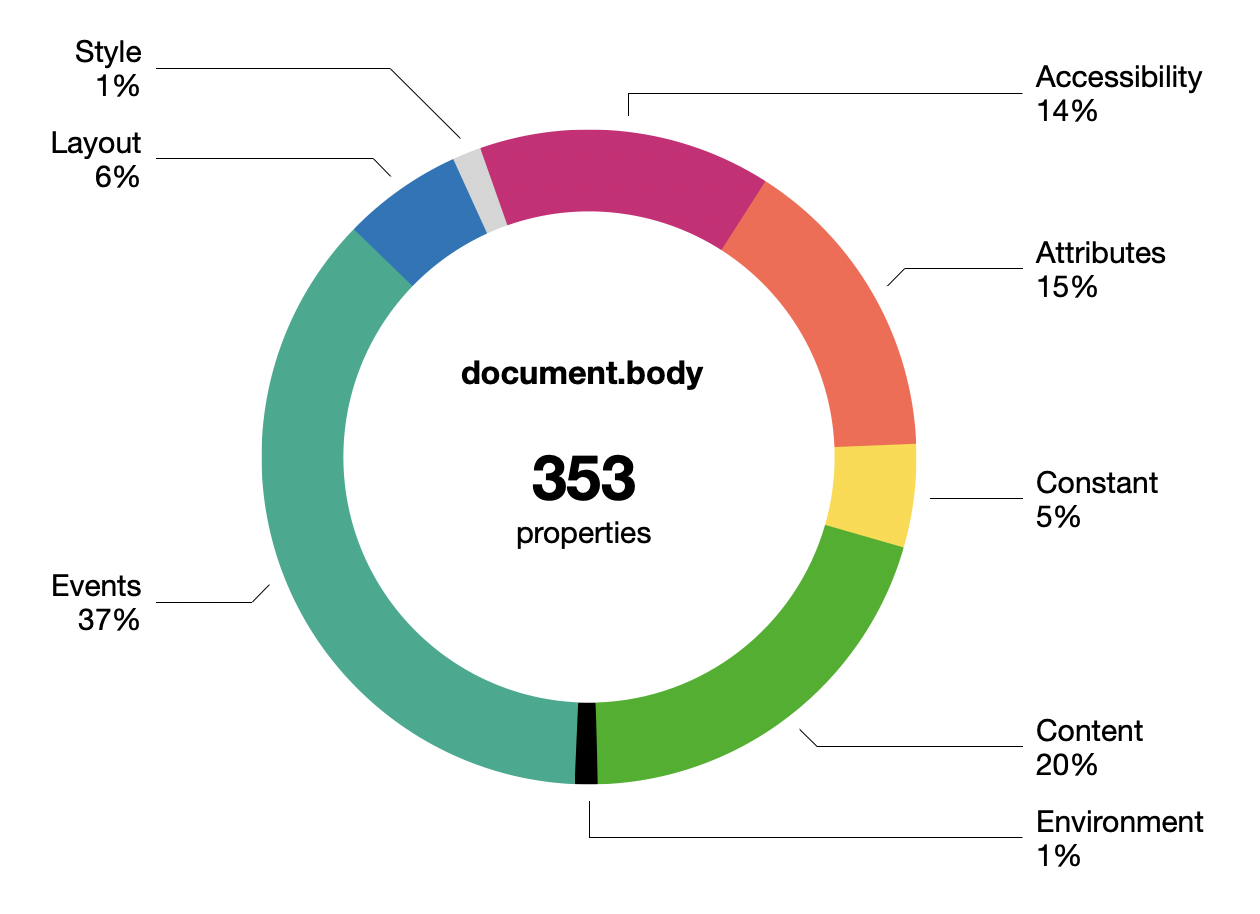
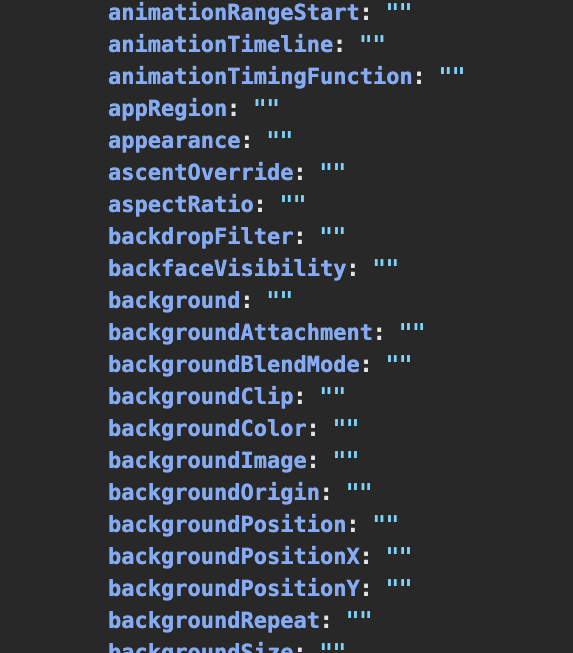
<p>Few know how bad the DOM really is. In Chrome, <code>document.body</code> now has 350+ keys, grouped roughly like this:</p>

</div></div>

<div class="g8 i2"><div class="pad">
  <div class="mt1"><img src="https://acko.net/files/dom-cruft-2025/document-body-chart.png" alt="document.body properties" /></div>
</div></div>

<div class="g8 i2"><div class="pad">

<p>This doesn't include the CSS properties in <code>document.body.style</code> of which there are... <b>660</b>.</p>

<p>The boundary between properties and methods is very vague. Many are just facades with an invisible setter behind them. Some getters may trigger a just-in-time re-layout. There's ancient legacy stuff, like all the <code>onevent</code> properties nobody uses anymore.</p>

<p>The DOM is not lean and continues to get fatter. Whether you notice this largely depends on whether you are making web pages or web applications.</p>

<p class="mt3">Most devs now avoid working with the DOM directly, though occasionally some purist will praise pure DOM as being superior to the various JS component/templating frameworks. What little declarative facilities the DOM has, like <code>innerHTML</code>, do not resemble modern UI patterns at all. The DOM has too many ways to do the same thing, none of them nice.</p>

<div class="c"></div>
<div class="mt2"></div>

<pre><code class="language-tsx wrap">connectedCallback() {
  const
    shadow = this.attachShadow({ mode: 'closed' }),
    template = document.getElementById('hello-world')
      .content.cloneNode(true),
    hwMsg = `Hello ${ this.name }`;

  Array.from(template.querySelectorAll('.hw-text'))
    .forEach(n =&gt; n.textContent = hwMsg);

  shadow.append(template);
}
</code></pre>
<div class="c"></div>

<p>Web Components deserve a mention, being the web-native equivalent of JS component libraries. But they came too late and are unpopular. The API seems clunky, with its Shadow DOM introducing new nesting and scoping layers. Proponents kinda <a href="https://kinsta.com/blog/web-components/" target="_blank">read like apologetics</a>.</p>

<p>The achilles heel is the DOM's SGML/XML heritage, making everything stringly typed. React-likes do not have this problem, their syntax only <i>looks</i> like XML. Devs have learned not to keep state in the document, because it's inadequate for it.</p>

</div></div>

<div class="c"></div>
<div class="mt2"></div>

<div class="g2 i1"><div class="pad">
  <div class="mt1"><img class="flat" src="https://acko.net/files/dom-cruft-2025/w3c-logo.png" alt="W3C logo" /></div>
  <div class="mt1 mb2"><img class="flat" src="https://acko.net/files/dom-cruft-2025/whatwg.png" alt="WHATWG logo" /></div>
</div></div>

<div class="g8"><div class="pad">

<p>For HTML itself, there isn't much to critique because nothing has changed in 10-15 years. Only <a href="https://developer.mozilla.org/en-US/docs/Web/Accessibility/ARIA" target="_blank">ARIA</a> (accessibility) is notable, and only because this was what Semantic HTML was supposed to do and didn't.</p>

<p>Semantic HTML never quite reached its goal. Despite dating from around 2011, there is e.g. no <code>&lt;thread&gt;</code> or <code>&lt;comment&gt;</code> tag, when those were well-established idioms. Instead, an article inside an article <a href="https://www.w3.org/TR/2011/WD-html5-author-20110809/the-article-element.html" target="_blank">is probably</a> a comment. The guidelines are... weird.</p>

<p>There's this feeling that HTML always had paper-envy, and couldn't quite embrace or fully define its hypertext nature, and did not trust its users to follow clear rules.</p>

<p>Stewardship of HTML has since firmly passed to WHATWG, really the browser vendors, who have not been able to define anything more concrete as a vision, and have instead just added epicycles at the margins.</p>

<p>Along the way even CSS has grown expressions, because every templating language wants to become a programming language.</p>

</div></div>

<div class="c"></div>

<div class="g8 i2 mt2">
  <img src="https://acko.net/files/dom-cruft-2025/composer.gif" alt="netscape composer" />
</div>

<div class="c"></div>

<div class="g8 i2"><div class="pad">

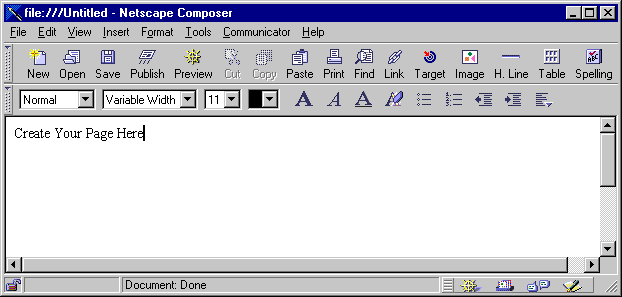
<p>Editability of HTML remains a sad footnote. While technically supported via <code>contentEditable</code>, actually wrangling this feature into something usable for applications is a dark art. I'm sure the Google Docs and Notion people have horror&nbsp;stories.</p>

</div></div>

<div class="g8 i2 mt2"><div class="pad">

<p>Nobody really believes in the old gods of progressive enhancement and separating markup from style anymore, not if they make apps.</p>

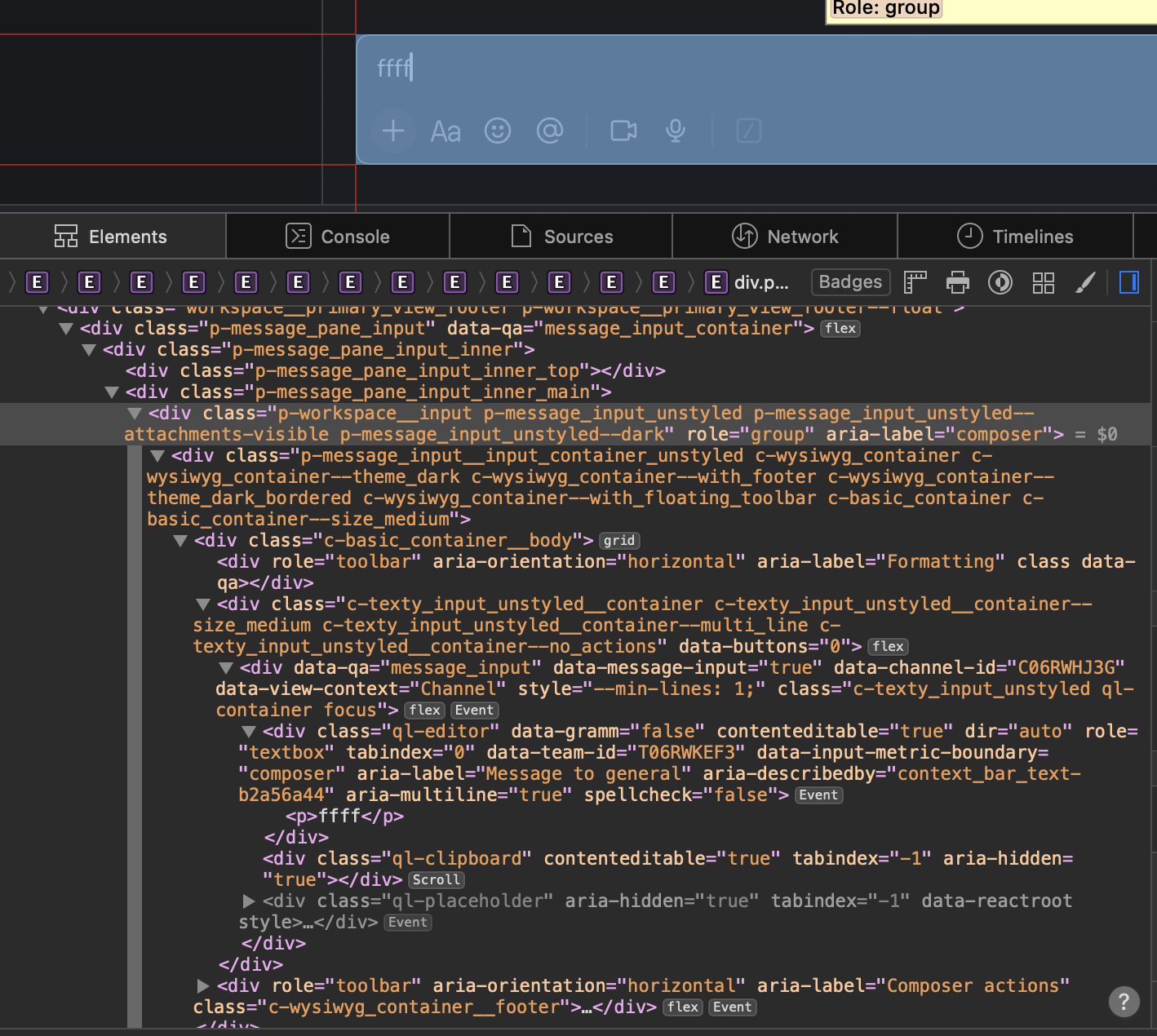
<p>Most of the applications you see nowadays will kitbash HTML/CSS/SVG into a pretty enough shape. But this comes with immense overhead, and is looking more and more like the opposite of a decent UI toolkit.</p>

</div></div>

<div class="c"></div>

<div class="g10 i1 mt1">
  <img src="https://acko.net/files/dom-cruft-2025/slack-html.png" alt="slack input editor" />
  <p class="tc"><i>The Slack input box</i></p>
</div>

<div class="c"></div>

<div class="g4 mt1">
  <img src="https://acko.net/files/dom-cruft-2025/slack-abs.png" alt="layout hack" />
  <p class="tc"><i>Off-screen clipboard hacks</i></p>
</div>

<div class="g8"><div class="pad">

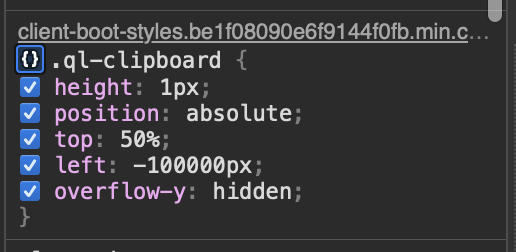
<p>Lists and tables must be virtualized by hand, taking over for layout, resizing, dragging, and so on. Making a chat window's scrollbar stick to the bottom is somebody's TODO, every single time. And the more you virtualize, the more you have to reinvent find-in-page, right-click menus, etc.</p>

<p>The web blurred the distinction between UI and fluid content, which was novel at the time. But it makes less and less sense, because the UI part is a decade obsolete, and the content has largely homogenized.</p>

</div></div>

<div class="c"></div>
<div class="mt2"></div>

<div class="g8 i2">
  <img src="https://acko.net/files/dom-cruft-2025/css-is-awesome.jpg" alt="'css is awesome' mug, truncated layout" />
</div>

<div class="g8 i2 mt2"><div class="pad">

<h2>CSS is inside-out</h2>

<p>CSS doesn't have a stellar reputation either, but few can put their finger on exactly&nbsp;why.</p>

<p>Where most people go wrong is to start with the wrong mental model, approaching it like a constraint solver. This is easy to show with e.g.:</p>

</div></div>

<div class="g5 i1"><div class="pad">

<pre><code class="language-tsx wrap">&lt;div&gt;
  &lt;div style="height: 50%"&gt;...&lt;/div&gt;
  &lt;div style="height: 50%"&gt;...&lt;/div&gt;
&lt;/div&gt;</code></pre>

</div></div>

<div class="c mobile-appear"></div>
<div class="mt1 mobile-appear"></div>

<div class="g5"><div class="pad">

<pre><code class="language-tsx wrap">&lt;div&gt;
  &lt;div style="height: 100%"&gt;...&lt;/div&gt;
  &lt;div style="height: 100%"&gt;...&lt;/div&gt;
&lt;/div&gt;</code></pre>

</div></div>

<div class="c"></div>

<div class="g8 i2"><div class="pad">

<p>The first might seem reasonable: divide the parent into two halves vertically. But what about the second?</p>

<p>Viewed as a set of constraints, it's contradictory, because the parent div is twice as tall as... itself. What will happen instead in <i>both cases</i> is the <code>height</code> is ignored. The parent height is unknown and CSS doesn't backtrack or iterate here. It just shrink-wraps the contents.</p>

<p>If you set e.g. <code>height: 300px</code> on the parent, then it works, but the latter case will still just spill out.</p>

</div></div>

<div class="g10 i1"><div class="pad">
<p class="tc"><img class="flat" src="https://acko.net/files/dom-cruft-2025/layout-modes.png" alt="Outside-in vs inside-out layout" /></p>
<p class="tc"><i>Outside-in and inside-out layout modes</i></p>
</div></div>

<div class="g8 i2"><div class="pad">

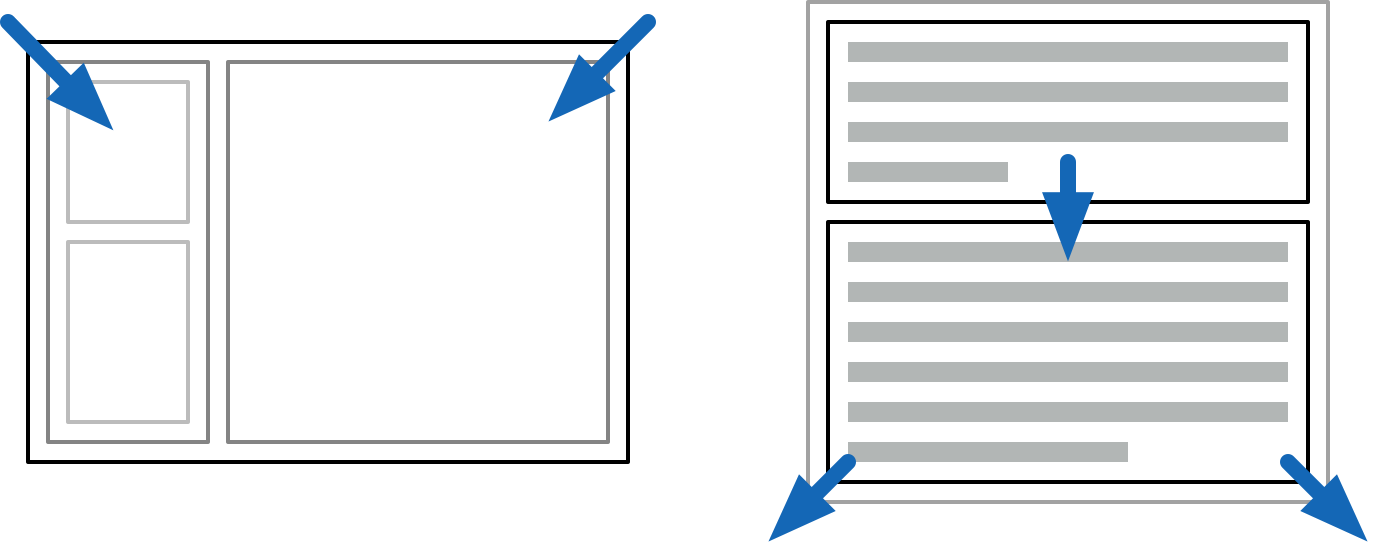
<p>Instead, your mental model of CSS should be applying two passes of constraints, first going outside-in, and then inside-out.</p>

<p>When you make an application frame, this is <i>outside-in</i>: the available space is divided, and the content inside does not affect sizing of panels.</p>

<p>When paragraphs stack on a page, this is <i>inside-out</i>: the text stretches out its containing parent. This is what HTML wants to do naturally.</p>

<p>By being structured this way, CSS layouts are computationally pretty simple. You can propagate the parent constraints down to the children, and then gather up the children's sizes in the other direction. This is attractive and allows webpages to scale well in terms of elements and text content.</p>

<p>CSS is always inside-out by default, reflecting its document-oriented nature. The outside-in is not obvious, because it's up to you to pass all the constraints down, starting with <code>body { height: 100%; }</code>. This is why they always say vertical alignment in CSS is hard.</p>


</div></div>

<div class="g10 i1"><div class="pad">
<p class="tc"><img class="flat" src="https://acko.net/files/dom-cruft-2025/flex.png" alt="Flex grow/shrink" /></p>
<p class="tc"><i>Use flex grow and shrink for spill-free auto-layouts with completely reasonable gaps</i></p>
</div></div>

<div class="g8 i2"><div class="pad">

<p>The scenario above is better handled with a CSS3 flex box (<code>display: flex</code>), which provides explicit control over how space is divided.</p>

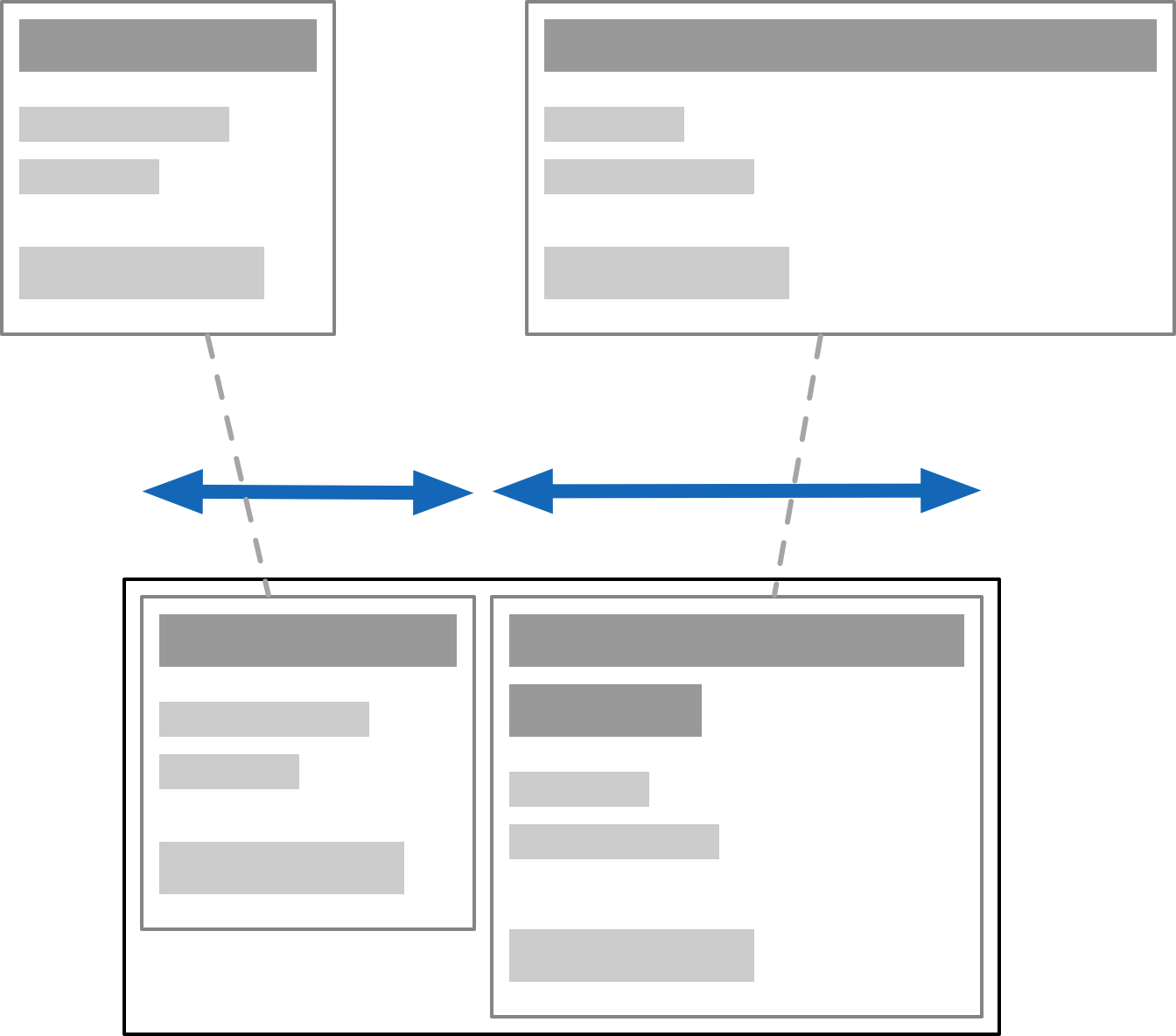
<p>Unfortunately flexing muddles the simple CSS model. To auto-flex, the <a href="https://www.w3.org/TR/css-flexbox-1/#algo-main-item" target="_blank">layout algorithm</a> must measure the "natural size" of every child. This means laying it out twice: first speculatively, as if floating in aether, and then again after growing or shrinking to fit:</p>

</div></div>

<div class="g6 i3"><div class="pad">
<p class="tc"><img class="flat square" src="https://acko.net/files/dom-cruft-2025/speculative-layout.png" alt="Flex speculative layout" /></p>
</div></div>

<div class="g8 i2"><div class="pad">

<p>This sounds reasonable but can come with hidden surprises, because it's recursive. Doing speculative layout of a parent often requires <i>full</i> layout of unsized children. e.g. to know how text will wrap. If you nest it right, it could in theory cause an exponential blow up, though I've never heard of it being an issue.</p>

<p>Instead you will only discover this when someone drops some large content in somewhere, and suddenly everything gets stretched out of whack. It's the opposite of the problem on the mug.</p>

<p>To avoid the recursive dependency, you need to isolate the children's contents from the outside, thus making speculative layout trivial. This can be done with <code>contain: size</code>, or by manually setting the <code>flex-basis</code> size.</p>

<p>CSS has gained a few constructs like <code>contain</code> or <code>will-change</code>, which work directly with the layout system, and drop the pretense of <i>one big happy layout</i>. It reveals some of the layer-oriented nature underneath, and is a substitute for e.g. using <code>position: absolute</code> wrappers to do the same.</p>

<p>What these do is strip <i>off</i> some of the semantics, and break the flow of DOM-wide constraints. These are overly broad by default and too document-oriented for the simpler cases. </p>

<p>This is really a metaphor for all DOM APIs.</p>

</div></div>

<div class="c"></div>

<div class="g2 i1">
  <div class="mt2 mobile-appear"><img class="flat square" src="https://acko.net/files/dom-cruft-2025/css-props-mini.png" alt="CSS props" /></div>
  <div class="mt2 mobile-vanish"><img class="flat square" src="https://acko.net/files/dom-cruft-2025/css-props.png" alt="CSS props" /></div>
</div>

<div class="g8"><div class="pad">

<h2 class="mt2">The Good Parts?</h2>

<p>That said, flex box is pretty decent if you understand these caveats. Building layouts out of nested rows and columns with gaps is intuitive, and adapts well to varying sizes. There is a <i>"CSS: The Good Parts"</i> here, which you can make ergonomic with sufficient love. CSS grids also work similarly, they're just very painfully... CSSy in their syntax.</p>

<p>But if you designed CSS layout from scratch, you wouldn't do it this way. You wouldn't have a subtractive API, with additional extra containment barrier hints. You would instead break the behavior down into its component facets, and use them à la carte. Outside-in and inside-out would both be legible as different kinds of containers and placement models.</p>

<p>The <code>inline-block</code> and <code>inline-flex</code> display models illustrate this: it's a <span style="display: inline-block; background: #ccc; padding: 5px; border: 1px solid #bbb;"><code>block</code></span> or <span style="display: inline-flex; background: #ccc; padding: 5px; border: 1px solid #bbb; width: 120px;"><span style="display: block; background: #ddd; padding: 5px; text-align: center; flex-grow: 1;"><code>f</code></span><span style="display: block; background: #ddd; padding: 5px; text-align: center; flex-grow: 1;"><code>l</code></span><span style="display: block; background: #ddd; padding: 5px; text-align: center; flex-grow: 1;"><code>e</code></span><span style="display: block; background: #ddd; padding: 5px; text-align: center; flex-grow: 1;"><code>x</code></span></span> on the inside, but an <code>inline</code> element on the outside. These are two (mostly) orthogonal aspects of a box in a box model.</p>

<p>Text and font styles are in fact the odd ones out, in hypertext. Properties like font size inherit from parent to child, so that formatting tags like <code>&lt;b&gt;</code> can work. But most of those 660 CSS properties do <i>not</i> do that. Setting a border on an element does not apply the same border to all its children recursively, that would be silly.</p>

<p>It shows that CSS is at least two different things mashed together: a system for styling rich text based on inheritance... and a layout system for block and inline elements, nested recursively but without inheritance, only containment. They use the same syntax and APIs, but don't really cascade the same way. Combining this under one style-umbrella was a mistake.</p>

<p>Worth pointing out: early ideas of relative <code>em</code> scaling have largely become irrelevant. We now think of logical vs device pixels instead, which is a far more sane solution, and closer to what users actually expect.</p>

</div></div>

<div class="c"></div>
<div class="mt2"></div>

<div class="g4 r">
  <div class="mt1"><img class="flat" src="https://acko.net/files/dom-cruft-2025/tiger.svg" alt="Tiger SVG" style="width: 100%" /></div>
</div>

<div class="g8"><div class="pad">

<p>SVG is natively integrated as well. Having SVGs in the DOM instead of just as <code>&lt;img&gt;</code> tags is useful to dynamically generate shapes and adjust icon styles.</p>

<p>But while SVG is powerful, it's neither a subset nor superset of CSS. Even when it overlaps, there are subtle differences, like the affine <code>transform</code>. It has its own warts, like serializing all coordinates to strings.</p>

<p>CSS has also gained the ability to round corners, draw gradients, and apply arbitrary clipping masks: it clearly has SVG-envy, but falls very short. SVG can e.g. do polygonal hit-testing for mouse events, which CSS cannot, and SVG has its own set of graphical layer effects.</p>

<p>Whether you use HTML/CSS or SVG to render any particular element is based on specific annoying trade-offs, even if they're all scalable vectors on the back-end.</p>

</div></div>

<div class="c"></div>

<div class="g8 i2"><div class="pad">

<p>In either case, there are also some roadblocks. I'll just mention three:</p>

<ul class="indent">

<li><code>text-ellipsis</code> can only be used to truncate <i>unwrapped</i> text, not entire paragraphs. Detecting truncated text is even harder, as is just measuring text: the APIs are inadequate. Everyone just counts letters instead.</li>

<li><code>position: sticky</code> lets elements stay in place while scrolling with zero jank. While tailor-made for this purpose, it's subtly broken. Having elements remain <i>unconditionally</i> sticky requires an absurd nesting hack, when it should be trivial.</li>

<li>The <code>z-index</code> property determines layering by absolute index. This inevitably leads to a <code>z-index-war.css</code> where everyone is putting in a new number +1 or -1 to make things layer correctly. There is no concept of relative Z positioning.</li>

</ul>

<p>For each of these features, we got stuck with v1 of whatever they could get working, instead of providing the right primitives.</p>

<p>Getting this right isn't easy, it's the hard part of API design. You can only iterate on it, by building real stuff with it before finalizing it, and looking for the holes.</p>


<h2 class="mt2">Oil on Canvas</h2>

<p>So, DOM is bad, CSS is single-digit X% good, and SVG is ugly but necessary... and nobody is in a position to fix it?</p>

<p>Well no. The diagnosis is that the middle layers don't suit anyone particularly well anymore. Just an HTML6 that finally <i>removes</i> things could be a good start.</p>

<p>But most of what needs to happen is to liberate the functionality that is there already. This can be done in good or bad ways. Ideally you design your system so the "escape hatch" for custom use is the <i>same API</i> you built the user-space stuff with. That's what dogfooding is, and also how you get good kernels.</p>

<p>A recent proposal here is <a href="https://github.com/WICG/html-in-canvas/tree/main" target="_blank">HTML in Canvas</a>, to draw HTML content into a <code>&lt;canvas&gt;</code>, with full control over the visual output. It's not very good.</p>

<p>While it might seem useful, the only reason the API has the shape that it does is because it's shoehorned into the DOM: elements must be descendants of <code>&lt;canvas&gt;</code> to fully participate in layout and styling, and to make accessibility work. There are also <i>"technical concerns"</i> with using it off-screen. </p>

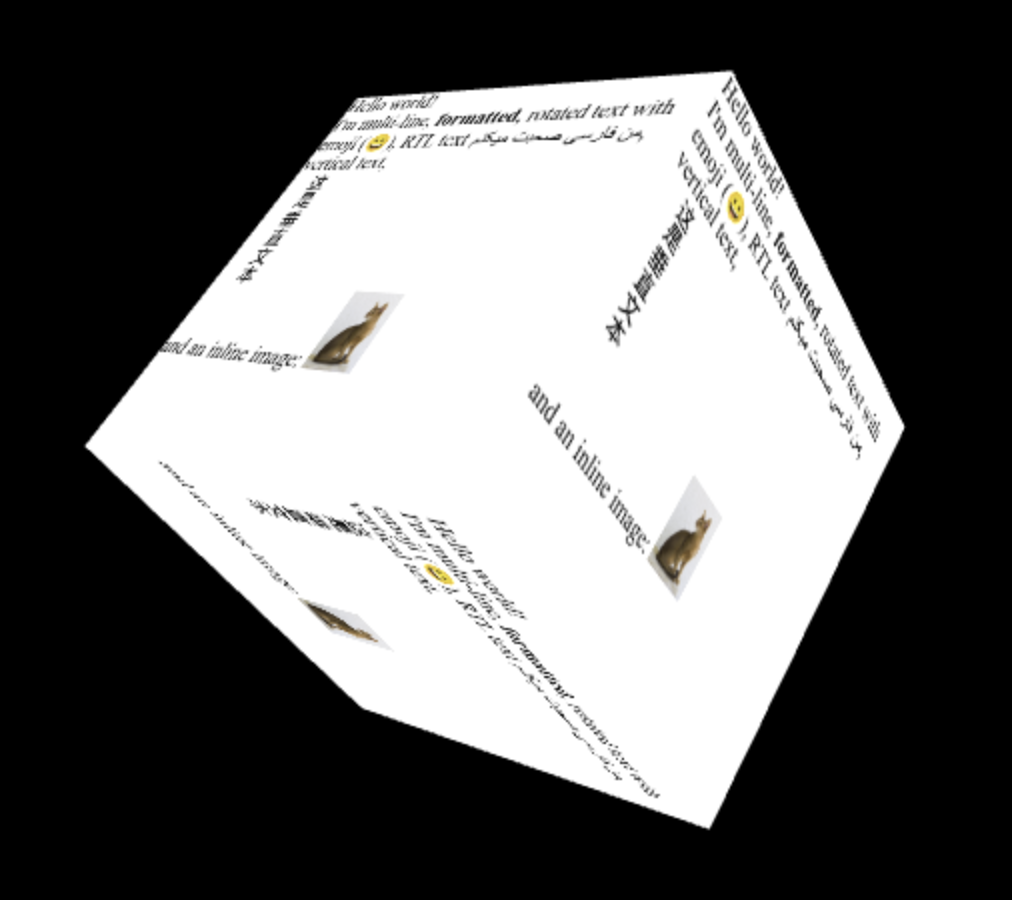
<p>One example is this spinny cube:</p>

</div></div>

<div class="g6 i3">
  <img src="https://acko.net/files/dom-cruft-2025/canvas-cube.png" alt="html-in-canvas spinny cube thing" />&lt;/a&gt;
</div>

<div class="g8 i2"><div class="pad">

<p>To make it interactive, you attach hit-testing rectangles and respond to paint events. This is a new kind of hit-testing API. But it only works in 2D... so it seems 3D-use is only cosmetic? I have many questions.</p>

<p class="mt2">Again, if you designed it from scratch, you wouldn't do it this way! In particular, it's absurd that you'd have to take over <i>all</i> interaction responsibilities for an element and its descendants just to be able to customize how it <i>looks</i> i.e. renders. Especially in a browser that has projective CSS 3D transforms.</p>

<p>The use cases not covered by that, e.g. curved re-projection, will also need more complicated hit-testing than rectangles. Did they think this through? What happens when you put a dropdown in there?</p>

<p>To me it seems like they couldn't really figure out how to unify CSS and SVG filters, or how to add shaders to CSS. Passing it thru canvas is the only viable option left. <i>"At least it's programmable."</i> Is it really? Screenshotting DOM content is 1 good use-case, but not what this is sold as at all.</p>

<p>The whole reason to do "complex UIs on canvas" is to do all the things the DOM <i>doesn't do</i>, like virtualizing content, just-in-time layout and styling, visual effects, custom gestures and hit-testing, and so on. It's all nuts and bolts stuff. Having to pre-stage all the DOM content you want to draw sounds... very counterproductive.</p>

<p>From a reactivity point-of-view it's also a bad idea to route this stuff back through the same document tree, because it sets up potential cycles with observers. A canvas that's rendering DOM content isn't really a document element anymore, it's doing something else entirely.</p>

</div></div>

<div class="g10 i1 mt1">
  <a href="https://farseerdev.github.io/sheet-happens/" target="_blank"><img src="https://acko.net/files/dom-cruft-2025/sheet.png" alt="sheet-happens" /></a>
  <p class="tc"><i>Canvas-based spreadsheet that skips the DOM entirely</i></p>
</div>

<div class="g8 i2"><div class="pad">

<p>The actual achilles heel of canvas is that you don't have any real access to system fonts, text layout APIs, or UI utilities. It's quite absurd how basic it is. You have to <a href="https://farseerdev.github.io/sheet-happens/" target="_blank">implement everything</a> from scratch, including Unicode word splitting, just to get wrapped text.</p>

<p>The proposal is <i>"just use the DOM as a black box for content."</i> But we already know that you can't do anything except more CSS/SVG kitbashing this way. <code>text-ellipsis</code> and friends will still be broken, and you will still need to implement UIs circa 1990 from scratch to fix it.</p>

<p>It's all-or-nothing when you actually want something right in the middle. That's why the lower level needs to be opened up.</p>


<h2 class="mt2">Where To Go From Here</h2>

<p>The goals of <i>"HTML in Canvas"</i> do strike a chord, with chunks of HTML used as free-floating fragments, a notion that has always existed under the hood. It's a composite value type you can handle. But it should not drag 20 years of useless baggage along, while not enabling anything truly novel.</p>

<p>The kitbashing of the web has also resulted in enormous stagnation, and a loss of general UI finesse. When UI behaviors have to be mined out of divs, it limits the kinds of solutions you can even consider. Fixing this within DOM/HTML seems unwise, because there's just too much mess inside. Instead, new surfaces should be opened up outside of it.</p>

</div></div>

<div class="c"></div>

<div class="g4 mt1">
  <a href="https://usegpu.live/demo/layout/display" target="_blank"><img src="https://acko.net/files/dom-cruft-2025/use.gpu-layout.png" alt="use-gpu-layout" /></a>
  <a href="https://usegpu.live/demo/layout/align" target="_blank"><img class="mt1" src="https://acko.net/files/dom-cruft-2025/use.gpu-layout-2.png" alt="use-gpu-layout" /></a>
  <p class="tc"><i>WebGPU-based box model</i></p>
</div>

<div class="g8"><div class="pad">

<p>My schtick here has become to point awkwardly at Use.GPU's <a href="https://usegpu.live/demo/layout/display" target="_blank">HTML-like renderer</a>, which does a full X/Y flex model in a fraction of the complexity or code. I don't mean my stuff is super great, no, it's pretty bare-bones and kinda niche... and yet definitely nicer. Vertical centering is easy. Positioning makes sense.</p>

<p>There is no semantic HTML or CSS cascade, just first-class layout. You don't need 61 different accessors for <code>border*</code> either. You can just <a href="https://usegpu.live/demo/rtt/cfd-compute" target="_blank">attach shaders</a> <a href="https://acko.net/files/bluebox/#!/" target="_blank">to divs</a>. Like, that's what people wanted right? Here's <a href="https://usegpu.live/docs/guides-layout-and-ui" target="_blank">a blueprint</a>, it's mostly just <a href="https://iquilezles.org/articles/distfunctions2d/" target="_blank">SDFs</a>.</p>

<p>Font and markup concerns only appear at the leaves of the tree, where the text sits. It's striking how you can do like 90% of what the DOM does here, without the tangle of HTML/CSS/SVG, if you just reinvent that wheel. Done by 1 guy. And yes, I know about the second 90% too.</p>

<p>The classic data model here is of a view tree and a render tree. What should the view tree actually look like? And what can it be lowered into? What is it being lowered into right now, by a giant pile of legacy crud?</p>

</div></div>

<div class="c"></div>

<div class="g3 i1 mt1 r">
  <a href="https://servo.org/" target="_blank"><img src="https://acko.net/files/dom-cruft-2025/servo.png" alt="servo" /></a>
  <a href="https://ladybird.org/" target="_blank"><img class="mt1" src="https://acko.net/files/dom-cruft-2025/ladybird.png" alt="ladybird" /></a>
</div>

<div class="g8"><div class="pad">

<p>Alt-browser projects like Servo or Ladybird are in a position to make good proposals here. They have the freshest implementations, and are targeting the most essential features first. The big browser vendors could also do it, but well, taste matters. Good big systems grow from good small ones, not bad big ones. Maybe if Mozilla hadn't imploded... but alas.</p>

<p>Platform-native UI toolkits are still playing catch up with declarative and reactive UI, so that's that. Native Electron-alternatives like Tauri could be helpful, but they don't treat origin isolation as a design constraint, which makes security teams antsy.</p>

</div> </div>

<div class="g8 i2"><div class="pad">

<p>There's a feasible carrot to dangle for them though, namely in the form of better process isolation. Because of CPU exploits like Spectre, multi-threading via <code>SharedArrayBuffer</code> and Web Workers is kinda dead on arrival anyway, and that affects all WASM. The <a href="https://developer.mozilla.org/en-US/docs/Web/HTTP/Reference/Headers/Cross-Origin-Embedder-Policy" target="_blank">details</a> are <a href="https://github.com/WebKit/standards-positions/issues/45#issuecomment-2077465281" target="_blank">boring</a> but right now it's an impossible sell when websites have to have things like OAuth and Zendesk integrated into them.</p>

<p>Reinventing the DOM to ditch all legacy baggage could coincide with redesigning it for a more multi-threaded, multi-origin, and async web. The browser engines are already multi-process... what did they learn? A lot has happened since Netscape, with advances in structured concurrency, ownership semantics, FP effects... all could come in handy here.</p>

<p class="mt2 mb2 tc" style="opacity: .5">* * *</p>

<p>Step 1 should just be a data model that doesn't have 350+ properties per node tho.</p>

<p>Don't be under the mistaken impression that this isn't entirely fixable.</p>

<div class="c"></div>
<div class="mt4"></div>

</div></div>

<div class="g4 i4">
  <img src="https://acko.net/files/dom-cruft-2025/netscape.png" alt="netscape wheel" />
</div>

<div class="c"></div>

<div class="mt4"></div>
]]></content>
  </entry>
  
  <entry>
    <title type="html"><![CDATA[I is for Intent]]></title>
    <link href="https://acko.net/blog/i-is-for-intent/"/>
    <updated>2024-02-05T00:00:00+01:00</updated>
    <id>https://acko.net/blog/i-is-for-intent</id>
    <content type="html"><![CDATA[<div class="g8 i2 first"><div class="pad">
  <h2 class="sub">Why your app turned into spaghetti</h2>
</div></div>

<div class="c"></div>

<p><img src="https://acko.net/files/intent/cover.jpg" style="position: absolute; left: -5000px; top: 0;" alt="Cover Image" /></p>

<div class="g6 i3 mb1 milky"><div class="pad clip">

<blockquote class="m2 mb2 tc ml0 mr0">
  <em class="storytime">
<p>
  "I do not like your software sir,<br />
  your architecture's poor.
</p>

<p>
  Your users can't do anything,<br />
  unless you code some more.
</p>

<p>
  This isn't how it used to be,<br />
  we had this figured out.
</p>

<p>
  But then you had to mess it up<br />
  by moving into clouds."
</p>
  </em>
</blockquote>

</div></div>

<div class="g8 i2"><div class="pad">

<p>There's a certain kind of programmer. Let's call him Stanley.</p>

<p>Stanley has been around for a while, and has his fair share of war stories. The common thread is that poorly conceived and specced solutions lead to disaster, or at least, ongoing misery. As a result, he has adopted a firm belief: it should be impossible for his program to reach an invalid state.</p>

<p>Stanley loves strong and static typing. He's a big fan of pattern matching, and enums, and discriminated unions, which allow correctness to be verified at compile time. He also has strong opinions on errors, which must be caught, logged and prevented. He uses only ACID-compliant databases, wants foreign keys and triggers to be enforced, and wraps everything in atomic transactions.</p>

<p>He hates any source of uncertainty or ambiguity, like untyped JSON or plain-text markup. His APIs will accept data only in normalized and validated form. When you use a Stanley lib, and it doesn't work, the answer will probably be: <i>"you're using it&nbsp;wrong."</i></p>

<p>Stanley is most likely a back-end or systems-level developer. Because nirvana in front-end development is reached when you understand that this view of software is not just wrong, but fundamentally incompatible with the real world.</p>

<p>I will prove it.</p>

</div></div>

<div class="c"></div>
<div class="mt1"></div>

<div class="g12"><div class="pad tc">
  <img src="https://acko.net/files/intent/alice.jpg" alt="Alice in wonderland" class="" />
</div></div>

<div class="c"></div>

<div class="g8 i2 mt1"><div class="pad">
  
<h2 class="mt3">State Your Intent</h2>

<p>Take a text editor. What happens if you press the up and down arrows?</p>

</div></div>

<div class="c"></div>

<div class="g8 i2">
  <video controls="controls" src="https://acko.net/files/intent/editor-cursor.mov" width="480" height="218" style="margin: 0 auto; max-width: 100%; display: block"></video>
</div>

<div class="c"></div>

<div class="g8 i2 mt1"><div class="pad">

<p>The keyboard cursor (aka caret) moves up and down. Duh. Except it also moves left and right.</p>

<p>The editor <i>state</i> at the start has the caret on line 1 column 6. Pressing down will move it to line 2 column 6. But line 2 is too short, so the caret is forcibly moved left to column 1. Then, pressing down again will move it back to column 6.</p>

<p>It should be obvious that any editor that didn't remember which column you were actually on would be a nightmare to use. You know it in your bones. Yet this only works because the editor allows the caret to be placed on a position that "does not exist." What <i>is</i> the caret <i>state</i> in the middle? It is both column 1 <i>and</i> column 6.</p>

</div></div>

<div class="c"></div>
<div class="mt1"></div>

<div class="g3 i1"><div class="pad tc mt1">
  <img src="https://acko.net/files/intent/intent-state-view.png" alt="Intent - State - View" class="flat square" style="max-width: 190px; margin: 0 auto;" />
</div></div>

<div class="g8"><div class="pad">

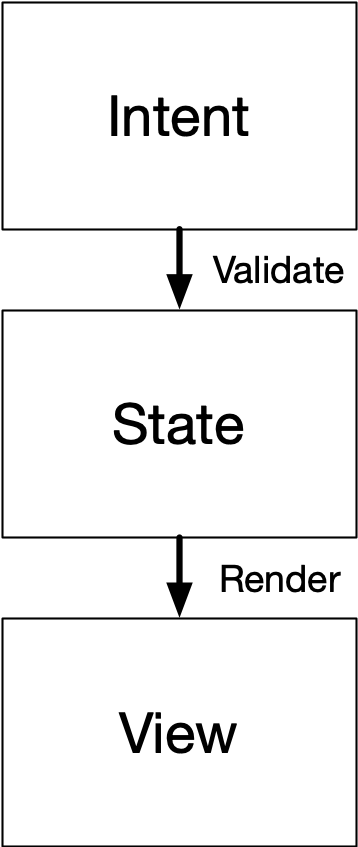
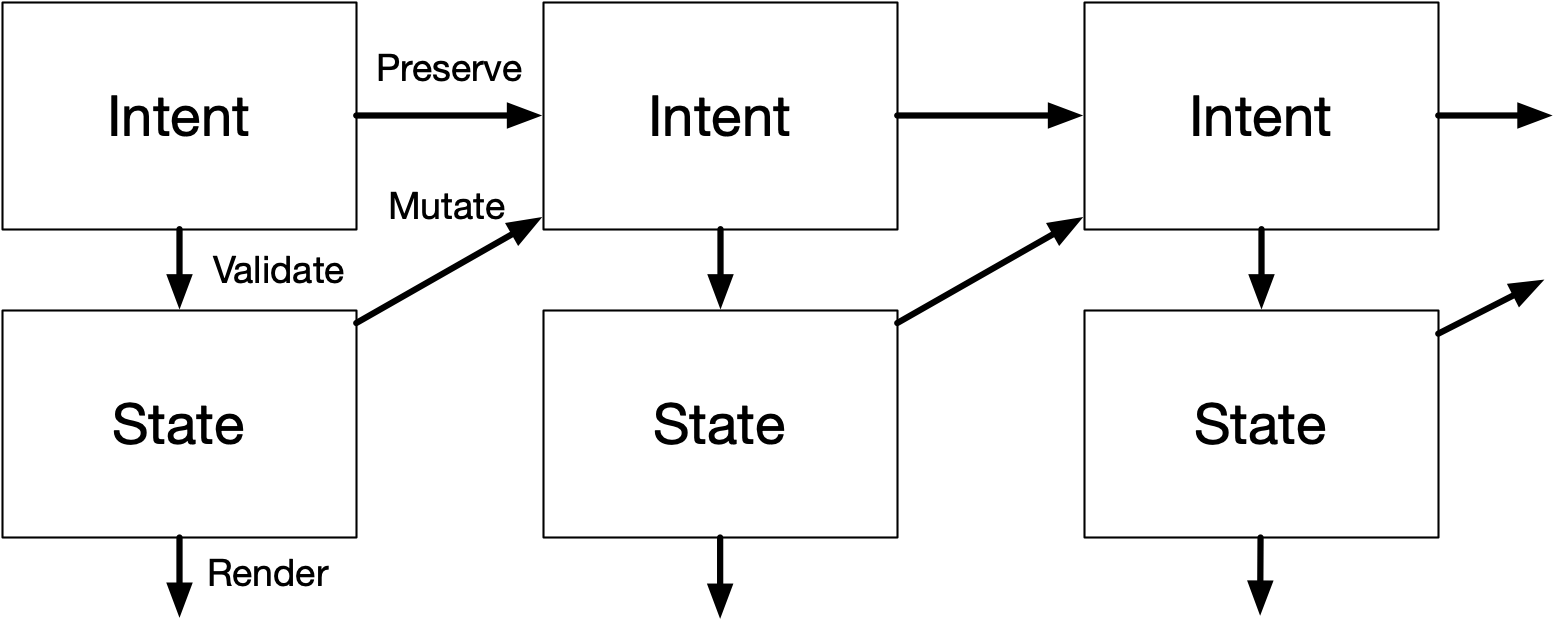
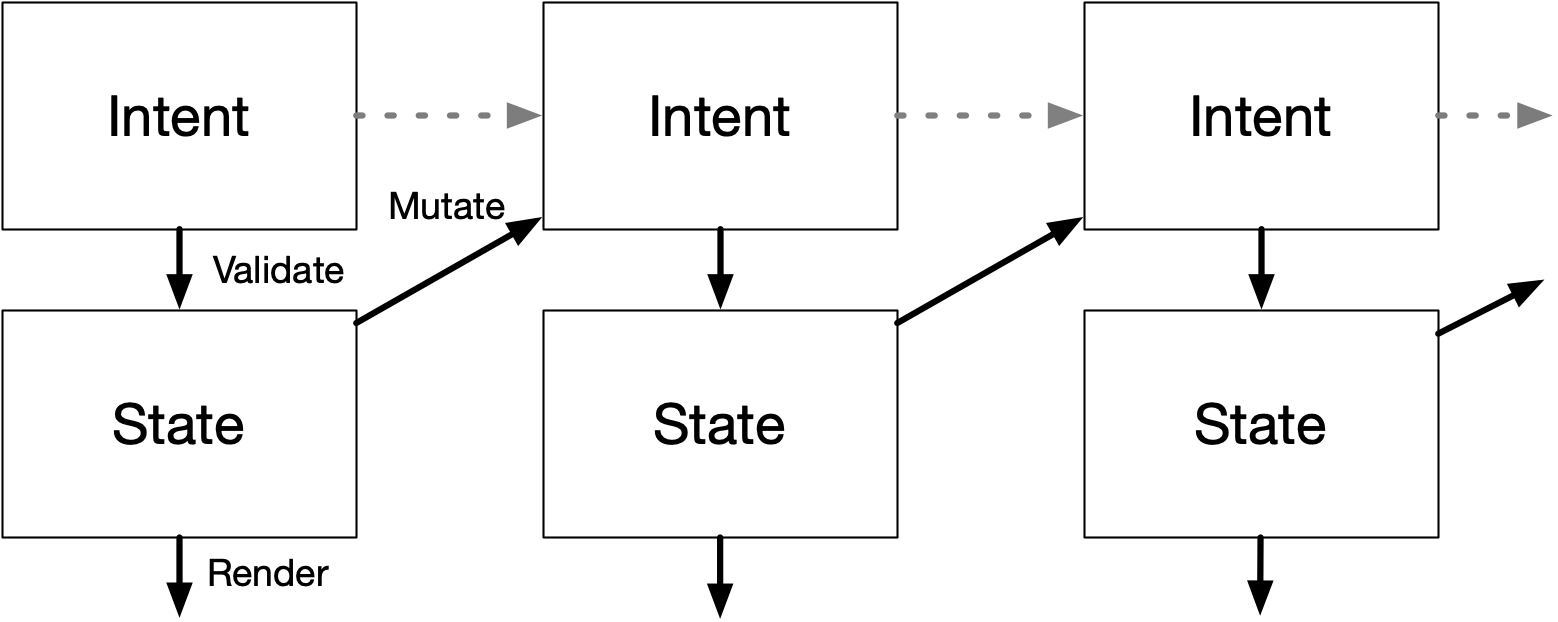
<p>To accommodate this, you need more than just a <code>View</code> that is a pure function of a <code>State</code>, as is now commonly taught. Rather, you need an <code>Intent</code>, which is the source of truth that you mutate... and which is then <i>parsed</i> and <i>validated</i> into a <code>State</code>. Only then can it be used by the <code>View</code> to render the caret in the right place.</p>

<p>To edit the intent, aka what a classic <code>Controller</code> does, is a bit tricky. When you press left/right, it should determine the new <code>Intent.column</code> based on the validated <code>State.column +/- 1</code>. But when you press up/down, it should keep the <code>Intent.column</code> you had before and instead change only <code>Intent.line</code>. New intent is a <i>mixed</i> function of both previous intent and previous state.</p>

<p>The general pattern is that you reuse <code>Intent</code> if it doesn't change, but that new computed <code>Intent</code> should be derived from <code>State</code>. Note that you should still enforce normal validation of <code>Intent.column</code> when editing too: you don't allow a user to go past the end of a line. Any <i>new intent</i> should be as valid as possible, but <i>old intent</i> should be preserved as is, even if non-sensical or inapplicable.</p>

</div></div>

<div class="c"></div>
<div class="mt1"></div>

<div class="g8 i2"><div class="pad tc">
  <img src="https://acko.net/files/intent/validate-mutate.png" alt="Validate vs Mutate" class="flat square" />
</div></div>

<div class="c"></div>

<div class="g8 i2 mt1"><div class="pad">

<p>Functionally, for most of the code, it really does look and feel as if the state is just <code>State</code>, which is valid. It's just that when you make 1 state change, the app may decide to jump into a different <code>State</code> than one would think. When this happens, it means some old intent first became invalid, but then became valid again due to a subsequent intent/state change.</p>

<p>This is how applications actually work IRL. FYI.</p>

</div></div>

<div class="c"></div>
<div class="mt2"></div>

<div class="g8 i2"><div class="pad tc">
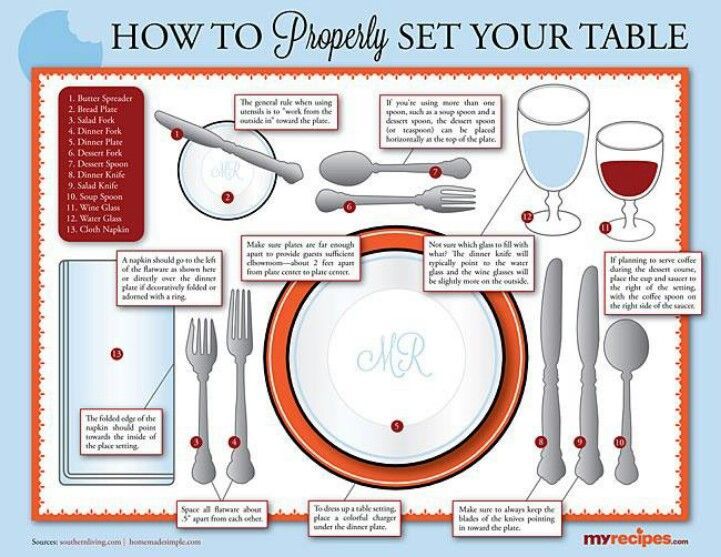
  <img src="https://acko.net/files/intent/dining-etiquette.jpg" alt="Dining Etiquette" class="" />
</div></div>

<div class="c"></div>

<div class="g8 i2"><div class="pad">

<h2 class="mt3">Knives and Forks</h2>

<p>I chose a text editor as an example because Stanley can't dismiss this as just frivolous UI polish for limp wristed homosexuals. It's essential that editors work like&nbsp;this.</p>

<p>The pattern is far more common than most devs realize:</p>

<ul class="indent">
  <li>A tree view remembers the expand/collapse state for rows that are hidden.</li>
  <li>Inspector tabs remember the tab you were on, even if currently disabled or&nbsp;inapplicable.</li>
  <li>Toggling a widget between type A/B/C should remember all the A, B and C options, even if mutually exclusive.</li>
</ul>

<p>All of these involve storing and preserving something unknown, invalid or unused, and bringing it back into play later.</p>

<p>More so, if software matches your expected intent, it's a complete non-event. What looks like a "surprise hidden state transition" to a programmer is actually the exact opposite. It would be an unpleasant surprise if that extra state transition <i>didn't</i> occur. It would only annoy users: they already told the software what they wanted, but it keeps forgetting.</p>

<p>The ur-example is how nested popup menus <i>should</i> work: good implementations track the motion of the cursor so you can move diagonally from parent to child, without falsely losing focus:</p>

</div></div>

<div class="c"></div>

<div class="g8 i2">
  <video controls="controls" src="https://acko.net/files/intent/menu-hover.mov" width="367" height="215" style="margin: 0 auto; max-width: 100%; display: block"></video>
</div>

<div class="c"></div>

<div class="g8 i2 mt1"><div class="pad">

<p>This is an instance of the goalkeeper's curse: people rarely compliment or notice the goalkeeper if they do their job, only if they mess up. Successful applications of this principle are doomed to remain unnoticed and unstudied.</p>

<p>Validation is not something you do once, discarding the messy input and only preserving the normalized output. It's something you do continuously and non-destructively, preserving the mess <i>as much as possible</i>. It's UI <i>etiquette</i>: the unspoken rules that everyone expects but which are mostly undocumented folklore.</p>

<p>This poses a problem for most SaaS in the wild, both architectural and existential. Most APIs will only accept mutations that are valid. The goal is for the database to be a sequence of fully valid states:</p>

</div></div>

<div class="c"></div>
<div class="mt1"></div>

<div class="g8 i2"><div class="pad tc">
  <img src="https://acko.net/files/intent/mutate.png" alt="Mutate" class="flat square" />
</div></div>

<div class="c"></div>

<div class="g8 i2 mt1"><div class="pad">

<p>The smallest possible operation in the system is a fully consistent transaction. This flattens any prior intent.</p>

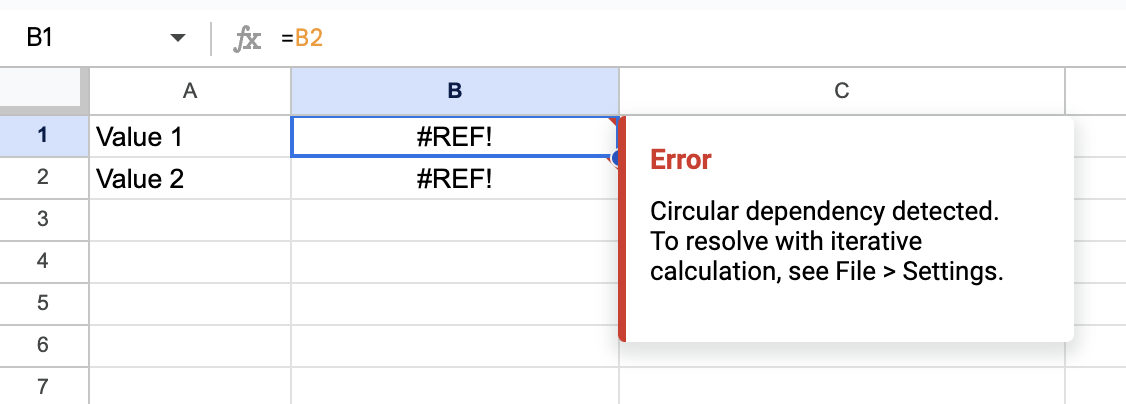
<p>In practice, many software deviates from this ad-hoc. For example, spreadsheets let you create cyclic references, which is by definition invalid. The reason it must let you do this is because fixing one side of a cyclic reference also fixes the other side. A user wants and needs to do these operations in any order. So you must allow a state transition through an invalid state:</p>

</div></div>

<div class="c"></div>
<div class="mt1"></div>

<div class="g8 i2"><div class="pad tc">
  <img src="https://acko.net/files/intent/sheets-circular.png" alt="Google sheets circular reference" class="" />
</div></div>

<div class="c"></div>

<div class="g8 i2 mt2"><div class="pad tc">
  <img src="https://acko.net/files/intent/mutate-2.png" alt="Mutate through invalid state" class="flat square" />
</div></div>

<div class="c"></div>

<div class="g8 i2 mt1"><div class="pad">

<p>This requires an effective Intent/State split, whether formal or informal.</p>

</div></div>

<div class="c"></div>

<div class="g3 mt1"><div class="pad tc">
  <a href="https://en.wikipedia.org/wiki/Edsger_W._Dijkstra" target="_blank"><img src="https://acko.net/files/intent/edsger-wybe-dijkstra.jpg" alt="Edsger Dijkstra" class="" /></a>
</div></div>

<div class="g8"><div class="pad">

<p>Because cyclic references can go several levels deep, identifying one cyclic reference may require you to spider out the entire dependency graph. This is functionally equivalent to identifying <i>all</i> cyclic references—dixit Dijkstra. Plus, you need to produce sensible, specific error messages. Many "clever" algorithmic tricks fail this test.</p>

<p>Now imagine a spreadsheet API that doesn't allow for any cyclic references ever. This still requires you to validate the entire resulting model, just to determine if 1 change is allowed. It still requires a general <code>validate(Intent)</code>. In short, it means your POST and PUT request handlers need to potentially call all your business logic.</p>

</div></div>

<div class="c"></div>

<div class="g8 i2 mt1"><div class="pad">

<p>That seems overkill, so the usual solution is bespoke validators for every single op. If the business logic changes, there is a risk your API will now accept invalid intent. And the app was not built for that.</p>

<p>If you flip it around and assume intent <i>will</i> go out-of-bounds as a normal matter, then you never have this risk. You can write the validation in one place, and you reuse it for every change as a normal matter of data flow.</p>

<p>Note that this is not <i>cowboy coding</i>. Records and state should not get irreversibly corrupted, because you only ever use valid inputs in computations. If the system is multiplayer, distributed changes should still be well-ordered and/or convergent. But the data structures you're encoding should be, essentially, entirely liberal to your user's needs.</p>

</div></div>

<div class="c"></div>
<div class="mt1"></div>

<div class="g8 i2"><div class="pad tc">
  <img src="https://acko.net/files/intent/git-diff.png" alt="Git diff" class="" />
</div></div>

<div class="c"></div>

<div class="g8 i2 mt1"><div class="pad">

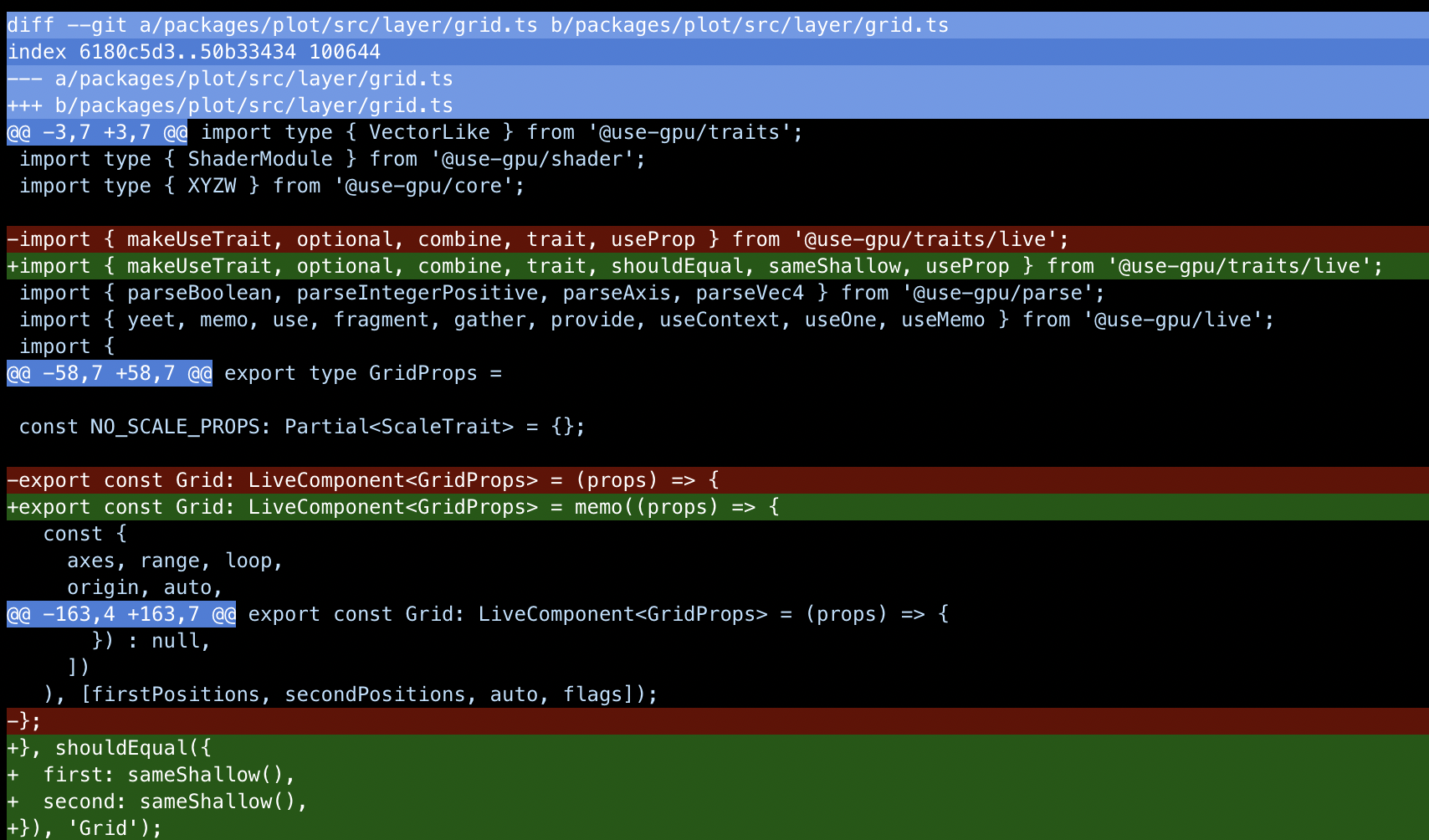
<p>Consider git. Here, a "unit of intent" is just a diff applied to a known revision ID. When something's wrong with a merge, it doesn't crash, or panic, or refuse to work. It just enters a conflict state. This state is computed by merging two <i>incompatible</i> intents.</p>

<p>It's a dirty state that can't be turned into a clean commit without human intervention. This means <i>git must continue to work</i>, because you need to use git to clean it up. So git is fully aware when a conflict is being resolved.</p>

<p>As a general rule, the cases where you actually need to forbid a mutation which satisfies all the type and access constraints are small. A good example is trying to move a folder inside itself: the file system has to remain a sensibly connected tree. Enforcing the uniqueness of names is similar, but also comes with a caution: <i>falsehoods programmers believe about names</i>. Adding <code>(Copy)</code> to a duplicate name is usually better than refusing to accept it, and most names in real life aren't unique at all. Having user-facing names actually requires creating tools and affordances for search, renaming references, resolving duplicates, and so on.</p>

<p>Even among front-end developers, few people actually grok this mental model of a user. It's why most React(-like) apps in the wild are spaghetti, and why most blog posts about React gripes continue to miss the bigger picture. Doing React (and UI) well requires you to unlearn old habits and actually design your types and data flow so it uses potentially <i>invalid input</i> as its <i>single source of truth</i>. That way, a one-way data flow can enforce the necessary constraints on the fly.</p>

<p>The way Stanley likes to encode and mutate his data is how programmers think about their own program: it should be bug-free and not crash. The mistake is to think that this should also apply to any sort of creative process that program is meant to enable. It would be like making an IDE that only allows you to save a file if the code compiles and passes all the tests.</p>

</div></div>

<div class="c"></div>
<div class="mt1"></div>

<div class="g10 i1"><div class="pad tc">
  <img src="https://acko.net/files/intent/emoji.png" alt="surprised, mind blown, cursing, thinking, light bulb" class="flat square" />
</div></div>

<div class="c"></div>

<div class="g8 i2 mt1"><div class="pad">
  
<h2 class="mt2">Trigger vs Memo</h2>

<p>Coding around intent is a very hard thing to teach, because it can seem overwhelming. But what's overwhelming is <i>not</i> doing this. It leads to codebases where every new feature makes ongoing development harder, because no part of the codebase is ever finished. You will sprinkle copies of your business logic all over the place, in the form of request validation, optimistic local updaters, and guess-based cache invalidation.</p>

<p>If this is your baseline experience, your estimate of what is needed to pull this off will simply be wrong.</p>

<p>In the traditional MVC model, intent is only handled at the individual input widget or form level. e.g. While typing a number, the intermediate representation is a string. This may be empty, incomplete or not a number, but you temporarily allow that.</p>

<p>I've never seen people formally separate <code>Intent</code> from <code>State</code> in an entire front-end. Often their state is just an adhoc mix of both, where validation constraints are relaxed in the places where it was most needed. They might just duplicate certain fields to keep a <code>validated</code> and <code>unvalidated</code> variant side by side.</p>

<p>There is one common exception. In a React-like, when you do a <code>useMemo</code> with a derived computation of some state, this is actually a perfect fit. The eponymous <code>useState</code> actually describes <code>Intent</code>, not <code>State</code>, because the derived state is ephemeral. This is why so many devs get lost here.</p>

</div></div>

<div class="g6 i3"><div class="pad">

<pre><code class="language-tsx wrap">const state = useMemo(
  () =&gt; validate(intent),
  [intent]
);</code></pre>

</div></div>

<div class="c"></div>

<div class="g8 i2 mt1"><div class="pad">

<p>Their usual instinct is that every action that has knock-on effects should be immediately and fully realized, as part of one transaction. Only, they discover some of those knock-on effects need to be re-evaluated if certain circumstances change. Often to do so, they need to undo and remember what it was before. This is then triggered anew via a bespoke effect, which requires a custom trigger and mutation. If they'd instead deferred the computation, it could have auto-updated itself, and they would've still had the original data to work with.</p>

</div></div>

<div class="c"></div>

<div class="g8 i2">
  <video controls="controls" src="https://acko.net/files/intent/wysiwyg.mov" width="643" height="598" style="margin: 0 auto; max-width: 100%; aspect-ratio: 1.075; display: block"></video>
</div>

<div class="c"></div>

<div class="g8 i2 mt1"><div class="pad">

<p>e.g. In a WYSIWYG scenario, you often want to preview an operation as part of mouse hovering or dragging. It should look like the final result. You don't need to implement custom previewing and rewinding code for this. You just need the ability to layer on some additional <i>ephemeral</i> intent on top of the intent that is currently committed. Rewinding just means resetting that extra intent back to empty.</p>

<p>You can make this easy to use by treating previews as a special kind of transaction: now you can make preview states with the same code you use to apply the final change. You can also auto-tag the created objects as being preview-only, which is very useful. That is: you can auto-translate editing intent into preview intent, by messing with the <i>contents</i> of a transaction. Sounds bad, is actually&nbsp;good.</p>

</div></div>

<div class="c"></div>

<div class="g8 i2">
  <video controls="controls" src="https://acko.net/files/intent/wysiwyg-2.mov" width="643" height="598" style="margin: 0 auto; max-width: 100%; aspect-ratio: 1.075; display: block"></video>
</div>

<div class="c"></div>

<div class="g8 i2 mt1"><div class="pad">

<p>The same applies to any other temporary state, for example, highlighting of elements. Instead of manually changing colors, and creating/deleting labels to pull this off, derive the resolved style just-in-time. This is vastly simpler than doing it all on 1 classic retained model. There, you run the risk of highlights incorrectly becoming sticky, or shapes reverting to the wrong style when un-highlighted. You can architect it so this is simply impossible.</p>

<p>The trigger vs memo problem also happens on the back-end, when you have derived collections. Each object of type A must have an associated type B, created on-demand for each A. What happens if you delete an A? Do you delete the B? Do you turn the B into a tombstone? What if the relationship is 1-to-N, do you need to garbage collect?</p>

<p>If you create invisible objects behind the scenes as a user edits, and you never tell them, expect to see a giant mess as a result. It's crazy how often I've heard engineers suggest a user should only be allowed to create something, but then never delete it, as a "solution" to this problem. Everyday undo/redo precludes it. Don't be ridiculous.</p>

<p>The problem is having an additional layer of bookkeeping you didn't need. The source of truth was collection A, but you created a permanent derived collection B. If you instead make B ephemeral, derived via a stateless computation, then the problem goes away. You can still associate data with B records, but you don't treat B as the authoritative source for itself. This is basically what a <code>WeakMap</code> is.</p>

</div></div>

<div class="c"></div>
<div class="mt1"></div>

<div class="g3 i1"><div class="pad tc mt1">
  <img src="https://acko.net/files/intent/event-sourcing.png" alt="Event Sourcing" class="flat square" style="max-width: 190px; margin: 0 auto;" />
</div></div>

<div class="g8"><div class="pad">

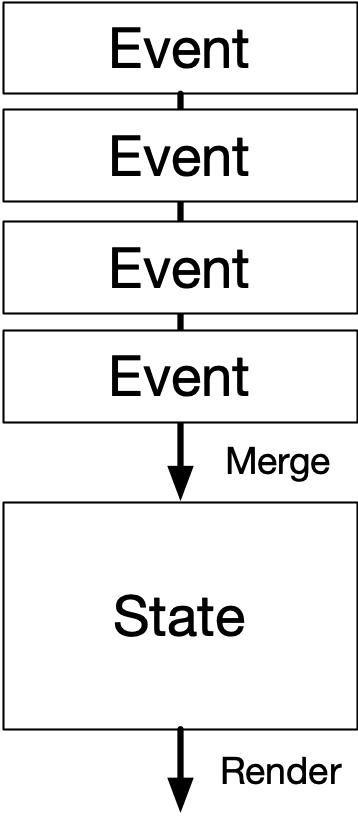
<p>In database land this can be realized with a materialized view, which can be incremental and subscribed to. Taken to its extreme, this turns into <a href="https://learn.microsoft.com/en-us/azure/architecture/patterns/event-sourcing" target="_blank">event-based sourcing</a>, which might seem like a panacea for this mindset. But in most cases, the latter is still a system by and for Stanley. The event-based nature of those systems exists to support housekeeping tasks like migration, backup and recovery. Users are not supposed to be aware that this is happening. They do not have any view into the event log, and cannot branch and merge it. The exceptions are extremely rare.</p>

<p>It's not a system for working <i>with</i> user intent, only for flattening it, because it's append-only. It has a lot of the necessary basic building blocks, but substitutes <i>programmer</i> intent for <i>user</i> intent.</p>

<p>What's most nefarious is that the resulting tech stacks are often quite big and intricate, involving job queues, multi-layered caches, distribution networks, and more. It's a bunch of stuff that Stanley can take joy and pride in, far away from users, with "hard" engineering challenges. Unlike all this *ugh* <i>JavaScript</i>, which is always broken and unreliable and uninteresting.</p>

<p>Except it's only needed because Stanley only solved half the problem, badly.</p>

</div></div>

<div class="c"></div>

<div class="g8 i2 mt1"><div class="pad">

<h2 class="mt3">Patch or Bust</h2>

<p>When factored in from the start, it's actually quite practical to split <code>Intent</code> from <code>State</code>, and it has lots of benefits. Especially if <code>State</code> is just a more constrained version of the same data structures as <code>Intent</code>. This doesn't need to be fully global either, but it needs to encompass a meaningful document or workspace to be useful.</p>

<p>It does create an additional problem: you now have two kinds of data in circulation. If reading or writing requires you to be aware of both <code>Intent</code> and <code>State</code>, you've made your code more complicated and harder to reason about.</p>

</div></div>

<div class="c"></div>
<div class="mt1"></div>

<div class="g8 i2"><div class="pad tc">
  <img src="https://acko.net/files/intent/validate-mutate.png" alt="Validate vs Mutate" class="flat square" />
</div></div>

<div class="c"></div>

<div class="g8 i2 mt1"><div class="pad">

<p>More so, making a new <code>Intent</code> requires a copy of the old <code>Intent</code>, which you mutate or clone. But you want to avoid passing <code>Intent</code> around in general, because it's fishy data. It may have the right types, but the constraints and referential integrity aren't guaranteed. It's a magnet for the kind of bugs a type-checker won't&nbsp;catch.</p>

<p>I've published my common solution before: <a href="https://usegpu.live/docs/reference-live-@use-gpu-state" target="_blank">turn changes into first-class values</a>, and make a generic <i>update</i> of type <code>Update&lt;T&gt;</code> be the basic unit of change. As a first approximation, consider a shallow merge <code>{...value, ...update}</code>. This allows you to make an <code>updateIntent(update)</code> function where <code>update</code> only specifies the fields that are changing.</p>

<p>In other words, <code>Update&lt;Intent&gt;</code> looks just like <code>Update&lt;State&gt;</code> and can be derived 100% from <code>State</code>, without <code>Intent</code>. Only one place needs to have access to the old <code>Intent</code>, all other code can just call that. You can make an app intent-aware without complicating all the code.</p>

</div></div>

<div class="c"></div>
<div class="mt1"></div>

<div class="g8 i2"><div class="pad tc">
  <img src="https://acko.net/files/intent/validate-mutate-2.png" alt="Validate vs Mutate 2" class="flat square" />
</div></div>

<div class="c"></div>

<div class="g8 i2 mt1"><div class="pad">

<p>If your state is cleaved along orthogonal lines, then this is all you need. i.e. If <code>column</code> and <code>line</code> are two separate fields, then you can selectively change only one of them. If they are stored as an <code>XY</code> tuple or vector, now you need to be able to describe a change that only affects either the X or Y component.</p>

</div></div>

<div class="g4 mt1-2"><div class="pad">

<pre><code class="language-tsx wrap">const value = {
  hello: 'text',
  foo: { bar: 2, baz: 4 },
};

const update = {
  hello: 'world',
  foo: { baz: 50 },
};

expect(
  patch(value, update)
).toEqual({
  hello: 'world',
  foo: { bar: 2, baz: 50 },
});</code></pre>

</div></div>

<div class="g8 cm"><div class="pad">

<p>So in practice I have a function <code><a href="https://usegpu.live/docs/reference-live-@use-gpu-state--patch" target="_blank">patch</a>(value, update)</code> which implements a comprehensive <i>superset</i> of a deep recursive merge, with full immutability. It doesn't try to do anything fancy with arrays or strings, they're just treated as atomic values. But it allows for precise overriding of merging behavior at every level, as well as custom lambda-based updates. You can patch tuples by index, but this is risky for dynamic lists. So instead you can express e.g. "append item to list" without the entire list, as a lambda.</p>

<p>I've been using <code>patch</code> for years now, and the uses are myriad. To overlay a set of overrides onto a base template, <code>patch(base, overrides)</code> is all you need. It's the most effective way I know to erase a metric ton of <code>{...splats}</code> and <code>?? defaultValues</code> and <code>!= null</code> from entire swathes of code. This is a real problem.</p>

</div></div>

<div class="c"></div>

<div class="g8 i2 mt1"><div class="pad">

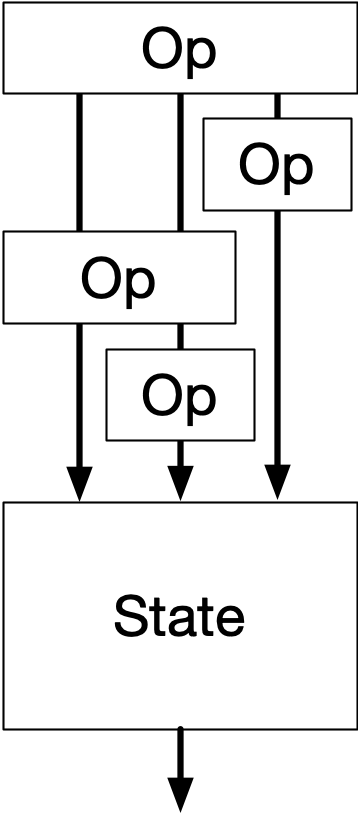
<p>You could also view this as a "poor man's <a href="https://en.wikipedia.org/wiki/Operational_transformation" target="_blank">OT</a>", with the main distinction being that a patch <code>update</code> only describes the new state, not the old state. Such updates are not reversible on their own. But they are far simpler to make and apply.</p>

<p>It can still power a global undo/redo system, in combination with its complement <code><a href="https://usegpu.live/docs/reference-live-@use-gpu-state--diff" target="_blank">diff</a>(A, B)</code>: you can reverse an update by diffing in the opposite direction. This is an operation which is formalized and streamlined into <code><a href="https://usegpu.live/docs/reference-live-@use-gpu-state--revise" target="_blank">revise</a>(…)</code>, so that it retains the exact shape of the original update, and doesn't require <code>B</code> at all. The structure of the update is sufficient information: it too encodes some intent behind the change.</p>

<p>With <code>patch</code> you also have a natural way to work with changes and conflicts as values. The earlier WYSIWIG scenario is just <code>patch(commited, ephemeral)</code> with bells on.</p>

<p>The net result is that mutating my intent or state is as <i>easy</i> as doing a <code>{...value, ...update}</code> splat, but I'm not falsely incentivized to flatten my data structures.</p>

<p>Instead it frees you up to think about what the most practical schema actually is from the <i>data</i>'s point of view. This is driven by how the <i>user</i> wishes to edit it, because that's what you will connect it to. It makes you think about what a user's workspace actually is, and lets you align boundaries in UX and process with boundaries in data structure.</p>

</div></div>

<div class="c"></div>
<div class="mt1"></div>

<div class="g8 i2"><div class="pad tc">
  <img src="https://acko.net/files/intent/array-list.png" alt="Array vs Linked List" class="flat square" />
</div></div>

<div class="c"></div>

<div class="g8 i2 mt1"><div class="pad">

<p>Remember: most classic "data structures" are not about the structure of data at all. They serve as acceleration tools to speed up <i>specific operations</i> you need on that data. Having the reads and writes drive the data design was always part of the job. What's weird is that people don't apply that idea end-to-end, from database to UI and back.</p>

<p>SQL tables are shaped the way they are because it enables complex filters and joins. However, I find this pretty counterproductive: it produces derived query results that are difficult to keep up to date on a client. They also don't look like any of the data structures I actually want to use in my code.</p>


<h2 class="mt3">A Bike Shed of Schemas</h2>

<p>This points to a very under-appreciated problem: it is <i>completely pointless</i> to argue about schemas and data types without citing <i>specific domain logic</i> and <i>code</i> that will be used to <i>produce</i>, <i>edit</i> and <i>consume</i> it. Because that code determines which structures you are incentivized to use, and which structures will require bespoke extra work.</p>

<p>From afar, <code>column</code> and <code>line</code> are just XY coordinates. Just use a 2-vector. But once you factor in the domain logic and etiquette, you realize that the horizontal and vertical directions have vastly different rules applied to them, and splitting might be better. Which one do you pick?</p>

<p>This applies to all data. Whether you should put items in a <code>List&lt;T&gt;</code> or a <code>Map&lt;K, V&gt;</code> largely depends on whether the consuming code will loop over it, or need random access. If an API only provides one, consumers will just build the missing <code>Map</code> or <code>List</code> as a first step. This is <code>O(n log n)</code> either way, because of sorting.</p>

<p>The method you use to read or write your data shouldn't limit use of everyday structure. Not unless you have a very good reason. But this is exactly what happens.</p>

<p>A lot of bad choices in data design come down to picking the "wrong" data type simply because the most appropriate one is inconvenient in some cases. This then leads to Conway's law, where one team picks the types that are most convenient only for them. The other teams are stuck with it, and end up writing bidirectional conversion code around their part, which will never be removed. The software will now always have this shape, reflecting which concerns were considered essential. <i><a href="https://acko.net/blog/on-variance-and-extensibility/" target="_blank">What color are your types?</a></i> </p>

</div></div>

<div class="g4 m1-2"><div class="pad">

<pre><code class="language-tsx wrap">{
  order: [4, 11, 9, 5, 15, 43],
  values: {
    4: {...},
    5: {...},
    9: {...},
    11: {...},
    15: {...},
    43: {...},
  },
);</code></pre>

</div></div>

<div class="g8 cm"><div class="pad">

<p>For <code>List</code> vs <code>Map</code>, you can have this particular cake and eat it too. Just provide a <code>List&lt;Id&gt;</code> for the <code>order</code> and a <code>Map&lt;Id, T&gt;</code> for the <code>values</code>. If you structure a list or tree this way, then you can do both iteration and ID-based traversal in the most natural and efficient way. Don't underestimate how convenient this can&nbsp;be.</p>

<p>This also has the benefit that "re-ordering items" and "editing items" are fully orthogonal operations. It decomposes the problem of "<i>patching</i> a list of objects" into "<i>patching</i> a list of IDs" and "<i>patching</i> N separate objects". It makes code for manipulating lists and trees universal. It lets you to decide on a case by case basis whether you need to garbage collect the map, or whether preserving unused records is actually&nbsp;desirable.</p>

</div></div>

<div class="c"></div>

<div class="g8 i2 mt1"><div class="pad">

<p>Limiting it to ordinary JSON or JS types, rather than going full-blown OT or <a href="https://en.wikipedia.org/wiki/Conflict-free_replicated_data_type" target="_blank">CRDT</a>, is a useful baseline. With sensible schema design, at ordinary editing rates, CRDTs are overkill compared to the ability to just replay edits, or notify conflicts. This only requires version numbers and retries.</p>

<p>Users need those things anyway: just because a CRDT converges when two people edit, doesn't mean the result is what either person wants. The only case where OTs/CRDTs are absolutely necessary is rich-text editing, and you need bespoke UI solutions for that anyway. For simple text fields, last-write-wins is perfectly fine, and also far superior to what 99% of RESTy APIs do.</p>

</div></div>

<div class="c"></div>
<div class="mt1"></div>

<div class="g3 i1"><div class="pad tc mt1">
  <img src="https://acko.net/files/intent/crdt.png" alt="CRDT" class="flat square" style="max-width: 190px; margin: 0 auto;" />
</div></div>

<div class="g8"><div class="pad">

<p>A CRDT is just a mechanism that translates partially ordered intents into a single state. Like, it's cool that you can make CRDT counters and CRDT lists and whatnot... but each CRDT implements only one particular resolution strategy. If it doesn't produce the desired result, you've created invalid intent no user expected. With last-write-wins, you at least have something 1 user <i>did</i> intend. Whether this is actually destructive or corrective is mostly a matter of <i>schema design</i> and <i>minimal surface area</i>, not math.</p>

<p>The main thing that OTs and CRDTs do well is resolve edits on <i>ordered sequences</i>, like strings. If two users are typing text in the same doc, edits higher-up will shift edits down below, which means the indices change when rebased. But if you are editing structured data, you can avoid referring to indices entirely, and just use IDs instead. This sidesteps the issue, like splitting <code>order</code> from <code>values</code>.</p>

<p>For the <code>order</code>, there is a simple solution: a map with a <a href="https://www.steveruiz.me/posts/reordering-fractional-indices" target="_blank">fractional index</a>, effectively a dead-simple list CRDT. It just comes with some overhead.</p>

</div></div>

<div class="c"></div>
<div class="mt1"></div>

<div class="g8 i2"><div class="pad tc">
  <img src="https://acko.net/files/intent/docs-comment.png" alt="Google docs comment" class="" />
</div></div>

<div class="c"></div>

<div class="g8 i2 mt1"><div class="pad">

<p>Using a CRDT for string editing might not even be enough. Consider Google Docs-style comments anchored to that text: their indices also need to shift on every edit. Now you need a bespoke domain-aware CRDT. Or you work around it by injecting magic markers into the text. Either way, it seems non-trivial to decouple a CRDT from the specific target domain of the data inside. The constraints get mixed in.</p>

<p>If you ask me, this is why the field of real-time web apps is still in somewhat of a rut. It's mainly viewed as a high-end technical problem: how do we synchronize data structures over a P2P network without any data conflicts? What they should be asking is: what is the minimal amount of <i>structure</i> we need to reliably synchronize, so that users can have a shared workspace where intent is preserved, and conflicts are clearly signposted. And how should we design our <i>schemas</i>, so that our code can manipulate the data in a straightforward and reliable way? Fixing non-trivial user conflicts is simply not your job.</p>

<p>Most SaaS out there doesn't need any of this technical complexity. Consider that a good multiplayer app requires user presence and broadcast anyway. The simplest solution is just a persistent process on a single server coordinating this, one per live workspace. It's what most MMOs do. In fast-paced video games, this even involves lag compensation. Reliable ordering is not the big problem.</p>

<p>The situations where this doesn't scale, or where you absolutely must be P2P, are a minority. If you run into them, you must be doing <i>very</i> well. The solution that I've sketched out here is explicitly designed so it can comfortably be done by small teams, or even just 1 person.</p>

</div></div>

<div class="c"></div>
<div class="mt1"></div>

<div class="g10 i1"><div class="pad tc">
  <img src="https://acko.net/files/intent/cad.png" alt="Private CAD app" class="" />
</div></div>

<div class="c"></div>

<div class="g8 i2 mt1"><div class="pad">

<p>The (private) CAD app I showed glimpses of above is entirely built this way. It's patch all the way down and it's had undo/redo from day 1. It also has a developer mode where you can just edit the user-space part of the data model, and save/load it.</p>

<p>When the in-house designers come to me with new UX requests, they often ask: <i>"Is it possible to do ____?"</i> The answer is never a laborious sigh from a front-end dev with too much on their plate. It's <i>"sure, and we can do more."</i></p>

<p>If you're not actively aware the design of schemas and code is tightly coupled, your codebase will explode, and the bulk of it will be glue. Much of it just serves to translate generalized intent into concrete state or commands. Arguments about schemas are usually just hidden debates about whose job it is to translate, split or join something. This isn't just an irrelevant matter of "wire formats" because changing the structure and format of data also changes how you <i>address</i> specific parts of it.</p>

<p>In an interactive UI, you also need a reverse path, to apply edits. What I hope you are starting to realize is that this is really just the forward path in reverse, on so many levels. The result of a basic query is just the ordered IDs of the records that it matched. A join returns a tuple of record IDs per row. If you pre-assemble the associated record data for me, you actually make my job as a front-end dev <i>harder</i>, because there are multiple forward paths for the exact same data, in subtly different forms. What I want is to query and mutate the same damn store you do, and be told when what changes. It's table-stakes now.</p>

<p>With well-architected data, this can be wired up mostly automatically, <i>without</i> any scaffolding. The implementations you encounter in the wild just obfuscate this, because they don't distinguish between the data store and the model it holds. The fact that the data store should not be corruptible, and should enforce permissions and quotas, is incorrectly extended to the entire model stored inside. But that model doesn't belong to Stanley, it belongs to the user. This is why desktop applications didn't have a "Data Export". It was just called <i>Load</i> and <i>Save</i>, and what you saved was the intent, in a&nbsp;file.</p>

</div></div>

<div class="c"></div>
<div class="mt1"></div>

<div class="g8 i2"><div class="pad tc">
  <img src="https://acko.net/files/intent/windows-95-save.png" alt="Windows 95 save dialog" class="" />
</div></div>

<div class="c"></div>

<div class="g8 i2 mt1"><div class="pad">

<p>Having a universal query or update mechanism doesn't absolve you from thinking about this either, which is why I think the <code>patch</code> approach is so rare: it looks like cowboy coding <i>if</i> you don't have the right boundaries in place. <code>Patch</code> is mainly for <i>user-space</i> mutations, not <i>kernel-space</i>, a concept that applies to more than just OS kernels. User-space must be very forgiving.</p>

<p>If you avoid it, you end up with something like GraphQL, a good example of solving only half the problem badly. Its getter assembles data for consumption by laboriously repeating it in dozens of partial variations. And it turns the setter part into an unsavory mix of lasagna and spaghetti. No wonder, it was designed for a platform that owns and hoards all your&nbsp;data.</p>

<p class="mt2 mb2 tc" style="opacity: .5">* * *</p>

<p>Viewed narrowly, <code>Intent</code> is just a useful concept to rethink how you enforce validation and constraints in a front-end app. Viewed broadly, it completely changes how you build back-ends and data flows to support that. It will also teach you how adding new aspects to your software can reduce complexity, not increase it, if done&nbsp;right.</p>

<p>A good metric is to judge implementation choices by how many other places of the code need to care about them. If a proposed change requires adjustments literally everywhere else, it's probably a bad idea, unless the net effect is to remove code rather than add.</p>

</div></div>

<div class="c"></div>
<div class="mt1"></div>

<div class="g8 i2"><div class="pad tc">
  <img src="https://acko.net/files/intent/live-canvas.png" alt="Live Canvas" class="" />
</div></div>

<div class="c"></div>

<div class="g8 i2 mt1"><div class="pad">

<p>I believe reconcilers like React or tree-sitter are a major guide stone here. What they do is apply structure-preserving transforms on data structures, and incrementally. They actually do the annoying part for you. I based Use.GPU on the same principles, and use it to drive CPU canvases too. The tree-based structure reflects that one function's state just might be the next function's intent, all the way down. This is a compelling argument that the data and the code should have roughly the same&nbsp;shape.</p>

</div></div>

<div class="c"></div>
<div class="mt1"></div>

<div class="g10 i1"><div class="pad tc">
  <img src="https://acko.net/files/intent/backend-frontend.png" alt="Back-end vs Front-end split" class="flat square" />
</div></div>

<div class="c"></div>

<div class="g8 i2 mt1"><div class="pad">

<p>You will also conclude there is nothing more nefarious than a hard split between back-end and front-end. You know, coded by different people, where each side is only half-aware of the other's needs, but one sits squarely in front of the other. Well-intentioned guesses about what the other end needs will often be wrong. You will end up with data types and query models that cannot answer questions concisely and efficiently, and which must be babysat to not go stale. </p>

<p>In the last 20 years, little has changed here in the wild. On the back-end, it still looks mostly the same. Even when modern storage solutions are deployed, people end up putting SQL- and ORM-like layers on top, because that's what's familiar. The split between back-end and database has the exact same malaise.</p>

<p>None of this work actually helps make the app more reliable, it's the opposite: every new feature makes on-going development harder. Many "solutions" in this space are not solutions, they are copes. Maybe we're overdue for a NoSQL-revival, this time with a focus on practical schema design and mutation? SQL was designed to model administrative business processes, not live interaction. I happen to believe a front-end should sit <i>next</i> to the back-end, not in front of it, with only a thin proxy as a broker.</p>

<p>What I can tell you for sure is: it's so much better when intent is a first-class concept. You don't need nor want to treat user data as something to pussy-foot around, or handle like it's radioactive. You can manipulate and transport it without a care. You can build rich, comfy functionality on top. Once implemented, you may find yourself not touching your network code for a very long time. It's the opposite of overwhelming, it's lovely. You can focus on building the tools your users need.</p>

<p>This can pave the way for more advanced concepts like OT and CRDT, but will show you that neither of them is a substitute for getting your application fundamentals&nbsp;right.</p>

<p>In doing so, you reach a synthesis of Dijkstra and anti-Dijkstra: your program should be <a href="https://www.cs.utexas.edu/users/EWD/transcriptions/EWD02xx/EWD288.html" target="_blank">provably correct in its data flow</a>, which means it can safely break in completely arbitrary ways.</p>

<p>Because the I in UI meant "intent" all along.</p>

<p class="mt3">
  <b>More:</b>
  <ul class="indent">
    <li><a href="https://acko.net/blog/on-variance-and-extensibility/" target="_blank">On Variance and Extensibility</a></li>
    <li><a href="https://acko.net/blog/climbing-mt-effect/" target="_blank">Climbing Mount Effect</a></li>
    <li><a href="https://acko.net/blog/apis-are-about-policy/" target="_blank">APIs are About Policy</a></li>
  </ul>
</p>

<div class="c"></div>
<div class="mt2"></div>

</div></div>
]]></content>
  </entry>
  
  <entry>
    <title type="html"><![CDATA[Get in Zoomer, We're Saving&nbsp;React]]></title>
    <link href="https://acko.net/blog/get-in-zoomer-we-re-saving-react/"/>
    <updated>2022-09-23T00:00:00+02:00</updated>
    <id>https://acko.net/blog/get-in-zoomer-we-re-saving-react</id>
    <content type="html"><![CDATA[<div class="g8 i2 first"><div class="pad">
  <h2 class="sub">Looking back, and forward</h2>
</div></div>

<div class="c"></div>

<p><img src="https://acko.net/files/zoomer/cover.jpg" style="position: absolute; left: -5000px; top: 0;" alt="Zoomer" /></p>

<div class="g8 i2"><div class="pad">

<p>Lately, it seems popular to talk smack about React. Both the orange <i>and</i> red site recently spilled the tea about how mean Uncle React has been, and how much nicer some of these next-gen frameworks supposedly&nbsp;are.</p>

<p>I find this bizarre for two reasons:</p>

<ul class="indent">
  <li>Most next-gen React spin-offs strike me as universally <i>regressive</i>, not&nbsp;progressive.</li>
  <li>The few exceptions don't seem to have any actual complex, <i>battle-hardened</i> apps to point to, to prove their&nbsp;worth.</li>
</ul>

<p>Now, before you close this tab thinking <i>"ugh, not another tech rant"</i>, let me first remind you that a post is not a rant simply because it makes <i>you</i> angry. Next, let me point out that I've been writing code for 32 years. You should listen to your elders, for they know shit and have seen shit. I've also spent a fair amount of time teaching people how to get really good at React, so I know the&nbsp;pitfalls.</p>

<p>You may also notice that not even venerated 3rd party developers are particularly excited about React 18 and its concurrent mode, let alone the unwashed masses. This should tell you the React team itself is suffering a bit of an existential crisis. The framework that started as just the V in MVC can't seem to figure out where it wants to&nbsp;go.</p>

<p>So this is not the praise of a React fanboy. I built my own <a href="https://usegpu.live/docs/guides-live-vs-react" target="_blank">clone of the core run-time</a>, and it was exactly because its limitations were grating, despite the potential there. I added numerous extensions, and then used it to tackle one of the most challenging domains around: GPU rendering. If one person can pull that off, that means there's actually something real going on here. It ties into genuine productivity boons, and results in robust, quality software, which seems to come together as if by&nbsp;magic.</p>

<p>To put it differently: when Figma recently announced they were acquired for $20B by Adobe, we all intuitively understood just how much of an exceptional black swan event that was. We know that 99.99…% of software companies are simply incapable of pulling off something similar. But do we know&nbsp;why?</p>

</div></div>

<div class="g6 i3 mt2">
<p class="tc"><img class="flat" src="https://acko.net/files/zoomer/cover.jpg" alt="Zoomer" /></p>
<p class="tc"><img class="flat" src="https://acko.net/files/zoomer/ibm.png" alt="IBM logo" /></p>
</div>
<div class="c"></div>

<div class="g8 i2"><div class="pad">

<h2 class="mt3">Where we came from</h2>

<p>If you're fresh off the boat today, React can seem like a fixture. The now-ancient saying <i>"Nobody ever got fired for choosing IBM"</i> may as well be updated for React. Nevertheless, when it appeared on the scene, it was wild: you're going to put the HTML and CSS <i>in</i> the JavaScript? Are you&nbsp;mad?</p>

<p>Yes, it <i>was</i> mad, and like Galileo, the people behind React were completely right, for they integrated some of the best ideas out there. They were so right that Angular pretty much threw in the towel on its abysmal two-way binding system and redesigned it to adopt a similar one-way data flow. They were so right that React also dethroned the previous fixture in web land, jQuery, as the diff-based Virtual DOM obsoleted almost all of the trickery people were using to beat the old DOM into shape. The fact that you could use e.g. <code>componentDidUpdate</code> to integrate legacy code was just a conceit, a transition mechanism that spelled out its own obsolescence as soon as you got comfortable with&nbsp;it.</p>

</div></div>

<div class="g10 i1"><div class="pad">
<p class="tc"><img class="flat" src="https://acko.net/files/zoomer/angular-template.png" alt="Angular Template" /></p>
</div></div>

<div class="g8 i2"><div class="pad">

<p>Many competing frameworks acted like this wasn't so, and stuck to the old practice of using <i>templates</i>. They missed the obvious lesson here: every templating language inevitably turns into a very poor programming language over time. It will grow to add conditionals, loops, scopes, macros, and other things that are much nicer in actual code. A templating language is mainly an inner platform effect. It targets a weird imagined archetype of someone who isn't allergic to code, but somehow isn't smart enough to work in a genuine programming language. In my experience, this archetype doesn't actually exist. Designers don't want to code at all, while coders want native expressiveness. It's just that&nbsp;simple.</p>

<p>Others looked at the Virtual DOM and only saw inefficiency. They wanted to add a compiler, so they could reduce the DOM manipulations to an absolute minimum, smugly pointing to benchmarks. This was often just premature optimization, because it failed to recognize the power of dynamic languages: that they can easily reconfigure their behavior at run-time, in response to data, in a turing-complete way. This is essential for composing grown up apps that enable user freedom. The use case that most of the React spin-offs seem to be targeting is not apps but <i>web sites</i>. They are paving cow paths that are well-worn with some minor conveniences, while never transcending&nbsp;them.</p>

</div></div>

<div class="g5 mt01">
<pre><code class="language-tsx wrap">var RouterMixin = {
  contextTypes: {
    router: React.PropTypes.object.isRequired
  },

  // The mixin provides a method so that
  // components don't have to use the
  // context API directly.
  push: function(path) {
    this.context.router.push(path)
  }
};

var Link = React.createClass({
  mixins: [RouterMixin],

  handleClick: function(e) {
    e.stopPropagation();

    // This method is defined in RouterMixin.
    this.push(this.props.to);
  },

  render: function() {
    return (
      &lt;a onClick={this.handleClick}&gt;
        {this.props.children}
      &lt;/a&gt;
    );
  }
});

module.exports = Link;</code></pre>
<div class="c"></div>
<p class="tc"><i>React circa 2016</i></p>
</div>

<div class="g7"><div class="pad">

<p>It's also easy to forget that React itself had many architectural revisions. When old farts like me got in on it, components still had <a href="https://reactjs.org/blog/2016/07/13/mixins-considered-harmful.html" target="_blank">mix-ins</a>, because genuine classes were a distant dream in JS. When ES classes showed up, React adopted those, but it didn't fundamentally change the way you structured your code. It wasn't until React 16.8 (!) that we got hooks, which completely changed the way you approached it. This reduced the necessary boilerplate by an order of magnitude, and triggered a cambrian explosion of custom hook development. That is, at least until the buzz wore off, and only the good ideas remained&nbsp;standing.</p>

<p>Along the way, third party React libraries have followed a similar path. Solutions like Redux appeared, got popular, and then were ditched as people realized the boilerplate just wasn't worth it. It was a necessary lesson to&nbsp;learn.</p>

<p>This legacy of evolution is also where the bulk of React's perceived bloat sits today. As browsers evolved, as libraries got smarter, and as more people ditched OO, much of it is now indeed unnecessary for many use cases. But while you can tweak React with a leaner-and-meaner reimplementation, this doesn't fundamentally alter the value proposition, or invalidate the existing appeal of&nbsp;it.</p>

<p>The fact remains that before React showed up, nobody really had any idea how to make concepts like URL routers, or drag and drop, or UI design systems, truly sing, not on the web. We had a lot of individual pieces, but nothing solid to puzzle them together with. Nevertheless, there is actual undiscovered country beyond, and that's really what this post is about: looking back and looking&nbsp;forward.</p>

</div></div>

<div class="g8 i2"><div class="pad">

<p>If there's one solid criticism I've heard of React, it's this: <i>that no two React codebases ever look alike.</i> This is generally true, but it's somewhat similar to another old adage: that happy families all look alike, but every broken family is broken in its own particular way. The reason bad React codebases are bad is because the people who code it have no idea what they're supposed to be doing. Without a model of how to reason about their code in a structured way, they just keep adding on hack upon hack, until it's better to throw the entire thing away and start from scratch. This is no different from any other codebase made up as they go along, React or&nbsp;not.</p>

<p>Where React came from is easy to explain, but difficult to grok: it's the solution that Facebook arrived at, in order to make their army of junior developers build a reliable front-end, that could be used by millions. There is an enormous amount of hard-earned experience encoded in its architecture today. Often though, it can be hard to sort the wheat from the chaff. If you stubbornly stick to what feels familiar and easy, you may never understand this. And if you never build anything other than a SaaS-with-forms, you never&nbsp;will.</p>

<p>I won't rehash the specifics of e.g. <code>useEffect</code> here, but rather, drop in a trickier question: what if the problem people have with <code>useEffect</code> + DOM Events isn't the fault of hooks at all, but is actually the fault of the DOM?</p>

<p>I only mention it because when I grafted an immediate-mode style interaction model onto my React clone instead, I discovered that complex gesture controllers <a href="https://gitlab.com/unconed/use.gpu/-/blob/master/packages/workbench/src/camera/fps-controls.ts#L69" target="_blank">suddenly became 2-3x shorter</a>. What's more, declaring data dependencies that "violate the rules of React" wasn't an anti-pattern at all: it was actually key to the entire thing. So when I hear that people are proudly trying to replace dependencies with magic signals, I just shake my head and look&nbsp;elsewhere.</p>

<p>Which makes me wonder… why is nobody else doing things like this? Immediate mode UI isn't new, not by a long shot. And it's hardly the only sticking&nbsp;point.</p>

</div></div>

<div class="c"></div>

<div class="g12 mt1"><div class="pad">
<p class="tc"><img class="flat" src="https://acko.net/files/zoomer/macos-leopard.webp" alt="Mac OS X - Leopard (2007)" /></p>
<p class="tc"><i>Mac OS X Leopard - 2007</i></p>
</div></div>

<div class="c"></div>

<div class="g8 i2"><div class="pad">
    
<h2 class="mt3">Where we actually came from</h2>

<p>Here's another thing you may not understand: just how good old desktop software truly&nbsp;was.</p>

<p>The gold standard here is Mac OS X, circa 2008. It was right before the iPhone, when Apple was still uniquely focused on making its desktop the slickest, most accessible platform around. It was a time when sites like Ars Technica still published real content, and John Siracusa would lovingly post <a href="https://arstechnica.com/gadgets/2007/10/mac-os-x-10-5/" target="_blank">multi-page breakdowns</a> of every new release, obsessing over every detail for years on end. Just imagine: tech journalists actually knowing the ins-and-outs of how the sausage was made, as opposed to copy/pasting advertorials. It was&nbsp;awesome.</p>

<p>This was supported by a blooming 3rd party app ecosystem, before anyone had heard of an App Store. It resulted in some genuine marvels, which fit seamlessly into the design principles of the platform. For example, Adium, a universal instant messenger, which made other open-source offerings seem clunky and downright cringe. Or Growl, a universal notification system that paired seamlessly with it. It's difficult to imagine this not being standard in every OS now, but Mac enthusiasts had it years before anyone&nbsp;else.</p>

<p class="tc mt2"><a href="https://adium.im/" target="_blank"><img src="https://acko.net/files/zoomer/adium.jpg" alt="Adium IM Client" /></a></p>

</div></div>

<div class="g8 l"><div class="pad">

<p>The monopolistic Apple of today can't hold a candle to the extended Apple cinematic universe from before. I still often refer to the <a href="https://acko.net/files/zoomer/apple-hig-2008.pdf" target="_blank">Apple Human Interface Guidelines</a> from that era, rather than the more "updated" versions of today, which have slowly but surely thrown their own wisdom in the&nbsp;trash.</p>

<p>The first section of three, <i>Application Design Fundamentals</i>, has almost nothing to do with Macs specifically. You can just tell from the&nbsp;chapter titles:</p>

<ul class="indent">
  <li>The Design Process</li>
  <li>Characteristics of Great Software</li>
  <li>Human Interface Design</li>
  <li>Prioritizing Design Decisions</li>
</ul>

</div></div>

<div class="g4 r mt01">
  <img src="https://acko.net/files/zoomer/apple-hig-2008.png" alt="Apple Human Interface Guidelines 2008 - Outline" />
</div>

<div class="g8 l"><div class="pad">

<p>Like another favorite, <a href="https://en.wikipedia.org/wiki/The_Design_of_Everyday_Things" target="_blank">The Design of Everyday Things</a>, it approaches software first and foremost as tools designed for people to use. The specific choices made in app design can be the difference between something that's a joy to use and something that's resented and constantly fought against.</p>

</div></div>

<div class="c"></div>

<div class="g8 i2 mt2"><div class="pad">

<p>So what exactly did we lose? It's quite simple: by moving software into the cloud and turning them into web-based SaaS offerings, many of the basic affordances that used to be standard have gotten watered down or removed entirely. Here are some examples:</p>

<div class="mt1 mb1">
  <video controls="controls" src="https://acko.net/files/zoomer/menu-hover.mov" width="367" height="215" style="margin: 0 auto; display: block"></video>
  <p class="tc"><i>Menus let you cross over empty space and other menu items, instead of strictly enforcing hover rectangles.</i></p>
</div>

<div class="mt1 mb1">
  <video controls="controls" src="https://acko.net/files/zoomer/drag-window-icon.mov" width="469" height="152" style="margin: 0 auto; display: block"></video>
  <p class="tc"><i>You can drag and drop the file icon from a document's titlebar e.g. to upload it, instead of having to go look for it again.</i></p>
</div>

</div></div>

<div class="c"></div>

<div class="g10 i1"><div class="pad">

<div class="mt1 mb1">
  <video controls="controls" src="https://acko.net/files/zoomer/alt-menu.mov" width="672" height="175" style="margin: 0 auto; display: block"></video>
  <p class="tc"><i>Holding keyboard modifiers like CTRL or ALT is reflected instantly in menus, and used to make power-user features discoverable-yet-unobtrusive.</i></p>
</div>

</div></div>

<div class="c"></div>

<div class="g8 i2"><div class="pad">

<p>And here are some more:</p>

<ul class="indent">
  <li>You can browse years of documents, emails, … and instantly draft new ones. Fully off-line, with zero lag.</li>
  <li>You can sort any table by any column, and it will remember prior keys to produce a stable sort for identical values.</li>
  <li>Undo/redo is standard and expected, even when moving entire directories around in the Finder.</li>
  <li>Copy/pasting rich content is normal, and entirely equivalent to dragging and dropping it.</li>
  <li>When you rename or move a file that you're editing, its window instantly reflects the new name and location.</li>
  <li>You can also drag a file into an "open file" dialog, to select it there.</li>
  <li>When downloading a file, the partial download has a progress bar on the icon. It can be double clicked to resume, or even copied to another machine.</li>
</ul>

<p>It's always amusing to me to watch a power user switch to a Mac late in life, because much of their early complaints stem from not realizing there are far more obvious ways to do what they've trained themselves to do in a cumbersome way.</p>

<p>On almost every platform, PDFs are just awful to use. Whereas out-of-the-box on a Mac, you can annotate them to your heart's content, or drag pages from one PDF to another to recompose it. You can also sign them with a signature read from your webcam, for those of us who still know what pens are for. This is what happens when you tell companies like Adobe to utterly stuff it and just show them how it's supposed to be done, instead of waiting for their approval. The productivity benefits were&nbsp;enormous.</p>

</div></div>

<div class="c"></div>

<div class="g4 mt1">
  <img src="https://acko.net/files/zoomer/fountain-pen.jpg" alt="Fountain pen" />
</div>

<div class="g8"><div class="pad">

<p>As an aside, if all of this seems quaint or positively boomeresque, here's a tip: forcing yourself to slow down and work with information directly, with your hands, manipulating objects physical or virtual, instead of offloading it all to a cloud… this is not an anti-pattern. Neither is genuine note taking on a piece of paper. You should try it&nbsp;sometime.</p>

<p>At the time, many supposed software experts scoffed at Apple, deriding their products as mere expensive toys differentiated purely by "marketing". But this is the same company that seamlessly transitioned its entire stack from PowerPC, to x86, to x64, and eventually ARM, with most users remaining blissfully unaware this ever took&nbsp;place.</p>

<p>This is what the pinnacle of our craft can actually look&nbsp;like.</p>

</div></div>

<div class="c"></div>

<div class="g8 i2"><div class="pad">

<p>Apple didn't just knock it out of the park when it came to the OS or the overall UI: they also shipped powerful first-party apps like iMovie and Keynote, which made competing offerings look positively shabby. Steve Jobs used them for his own keynotes, arguably the best in the&nbsp;business.</p>

<p>Similarly, what set the iPhone apart was not just its touch interface, but that they actually ported a mature media and document stack to mobile wholesale. At that time, the "mobile web" was a complete and utter joke, and it would take Android years to catch up, whether it was video or music, or basic stuff like calendar invites and&nbsp;contacts.</p>

<p>It has <i>nothing</i> to do with marketing. Indeed, while many companies have since emulated and perfected their own Apple-style pitch, almost no-one manages to get away from that tell-tale "enterprise" feel. They don't know or care how their users actually want to use their products: the people in charge don't have the first clue about the fundamentals of product design. They just like shiny things when they see&nbsp;them.</p>

</div></div>

<div class="c"></div>

<div class="g12 mt1"><div class="pad">
<p class="tc"><img class="flat" src="https://acko.net/files/zoomer/imovie.jpg" alt="iMovie (2010)" /></p>
<p class="tc"><i>iMovie - 2010</i></p>
</div></div>

<div class="c"></div>

<div class="g8 i2"><div class="pad">

<h2 class="mt2">The Reactive Enterprise</h2>

<p>What does any of this have to do with React? Well it's very simple. Mac OS X was the first OS that could actually seriously claim to be reactive.</p>

<p>The standard which virtually everyone emulated back then was Windows. And in Windows, the norm—which mostly remains to this day—is that when you query information, that information is fetched once, and never updated. The user was just supposed to know that in order to see it update, they had to manually refresh it, either by bumping a selection back and forth, or by closing and reopening a dialog.</p>

</div></div>

<div class="c"></div>

<div class="g4 mt1">
<img class="flat" src="https://acko.net/files/zoomer/windows95.gif" alt="Windows 95" />
<p class="tc"><i>Windows 95</i></p>
</div>

<div class="g8"><div class="pad">

<p>The same applied to preferences: in Windows land, the established pattern was to present a user with a set of buttons, the triad of <i>Ok</i>, <i>Cancel</i> and <i>Apply</i>. This is awful, and here's why. If you click <i>Ok</i>, you are committing to a choice you haven't yet had the chance to see the implications of. If you click <i>Cancel</i>, you are completely discarding everything you did, without ever trying it out. If you click <i>Apply</i>, it's the same as pressing <i>Ok</i>, just the window stays open. None of the 3 buttons let you interact confidently, or easily try changes one by one, reinforcing the idea that it's the user's fault for being "bad at computers" if it doesn't do what they expect, or they don't know how to back&nbsp;out.</p>

<p>The bold Mac solution was that toggling a preference should take effect immediately. Even if that choice affects the entire desktop, such as changing the UI theme. So if that's not what you wanted, you simply clicked again to undo it right away. Macs were reactive, while Windows was transactional. The main reason it worked this way was because most programmers had no clue how to effectively make their software respond to arbitrary&nbsp;changes, and Microsoft couldn't go a few years without coming up with yet another ill-conceived UI framework.</p>

</div></div>

<div class="c"></div>

<div class="g8 i2"><div class="pad">

<p>This divide has mostly remained, with the only notable change being that on mobile devices, both iOS and Android tend to embrace the reactive model. However, given that much of the software used is made partially or wholly out of web views, this is a promise that is often violated and rarely seen as an inviolable constraint. It's just a nice-to-have. Furthermore, while it has become easier to <i>display</i> reactive information, the crucial second half of the equation—interaction—remains mostly neglected, also by&nbsp;design.</p>

</div></div>

<div class="c"></div>

<div class="g4 l mt1">
  <img src="https://acko.net/files/zoomer/tacoma.jpg" alt="Tacoma Narrows Bridge Collapse" />
  <p class="tc"><i><a href="https://en.wikipedia.org/wiki/Tacoma_Narrows_Bridge" target="_blank">Tacoma Narrows bridge collapse</a> (1940)</i></p>

  <img src="https://acko.net/files/zoomer/hyatt.jpg" alt="Tacoma Narrows Bridge Collapse" />
  <p class="tc"><i><a href="https://en.wikipedia.org/wiki/Hyatt_Regency_walkway_collapse" target="_blank">Hyatt Regency walkway collapse</a> (1981)</i></p>
</div>

<div class="g8 r"><div class="pad">

<p>I'm going to be cheeky and say if there's anyone who should take the blame for this, it's back-end engineers and the technology choices they continue to make. The very notion of "back-end" is a fallacy: it implies that one can produce a useful, working system, without ever having to talk to&nbsp;end-users.</p>

<p>Just imagine how alien this concept would be to an engineer before the software revolution happened: it'd be like suggesting you build a bridge without ever having to think about where it sits or who drives over it, because that's just "installation" and "surfacing". In civil engineering, catastrophes are rare, and each is a cautionary tale, never to be repeated: the loss of life was often visceral and brutal. But in software, we embraced never learning such&nbsp;lessons.</p>

<p>A specific evil here is the legacy of SQL and the associated practices, which fragments and normalizes data into rigid tables. As a result, the effect of any change is difficult to predict, and virtually impossible to reliably undo or&nbsp;synchronize after the fact.</p>

<p>This is also the fault of "enterprise", in a very direct sense: SQL databases and transactions are mainly designed to model business processes. They evolved to model bureaucratic workflows in actual enterprises, with a clear hierarchy of command, a need to maintain an official set of records, with the ability for auditing and&nbsp;oversight.</p>

</div></div>

<div class="c"></div>

<div class="g8 i2"><div class="pad">

<p>However, such classic enterprises were of course still run by people, by individuals. The bulk of the work they did was done offline, producing documents, spreadsheets and other materials through direct interaction and iteration. The bureaucracy was a means to an end, it wasn't the sole activity. The idea of an organization or country run entirely on bureaucracy was the stuff people made <a href="https://en.wikipedia.org/wiki/Brazil_(1985_film)" target="_blank">satirical movies</a>&nbsp;about.</p>

<p>And yet, many jobs now follow exactly this template. The activity is entirely coordinated and routed through specific SaaS apps, either off-the-shelf or bespoke, which strictly limit the available actions. They only contain watered down mockeries of classic desktop concepts such as files and folders, direct manipulation of data, and parallel off-line workstreams. They have little to no affordances for drafts, iteration or errors. They are mainly designed to appeal to management, not the&nbsp;riff-raff.</p>

<p>The promise of adopting such software is that everything will run more smoothly, and that oversight becomes effortless thanks to a multitude of metrics and paper trails. The reality is that you often replace tasks that ordinary, capable employees could do themselves, with a cumbersome and restrictive process. Information becomes harder to find, mistakes are more difficult to correct, and the normal activity of doing your job is replaced with endless form filling, box-ticking and notification chasing. There is a reason nobody likes JIRA, and this is it.</p>

<p>What's more, by adopting SaaS, companies put themselves at the mercy of someone else's development process. When dealing with an unanticipated scenario, you often simply <i>can't</i> work around it with the tools given, by design. It doesn't matter how smart or self-reliant the employees are: the software forces them to be stupid, and the only solution is to pay the vendor and wait 3 months or more.</p>

<p>For some reason, everyone has agreed that this is the way forward. It's insane.</p>

</div></div>

<div class="c"></div>

<div class="g12 mt1"><div class="pad">
<p class="tc"><img class="flat" src="https://acko.net/files/zoomer/oracle.png" alt="Oracle Cloud Stuff" /></p>
<p class="tc"><i>Oracle Cloud with AI Bullshit</i></p>
</div></div>

<div class="c"></div>

<div class="g8 i2"><div class="pad">

<h2 class="mt2">Circling Back</h2>

<p>Despite all its embedded architectural wisdom, this is a flaw that React shares: it was never meant to enable user freedom. Indeed, the very concept of Facebook precludes it, arguably the world's biggest lock-in SaaS. The interactions that are allowed there are exactly like any other SaaS: GET and POST to a monolithic back-end, which enforces rigid processes.</p>

<p>As an app developer, if you want to add robust undo/redo, comfy mouse interactions and drag-n-drop, keyboard shortcuts, and all the other goodies that were standard on the desktop, there are no easy architectural shortcuts available today. And if you want to add real-time collaboration, practically a necessity for real apps, all of these concerns spill out, because they cannot be split up neatly into a wholly separate front-end and back-end.</p>

<p>A good example is when people mistakenly equate undo/redo with a discrete, immutable event log. This is fundamentally wrong, because what constitutes an action from user's point of view is entirely different from how a back-end engineer perceives it. For example undo/redo needs to group multiple operations to enable sensible, logical checkpoints… but it also needs to do so on the fly, for actions which are rapid and don't conflict.</p>

<p>If you don't believe me, go type some text in your text editor and see what happens when you press CTRL-Z. It won't erase character by character, but did you ever think about that? Plus, if multiple users collaborate, each needs their own undo/redo stack, which means you need the equivalent of git rebasing and merging. You'd be amazed how many people don't realize this.</p>

<p>If we want to move forward, surely, we should be able to replicate what was normal 20 years ago?</p>

<p class="tc">
  <a href="https://supabase.com/"><img class="flat inline" src="https://acko.net/files/zoomer/supabase.webp" alt="SupaBase" style="width: 120px" /></a>
  <a href="https://tinybase.org/"><img class="flat inline" src="https://acko.net/files/zoomer/tinybase.svg" alt="TinyBase" style="width: 120px" /></a>
  <a href="https://rxdb.info/"><img class="flat inline" src="https://acko.net/files/zoomer/rxdb.svg" alt="RxDB" style="width: 120px" /></a>
  <br />
  <i>Real-time databases</i>
</p>

<p>There are a few promising things happening in the field, but they are so, so rare… like the slow-death-and-rebirth of <a href="https://acko.net/blog/the-database-is-on-fire/" target="_blank">Firebase</a> into open-source alternatives and lookalikes. But even then, robust real-time collaboration remains a 5-star premium feature.</p>

<p>Similarly, big canvas-based apps like Figma, and scrappy upstarts like <a href="https://www.tldraw.com/" target="_blank">TLDraw</a> have to painstakingly reinvent all the wheels, as practically all the relevant knowledge has been lost. And heaven forbid you actually want a decent, GPU-accelerated renderer: you will need to pay a dedicated team of experts to write code nobody else in-house can maintain, because the tooling is awful and also they are scared of math.</p>

<p>What bugs me the most is that the React dev team and friends seem extremely unaware of any of this. The things they are prioritizing simply don't matter in bringing the quality of the resulting software forward, except at the margins. It'll just load the same HTML a bit faster. If you stubbornly refuse to learn what <code>memo(…)</code> is for, it'll render slightly <i>less worse</i>. But the advice they give for event handling, for data fetching, and so on… for advanced use it's simply wrong.</p>

<p>A good example is that <a href="https://www.apollographql.com/docs/react/data/subscriptions/#subscribing-to-updates-for-a-query" target="_blank">GraphQL query subscriptions</a> in Apollo split up the initial <code>GET</code> from the subsequent <code>SUBSCRIBE</code>. This means there is always a chance one or more events were dropped in between the two. Nevertheless, this is how the library is designed, and this is what countless developers are doing today. Well okay then.</p>

<p>Another good example is implementing mouse gestures, because mouse events happen quicker than React can re-render. Making this work right the "proper way" is an exercise in frustration, and eventually you will conclude that everything you've been told about non-HTML-element <code>useRef</code> is a lie: just embrace mutating state here.</p>

<p>In fact, despite being told this will cause bugs, I've never had any issues with it in React 17. This leads me to suspect that what they were really doing was trying to prevent people from writing code that would break in React 18's concurrent mode. If so: dick move, guys. Here's what I propose: if you want to warn people about "subtle bugs", post a concrete proof, <a href="https://pocorgtfo.hacke.rs/" target="_blank">or GTFO</a>.</p>

<p class="mt2 mb2 tc" style="opacity: .5">* * *</p>

<p>If you want to build a truly modern, robust, desktop-class web app with React, you will find that you still need to pretty much make apple pie from scratch, by first re-inventing the entire universe. You can try starting with the pre-made stuff, but you will hit a wall, and/or eventually corrupt your users' data. It's simply been my experience, and I've done the React real-time collaboration rodeo with GPU sprinkles on top multiple times now.</p>

<p>Crucially, none of the React alternatives solve this, indeed, they mostly just make it worse by trying to "helpfully" mutate state right away. But here's the annoying truth: you cannot skip learning to reason about well-ordered orchestration. It will just bite you in the ass, guaranteed.</p>

<p>What's really frustrating about all this is how passive and helpless the current generation of web developers seem to be in all this. It's as if they've all been lulled into complacency by convenience. They seem afraid to carve out their own ambitious paths, and lack serious gusto for engineering. If there isn't a "friendly" bot spewing encouraging messages with plenty of 👏 emoji at every turn, they won't engage.</p>

<p>As someone who took a classical engineering education, which included not just a broad scientific and mathematical basis, but crucially also the necessary engineering <i>ethos</i>, this is just alien to me. Call me cynical all you want, but it matches my experience. Coming after the generation that birthed Git and BitTorrent, and which killed IE with Firefox and Konqueror/WebKit, it just seems ridiculous.</p>

<p>Fuck, most zoomers don't even know how to <i>dance</i>. I don't mean that they are <i>bad</i> at dancing, I mean they literally <i>won't try</i>, and just stand around awkwardly.</p>

<p>Just know: nobody else is going to do it for you. So what are you waiting for?</p>

</div></div>
]]></content>
  </entry>
  
  <entry>
    <title type="html"><![CDATA[OSCMS Talk: Designer Eye for the Geek Guy/Gal]]></title>
    <link href="https://acko.net/blog/oscms-talk-designer-eye-for-the-geek-guy-gal/"/>
    <updated>2007-02-14T00:00:00+01:00</updated>
    <id>https://acko.net/blog/oscms-talk-designer-eye-for-the-geek-guy-gal</id>
    <content type="html"><![CDATA[<div class="g8 i2 first"><div class="pad"><p><em>Update: I've posted the <a href="/blog/design-presentation-slides">presentation slides and a video</a> is available as well.</em>
</p>

<p>
I'll be attending the <a href="http://www.oscms-summit.org">OSCMS conference</a> in Sunnyvale CA at Yahoo next month. Aside from a repeat of my DrupalCon jQuery talk, (though with a bit more examples) I just submitted another proposal for a talk. It's something that I've wanted to do for a while now:
</p>

<blockquote>
<p>
In meetings and lectures across the globe, people are made to endure hideous presentation slides featuring some of the wildest colors, clip art and typography. Many websites are so confusingly laid out, that you get dizzy from the overload of boxes, images or links. And every day, people receive resumés, invoices and ads ... <em>*cue lightning and thunder*</em> set in the Comic Sans font.
</p>

<p>
It's enough to make the average designer's hair turn blue, fall out, morph into a ninja and stab him/her in the eyes.
</p>

<p>
But, all hope is not lost! Contrary to popular belief, graphical design is not some arcane voodoo magic, but a straightforward discipline that values experience, reusability, elegance and good tools just like programming. Just like code, there are plenty of objective ways to measure the quality of a design. However, just like art is subjective, so may two programmers disagree on which implementation is the best. No designer is born with a genetic sense of proportion... it's just that while you were busy writing BASIC code on your C64, they were busy drawing superheroes.
</p>

<p>
I myself am an engineering geek who's never had any sort of formal design or art training, but has earned the title of "design nazi" on numerous occasions.
</p>

<p>
This session will teach geeks some basic principles about graphical design (especially on the web), from a geek perspective. This means we won't talk about "visually balanced design" but "here's a good approach to spacing". Soon, you'll be hearing the oooh's and aaah's when you don your designer hat.
</p>
</blockquote>

<p>
You can vote on the <a href="http://2007.oscms-summit.org/node/340">session page</a> if you're interested.</p></div></div>
]]></content>
  </entry>
  
  <entry>
    <title type="html"><![CDATA[Farbtastic Color Picker]]></title>
    <link href="https://acko.net/blog/farbtastic-jquery-color-picker-plug-in/"/>
    <updated>2006-07-14T00:00:00+02:00</updated>
    <id>https://acko.net/blog/farbtastic-jquery-color-picker-plug-in</id>
    <content type="html"><![CDATA[<div class="g8 i2 first"><div class="pad">
  
<h2 class="sub">jQuery Plug-in</h2>

<p>
Farbtastic is a <a href="http://www.jquery.com/">jQuery</a> plug-in that can add one or more color picker widgets into a page through JavaScript. Each widget is then linked to an existing element (e.g. a text field) and will update the element's value when a color is selected.
</p>

<p>
<a href="/files/farbtastic/farbtastic12.zip">Download Farbtastic 1.2</a> - January 8, 2007 (License: <a href="http://www.gnu.org/copyleft/gpl.html">GPL</a>).
</p>

</div></div>

<div class="g5 i2"><div class="pad">

<h2>Demo</h2>

<p>
Farbtastic uses layered transparent PNGs to render a saturation/luminance gradient inside of a hue circle. No Flash, no pixel sized divs.
</p>

<p>
Click and drag over the selector to try it out.
</p>

<p>
<form action="">
  <div class="form-item"><label for="color">Color:</label><input type="text" id="color" name="color" value="#123456" style="width: 195px" /></div>
</form>
</p>

</div></div>

<div class="g3"><div class="pad m3">

<link rel="stylesheet" type="text/css" media="screen" href="/files/farbtastic/demo/farbtastic.css" />

<script type="text/javascript" charset="utf-8" src="/files/farbtastic/jquery.min.js"></script>

<script type="text/javascript" charset="utf-8" src="/files/farbtastic/demo/farbtastic.js"></script>

<script type="text/javascript" charset="utf-8">
Acko.queue(function() {
  jQuery.farbtastic('#picker').linkTo('#color');
});
</script>

<div id="picker"></div>

</div></div>

<div class="g8 i2"><div class="pad">

<h2>Basic Usage</h2>
<ol>
<li>
  <p>Include farbtastic.js and farbtastic.css in your HTML:</p>
<p class="codeblock">
<code>&lt;script&nbsp;type=&quot;text/javascript&quot;&nbsp;src=&quot;farbtastic.js&quot;&gt;&lt;/script&gt;<br />
&lt;link&nbsp;rel=&quot;stylesheet&quot;&nbsp;href=&quot;farbtastic.css&quot;&nbsp;type=&quot;text/css&quot;&nbsp;/&gt;
</code></p>
</li><li>
  <p>Add a placeholder div and a text field to your HTML, and give each an ID:</p>
<p class="codeblock"><code>&lt;form&gt;&lt;input&nbsp;type=&quot;text&quot;&nbsp;id=&quot;color&quot;&nbsp;name=&quot;color&quot;&nbsp;value=&quot;#123456&quot;&nbsp;/&gt;&lt;/form&gt;<br />
&lt;div&nbsp;id=&quot;colorpicker&quot;&gt;&lt;/div&gt;<br />
</code></p>
</li>
<li>
  <p>Add a ready() handler to the document which initializes the color picker and link it to the text field with the following syntax:</p>
<p class="codeblock"><code>&lt;script&nbsp;type=&quot;text/javascript&quot;&gt;<br />
&nbsp;&nbsp;$(document).ready(function()&nbsp;{<br />
&nbsp;&nbsp;&nbsp;&nbsp;$('#colorpicker').farbtastic('#color');<br />
&nbsp;&nbsp;});<br />
&lt;/script&gt;<br />
</code></p>
</li></ol>

<p>
See demo1.html and demo2.html for an example (jquery.js is not included!).
</p>

<h2>Styling</h2>

<p>
The color picker is a block-level element and is 195x195 pixels large. You can control the position by styling your placeholder (e.g. floating it).
</p>

<p>
Note that the black/white gradients inside wheel.png and mask.png were generated programmatically and cannot be recreated easily in an image editing program.
</p>

<h2>Advanced Usage</h2>

<h3>jQuery Method</h3>
<dl>
<dt>$(...).farbtastic()
$(...).farbtastic(callback)</dt>
<dd>This creates color pickers in the selected objects. <code>callback</code> is optional and can be a:
<ul>
<li><em>DOM Node</em>, <em>jQuery object</em> or <em>jQuery selector</em>: the color picker will be linked to the selected element(s) by syncing the value (for form elements) and color (all elements).</li>
<li><p><em>Function</em>: this function will be called whenever the user chooses a different color. It should have the following signature:
</p>

<p class="codeblock"><code>function&nbsp;callback(color)&nbsp;{&nbsp;...&nbsp;}</code>
</p>

<p>
With <code>color</code> the chosen color in hex representation (e.g. '#123456').
</p>
</li>
</ul>
</dd>
</dl>

<h3>Object</h3>
<dl>
<dt>$.farbtastic(placeholder)
$.farbtastic(placeholder, callback)
</dt>
<dd><p>Invoking <code>$.farbtastic(placeholder)</code> is the same as using <code>$(placeholder).farbtastic()</code> except that the Farbtastic object is returned instead of the jQuery object. This allows you to use the Farbtastic methods and properties below.
</p>

<p>
Note that there is only one Farbtastic object per placeholder. If you call <code>$.farbtastic(placeholder)</code> twice <em>with the same placeholder</em>, you will get the same object back each time.
</p>

<p>
The optional <code>callback</code> argument behaves exactly as for the jQuery method.
</p>
</dd>
</dl>

<h3>Methods</h3>
<dl>
<dt>.linkTo(callback)</dt>
<dd>Allows you to set a new callback. Any existing callbacks are removed. See above for the meaning of <code>callback</code>.</dd>
<dt>.setColor(string)</dt>
<dd>Sets the picker color to the given color in hex representation (e.g. '#123456').</dd>
<dt>.setColor([h, s, l])</dt>
<dd>Sets the picker color to the given color in normalized HSL (0..1 scale).</dd>
</dl>

<h3>Properties</h3>
<dl>
<dt>.linked</dt>
<dd>The elements (jQuery object) or callback function this picker is linked to.</dd>
<dt>.color</dt>
<dd>Current color in hex representation (e.g. '#123456').</dd>
<dt>.hsl</dt>
<dd>Current color in normalized HSL (e.g. [0.3, 0.4, 0.5]).</dd>
</dl>

</div></div>
]]></content>
  </entry>
  
</feed>