<?xml version="1.0" encoding="utf-8"?>
<feed xmlns="http://www.w3.org/2005/Atom">

  <title><![CDATA[Acko.net]]></title>
  <link href="https://acko.net/atom.xml" rel="self"/>
  <link href="https://acko.net/"/>
  <updated>2026-03-05T12:10:39+01:00</updated>
  <id>https://acko.net</id>
  <author>
    <name><![CDATA[Steven Wittens]]></name>
    
  </author>

  
  <entry>
    <title type="html"><![CDATA[Yak Shading]]></title>
    <link href="https://acko.net/blog/yak-shading/"/>
    <updated>2015-09-27T00:00:00+02:00</updated>
    <id>https://acko.net/blog/yak-shading</id>
    <content type="html"><![CDATA[<script src="/files/katex/katex.min.js"></script>

<script src="/files/katex/contrib/auto-render.min.js"></script>

<link rel="stylesheet" type="text/css" href="/files/katex/katex.min.css" />

<div class="g8 i2 first"><div class="pad">

<h2 class="sub">Data-Driven Geometry</h2>

<p>MathBox primitives need to take arbitrary data, transform it on the fly, and render it as styled geometry based on their attributes. Done as much as possible on the graphics hardware.</p>

<p>Three.js can render points, lines, triangles, but only with a few predetermined strategies. The alternative is to write your own vertex and fragment shader and do everything from scratch. Each new use case means a new <code>ShaderMaterial</code> with its own properties, so called <em>uniforms</em>. If the stock geometry doesn't suffice, you can make your own triangles by filling a raw <code>BufferGeometry</code> and assign custom per-vertex attributes. Essentially, to leverage GPU computation with Three.js—most engines, really—you have to ignore most of it.</p>


<h2>Virtual Geometry</h2>

<p>Shader computations are mainly rote transforms. For example, if you want to draw a line between two points, you'll have to make a long rectangle, made out of two triangles. But this simple idea gets complicated quickly once you add corner joins, depth scaling, 3D clipping, and so on. Doing this to an entire data set at once is what GPUs are made for, through vertex shaders which transform points.</p>

</div></div>

<div class="wide full">

  <div class="iframe c">
    <iframe src="/files/mathbox2/iframe-line-shader.html?c3d6624d" class="mathbox janky" height="150" style="width: 100%;"></iframe>
  </div>

</div>

<div class="c"></div>

<div class="wide m1">
   <img src="/files/mathbox2/yakshading2.png" class="flat" alt="Vertex Shader" style="position: relative; left: -5px;" />
</div>

<div class="g8 i2 m1"><div class="pad">
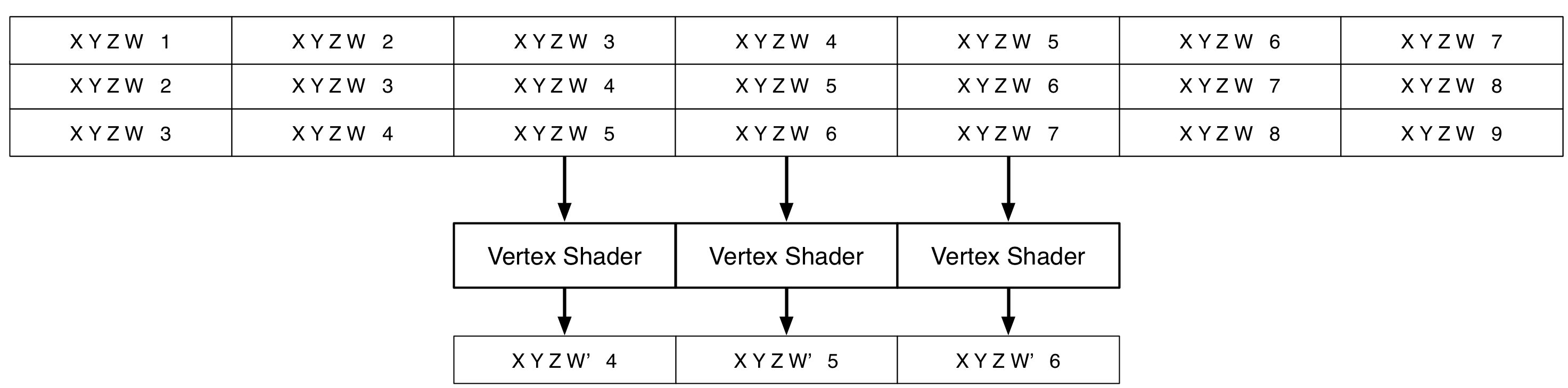
<p>Vertex shaders can only do 1-to-1 mappings. This isn't a problem by itself. You can use a <em>gather</em> approach to do N-to-1 mapping, where all the necessary data is pre-arranged into attribute arrays, with the data repeated and interleaved per vertex as necessary.</p>
</div></div>

<div class="c"></div>

<div class="wide m2">
   <img src="/files/mathbox2/yakshading3.png" class="flat" alt="Vertex Shader Attributes" style="position: relative; left: -5px;" />
</div>

<div class="g8 i2 m1"><div class="pad">
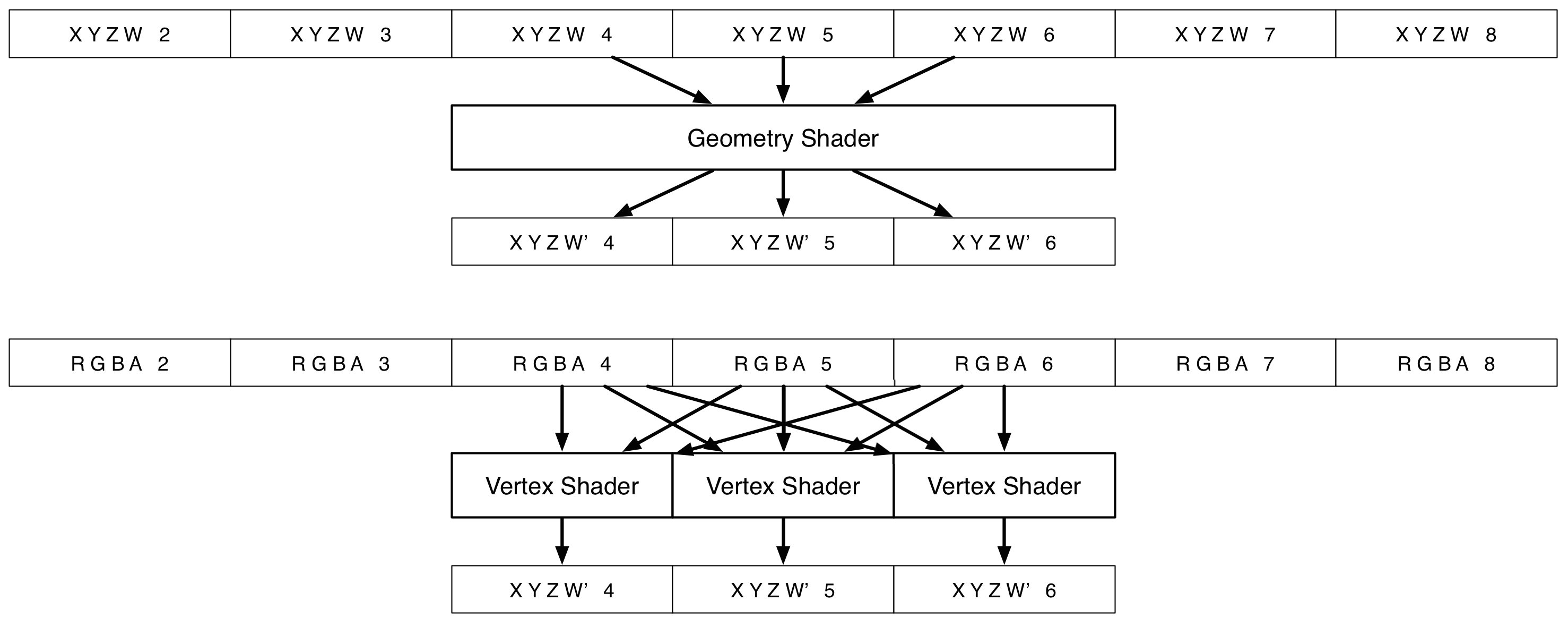
<p>The proper tool for this is a geometry shader: a program that creates new geometry by N-to-M mapping of data, like making triangles out of points. WebGL doesn't support geometry shaders, won't any time soon, but you can emulate them with texture samplers. A texture image is just a big typed array, and you have random access unlike vertex attributes.</p>

</div></div>

<div class="c"></div>

<div class="wide m2">
   <img src="/files/mathbox2/yakshading.png" class="flat" alt="Yak Shading" style="position: relative; left: -5px;" />
</div>

<div class="g8 i2 m1"><div class="pad">

<p>The original geometry acts only as a template, directing the shader's real data lookups. You lose some performance this way, but it's not too bad. Any procedural sampling pattern works, drawing 1 shape or 10,000. As textures can be rendered <em>to</em>, not just from, this also enables transform feedback, using the result of one pass to create new geometry in another.</p>

<p>All geometry rendered this way is 100% static as far as Three.js is concerned. New values are uploaded directly to GPU memory just before the rendering starts. The only gotcha is handling variable size input, because reallocation is costly. Pre-allocating a larger texture is easy, but clipping off the excess geometry in an O(1) fashion on the JS side is hard. In most cases there's the work around of dynamically generating <em>degenerate</em> triangles in a shader, which collapse down to invisible edges or points. This way, MathBox can accept variable sized arrays in multiple dimensions and will do its best to minimize disruption. If attribute instancing was more standard in WebGL, this wouldn't be such an issue, but as it stands, the workarounds are very necessary.</p>

</div></div>

<div class="wide full">

  <div class="iframe c">
    <iframe src="/files/mathbox2/iframe-cylindrical-stream.html?c3d6624d" class="mathbox autosize janky" height="320"></iframe>
  </div>

</div>

<div class="g8 i2"><div class="pad">

<h2>Vertex Party</h2>

<p>If you squint <em>very</em> hard it looks a bit like React for live geometry. Except instead of a diffing algorithm, there's a few events, some texture uploads, a handful of draw calls and then an idle CPU. It's ideal for drawing thousands of things that look similar and follow the same rules. It can handle not just basic GL primitives like lines or triangles, but higher level shapes like 3D arrows or sprites.</p>

<p>My first prototype of this was my last <a href="http://christmasexperiments.com/2013/22/" target="_blank">christmas demo</a>. It was messy and tedious to make, especially the shaders, but it performed excellently: the final scene renders ~200,000 triangles. Despite being a layer around Three.js … around WebGL … around OpenGL … around a driver … around a GPU … performance has far exceeded my expectations. Even complex scenes run great on my Android phone, easily 10x faster than MathBox 1, in some cases more like 1000x.</p>

<p>Of course compared to cutting edge DirectX or <a href="http://en.wikipedia.org/wiki/OpenCL">OpenCL</a> (not a typo), this is still very limited. In today's GPUs, the charade of attributes, geometries, vertices and samples has mostly been stripped away. What remains is buffers and massive operations on them, exposed raw in new APIs like AMD's Mantle and iOS's Metal. My vertex trickery acts like a polyfill, virtualizing WebGL's capabilities to bring them closer to the present. It goes a bit beyond what geometry shaders can provide, but still lacks many useful things like atomic append queues or stream compaction.</p>

<p>For large geometries, the set up cost can be noticeable though. Shader compilation time also grows with transform complexity, doubly so on Windows where shaders are recompiled to HLSL / Direct3D. This makes drawing ops the heaviest MathBox primitives to spawn and reallocate. You could call this the MathBox version of the dreaded 'paint' of HTML. Once warmed up though, most other properties can be animated instantly, including the data being displayed: this is the opposite of how HTML works. Hence you can mostly spawn things ahead of time, revealing and hiding objects as needed, with minimal overhead and jank at runtime.</p>

<p>This all relies on carefully constructed shaders which have to be wired up in all their individual permutations. This needed to be solved programmatically, which is where we go last.</p>

<ul>
  <li><a href="/blog/mathbox2/">MathBox² - PowerPoint Must Die</a></li>
  <li><a href="/blog/a-dom-for-robots/">A DOM for Robots - Modelling Live Data</a></li>
  <li><em>Yak Shading - Data Driven Geometry</em></li>
  <li><a href="/blog/shadergraph-2/">ShaderGraph 2 - Functional GLSL</a></li>
</ul>

</div></div>
]]></content>
  </entry>
  
  <entry>
    <title type="html"><![CDATA[MathBox²]]></title>
    <link href="https://acko.net/blog/mathbox2/"/>
    <updated>2015-09-27T00:00:00+02:00</updated>
    <id>https://acko.net/blog/mathbox2</id>
    <content type="html"><![CDATA[<script src="/files/katex/katex.min.js"></script>

<script src="/files/katex/contrib/auto-render.min.js"></script>

<link rel="stylesheet" type="text/css" href="/files/katex/katex.min.css" />

<script type="text/javascript">
Acko.queue(function () {
  renderMathInElement(document.querySelector('article'), {delimiters: [
    {left: "$$", right: "$$", display: true},
    {left: "($", right: "$)", display: false},
  ]});
});
</script>

<div class="g8 i2 first"><div class="pad">

<h2 class="sub">PowerPoint Must Die</h2>

</div></div>

<div class="c"></div>

<div class="g12"><div class="pad">

<blockquote class="m2">
  <em class="big">"<strong>I think a lot of mathematics is really about how you understand things in your head.</strong> It's people that did mathematics, we're not just general purpose machines, we're people. We see things, we feel things, we think of things. A lot of what I have done in my mathematical career has had to do with finding new ways to build models, to see things, do computations. Really get a feel for stuff.<br /><br />
It may seem unimportant, but when I started out people drew pictures of 3-manifolds one way and I started drawing them a different way. People drew pictures of surfaces one way and I started drawing them a different way. <strong>There's something significant about how the representation in your head profoundly changes how you think.</strong><br /><br />
It's very hard to do a brain dump. Very hard to do that. But I'm still going to try to do something to give a feel for 3-manifolds. Words are one thing, we can talk about geometric structures. There are many precise mathematical words that could be used, but they don't automatically convey a feeling for it. <strong>I probably can't convey a feeling for it either, but I want to try.</strong>"</em>
<div class="tr m1">– <a href="https://duckduckgo.com/?q=William+Thurston" target="_blank">William Thurston</a>, The Mystery of 3-Manifolds (<a href="https://www.youtube.com/watch?v=4jdmkUQDWtQ&amp;t=168s" target="_blank">Video</a>)</div>
</blockquote>

</div></div>

<div class="g8 i2 m2"><div class="pad">

<p>How do you convince web developers—heck, people in general—to care about math? This was the challenge underlying <a href="/tv/wdcode/">Making Things With Maths</a>, a talk I gave three years ago. I didn't know either, I just knew why I liked this stuff: demoscene, games, simulation, physics, VR, … It had little to do with what passed for mathematics in my own engineering education. There we were served only eyesore PowerPoints or handwritten overhead transparencies, with simplified graphs, abstract flowcharts and rote formulas, available on black and white photocopies.</p>

<p>Smart people who were supposed to teach us about technology seemed unable to teach us <em>with</em> technology. Fixing this felt like a huge challenge where I'd have to start from scratch. This is why the focus was entirely on showing rather than telling, and why MathBox 1 was born. It's how this stuff looks and feels in my head, and how I got my degree: by translating formulas into mental pictures, which I could replay and reason about on demand.</p>

<h2>PowerPoint Syndrome</h2>

<p>Initially I used MathBox like an embedded image or video: compact diagrams, each a point or two in a presentation. My style quickly shifted though. I kept on finding ways to transform from one visualization to another. Not for show, but to reveal the similarities and relationships underneath. MathBox encouraged me to animate things correctly, leveraging the actual models themselves, instead of doing a visual morph from A to B. Each animation became a continuous stream of valid examples, a quality both captivating and revealing.</p>

</div></div>

<div class="c"></div>

<div class="wide mt2">
    <a target="_blank" href="/blog/how-to-fold-a-julia-fractal/"><img src="/files/mathbox2/julia-fractal.jpg" alt="How to Fold a Julia Fractal" /></a>
</div>

<div class="g8 i2 m2"><div class="pad">

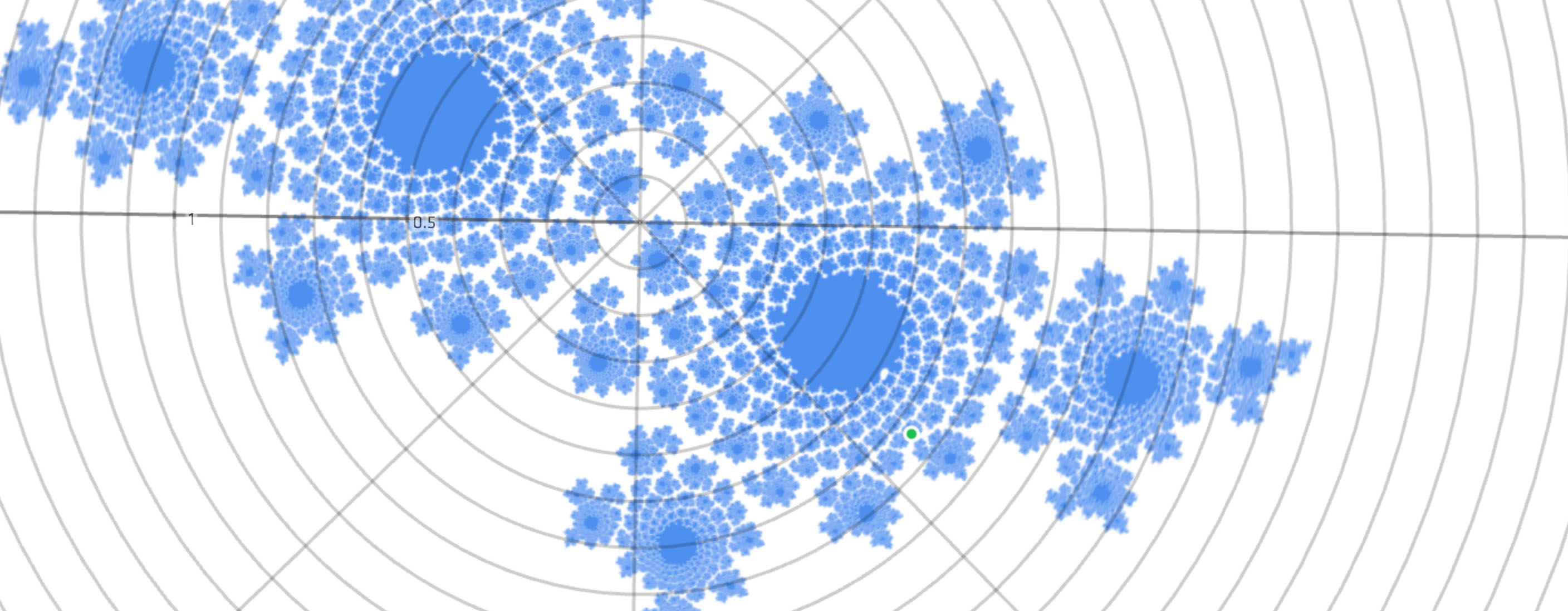
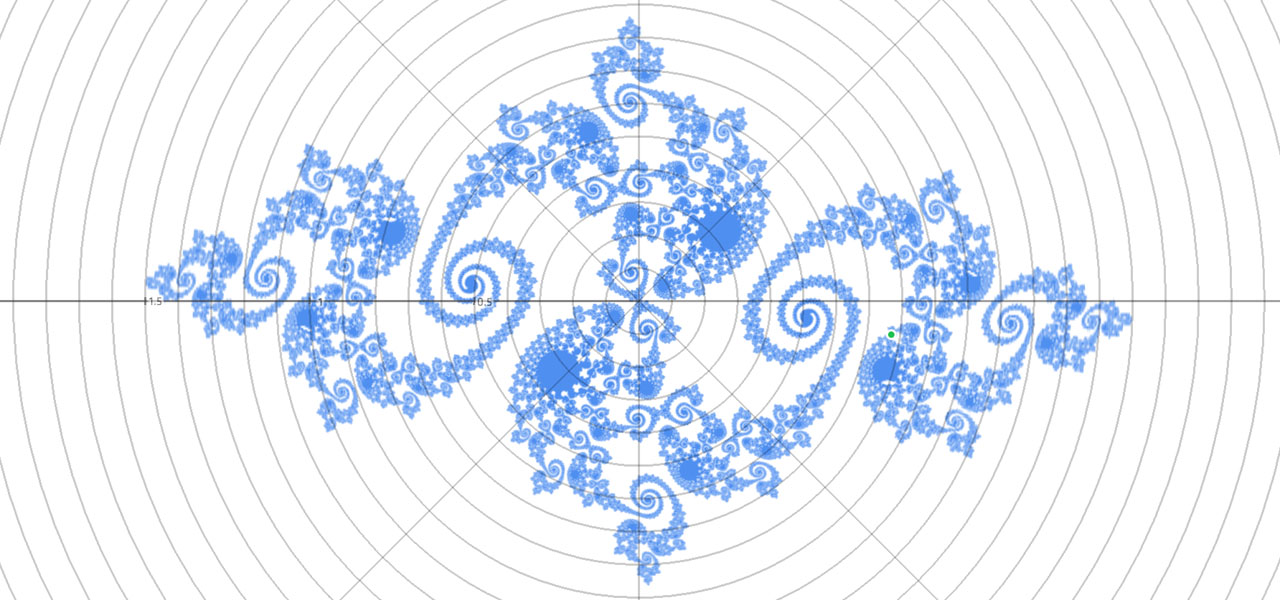
<p>For instance, <a href="/blog/how-to-fold-a-julia-fractal/">How to Fold a Julia Fractal</a> is filled with animations of complex exponentials, right from the get go. This way I avoid the scare that ($ e^{i\pi} $) is a meaningful expression; symbology and tau-tology never have a chance to obscure geometrical workings. Instead a web page that casually demonstrates conformal mapping and complex differential equations got 340,000 visits. Despite spotty web browser support and excluding all mobile phones for years.</p>

</div></div>

<aside class="g4 m3 ti tc muted"><div class="pad">
  <img src="/files/mathbox2/elsevier.png" style="max-width: 75%; margin: 0 auto;" alt="Elsevier $42 per PDF paywall" />
  <p>Meanwhile academics voluntarily published their writings behind a&nbsp;<a href="http://www.elsevier.com" rel="nofollow">$42&nbsp;per&nbsp;PDF</a> paywall, the&nbsp;<em>colossal&nbsp;idiots</em>.</p>
</div></aside>

<div class="g7 m1"><div class="pad">

<p>The next talk, <a href="/tv/webglmath/">Making WebGL Dance</a>, contained elaborate <em>long takes</em> worthy of an Alfonso Cuarón film, with only 3 separate shots for the bulk of a 30 minute talk. The lesson seemed obvious: the slides shouldn't have graphics in them, rather, <em>the graphics should have slides in them</em>. The diagnosis of PowerPoint syndrome is then the constant trashing of context from one slide to the next. A traditional blackboard doesn't have this problem: you build up diagrams slowly, by hand, across a large surface, erasing selectively and only when you run out of space.</p>

</div></div>

<div class="c"></div>

<div class="g8 i2 m2"><div class="pad">

<p>It's not just about permanence and progression though, it's also about leveraging our natural understanding of shape, scale, color and motion. Think of how a toddler learns to interact with the world: poke, grab, chew, spit, smash. Which evolves into run, jump, fall, get back up again. Humans are naturals at taking multiple cases of "If I do this, that will happen" and turning it into a consistent, functional model of how things work. We learn language by bootstrapping random jibberish into situational meaning, converging on a shared protocol.</p>

<p>That said, I find the usual descriptions of how people experience language and thought foreign. Instead, when <a href="http://grandin.com" target="_blank">Temple Grandin</a> speaks about visual thinking, I nod vigorously. Thought to me is analog concepts and sensory memories, remixed with visual and other simulations. It builds off the quantities and qualities present in spatial and temporal notions, which appear built-in to us.</p>

</div></div>

<div class="g8 m1"><div class="pad">

<p>Speech and writing is then a program designed to reconstruct particular thoughts in a compatible brain. There are a multitude of evolving languages, they can be used elegantly, bluntly, incomprehensibly, but the desired output remains the same. In my talks, armed with weapons-grade <a href="https://duckduckgo.com/?q=c2+continuous" target="_blank">C2-continuous</a> animations, it is easy to transcode my film reel into words, because the slides run themselves. The string of concepts already hangs in the air, I only add the missing grammar that links them up. This is a puzzle our brains are so good at solving, we usually do it <em>without</em> thinking.</p>

<p>Language is the ability of thoughts to compute their own source code.</p>

<p>(It's not proof, I just supply pudding.)</p>

</div></div>

<aside class="g4 m2"><div class="pad">
  <img src="/files/mathbox2/remote.jpg" alt="powerpoint remote" style="max-width: 50%; margin: 0 auto" />
  <p class="tc">Tip: Powerpoint remotes are 4-key USB keyboards with <kbd>PageUp</kbd>/<kbd>PageDown</kbd>, <kbd>F5</kbd> and <kbd>.</kbd> keys.<br /><br />Comes with dongle.</p>
</div></aside>

<div class="c"></div>

<div class="g6 m3"><div class="pad">
  <img src="/files/mathbox2/sketch1.jpg" alt="mathbox presentation slide sketches" />
</div></div>
<div class="g6 m2"><div class="pad">
  <img src="/files/mathbox2/sketch2.jpg" alt="mathbox presentation slide sketches" />
</div></div>

<aside class="g12"><div class="pad">
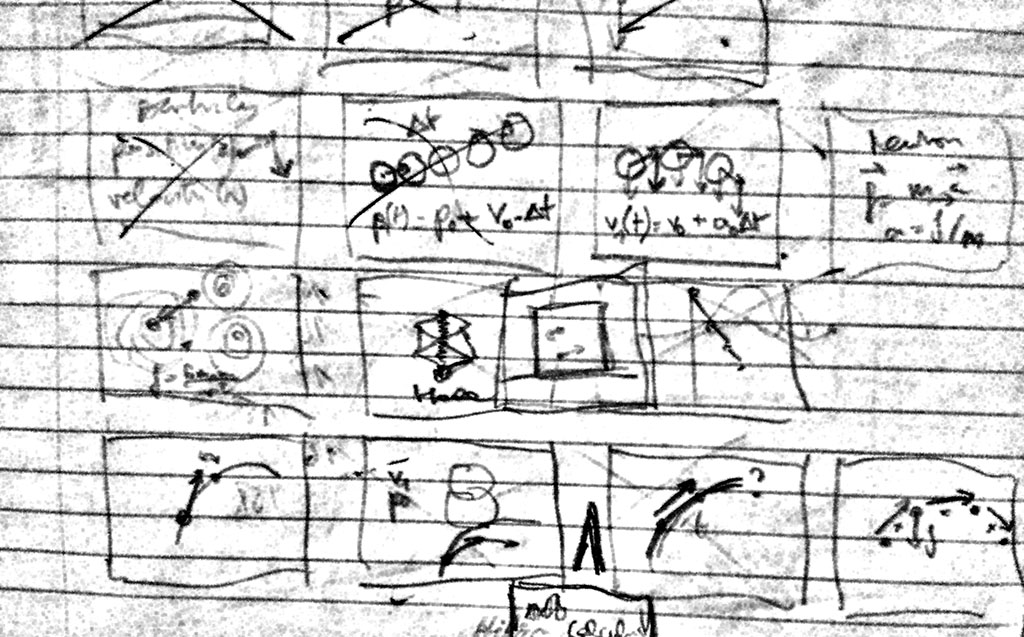
  <p class="tc">I sketch rough thumbnails, then start animating until I hit a dead end. Then start another one. Titles and overlays always come last.</p>
</div></aside>

<div class="g8 i2 m2"><div class="pad">

<h2>Manifold Dreams</h2>

<p>I don't say all this to up my Rain Man cred, but to lay to rest the recurring question of where my work comes from. I translate the pictures in my head to HD, in order to learn from and refine the view. As I did with <a href="/blog/animate-your-way-to-glory-pt2/#quaternions">quaternions</a>: I struggled to grok the hypersphere, it wouldn't fit together right. So I wrote the code to trace out geodesics in color and fly around in it, and suddenly the twisting made sense. Hence my entire tutorial was built to replicate the same discovery process I went through myself.</p>

</div></div>

<div class="c"></div>

<aside class="wide full">

  <div class="iframe c m1">
    <iframe src="/files/mathbox2/iframe-quat.html?c3d6624d" class="mathbox autosize janky" height="320"></iframe>

    <p class="tc">For visualizing the 4D hypersphere, quaternions are a natural fit.<br />They reveal their underlying cyclic symmetry under 4D stereographic projection.</p>
  </div>

</aside>

<div class="g8 i2"><div class="pad">

<p>There was one big problem: scenes now consisted of <em>diagrams of diagrams</em>, which meant working around MathBox more than with it. Performance issues arose as complexity grew. Above all there was a total lack of composability in the components. None of this could be fixed without ripping out significant pieces, so doing it incrementally seemed futile. I started from scratch and set off to reinvent all the wheels.</p>

<p class="tc">$$ \text{MathBox}^2 = \int_1^2 \text{code}(v) dv $$</p>

<p>MathBox 2 was inevitably going to suffer <em>second-system syndrome</em>, parts would be overengineered. Rather than fight it, I embraced it and effectively wrote a strange vector GPU driver in CoffeeScript. (Such is life, this is a blueprint meant to be simplified and made obsolete over time, not expanded upon.) It's a freight train straight to the heart of a graphics card, combining low-level and high-level in a way that feels novel <span style="font-size:0;opacity:0;width:0;position:absolute;left:-10000px;">🐴</span> when you use it, squeezing <span style="font-size:0;opacity:0;width:0;position:absolute;left:-10000px;">🐴</span> through a very small opening.</p>

<p>What was tedious before, now falls out naturally. If I format the scene above as XML/JSX, it becomes:</p>

</div></div>

<div class="g8 i2"><div class="pad">
  <!--first-->

<pre><code class="language-jsx wrap small"><span style="color:rgb(128,0,128)">&lt;root&gt;
  <span style="color:rgb(0,70,156)">&lt;!-- Place the camera --&gt;</span>
  &lt;camera /&gt;
  <span style="color:rgb(0,70,156)">&lt;!-- Change clock speed --&gt;</span>
  &lt;clock&gt;
    <span style="color:rgb(0,70,156)">&lt;!-- 4D Stereographic projection --&gt;</span>
    &lt;stereographic4&gt;
      <span style="color:rgb(0,70,156)">&lt;!-- Custom 4D rotation shader --&gt;</span>
      &lt;shader /&gt;
      <span style="color:rgb(0,70,156)">&lt;!-- Move vertices --&gt;</span>
      &lt;vertex&gt;
        <span style="color:rgb(0,70,156)">&lt;!-- Sample an area --&gt;</span>
        <span style="color:rgb(0,70,156)">&lt;!-- Draw a set of lines --&gt;</span>
        <span style="color:rgb(32,128,240)">&lt;area /&gt;</span>
        <span style="color:rgb(32,128,240)">&lt;line /&gt;</span>

        <span style="color:rgb(0,70,156)">&lt;!-- Sample an area --&gt;</span>
        <span style="color:rgb(0,70,156)">&lt;!-- Draw a set of lines --&gt;</span>
        <span style="color:rgb(32,140,0)">&lt;area /&gt;</span>
        <span style="color:rgb(32,140,0)">&lt;line /&gt;</span>

        <span style="color:rgb(0,70,156)">&lt;!-- Sample an area --&gt;</span>
        <span style="color:rgb(0,70,156)">&lt;!-- Draw a set of lines --&gt;</span>
        <span style="color:rgb(203,32,0)">&lt;area /&gt;</span>
        <span style="color:rgb(203,32,0)">&lt;line /&gt;</span>
      &lt;/vertex&gt;
    &lt;/stereographic4&gt;
  &lt;/clock&gt;
&lt;/root&gt;</span></code></pre>

</div></div>

<div class="c"></div>

<div class="g12 m1"><div class="pad">
  
<p>In order to make these pieces behave, a bunch of additional attributes are applied, most of which are strings or values, some of which are functions/code, either JavaScript or GLSL:</p>

</div></div>

<div class="g12"><div class="pad">
  <!--second-->

<pre><code class="language-jsx wrap small"><span></span><span style="color:rgb(128,0,128)">&lt;root </span><span style="color:rgb(144,64,0)">id</span><span style="color:rgb(128,0,128)">=&quot;</span><span style="color:rgb(0,0,192)">1</span><span style="color:rgb(128,0,128)">&quot; </span><span style="color:rgb(144,64,0)">scale</span><span style="color:rgb(128,0,128)">=</span><span style="color:rgb(0,70,156)">{300}</span><span style="color:rgb(128,0,128)"></span><span style="color:rgb(128,0,128)">&gt;</span><span style="color:inherit">
 </span><span style="color:rgb(144,64,0)"> </span><span style="color:rgb(144,64,0)"></span><span style="color:rgb(128,0,128)">&lt;camera </span><span style="color:rgb(144,64,0)">id</span><span style="color:rgb(128,0,128)">=&quot;</span><span style="color:rgb(0,0,192)">2</span><span style="color:rgb(128,0,128)">&quot; </span><span style="color:rgb(144,64,0)">proxy</span><span style="color:rgb(128,0,128)">=</span><span style="color:rgb(0,70,156)">{true}</span><span style="color:rgb(128,0,128)"> </span><span style="color:rgb(144,64,0)">position</span><span style="color:rgb(128,0,128)">=</span><span style="color:rgb(0,70,156)">{[0, 0, 3]}</span><span style="color:rgb(128,0,128)"> </span><span style="color:rgb(144,64,0)">/</span><span style="color:rgb(128,0,128)">&gt;</span><span style="color:inherit">
 </span><span style="color:rgb(144,64,0)"> </span><span style="color:rgb(144,64,0)"></span><span style="color:rgb(128,0,128)">&lt;clock </span><span style="color:rgb(144,64,0)">id</span><span style="color:rgb(128,0,128)">=&quot;</span><span style="color:rgb(0,0,192)">3</span><span style="color:rgb(128,0,128)">&quot; </span><span style="color:rgb(144,64,0)">speed</span><span style="color:rgb(128,0,128)">=</span><span style="color:rgb(0,70,156)">{1/4}</span><span style="color:rgb(128,0,128)"></span><span style="color:rgb(128,0,128)">&gt;</span><span style="color:inherit">
 </span><span style="color:rgb(144,64,0)"> </span><span style="color:rgb(144,64,0)"> </span><span style="color:rgb(144,64,0)"> </span><span style="color:rgb(144,64,0)"></span><span style="color:rgb(128,0,128)">&lt;stereographic4 </span><span style="color:rgb(144,64,0)">id</span><span style="color:rgb(128,0,128)">=&quot;</span><span style="color:rgb(0,0,192)">4</span><span style="color:rgb(128,0,128)">&quot; </span><span style="color:rgb(144,64,0)">bend</span><span style="color:rgb(128,0,128)">=</span><span style="color:rgb(0,70,156)">{1}</span><span style="color:rgb(128,0,128)"></span><span style="color:rgb(128,0,128)">&gt;</span><span style="color:inherit">
 </span><span style="color:rgb(144,64,0)"> </span><span style="color:rgb(144,64,0)"> </span><span style="color:rgb(144,64,0)"> </span><span style="color:rgb(144,64,0)"> </span><span style="color:rgb(144,64,0)"> </span><span style="color:rgb(144,64,0)"></span><span style="color:rgb(128,0,128)">&lt;shader </span><span style="color:rgb(144,64,0)">id</span><span style="color:rgb(128,0,128)">=&quot;</span><span style="color:rgb(0,0,192)">5</span><span style="color:rgb(128,0,128)">&quot; </span><span style="color:rgb(144,64,0)">code</span><span style="color:rgb(128,0,128)">=&quot;</span><span style="color:rgb(0,0,192)">
uniform float cos1;
uniform float sin1;
uniform float cos2;
uniform float sin2;
uniform float cos3;
uniform float sin3;
uniform float cos4;
uniform float sin4;

vec4 getRotate4D(vec4 xyzw, inout vec4 stpq) {
  xyzw.xy = xyzw.xy * mat2(cos1, sin1, -sin1, cos1);
  xyzw.zw = xyzw.zw * mat2(cos2, sin2, -sin2, cos2);
  xyzw.xz = xyzw.xz * mat2(cos3, sin3, -sin3, cos3);
  xyzw.yw = xyzw.yw * mat2(cos4, sin4, -sin4, cos4);

  return xyzw;
}</span><span style="color:rgb(128,0,128)">&quot;
 </span><span style="color:rgb(144,64,0)">cos1</span><span style="color:rgb(128,0,128)">=&gt;</span><span style="color:rgb(0,70,156)">{(t) =&gt; Math.cos(t * .111)}</span><span style="color:rgb(128,0,128)"> </span><span style="color:rgb(144,64,0)">sin1</span><span style="color:rgb(128,0,128)">=&gt;</span><span style="color:rgb(0,70,156)">{(t) =&gt; Math.sin(t * .111)}</span><span style="color:rgb(128,0,128)"> </span><span style="color:rgb(144,64,0)">cos2</span><span style="color:rgb(128,0,128)">=&gt;</span><span style="color:rgb(0,70,156)">{(t) =&gt; Math.cos(t * .151 + 1)}</span><span style="color:rgb(128,0,128)"> </span><span style="color:rgb(144,64,0)">sin2</span><span style="color:rgb(128,0,128)">=&gt;</span><span style="color:rgb(0,70,156)">{(t) =&gt; Math.sin(t * .151 + 1)}</span><span style="color:rgb(128,0,128)"> </span><span style="color:rgb(144,64,0)">cos3</span><span style="color:rgb(128,0,128)">=&gt;</span><span style="color:rgb(0,70,156)">{(t) =&gt; Math.cos(t * .071 + Math.sin(t * .081))}</span><span style="color:rgb(128,0,128)"> </span><span style="color:rgb(144,64,0)">sin3</span><span style="color:rgb(128,0,128)">=&gt;</span><span style="color:rgb(0,70,156)">{(t) =&gt; Math.sin(t * .071 + Math.sin(t * .081))}</span><span style="color:rgb(128,0,128)"> </span><span style="color:rgb(144,64,0)">cos4</span><span style="color:rgb(128,0,128)">=&gt;</span><span style="color:rgb(0,70,156)">{(t) =&gt; Math.cos(t * .053 + Math.sin(t * .066) + 1)}</span><span style="color:rgb(128,0,128)"> </span><span style="color:rgb(144,64,0)">sin4</span><span style="color:rgb(128,0,128)">=&gt;</span><span style="color:rgb(0,70,156)">{(t) =&gt; Math.sin(t * .053 + Math.sin(t * .066) + 1)}</span><span style="color:rgb(128,0,128)"> </span><span style="color:rgb(144,64,0)">/</span><span style="color:rgb(128,0,128)">&gt;</span><span style="color:inherit">
 </span><span style="color:rgb(144,64,0)"> </span><span style="color:rgb(144,64,0)"> </span><span style="color:rgb(144,64,0)"> </span><span style="color:rgb(144,64,0)"> </span><span style="color:rgb(144,64,0)"> </span><span style="color:rgb(144,64,0)"></span><span style="color:rgb(128,0,128)">&lt;vertex </span><span style="color:rgb(144,64,0)">id</span><span style="color:rgb(128,0,128)">=&quot;</span><span style="color:rgb(0,0,192)">6</span><span style="color:rgb(128,0,128)">&quot;</span><span style="color:rgb(128,0,128)">&gt;</span><span style="color:inherit">
 </span><span style="color:rgb(144,64,0)"> </span><span style="color:rgb(144,64,0)"> </span><span style="color:rgb(144,64,0)"> </span><span style="color:rgb(144,64,0)"> </span><span style="color:rgb(144,64,0)"> </span><span style="color:rgb(144,64,0)"> </span><span style="color:rgb(144,64,0)"> </span><span style="color:rgb(144,64,0)"></span><span style="color:rgb(128,0,128)">&lt;area </span><span style="color:rgb(144,64,0)">id</span><span style="color:rgb(128,0,128)">=&quot;</span><span style="color:rgb(0,0,192)">7</span><span style="color:rgb(128,0,128)">&quot; </span><span style="color:rgb(144,64,0)">rangeX</span><span style="color:rgb(128,0,128)">=</span><span style="color:rgb(0,70,156)">{[-π/2, π/2]}</span><span style="color:rgb(128,0,128)"> </span><span style="color:rgb(144,64,0)">rangeY</span><span style="color:rgb(128,0,128)">=</span><span style="color:rgb(0,70,156)">{[0, τ]}</span><span style="color:rgb(128,0,128)"> </span><span style="color:rgb(144,64,0)">width</span><span style="color:rgb(128,0,128)">=</span><span style="color:rgb(0,70,156)">{129}</span><span style="color:rgb(128,0,128)"> </span><span style="color:rgb(144,64,0)">height</span><span style="color:rgb(128,0,128)">=</span><span style="color:rgb(0,70,156)">{65}</span><span style="color:rgb(128,0,128)"> </span><span style="color:rgb(144,64,0)">expr</span><span style="color:rgb(128,0,128)">=</span><span style="color:rgb(0,70,156)">{(emit, θ, ϕ, i, j) =&gt; {
        q1.set(0, 0, Math.sin(θ), Math.cos(θ));
        q2.set(0, Math.sin(ϕ), 0, Math.cos(ϕ));
        q1.multiply(q2);
        emit(q1.x, q1.y, q1.z, q1.w);
      }}</span><span style="color:rgb(128,0,128)"> </span><span style="color:rgb(144,64,0)">live</span><span style="color:rgb(128,0,128)">=</span><span style="color:rgb(0,70,156)">{false}</span><span style="color:rgb(128,0,128)"> </span><span style="color:rgb(144,64,0)">channels</span><span style="color:rgb(128,0,128)">=</span><span style="color:rgb(0,70,156)">{4}</span><span style="color:rgb(128,0,128)"> </span><span style="color:rgb(144,64,0)">/</span><span style="color:rgb(128,0,128)">&gt;</span><span style="color:inherit">
 </span><span style="color:rgb(144,64,0)"> </span><span style="color:rgb(144,64,0)"> </span><span style="color:rgb(144,64,0)"> </span><span style="color:rgb(144,64,0)"> </span><span style="color:rgb(144,64,0)"> </span><span style="color:rgb(144,64,0)"> </span><span style="color:rgb(144,64,0)"> </span><span style="color:rgb(144,64,0)"></span><span style="color:rgb(128,0,128)">&lt;line </span><span style="color:rgb(144,64,0)">id</span><span style="color:rgb(128,0,128)">=&quot;</span><span style="color:rgb(0,0,192)">8</span><span style="color:rgb(128,0,128)">&quot; </span><span style="color:rgb(144,64,0)">color</span><span style="color:rgb(128,0,128)">=&quot;</span><span style="color:rgb(32,128,240)">#3090FF</span><span style="color:rgb(128,0,128)">&quot; </span><span style="color:rgb(144,64,0)">/</span><span style="color:rgb(128,0,128)">&gt;</span><span style="color:inherit">
 </span><span style="color:rgb(144,64,0)"> </span><span style="color:rgb(144,64,0)"> </span><span style="color:rgb(144,64,0)"> </span><span style="color:rgb(144,64,0)"> </span><span style="color:rgb(144,64,0)"> </span><span style="color:rgb(144,64,0)"> </span><span style="color:rgb(144,64,0)"> </span><span style="color:rgb(144,64,0)"></span><span style="color:rgb(128,0,128)">&lt;area </span><span style="color:rgb(144,64,0)">id</span><span style="color:rgb(128,0,128)">=&quot;</span><span style="color:rgb(0,0,192)">9</span><span style="color:rgb(128,0,128)">&quot; </span><span style="color:rgb(144,64,0)">rangeX</span><span style="color:rgb(128,0,128)">=</span><span style="color:rgb(0,70,156)">{[-π/2, π/2]}</span><span style="color:rgb(128,0,128)"> </span><span style="color:rgb(144,64,0)">rangeY</span><span style="color:rgb(128,0,128)">=</span><span style="color:rgb(0,70,156)">{[0, τ]}</span><span style="color:rgb(128,0,128)"> </span><span style="color:rgb(144,64,0)">width</span><span style="color:rgb(128,0,128)">=</span><span style="color:rgb(0,70,156)">{129}</span><span style="color:rgb(128,0,128)"> </span><span style="color:rgb(144,64,0)">height</span><span style="color:rgb(128,0,128)">=</span><span style="color:rgb(0,70,156)">{65}</span><span style="color:rgb(128,0,128)"> </span><span style="color:rgb(144,64,0)">expr</span><span style="color:rgb(128,0,128)">=</span><span style="color:rgb(0,70,156)">{(emit, θ, ϕ, i, j) =&gt; {
        q1.set(0, Math.sin(θ), 0, Math.cos(θ));
        q2.set(Math.sin(ϕ), 0, 0, Math.cos(ϕ));
        q1.multiply(q2);
        emit(q1.x, q1.y, q1.z, q1.w);
      }}</span><span style="color:rgb(128,0,128)"> </span><span style="color:rgb(144,64,0)">live</span><span style="color:rgb(128,0,128)">=</span><span style="color:rgb(0,70,156)">{false}</span><span style="color:rgb(128,0,128)"> </span><span style="color:rgb(144,64,0)">channels</span><span style="color:rgb(128,0,128)">=</span><span style="color:rgb(0,70,156)">{4}</span><span style="color:rgb(128,0,128)"> </span><span style="color:rgb(144,64,0)">/</span><span style="color:rgb(128,0,128)">&gt;</span><span style="color:inherit">
 </span><span style="color:rgb(144,64,0)"> </span><span style="color:rgb(144,64,0)"> </span><span style="color:rgb(144,64,0)"> </span><span style="color:rgb(144,64,0)"> </span><span style="color:rgb(144,64,0)"> </span><span style="color:rgb(144,64,0)"> </span><span style="color:rgb(144,64,0)"> </span><span style="color:rgb(144,64,0)"></span><span style="color:rgb(128,0,128)">&lt;line </span><span style="color:rgb(144,64,0)">id</span><span style="color:rgb(128,0,128)">=&quot;</span><span style="color:rgb(0,0,192)">10</span><span style="color:rgb(128,0,128)">&quot; </span><span style="color:rgb(144,64,0)">color</span><span style="color:rgb(128,0,128)">=&quot;</span><span style="color:rgb(32,140,0)">#20A000</span><span style="color:rgb(128,0,128)">&quot; </span><span style="color:rgb(144,64,0)">/</span><span style="color:rgb(128,0,128)">&gt;</span><span style="color:inherit">
 </span><span style="color:rgb(144,64,0)"> </span><span style="color:rgb(144,64,0)"> </span><span style="color:rgb(144,64,0)"> </span><span style="color:rgb(144,64,0)"> </span><span style="color:rgb(144,64,0)"> </span><span style="color:rgb(144,64,0)"> </span><span style="color:rgb(144,64,0)"> </span><span style="color:rgb(144,64,0)"></span><span style="color:rgb(128,0,128)">&lt;area </span><span style="color:rgb(144,64,0)">id</span><span style="color:rgb(128,0,128)">=&quot;</span><span style="color:rgb(0,0,192)">11</span><span style="color:rgb(128,0,128)">&quot; </span><span style="color:rgb(144,64,0)">rangeX</span><span style="color:rgb(128,0,128)">=</span><span style="color:rgb(0,70,156)">{[-π/2, π/2]}</span><span style="color:rgb(128,0,128)"> </span><span style="color:rgb(144,64,0)">rangeY</span><span style="color:rgb(128,0,128)">=</span><span style="color:rgb(0,70,156)">{[0, τ]}</span><span style="color:rgb(128,0,128)"> </span><span style="color:rgb(144,64,0)">width</span><span style="color:rgb(128,0,128)">=</span><span style="color:rgb(0,70,156)">{129}</span><span style="color:rgb(128,0,128)"> </span><span style="color:rgb(144,64,0)">height</span><span style="color:rgb(128,0,128)">=</span><span style="color:rgb(0,70,156)">{65}</span><span style="color:rgb(128,0,128)"> </span><span style="color:rgb(144,64,0)">expr</span><span style="color:rgb(128,0,128)">=</span><span style="color:rgb(0,70,156)">{(emit, θ, ϕ, i, j) =&gt; {
        q1.set(Math.sin(θ), 0, 0, Math.cos(θ));
        q2.set(0, 0, Math.sin(ϕ), Math.cos(ϕ));
        q1.multiply(q2);
        emit(q1.x, q1.y, q1.z, q1.w);
      }}</span><span style="color:rgb(128,0,128)"> </span><span style="color:rgb(144,64,0)">live</span><span style="color:rgb(128,0,128)">=</span><span style="color:rgb(0,70,156)">{false}</span><span style="color:rgb(128,0,128)"> </span><span style="color:rgb(144,64,0)">channels</span><span style="color:rgb(128,0,128)">=</span><span style="color:rgb(0,70,156)">{4}</span><span style="color:rgb(128,0,128)"> </span><span style="color:rgb(144,64,0)">/</span><span style="color:rgb(128,0,128)">&gt;</span><span style="color:inherit">
 </span><span style="color:rgb(144,64,0)"> </span><span style="color:rgb(144,64,0)"> </span><span style="color:rgb(144,64,0)"> </span><span style="color:rgb(144,64,0)"> </span><span style="color:rgb(144,64,0)"> </span><span style="color:rgb(144,64,0)"> </span><span style="color:rgb(144,64,0)"> </span><span style="color:rgb(144,64,0)"></span><span style="color:rgb(128,0,128)">&lt;line </span><span style="color:rgb(144,64,0)">id</span><span style="color:rgb(128,0,128)">=&quot;</span><span style="color:rgb(0,0,192)">12</span><span style="color:rgb(128,0,128)">&quot; </span><span style="color:rgb(144,64,0)">color</span><span style="color:rgb(128,0,128)">=&quot;</span><span style="color:rgb(203,32,0)">#DF2000</span><span style="color:rgb(128,0,128)">&quot; </span><span style="color:rgb(144,64,0)">/</span><span style="color:rgb(128,0,128)">&gt;</span><span style="color:inherit">
 </span><span style="color:rgb(144,64,0)"> </span><span style="color:rgb(144,64,0)"> </span><span style="color:rgb(144,64,0)"> </span><span style="color:rgb(144,64,0)"> </span><span style="color:rgb(144,64,0)"> </span><span style="color:rgb(144,64,0)"></span><span style="color:rgb(128,0,128)">&lt;/vertex</span><span style="color:rgb(128,0,128)">&gt;</span><span style="color:inherit">
 </span><span style="color:rgb(144,64,0)"> </span><span style="color:rgb(144,64,0)"> </span><span style="color:rgb(144,64,0)"> </span><span style="color:rgb(144,64,0)"></span><span style="color:rgb(128,0,128)">&lt;/stereographic4</span><span style="color:rgb(128,0,128)">&gt;</span><span style="color:inherit">
 </span><span style="color:rgb(144,64,0)"> </span><span style="color:rgb(144,64,0)"></span><span style="color:rgb(128,0,128)">&lt;/clock</span><span style="color:rgb(128,0,128)">&gt;</span><span style="color:inherit">
</span><span style="color:rgb(128,0,128)">&lt;/root</span><span style="color:rgb(128,0,128)">&gt;</span><span style="color:inherit"></span></code></pre>

</div></div>

<div class="g8 i2"><div class="pad">

<p>Phew. That's how you make a 4D diagram with Hopf fibration as far as the eye can see. Except it's not actually JSX, that's just me and my pretty-printer pretending.</p>

<h2>Geometry Streaming</h2>

<p>The key is the data itself. It's an array of points mostly, but how that data is laid out and interpreted determines how useful it can be.</p>

<p>Most basic primitives come in fixed size chunks. Particles are single points, lines have two points, triangles have three points. Polygons and polylines have N points. So it made sense to have a <em>tuple of N points</em> be the basic logical unit. You can think in logical pieces of geometry, rather than raw points or individual triangles, unlike GL.</p>

<p>Each primitive maps over data in a standard way. Feed an <code>array</code> of points to a <code>line</code>, you get a polyline. Feed a <code>matrix</code> of points to a <code>surface</code> and you get a grid mesh. Simple. But feed a <code>voxel</code> to a <code>vector</code>, and you get a <em>3D vector field</em>. The general idea is that drawing 1 of something should be as easy as drawing 100×100×100.</p>

</div></div>

<div class="wide full">

  <div class="iframe c">
    <iframe src="/files/mathbox2/iframe-lineup.html?c3d6624d" class="mathbox autosize janky" height="320"></iframe>
  </div>

</div>

<div class="c"></div>

<div class="g8 i2 m1"><div class="pad">

<p>This is particularly useful for custom data expressions, which stream in live or procedural data. They now receive an <code>emit(x, y, z, w)</code> function, for emitting a 4-vector like XYZW or RGBA. This is little more than an inlineable call to fill a <code>floatArray[i++] = x</code>, quite a lot faster than returning an array or object.</p>

</div></div>

<div class="c"></div>

<div class="g8 m2"><div class="pad">

  <div class="iframe c">
    <iframe src="/files/mathbox2/iframe-vector.html?c3d6624d" class="mathbox janky" height="250" style="background: #fff; width: 100%;"></iframe>
  </div>

<pre><code class="language-javascript">mathbox
  .interval({
    expr: function (emit, x, i, t) {
      y = Math.sin(x + t);
      emit(x,  y);
      emit(x, -y);
    },
    width:   64,
    items:    2,
    channels: 2,
  })
  .vector({
    color: 0x3090FF,
    width: 3,
    start: true,
  });
</code></pre>

<div class="c"></div>

<p class="tc"><em>Emitting 64 2D vectors on an interval, 2 points each.</em></p>

<p>More importantly it lets you emit N points in one iteration, which makes the JS expressions themselves feel like geometry shaders. The result feeds into one or more styled drawing ops. The number of emit calls has to be constant, but you can always knock out or mask the excess geometry.</p>

</div></div>

<div class="g4 m3"><div class="pad">

  <pre><code class="language-javascript">emit = switch channels
  when 1 then (x) -&gt;
    array[i++] = x
    ++j
    return

  when 2 then (x, y) -&gt;
    array[i++] = x
    array[i++] = y
    ++j
    return

  when 3 then (x, y, z) -&gt;
    array[i++] = x
    array[i++] = y
    array[i++] = z
    ++j
    return

  when 4 then (x, y, z, w) -&gt;
    array[i++] = x
    array[i++] = y
    array[i++] = z
    array[i++] = w
    ++j
    return</code></pre>

  <div class="c"></div>
  
  <p><em>Both the <code>expr</code>ession and <code>emit</code>ter will be inlined into the stream's iteration loop.</em></p>

</div></div>

<div class="g12"><div class="pad">

  <pre><code class="language-javascript">consume = switch channels
  when 1 then (emit) -&gt;
    emit array[i++]
    ++j
    return

  when 2 then (emit) -&gt;
    emit array[i++], array[i++]
    ++j
    return

  when 3 then (emit) -&gt;
    emit array[i++], array[i++], array[i++]
    ++j
    return

  when 4 then (emit) -&gt;
    emit array[i++], array[i++], array[i++], array[i++]
    ++j
    return</code></pre>

  <div class="c"></div>
    
  <p class="tc m1"><em>Closures of Hanoi</em></p>

</div></div>

<div class="g8 i2"><div class="pad">

<h2>(4-in-1)²</h2>

<p>GPUs can operate on 4×1 vectors and 4×4 matrices, so working with 4D values is natural. Values can also be referenced by 4D indices. With one dimension reserved for the tuples, that leaves us 3 dimensions XYZ. Hence MathBox arrays are 3+1D. This is for <em>width</em>, <em>height</em>, <em>depth</em>, while the tuple dimension is called <em>items</em>. It does what it says on the tin, creating 1D W, 2D W×H and 3D W×H×D arrays of tuples. Each tuple is made of N vectors of up to 4 channels each.</p>

<p>Thanks to cyclic buffers and partial updates, history also comes baked in. You can use a spare dimension as a free time axis, retaining samples on the go. You can <code>.set('history', N)</code> to record a short log of a whole array over time, indefinitely.</p>

<p>All of this is modular: a data source is something that can be sampled by a 4D pointer from GLSL. Underneath, arrays end up packed into a regular 2D float texture, with "items × width" horizontally and "height × depth" vertically. Each 'pixel' holds a 1/2/3/4D point.</p>

<p>Mapping a 4D 'pointer' to the real 2D UV coordinates is just arithmetic, and so are operators like <code>transpose</code> and <code>repeat</code>. You just swap the XY indices and tell everyone downstream that it's now <em>this</em> big instead. They can't tell the difference.</p>

<p>You can create giant procedural arrays this way, including across rectangular texture size limits, as none of them actually exist except as transient values deep inside a GPU core. Until you materialize them by rendering to a texture using the <code>memo</code> primitive. Add in operators like interpolation and convolution and it's a pretty neat real-time finishing kit for data.</p>

</div></div>

<div class="wide full">

  <div class="iframe c">
    <iframe src="/files/mathbox2/iframe-volume.html?c3d6624d" class="mathbox autosize janky" height="320"></iframe>
  </div>

</div>

<div class="c"></div>

<div class="g10 i1 m4"><div class="pad">

<p><img src="/files/mathbox2/too-many-webgls.png" alt="Too many WebGL contexts" /></p>

</div></div>

<div class="g8 i2"><div class="pad">

<p><em><big><a href="/blog/mathbox2-pt2/">Continued in Part 2.</a></big></em></p>

</div></div>
]]></content>
  </entry>
  
  <entry>
    <title type="html"><![CDATA[MathBox²]]></title>
    <link href="https://acko.net/blog/mathbox2-pt2/"/>
    <updated>2015-09-27T00:00:00+02:00</updated>
    <id>https://acko.net/blog/mathbox2-pt2</id>
    <content type="html"><![CDATA[<script src="/files/katex/katex.min.js"></script>

<script src="/files/katex/contrib/auto-render.min.js"></script>

<link rel="stylesheet" type="text/css" href="/files/katex/katex.min.css" />

<div class="g8 i2 first"><div class="pad">

<h2 class="sub">Part 2</h2>

</div></div>

<div class="c"></div>

<div class="g8 i2"><div class="pad">

<a href="/blog/mathbox2/">Continued from Part 1.</a>

<h2>I-Can't-Believe-It's-Not-React</h2>

<p>Underneath sits a large codebase driving it, 200+ files in JS/CS alone, not including dependencies that aren't my own. Much of it is infrastructure necessary to pull off certain tricks consistently: you can draw 2.5D lines with grace, render arbitrary Unicode text in GL, sync HTML to GPU-computed geometry, and do all this with GLSL code composed on the fly, including your own. Nobody needs all of this.</p>

</div></div>

<div class="wide full">

  <div class="iframe c">
    <iframe src="/files/mathbox2/iframe-labels.html?c3d6624d" class="mathbox autosize janky" height="320"></iframe>
  </div>

</div>

<aside class="g8 i2"><div class="pad">

    <ul>
    <li><span style="color: rgb(48,192,255)">LaTeX HTML with KaTeX.</span></li>
    <li><span style="color: rgb(48,144,255)">Plain HTML DOM.</span></li>
    <li><span style="color: rgb(192,64,0)">Virtual HTML with DOM diff.</span></li>
    <li>Live Signed Distance Fields for GL.</li>
    </ul>
  
</div></aside>

<div class="g8 i2"><div class="pad">

<p>These wildly different strategies are actually all abstracted into the DOM path or the GL path, with a quacks-like-React component as the glue in the DOM path.</p>

</div></div>

<div class="g5"><div class="pad">

<pre><code class="language-jsx wrap small"><span style="color:rgb(128,0,128)">&lt;root&gt;
  <span style="color:rgb(0,70,156)">&lt;!-- Place the camera --&gt;</span>
  &lt;camera /&gt;
  <span style="color:rgb(0,70,156)">&lt;!-- 3D Polar view --&gt;</span>
  &lt;polar&gt;
      <span style="color:rgb(0,70,156)">&lt;!-- Sample an interval --&gt;</span>
      &lt;interval /&gt;
      <span style="color:rgb(0,70,156)">&lt;!-- Draw a line --&gt;</span>
      &lt;line /&gt;
      <span style="color:rgb(0,70,156)">&lt;!-- Resample along length --&gt;</span>
      &lt;resample /&gt;
      <span style="color:rgb(0,70,156)">&lt;!-- Draw a set of points --&gt;</span>
      &lt;point /&gt;
      <span style="color:rgb(0,70,156)">&lt;!-- Make HTML labels --&gt;</span>
      &lt;html /&gt;
      <span style="color:rgb(0,70,156)">&lt;!-- Draw HTML sprites --&gt;</span>
      &lt;dom /&gt;

      <span style="color:rgb(0,70,156)">...</span>      

      <span style="color:rgb(0,70,156)">&lt;!-- Sample an interval --&gt;</span>
      &lt;interval /&gt;
      <span style="color:rgb(0,70,156)">&lt;!-- Draw a line --&gt;</span>
      &lt;line /&gt;
      <span style="color:rgb(0,70,156)">&lt;!-- Resample along length --&gt;</span>
      &lt;resample /&gt;
      <span style="color:rgb(0,70,156)">&lt;!-- Draw a set of points --&gt;</span>
      &lt;point /&gt;
      <span style="color:rgb(0,70,156)">&lt;!-- Make GL text --&gt;</span>
      &lt;text /&gt;
      <span style="color:rgb(0,70,156)">&lt;!-- Generate colors --&gt;</span>
      &lt;array /&gt;
      <span style="color:rgb(0,70,156)">&lt;!-- Draw GL sprites --&gt;</span>
      &lt;label /&gt;

    &lt;/vertex&gt;
  &lt;/cartesian&gt;
&lt;/root&gt;</span></code></pre>

</div></div>

<aside class="g7"><div class="pad">

<pre><code class="language-javascript wrap small">// Define VDOM handler to clone real DOM elements
var clone = MathBox.DOM.createClass({
  render: function (el, props, children) {
    var element = children.cloneNode(true);
    return element;
  },
});

// Define VDOM handler to format 'latex' into an HTML span
var latex = MathBox.DOM.createClass({
  render: function (el) {
    this.props.innerHTML = katex.renderToString(this.children);
    return el('span', this.props);
  }
});</code></pre>

<div class="c"></div>

<p class="tc"><em>The interface with the HTML DOM.</em></p>

<p class="tc"><em>Appearances deceive however,<br />as MathBox's own DOM is an entirely different beast.</em></p>

</div></aside>

<div class="g8 i2"><div class="pad">

<p>Most of the code is for initialization only, building up a reactive machine by combining components. Once assembled it lets the GPU do most of the crunching, while relying on the JS VM to inline and optimize the chewy outside.</p>

<p>At the top level, MathBox is plain old JavaScript, used like this:</p>

</div></div>

<div class="g8"><div class="pad">
  <pre><code class="language-javascript" tabindex="0">/* Easy Mode */

// Bootstrap MathBox and Three.js
var mathbox = mathBox();
if (mathbox.fallback) { throw Error("No WebGL support.") };

// Make MathBox primitives
var view =
  mathbox
  .set({
    scale: null,
  })
  .camera({
    proxy: true,
    position: [0, 0, 3]
  })
  .polar({
    range: [[-2, 2], [-1, 1], [-1, 1]],
    scale: [2, 1, 1],
    bend: .25
  });

view.interval({
  width: 48,
  expr: function (emit, x, i, t) {
    // Emit sine wave
    y = Math.sin(x + t / 4) * .5 + .75;
    emit(x, y);
  },
  channels: 2,
})
.line({
  color: 0x30C0FF,
  width: 16,
})
.resample({
  width: 8,
})
.point({
  color: 0x30C0FF,
  size: 60,
})
.html({
  width:  8,
  expr: function (emit, el, i, j, k, l, t) {
    // Emit random latex
    var color = ['#30D0FF','#30A0FF'][i%2];
    var a = Math.round(t + i) % symbols.length;
    var b = Math.round(Math.sqrt(t * t + Math.sin(t + i * i) + 5));
    emit(el(latex, {style: {color: color}},
      '\\sqrt{\\text{LaTeX} + '+(i + b)+' \\pi^{'+symbols[a]+'}}'));
  },
})
.dom({
  snap: false,
  offset: [0, 32],
  depth: 0,
  zoom: 1,
  outline: 2,
  size: 20,
});

// ...
</code></pre>

</div></div>

<aside class="g4 m1">

  <div class="iframe c">
    <iframe src="/files/mathbox2/iframe-splash.html?c3d6624d" class="mathbox janky" height="250" style="background: #fff; width: 100%;"></iframe>

    <p class="tc">CSS 3D rims included.</p>
  </div>

</aside>

<aside class="g4">

  <div class="iframe c">
    <iframe src="/files/mathbox2/iframe-fallback.html?c3d6624d" class="mathbox janky" height="250" style="background: #fff; width: 100%;"></iframe>

    <p class="tc">The default fallback message.</p>
  </div>

</aside>

<div class="g8 i2"><div class="pad">
  
<p>The WebGL Canvas bootstrapper is a separate piece though, it's wrapping <a href="https://github.com/unconed/threestrap" target="_blank">Threestrap</a>, the little non-framework that could. It lets you spawn a fully functioning GL canvas in one exceedingly configurable call. It takes care of browser support, resizing with retina, CSS alignment, warm-up and more.</p>

<p>If you prefer instead, you can spawn a bare MathBox context in a Three.js scene of your choosing, but you'll have to babysit it:</p>

</div></div>

<div class="g12"><div class="pad">
  <pre><code class="language-javascript" tabindex="1">/* Simple Mode */

// Vanilla Three.js
var renderer = new THREE.WebGLRenderer();
var scene = new THREE.Scene();
var camera = new THREE.PerspectiveCamera(60, WIDTH / HEIGHT, .01, 1000);

// Insert into document
document.body.appendChild(renderer.domElement);

// MathBox context
var context = new MathBox.Context(renderer, scene, camera).init();
var mathbox = context.api;

// Set size
renderer.setSize(WIDTH, HEIGHT);
context.resize({ viewWidth: WIDTH, viewHeight: HEIGHT });

// Place camera and set background
camera.position.set(0, 0, 3);
renderer.setClearColor(new THREE.Color(0xFFFFFF), 1.0);

// MathBox elements
view = mathbox
.set({
  focus: 3,
})
.cartesian({
  range: [[-2, 2], [-1, 1], [-1, 1]],
  scale: [2, 1, 1],
});
// ...

// Render frames
var frame = function () {
  requestAnimationFrame(frame);
  context.frame();
  renderer.render(scene, camera);
};
requestAnimationFrame(frame);</code></pre>
</div></div>

<div class="g8 i2 m1"><div class="pad">

<p>Despite looking like a monolith, it really isn't, it was merely a matter of convenience and sanity to not decouple it more until its shape had stabilized. Minimal builds are, for now, left as an exercise to the reader. I've split up the thinking and design into several articles, mirroring the architecture. However, you don't need to know all this to <em>use</em> MathBox 2, they are for people who want to know the how and why... the <a href="/blog/a-dom-for-robots/">document model</a>, the <a href="/blog/yak-shading/">geometry core</a> and the <a href="/blog/shadergraph-2/">shader assembly</a>.</p>

<p>In putting it all together, the devil's in the details of course. Depending on your imagination, it's either much more or much less powerful than you want. There's still far too much to cover: slideshows, keyframe tracks, fov-calibrated units, z-indexes, atlas retexting, … Most of this is unsurprising in that it all works. You can define a keyframe interpolation between two value or emitter expressions, and watch the smoothly lerped data go. Animation tracks are tied to triggers like clocks and slides, which lets them fit naturally in presentations.</p>

</div></div>

<div class="c"></div>

<div class="g10 i1"><div class="pad">

<pre><code class="language-jsx wrap small"><span style="color:rgb(128,0,128)">&lt;root&gt;
  <span style="color:rgb(0,70,156)">&lt;!-- Present slides --&gt;</span>
  &lt;present <span style="color:rgb(144,64,0)">index</span><span style="color:rgb(128,0,128)">=</span><span style="color:rgb(0,70,156)">{1}</span>&gt;
    <span style="color:rgb(0,70,156)">&lt;!-- Slide 1 --&gt;</span>
    &lt;slide <span style="color:rgb(144,64,0)">steps</span><span style="color:rgb(128,0,128)">=</span><span style="color:rgb(0,70,156)">{2}</span>&gt;
      <span style="color:rgb(0,70,156)">&lt;!-- Transition effect --&gt;</span>
      &lt;reveal&gt;
        <span style="color:rgb(0,70,156)">&lt;!-- Sample an interval --&gt;</span>
        &lt;interval /&gt;
        <span style="color:rgb(0,70,156)">&lt;!-- Draw a line --&gt;</span>
        &lt;line /&gt;
        <span style="color:rgb(0,70,156)">&lt;!-- Step through keyframes --&gt;</span>
        &lt;step <span style="color:rgb(144,64,0)">script</span><span style="color:rgb(128,0,128)">=</span><span style="color:rgb(0,70,156)">{[
            {props: {color: 'red'}},
            {props: {color: 'blue'}},
          ]}</span> &gt;
      &lt;/reveal&gt;
    &lt;/slide&gt;
    <span style="color:rgb(0,70,156)">&lt;!-- Slide 2 --&gt;</span>
    &lt;slide&gt;
      <span style="color:rgb(0,70,156)">&lt;!-- Transition effect --&gt;</span>
      &lt;move&gt;
        <span style="color:rgb(0,70,156)">&lt;!-- Sample an interval --&gt;</span>
        &lt;interval /&gt;
        <span style="color:rgb(0,70,156)">&lt;!-- Play through keyframes --&gt;</span>
        &lt;play <span style="color:rgb(144,64,0)">script</span><span style="color:rgb(128,0,128)">=</span><span style="color:rgb(0,70,156)">{[
                       {props: {expr: (emit, x) =&gt; emit(x, Math.sin(x))}},
                       {props: {expr: (emit, x) =&gt; emit(x, Math.tan(x))}},
                      ]}</span> /&gt;
        <span style="color:rgb(0,70,156)">&lt;!-- Draw a line --&gt;</span>
        &lt;line /&gt;

        <span style="color:rgb(0,70,156)">&lt;!-- Slide 2.1 --&gt;</span>
        &lt;slide&gt;
        &lt;/slide&gt;
      &lt;/move&gt;
    &lt;/slide&gt;
    <span style="color:rgb(0,70,156)">&lt;!-- Slide 3 --&gt;</span>
    &lt;slide&gt;
      <span style="color:rgb(0,70,156)">&lt;!-- Transition effect --&gt;</span>
      &lt;reveal&gt;
        <span style="color:rgb(0,70,156)">&lt;!-- Sample an interval --&gt;</span>
        &lt;interval /&gt;
        <span style="color:rgb(0,70,156)">&lt;!-- Draw a line --&gt;</span>
        &lt;line /&gt;
      &lt;/reveal&gt;
    &lt;/slide&gt;
  &lt;/present&gt;
&lt;/root&gt;</span></code></pre>

</div></div>

<div class="g8 i2"><div class="pad">

<h2>One More Thing…</h2>

<p class="tc"><img src="/files/mathbox2/fridge.png" style="max-width: 30%; margin: 0 auto;" class="flat" alt="Fridge is cool" title="Fridge is cool" /></p>

<p>Images are data. So is audio. That means MathBox 2 is Winamp AVS, Milkdrop and the mythical Fridge all rolled into one. You can replicate your everyday trippy music visualizer with two operators: render-to-texture (<code>rtt</code>) and <code>compose</code>. It acts as an embedded scene, rendering all of its children to an off-screen image, while Compose renders a full-screen pass. This is where the model's expressiveness shines.</p>

<p>Milkdrop equals <code>mathbox.rtt(…).compose(…).….end().compose(…)</code>, that is, an image feeding back into itself, but also rendered to the screen. The necessary double buffering and swaps are abstracted away. Drop in shapes and shaders, add transforms, nest as you like. RTTs have a <code>history</code> parameter like arrays, so Turing patterns, self-propagating hypno spirals, and other cool partial diffy eqs are a shader away.</p>

</div></div>

<div class="c"></div>

<div class="wide full m2">

  <div class="iframe c">
    <iframe src="/files/mathbox2/iframe-rtt-history.html?c3d6624d" class="mathbox autosize janky" height="320"></iframe>
  </div>

</div>

<div class="c"></div>

<div class="g12"><div class="pad">
  <!--rtt history-->

<pre><code class="language-jsx wrap small"><span></span><span style="color:rgb(128,0,128)">&lt;root </span><span style="color:rgb(144,64,0)">id</span><span style="color:rgb(128,0,128)">=&quot;</span><span style="color:rgb(0,0,192)">1</span><span style="color:rgb(128,0,128)">&quot; </span><span style="color:rgb(144,64,0)">scale</span><span style="color:rgb(128,0,128)">=</span><span style="color:rgb(0,70,156)">{720}</span><span style="color:rgb(128,0,128)"></span><span style="color:rgb(128,0,128)">&gt;</span><span style="color:inherit">
 </span><span style="color:rgb(144,64,0)"> </span><span style="color:rgb(144,64,0)"></span><span style="color:rgb(128,0,128)">&lt;rtt </span><span style="color:rgb(144,64,0)">id</span><span style="color:rgb(128,0,128)">=&quot;</span><span style="color:rgb(0,0,192)">render</span><span style="color:rgb(128,0,128)">&quot; </span><span style="color:rgb(144,64,0)">minFilter</span><span style="color:rgb(128,0,128)">=&quot;</span><span style="color:rgb(0,0,192)">nearest</span><span style="color:rgb(128,0,128)">&quot; </span><span style="color:rgb(144,64,0)">magFilter</span><span style="color:rgb(128,0,128)">=&quot;</span><span style="color:rgb(0,0,192)">nearest</span><span style="color:rgb(128,0,128)">&quot; </span><span style="color:rgb(144,64,0)">type</span><span style="color:rgb(128,0,128)">=&quot;</span><span style="color:rgb(0,0,192)">unsignedByte</span><span style="color:rgb(128,0,128)">&quot;</span><span style="color:rgb(128,0,128)">&gt;</span><span style="color:inherit">
 </span><span style="color:rgb(144,64,0)"> </span><span style="color:rgb(144,64,0)"> </span><span style="color:rgb(144,64,0)"> </span><span style="color:rgb(144,64,0)"></span><span style="color:rgb(128,0,128)">&lt;camera </span><span style="color:rgb(144,64,0)">id</span><span style="color:rgb(128,0,128)">=&quot;</span><span style="color:rgb(0,0,192)">3</span><span style="color:rgb(128,0,128)">&quot; </span><span style="color:rgb(144,64,0)">lookAt</span><span style="color:rgb(128,0,128)">=</span><span style="color:rgb(0,70,156)">{[0, 0, 0]}</span><span style="color:rgb(128,0,128)"> </span><span style="color:rgb(144,64,0)">position</span><span style="color:rgb(128,0,128)">=&gt;</span><span style="color:rgb(0,70,156)">{(t) =&gt; { return [Math.cos(t) * 3, 0, Math.sin(t) * 3] }}</span><span style="color:rgb(128,0,128)"> </span><span style="color:rgb(144,64,0)">/</span><span style="color:rgb(128,0,128)">&gt;</span><span style="color:inherit">
 </span><span style="color:rgb(144,64,0)"> </span><span style="color:rgb(144,64,0)"> </span><span style="color:rgb(144,64,0)"> </span><span style="color:rgb(144,64,0)"></span><span style="color:rgb(128,0,128)">&lt;cartesian </span><span style="color:rgb(144,64,0)">id</span><span style="color:rgb(128,0,128)">=&quot;</span><span style="color:rgb(0,0,192)">4</span><span style="color:rgb(128,0,128)">&quot; </span><span style="color:rgb(144,64,0)">range</span><span style="color:rgb(128,0,128)">=</span><span style="color:rgb(0,70,156)">{[[-2, 2], [-1, 1], [-1, 1]]}</span><span style="color:rgb(128,0,128)"> </span><span style="color:rgb(144,64,0)">scale</span><span style="color:rgb(128,0,128)">=</span><span style="color:rgb(0,70,156)">{[2, 1, 1]}</span><span style="color:rgb(128,0,128)"></span><span style="color:rgb(128,0,128)">&gt;</span><span style="color:inherit">
 </span><span style="color:rgb(144,64,0)"> </span><span style="color:rgb(144,64,0)"> </span><span style="color:rgb(144,64,0)"> </span><span style="color:rgb(144,64,0)"> </span><span style="color:rgb(144,64,0)"> </span><span style="color:rgb(144,64,0)"></span><span style="color:rgb(128,0,128)">&lt;transform </span><span style="color:rgb(144,64,0)">id</span><span style="color:rgb(128,0,128)">=&quot;</span><span style="color:rgb(0,0,192)">5</span><span style="color:rgb(128,0,128)">&quot; </span><span style="color:rgb(144,64,0)">scale</span><span style="color:rgb(128,0,128)">=</span><span style="color:rgb(0,70,156)">{[7/10, 7/10, 7/10]}</span><span style="color:rgb(128,0,128)"></span><span style="color:rgb(128,0,128)">&gt;</span><span style="color:inherit">
 </span><span style="color:rgb(144,64,0)"> </span><span style="color:rgb(144,64,0)"> </span><span style="color:rgb(144,64,0)"> </span><span style="color:rgb(144,64,0)"> </span><span style="color:rgb(144,64,0)"> </span><span style="color:rgb(144,64,0)"> </span><span style="color:rgb(144,64,0)"> </span><span style="color:rgb(144,64,0)"></span><span style="color:rgb(128,0,128)">&lt;grid </span><span style="color:rgb(144,64,0)">id</span><span style="color:rgb(128,0,128)">=&quot;</span><span style="color:rgb(0,0,192)">6</span><span style="color:rgb(128,0,128)">&quot; </span><span style="color:rgb(144,64,0)">width</span><span style="color:rgb(128,0,128)">=</span><span style="color:rgb(0,70,156)">{5}</span><span style="color:rgb(128,0,128)"> </span><span style="color:rgb(144,64,0)">divideX</span><span style="color:rgb(128,0,128)">=</span><span style="color:rgb(0,70,156)">{2}</span><span style="color:rgb(128,0,128)"> </span><span style="color:rgb(144,64,0)">divideY</span><span style="color:rgb(128,0,128)">=</span><span style="color:rgb(0,70,156)">{2}</span><span style="color:rgb(128,0,128)"> </span><span style="color:rgb(144,64,0)">zBias</span><span style="color:rgb(128,0,128)">=</span><span style="color:rgb(0,70,156)">{10}</span><span style="color:rgb(128,0,128)"> </span><span style="color:rgb(144,64,0)">opacity</span><span style="color:rgb(128,0,128)">=</span><span style="color:rgb(0,70,156)">{1/4}</span><span style="color:rgb(128,0,128)"> </span><span style="color:rgb(144,64,0)">color</span><span style="color:rgb(128,0,128)">=</span><span style="color:rgb(0,70,156)">{16768992}</span><span style="color:rgb(128,0,128)"> </span><span style="color:rgb(144,64,0)">/</span><span style="color:rgb(128,0,128)">&gt;</span><span style="color:inherit">
 </span><span style="color:rgb(144,64,0)"> </span><span style="color:rgb(144,64,0)"> </span><span style="color:rgb(144,64,0)"> </span><span style="color:rgb(144,64,0)"> </span><span style="color:rgb(144,64,0)"> </span><span style="color:rgb(144,64,0)"></span><span style="color:rgb(128,0,128)">&lt;/transform</span><span style="color:rgb(128,0,128)">&gt;</span><span style="color:inherit">
 </span><span style="color:rgb(144,64,0)"> </span><span style="color:rgb(144,64,0)"> </span><span style="color:rgb(144,64,0)"> </span><span style="color:rgb(144,64,0)"></span><span style="color:rgb(128,0,128)">&lt;/cartesian</span><span style="color:rgb(128,0,128)">&gt;</span><span style="color:inherit">
 </span><span style="color:rgb(144,64,0)"> </span><span style="color:rgb(144,64,0)"></span><span style="color:rgb(128,0,128)">&lt;/rtt</span><span style="color:rgb(128,0,128)">&gt;</span><span style="color:inherit">
 </span><span style="color:rgb(144,64,0)"> </span><span style="color:rgb(144,64,0)"></span><span style="color:rgb(128,0,128)">&lt;rtt </span><span style="color:rgb(144,64,0)">id</span><span style="color:rgb(128,0,128)">=&quot;</span><span style="color:rgb(0,0,192)">rtt1</span><span style="color:rgb(128,0,128)">&quot; </span><span style="color:rgb(144,64,0)">history</span><span style="color:rgb(128,0,128)">=</span><span style="color:rgb(0,70,156)">{4}</span><span style="color:rgb(128,0,128)"> </span><span style="color:rgb(144,64,0)">type</span><span style="color:rgb(128,0,128)">=&quot;</span><span style="color:rgb(0,0,192)">unsignedByte</span><span style="color:rgb(128,0,128)">&quot; </span><span style="color:rgb(144,64,0)">minFilter</span><span style="color:rgb(128,0,128)">=&quot;</span><span style="color:rgb(0,0,192)">linear</span><span style="color:rgb(128,0,128)">&quot; </span><span style="color:rgb(144,64,0)">magFilter</span><span style="color:rgb(128,0,128)">=&quot;</span><span style="color:rgb(0,0,192)">linear</span><span style="color:rgb(128,0,128)">&quot;</span><span style="color:rgb(128,0,128)">&gt;</span><span style="color:inherit">
 </span><span style="color:rgb(144,64,0)"> </span><span style="color:rgb(144,64,0)"> </span><span style="color:rgb(144,64,0)"> </span><span style="color:rgb(144,64,0)"></span><span style="color:rgb(128,0,128)">&lt;shader </span><span style="color:rgb(144,64,0)">id</span><span style="color:rgb(128,0,128)">=&quot;</span><span style="color:rgb(0,0,192)">8</span><span style="color:rgb(128,0,128)">&quot; </span><span style="color:rgb(144,64,0)">code</span><span style="color:rgb(128,0,128)">=&quot;</span><span style="color:rgb(0,0,192)">
uniform vec3 dataResolution;
uniform vec3 dataSize;
uniform float cosine;
uniform float sine;
vec4 getSample(vec3 xyz);
vec4 getFramesSample(vec3 xyz) {
  vec2 pos = xyz.xy * dataResolution.xy - .5;
  pos = ((pos * dataSize.xy) * mat2(cosine, sine, -sine, cosine) * .999) / dataSize.xy;
  xyz.xy = (pos + .5) * dataSize.xy;
  vec4 c = getSample(xyz + vec3( 0.0, 0.0, 1.0));
  vec3 t = getSample(xyz + vec3( 0.0, 1.5, 0.0)).xyz;
  vec3 b = getSample(xyz + vec3( 0.0,-1.5, 0.0)).xyz;
  vec3 l = getSample(xyz + vec3(-1.5, 0.0, 0.0)).xyz;
  vec3 r = getSample(xyz + vec3( 1.5, 0.0, 0.0)).xyz;
  return vec4((t + b + l + r) / 2.0 - c.xyz, c.w);
}</span><span style="color:rgb(128,0,128)">&quot;
 </span><span style="color:rgb(144,64,0)">cosine</span><span style="color:rgb(128,0,128)">=&gt;</span><span style="color:rgb(0,70,156)">{(t) =&gt; Math.cos(Math.sin(t * .2) * .005)}</span><span style="color:rgb(128,0,128)"> </span><span style="color:rgb(144,64,0)">sine</span><span style="color:rgb(128,0,128)">=&gt;</span><span style="color:rgb(0,70,156)">{(t) =&gt; Math.sin(Math.sin(t * .2) * .005)}</span><span style="color:rgb(128,0,128)"> </span><span style="color:rgb(144,64,0)">/</span><span style="color:rgb(128,0,128)">&gt;</span><span style="color:inherit">
 </span><span style="color:rgb(144,64,0)"> </span><span style="color:rgb(144,64,0)"> </span><span style="color:rgb(144,64,0)"> </span><span style="color:rgb(144,64,0)"></span><span style="color:rgb(128,0,128)">&lt;resample </span><span style="color:rgb(144,64,0)">id</span><span style="color:rgb(128,0,128)">=&quot;</span><span style="color:rgb(0,0,192)">resample1</span><span style="color:rgb(128,0,128)">&quot; </span><span style="color:rgb(144,64,0)">indices</span><span style="color:rgb(128,0,128)">=</span><span style="color:rgb(0,70,156)">{3}</span><span style="color:rgb(128,0,128)"> </span><span style="color:rgb(144,64,0)">channels</span><span style="color:rgb(128,0,128)">=</span><span style="color:rgb(0,70,156)">{4}</span><span style="color:rgb(128,0,128)"> </span><span style="color:rgb(144,64,0)">/</span><span style="color:rgb(128,0,128)">&gt;</span><span style="color:inherit">
 </span><span style="color:rgb(144,64,0)"> </span><span style="color:rgb(144,64,0)"> </span><span style="color:rgb(144,64,0)"> </span><span style="color:rgb(144,64,0)"></span><span style="color:rgb(128,0,128)">&lt;compose </span><span style="color:rgb(144,64,0)">id</span><span style="color:rgb(128,0,128)">=&quot;</span><span style="color:rgb(0,0,192)">10</span><span style="color:rgb(128,0,128)">&quot; </span><span style="color:rgb(144,64,0)">/</span><span style="color:rgb(128,0,128)">&gt;</span><span style="color:inherit">
 </span><span style="color:rgb(144,64,0)"> </span><span style="color:rgb(144,64,0)"> </span><span style="color:rgb(144,64,0)"> </span><span style="color:rgb(144,64,0)"></span><span style="color:rgb(128,0,128)">&lt;compose </span><span style="color:rgb(144,64,0)">id</span><span style="color:rgb(128,0,128)">=&quot;</span><span style="color:rgb(0,0,192)">11</span><span style="color:rgb(128,0,128)">&quot; </span><span style="color:rgb(144,64,0)">source</span><span style="color:rgb(128,0,128)">=&quot;</span><span style="color:rgb(0,0,192)">#render</span><span style="color:rgb(128,0,128)">&quot; </span><span style="color:rgb(144,64,0)">blending</span><span style="color:rgb(128,0,128)">=&quot;</span><span style="color:rgb(0,0,192)">add</span><span style="color:rgb(128,0,128)">&quot; </span><span style="color:rgb(144,64,0)">/</span><span style="color:rgb(128,0,128)">&gt;</span><span style="color:inherit">
 </span><span style="color:rgb(144,64,0)"> </span><span style="color:rgb(144,64,0)"></span><span style="color:rgb(128,0,128)">&lt;/rtt</span><span style="color:rgb(128,0,128)">&gt;</span><span style="color:inherit">
 </span><span style="color:rgb(144,64,0)"> </span><span style="color:rgb(144,64,0)"></span><span style="color:rgb(128,0,128)">&lt;rtt </span><span style="color:rgb(144,64,0)">id</span><span style="color:rgb(128,0,128)">=&quot;</span><span style="color:rgb(0,0,192)">12</span><span style="color:rgb(128,0,128)">&quot; </span><span style="color:rgb(144,64,0)">minFilter</span><span style="color:rgb(128,0,128)">=&quot;</span><span style="color:rgb(0,0,192)">linear</span><span style="color:rgb(128,0,128)">&quot; </span><span style="color:rgb(144,64,0)">magFilter</span><span style="color:rgb(128,0,128)">=&quot;</span><span style="color:rgb(0,0,192)">linear</span><span style="color:rgb(128,0,128)">&quot; </span><span style="color:rgb(144,64,0)">type</span><span style="color:rgb(128,0,128)">=&quot;</span><span style="color:rgb(0,0,192)">unsignedByte</span><span style="color:rgb(128,0,128)">&quot;</span><span style="color:rgb(128,0,128)">&gt;</span><span style="color:inherit">
 </span><span style="color:rgb(144,64,0)"> </span><span style="color:rgb(144,64,0)"> </span><span style="color:rgb(144,64,0)"> </span><span style="color:rgb(144,64,0)"></span><span style="color:rgb(128,0,128)">&lt;shader </span><span style="color:rgb(144,64,0)">id</span><span style="color:rgb(128,0,128)">=&quot;</span><span style="color:rgb(0,0,192)">colormap</span><span style="color:rgb(128,0,128)">&quot; </span><span style="color:rgb(144,64,0)">code</span><span style="color:rgb(128,0,128)">=&quot;</span><span style="color:rgb(0,0,192)">
uniform float modulate1;
uniform float modulate2;
uniform float modulate3;
uniform float modulate4;
vec4 getSample(vec3 xyz);
vec4 getFramesSample(vec3 xyz) {
  vec4 color = (
    getSample(xyz) +
    getSample(xyz + vec3(0.0, 0.0, 1.0)) +
    getSample(xyz + vec3(0.0, 0.0, 2.0)) +
    getSample(xyz + vec3(0.0, 0.0, 3.0))
  ) / 4.0;
  color = color * color * color * 1.15;
  float v = color.x + color.y + color.z;
  vec3 c = vec3(v*v + color.x * .2, v*v, v*v*v + color.z) * .333;
  c = mix(c, mix(sqrt(c.yzx * c), c.zxy, modulate1), modulate2);
  c = mix(c, mix(c.yzx, c.zxy, modulate1), modulate2);
  c = mix(c, mix(abs(sin(c.yxz * 2.0)), c.zyx, modulate3), modulate4);
  return vec4(c, 1.0);
}</span><span style="color:rgb(128,0,128)">&quot;
 </span><span style="color:rgb(144,64,0)">modulate1</span><span style="color:rgb(128,0,128)">=&gt;</span><span style="color:rgb(0,70,156)">{(t) =&gt; Math.cos(t * .417) * .5 + .5}</span><span style="color:rgb(128,0,128)"> </span><span style="color:rgb(144,64,0)">modulate2</span><span style="color:rgb(128,0,128)">=&gt;</span><span style="color:rgb(0,70,156)">{(t) =&gt; Math.cos(t * .617 + Math.sin(t * .133)) * .5 + .5}</span><span style="color:rgb(128,0,128)"> </span><span style="color:rgb(144,64,0)">modulate3</span><span style="color:rgb(128,0,128)">=&gt;</span><span style="color:rgb(0,70,156)">{(t) =&gt; Math.cos(t * .217 + 2.0) * .5 + .5}</span><span style="color:rgb(128,0,128)"> </span><span style="color:rgb(144,64,0)">modulate4</span><span style="color:rgb(128,0,128)">=&gt;</span><span style="color:rgb(0,70,156)">{(t) =&gt; Math.cos(t * .117 + 3.0 + Math.sin(t * .133)) * .5 + .5}</span><span style="color:rgb(128,0,128)"> </span><span style="color:rgb(144,64,0)">/</span><span style="color:rgb(128,0,128)">&gt;</span><span style="color:inherit">
 </span><span style="color:rgb(144,64,0)"> </span><span style="color:rgb(144,64,0)"> </span><span style="color:rgb(144,64,0)"> </span><span style="color:rgb(144,64,0)"></span><span style="color:rgb(128,0,128)">&lt;resample </span><span style="color:rgb(144,64,0)">id</span><span style="color:rgb(128,0,128)">=&quot;</span><span style="color:rgb(0,0,192)">resample2</span><span style="color:rgb(128,0,128)">&quot; </span><span style="color:rgb(144,64,0)">source</span><span style="color:rgb(128,0,128)">=&quot;</span><span style="color:rgb(0,0,192)">#rtt1</span><span style="color:rgb(128,0,128)">&quot; </span><span style="color:rgb(144,64,0)">indices</span><span style="color:rgb(128,0,128)">=</span><span style="color:rgb(0,70,156)">{3}</span><span style="color:rgb(128,0,128)"> </span><span style="color:rgb(144,64,0)">channels</span><span style="color:rgb(128,0,128)">=</span><span style="color:rgb(0,70,156)">{4}</span><span style="color:rgb(128,0,128)"> </span><span style="color:rgb(144,64,0)">/</span><span style="color:rgb(128,0,128)">&gt;</span><span style="color:inherit">
 </span><span style="color:rgb(144,64,0)"> </span><span style="color:rgb(144,64,0)"> </span><span style="color:rgb(144,64,0)"> </span><span style="color:rgb(144,64,0)"></span><span style="color:rgb(128,0,128)">&lt;compose </span><span style="color:rgb(144,64,0)">id</span><span style="color:rgb(128,0,128)">=&quot;</span><span style="color:rgb(0,0,192)">15</span><span style="color:rgb(128,0,128)">&quot; </span><span style="color:rgb(144,64,0)">/</span><span style="color:rgb(128,0,128)">&gt;</span><span style="color:inherit">
 </span><span style="color:rgb(144,64,0)"> </span><span style="color:rgb(144,64,0)"></span><span style="color:rgb(128,0,128)">&lt;/rtt</span><span style="color:rgb(128,0,128)">&gt;</span><span style="color:inherit">
 </span><span style="color:rgb(144,64,0)"> </span><span style="color:rgb(144,64,0)"></span><span style="color:rgb(128,0,128)">&lt;shader </span><span style="color:rgb(144,64,0)">id</span><span style="color:rgb(128,0,128)">=&quot;</span><span style="color:rgb(0,0,192)">16</span><span style="color:rgb(128,0,128)">&quot; </span><span style="color:rgb(144,64,0)">code</span><span style="color:rgb(128,0,128)">=&quot;</span><span style="color:rgb(0,0,192)">
vec4 getSample(vec2 xy);
vec4 getFramesSample(vec2 xy) {
  return getSample(xy + vec2(0.5, 0.5));
}</span><span style="color:rgb(128,0,128)">&quot;
 </span><span style="color:rgb(144,64,0)">/</span><span style="color:rgb(128,0,128)">&gt;</span><span style="color:inherit">
 </span><span style="color:rgb(144,64,0)"> </span><span style="color:rgb(144,64,0)"></span><span style="color:rgb(128,0,128)">&lt;resample </span><span style="color:rgb(144,64,0)">id</span><span style="color:rgb(128,0,128)">=&quot;</span><span style="color:rgb(0,0,192)">resample3</span><span style="color:rgb(128,0,128)">&quot; </span><span style="color:rgb(144,64,0)">indices</span><span style="color:rgb(128,0,128)">=</span><span style="color:rgb(0,70,156)">{2}</span><span style="color:rgb(128,0,128)"> </span><span style="color:rgb(144,64,0)">channels</span><span style="color:rgb(128,0,128)">=</span><span style="color:rgb(0,70,156)">{4}</span><span style="color:rgb(128,0,128)"> </span><span style="color:rgb(144,64,0)">/</span><span style="color:rgb(128,0,128)">&gt;</span><span style="color:inherit">
 </span><span style="color:rgb(144,64,0)"> </span><span style="color:rgb(144,64,0)"></span><span style="color:rgb(128,0,128)">&lt;compose </span><span style="color:rgb(144,64,0)">id</span><span style="color:rgb(128,0,128)">=&quot;</span><span style="color:rgb(0,0,192)">18</span><span style="color:rgb(128,0,128)">&quot; </span><span style="color:rgb(144,64,0)">source</span><span style="color:rgb(128,0,128)">=&quot;</span><span style="color:rgb(0,0,192)">#resample2</span><span style="color:rgb(128,0,128)">&quot; </span><span style="color:rgb(144,64,0)">/</span><span style="color:rgb(128,0,128)">&gt;</span><span style="color:inherit">
</span><span style="color:rgb(128,0,128)">&lt;/root</span><span style="color:rgb(128,0,128)">&gt;</span><span style="color:inherit"></span></code></pre>

</div></div>

<div class="c"></div>

<div class="g8 i2 m2"><div class="pad">

<p>The difference compared to AVS is that the <code>.rtt()</code> is inert to its container by default. Until you add on a <code>.compose()</code> pass, it's just a dangling data source. Meanwhile the <code>.compose()</code> op offers the necessary  GL blend modes, opacity and color tints through style properties. Document order defines drawing order, so the decomposition into render passes is direct. On top, <code>zOrder</code> can be overridden (drawing order), as can <code>zIndex</code> (2D stacking order) and <code>zBias</code> (3D stacking order).</p>

<p>You can nest effects and compose shaders to create recursive visualizations, sampling from themselves or each other:</p>

</div></div>

<div class="c"></div>

<div class="wide full m2">

  <div class="iframe c">
    <iframe src="/files/mathbox2/iframe-readyornot.html?c3d6624d" class="mathbox autosize janky" height="320" allowfullscreen="allowfullscreen"></iframe>
  </div>
  
  <div class="c"></div>
  
  <p class="tc"><a href="http://acko.net/files/mathbox2/iframe-readyornot.html?1" target="_blank">Open in New Window</a><br /><em>(Burn that fillrate, baby.)</em></p>
  
  <p class="tc m2">Bonus: <a href="http://fm.acko.net/" target="_blank">Endless Visualizer</a>.</p>
</div>

<div class="g12"><div class="pad">


  <!--vertex feedback-->
<pre><code class="language-jsx wrap small"><span></span><span style="color:rgb(128,0,128)">&lt;root </span><span style="color:rgb(144,64,0)">id</span><span style="color:rgb(128,0,128)">=&quot;</span><span style="color:rgb(0,0,192)">1</span><span style="color:rgb(128,0,128)">&quot; </span><span style="color:rgb(144,64,0)">scale</span><span style="color:rgb(128,0,128)">=</span><span style="color:rgb(0,70,156)">{720}</span><span style="color:rgb(128,0,128)"></span><span style="color:rgb(128,0,128)">&gt;</span><span style="color:inherit">
 </span><span style="color:rgb(144,64,0)"> </span><span style="color:rgb(144,64,0)"></span><span style="color:rgb(128,0,128)">&lt;camera </span><span style="color:rgb(144,64,0)">id</span><span style="color:rgb(128,0,128)">=&quot;</span><span style="color:rgb(0,0,192)">2</span><span style="color:rgb(128,0,128)">&quot; </span><span style="color:rgb(144,64,0)">proxy</span><span style="color:rgb(128,0,128)">=</span><span style="color:rgb(0,70,156)">{true}</span><span style="color:rgb(128,0,128)"> </span><span style="color:rgb(144,64,0)">position</span><span style="color:rgb(128,0,128)">=</span><span style="color:rgb(0,70,156)">{[3/10, 1/10, 2]}</span><span style="color:rgb(128,0,128)"> </span><span style="color:rgb(144,64,0)">/</span><span style="color:rgb(128,0,128)">&gt;</span><span style="color:inherit">
 </span><span style="color:rgb(144,64,0)"> </span><span style="color:rgb(144,64,0)"></span><span style="color:rgb(128,0,128)">&lt;group </span><span style="color:rgb(144,64,0)">id</span><span style="color:rgb(128,0,128)">=&quot;</span><span style="color:rgb(0,0,192)">3</span><span style="color:rgb(128,0,128)">&quot;</span><span style="color:rgb(128,0,128)">&gt;</span><span style="color:inherit">
 </span><span style="color:rgb(144,64,0)"> </span><span style="color:rgb(144,64,0)"> </span><span style="color:rgb(144,64,0)"> </span><span style="color:rgb(144,64,0)"></span><span style="color:rgb(128,0,128)">&lt;array </span><span style="color:rgb(144,64,0)">id</span><span style="color:rgb(128,0,128)">=&quot;</span><span style="color:rgb(0,0,192)">audioTime</span><span style="color:rgb(128,0,128)">&quot; </span><span style="color:rgb(144,64,0)">data</span><span style="color:rgb(128,0,128)">=</span><span style="color:rgb(0,70,156)">{[]}</span><span style="color:rgb(128,0,128)"> </span><span style="color:rgb(144,64,0)">width</span><span style="color:rgb(128,0,128)">=</span><span style="color:rgb(0,70,156)">{1024}</span><span style="color:rgb(128,0,128)"> </span><span style="color:rgb(144,64,0)">channels</span><span style="color:rgb(128,0,128)">=</span><span style="color:rgb(0,70,156)">{1}</span><span style="color:rgb(128,0,128)"> </span><span style="color:rgb(144,64,0)">/</span><span style="color:rgb(128,0,128)">&gt;</span><span style="color:inherit">
 </span><span style="color:rgb(144,64,0)"> </span><span style="color:rgb(144,64,0)"> </span><span style="color:rgb(144,64,0)"> </span><span style="color:rgb(144,64,0)"></span><span style="color:rgb(128,0,128)">&lt;array </span><span style="color:rgb(144,64,0)">id</span><span style="color:rgb(128,0,128)">=&quot;</span><span style="color:rgb(0,0,192)">audioFreq</span><span style="color:rgb(128,0,128)">&quot; </span><span style="color:rgb(144,64,0)">data</span><span style="color:rgb(128,0,128)">=</span><span style="color:rgb(0,70,156)">{[]}</span><span style="color:rgb(128,0,128)"> </span><span style="color:rgb(144,64,0)">width</span><span style="color:rgb(128,0,128)">=</span><span style="color:rgb(0,70,156)">{512}</span><span style="color:rgb(128,0,128)"> </span><span style="color:rgb(144,64,0)">channels</span><span style="color:rgb(128,0,128)">=</span><span style="color:rgb(0,70,156)">{1}</span><span style="color:rgb(128,0,128)"> </span><span style="color:rgb(144,64,0)">/</span><span style="color:rgb(128,0,128)">&gt;</span><span style="color:inherit">
 </span><span style="color:rgb(144,64,0)"> </span><span style="color:rgb(144,64,0)"></span><span style="color:rgb(128,0,128)">&lt;/group</span><span style="color:rgb(128,0,128)">&gt;</span><span style="color:inherit">
 </span><span style="color:rgb(144,64,0)"> </span><span style="color:rgb(144,64,0)"></span><span style="color:rgb(128,0,128)">&lt;rtt </span><span style="color:rgb(144,64,0)">id</span><span style="color:rgb(128,0,128)">=&quot;</span><span style="color:rgb(0,0,192)">render</span><span style="color:rgb(128,0,128)">&quot; </span><span style="color:rgb(144,64,0)">width</span><span style="color:rgb(128,0,128)">=</span><span style="color:rgb(0,70,156)">{256}</span><span style="color:rgb(128,0,128)"> </span><span style="color:rgb(144,64,0)">height</span><span style="color:rgb(128,0,128)">=</span><span style="color:rgb(0,70,156)">{144}</span><span style="color:rgb(128,0,128)"> </span><span style="color:rgb(144,64,0)">type</span><span style="color:rgb(128,0,128)">=&quot;</span><span style="color:rgb(0,0,192)">unsignedByte</span><span style="color:rgb(128,0,128)">&quot; </span><span style="color:rgb(144,64,0)">minFilter</span><span style="color:rgb(128,0,128)">=&quot;</span><span style="color:rgb(0,0,192)">nearest</span><span style="color:rgb(128,0,128)">&quot; </span><span style="color:rgb(144,64,0)">magFilter</span><span style="color:rgb(128,0,128)">=&quot;</span><span style="color:rgb(0,0,192)">nearest</span><span style="color:rgb(128,0,128)">&quot;</span><span style="color:rgb(128,0,128)">&gt;</span><span style="color:inherit">
 </span><span style="color:rgb(144,64,0)"> </span><span style="color:rgb(144,64,0)"> </span><span style="color:rgb(144,64,0)"> </span><span style="color:rgb(144,64,0)"></span><span style="color:rgb(128,0,128)">&lt;camera </span><span style="color:rgb(144,64,0)">id</span><span style="color:rgb(128,0,128)">=&quot;</span><span style="color:rgb(0,0,192)">7</span><span style="color:rgb(128,0,128)">&quot; </span><span style="color:rgb(144,64,0)">position</span><span style="color:rgb(128,0,128)">=</span><span style="color:rgb(0,70,156)">{[0, 0, 5/2]}</span><span style="color:rgb(128,0,128)"> </span><span style="color:rgb(144,64,0)">/</span><span style="color:rgb(128,0,128)">&gt;</span><span style="color:inherit">
 </span><span style="color:rgb(144,64,0)"> </span><span style="color:rgb(144,64,0)"> </span><span style="color:rgb(144,64,0)"> </span><span style="color:rgb(144,64,0)"></span><span style="color:rgb(128,0,128)">&lt;group </span><span style="color:rgb(144,64,0)">id</span><span style="color:rgb(128,0,128)">=&quot;</span><span style="color:rgb(0,0,192)">8</span><span style="color:rgb(128,0,128)">&quot;</span><span style="color:rgb(128,0,128)">&gt;</span><span style="color:inherit">
 </span><span style="color:rgb(144,64,0)"> </span><span style="color:rgb(144,64,0)"> </span><span style="color:rgb(144,64,0)"> </span><span style="color:rgb(144,64,0)"> </span><span style="color:rgb(144,64,0)"> </span><span style="color:rgb(144,64,0)"></span><span style="color:rgb(128,0,128)">&lt;swizzle </span><span style="color:rgb(144,64,0)">id</span><span style="color:rgb(128,0,128)">=&quot;</span><span style="color:rgb(0,0,192)">9</span><span style="color:rgb(128,0,128)">&quot; </span><span style="color:rgb(144,64,0)">source</span><span style="color:rgb(128,0,128)">=&quot;</span><span style="color:rgb(0,0,192)">#audioTime</span><span style="color:rgb(128,0,128)">&quot; </span><span style="color:rgb(144,64,0)">order</span><span style="color:rgb(128,0,128)">=&quot;</span><span style="color:rgb(0,0,192)">yx</span><span style="color:rgb(128,0,128)">&quot; </span><span style="color:rgb(144,64,0)">/</span><span style="color:rgb(128,0,128)">&gt;</span><span style="color:inherit">
 </span><span style="color:rgb(144,64,0)"> </span><span style="color:rgb(144,64,0)"> </span><span style="color:rgb(144,64,0)"> </span><span style="color:rgb(144,64,0)"> </span><span style="color:rgb(144,64,0)"> </span><span style="color:rgb(144,64,0)"></span><span style="color:rgb(128,0,128)">&lt;spread </span><span style="color:rgb(144,64,0)">id</span><span style="color:rgb(128,0,128)">=&quot;</span><span style="color:rgb(0,0,192)">10</span><span style="color:rgb(128,0,128)">&quot; </span><span style="color:rgb(144,64,0)">width</span><span style="color:rgb(128,0,128)">=</span><span style="color:rgb(0,70,156)">{[861/250, 0, 0, 0]}</span><span style="color:rgb(128,0,128)"> </span><span style="color:rgb(144,64,0)">/</span><span style="color:rgb(128,0,128)">&gt;</span><span style="color:inherit">
 </span><span style="color:rgb(144,64,0)"> </span><span style="color:rgb(144,64,0)"> </span><span style="color:rgb(144,64,0)"> </span><span style="color:rgb(144,64,0)"> </span><span style="color:rgb(144,64,0)"> </span><span style="color:rgb(144,64,0)"></span><span style="color:rgb(128,0,128)">&lt;shader </span><span style="color:rgb(144,64,0)">id</span><span style="color:rgb(128,0,128)">=&quot;</span><span style="color:rgb(0,0,192)">11</span><span style="color:rgb(128,0,128)">&quot; </span><span style="color:rgb(144,64,0)">code</span><span style="color:rgb(128,0,128)">=&quot;</span><span style="color:rgb(0,0,192)">
vec4 getSample(vec4 xyzw);
vec4 getColor(vec4 xyzw) {
  float h = getSample(xyzw).y;
  return vec4(vec3(h), 1.0);
}</span><span style="color:rgb(128,0,128)">&quot;
 </span><span style="color:rgb(144,64,0)">/</span><span style="color:rgb(128,0,128)">&gt;</span><span style="color:inherit">
 </span><span style="color:rgb(144,64,0)"> </span><span style="color:rgb(144,64,0)"> </span><span style="color:rgb(144,64,0)"> </span><span style="color:rgb(144,64,0)"> </span><span style="color:rgb(144,64,0)"> </span><span style="color:rgb(144,64,0)"></span><span style="color:rgb(128,0,128)">&lt;resample </span><span style="color:rgb(144,64,0)">id</span><span style="color:rgb(128,0,128)">=&quot;</span><span style="color:rgb(0,0,192)">12</span><span style="color:rgb(128,0,128)">&quot; </span><span style="color:rgb(144,64,0)">/</span><span style="color:rgb(128,0,128)">&gt;</span><span style="color:inherit">
 </span><span style="color:rgb(144,64,0)"> </span><span style="color:rgb(144,64,0)"> </span><span style="color:rgb(144,64,0)"> </span><span style="color:rgb(144,64,0)"> </span><span style="color:rgb(144,64,0)"> </span><span style="color:rgb(144,64,0)"></span><span style="color:rgb(128,0,128)">&lt;transform </span><span style="color:rgb(144,64,0)">id</span><span style="color:rgb(128,0,128)">=&quot;</span><span style="color:rgb(0,0,192)">13</span><span style="color:rgb(128,0,128)">&quot; </span><span style="color:rgb(144,64,0)">scale</span><span style="color:rgb(128,0,128)">=</span><span style="color:rgb(0,70,156)">{[1, 3/4, 1]}</span><span style="color:rgb(128,0,128)"></span><span style="color:rgb(128,0,128)">&gt;</span><span style="color:inherit">
 </span><span style="color:rgb(144,64,0)"> </span><span style="color:rgb(144,64,0)"> </span><span style="color:rgb(144,64,0)"> </span><span style="color:rgb(144,64,0)"> </span><span style="color:rgb(144,64,0)"> </span><span style="color:rgb(144,64,0)"> </span><span style="color:rgb(144,64,0)"> </span><span style="color:rgb(144,64,0)"></span><span style="color:rgb(128,0,128)">&lt;line </span><span style="color:rgb(144,64,0)">id</span><span style="color:rgb(128,0,128)">=&quot;</span><span style="color:rgb(0,0,192)">14</span><span style="color:rgb(128,0,128)">&quot; </span><span style="color:rgb(144,64,0)">points</span><span style="color:rgb(128,0,128)">=&quot;</span><span style="color:rgb(0,0,192)">&lt;&lt;</span><span style="color:rgb(128,0,128)">&quot; </span><span style="color:rgb(144,64,0)">colors</span><span style="color:rgb(128,0,128)">=&quot;</span><span style="color:rgb(0,0,192)">&lt;</span><span style="color:rgb(128,0,128)">&quot; </span><span style="color:rgb(144,64,0)">width</span><span style="color:rgb(128,0,128)">=</span><span style="color:rgb(0,70,156)">{5}</span><span style="color:rgb(128,0,128)"> </span><span style="color:rgb(144,64,0)">color</span><span style="color:rgb(128,0,128)">=</span><span style="color:rgb(0,70,156)">{16777215}</span><span style="color:rgb(128,0,128)"> </span><span style="color:rgb(144,64,0)">opacity</span><span style="color:rgb(128,0,128)">=</span><span style="color:rgb(0,70,156)">{2/5}</span><span style="color:rgb(128,0,128)"> </span><span style="color:rgb(144,64,0)">blending</span><span style="color:rgb(128,0,128)">=&quot;</span><span style="color:rgb(0,0,192)">add</span><span style="color:rgb(128,0,128)">&quot; </span><span style="color:rgb(144,64,0)">/</span><span style="color:rgb(128,0,128)">&gt;</span><span style="color:inherit">
 </span><span style="color:rgb(144,64,0)"> </span><span style="color:rgb(144,64,0)"> </span><span style="color:rgb(144,64,0)"> </span><span style="color:rgb(144,64,0)"> </span><span style="color:rgb(144,64,0)"> </span><span style="color:rgb(144,64,0)"></span><span style="color:rgb(128,0,128)">&lt;/transform</span><span style="color:rgb(128,0,128)">&gt;</span><span style="color:inherit">
 </span><span style="color:rgb(144,64,0)"> </span><span style="color:rgb(144,64,0)"> </span><span style="color:rgb(144,64,0)"> </span><span style="color:rgb(144,64,0)"></span><span style="color:rgb(128,0,128)">&lt;/group</span><span style="color:rgb(128,0,128)">&gt;</span><span style="color:inherit">
 </span><span style="color:rgb(144,64,0)"> </span><span style="color:rgb(144,64,0)"> </span><span style="color:rgb(144,64,0)"> </span><span style="color:rgb(144,64,0)"></span><span style="color:rgb(128,0,128)">&lt;cartesian </span><span style="color:rgb(144,64,0)">id</span><span style="color:rgb(128,0,128)">=&quot;</span><span style="color:rgb(0,0,192)">15</span><span style="color:rgb(128,0,128)">&quot; </span><span style="color:rgb(144,64,0)">range</span><span style="color:rgb(128,0,128)">=</span><span style="color:rgb(0,70,156)">{[[-2, 2], [-1, 1], [-1, 1]]}</span><span style="color:rgb(128,0,128)"> </span><span style="color:rgb(144,64,0)">scale</span><span style="color:rgb(128,0,128)">=</span><span style="color:rgb(0,70,156)">{[1/2, 1/4, 1/4]}</span><span style="color:rgb(128,0,128)"> </span><span style="color:rgb(144,64,0)">quaternion</span><span style="color:rgb(128,0,128)">=&gt;</span><span style="color:rgb(0,70,156)">{(t) =&gt; {
          c = Math.cos(t / 3);
          s = Math.sin(t / 3);
          c2 = Math.cos(t / 8.71);
          s2 = Math.sin(t / 8.71);
          return [s * s2, s * c2, .2, c];
        }}</span><span style="color:rgb(128,0,128)"></span><span style="color:rgb(128,0,128)">&gt;</span><span style="color:inherit">
 </span><span style="color:rgb(144,64,0)"> </span><span style="color:rgb(144,64,0)"> </span><span style="color:rgb(144,64,0)"> </span><span style="color:rgb(144,64,0)"> </span><span style="color:rgb(144,64,0)"> </span><span style="color:rgb(144,64,0)"></span><span style="color:rgb(128,0,128)">&lt;grid </span><span style="color:rgb(144,64,0)">id</span><span style="color:rgb(128,0,128)">=&quot;</span><span style="color:rgb(0,0,192)">16</span><span style="color:rgb(128,0,128)">&quot; </span><span style="color:rgb(144,64,0)">divideX</span><span style="color:rgb(128,0,128)">=</span><span style="color:rgb(0,70,156)">{4}</span><span style="color:rgb(128,0,128)"> </span><span style="color:rgb(144,64,0)">divideY</span><span style="color:rgb(128,0,128)">=</span><span style="color:rgb(0,70,156)">{4}</span><span style="color:rgb(128,0,128)"> </span><span style="color:rgb(144,64,0)">zBias</span><span style="color:rgb(128,0,128)">=</span><span style="color:rgb(0,70,156)">{10}</span><span style="color:rgb(128,0,128)"> </span><span style="color:rgb(144,64,0)">opacity</span><span style="color:rgb(128,0,128)">=</span><span style="color:rgb(0,70,156)">{1/10}</span><span style="color:rgb(128,0,128)"> </span><span style="color:rgb(144,64,0)">color</span><span style="color:rgb(128,0,128)">=</span><span style="color:rgb(0,70,156)">{16768992}</span><span style="color:rgb(128,0,128)"> </span><span style="color:rgb(144,64,0)">width</span><span style="color:rgb(128,0,128)">=</span><span style="color:rgb(0,70,156)">{6}</span><span style="color:rgb(128,0,128)"> </span><span style="color:rgb(144,64,0)">/</span><span style="color:rgb(128,0,128)">&gt;</span><span style="color:inherit">
 </span><span style="color:rgb(144,64,0)"> </span><span style="color:rgb(144,64,0)"> </span><span style="color:rgb(144,64,0)"> </span><span style="color:rgb(144,64,0)"></span><span style="color:rgb(128,0,128)">&lt;/cartesian</span><span style="color:rgb(128,0,128)">&gt;</span><span style="color:inherit">
 </span><span style="color:rgb(144,64,0)"> </span><span style="color:rgb(144,64,0)"></span><span style="color:rgb(128,0,128)">&lt;/rtt</span><span style="color:rgb(128,0,128)">&gt;</span><span style="color:inherit">
 </span><span style="color:rgb(144,64,0)"> </span><span style="color:rgb(144,64,0)"></span><span style="color:rgb(128,0,128)">&lt;rtt </span><span style="color:rgb(144,64,0)">id</span><span style="color:rgb(128,0,128)">=&quot;</span><span style="color:rgb(0,0,192)">rtt1</span><span style="color:rgb(128,0,128)">&quot; </span><span style="color:rgb(144,64,0)">history</span><span style="color:rgb(128,0,128)">=</span><span style="color:rgb(0,70,156)">{4}</span><span style="color:rgb(128,0,128)"> </span><span style="color:rgb(144,64,0)">width</span><span style="color:rgb(128,0,128)">=</span><span style="color:rgb(0,70,156)">{256}</span><span style="color:rgb(128,0,128)"> </span><span style="color:rgb(144,64,0)">height</span><span style="color:rgb(128,0,128)">=</span><span style="color:rgb(0,70,156)">{144}</span><span style="color:rgb(128,0,128)"> </span><span style="color:rgb(144,64,0)">type</span><span style="color:rgb(128,0,128)">=&quot;</span><span style="color:rgb(0,0,192)">unsignedByte</span><span style="color:rgb(128,0,128)">&quot;</span><span style="color:rgb(128,0,128)">&gt;</span><span style="color:inherit">
 </span><span style="color:rgb(144,64,0)"> </span><span style="color:rgb(144,64,0)"> </span><span style="color:rgb(144,64,0)"> </span><span style="color:rgb(144,64,0)"></span><span style="color:rgb(128,0,128)">&lt;shader </span><span style="color:rgb(144,64,0)">id</span><span style="color:rgb(128,0,128)">=&quot;</span><span style="color:rgb(0,0,192)">18</span><span style="color:rgb(128,0,128)">&quot; </span><span style="color:rgb(144,64,0)">code</span><span style="color:rgb(128,0,128)">=&quot;</span><span style="color:rgb(0,0,192)">#map-rotate</span><span style="color:rgb(128,0,128)">&quot; </span><span style="color:rgb(144,64,0)">/</span><span style="color:rgb(128,0,128)">&gt;</span><span style="color:inherit">
 </span><span style="color:rgb(144,64,0)"> </span><span style="color:rgb(144,64,0)"> </span><span style="color:rgb(144,64,0)"> </span><span style="color:rgb(144,64,0)"></span><span style="color:rgb(128,0,128)">&lt;resample </span><span style="color:rgb(144,64,0)">id</span><span style="color:rgb(128,0,128)">=&quot;</span><span style="color:rgb(0,0,192)">resample1</span><span style="color:rgb(128,0,128)">&quot; </span><span style="color:rgb(144,64,0)">indices</span><span style="color:rgb(128,0,128)">=</span><span style="color:rgb(0,70,156)">{3}</span><span style="color:rgb(128,0,128)"> </span><span style="color:rgb(144,64,0)">channels</span><span style="color:rgb(128,0,128)">=</span><span style="color:rgb(0,70,156)">{4}</span><span style="color:rgb(128,0,128)"> </span><span style="color:rgb(144,64,0)">/</span><span style="color:rgb(128,0,128)">&gt;</span><span style="color:inherit">
 </span><span style="color:rgb(144,64,0)"> </span><span style="color:rgb(144,64,0)"> </span><span style="color:rgb(144,64,0)"> </span><span style="color:rgb(144,64,0)"></span><span style="color:rgb(128,0,128)">&lt;compose </span><span style="color:rgb(144,64,0)">id</span><span style="color:rgb(128,0,128)">=&quot;</span><span style="color:rgb(0,0,192)">20</span><span style="color:rgb(128,0,128)">&quot; </span><span style="color:rgb(144,64,0)">color</span><span style="color:rgb(128,0,128)">=&quot;</span><span style="color:rgb(0,0,192)">#ffffff</span><span style="color:rgb(128,0,128)">&quot; </span><span style="color:rgb(144,64,0)">zWrite</span><span style="color:rgb(128,0,128)">=</span><span style="color:rgb(0,70,156)">{false}</span><span style="color:rgb(128,0,128)"> </span><span style="color:rgb(144,64,0)">/</span><span style="color:rgb(128,0,128)">&gt;</span><span style="color:inherit">
 </span><span style="color:rgb(144,64,0)"> </span><span style="color:rgb(144,64,0)"> </span><span style="color:rgb(144,64,0)"> </span><span style="color:rgb(144,64,0)"></span><span style="color:rgb(128,0,128)">&lt;compose </span><span style="color:rgb(144,64,0)">id</span><span style="color:rgb(128,0,128)">=&quot;</span><span style="color:rgb(0,0,192)">21</span><span style="color:rgb(128,0,128)">&quot; </span><span style="color:rgb(144,64,0)">source</span><span style="color:rgb(128,0,128)">=&quot;</span><span style="color:rgb(0,0,192)">#render</span><span style="color:rgb(128,0,128)">&quot; </span><span style="color:rgb(144,64,0)">blending</span><span style="color:rgb(128,0,128)">=&quot;</span><span style="color:rgb(0,0,192)">add</span><span style="color:rgb(128,0,128)">&quot; </span><span style="color:rgb(144,64,0)">color</span><span style="color:rgb(128,0,128)">=&quot;</span><span style="color:rgb(0,0,192)">#ffffff</span><span style="color:rgb(128,0,128)">&quot; </span><span style="color:rgb(144,64,0)">zWrite</span><span style="color:rgb(128,0,128)">=</span><span style="color:rgb(0,70,156)">{false}</span><span style="color:rgb(128,0,128)"> </span><span style="color:rgb(144,64,0)">/</span><span style="color:rgb(128,0,128)">&gt;</span><span style="color:inherit">
 </span><span style="color:rgb(144,64,0)"> </span><span style="color:rgb(144,64,0)"></span><span style="color:rgb(128,0,128)">&lt;/rtt</span><span style="color:rgb(128,0,128)">&gt;</span><span style="color:inherit">
 </span><span style="color:rgb(144,64,0)"> </span><span style="color:rgb(144,64,0)"></span><span style="color:rgb(128,0,128)">&lt;rtt </span><span style="color:rgb(144,64,0)">id</span><span style="color:rgb(128,0,128)">=&quot;</span><span style="color:rgb(0,0,192)">rtt2</span><span style="color:rgb(128,0,128)">&quot; </span><span style="color:rgb(144,64,0)">width</span><span style="color:rgb(128,0,128)">=</span><span style="color:rgb(0,70,156)">{256}</span><span style="color:rgb(128,0,128)"> </span><span style="color:rgb(144,64,0)">height</span><span style="color:rgb(128,0,128)">=</span><span style="color:rgb(0,70,156)">{144}</span><span style="color:rgb(128,0,128)"> </span><span style="color:rgb(144,64,0)">type</span><span style="color:rgb(128,0,128)">=&quot;</span><span style="color:rgb(0,0,192)">float</span><span style="color:rgb(128,0,128)">&quot;</span><span style="color:rgb(128,0,128)">&gt;</span><span style="color:inherit">
 </span><span style="color:rgb(144,64,0)"> </span><span style="color:rgb(144,64,0)"> </span><span style="color:rgb(144,64,0)"> </span><span style="color:rgb(144,64,0)"></span><span style="color:rgb(128,0,128)">&lt;camera </span><span style="color:rgb(144,64,0)">id</span><span style="color:rgb(128,0,128)">=&quot;</span><span style="color:rgb(0,0,192)">23</span><span style="color:rgb(128,0,128)">&quot; </span><span style="color:rgb(144,64,0)">position</span><span style="color:rgb(128,0,128)">=</span><span style="color:rgb(0,70,156)">{[0, 0, 5/2]}</span><span style="color:rgb(128,0,128)"> </span><span style="color:rgb(144,64,0)">/</span><span style="color:rgb(128,0,128)">&gt;</span><span style="color:inherit">
 </span><span style="color:rgb(144,64,0)"> </span><span style="color:rgb(144,64,0)"> </span><span style="color:rgb(144,64,0)"> </span><span style="color:rgb(144,64,0)"></span><span style="color:rgb(128,0,128)">&lt;clock </span><span style="color:rgb(144,64,0)">id</span><span style="color:rgb(128,0,128)">=&quot;</span><span style="color:rgb(0,0,192)">24</span><span style="color:rgb(128,0,128)">&quot; </span><span style="color:rgb(144,64,0)">seek</span><span style="color:rgb(128,0,128)">=&gt;</span><span style="color:rgb(0,70,156)">{(t) =&gt; audio ? audio.currentTime : t}</span><span style="color:rgb(128,0,128)"></span><span style="color:rgb(128,0,128)">&gt;</span><span style="color:inherit">
 </span><span style="color:rgb(144,64,0)"> </span><span style="color:rgb(144,64,0)"> </span><span style="color:rgb(144,64,0)"> </span><span style="color:rgb(144,64,0)"> </span><span style="color:rgb(144,64,0)"> </span><span style="color:rgb(144,64,0)"></span><span style="color:rgb(128,0,128)">&lt;shader </span><span style="color:rgb(144,64,0)">id</span><span style="color:rgb(128,0,128)">=&quot;</span><span style="color:rgb(0,0,192)">25</span><span style="color:rgb(128,0,128)">&quot; </span><span style="color:rgb(144,64,0)">code</span><span style="color:rgb(128,0,128)">=&quot;</span><span style="color:rgb(0,0,192)">#map-temporal-blur</span><span style="color:rgb(128,0,128)">&quot; </span><span style="color:rgb(144,64,0)">time</span><span style="color:rgb(128,0,128)">=&gt;</span><span style="color:rgb(0,70,156)">{(t) =&gt; t * 16.0}</span><span style="color:rgb(128,0,128)"> </span><span style="color:rgb(144,64,0)">modulate</span><span style="color:rgb(128,0,128)">=&gt;</span><span style="color:rgb(0,70,156)">{(t) =&gt; {
            var bang = ((t &gt; 69.229311)  &amp;&amp; (t &lt; 88.922656)) ||
                       ((t &gt; 88.922656)  &amp;&amp; (t &lt; 148.9143)) ||
                       ((t &gt; 148.9143)   &amp;&amp; (t &lt; 158.2)) ||
                       ((t &gt; 168.284427) &amp;&amp; (t &lt; 188.00)) ? 1 : 0;
            if ((t &gt; 88.922656)  &amp;&amp; (t &lt; 148.9143)) {
              bang *= .5 + .45 * Math.cos(t / 3);
            }
            if ((t &gt; 168)) {
              bang *= .85 + .15 * Math.cos(t);
            }
            modulate = modulate + (bang - modulate) * .1;
            return modulate;
          }}</span><span style="color:rgb(128,0,128)"> </span><span style="color:rgb(144,64,0)">pattern</span><span style="color:rgb(128,0,128)">=&gt;</span><span style="color:rgb(0,70,156)">{(t) =&gt; {
            var bang = ((t &gt; 88.922656) &amp;&amp; (t &lt; 148.9143));
            pattern = pattern + (bang - pattern) * .1;
            if ((t &gt; 168)) {
              pattern = .5 + .4 * Math.cos(t * 2.311);
            }
            return pattern;
          }}</span><span style="color:rgb(128,0,128)"> </span><span style="color:rgb(144,64,0)">warp</span><span style="color:rgb(128,0,128)">=&gt;</span><span style="color:rgb(0,70,156)">{(t) =&gt; {
            var bang = (t &gt; 148.9143);
            if ((t &gt; 168)) {
              warp *= 1 + .5 * Math.cos(t * .556);
            }
            if ((t &gt; 148.2) &amp;&amp; (t &lt; 158.2)) warp = warp + .75 + .25 * Math.cos((t - 158.2));
            warp = warp + (bang - warp) * .1;
            return warp;
          }}</span><span style="color:rgb(128,0,128)"> </span><span style="color:rgb(144,64,0)">shift</span><span style="color:rgb(128,0,128)">=&gt;</span><span style="color:rgb(0,70,156)">{(t) =&gt; {
            var bang = (t &gt; 168) ? Math.max(0, Math.min(1, .1 * (t - 168))) : 0;
            bang *= .75 + .25 * Math.cos(t * .731);
            warp = warp + (bang - warp) * .1;
            return warp;
          }}</span><span style="color:rgb(128,0,128)"> </span><span style="color:rgb(144,64,0)">/</span><span style="color:rgb(128,0,128)">&gt;</span><span style="color:inherit">
 </span><span style="color:rgb(144,64,0)"> </span><span style="color:rgb(144,64,0)"> </span><span style="color:rgb(144,64,0)"> </span><span style="color:rgb(144,64,0)"> </span><span style="color:rgb(144,64,0)"> </span><span style="color:rgb(144,64,0)"></span><span style="color:rgb(128,0,128)">&lt;resample </span><span style="color:rgb(144,64,0)">id</span><span style="color:rgb(128,0,128)">=&quot;</span><span style="color:rgb(0,0,192)">resample2</span><span style="color:rgb(128,0,128)">&quot; </span><span style="color:rgb(144,64,0)">source</span><span style="color:rgb(128,0,128)">=&quot;</span><span style="color:rgb(0,0,192)">#rtt1</span><span style="color:rgb(128,0,128)">&quot; </span><span style="color:rgb(144,64,0)">indices</span><span style="color:rgb(128,0,128)">=</span><span style="color:rgb(0,70,156)">{3}</span><span style="color:rgb(128,0,128)"> </span><span style="color:rgb(144,64,0)">channels</span><span style="color:rgb(128,0,128)">=</span><span style="color:rgb(0,70,156)">{4}</span><span style="color:rgb(128,0,128)"> </span><span style="color:rgb(144,64,0)">/</span><span style="color:rgb(128,0,128)">&gt;</span><span style="color:inherit">
 </span><span style="color:rgb(144,64,0)"> </span><span style="color:rgb(144,64,0)"> </span><span style="color:rgb(144,64,0)"> </span><span style="color:rgb(144,64,0)"> </span><span style="color:rgb(144,64,0)"> </span><span style="color:rgb(144,64,0)"></span><span style="color:rgb(128,0,128)">&lt;compose </span><span style="color:rgb(144,64,0)">id</span><span style="color:rgb(128,0,128)">=&quot;</span><span style="color:rgb(0,0,192)">27</span><span style="color:rgb(128,0,128)">&quot; </span><span style="color:rgb(144,64,0)">color</span><span style="color:rgb(128,0,128)">=&quot;</span><span style="color:rgb(0,0,192)">#fff</span><span style="color:rgb(128,0,128)">&quot; </span><span style="color:rgb(144,64,0)">zWrite</span><span style="color:rgb(128,0,128)">=</span><span style="color:rgb(0,70,156)">{false}</span><span style="color:rgb(128,0,128)"> </span><span style="color:rgb(144,64,0)">/</span><span style="color:rgb(128,0,128)">&gt;</span><span style="color:inherit">
 </span><span style="color:rgb(144,64,0)"> </span><span style="color:rgb(144,64,0)"> </span><span style="color:rgb(144,64,0)"> </span><span style="color:rgb(144,64,0)"></span><span style="color:rgb(128,0,128)">&lt;/clock</span><span style="color:rgb(128,0,128)">&gt;</span><span style="color:inherit">
 </span><span style="color:rgb(144,64,0)"> </span><span style="color:rgb(144,64,0)"> </span><span style="color:rgb(144,64,0)"> </span><span style="color:rgb(144,64,0)"></span><span style="color:rgb(128,0,128)">&lt;transform </span><span style="color:rgb(144,64,0)">id</span><span style="color:rgb(128,0,128)">=&quot;</span><span style="color:rgb(0,0,192)">28</span><span style="color:rgb(128,0,128)">&quot; </span><span style="color:rgb(144,64,0)">scale</span><span style="color:rgb(128,0,128)">=</span><span style="color:rgb(0,70,156)">{[1, 1/4, 1]}</span><span style="color:rgb(128,0,128)"></span><span style="color:rgb(128,0,128)">&gt;</span><span style="color:inherit">
 </span><span style="color:rgb(144,64,0)"> </span><span style="color:rgb(144,64,0)"> </span><span style="color:rgb(144,64,0)"> </span><span style="color:rgb(144,64,0)"> </span><span style="color:rgb(144,64,0)"> </span><span style="color:rgb(144,64,0)"></span><span style="color:rgb(128,0,128)">&lt;swizzle </span><span style="color:rgb(144,64,0)">id</span><span style="color:rgb(128,0,128)">=&quot;</span><span style="color:rgb(0,0,192)">29</span><span style="color:rgb(128,0,128)">&quot; </span><span style="color:rgb(144,64,0)">source</span><span style="color:rgb(128,0,128)">=&quot;</span><span style="color:rgb(0,0,192)">#audioTime</span><span style="color:rgb(128,0,128)">&quot; </span><span style="color:rgb(144,64,0)">order</span><span style="color:rgb(128,0,128)">=&quot;</span><span style="color:rgb(0,0,192)">yx</span><span style="color:rgb(128,0,128)">&quot; </span><span style="color:rgb(144,64,0)">/</span><span style="color:rgb(128,0,128)">&gt;</span><span style="color:inherit">
 </span><span style="color:rgb(144,64,0)"> </span><span style="color:rgb(144,64,0)"> </span><span style="color:rgb(144,64,0)"> </span><span style="color:rgb(144,64,0)"> </span><span style="color:rgb(144,64,0)"> </span><span style="color:rgb(144,64,0)"></span><span style="color:rgb(128,0,128)">&lt;spread </span><span style="color:rgb(144,64,0)">id</span><span style="color:rgb(128,0,128)">=&quot;</span><span style="color:rgb(0,0,192)">30</span><span style="color:rgb(128,0,128)">&quot; </span><span style="color:rgb(144,64,0)">width</span><span style="color:rgb(128,0,128)">=</span><span style="color:rgb(0,70,156)">{[861/250, 0, 0, 0]}</span><span style="color:rgb(128,0,128)"> </span><span style="color:rgb(144,64,0)">/</span><span style="color:rgb(128,0,128)">&gt;</span><span style="color:inherit">
 </span><span style="color:rgb(144,64,0)"> </span><span style="color:rgb(144,64,0)"> </span><span style="color:rgb(144,64,0)"> </span><span style="color:rgb(144,64,0)"> </span><span style="color:rgb(144,64,0)"> </span><span style="color:rgb(144,64,0)"></span><span style="color:rgb(128,0,128)">&lt;shader </span><span style="color:rgb(144,64,0)">id</span><span style="color:rgb(128,0,128)">=&quot;</span><span style="color:rgb(0,0,192)">31</span><span style="color:rgb(128,0,128)">&quot; </span><span style="color:rgb(144,64,0)">code</span><span style="color:rgb(128,0,128)">=&quot;</span><span style="color:rgb(0,0,192)">
vec4 getSample(vec4 xyzw);
vec4 getColor(vec4 xyzw) {
  float h = getSample(xyzw).y;
  return vec4(vec3(h) * .2, 1.0);
}</span><span style="color:rgb(128,0,128)">&quot;
 </span><span style="color:rgb(144,64,0)">/</span><span style="color:rgb(128,0,128)">&gt;</span><span style="color:inherit">
 </span><span style="color:rgb(144,64,0)"> </span><span style="color:rgb(144,64,0)"> </span><span style="color:rgb(144,64,0)"> </span><span style="color:rgb(144,64,0)"> </span><span style="color:rgb(144,64,0)"> </span><span style="color:rgb(144,64,0)"></span><span style="color:rgb(128,0,128)">&lt;resample </span><span style="color:rgb(144,64,0)">id</span><span style="color:rgb(128,0,128)">=&quot;</span><span style="color:rgb(0,0,192)">32</span><span style="color:rgb(128,0,128)">&quot; </span><span style="color:rgb(144,64,0)">/</span><span style="color:rgb(128,0,128)">&gt;</span><span style="color:inherit">
 </span><span style="color:rgb(144,64,0)"> </span><span style="color:rgb(144,64,0)"> </span><span style="color:rgb(144,64,0)"> </span><span style="color:rgb(144,64,0)"> </span><span style="color:rgb(144,64,0)"> </span><span style="color:rgb(144,64,0)"></span><span style="color:rgb(128,0,128)">&lt;line </span><span style="color:rgb(144,64,0)">id</span><span style="color:rgb(128,0,128)">=&quot;</span><span style="color:rgb(0,0,192)">33</span><span style="color:rgb(128,0,128)">&quot; </span><span style="color:rgb(144,64,0)">points</span><span style="color:rgb(128,0,128)">=&quot;</span><span style="color:rgb(0,0,192)">&lt;&lt;</span><span style="color:rgb(128,0,128)">&quot; </span><span style="color:rgb(144,64,0)">colors</span><span style="color:rgb(128,0,128)">=&quot;</span><span style="color:rgb(0,0,192)">&lt;</span><span style="color:rgb(128,0,128)">&quot; </span><span style="color:rgb(144,64,0)">width</span><span style="color:rgb(128,0,128)">=</span><span style="color:rgb(0,70,156)">{50}</span><span style="color:rgb(128,0,128)"> </span><span style="color:rgb(144,64,0)">color</span><span style="color:rgb(128,0,128)">=</span><span style="color:rgb(0,70,156)">{16777215}</span><span style="color:rgb(128,0,128)"> </span><span style="color:rgb(144,64,0)">opacity</span><span style="color:rgb(128,0,128)">=</span><span style="color:rgb(0,70,156)">{1}</span><span style="color:rgb(128,0,128)"> </span><span style="color:rgb(144,64,0)">blending</span><span style="color:rgb(128,0,128)">=&quot;</span><span style="color:rgb(0,0,192)">add</span><span style="color:rgb(128,0,128)">&quot; </span><span style="color:rgb(144,64,0)">/</span><span style="color:rgb(128,0,128)">&gt;</span><span style="color:inherit">
 </span><span style="color:rgb(144,64,0)"> </span><span style="color:rgb(144,64,0)"> </span><span style="color:rgb(144,64,0)"> </span><span style="color:rgb(144,64,0)"></span><span style="color:rgb(128,0,128)">&lt;/transform</span><span style="color:rgb(128,0,128)">&gt;</span><span style="color:inherit">
 </span><span style="color:rgb(144,64,0)"> </span><span style="color:rgb(144,64,0)"></span><span style="color:rgb(128,0,128)">&lt;/rtt</span><span style="color:rgb(128,0,128)">&gt;</span><span style="color:inherit">
 </span><span style="color:rgb(144,64,0)"> </span><span style="color:rgb(144,64,0)"></span><span style="color:rgb(128,0,128)">&lt;resample </span><span style="color:rgb(144,64,0)">id</span><span style="color:rgb(128,0,128)">=&quot;</span><span style="color:rgb(0,0,192)">34</span><span style="color:rgb(128,0,128)">&quot; </span><span style="color:rgb(144,64,0)">width</span><span style="color:rgb(128,0,128)">=</span><span style="color:rgb(0,70,156)">{129}</span><span style="color:rgb(128,0,128)"> </span><span style="color:rgb(144,64,0)">height</span><span style="color:rgb(128,0,128)">=</span><span style="color:rgb(0,70,156)">{73}</span><span style="color:rgb(128,0,128)"> </span><span style="color:rgb(144,64,0)">/</span><span style="color:rgb(128,0,128)">&gt;</span><span style="color:inherit">
 </span><span style="color:rgb(144,64,0)"> </span><span style="color:rgb(144,64,0)"></span><span style="color:rgb(128,0,128)">&lt;repeat </span><span style="color:rgb(144,64,0)">id</span><span style="color:rgb(128,0,128)">=&quot;</span><span style="color:rgb(0,0,192)">lerp</span><span style="color:rgb(128,0,128)">&quot; </span><span style="color:rgb(144,64,0)">depth</span><span style="color:rgb(128,0,128)">=</span><span style="color:rgb(0,70,156)">{2}</span><span style="color:rgb(128,0,128)"> </span><span style="color:rgb(144,64,0)">/</span><span style="color:rgb(128,0,128)">&gt;</span><span style="color:inherit">
 </span><span style="color:rgb(144,64,0)"> </span><span style="color:rgb(144,64,0)"></span><span style="color:rgb(128,0,128)">&lt;shader </span><span style="color:rgb(144,64,0)">id</span><span style="color:rgb(128,0,128)">=&quot;</span><span style="color:rgb(0,0,192)">36</span><span style="color:rgb(128,0,128)">&quot; </span><span style="color:rgb(144,64,0)">code</span><span style="color:rgb(128,0,128)">=&quot;</span><span style="color:rgb(0,0,192)">#map-xy-to-xyz</span><span style="color:rgb(128,0,128)">&quot; </span><span style="color:rgb(144,64,0)">/</span><span style="color:rgb(128,0,128)">&gt;</span><span style="color:inherit">
 </span><span style="color:rgb(144,64,0)"> </span><span style="color:rgb(144,64,0)"></span><span style="color:rgb(128,0,128)">&lt;resample </span><span style="color:rgb(144,64,0)">id</span><span style="color:rgb(128,0,128)">=&quot;</span><span style="color:rgb(0,0,192)">37</span><span style="color:rgb(128,0,128)">&quot; </span><span style="color:rgb(144,64,0)">indices</span><span style="color:rgb(128,0,128)">=</span><span style="color:rgb(0,70,156)">{3}</span><span style="color:rgb(128,0,128)"> </span><span style="color:rgb(144,64,0)">channels</span><span style="color:rgb(128,0,128)">=</span><span style="color:rgb(0,70,156)">{3}</span><span style="color:rgb(128,0,128)"> </span><span style="color:rgb(144,64,0)">/</span><span style="color:rgb(128,0,128)">&gt;</span><span style="color:inherit">
 </span><span style="color:rgb(144,64,0)"> </span><span style="color:rgb(144,64,0)"></span><span style="color:rgb(128,0,128)">&lt;transpose </span><span style="color:rgb(144,64,0)">id</span><span style="color:rgb(128,0,128)">=&quot;</span><span style="color:rgb(0,0,192)">transpose</span><span style="color:rgb(128,0,128)">&quot; </span><span style="color:rgb(144,64,0)">order</span><span style="color:rgb(128,0,128)">=&quot;</span><span style="color:rgb(0,0,192)">xywz</span><span style="color:rgb(128,0,128)">&quot; </span><span style="color:rgb(144,64,0)">/</span><span style="color:rgb(128,0,128)">&gt;</span><span style="color:inherit">
 </span><span style="color:rgb(144,64,0)"> </span><span style="color:rgb(144,64,0)"></span><span style="color:rgb(128,0,128)">&lt;transpose </span><span style="color:rgb(144,64,0)">id</span><span style="color:rgb(128,0,128)">=&quot;</span><span style="color:rgb(0,0,192)">color</span><span style="color:rgb(128,0,128)">&quot; </span><span style="color:rgb(144,64,0)">source</span><span style="color:rgb(128,0,128)">=&quot;</span><span style="color:rgb(0,0,192)">#lerp</span><span style="color:rgb(128,0,128)">&quot; </span><span style="color:rgb(144,64,0)">order</span><span style="color:rgb(128,0,128)">=&quot;</span><span style="color:rgb(0,0,192)">xywz</span><span style="color:rgb(128,0,128)">&quot; </span><span style="color:rgb(144,64,0)">/</span><span style="color:rgb(128,0,128)">&gt;</span><span style="color:inherit">
 </span><span style="color:rgb(144,64,0)"> </span><span style="color:rgb(144,64,0)"></span><span style="color:rgb(128,0,128)">&lt;clock </span><span style="color:rgb(144,64,0)">id</span><span style="color:rgb(128,0,128)">=&quot;</span><span style="color:rgb(0,0,192)">40</span><span style="color:rgb(128,0,128)">&quot; </span><span style="color:rgb(144,64,0)">seek</span><span style="color:rgb(128,0,128)">=&gt;</span><span style="color:rgb(0,70,156)">{(t) =&gt; audio ? audio.currentTime : t}</span><span style="color:rgb(128,0,128)"></span><span style="color:rgb(128,0,128)">&gt;</span><span style="color:inherit">
 </span><span style="color:rgb(144,64,0)"> </span><span style="color:rgb(144,64,0)"> </span><span style="color:rgb(144,64,0)"> </span><span style="color:rgb(144,64,0)"></span><span style="color:rgb(128,0,128)">&lt;clock </span><span style="color:rgb(144,64,0)">id</span><span style="color:rgb(128,0,128)">=&quot;</span><span style="color:rgb(0,0,192)">disco</span><span style="color:rgb(128,0,128)">&quot; </span><span style="color:rgb(144,64,0)">speed</span><span style="color:rgb(128,0,128)">=&gt;</span><span style="color:rgb(0,70,156)">{(t) =&gt; {
        var bang = ((t &gt; 69.329311)  &amp;&amp; (t &lt; 89.122656)) ||
                   ((t &gt; 148.9143)   &amp;&amp; (t &lt; 158.0)) ||
                   ((t &gt; 168.284427) &amp;&amp; (t &lt; 188.077772));
        return bang ? 1 : .2;
      }}</span><span style="color:rgb(128,0,128)"></span><span style="color:rgb(128,0,128)">&gt;</span><span style="color:inherit">
 </span><span style="color:rgb(144,64,0)"> </span><span style="color:rgb(144,64,0)"> </span><span style="color:rgb(144,64,0)"> </span><span style="color:rgb(144,64,0)"> </span><span style="color:rgb(144,64,0)"> </span><span style="color:rgb(144,64,0)"></span><span style="color:rgb(128,0,128)">&lt;shader </span><span style="color:rgb(144,64,0)">id</span><span style="color:rgb(128,0,128)">=&quot;</span><span style="color:rgb(0,0,192)">42</span><span style="color:rgb(128,0,128)">&quot; </span><span style="color:rgb(144,64,0)">code</span><span style="color:rgb(128,0,128)">=&quot;</span><span style="color:rgb(0,0,192)">#map-z-to-color</span><span style="color:rgb(128,0,128)">&quot; </span><span style="color:rgb(144,64,0)">modulate1</span><span style="color:rgb(128,0,128)">=&gt;</span><span style="color:rgb(0,70,156)">{(t) =&gt; Math.cos((t + 1) * .417) * .5 + .5}</span><span style="color:rgb(128,0,128)"> </span><span style="color:rgb(144,64,0)">modulate2</span><span style="color:rgb(128,0,128)">=&gt;</span><span style="color:rgb(0,70,156)">{(t) =&gt; Math.cos((t + 1) * .617 + Math.sin(t * .133)) * .5 + .5}</span><span style="color:rgb(128,0,128)"> </span><span style="color:rgb(144,64,0)">modulate3</span><span style="color:rgb(128,0,128)">=&gt;</span><span style="color:rgb(0,70,156)">{(t) =&gt; Math.cos((t + 1) * .217 + 2.0) * .5 + .5}</span><span style="color:rgb(128,0,128)"> </span><span style="color:rgb(144,64,0)">modulate4</span><span style="color:rgb(128,0,128)">=&gt;</span><span style="color:rgb(0,70,156)">{(t) =&gt; Math.cos((t + 1) * .117 + 3.0 + Math.sin(t * .133)) * .5 + .5}</span><span style="color:rgb(128,0,128)"> </span><span style="color:rgb(144,64,0)">/</span><span style="color:rgb(128,0,128)">&gt;</span><span style="color:inherit">
 </span><span style="color:rgb(144,64,0)"> </span><span style="color:rgb(144,64,0)"> </span><span style="color:rgb(144,64,0)"> </span><span style="color:rgb(144,64,0)"> </span><span style="color:rgb(144,64,0)"> </span><span style="color:rgb(144,64,0)"></span><span style="color:rgb(128,0,128)">&lt;resample </span><span style="color:rgb(144,64,0)">id</span><span style="color:rgb(128,0,128)">=&quot;</span><span style="color:rgb(0,0,192)">color1</span><span style="color:rgb(128,0,128)">&quot; </span><span style="color:rgb(144,64,0)">source</span><span style="color:rgb(128,0,128)">=&quot;</span><span style="color:rgb(0,0,192)">#lerp</span><span style="color:rgb(128,0,128)">&quot; </span><span style="color:rgb(144,64,0)">indices</span><span style="color:rgb(128,0,128)">=</span><span style="color:rgb(0,70,156)">{2}</span><span style="color:rgb(128,0,128)"> </span><span style="color:rgb(144,64,0)">channels</span><span style="color:rgb(128,0,128)">=</span><span style="color:rgb(0,70,156)">{4}</span><span style="color:rgb(128,0,128)"> </span><span style="color:rgb(144,64,0)">/</span><span style="color:rgb(128,0,128)">&gt;</span><span style="color:inherit">
 </span><span style="color:rgb(144,64,0)"> </span><span style="color:rgb(144,64,0)"> </span><span style="color:rgb(144,64,0)"> </span><span style="color:rgb(144,64,0)"> </span><span style="color:rgb(144,64,0)"> </span><span style="color:rgb(144,64,0)"></span><span style="color:rgb(128,0,128)">&lt;shader </span><span style="color:rgb(144,64,0)">id</span><span style="color:rgb(128,0,128)">=&quot;</span><span style="color:rgb(0,0,192)">44</span><span style="color:rgb(128,0,128)">&quot; </span><span style="color:rgb(144,64,0)">code</span><span style="color:rgb(128,0,128)">=&quot;</span><span style="color:rgb(0,0,192)">#map-z-to-color-2</span><span style="color:rgb(128,0,128)">&quot; </span><span style="color:rgb(144,64,0)">modulate1</span><span style="color:rgb(128,0,128)">=&gt;</span><span style="color:rgb(0,70,156)">{(t) =&gt; Math.cos((t + 1) * .417) * .5 + .5}</span><span style="color:rgb(128,0,128)"> </span><span style="color:rgb(144,64,0)">modulate2</span><span style="color:rgb(128,0,128)">=&gt;</span><span style="color:rgb(0,70,156)">{(t) =&gt; Math.cos((t + 1) * .617 + Math.sin(t * .133)) * .5 + .5}</span><span style="color:rgb(128,0,128)"> </span><span style="color:rgb(144,64,0)">modulate3</span><span style="color:rgb(128,0,128)">=&gt;</span><span style="color:rgb(0,70,156)">{(t) =&gt; Math.cos((t + 1) * .217 + 2.0) * .5 + .5}</span><span style="color:rgb(128,0,128)"> </span><span style="color:rgb(144,64,0)">modulate4</span><span style="color:rgb(128,0,128)">=&gt;</span><span style="color:rgb(0,70,156)">{(t) =&gt; Math.cos((t + 1) * .117 + 3.0 + Math.sin(t * .133)) * .5 + .5}</span><span style="color:rgb(128,0,128)"> </span><span style="color:rgb(144,64,0)">/</span><span style="color:rgb(128,0,128)">&gt;</span><span style="color:inherit">
 </span><span style="color:rgb(144,64,0)"> </span><span style="color:rgb(144,64,0)"> </span><span style="color:rgb(144,64,0)"> </span><span style="color:rgb(144,64,0)"> </span><span style="color:rgb(144,64,0)"> </span><span style="color:rgb(144,64,0)"></span><span style="color:rgb(128,0,128)">&lt;resample </span><span style="color:rgb(144,64,0)">id</span><span style="color:rgb(128,0,128)">=&quot;</span><span style="color:rgb(0,0,192)">color2</span><span style="color:rgb(128,0,128)">&quot; </span><span style="color:rgb(144,64,0)">source</span><span style="color:rgb(128,0,128)">=&quot;</span><span style="color:rgb(0,0,192)">#lerp</span><span style="color:rgb(128,0,128)">&quot; </span><span style="color:rgb(144,64,0)">indices</span><span style="color:rgb(128,0,128)">=</span><span style="color:rgb(0,70,156)">{2}</span><span style="color:rgb(128,0,128)"> </span><span style="color:rgb(144,64,0)">channels</span><span style="color:rgb(128,0,128)">=</span><span style="color:rgb(0,70,156)">{4}</span><span style="color:rgb(128,0,128)"> </span><span style="color:rgb(144,64,0)">/</span><span style="color:rgb(128,0,128)">&gt;</span><span style="color:inherit">
 </span><span style="color:rgb(144,64,0)"> </span><span style="color:rgb(144,64,0)"> </span><span style="color:rgb(144,64,0)"> </span><span style="color:rgb(144,64,0)"></span><span style="color:rgb(128,0,128)">&lt;/clock</span><span style="color:rgb(128,0,128)">&gt;</span><span style="color:inherit">
 </span><span style="color:rgb(144,64,0)"> </span><span style="color:rgb(144,64,0)"> </span><span style="color:rgb(144,64,0)"> </span><span style="color:rgb(144,64,0)"></span><span style="color:rgb(128,0,128)">&lt;cartesian </span><span style="color:rgb(144,64,0)">id</span><span style="color:rgb(128,0,128)">=&quot;</span><span style="color:rgb(0,0,192)">46</span><span style="color:rgb(128,0,128)">&quot; </span><span style="color:rgb(144,64,0)">range</span><span style="color:rgb(128,0,128)">=</span><span style="color:rgb(0,70,156)">{[[-1.7788, 1.7788], [-1, 1], [-1, 1]]}</span><span style="color:rgb(128,0,128)"> </span><span style="color:rgb(144,64,0)">scale</span><span style="color:rgb(128,0,128)">=</span><span style="color:rgb(0,70,156)">{[16/9, 1, 1]}</span><span style="color:rgb(128,0,128)"> </span><span style="color:rgb(144,64,0)">quaternion</span><span style="color:rgb(128,0,128)">=&gt;</span><span style="color:rgb(0,70,156)">{(t) =&gt; {
        t = t / 3;
        c = Math.cos(t / 4);
        s = Math.sin(t / 4);
        c2 = Math.cos(t / 11.71) * 1.71;
        s2 = Math.sin(t / 11.71) * 1.71;
        return [s * s2, s * c2, -.2, c];
      }}</span><span style="color:rgb(128,0,128)"></span><span style="color:rgb(128,0,128)">&gt;</span><span style="color:inherit">
 </span><span style="color:rgb(144,64,0)"> </span><span style="color:rgb(144,64,0)"> </span><span style="color:rgb(144,64,0)"> </span><span style="color:rgb(144,64,0)"> </span><span style="color:rgb(144,64,0)"> </span><span style="color:rgb(144,64,0)"></span><span style="color:rgb(128,0,128)">&lt;lerp </span><span style="color:rgb(144,64,0)">id</span><span style="color:rgb(128,0,128)">=&quot;</span><span style="color:rgb(0,0,192)">47</span><span style="color:rgb(128,0,128)">&quot; </span><span style="color:rgb(144,64,0)">source</span><span style="color:rgb(128,0,128)">=&quot;</span><span style="color:rgb(0,0,192)">#transpose</span><span style="color:rgb(128,0,128)">&quot; </span><span style="color:rgb(144,64,0)">width</span><span style="color:rgb(128,0,128)">=</span><span style="color:rgb(0,70,156)">{33}</span><span style="color:rgb(128,0,128)"> </span><span style="color:rgb(144,64,0)">height</span><span style="color:rgb(128,0,128)">=</span><span style="color:rgb(0,70,156)">{19}</span><span style="color:rgb(128,0,128)"> </span><span style="color:rgb(144,64,0)">/</span><span style="color:rgb(128,0,128)">&gt;</span><span style="color:inherit">
 </span><span style="color:rgb(144,64,0)"> </span><span style="color:rgb(144,64,0)"> </span><span style="color:rgb(144,64,0)"> </span><span style="color:rgb(144,64,0)"> </span><span style="color:rgb(144,64,0)"> </span><span style="color:rgb(144,64,0)"></span><span style="color:rgb(128,0,128)">&lt;lerp </span><span style="color:rgb(144,64,0)">id</span><span style="color:rgb(128,0,128)">=&quot;</span><span style="color:rgb(0,0,192)">48</span><span style="color:rgb(128,0,128)">&quot; </span><span style="color:rgb(144,64,0)">source</span><span style="color:rgb(128,0,128)">=&quot;</span><span style="color:rgb(0,0,192)">#color2</span><span style="color:rgb(128,0,128)">&quot; </span><span style="color:rgb(144,64,0)">width</span><span style="color:rgb(128,0,128)">=</span><span style="color:rgb(0,70,156)">{33}</span><span style="color:rgb(128,0,128)"> </span><span style="color:rgb(144,64,0)">height</span><span style="color:rgb(128,0,128)">=</span><span style="color:rgb(0,70,156)">{19}</span><span style="color:rgb(128,0,128)"> </span><span style="color:rgb(144,64,0)">/</span><span style="color:rgb(128,0,128)">&gt;</span><span style="color:inherit">
 </span><span style="color:rgb(144,64,0)"> </span><span style="color:rgb(144,64,0)"> </span><span style="color:rgb(144,64,0)"> </span><span style="color:rgb(144,64,0)"> </span><span style="color:rgb(144,64,0)"> </span><span style="color:rgb(144,64,0)"></span><span style="color:rgb(128,0,128)">&lt;transform </span><span style="color:rgb(144,64,0)">id</span><span style="color:rgb(128,0,128)">=&quot;</span><span style="color:rgb(0,0,192)">49</span><span style="color:rgb(128,0,128)">&quot;</span><span style="color:rgb(128,0,128)">&gt;</span><span style="color:inherit">
 </span><span style="color:rgb(144,64,0)"> </span><span style="color:rgb(144,64,0)"> </span><span style="color:rgb(144,64,0)"> </span><span style="color:rgb(144,64,0)"> </span><span style="color:rgb(144,64,0)"> </span><span style="color:rgb(144,64,0)"> </span><span style="color:rgb(144,64,0)"> </span><span style="color:rgb(144,64,0)"></span><span style="color:rgb(128,0,128)">&lt;line </span><span style="color:rgb(144,64,0)">id</span><span style="color:rgb(128,0,128)">=&quot;</span><span style="color:rgb(0,0,192)">50</span><span style="color:rgb(128,0,128)">&quot; </span><span style="color:rgb(144,64,0)">points</span><span style="color:rgb(128,0,128)">=&quot;</span><span style="color:rgb(0,0,192)">&lt;&lt;</span><span style="color:rgb(128,0,128)">&quot; </span><span style="color:rgb(144,64,0)">colors</span><span style="color:rgb(128,0,128)">=&quot;</span><span style="color:rgb(0,0,192)">&lt;</span><span style="color:rgb(128,0,128)">&quot; </span><span style="color:rgb(144,64,0)">color</span><span style="color:rgb(128,0,128)">=&quot;</span><span style="color:rgb(0,0,192)">#ffffff</span><span style="color:rgb(128,0,128)">&quot; </span><span style="color:rgb(144,64,0)">width</span><span style="color:rgb(128,0,128)">=</span><span style="color:rgb(0,70,156)">{2}</span><span style="color:rgb(128,0,128)"> </span><span style="color:rgb(144,64,0)">zBias</span><span style="color:rgb(128,0,128)">=</span><span style="color:rgb(0,70,156)">{5}</span><span style="color:rgb(128,0,128)"> </span><span style="color:rgb(144,64,0)">/</span><span style="color:rgb(128,0,128)">&gt;</span><span style="color:inherit">
 </span><span style="color:rgb(144,64,0)"> </span><span style="color:rgb(144,64,0)"> </span><span style="color:rgb(144,64,0)"> </span><span style="color:rgb(144,64,0)"> </span><span style="color:rgb(144,64,0)"> </span><span style="color:rgb(144,64,0)"></span><span style="color:rgb(128,0,128)">&lt;/transform</span><span style="color:rgb(128,0,128)">&gt;</span><span style="color:inherit">
 </span><span style="color:rgb(144,64,0)"> </span><span style="color:rgb(144,64,0)"> </span><span style="color:rgb(144,64,0)"> </span><span style="color:rgb(144,64,0)"> </span><span style="color:rgb(144,64,0)"> </span><span style="color:rgb(144,64,0)"></span><span style="color:rgb(128,0,128)">&lt;play </span><span style="color:rgb(144,64,0)">id</span><span style="color:rgb(128,0,128)">=&quot;</span><span style="color:rgb(0,0,192)">51</span><span style="color:rgb(128,0,128)">&quot; </span><span style="color:rgb(144,64,0)">script</span><span style="color:rgb(128,0,128)">=</span><span style="color:rgb(0,70,156)">{<span></span>{19: {position: [0, 0, 0]}, 39: {position: [0, 0, 2]}, 57: {position: [0, 0, 0]}}}</span><span style="color:rgb(128,0,128)"> </span><span style="color:rgb(144,64,0)">/</span><span style="color:rgb(128,0,128)">&gt;</span><span style="color:inherit">
 </span><span style="color:rgb(144,64,0)"> </span><span style="color:rgb(144,64,0)"> </span><span style="color:rgb(144,64,0)"> </span><span style="color:rgb(144,64,0)"> </span><span style="color:rgb(144,64,0)"> </span><span style="color:rgb(144,64,0)"></span><span style="color:rgb(128,0,128)">&lt;transpose </span><span style="color:rgb(144,64,0)">id</span><span style="color:rgb(128,0,128)">=&quot;</span><span style="color:rgb(0,0,192)">52</span><span style="color:rgb(128,0,128)">&quot; </span><span style="color:rgb(144,64,0)">source</span><span style="color:rgb(128,0,128)">=&quot;</span><span style="color:rgb(0,0,192)">&lt;&lt;</span><span style="color:rgb(128,0,128)">&quot; </span><span style="color:rgb(144,64,0)">order</span><span style="color:rgb(128,0,128)">=&quot;</span><span style="color:rgb(0,0,192)">yxzw</span><span style="color:rgb(128,0,128)">&quot; </span><span style="color:rgb(144,64,0)">/</span><span style="color:rgb(128,0,128)">&gt;</span><span style="color:inherit">
 </span><span style="color:rgb(144,64,0)"> </span><span style="color:rgb(144,64,0)"> </span><span style="color:rgb(144,64,0)"> </span><span style="color:rgb(144,64,0)"> </span><span style="color:rgb(144,64,0)"> </span><span style="color:rgb(144,64,0)"></span><span style="color:rgb(128,0,128)">&lt;transpose </span><span style="color:rgb(144,64,0)">id</span><span style="color:rgb(128,0,128)">=&quot;</span><span style="color:rgb(0,0,192)">53</span><span style="color:rgb(128,0,128)">&quot; </span><span style="color:rgb(144,64,0)">source</span><span style="color:rgb(128,0,128)">=&quot;</span><span style="color:rgb(0,0,192)">&lt;&lt;</span><span style="color:rgb(128,0,128)">&quot; </span><span style="color:rgb(144,64,0)">order</span><span style="color:rgb(128,0,128)">=&quot;</span><span style="color:rgb(0,0,192)">yxzw</span><span style="color:rgb(128,0,128)">&quot; </span><span style="color:rgb(144,64,0)">/</span><span style="color:rgb(128,0,128)">&gt;</span><span style="color:inherit">
 </span><span style="color:rgb(144,64,0)"> </span><span style="color:rgb(144,64,0)"> </span><span style="color:rgb(144,64,0)"> </span><span style="color:rgb(144,64,0)"> </span><span style="color:rgb(144,64,0)"> </span><span style="color:rgb(144,64,0)"></span><span style="color:rgb(128,0,128)">&lt;transform </span><span style="color:rgb(144,64,0)">id</span><span style="color:rgb(128,0,128)">=&quot;</span><span style="color:rgb(0,0,192)">54</span><span style="color:rgb(128,0,128)">&quot;</span><span style="color:rgb(128,0,128)">&gt;</span><span style="color:inherit">
 </span><span style="color:rgb(144,64,0)"> </span><span style="color:rgb(144,64,0)"> </span><span style="color:rgb(144,64,0)"> </span><span style="color:rgb(144,64,0)"> </span><span style="color:rgb(144,64,0)"> </span><span style="color:rgb(144,64,0)"> </span><span style="color:rgb(144,64,0)"> </span><span style="color:rgb(144,64,0)"></span><span style="color:rgb(128,0,128)">&lt;line </span><span style="color:rgb(144,64,0)">id</span><span style="color:rgb(128,0,128)">=&quot;</span><span style="color:rgb(0,0,192)">55</span><span style="color:rgb(128,0,128)">&quot; </span><span style="color:rgb(144,64,0)">points</span><span style="color:rgb(128,0,128)">=&quot;</span><span style="color:rgb(0,0,192)">&lt;&lt;</span><span style="color:rgb(128,0,128)">&quot; </span><span style="color:rgb(144,64,0)">colors</span><span style="color:rgb(128,0,128)">=&quot;</span><span style="color:rgb(0,0,192)">&lt;</span><span style="color:rgb(128,0,128)">&quot; </span><span style="color:rgb(144,64,0)">color</span><span style="color:rgb(128,0,128)">=&quot;</span><span style="color:rgb(0,0,192)">#ffffff</span><span style="color:rgb(128,0,128)">&quot; </span><span style="color:rgb(144,64,0)">width</span><span style="color:rgb(128,0,128)">=</span><span style="color:rgb(0,70,156)">{2}</span><span style="color:rgb(128,0,128)"> </span><span style="color:rgb(144,64,0)">zBias</span><span style="color:rgb(128,0,128)">=</span><span style="color:rgb(0,70,156)">{5}</span><span style="color:rgb(128,0,128)"> </span><span style="color:rgb(144,64,0)">/</span><span style="color:rgb(128,0,128)">&gt;</span><span style="color:inherit">
 </span><span style="color:rgb(144,64,0)"> </span><span style="color:rgb(144,64,0)"> </span><span style="color:rgb(144,64,0)"> </span><span style="color:rgb(144,64,0)"> </span><span style="color:rgb(144,64,0)"> </span><span style="color:rgb(144,64,0)"></span><span style="color:rgb(128,0,128)">&lt;/transform</span><span style="color:rgb(128,0,128)">&gt;</span><span style="color:inherit">
 </span><span style="color:rgb(144,64,0)"> </span><span style="color:rgb(144,64,0)"> </span><span style="color:rgb(144,64,0)"> </span><span style="color:rgb(144,64,0)"> </span><span style="color:rgb(144,64,0)"> </span><span style="color:rgb(144,64,0)"></span><span style="color:rgb(128,0,128)">&lt;play </span><span style="color:rgb(144,64,0)">id</span><span style="color:rgb(128,0,128)">=&quot;</span><span style="color:rgb(0,0,192)">56</span><span style="color:rgb(128,0,128)">&quot; </span><span style="color:rgb(144,64,0)">script</span><span style="color:rgb(128,0,128)">=</span><span style="color:rgb(0,70,156)">{<span></span>{19: {position: [0, 0, 0]}, 39: {position: [0, 0, -2]}, 57: {position: [0, 0, 0]}}}</span><span style="color:rgb(128,0,128)"> </span><span style="color:rgb(144,64,0)">/</span><span style="color:rgb(128,0,128)">&gt;</span><span style="color:inherit">
 </span><span style="color:rgb(144,64,0)"> </span><span style="color:rgb(144,64,0)"> </span><span style="color:rgb(144,64,0)"> </span><span style="color:rgb(144,64,0)"> </span><span style="color:rgb(144,64,0)"> </span><span style="color:rgb(144,64,0)"></span><span style="color:rgb(128,0,128)">&lt;transform </span><span style="color:rgb(144,64,0)">id</span><span style="color:rgb(128,0,128)">=&quot;</span><span style="color:rgb(0,0,192)">57</span><span style="color:rgb(128,0,128)">&quot;</span><span style="color:rgb(128,0,128)">&gt;</span><span style="color:inherit">
 </span><span style="color:rgb(144,64,0)"> </span><span style="color:rgb(144,64,0)"> </span><span style="color:rgb(144,64,0)"> </span><span style="color:rgb(144,64,0)"> </span><span style="color:rgb(144,64,0)"> </span><span style="color:rgb(144,64,0)"> </span><span style="color:rgb(144,64,0)"> </span><span style="color:rgb(144,64,0)"></span><span style="color:rgb(128,0,128)">&lt;point </span><span style="color:rgb(144,64,0)">id</span><span style="color:rgb(128,0,128)">=&quot;</span><span style="color:rgb(0,0,192)">58</span><span style="color:rgb(128,0,128)">&quot; </span><span style="color:rgb(144,64,0)">points</span><span style="color:rgb(128,0,128)">=&quot;</span><span style="color:rgb(0,0,192)">&lt;&lt;</span><span style="color:rgb(128,0,128)">&quot; </span><span style="color:rgb(144,64,0)">colors</span><span style="color:rgb(128,0,128)">=&quot;</span><span style="color:rgb(0,0,192)">&lt;</span><span style="color:rgb(128,0,128)">&quot; </span><span style="color:rgb(144,64,0)">color</span><span style="color:rgb(128,0,128)">=&quot;</span><span style="color:rgb(0,0,192)">#ffffff</span><span style="color:rgb(128,0,128)">&quot; </span><span style="color:rgb(144,64,0)">size</span><span style="color:rgb(128,0,128)">=</span><span style="color:rgb(0,70,156)">{10}</span><span style="color:rgb(128,0,128)"> </span><span style="color:rgb(144,64,0)">zBias</span><span style="color:rgb(128,0,128)">=</span><span style="color:rgb(0,70,156)">{5}</span><span style="color:rgb(128,0,128)"> </span><span style="color:rgb(144,64,0)">zOrder</span><span style="color:rgb(128,0,128)">=</span><span style="color:rgb(0,70,156)">{1}</span><span style="color:rgb(128,0,128)"> </span><span style="color:rgb(144,64,0)">blending</span><span style="color:rgb(128,0,128)">=&quot;</span><span style="color:rgb(0,0,192)">add</span><span style="color:rgb(128,0,128)">&quot; </span><span style="color:rgb(144,64,0)">zWrite</span><span style="color:rgb(128,0,128)">=</span><span style="color:rgb(0,70,156)">{false}</span><span style="color:rgb(128,0,128)"> </span><span style="color:rgb(144,64,0)">/</span><span style="color:rgb(128,0,128)">&gt;</span><span style="color:inherit">
 </span><span style="color:rgb(144,64,0)"> </span><span style="color:rgb(144,64,0)"> </span><span style="color:rgb(144,64,0)"> </span><span style="color:rgb(144,64,0)"> </span><span style="color:rgb(144,64,0)"> </span><span style="color:rgb(144,64,0)"></span><span style="color:rgb(128,0,128)">&lt;/transform</span><span style="color:rgb(128,0,128)">&gt;</span><span style="color:inherit">
 </span><span style="color:rgb(144,64,0)"> </span><span style="color:rgb(144,64,0)"> </span><span style="color:rgb(144,64,0)"> </span><span style="color:rgb(144,64,0)"> </span><span style="color:rgb(144,64,0)"> </span><span style="color:rgb(144,64,0)"></span><span style="color:rgb(128,0,128)">&lt;play </span><span style="color:rgb(144,64,0)">id</span><span style="color:rgb(128,0,128)">=&quot;</span><span style="color:rgb(0,0,192)">59</span><span style="color:rgb(128,0,128)">&quot; </span><span style="color:rgb(144,64,0)">script</span><span style="color:rgb(128,0,128)">=</span><span style="color:rgb(0,70,156)">{<span></span>{19: {position: [0, 0, 0]}, 39: {position: [0, 0, -1]}, 57: {position: [0, 0, 0]}}}</span><span style="color:rgb(128,0,128)"> </span><span style="color:rgb(144,64,0)">/</span><span style="color:rgb(128,0,128)">&gt;</span><span style="color:inherit">
 </span><span style="color:rgb(144,64,0)"> </span><span style="color:rgb(144,64,0)"> </span><span style="color:rgb(144,64,0)"> </span><span style="color:rgb(144,64,0)"> </span><span style="color:rgb(144,64,0)"> </span><span style="color:rgb(144,64,0)"></span><span style="color:rgb(128,0,128)">&lt;transform </span><span style="color:rgb(144,64,0)">id</span><span style="color:rgb(128,0,128)">=&quot;</span><span style="color:rgb(0,0,192)">60</span><span style="color:rgb(128,0,128)">&quot;</span><span style="color:rgb(128,0,128)">&gt;</span><span style="color:inherit">
 </span><span style="color:rgb(144,64,0)"> </span><span style="color:rgb(144,64,0)"> </span><span style="color:rgb(144,64,0)"> </span><span style="color:rgb(144,64,0)"> </span><span style="color:rgb(144,64,0)"> </span><span style="color:rgb(144,64,0)"> </span><span style="color:rgb(144,64,0)"> </span><span style="color:rgb(144,64,0)"></span><span style="color:rgb(128,0,128)">&lt;point </span><span style="color:rgb(144,64,0)">id</span><span style="color:rgb(128,0,128)">=&quot;</span><span style="color:rgb(0,0,192)">61</span><span style="color:rgb(128,0,128)">&quot; </span><span style="color:rgb(144,64,0)">points</span><span style="color:rgb(128,0,128)">=&quot;</span><span style="color:rgb(0,0,192)">#transpose</span><span style="color:rgb(128,0,128)">&quot; </span><span style="color:rgb(144,64,0)">colors</span><span style="color:rgb(128,0,128)">=&quot;</span><span style="color:rgb(0,0,192)">#color2</span><span style="color:rgb(128,0,128)">&quot; </span><span style="color:rgb(144,64,0)">color</span><span style="color:rgb(128,0,128)">=&quot;</span><span style="color:rgb(0,0,192)">#ffffff</span><span style="color:rgb(128,0,128)">&quot; </span><span style="color:rgb(144,64,0)">size</span><span style="color:rgb(128,0,128)">=</span><span style="color:rgb(0,70,156)">{5}</span><span style="color:rgb(128,0,128)"> </span><span style="color:rgb(144,64,0)">zBias</span><span style="color:rgb(128,0,128)">=</span><span style="color:rgb(0,70,156)">{5}</span><span style="color:rgb(128,0,128)"> </span><span style="color:rgb(144,64,0)">zOrder</span><span style="color:rgb(128,0,128)">=</span><span style="color:rgb(0,70,156)">{1}</span><span style="color:rgb(128,0,128)"> </span><span style="color:rgb(144,64,0)">blending</span><span style="color:rgb(128,0,128)">=&quot;</span><span style="color:rgb(0,0,192)">add</span><span style="color:rgb(128,0,128)">&quot; </span><span style="color:rgb(144,64,0)">zWrite</span><span style="color:rgb(128,0,128)">=</span><span style="color:rgb(0,70,156)">{false}</span><span style="color:rgb(128,0,128)"> </span><span style="color:rgb(144,64,0)">/</span><span style="color:rgb(128,0,128)">&gt;</span><span style="color:inherit">
 </span><span style="color:rgb(144,64,0)"> </span><span style="color:rgb(144,64,0)"> </span><span style="color:rgb(144,64,0)"> </span><span style="color:rgb(144,64,0)"> </span><span style="color:rgb(144,64,0)"> </span><span style="color:rgb(144,64,0)"></span><span style="color:rgb(128,0,128)">&lt;/transform</span><span style="color:rgb(128,0,128)">&gt;</span><span style="color:inherit">
 </span><span style="color:rgb(144,64,0)"> </span><span style="color:rgb(144,64,0)"> </span><span style="color:rgb(144,64,0)"> </span><span style="color:rgb(144,64,0)"> </span><span style="color:rgb(144,64,0)"> </span><span style="color:rgb(144,64,0)"></span><span style="color:rgb(128,0,128)">&lt;play </span><span style="color:rgb(144,64,0)">id</span><span style="color:rgb(128,0,128)">=&quot;</span><span style="color:rgb(0,0,192)">62</span><span style="color:rgb(128,0,128)">&quot; </span><span style="color:rgb(144,64,0)">script</span><span style="color:rgb(128,0,128)">=</span><span style="color:rgb(0,70,156)">{<span></span>{9: {position: [0, 0, 0]}, 39: {position: [0, 0, 1]}, 57: {position: [0, 0, 0]}}}</span><span style="color:rgb(128,0,128)"> </span><span style="color:rgb(144,64,0)">/</span><span style="color:rgb(128,0,128)">&gt;</span><span style="color:inherit">
 </span><span style="color:rgb(144,64,0)"> </span><span style="color:rgb(144,64,0)"> </span><span style="color:rgb(144,64,0)"> </span><span style="color:rgb(144,64,0)"> </span><span style="color:rgb(144,64,0)"> </span><span style="color:rgb(144,64,0)"></span><span style="color:rgb(128,0,128)">&lt;vector </span><span style="color:rgb(144,64,0)">id</span><span style="color:rgb(128,0,128)">=&quot;</span><span style="color:rgb(0,0,192)">63</span><span style="color:rgb(128,0,128)">&quot; </span><span style="color:rgb(144,64,0)">points</span><span style="color:rgb(128,0,128)">=&quot;</span><span style="color:rgb(0,0,192)">#transpose</span><span style="color:rgb(128,0,128)">&quot; </span><span style="color:rgb(144,64,0)">colors</span><span style="color:rgb(128,0,128)">=&quot;</span><span style="color:rgb(0,0,192)">#color1</span><span style="color:rgb(128,0,128)">&quot; </span><span style="color:rgb(144,64,0)">color</span><span style="color:rgb(128,0,128)">=&quot;</span><span style="color:rgb(0,0,192)">#ffffff</span><span style="color:rgb(128,0,128)">&quot; </span><span style="color:rgb(144,64,0)">start</span><span style="color:rgb(128,0,128)">=</span><span style="color:rgb(0,70,156)">{false}</span><span style="color:rgb(128,0,128)"> </span><span style="color:rgb(144,64,0)">end</span><span style="color:rgb(128,0,128)">=</span><span style="color:rgb(0,70,156)">{false}</span><span style="color:rgb(128,0,128)"> </span><span style="color:rgb(144,64,0)">width</span><span style="color:rgb(128,0,128)">=</span><span style="color:rgb(0,70,156)">{40}</span><span style="color:rgb(128,0,128)"> </span><span style="color:rgb(144,64,0)">opacity</span><span style="color:rgb(128,0,128)">=</span><span style="color:rgb(0,70,156)">{3/100}</span><span style="color:rgb(128,0,128)"> </span><span style="color:rgb(144,64,0)">blending</span><span style="color:rgb(128,0,128)">=&quot;</span><span style="color:rgb(0,0,192)">add</span><span style="color:rgb(128,0,128)">&quot; </span><span style="color:rgb(144,64,0)">zWrite</span><span style="color:rgb(128,0,128)">=</span><span style="color:rgb(0,70,156)">{false}</span><span style="color:rgb(128,0,128)"> </span><span style="color:rgb(144,64,0)">zOrder</span><span style="color:rgb(128,0,128)">=</span><span style="color:rgb(0,70,156)">{-2}</span><span style="color:rgb(128,0,128)"> </span><span style="color:rgb(144,64,0)">/</span><span style="color:rgb(128,0,128)">&gt;</span><span style="color:inherit">
 </span><span style="color:rgb(144,64,0)"> </span><span style="color:rgb(144,64,0)"> </span><span style="color:rgb(144,64,0)"> </span><span style="color:rgb(144,64,0)"></span><span style="color:rgb(128,0,128)">&lt;/cartesian</span><span style="color:rgb(128,0,128)">&gt;</span><span style="color:inherit">
 </span><span style="color:rgb(144,64,0)"> </span><span style="color:rgb(144,64,0)"></span><span style="color:rgb(128,0,128)">&lt;/clock</span><span style="color:rgb(128,0,128)">&gt;</span><span style="color:inherit">
</span><span style="color:rgb(128,0,128)">&lt;/root</span><span style="color:rgb(128,0,128)">&gt;</span><span style="color:inherit"></span></code></pre>
  
</div></div>

<div class="c"></div>

<div class="g8 i2 m2"><div class="pad">

<h2>Full Stack</h2>

<p>What's left is basically kicking the tires and fixing the blind spots. As such this is not MathBox 2.0, this is MathBox 2 Alpha 1. It's still rough in the compatibility department, easily letting you exceed GL limits satisfied by only 70-80% of WebGL implementations in the wild, without warning. My own goal for public release was to be able to make another one of <em>those</em> presentations with it, only this time, 100% idiosyncratic MathBox. Result, <a href="http://acko.net/tv/pixelfactory/" target="_blank">The Pixel Factory</a>.</p>

<p>Some people have assumed this talk was another tour-de-force of multi-week autism, but in fact, rebuilding my old slides for v2 was easy and obvious. The RGBA subpixels and their labels are animated lambdas and GLSL. The multi-samples, the depth buffer columns, the tangents and normals, same thing. JavaScript twiddles the knobs while the GPU visualizes the visualizer, and in doing so, itself.</p>

<p><a href="https://gitgud.io/unconed/mathbox" target="_blank">Here the code be</a>.</p>

<p><em>To give it a whirl in your browser, open the <a target="_blank" href="http://jsbin.com/hasuhaw/edit?html,output">JSBin Sandbox</a>. There is a <a target="_blank" href="https://gitgud.io/unconed/mathbox/blob/master/docs/intro.md">quick start introduction</a> and a <a target="_blank" href="https://gitgud.io/unconed/mathbox/blob/master/docs/primitives.md">list of legos</a>.</em></p>

<ul>
  <li><em>MathBox² - PowerPoint Must Die</em></li>
  <li><a href="/blog/a-dom-for-robots/">A DOM for Robots - Modelling Live Data</a></li>
  <li><a href="/blog/yak-shading/">Yak Shading - Data Driven Geometry</a></li>
  <li><a href="/blog/shadergraph-2/">ShaderGraph 2 - Functional GLSL</a></li>
</ul>


</div></div>
]]></content>
  </entry>
  
  <entry>
    <title type="html"><![CDATA[A DOM for Robots]]></title>
    <link href="https://acko.net/blog/a-dom-for-robots/"/>
    <updated>2015-09-27T00:00:00+02:00</updated>
    <id>https://acko.net/blog/a-dom-for-robots</id>
    <content type="html"><![CDATA[<script src="/files/katex/katex.min.js"></script>

<script src="/files/katex/contrib/auto-render.min.js"></script>

<link rel="stylesheet" type="text/css" href="/files/katex/katex.min.css" />

<div class="g8 i2 first"><div class="pad">

<h2 class="sub">Modelling Live Data</h2>

<p>I want to render live 3D graphics based on a declarative data model. That means a choice of shapes and transforms, as well as data sources and formats. I also want to combine them and make live changes. Which sounds kind of <abbr title="Document Object Model">DOMmy</abbr>.</p>

</div></div>

<div class="g8 i2 first"><div class="pad">
  <a href="http://threejs.org/editor/"><img src="/files/mathbox2/three.js-editor.png" alt="Three.js Editor" title="Three.js Editor" /></a>
</div></div>

<div class="g8 i2"><div class="pad">

<p>3D engines don't have <em>Document Object Models</em> though, they have <em>scene graphs</em> and <em>render trees</em>: minimal data structures optimized for rendering output. In Three.js, each tree node is a JS object with properties and children like itself. Composition only exists in a limited form, with a parent's matrix and visibility combining with that of its children. There is no fancy data binding: the renderer loops over the visible tree leaves every frame, passing in values directly to GL calls. Any geometry is uploaded once to GPU memory and cached. If you put in new parameters or data, it will be used to produce the next frame automatically, aside from a <em>needsUpdate</em> bit here and there for performance reasons.</p>

<p>So Three.js is a thin retained mode layer on top of an immediate mode API. It makes it trivial to draw the same thing over and over again in various configurations. That won't do, I want to draw <em>dynamic</em> things with the same ease. I need a richer model, which means wrapping another retained mode layer around it. That could mean observables, data binding, tree diffing, immutable data, and all the other fun stuff nobody can agree on.</p>

<p>However I mostly feed data <em>in</em> and many parameters will end up as shader properties. These are passed to Three as a dictionary of <code>{ type: '…', value: x }</code> objects, each holding a single parameter. Any code that holds a reference to the dictionary will see the same value, as such it acts as a <em>register</em>: you can share it, transparently binding one value to N shaders. This way a single <code>.set('color', 'blue')</code> call on the fringes can instantly affect data structures deep inside the <code>WebGLRenderer</code>, without actually cascading through.</p>

</div></div>

<div class="wide full">

  <div class="iframe c">
    <iframe src="/files/mathbox2/iframe-vertex.html?c3d6624d" class="mathbox autosize janky" height="320"></iframe>
  </div>

</div>

<div class="g8 i2"><div class="pad">
  <img src="/files/mathbox2/mathbox-scene.png" alt="MathBox Three Scene Object" title="MathBox Three Scene" />
</div></div>

<div class="g8 i2"><div class="pad">

<p>I applied this to build a view tree which retains this property, storing all attributes as shareable registers. The Three.js scene graph is reduced to a single layer of <code>THREE.Mesh</code> objects, flattening the hierarchy. Rather than clumsy CSS3D divs which encode matrices as strings, there's binary arrays, GLSL shaders, and highly optimizable JS lambdas.</p>

<p>As long as you don't go overboard with the numbers, it runs fine even on mobile.</p>

</div></div>

<div class="g12 first"><div class="pad">
  <!--<img src="/files/mathbox2/mathbox-dom-vertex.png" alt="MathBox 2 DOM" title="MathBox 2 DOM">-->

<pre><code class="language-jsx wrap small"><span></span><span style="color:rgb(128,0,128)">&lt;root </span><span style="color:rgb(144,64,0)">id</span><span style="color:rgb(128,0,128)">=&quot;</span><span style="color:rgb(0,0,192)">1</span><span style="color:rgb(128,0,128)">&quot; </span><span style="color:rgb(144,64,0)">scale</span><span style="color:rgb(128,0,128)">=</span><span style="color:rgb(0,70,156)">{600}</span><span style="color:rgb(128,0,128)"> </span><span style="color:rgb(144,64,0)">focus</span><span style="color:rgb(128,0,128)">=</span><span style="color:rgb(0,70,156)">{3}</span><span style="color:rgb(128,0,128)"></span><span style="color:rgb(128,0,128)">&gt;</span><span style="color:inherit">
 </span><span style="color:rgb(144,64,0)"> </span><span style="color:rgb(144,64,0)"></span><span style="color:rgb(128,0,128)">&lt;camera </span><span style="color:rgb(144,64,0)">id</span><span style="color:rgb(128,0,128)">=&quot;</span><span style="color:rgb(0,0,192)">2</span><span style="color:rgb(128,0,128)">&quot; </span><span style="color:rgb(144,64,0)">proxy</span><span style="color:rgb(128,0,128)">=</span><span style="color:rgb(0,70,156)">{true}</span><span style="color:rgb(128,0,128)"> </span><span style="color:rgb(144,64,0)">position</span><span style="color:rgb(128,0,128)">=</span><span style="color:rgb(0,70,156)">{[0, 0, 3]}</span><span style="color:rgb(128,0,128)"> </span><span style="color:rgb(144,64,0)">/</span><span style="color:rgb(128,0,128)">&gt;</span><span style="color:inherit">
 </span><span style="color:rgb(144,64,0)"> </span><span style="color:rgb(144,64,0)"></span><span style="color:rgb(128,0,128)">&lt;shader </span><span style="color:rgb(144,64,0)">id</span><span style="color:rgb(128,0,128)">=&quot;</span><span style="color:rgb(0,0,192)">3</span><span style="color:rgb(128,0,128)">&quot; </span><span style="color:rgb(144,64,0)">code</span><span style="color:rgb(128,0,128)">=&quot;</span><span style="color:rgb(0,0,192)">
uniform float time;
uniform float intensity;

vec4 warpVertex(vec4 xyzw, inout vec4 stpq) {
  xyzw +=   0.2 * intensity * (sin(xyzw.yzwx * 1.91 + time + sin(xyzw.wxyz * 1.74 + time)));
  xyzw +=   0.1 * intensity * (sin(xyzw.yzwx * 4.03 + time + sin(xyzw.wxyz * 2.74 + time)));
  xyzw +=  0.05 * intensity * (sin(xyzw.yzwx * 8.39 + time + sin(xyzw.wxyz * 4.18 + time)));
  xyzw += 0.025 * intensity * (sin(xyzw.yzwx * 15.1 + time + sin(xyzw.wxyz * 9.18 + time)));

  return xyzw;
}</span><span style="color:rgb(128,0,128)">&quot;
 </span><span style="color:rgb(144,64,0)">time</span><span style="color:rgb(128,0,128)">=&gt;</span><span style="color:rgb(0,70,156)">{(t) =&gt; t / 4}</span><span style="color:rgb(128,0,128)"> </span><span style="color:rgb(144,64,0)">intensity</span><span style="color:rgb(128,0,128)">=&gt;</span><span style="color:rgb(0,70,156)">{(t) =&gt; {
        t = t / 4;
        intensity = .5 + .5 * Math.cos(t / 3);
        intensity = 1.0 - Math.pow(intensity, 4);
        return intensity * 2.5;
      }}</span><span style="color:rgb(128,0,128)"> </span><span style="color:rgb(144,64,0)">/</span><span style="color:rgb(128,0,128)">&gt;</span><span style="color:inherit">
 </span><span style="color:rgb(144,64,0)"> </span><span style="color:rgb(144,64,0)"></span><span style="color:rgb(128,0,128)">&lt;reveal </span><span style="color:rgb(144,64,0)">id</span><span style="color:rgb(128,0,128)">=&quot;</span><span style="color:rgb(0,0,192)">4</span><span style="color:rgb(128,0,128)">&quot; </span><span style="color:rgb(144,64,0)">stagger</span><span style="color:rgb(128,0,128)">=</span><span style="color:rgb(0,70,156)">{[10, 0, 0, 0]}</span><span style="color:rgb(128,0,128)"> </span><span style="color:rgb(144,64,0)">enter</span><span style="color:rgb(128,0,128)">=&gt;</span><span style="color:rgb(0,70,156)">{(t) =&gt; 1.0 - Math.pow(1.0 - Math.min(1,  (1 + pingpong(t))*2), 2)}</span><span style="color:rgb(128,0,128)"> </span><span style="color:rgb(144,64,0)">exit</span><span style="color:rgb(128,0,128)">=&gt;</span><span style="color:rgb(0,70,156)">{(t) =&gt; 1.0 - Math.pow(1.0 - Math.min(1,  (1 - pingpong(t))*2), 2)}</span><span style="color:rgb(128,0,128)"></span><span style="color:rgb(128,0,128)">&gt;</span><span style="color:inherit">
 </span><span style="color:rgb(144,64,0)"> </span><span style="color:rgb(144,64,0)"> </span><span style="color:rgb(144,64,0)"> </span><span style="color:rgb(144,64,0)"></span><span style="color:rgb(128,0,128)">&lt;vertex </span><span style="color:rgb(144,64,0)">id</span><span style="color:rgb(128,0,128)">=&quot;</span><span style="color:rgb(0,0,192)">5</span><span style="color:rgb(128,0,128)">&quot; </span><span style="color:rgb(144,64,0)">pass</span><span style="color:rgb(128,0,128)">=&quot;</span><span style="color:rgb(0,0,192)">view</span><span style="color:rgb(128,0,128)">&quot;</span><span style="color:rgb(128,0,128)">&gt;</span><span style="color:inherit">
 </span><span style="color:rgb(144,64,0)"> </span><span style="color:rgb(144,64,0)"> </span><span style="color:rgb(144,64,0)"> </span><span style="color:rgb(144,64,0)"> </span><span style="color:rgb(144,64,0)"> </span><span style="color:rgb(144,64,0)"></span><span style="color:rgb(128,0,128)">&lt;polar </span><span style="color:rgb(144,64,0)">id</span><span style="color:rgb(128,0,128)">=&quot;</span><span style="color:rgb(0,0,192)">6</span><span style="color:rgb(128,0,128)">&quot; </span><span style="color:rgb(144,64,0)">bend</span><span style="color:rgb(128,0,128)">=</span><span style="color:rgb(0,70,156)">{1/4}</span><span style="color:rgb(128,0,128)"> </span><span style="color:rgb(144,64,0)">range</span><span style="color:rgb(128,0,128)">=</span><span style="color:rgb(0,70,156)">{[[-π, π], [0, 1], [-1, 1]]}</span><span style="color:rgb(128,0,128)"> </span><span style="color:rgb(144,64,0)">scale</span><span style="color:rgb(128,0,128)">=</span><span style="color:rgb(0,70,156)">{[2, 1, 1]}</span><span style="color:rgb(128,0,128)"></span><span style="color:rgb(128,0,128)">&gt;</span><span style="color:inherit">
 </span><span style="color:rgb(144,64,0)"> </span><span style="color:rgb(144,64,0)"> </span><span style="color:rgb(144,64,0)"> </span><span style="color:rgb(144,64,0)"> </span><span style="color:rgb(144,64,0)"> </span><span style="color:rgb(144,64,0)"> </span><span style="color:rgb(144,64,0)"> </span><span style="color:rgb(144,64,0)"></span><span style="color:rgb(128,0,128)">&lt;transform </span><span style="color:rgb(144,64,0)">id</span><span style="color:rgb(128,0,128)">=&quot;</span><span style="color:rgb(0,0,192)">7</span><span style="color:rgb(128,0,128)">&quot; </span><span style="color:rgb(144,64,0)">position</span><span style="color:rgb(128,0,128)">=</span><span style="color:rgb(0,70,156)">{[0, 1/2, 0]}</span><span style="color:rgb(128,0,128)"></span><span style="color:rgb(128,0,128)">&gt;</span><span style="color:inherit">
 </span><span style="color:rgb(144,64,0)"> </span><span style="color:rgb(144,64,0)"> </span><span style="color:rgb(144,64,0)"> </span><span style="color:rgb(144,64,0)"> </span><span style="color:rgb(144,64,0)"> </span><span style="color:rgb(144,64,0)"> </span><span style="color:rgb(144,64,0)"> </span><span style="color:rgb(144,64,0)"> </span><span style="color:rgb(144,64,0)"> </span><span style="color:rgb(144,64,0)"></span><span style="color:rgb(128,0,128)">&lt;axis </span><span style="color:rgb(144,64,0)">id</span><span style="color:rgb(128,0,128)">=&quot;</span><span style="color:rgb(0,0,192)">8</span><span style="color:rgb(128,0,128)">&quot; </span><span style="color:rgb(144,64,0)">detail</span><span style="color:rgb(128,0,128)">=</span><span style="color:rgb(0,70,156)">{512}</span><span style="color:rgb(128,0,128)"> </span><span style="color:rgb(144,64,0)">/</span><span style="color:rgb(128,0,128)">&gt;</span><span style="color:inherit">
 </span><span style="color:rgb(144,64,0)"> </span><span style="color:rgb(144,64,0)"> </span><span style="color:rgb(144,64,0)"> </span><span style="color:rgb(144,64,0)"> </span><span style="color:rgb(144,64,0)"> </span><span style="color:rgb(144,64,0)"> </span><span style="color:rgb(144,64,0)"> </span><span style="color:rgb(144,64,0)"> </span><span style="color:rgb(144,64,0)"> </span><span style="color:rgb(144,64,0)"></span><span style="color:rgb(128,0,128)">&lt;scale </span><span style="color:rgb(144,64,0)">id</span><span style="color:rgb(128,0,128)">=&quot;</span><span style="color:rgb(0,0,192)">9</span><span style="color:rgb(128,0,128)">&quot; </span><span style="color:rgb(144,64,0)">divide</span><span style="color:rgb(128,0,128)">=</span><span style="color:rgb(0,70,156)">{10}</span><span style="color:rgb(128,0,128)"> </span><span style="color:rgb(144,64,0)">unit</span><span style="color:rgb(128,0,128)">=</span><span style="color:rgb(0,70,156)">{π}</span><span style="color:rgb(128,0,128)"> </span><span style="color:rgb(144,64,0)">base</span><span style="color:rgb(128,0,128)">=</span><span style="color:rgb(0,70,156)">{2}</span><span style="color:rgb(128,0,128)"> </span><span style="color:rgb(144,64,0)">/</span><span style="color:rgb(128,0,128)">&gt;</span><span style="color:inherit">
 </span><span style="color:rgb(144,64,0)"> </span><span style="color:rgb(144,64,0)"> </span><span style="color:rgb(144,64,0)"> </span><span style="color:rgb(144,64,0)"> </span><span style="color:rgb(144,64,0)"> </span><span style="color:rgb(144,64,0)"> </span><span style="color:rgb(144,64,0)"> </span><span style="color:rgb(144,64,0)"> </span><span style="color:rgb(144,64,0)"> </span><span style="color:rgb(144,64,0)"></span><span style="color:rgb(128,0,128)">&lt;ticks </span><span style="color:rgb(144,64,0)">id</span><span style="color:rgb(128,0,128)">=&quot;</span><span style="color:rgb(0,0,192)">10</span><span style="color:rgb(128,0,128)">&quot; </span><span style="color:rgb(144,64,0)">width</span><span style="color:rgb(128,0,128)">=</span><span style="color:rgb(0,70,156)">{3}</span><span style="color:rgb(128,0,128)"> </span><span style="color:rgb(144,64,0)">classes</span><span style="color:rgb(128,0,128)">=[&quot;</span><span style="color:rgb(0,0,192)">foo</span><span style="color:rgb(128,0,128)">&quot;, </span><span style="color:rgb(144,64,0)">&quot;</span><span style="color:rgb(0,0,192)">bar</span><span style="color:rgb(128,0,128)">&quot;] </span><span style="color:rgb(144,64,0)">/</span><span style="color:rgb(128,0,128)">&gt;</span><span style="color:inherit">
 </span><span style="color:rgb(144,64,0)"> </span><span style="color:rgb(144,64,0)"> </span><span style="color:rgb(144,64,0)"> </span><span style="color:rgb(144,64,0)"> </span><span style="color:rgb(144,64,0)"> </span><span style="color:rgb(144,64,0)"> </span><span style="color:rgb(144,64,0)"> </span><span style="color:rgb(144,64,0)"> </span><span style="color:rgb(144,64,0)"> </span><span style="color:rgb(144,64,0)"></span><span style="color:rgb(128,0,128)">&lt;scale </span><span style="color:rgb(144,64,0)">id</span><span style="color:rgb(128,0,128)">=&quot;</span><span style="color:rgb(0,0,192)">11</span><span style="color:rgb(128,0,128)">&quot; </span><span style="color:rgb(144,64,0)">divide</span><span style="color:rgb(128,0,128)">=</span><span style="color:rgb(0,70,156)">{5}</span><span style="color:rgb(128,0,128)"> </span><span style="color:rgb(144,64,0)">unit</span><span style="color:rgb(128,0,128)">=</span><span style="color:rgb(0,70,156)">{π}</span><span style="color:rgb(128,0,128)"> </span><span style="color:rgb(144,64,0)">base</span><span style="color:rgb(128,0,128)">=</span><span style="color:rgb(0,70,156)">{2}</span><span style="color:rgb(128,0,128)"> </span><span style="color:rgb(144,64,0)">/</span><span style="color:rgb(128,0,128)">&gt;</span><span style="color:inherit">
 </span><span style="color:rgb(144,64,0)"> </span><span style="color:rgb(144,64,0)"> </span><span style="color:rgb(144,64,0)"> </span><span style="color:rgb(144,64,0)"> </span><span style="color:rgb(144,64,0)"> </span><span style="color:rgb(144,64,0)"> </span><span style="color:rgb(144,64,0)"> </span><span style="color:rgb(144,64,0)"> </span><span style="color:rgb(144,64,0)"> </span><span style="color:rgb(144,64,0)"></span><span style="color:rgb(128,0,128)">&lt;format </span><span style="color:rgb(144,64,0)">id</span><span style="color:rgb(128,0,128)">=&quot;</span><span style="color:rgb(0,0,192)">12</span><span style="color:rgb(128,0,128)">&quot; </span><span style="color:rgb(144,64,0)">expr</span><span style="color:rgb(128,0,128)">=</span><span style="color:rgb(0,70,156)">{(x) =&gt; {
        return x ? (x / π).toPrecision(2) + '</span><span style="color:rgb(144,64,0)">π</span><span style="color:rgb(0,70,156)">' : 0
      }}</span><span style="color:rgb(128,0,128)"> </span><span style="color:rgb(144,64,0)">/</span><span style="color:rgb(128,0,128)">&gt;</span><span style="color:inherit">
 </span><span style="color:rgb(144,64,0)"> </span><span style="color:rgb(144,64,0)"> </span><span style="color:rgb(144,64,0)"> </span><span style="color:rgb(144,64,0)"> </span><span style="color:rgb(144,64,0)"> </span><span style="color:rgb(144,64,0)"> </span><span style="color:rgb(144,64,0)"> </span><span style="color:rgb(144,64,0)"> </span><span style="color:rgb(144,64,0)"> </span><span style="color:rgb(144,64,0)"></span><span style="color:rgb(128,0,128)">&lt;label </span><span style="color:rgb(144,64,0)">id</span><span style="color:rgb(128,0,128)">=&quot;</span><span style="color:rgb(0,0,192)">13</span><span style="color:rgb(128,0,128)">&quot; </span><span style="color:rgb(144,64,0)">depth</span><span style="color:rgb(128,0,128)">=</span><span style="color:rgb(0,70,156)">{1/2}</span><span style="color:rgb(128,0,128)"> </span><span style="color:rgb(144,64,0)">zIndex</span><span style="color:rgb(128,0,128)">=</span><span style="color:rgb(0,70,156)">{1}</span><span style="color:rgb(128,0,128)"> </span><span style="color:rgb(144,64,0)">/</span><span style="color:rgb(128,0,128)">&gt;</span><span style="color:inherit">
 </span><span style="color:rgb(144,64,0)"> </span><span style="color:rgb(144,64,0)"> </span><span style="color:rgb(144,64,0)"> </span><span style="color:rgb(144,64,0)"> </span><span style="color:rgb(144,64,0)"> </span><span style="color:rgb(144,64,0)"> </span><span style="color:rgb(144,64,0)"> </span><span style="color:rgb(144,64,0)"></span><span style="color:rgb(128,0,128)">&lt;/transform</span><span style="color:rgb(128,0,128)">&gt;</span><span style="color:inherit">
 </span><span style="color:rgb(144,64,0)"> </span><span style="color:rgb(144,64,0)"> </span><span style="color:rgb(144,64,0)"> </span><span style="color:rgb(144,64,0)"> </span><span style="color:rgb(144,64,0)"> </span><span style="color:rgb(144,64,0)"> </span><span style="color:rgb(144,64,0)"> </span><span style="color:rgb(144,64,0)"></span><span style="color:rgb(128,0,128)">&lt;axis </span><span style="color:rgb(144,64,0)">id</span><span style="color:rgb(128,0,128)">=&quot;</span><span style="color:rgb(0,0,192)">14</span><span style="color:rgb(128,0,128)">&quot; </span><span style="color:rgb(144,64,0)">axis</span><span style="color:rgb(128,0,128)">=</span><span style="color:rgb(0,70,156)">{2}</span><span style="color:rgb(128,0,128)"> </span><span style="color:rgb(144,64,0)">detail</span><span style="color:rgb(128,0,128)">=</span><span style="color:rgb(0,70,156)">{128}</span><span style="color:rgb(128,0,128)"> </span><span style="color:rgb(144,64,0)">crossed</span><span style="color:rgb(128,0,128)">=</span><span style="color:rgb(0,70,156)">{true}</span><span style="color:rgb(128,0,128)"> </span><span style="color:rgb(144,64,0)">/</span><span style="color:rgb(128,0,128)">&gt;</span><span style="color:inherit">
 </span><span style="color:rgb(144,64,0)"> </span><span style="color:rgb(144,64,0)"> </span><span style="color:rgb(144,64,0)"> </span><span style="color:rgb(144,64,0)"> </span><span style="color:rgb(144,64,0)"> </span><span style="color:rgb(144,64,0)"> </span><span style="color:rgb(144,64,0)"> </span><span style="color:rgb(144,64,0)"></span><span style="color:rgb(128,0,128)">&lt;transform </span><span style="color:rgb(144,64,0)">id</span><span style="color:rgb(128,0,128)">=&quot;</span><span style="color:rgb(0,0,192)">15</span><span style="color:rgb(128,0,128)">&quot; </span><span style="color:rgb(144,64,0)">position</span><span style="color:rgb(128,0,128)">=</span><span style="color:rgb(0,70,156)">{[π/2, 0, 0]}</span><span style="color:rgb(128,0,128)"></span><span style="color:rgb(128,0,128)">&gt;</span><span style="color:inherit">
 </span><span style="color:rgb(144,64,0)"> </span><span style="color:rgb(144,64,0)"> </span><span style="color:rgb(144,64,0)"> </span><span style="color:rgb(144,64,0)"> </span><span style="color:rgb(144,64,0)"> </span><span style="color:rgb(144,64,0)"> </span><span style="color:rgb(144,64,0)"> </span><span style="color:rgb(144,64,0)"> </span><span style="color:rgb(144,64,0)"> </span><span style="color:rgb(144,64,0)"></span><span style="color:rgb(128,0,128)">&lt;axis </span><span style="color:rgb(144,64,0)">id</span><span style="color:rgb(128,0,128)">=&quot;</span><span style="color:rgb(0,0,192)">16</span><span style="color:rgb(128,0,128)">&quot; </span><span style="color:rgb(144,64,0)">axis</span><span style="color:rgb(128,0,128)">=</span><span style="color:rgb(0,70,156)">{2}</span><span style="color:rgb(128,0,128)"> </span><span style="color:rgb(144,64,0)">detail</span><span style="color:rgb(128,0,128)">=</span><span style="color:rgb(0,70,156)">{128}</span><span style="color:rgb(128,0,128)"> </span><span style="color:rgb(144,64,0)">crossed</span><span style="color:rgb(128,0,128)">=</span><span style="color:rgb(0,70,156)">{true}</span><span style="color:rgb(128,0,128)"> </span><span style="color:rgb(144,64,0)">/</span><span style="color:rgb(128,0,128)">&gt;</span><span style="color:inherit">
 </span><span style="color:rgb(144,64,0)"> </span><span style="color:rgb(144,64,0)"> </span><span style="color:rgb(144,64,0)"> </span><span style="color:rgb(144,64,0)"> </span><span style="color:rgb(144,64,0)"> </span><span style="color:rgb(144,64,0)"> </span><span style="color:rgb(144,64,0)"> </span><span style="color:rgb(144,64,0)"></span><span style="color:rgb(128,0,128)">&lt;/transform</span><span style="color:rgb(128,0,128)">&gt;</span><span style="color:inherit">
 </span><span style="color:rgb(144,64,0)"> </span><span style="color:rgb(144,64,0)"> </span><span style="color:rgb(144,64,0)"> </span><span style="color:rgb(144,64,0)"> </span><span style="color:rgb(144,64,0)"> </span><span style="color:rgb(144,64,0)"> </span><span style="color:rgb(144,64,0)"> </span><span style="color:rgb(144,64,0)"></span><span style="color:rgb(128,0,128)">&lt;transform </span><span style="color:rgb(144,64,0)">id</span><span style="color:rgb(128,0,128)">=&quot;</span><span style="color:rgb(0,0,192)">17</span><span style="color:rgb(128,0,128)">&quot; </span><span style="color:rgb(144,64,0)">position</span><span style="color:rgb(128,0,128)">=</span><span style="color:rgb(0,70,156)">{[-π/2, 0, 0]}</span><span style="color:rgb(128,0,128)"></span><span style="color:rgb(128,0,128)">&gt;</span><span style="color:inherit">
 </span><span style="color:rgb(144,64,0)"> </span><span style="color:rgb(144,64,0)"> </span><span style="color:rgb(144,64,0)"> </span><span style="color:rgb(144,64,0)"> </span><span style="color:rgb(144,64,0)"> </span><span style="color:rgb(144,64,0)"> </span><span style="color:rgb(144,64,0)"> </span><span style="color:rgb(144,64,0)"> </span><span style="color:rgb(144,64,0)"> </span><span style="color:rgb(144,64,0)"></span><span style="color:rgb(128,0,128)">&lt;axis </span><span style="color:rgb(144,64,0)">id</span><span style="color:rgb(128,0,128)">=&quot;</span><span style="color:rgb(0,0,192)">18</span><span style="color:rgb(128,0,128)">&quot; </span><span style="color:rgb(144,64,0)">axis</span><span style="color:rgb(128,0,128)">=</span><span style="color:rgb(0,70,156)">{2}</span><span style="color:rgb(128,0,128)"> </span><span style="color:rgb(144,64,0)">detail</span><span style="color:rgb(128,0,128)">=</span><span style="color:rgb(0,70,156)">{128}</span><span style="color:rgb(128,0,128)"> </span><span style="color:rgb(144,64,0)">crossed</span><span style="color:rgb(128,0,128)">=</span><span style="color:rgb(0,70,156)">{true}</span><span style="color:rgb(128,0,128)"> </span><span style="color:rgb(144,64,0)">/</span><span style="color:rgb(128,0,128)">&gt;</span><span style="color:inherit">
 </span><span style="color:rgb(144,64,0)"> </span><span style="color:rgb(144,64,0)"> </span><span style="color:rgb(144,64,0)"> </span><span style="color:rgb(144,64,0)"> </span><span style="color:rgb(144,64,0)"> </span><span style="color:rgb(144,64,0)"> </span><span style="color:rgb(144,64,0)"> </span><span style="color:rgb(144,64,0)"></span><span style="color:rgb(128,0,128)">&lt;/transform</span><span style="color:rgb(128,0,128)">&gt;</span><span style="color:inherit">
 </span><span style="color:rgb(144,64,0)"> </span><span style="color:rgb(144,64,0)"> </span><span style="color:rgb(144,64,0)"> </span><span style="color:rgb(144,64,0)"> </span><span style="color:rgb(144,64,0)"> </span><span style="color:rgb(144,64,0)"> </span><span style="color:rgb(144,64,0)"> </span><span style="color:rgb(144,64,0)"></span><span style="color:rgb(128,0,128)">&lt;grid </span><span style="color:rgb(144,64,0)">id</span><span style="color:rgb(128,0,128)">=&quot;</span><span style="color:rgb(0,0,192)">19</span><span style="color:rgb(128,0,128)">&quot; </span><span style="color:rgb(144,64,0)">divideX</span><span style="color:rgb(128,0,128)">=</span><span style="color:rgb(0,70,156)">{40}</span><span style="color:rgb(128,0,128)"> </span><span style="color:rgb(144,64,0)">detailX</span><span style="color:rgb(128,0,128)">=</span><span style="color:rgb(0,70,156)">{512}</span><span style="color:rgb(128,0,128)"> </span><span style="color:rgb(144,64,0)">divideY</span><span style="color:rgb(128,0,128)">=</span><span style="color:rgb(0,70,156)">{20}</span><span style="color:rgb(128,0,128)"> </span><span style="color:rgb(144,64,0)">detailY</span><span style="color:rgb(128,0,128)">=</span><span style="color:rgb(0,70,156)">{128}</span><span style="color:rgb(128,0,128)"> </span><span style="color:rgb(144,64,0)">width</span><span style="color:rgb(128,0,128)">=</span><span style="color:rgb(0,70,156)">{1}</span><span style="color:rgb(128,0,128)"> </span><span style="color:rgb(144,64,0)">opacity</span><span style="color:rgb(128,0,128)">=</span><span style="color:rgb(0,70,156)">{1/2}</span><span style="color:rgb(128,0,128)"> </span><span style="color:rgb(144,64,0)">unitX</span><span style="color:rgb(128,0,128)">=</span><span style="color:rgb(0,70,156)">{π}</span><span style="color:rgb(128,0,128)"> </span><span style="color:rgb(144,64,0)">baseX</span><span style="color:rgb(128,0,128)">=</span><span style="color:rgb(0,70,156)">{2}</span><span style="color:rgb(128,0,128)"> </span><span style="color:rgb(144,64,0)">zBias</span><span style="color:rgb(128,0,128)">=</span><span style="color:rgb(0,70,156)">{-5}</span><span style="color:rgb(128,0,128)"> </span><span style="color:rgb(144,64,0)">/</span><span style="color:rgb(128,0,128)">&gt;</span><span style="color:inherit">
 </span><span style="color:rgb(144,64,0)"> </span><span style="color:rgb(144,64,0)"> </span><span style="color:rgb(144,64,0)"> </span><span style="color:rgb(144,64,0)"> </span><span style="color:rgb(144,64,0)"> </span><span style="color:rgb(144,64,0)"> </span><span style="color:rgb(144,64,0)"> </span><span style="color:rgb(144,64,0)"></span><span style="color:rgb(128,0,128)">&lt;interval </span><span style="color:rgb(144,64,0)">id</span><span style="color:rgb(128,0,128)">=&quot;</span><span style="color:rgb(0,0,192)">20</span><span style="color:rgb(128,0,128)">&quot; </span><span style="color:rgb(144,64,0)">width</span><span style="color:rgb(128,0,128)">=</span><span style="color:rgb(0,70,156)">{512}</span><span style="color:rgb(128,0,128)"> </span><span style="color:rgb(144,64,0)">expr</span><span style="color:rgb(128,0,128)">=</span><span style="color:rgb(0,70,156)">{(emit, x, i, t) =&gt; {
        emit(x, .5 + .25 * Math.sin(x + t) + .25 * Math.sin(x * 1.91 + t * 1.81));
      }}</span><span style="color:rgb(128,0,128)"> </span><span style="color:rgb(144,64,0)">channels</span><span style="color:rgb(128,0,128)">=</span><span style="color:rgb(0,70,156)">{2}</span><span style="color:rgb(128,0,128)"> </span><span style="color:rgb(144,64,0)">/</span><span style="color:rgb(128,0,128)">&gt;</span><span style="color:inherit">
 </span><span style="color:rgb(144,64,0)"> </span><span style="color:rgb(144,64,0)"> </span><span style="color:rgb(144,64,0)"> </span><span style="color:rgb(144,64,0)"> </span><span style="color:rgb(144,64,0)"> </span><span style="color:rgb(144,64,0)"> </span><span style="color:rgb(144,64,0)"> </span><span style="color:rgb(144,64,0)"></span><span style="color:rgb(128,0,128)">&lt;line </span><span style="color:rgb(144,64,0)">id</span><span style="color:rgb(128,0,128)">=&quot;</span><span style="color:rgb(0,0,192)">21</span><span style="color:rgb(128,0,128)">&quot; </span><span style="color:rgb(144,64,0)">width</span><span style="color:rgb(128,0,128)">=</span><span style="color:rgb(0,70,156)">{5}</span><span style="color:rgb(128,0,128)"> </span><span style="color:rgb(144,64,0)">/</span><span style="color:rgb(128,0,128)">&gt;</span><span style="color:inherit">
 </span><span style="color:rgb(144,64,0)"> </span><span style="color:rgb(144,64,0)"> </span><span style="color:rgb(144,64,0)"> </span><span style="color:rgb(144,64,0)"> </span><span style="color:rgb(144,64,0)"> </span><span style="color:rgb(144,64,0)"> </span><span style="color:rgb(144,64,0)"> </span><span style="color:rgb(144,64,0)"></span><span style="color:rgb(128,0,128)">&lt;play </span><span style="color:rgb(144,64,0)">id</span><span style="color:rgb(128,0,128)">=&quot;</span><span style="color:rgb(0,0,192)">22</span><span style="color:rgb(128,0,128)">&quot; </span><span style="color:rgb(144,64,0)">pace</span><span style="color:rgb(128,0,128)">=</span><span style="color:rgb(0,70,156)">{10}</span><span style="color:rgb(128,0,128)"> </span><span style="color:rgb(144,64,0)">loop</span><span style="color:rgb(128,0,128)">=</span><span style="color:rgb(0,70,156)">{true}</span><span style="color:rgb(128,0,128)"> </span><span style="color:rgb(144,64,0)">to</span><span style="color:rgb(128,0,128)">=</span><span style="color:rgb(0,70,156)">{3}</span><span style="color:rgb(128,0,128)"> </span><span style="color:rgb(144,64,0)">script</span><span style="color:rgb(128,0,128)">=[[</span><span style="color:rgb(0,70,156)">{color: &quot;</span><span style="color:rgb(144,64,0)">rgb(48, 144, 255)</span><span style="color:rgb(0,70,156)">&quot;}</span><span style="color:rgb(128,0,128)">], </span><span style="color:rgb(144,64,0)">[</span><span style="color:rgb(0,70,156)">{color: &quot;</span><span style="color:rgb(144,64,0)">rgb(100, 180, 60)</span><span style="color:rgb(0,70,156)">&quot;}</span><span style="color:rgb(128,0,128)">], </span><span style="color:rgb(144,64,0)">[</span><span style="color:rgb(0,70,156)">{color: &quot;</span><span style="color:rgb(144,64,0)">rgb(240, 20, 40)</span><span style="color:rgb(0,70,156)">&quot;}</span><span style="color:rgb(128,0,128)">], </span><span style="color:rgb(144,64,0)">[</span><span style="color:rgb(0,70,156)">{color: &quot;</span><span style="color:rgb(144,64,0)">rgb(48, 144, 255)</span><span style="color:rgb(0,70,156)">&quot;}</span><span style="color:rgb(128,0,128)">]] </span><span style="color:rgb(144,64,0)">/</span><span style="color:rgb(128,0,128)">&gt;</span><span style="color:inherit">
 </span><span style="color:rgb(144,64,0)"> </span><span style="color:rgb(144,64,0)"> </span><span style="color:rgb(144,64,0)"> </span><span style="color:rgb(144,64,0)"> </span><span style="color:rgb(144,64,0)"> </span><span style="color:rgb(144,64,0)"></span><span style="color:rgb(128,0,128)">&lt;/polar</span><span style="color:rgb(128,0,128)">&gt;</span><span style="color:inherit">
 </span><span style="color:rgb(144,64,0)"> </span><span style="color:rgb(144,64,0)"> </span><span style="color:rgb(144,64,0)"> </span><span style="color:rgb(144,64,0)"></span><span style="color:rgb(128,0,128)">&lt;/vertex</span><span style="color:rgb(128,0,128)">&gt;</span><span style="color:inherit">
 </span><span style="color:rgb(144,64,0)"> </span><span style="color:rgb(144,64,0)"></span><span style="color:rgb(128,0,128)">&lt;/reveal</span><span style="color:rgb(128,0,128)">&gt;</span><span style="color:inherit">
</span><span style="color:rgb(128,0,128)">&lt;/root</span><span style="color:rgb(128,0,128)">&gt;</span><span style="color:inherit"></span></code></pre>  
  
  <div class="c"></div>
    
  <p><em>Note: The JSX is a lie, you define nodes in pure JS.</em></p>
</div></div>

<div class="g8 i2"><div class="pad">

<h2>Keep it Simple</h2>

<p>From afar there's a tree of nodes, similar to SVG tags. This is the MathBox library of vector primitives. The basic shapes are all there: points, lines, faces, vectors, surfaces, etc. These nodes are placed inside a shallow hierarchy of views and transforms.</p>

<p>However none of the shapes draw anything by themselves. They only know how to draw <em>data</em> supplied by a linked source. Data can be an array (static or live), a procedural source, custom JS / GLSL code, etc. This is further augmented by data operators which can be sandwiched between source and shape, forming automatic pipelines between siblings.</p>

<p>The current set of components looks like this:</p>

</div></div>

<div class="c"></div>

<div class="g12 m1"><div class="pad">

<div class="columns-4">

  <div class="g3 section">
  <h3>Base</h3>
  <ul>
    <li>Group</li>
    <li>Inherit</li>
    <li>Root</li>
    <li>Unit</li>
  </ul>

  <h3>Camera</h3>
  <ul>
    <li>Camera</li>
  </ul>
  </div>

  <div class="g3 section">
  <h3>Draw</h3>
  <ul>
    <li>Axis</li>
    <li>Face</li>
    <li>Grid</li>
    <li>Line</li>
    <li>Point</li>
    <li>Strip</li>
    <li>Surface</li>
    <li>Ticks</li>
    <li>Vector</li>
  </ul>
  </div>

  <div class="g3 section">
  <h3>Data</h3>
  <ul>
    <li>Area</li>
    <li>Array</li>
    <li>Interval</li>
    <li>Matrix</li>
    <li>Scale</li>
    <li>Volume</li>
    <li>Voxel</li>
  </ul>
  </div>

  <div class="g3 section">
  <h3>Operator</h3>
  <ul>
    <li>Grow</li>
    <li>Join</li>
    <li>Lerp</li>
    <li>Memo</li>
    <li>Resample</li>
    <li>Repeat</li>
    <li>Slice</li>
    <li>Split</li>
    <li>Spread</li>
    <li>Swizzle</li>
    <li>Transpose</li>
  </ul>
  </div>

  <div class="c"></div>

  <div class="g3 section">
  <h3>Overlay</h3>
  <ul>
    <li>DOM</li>
    <li>HTML</li>
  </ul>

  <h3>Present</h3>
  <ul>
    <li>Move</li>
    <li>Play</li>
    <li>Present</li>
    <li>Reveal</li>
    <li>Slide</li>
    <li>Step</li>
  </ul>
  </div>

  <div class="g3 section">
  <h3>RTT</h3>
  <ul>
    <li>Compose</li>
    <li>RTT</li>
  </ul>

  <h3>Shader</h3>
  <ul>
    <li>Shader</li>
  </ul>
  </div>

  <div class="g3 section">
  <h3>Text</h3>
  <ul>
    <li>Format</li>
    <li>Label</li>
    <li>Text</li>
    <li>Retext</li>
  </ul>

  <h3>Time</h3>
  <ul>
    <li>Clock</li>
    <li>Now</li>
  </ul>
  </div>

  <div class="g3 section">
  <h3>Transform</h3>
  <ul>
    <li>Fragment</li>
    <li>Layer</li>
    <li>Transform</li>
    <li>Transform4</li>
    <li>Vertex</li>
  </ul>
  </div>

  <div class="g3 section">
  <h3>View</h3>
  <ul>
    <li>Cartesian</li>
    <li>Cartesian4</li>
    <li>Polar</li>
    <li>Spherical</li>
    <li>Stereographic</li>
    <li>Stereographic4</li>
    <li>View</li>
  </ul>
  </div>

</div>

</div></div>

<div class="c"></div>

<div class="g8 i2 m1"><div class="pad">

<p>To make you feel at home, nodes have an <code>id</code> and <code>classes</code>, and you can use CSS selectors to identify them. Nodes link up with preceding siblings and parents by default, but you can select any node in the tree. This allows for arbitrary graphs, including feedback loops. However all of this is optional: you can also pass in direct node objects or MathBox's own jQuery-like selections. What it doesn't have is a notion of detached document fragments: nodes are immediately inserted on creation.</p>

<p>A node's attributes can be <code>.get()</code> and <code>.set()</code>, though there is also a read-only <code>.props</code> dictionary for fashionable reasons. The values are strongly typed as Three.js colors, vectors, matrices, … but accept e.g. CSS colors and ordinary arrays too. The values are normalized for immediate use, the original values are preserved on the side for printing and serialization.</p>

<p><img src="/files/mathbox2/api.png" alt="MathBox Node API" /></p>

<p>What's unique is the emphasis on time. First, properties can be directly bound to time-dependent expressions, on creation or afterwards. Second, clocks are primitives on their own. This allows for nested timelines, on-demand bullet time, fast forwards and more. It even supports limited time travel, evaluating an expression several frames in the past. This can be used to ensure consistent 60 fps data logging through janky updates, useful for all sorts of things. It's exposed publicly as <code>.bind(key, expr)</code> and <code>.evaluate(key, time)</code> per node. It's also dogfood for declarative animation tracks. The primitives <code>clock</code>/<code>now</code> provide timing, while <code>step</code> and <code>play</code> handle keyframes on tracks.</p>

<p>This is definitely <em>a</em> DOM, but it has only basic features in common with <em>the</em> HTML DOM and does much less. Most of the magic comes from the components themselves. There's no cascade of styles to inherit. Children compose <em>with</em> a parent, they do not inherit <em>from</em> it, only caring about their own attributes. The namespace is clean, with no weird combo styles à la CSS. As much as possible, attributes are unique orthogonal knobs you can turn freely.</p>

<h2>Model-View-Projection</h2>

<p>On the inside I separate the generic data model from the type-specific View Controller attached to it. The controller's job is to create and manage Three.js objects to display the node (if any). Because a data source and a visible shape have very little in common, the nodes and their controllers are blank slates built and organized around named <em>traits</em>. Each trait is a data mix-in, with associated attributes and helpers for common behavior. Primitives with the same traits can be expected to work the same, as their public facing models are identical.</p>

<p>Controllers can traverse the graph to find each other by matching traits, listening for events and making calls in response. This way only specific <em>events</em> will cascade through cause and effect, often skipping large parts of the hierarchy. The only way to do a "global style recalculation" would be to send a forced change event to every single controller, and there's never a reason to do so.</p>

<p>The controller lifecycle is deliberately kept simple: <code>make()</code>, <code>made()</code>, <code>change(…)</code>, <code>unmake()</code>, <code>unmade()</code>. When a model changes, its controller either updates in place, or rebuilds itself, doing an unmake/make cycle. The change handler is invoked on creation as well, to encourage stateless updates. It affords live editing of anything, without having to micro-optimize every possible change scenario. Controllers can also watch bound selectors, retargeting if their matched set changes. This lets primitives link up with elements that have yet to be inserted.</p>

<p>Unlike HTML, the DOM is not forced to contain a render tree as well. Only some of the leaf nodes have styles and create renderables. Siblings and parents are called upon to help, but the effects don't have to be strictly hierarchical. For example, a visual effect can wrap a single leaf but still be applied after all its parents, as transformations are collected and composed in passes.</p>


<h2>It'll Do</h2>

<p>The result is not so much a <em>document model</em> as it is a <em>computational model</em> inside a <em>presentational model</em>. You can feed it finalized data and draw it directly… or you can build new models within it and reproject them live. Memoization enables feedback and meta-visualization. The line between data viz and demo scene is rarely this blurry.</p>

<p>Here, the notion of a <em>computed style</em> has little meaning. Any value will end up being transformed and processed in arbitrary ways down the pipe. As I've <a href="/blog/shadow-dom">tried to explain before</a>, the kinds of things people do with <code>getComputedStyle()</code> and <code>getClientBoundingRect()</code> are better achieved by having an extensible layout model, one that affords custom constraints and composition on an equal footing. To do otherwise is to admit defeat and embrace a leaky abstraction by design.</p>

<p>The shallow hierarchy with composition between siblings is particularly appealing to me, even if I realize it introduces non-traditional semantics more reminiscent of a command-line. It acts as both a jQuery-style chainable API, and a minimal document model. If it offends your sensibilities, you could always defuse the magic by explicitly wiring up every relationship. In case of confusion, <code>.inspect()</code> will log syntax highlighted JSX, while <code>.debug()</code> will draw the underlying shader graphs.</p>

<p>I've defined a good set of basic primitives and iterated on them a few times. But how to implement it, when WebGL doesn't even fully cover OpenGL ES 2?</p>


<ul>
  <li><a href="/blog/mathbox2/">MathBox² - PowerPoint Must Die</a></li>
  <li><em>A DOM for Robots - Modelling Live Data</em></li>
  <li><a href="/blog/yak-shading/">Yak Shading - Data Driven Geometry</a></li>
  <li><a href="/blog/shadergraph-2/">ShaderGraph 2 - Functional GLSL</a></li>
</ul>

</div></div>
]]></content>
  </entry>
  
  <entry>
    <title type="html"><![CDATA[Zero to Sixty in One Second]]></title>
    <link href="https://acko.net/blog/zero-to-sixty-in-one-second/"/>
    <updated>2013-08-23T00:00:00+02:00</updated>
    <id>https://acko.net/blog/zero-to-sixty-in-one-second</id>
    <content type="html"><![CDATA[<style type="text/css" media="screen">
  .visualizer-activate {
    display: none;
  }
  .visualizer-activate a {
    display: block;
    position: absolute;
    left: 50%;
    top: 37%;
    width: 50px;
    height: 50px;
    margin-left: -25px;
    margin-top: -25px;
    text-align: center;
    vertical-align: middle;
    line-height: 58px;
    font-size: 28px;
    box-sizing: border-box;
    -moz-box-sizing: border-box;
    -webkit-box-sizing: border-box;
    padding-left: 4px;
    border-radius: 25px;
    color: #fff;
    background: rgb(108,123,132);
    box-shadow: 0 2px 0 rgb(84,98,105);
    box-shadow: 0 2px 0 rgb(84,98,105),
                0 0px 5px rgb(255,255,255),
                0 0px 20px rgb(255,255,255);
  }
  .visualizer-activate a.pause {
    display: none;
    opacity: .5;
    transition: opacity .1s ease-in-out;
    -webkit-transition: opacity .1s ease-in-out;
    line-height: 56px;
  }
  .visualizer-activate:hover a.pause {
    opacity: 1;
  }

</style>

<script type="text/javascript">
// <!--
window.Acko && Acko.queue(function () {
  if (window.gl) {
    var p = document.querySelector('.visualizer-activate');
    p.innerHTML = '<a href="#" class="play"><span class="icon-play"><span></span></span></a>'+
                  '<a href="#" class="pause"><span class="icon-pause"><span></span><span></span></span></a>';
    p.style.display = 'block';
    p.children[0].addEventListener('click', function (e) {
      e.preventDefault();
      gl.exports.visualizer.quietFrames = -420*60;
      gl.exports.visualizer.start();
      this.style.display = 'none';
      this.parentNode.children[1].style.display = 'block';
    });
    p.children[1].addEventListener('click', function (e) {
      e.preventDefault();
      gl.exports.visualizer.quietFrames = 0;
      gl.exports.visualizer.stop();
      this.style.display = 'none';
      this.parentNode.children[0].style.display = 'block';
    });
  }
});
// -->
</script>

<div class="g8 i2"><div class="pad">

<h2 class="sub">Fusing WebGL, CSS 3D and HTML</h2>

<p><em>Ladies and gentlemen, this is your captain speaking. Today's flight on WebGL Air will take us high above the cloud. Those of you sitting in Chrome class, on the desktop side of the plane, will have the clearest view. Internet Explorer class passengers may turn to their in-seat entertainment system instead. Passengers are reminded to put away their iPads and iPhones during take off and landing.</em></p>

<p><em>Edit: You can now also watch the <a href="http://www.youtube.com/watch?v=zjwA1VmuPnw">YouTube video</a> kindly provided by Leland Batey.</em></p>

<p>Acko.net, the domain, just turned 13, so it's time for a birthday present in the form of a complete front-end rewrite. The last design was entirely based on CSS 3D: it was a fun experiment, but created at a time when browser implementations were still wonky. It ultimately proved impractical: the DOM is not a good place to store complicated geometry. It's too bulky and there is a huge difference between a styled <code>&lt;div&gt;</code> and a shaded quad. After adding WebGL to the mix with MathBox and typesetting with MathJax, it turned into a catastrophic worst case for loading, and the smoothness was often lost even on fast computers.</p>

<p>Since then, we've seen a big push for rendering performance, both from the native and JS side. Hardware-accelerated DOM compositing is better understood, <code>requestAnimationFrame</code> is now common-place and reliable, and we have excellent profiling tools down to the frame level.</p>

<p>Hence the goal: to fuse 3D elements into the page like before, but with full 60 <span title="frames per second">fps</span> rendering. Plus to use WebGL instead of CSS 3D where possible, and be free of the constraints of the DOM.</p>

<p>Like <a href="http://www.voodoojs.com/">Voodoo.js</a> I use a fixed full-screen canvas and sync up scrolling with a 3D camera. The scene is mapped to CSS pixels and CSS perspective is locked to the camera. Once HTML, CSS 3D and WebGL are all in sync there's a truckload of <a href="http://acko.net/files/fullfrontal/fullfrontal/webglmath/online.html">linear algebra</a> and easing functions to keep you amused. The code is based on the platform I kludged together for the christmas demo, at times a mess of ad hoc demo formulas and spaghetti, though robust enough in the parts that count.</p>

</div></div>

<div class="c"></div>

<div class="wide mt2">
  <a target="_blank" href="http://daim.org/"><img src="https://acko.net/files/zerotosixty/daim.jpg" alt="Daim Graffiti" /></a>
</div>

<div class="g8 i2 mb1">
  <a target="_blank" class="credit" href="http://daim.org/">Daim</a>
</div>

<div class="g8 i2"><div class="pad">

<h2>Procedural Wildstyle</h2>

<p>The <em>so Designers Republic</em> kitsch of last time was starting to grate, and I wanted something more stylish. Taking inspiration from street art and graffiti, in particular long-time favorite <a href="http://daim.org/">Daim</a>, Acko's gone wild, though with a math twist. This design was built procedurally using some nifty vector calculus and more difference equations than you can shake a stick at.</p>

<p>At its heart it's really a game of Snake, albeit a complicated one. Starting from a line-based skeleton of the model, the curves are traced out, smoothed, oriented and finally extruded on the fly into ribbons. The final pose shows 261 lines mapped to 2,783 curve segments, tessellated into 43,168 triangles, though that amount is just a knob that can be tuned. In other words, it's a <em>scalable vector graphic</em>. No images were harmed in the making of this header, or the rest of the window dressing for that matter. These pixels are local, organic and bespoke, though I'm pretty sure they're not vegan.</p>

</div></div>

<div class="c"></div>

<div class="wide mt2 mb2 draggable">
  <img src="https://acko.net/files/zerotosixty/skeleton.png" alt="Mesh Skeleton" data-replace="gl.exports.tracks.exportTracks()" data-position="[0, -150, 150]" data-rotation="[.3, 0, 0]" />
</div>

<div class="c"></div>

<div class="g8 i2"><div class="pad">

<p>The ribbons need to animate, so I'm using a slightly exotic set up: a single Three.js <code>BufferGeometry</code> mesh is created with all the ribbons' topology in it. It only contains the connectivity of the triangles that span the vertices, stored as indices. The actual positions and normals are read from a texture that is updated on the fly by JavaScript using <code>gl.texSubImage2D</code>.</p>

</div></div>

<div class="c"></div>

<aside class="g6 mt1 tc pr"><div class="pad">
  <img src="https://acko.net/files/zerotosixty/geometrytexture.png" alt="Ribbon Geometry Texture" data-replace="gl.exports.tracks.exportTexture()" />
  <p>This is the actual geometry data for the header, stored in a 288×256 RGBA texture (floating point). The columns alternate between position and normal.</p>
  <p class="visualizer-activate"></p>
</div></aside>

<div class="g6"><div class="pad">

<p>As a ribbon follows its path, only its head and tail change, growing new segments or collapsing older ones. Each ribbon scrolls through the texture, which alters only a fraction of the total data per frame. Both the head and tail can add and remove segments at will, which allows me to vary the geometrical detail along each path. As long as the number of drawn segments at any given time never exceeds the texture height, a ribbon could in theory follow an infinitely long trail, wrapping around the edge endlessly. They're basically semi-virtualized meshes, allocated out of a fixed memory space. The arrows are an easy upgrade: I allocate a couple additional segments at the end and shape them to the right widths.</p>

<p>To draw a ribbon, I draw one contiguous subset of the total mesh (or two, if wrapping around the edge) which maps into a rectangular area of the texture. Ribbon color is stored statically as a vertex attribute, which means the entire hero piece can be drawn using a single shader, texture and vertex buffer.</p>

<p>For the background, I added a static <code>BufferGeometry</code> clocking in at 3,344 triangles. It consists of rounded boxes laid out in a randomized hyperboloid pattern. Aside from breaking the uniform whiteness, it's also quite the parallax enhancer down here.</p>

</div></div>

<div class="c"></div>

<div class="g8 i2"><div class="pad">

<h2>DJ Ambient</h2>

<p>All of this is shaded with some custom GLSL. I use a basic Blinn-Phong lighting model tweaked for aesthetics, and there's some edge highlights and fog to top it off. But if I left it there, the result would still look pretty flat, without shadows. A common approach is to use shadow mapping, but that only works for point sources like the sun. The diffuse shadows that you see on an overcast day require an entirely different approach.</p>

</div></div>

<aside class="g3 i2 mt1 tc ol1"><div class="pad">
  <a href="http://http.developer.nvidia.com/GPUGems2/gpugems2_chapter14.html" target="_blank"><img src="https://acko.net/files/zerotosixty/ao1.jpg" alt="Ambient Occlusion" /></a>
  <p>No shadows</p>
</div></aside>

<aside class="g3 mt1 tc ol1"><div class="pad">
  <a href="http://http.developer.nvidia.com/GPUGems2/gpugems2_chapter14.html" target="_blank"><img src="https://acko.net/files/zerotosixty/ao2.jpg" alt="Ambient Occlusion" /></a>
  <p>Ambient occlusion</p>
</div></aside>

<aside class="g3 mt1 tc ol1"><div class="pad">
  <a href="http://http.developer.nvidia.com/GPUGems2/gpugems2_chapter14.html" target="_blank"><img src="https://acko.net/files/zerotosixty/ao3.jpg" alt="Ambient Occlusion" /></a>
  <p>One indirect light bounce</p>
</div></aside>

<div class="c"></div>

<div class="g8 i2"><div class="pad">

<p>What's needed is <a href="http://en.wikipedia.org/wiki/Ambient_occlusion" target="_blank">ambient occlusion</a>, a measure of how much skylight is obscured by the surrounding geometry at every point. The less sky you can see from a point, the darker it should be. This is slow to compute analytically for large scenes and hence is typically either faked or baked in. An easy hack is <a href="http://en.wikipedia.org/wiki/Screen_space_ambient_occlusion" target="_blank">Screen-Space AO</a>, which is really just <em>crease darkening</em> using the final image's depth buffer. It's clever but expensive, creating only local shadows. Quality can vary a lot between implementations, often creating distracting dark or light halos around silhouettes. They all share the same blind spot: only the currently visible pixels can cast any shadow. So while I added <a href="http://alteredqualia.com/three/examples/webgl_postprocessing_ssao.html" target="_blank">alteredq's SSAO shader</a>, it's disabled by default and only rendered at quarter resolution, upscaled with a bilateral filter to hide this fact.</p>

<aside class="tc mt2 mb2">
  <p><img src="https://acko.net/files/zerotosixty/ssao.jpg" alt="Screen-space Ambient Occlusion" /></p>
  <p class="mt0">Screen-space ambient occlusion (SSAO) in CryEngine 2</p>
</aside>

<p>Instead, I used a technique from NVidia's <em>GPU Gems 2</em>. It uses a <a href="http://http.developer.nvidia.com/GPUGems2/gpugems2_chapter14.html">disc-based model</a> to calculate occlusion and even indirect lighting on the fly. Rather than go real-time on the GPU, I decided to only do it statically in JS, and just do plain occlusion without light bounces.</p>

<p>The discs for all the ribbons are generated ahead of time, and the disc-to-disc shadowing is done once for the final model in two passes. The first pass overestimates due to overlapping shadows and thus is too dark. The second pass uses the first to assign lesser weights to discs in shadow to compensate, then runs the algorithm anew.</p>

<p>There's another simplification: instead of small one-sided discs based on the real geometry, I use large two-sided discs and treat each ribbon as flat. Each disc occludes in both directions, but accumulates shadow on its front and back separately.  This gives a decent approximation of light around and across the entire object.</p>
  
<p>Below is the actual disc model. In this diagram, the two radii of each disc represent its front and back illumination, with smaller discs receiving more shadow. The crosshairs mark the real disc radius.</p>

</div></div>

<div class="c"></div>

<div class="wide mt2 mb2 draggable">
  <img src="https://acko.net/files/zerotosixty/discs.png" alt="Occlusion Model" data-replace="gl.exports.tracks.exportDiscs()" data-position="[0, -150, 150]" data-rotation="[.3, 0, 0]" />
</div>

<div class="c"></div>

<div class="g8 i2"><div class="pad">

<p>When streaming out new pieces of ribbon, the occlusion is baked in on the fly, stored in the unused alpha channel next to the position (RGB). The four nearest discs on the ribbon are interpolated bilinearly, and the vertex's normal and position is used to mix the front and back shadow values appropriately. Thus it's effectively trilinear filtering a 2×2×N voxel grid per ribbon, which snakes and twists along its length.</p>

<p>I'm very happy with how good it looks, even with very coarse divisions like this. Unlike SSAO it costs practically nothing once generated. If you wish, you can view the design <a href="http://acko.net/#white" target="_blank">entirely in white</a> to examine the lighting—or in <a href="http://acko.net/#sepia" target="_blank">black and white</a>, or in <a href="http://acko.net#70s" target="_blank">the seventies</a>, tone mapping is fun.</p>

<p>To ensure smooth rendering, the resolution is scaled down if it drops below 45 fps for several frames. This is essential on slower GPUs, but can sometimes over&shy;compensate, as WebGL is easily interrupted by other tasks on the machine. The browser doesn't tell you how much you're currently pushing it, so it's impossible to safely scale back up without causing more stutters. To mitigate this problem, I built in some strategic reset points, like when you focus the window or scroll to the top. In the end, 60fps happens more often than not, though it remains a goal rather than a guarantee. If you fullscreen your browser, you are now the bane of my existence, especially if you keep two dozen other windows open on the second monitor at the same time. On an underpowered retina MacBook.</p>

<p>Finally I also turned on <a href="http://mynameismjp.wordpress.com/2012/10/24/msaa-overview/" target="_blank">MultiSample Anti-Aliasing</a> to avoid the dreaded jaggies and make the vector style shine. It's substituted with <a href="http://en.wikipedia.org/wiki/Fast_approximate_anti-aliasing" target="_blank">Fast Approximate AA</a> if it's unavailable. FXAA is also used if SSAO is enabled, as you can't post-process multisampled images with WebGL.</p>

<p>Preparing all of this would take ~400ms on my 4 year old laptop, but most of that is spent on the occlusion which is static. Hence, I saved the lighting data into a JSON file for speedier loading, which cuts it down to ~100ms. The data gzips into 18KB, about the size of a small PNG, so no worries there. Add to that the time required to fetch and run the rest of the page, and we can call it an even second.</p>

<p>Of course, it only works on a subset of browsers and leaves the vast majority of mobile devices out in the cold. It does work in Chrome Beta on Android, though performance and stability is still pretty crap and more fixes are needed, both in the browser and in my own code. Rather than try and emulate some of the bling for CSS 3D-only environments, it's all or nothing. Without WebGL, you get plain images.</p>

<h2>Achievement Unlocked</h2>

<p>Reading all that, you might mistake the header as a mere love letter to hackery. But there's a twist, quite a literal one. The twisting of each ribbon is not generated arbitrarily, but mathematically derived. It embodies the differential principle of <a href="https://en.wikipedia.org/wiki/Parallel_transport" target="_blank">parallel transport</a>. The up direction changes parallel to each curve, which means the ribbons never rotate in place. They only turn when they naturally want to. Hence, the design kind of has a will of its own. I can set the initial up direction of a ribbon, but only affect it through its curved path. Arranging and tuning all the ribbons was a nice puzzle in itself, and it's a nice nod to the math that's all over the place, even if it is invisible.</p>

<p>As I started playing around with some screensaver-style shots, I realized it would make a pretty neat demo just by itself, so I built that in too, to the dulcet tones of <a href="http://www.selahsue.com/" target="_blank">Selah Sue</a>—whose last name I hope is not indicative. Here parallel transport would ensure a perfectly smooth ride, but that's not exciting, so there's some springy exponential easing with adaptive lookahead instead. That's on top of the secondary demo, which features an audio visualizer and the smooth drum and bass of <a href="http://www.secretoperations.com/" target="_blank">Seba</a>. There's maybe a third one too.</p>

<p>The songs are used here <em>entirely for educational purposes</em> of course. Not that it matters, since they're all on YouTube anyway. Click the Growl-like notifications to find out more about the artists. There's also a handful of achievements to be gathered, eight to be precise. Some of these are experiments that were turned off in the final version. Others are... trickier. Oh hey, did you notice the JS console?</p>

<p>By the way, special mention also goes to Time and how some browsers keep terrible track of it. Like when you're trying to sync a demo to a stuttery <code>&lt;audio&gt;</code> clock, Firefox ಠ_ಠ. There's also the matter of what to do when the user switches to another tab, and the answer is.... it'll desync, because I don't want to be sapping resources in a background tab. Minor constraints of putting on a live act, doors close after the show starts.</p>

<p class="tc mt2">
  <img src="https://acko.net/css/images/growl-large-01.png" class="inline flat" width="112" height="112" alt="Achievement Unlocked" />
  <img src="https://acko.net/css/images/growl-large-02.png" class="inline flat" width="112" height="112" alt="Information" />
  <img src="https://acko.net/css/images/growl-large-03.png" class="inline flat" width="112" height="112" alt="Music" />
</p>

<h2>Turn Right Past The Header</h2>

<p>The refresh-less navigation is also back from last time, slightly cleaned up. It still works on the same basic principle of fetching static, full HTML documents. However the transition mechanism now carefully choreographs the necessary DOM manipulation to avoid stutters: any image, iframe or video inserted in the content would mean future paints at an unknown time, so they're postponed until after the transition is complete. I did it the dirty but fast way, with string manipulation before it hits the DOM: such is the luxury of being the only one, person or machine, writing the markup.</p>

<p>Which leaves of course the content. But don't fix what ain't broke: distraction-free publishing is easy enough with Jekyll and a responsive 960 pixel grid with sideburns, so things still look and work mostly the same. I only added a home for my math talks and expanded the front page to highlight some demos and experiments. I aim to keep focusing on quality rather than quantity, and to remind visitors what the web looks like when you take away everything social media's done to it.</p>

<p>It's also fun to observe that after many years, the unified front-end convergence really has arrived. There is little difference between this site and the games that use HTML for their UI, such as the latest Sim City. For dealing with typography, illustration and UI, you want the comfort of DOM and CSS. For real-time graphical content, you'll want to draw it yourself, either in 2D, or 3D. Combine the two, and you get what game developers have been doing for years. Only this lacks all the sharp C bits, which game devs been replacing with Lua for years anyhow. That's Portuguese for "JavaScript" by the way.</p>

<p>So there you have it. A fresh look with a pile of juicy hax, and hopefully not too many bugs in the wild. Thanks go to all those who came before and provided all these toys for me to play with. You can too, for the source is <a href="https://github.com/unconed/fuse10/" target="_blank">entirely on Github</a>. Like I said, <em>educational</em>. Meanwhile I'll be over here, listening to the <a href="http://en.wikipedia.org/wiki/Wipeout_(video_game)" target="_blank">wipE'out"</a> <a href="http://www.coldstorage.org.uk/" target="_blank">soundtrack</a> on repeat in memory of the old one. Comments welcome on <a href="https://plus.google.com/112457107445031703644/posts/6xhyep1357J">Google Plus</a>.</p>

<p><em>PS: The previous version <a href="http://acko.net/files/slacko/" target="_blank">has been archived</a> with its fallbacks disabled so you can see the current state of CSS 3D in browsers. Still pretty broken. Still a great test case. So is the <a href="/blog/this-is-your-brain-on-css/">disembodied head</a>.</em></p>

</div></div>
]]></content>
  </entry>
  
  <entry>
    <title type="html"><![CDATA[On WebGL]]></title>
    <link href="https://acko.net/blog/on-webgl/"/>
    <updated>2013-03-11T00:00:00+01:00</updated>
    <id>https://acko.net/blog/on-webgl</id>
    <content type="html"><![CDATA[<div class="g8 i2 first"><div class="pad">

<h2 class="sub">More than pretty pictures</h2>

<div class="c m2"></div>

<p>Like a dragon, WebGL slumbers. But you've seen them, right? Those seemingly magical demos that transform your ordinary browser into a lush 3D world with one click?</p>

<p>While available in Chrome and Firefox on the desktop, WebGL is still not widely supported. So far it's mostly used for demo projects and flashy one-off brochures. On the few mobile devices that support it, you need developer access to enable it. It's certainly nowhere near to being ready for prime time. So why should you care?</p>

</div></div>

<div class="c"></div>

<div class="wide mt2">
    <a target="_blank" href="http://alteredqualia.com/three/examples/webgl_postprocessing_ssao.html"><img src="/files/on-webgl/aq-ssao.jpg" alt="City scene" /></a>
</div>
<div class="g8 i2 mb0">
    <a target="_blank" class="credit" href="http://twitter.com/alteredq">AlteredQualia</a>
</div>

<div class="g8 i2 mt1"><div class="pad">

<h2>The Black Sheep</h2>

<p>The goal of WebGL is to bring the graphics capabilities of traditional apps and games into the browser, with performance as the main benefit. The graphics hardware does the work directly, leaving the CPU to just coordinate. Yet those developers look on with skepticism: "You mean we have to code in <em>JavaScript</em>?" There's grumbling about the limited capabilities too, which lag a few years behind the latest OpenGL and Direct3D APIs, and there's worries about copyright and modding.</p>

<p>First, we have to be honest: there's no question that native apps and 3D engines will continue to excel, bringing cutting edge graphics and performance. The layers of indirection in both HTML5 and WebGL cannot be circumvented.</p>

<p>But they do serve a purpose: to provide a safe sandbox for untrusted code from the web at large. Even triple-A games still occasionally crash, a result of their complexity, with thread synchronization, memory management and manual context-switching the price to pay. Random phishers shouldn't have that level of access to your system, nor should it be required.</p>

</div></div>

<div class="c"></div>

<div class="wide mt2">
    <a target="_blank" href="http://alteredqualia.com/three/examples/webgl_loader_ctm_materials.html"><img src="/files/on-webgl/aq-loader.jpg" alt="Car scene" /></a>
  </div>
<div class="g8 i2 mb1">
    <a target="_blank" class="credit" href="http://twitter.com/alteredq">AlteredQualia</a>
</div>

<div class="g8 i2 mt1"><div class="pad">

<p>WebGL represents a different way of using high-performance graphics: not as a bare metal API with caveats, but as a safe service to be exposed, to be flicked on or off without a second thought. It may not sound like much, but the security implications are big and will only be solved carefully, over time. It's undoubtedly a big reason behind Apple and Microsoft's reluctance to embrace it.</p>

<p>We should also note that this isn't a one-way cross-over. HTML has already snuck into the real-time graphics scene. First we saw in-game web views and browsers, then UIs such as Steam's overlay. In fact, <em>all</em> of Steam is WebKit. The main benefit is familiarity: designers can use the well-known techniques of the web both inside and outside the game. This mirrors the way Adobe Flash entered the gaming space before, being used to drive menus and overlays in many games.</p>

<p>It's been said that the skills required for front-end web development and game development eventually converge on the same thing. The technologies certainly have.</p>

</div></div>

<div class="c"></div>

<div class="wide mt2">
    <a target="_blank" href="http://cake23.de/turing-fluid.html"><img src="/files/on-webgl/ck-cfd.jpg" alt="Turing fluid patterns" /></a>
  </div>
<div class="g8 i2 mb0">
    <a target="_blank" class="credit" href="https://twitter.com/flexi23">Felix Woitzel</a>
</div>

<div class="g8 i2 mt0"><div class="pad">

<h2>The Procedural Canvas</h2>

<p>The web is the world's only universal procedural medium. Content is downloaded in partially assembled form, and you and your browser decide how it should be displayed. The procedural aspect has always been there, and today's practice of responsive design is just another evolution in procedural page layout. It all started with resizable windows and tables.</p>

<p>But when we decide to put a graphic into a page, we still bake it into a grid of pixels and send that down the pipe. This has worked great as a delivery mechanism, but is starting to show its age, due to high DPI displays and adaptive streaming.</p>

<p>It's also pushed the web further towards consumption: YouTube and Tumblr are obvious results. Both sites have a huge asymmetry between content creator and consumer, encouraging sharing rather than creating.</p>

</div></div>

<div class="c"></div>

<div class="wide mt2">
    <a target="_blank" href="http://cake23.de/turing-pattern-gradient-attractor-feedback.html"><img src="/files/on-webgl/ck-attract.jpg" alt="Turing pattern gradient attractor feedback" /></a>
  </div>
<div class="g8 i2 mb1">
    <a target="_blank" class="credit" href="https://twitter.com/flexi23">Felix Woitzel</a>
</div>

<div class="g8 i2 mt1"><div class="pad">

<p>Real-time graphics level the playing field: once built, both creator and consumer have the same degree of control—at least in theory. All the work necessary to produce the end result is ideally being done 60 times per second. The experience of e.g. playing a game is like a sort of benign DRM, which requires you to access the content in a certain way. All native apps implement such 'DRM' by accident: their formats are binary and often proprietary, the code is compiled. Usually modding is supported in theory—that's what <em>Downloadable Content</em> is, an official mod—but the tools simply aren't included.</p>

<p>The web is different. No matter how obfuscated, all code eventually has to talk to an interface that is both completely open and introspective. You can hook into any aspect of it and watch the data. There isn't a serious web developer around who would argue that this is a bad thing, who hasn't spent time deconstructing a site through a web inspector on a whim.</p>

</div></div>

<div class="c"></div>

<div class="wide mt2">
    <a target="_blank" href="http://codeflow.org/webgl/deferred-irradiance-volumes/www/"><img src="/files/on-webgl/fb-div.jpg" alt="Deferred irradiance volumes" /></a>
  </div>
<div class="g8 i2 mb1">
    <a target="_blank" class="credit" href="http://twitter.com/pyalot">Florian Bösch</a>
</div>

<div class="g8 i2 mt1"><div class="pad">

<p>This is where WebGL gets interesting. It takes the tools normally reserved for well, the hardcore geeks, and makes them much more open and understandable. I can certainly say from experience that coding with an engine like Three.js is an order of magnitude more productive than e.g. Ogre3D in C++. For most of the things I want to do with it, the performance difference is negligible, but there is much less code. Once you get your dev environment going, creating a new 3D scene is as simple as opening a text file. You can interact with your code live through the console for free.</p>

<p>More so, it integrates with the publishing tools we already know. I wonder for example how many hours of dev time the game industry has spent reinventing the wheel for fonts, menus, option screens, etc. To be fair, they often do so with amazing production value. But guess what: you now have CSS 3D, and soon you'll have CSS shaders. You don't need custom in-house tools when your designers can just use Chrome's Inspector and get the exact same result. Content delivery is easy: you have cloud storage, CDNs and memory caches at your disposal.</p>

<p>There is a missing link however: WebGL is a canvas inside the page, isolated from what's outside. But you could imagine APIs to help bring HTML content into a WebGL texture, taking over responsibility for drawing it. After all, most web browsers already use hardware acceleration to compose 2D web pages on screen. The convergence has already started.</p>

</div></div>

<div class="c"></div>

<div class="wide mt2">
    <a target="_blank" href="http://codeflow.org/webgl/craftscape/" alt="Landscape erosion simulation"><img src="/files/on-webgl/fb-erode.jpg" /></a>
  </div>
<div class="g8 i2 mb1">
    <a target="_blank" class="credit" href="http://twitter.com/pyalot">Florian Bösch</a>
</div>

<div class="g8 i2 mt1"><div class="pad">

<p>The web has a history of transformative changes. CSS gave us <a href="http://csszengarden.com/">real web design</a>, Flash gave us <a href="http://youtube.com/">ubiquitous video</a>, Firebug gave us <a href="https://developers.google.com/chrome-developer-tools/">Web Inspectors</a>, jQuery gave us <a href="http://sizzlejs.com">non-painful DOM manipulation</a>, and so on. None of these ideas were new in computing when they debuted, the web merely adapted to fill a need. WebGL is an idea in a similar vein, a base platform for an ecosystem of specialized frameworks on top.</p>

<p>It can help lead to a WolframAlpha-ized <a href="http://en.wikipedia.org/wiki/LCARS">LCARS future</a>, where graphics can be interactive and introspective by default. Why shouldn't you be able to click on a news graphic to filter the view, or download the dataset? For sure, this is not something that uniquely requires WebGL, and tools like d3.js are already showing the way with CSS and SVG. As a result, the <em>last mile</em> of interactivity becomes a mere afterthought: everything is live anyway. What WebGL does is raise the limit significantly on what sort of content can be displayed in a browser. It's not until those caps are lifted that we can say with a straight face that web apps can rival native apps.</p>

<p>Still, we shouldn't be aiming to recreate Unreal Engine in HTML / JS / GL, though someone will probably try, and eventually succeed. Rather we should explore what happens when you put a 3D engine inside a web page. Is it web publishing, or demoscene? Does it matter?</p>

</div></div>

<div class="c"></div>

<div class="wide mt2 tc">
    <a target="_blank" href="http://www.ro.me/tech/hatching-glow-shader"><img src="/files/on-webgl/rm-crosshatch.jpg" alt="Stylistic cross hatch effect" /></a>
  </div>
<div class="g8 i2 mb1">
    <a target="_blank" class="credit" href="http://www.ro.me/tech/">Ro.me team</a>
  </div>
<div class="wide mt2 tc">
    <a target="_blank" href="http://mrdoob.github.com/three.js/examples/css3d_periodictable.html" alt="CSS 3D periodic table"><img src="/files/on-webgl/db-css3d.jpg" /></a>
  </div>
<div class="g8 i2 mb1">
    <a target="_blank" class="credit" href="http://twitter.com/mrdoob">Mr.doob</a>
  </div>
<div class="wide mt2 tc">
    <a target="_blank" href="http://workshop.chromeexperiments.com/projects/armsglobe/"><img src="/files/on-webgl/ch-globe.jpg" alt="Chrome Workshop - Globe" /></a>
  </div>
<div class="g8 i2 mb1">
    <a target="_blank" class="credit" href="http://workshop.chromeexperiments.com">Chrome Workshop</a>
  </div>
<div class="wide mt2 tc">
    <a target="_blank" href="http://acko.net/blog/how-to-fold-a-julia-fractal/" alt="How to Fold a Julia Fractal - Complex math"><img src="/files/on-webgl/ucd-julia.jpg" /></a>
</div>

<div class="g8 i2 mt1"><div class="pad">

<h2>A Useful Baseline</h2>

<p>In this light, WebGL's often lamented limitation becomes its strength. WebGL is not modelled after 'grown-up' OpenGL, but mirrors OpenGL ES (Embedded Systems). It's a suite of functionality supported by most mobile devices, but eclipsed by even the crummiest integrated laptop graphics from 3 years ago.</p>

<p>This needn't be a worry for two reasons. First, WebGL supports extensions, which add to the functionality and continue to be specced out. A WebGL developer can inspect the capabilities of the system and determine an appropriate strategy to use. Many extensions are <a href="http://webglstats.com">widely supported</a>, and even without extensions, all GL code is already subject to the platform's size limits on resources. WebGL is no different from other APIs, it just puts the bar a bit lower than usual.</p>

<p>Second of all, it means WebGL is the only 3D API that has a shot at being universal, from desks to laps to pockets to living rooms, and everything in between. Your game console could be an Android computer, handheld or appliance. Your TV might run Linux or iOS. So might your fridge. WebGL fits with where hardware and software is going, and adapting to various devices is nothing new for the web. I imagine we might see a standardized benchmark library pop up, and developer tools to make e.g. desktop Chrome mimic a cellphone's limited capabilities. </p>

</div></div>

<div class="c"></div>

<div class="wide mt2">
    <a target="_blank" href="http://acko.net/files/never-seen-the-sky/git/"><img src="/files/on-webgl/ucd-aurora.jpg" alt="Never Seen The Sky - WebGL Demo" /></a>
</div>

<div class="g8 i2 mt2"><div class="pad">

<p>For the Christmas demo above, I included a simple benchmark that pre-selects the demo resolution based on the time needed to generate assets up front. Additionally, it was built on a 4 year old laptop GPU, so it should run well for the majority of viewers on first viewing. The same can't be said for cutting-edge demoscene demos, which often only run smoothly on top of the line hardware. I know I'm usually resigned to watching them on YouTube instead. As neat as tomorrow's tech is, for most people it only matters what they have today.</p>

<p>This is the biggest philosophical difference between WebGL and OpenGL. WebGL aims to be a good enough baseline that you can carry in your pocket as well as put on a big screen, and make accessible with a simple link. I don't expect graphics legends like John Carmack to take anything but a cursory glance at it, but then, it's not encroaching on his territory. It is a bit surprising though that the demoscene hasn't taken to the web more quickly. It has never been about having top of the line hardware, only what you use it for. Contests like JS1K continue to demonstrate JavaScript's expressiveness, but we haven't really seen the bigger guns come out yet.</p>

<p>And it really is <em>good enough</em>. Here's 150,000 cubes, made out of 1.8 million triangles:</p>

</div></div>

<div class="c"></div>

<div class="wide mt2">
    <a target="_blank" href="http://alteredqualia.com/three/examples/webgl_cubes.html" alt="150000 cubes"><img src="/files/on-webgl/aq-cubes.jpg" /></a>
  </div>
<div class="g8 i2 mb1">
    <a target="_blank" class="credit" href="http://twitter.com/alteredq">AlteredQualia</a>
</div>

<div class="g8 i2 mt1"><div class="pad">

<p>Next up is a fractal raytracer. At 30 frames per second, 512x512 pixels, 40 iterations per pixel, each folding 3D space 18 levels deep… that's 5.6 <em>billion</em> folds per second. This intricate visualization is little more than raw number crunching power. That's just the core loop and excludes set up and lighting. It's all driven by a couple kilobytes of JavaScript wrapped in some HTML, delivered over HTTP.</p>

</div></div>

<div class="c"></div>

<div class="wide mt2">
    <a target="_blank" href="http://acko.net/files/on-webgl/whittaker/raytrace-creepy.html"><img src="/files/on-webgl/ucd-de.jpg" alt="Distance estimation with fractals" /></a>
</div>

<div class="g8 i2 mt2"><div class="pad">

<p>Why wouldn't you want to play with that? Come try WebGL, <a href="http://madebyevan.com/webgl-water/" target="_blank">the water's fine</a>.</p>

<h2>Further reading</h2>

<ul>
  <li>Paul Lewis' <a href="http://aerotwist.com/tutorials/getting-started-with-three-js/">excellent tutorials</a> on Three.js. He also runs the <a href="http://thewebglpodcast.com">WebGL podcast</a>.</li>
  <li>The <a href="https://www.udacity.com/course/cs291">Interactive 3D graphics</a> WebGL course on Udacity by Eric Haines.</li>
  <li>The <a href="https://www.shadertoy.com">ShaderToy</a> and <a href="http://glsl.heroku.com">GLSL</a> sandboxes.</li>
  <li>The <a href="https://twitter.com/search?q=webgl">WebGL hashtag on Twitter</a>.</li>
</ul>

<p><em>Examples by the amazing <a href="http://twitter.com/alteredq">AlteredQualia</a>, <a href="https://twitter.com/flexi23">Felix Woitzel</a>, <a href="http://twitter.com/pyalot">Florian Bösch</a>, the <a href="http://www.ro.me/tech/">Ro.me team</a>, <a href="http://twitter.com/mrdoob">Mr.doob</a>, <a href="http://workshop.chromeexperiments.com">Chrome Workshop</a>, as well as myself. Many of these techniques are documented on <a href="http://www.iquilezles.org/">Iñigo Quilez</a>'s comprehensive site.</em></p>

<p><em>Additional demos and comments are welcome on <a href="https://plus.google.com/112457107445031703644/posts/4qcrPNzEVjk">Google Plus</a>.</em></p>
 
</div></div>
]]></content>
  </entry>
  
  <entry>
    <title type="html"><![CDATA[Making MathBox]]></title>
    <link href="https://acko.net/blog/making-mathbox/"/>
    <updated>2012-11-14T00:00:00+01:00</updated>
    <id>https://acko.net/blog/making-mathbox</id>
    <content type="html"><![CDATA[<div class="g8 i2 first"><div class="pad">

  <h2 class="sub">Presentation-Quality Math with Three.js and WebGL</h2>

</div></div>

<div class="c"></div>

<aside class="g4"><div class="pad tc">
  <iframe class="mathbox" src="/files/mathbox/MathBox.js/examples/ProjectiveLine.html?c3d6624d" height="600"></iframe>
  A fun little graph involving rational functions on the <a href="http://en.wikipedia.org/wiki/Real_projective_line">real projective line</a>.
</div></aside>

<div class="g8"><div class="pad">

  <p>For most of my life, I've found math to be a visual experience. My math scores went from crap to great once I started playing with graphics code, found some demoscene tutorials, and realized I could reason about formulas by picturing the graphs they create. I could apply operators by learning how they morph, shift, turn and fold those graphs and create symmetries. I could remember equations and formulas more easily when I could layer on top the visual relationships they embody. I was less likely to make mistakes when I could augment the boring symbolic manipulation with a mental set of visual cross-checks.</p>

  <p>So, when tasked with holding a conference talk on <a href="http://www.youtube.com/watch?v=Zkx1aKv2z8o">how to make things out of math</a> at <a href="http://www.full-frontal.org">Full Frontal</a>—later redone at <a href="http://www.webdirections.org/">Web Directions Code</a>—I knew the resulting presentation would have to consist of intricate visualizations as the main draw, with whatever I had to say as mere glue to hold it together.</p>

  <p>The problem was, I didn't know of a good tool to do so, and creating animations by hand would probably be too time consuming. With the writings of <a href="http://www.maa.org/devlin/LockhartsLament.pdf">Paul Lockhart</a> and <a href="http://worrydream.com/KillMath/">Bret Victor</a> firmly in mind, I also knew I wanted to start blogging more about mathematical concepts in a non-traditional way, showing the principles of calculus, analysis and algebra the way I learnt to see them in my head, rather than through the obscure symbols served up in engineering school.</p>

  <p>So I set out to create that tool, keeping in mind the most important lesson I've picked up as a web developer: one cannot overstate the value in being able to send someone a link and have it just work, right there. It was obvious it would have to be browser-based.</p>

  <p><em>2015 Update: MathBox has evolved, <a href="/blog/mathbox2">version 2 is now available</a></em>.</p>

</div></div>

<aside class="g4 i2 c"><div class="pad">
  <p class="tc">
    <a href="http://www.youtube.com/watch?v=Zkx1aKv2z8o">
    <img style="top: 0" src="/files/fullfrontal/video2.jpg" alt="Video" />
    Presentation Video<br />(updated)
    </a>
  </p>
</div></aside>

<aside class="g4"><div class="pad">
  <p class="tc">
    <a href="http://acko.net/files/fullfrontal/fullfrontal/wdcode/online.html">
    <img style="top: 0; -webkit-box-shadow: 0 2px 10px rgba(0, 0, 0, .3); -moz-box-shadow: 0 2px 10px rgba(0, 0, 0, .3); box-shadow: 0 2px 10px rgba(0, 0, 0, .3);" src="/files/fullfrontal/slides.png" alt="Slides" />
    Slide Deck<br />
    (updated)
    </a>
  </p>
</div></aside>

<div class="g8 i2 c"><div class="pad">

  <h2>Choose your Poison</h2>

  <p>Now, when people think of graphs in a browser, the natural thought is vector graphics and SVG, which quickly leads to <a href="http://d3js.org">visualization powerhouse d3.js</a>. It really is an amazing piece of tech with a vast library of useful code to accompany it. When I wrapped my head around how d3's enter/exit selections are implemented and how little it actually does to achieve so much, I was blown away. It's just so elegant and simple.</p>

  <p>Unfortunately, d3's core is intricately tied to the DOM through SVG and CSS. And that means ironically that d3 is not really capable of 3D. Additionally, d3 is a power tool that makes no assumptions: it is up to you to choose which visual elements and techniques to use to make your diagrams, and as such it is more like assembly language for graphs than a drop-in tool. These two were show stoppers.</p>

  <p>For one, manually designing layouts, grids, axes, etc. every time is tedious. You should be able to drop in a mathematical expression with as little fanfare as possible and have it come out looking right. This includes sane defaults for transitions and animations.</p>

</div></div>

<div class="g12">
  <iframe class="mathbox" src="/files/mathbox/MathBox.js/examples/Intersections.html?c3d6624d" width="960" height="500"></iframe>
</div>

<div class="g7"><div class="pad">

  <p>For another, I've found that, when in doubt, adding an extra dimension always helps. The moment I finally realized that every implicit graph in N dimensions is really just a slice of an explicit one in N+1 dimensions, a ridiculous amount of things clicked together. And it took until years after studying signal processing to at long last discover the 4D picture of complex exponentiation that tied the entire thing together (projected into 3D below): it revealed the famous "magic formula" involving e, i and π to be a meaningless symbological distraction, a pinhole view of a much larger, much more beautiful structure, underpinning every Fourier and Z transform I'd ever encountered.</p>

</div></div>

<aside class="g5 m1"><div class="pad">
  <p class="tc"><big>
    e<sup>iπ</sup> = -1
  </big></p>
  <p class="tc">This particular formula is not that important.</p>

  <p class="tc"><big>
    e<sup>x+iy</sup> = e<sup>x</sup> &middot; e<sup>iy</sup> = e<sup>x</sup> ∠ y
    
  </big></p>
  <p class="tc">This one is (∠ = rotate by).<br />Unfortunately it has a four dimensional graph.</p>
  
</div></aside>

<div class="g12">
  <iframe class="mathbox" src="/files/mathbox/MathBox.js/examples/ComplexExponentiation.html?c3d6624d" width="960" height="500"></iframe>
</div>

<div class="g8 i2"><div class="pad">

  <p>So, WebGL it was, because I needed 3D. Unfortunately that meant the promise of having it just work everywhere was tempered by a lack of browser support, but I would certainly hope that's something we can overcome sooner than later. Dear Apple and Microsoft: get your shit together already. Dear Firefox and Opera: your WebGL performance could be a lot better.</p>

  <h2>Shady Dealings</h2>

  <p>These days I don't really touch WebGL without going through <a href="http://mrdoob.github.com/three.js/">Three.js</a> first. Three.js is a wonderful, mature engine that contains tons of useful high-level components. At the same time, it also does a great job in just handling the boilerplate of WebGL while not getting in the way of doing some heavy lifting yourself.</p>

  <p>Rendering vector-style graphics with WebGL is not hard, certainly easier than photorealistic 3D. Primitives like lines and points are sized in absolute pixels by default, and with hardware multisampling for anti-aliasing, you get somewhat decent image quality out of it. Though, as is typical for a Web API, we're treated like children and can only cross our fingers and <em>request</em> anti-aliasing politely, hoping it will be available. Meanwhile native developers <a href="http://www.nvidia.com/object/coverage-sampled-aa.html">have full control</a> over speed and quality and can adjust their strategy to the specific hardware's capabilities. The more things change... And then <a href="http://code.google.com/p/chromium/issues/detail?id=159275">Chrome decided to disable anti-aliasing altogether</a> due to esoteric security issues with buggy drivers. Bah.</p>

  <p>Now, when rendering with WebGL, you really have two options. One is to just treat it as a dumb output layer, loading or generating all your geometry in JavaScript and rendering it directly in 3D. With the speed of JS engines today, this can get you pretty far.</p>

</div></div>

<div class="g7"><div class="pad">
  <p>The second option is to leverage the GPU's own capabilities as much as possible, doing computations in GLSL through so-called vertex and fragment shader programs. These are run for every vertex in a mesh, every pixel being drawn, and have been the main force driving innovation in real-time graphics for the past decade. With the goal of butter-smooth 60fps graphical goodness, this seemed like the better choice.</p>

  <p>Unfortunately, GLSL shaders are rather monolithic things. While you do have the ability to create subroutines, every shader still has to be a stand-alone program with its own main() function. This means you either need to include a shader for every possible combination of operations, or generate shader code dynamically by concatenating pre-made snippets or using #ifdef switches to knock them out. This is the approach taken by Three.js, which results in some <a href="https://github.com/mrdoob/three.js/blob/master/src/renderers/WebGLShaders.js">very hairy code</a> that is neither easy to read nor easy to maintain.</p>

  <p>Having made a prototype, I knew I wanted to show continuous transitions between various coordinate systems (e.g. polar and spherical), knew I needed to render shaded and unshaded geometry, and knew I would need to slot in specific snippets for things like point sprites, bezier curves/surfaces, dynamic tick marks, and more. Sorting this all out Three.js-style would be a nightmare.</p>

</div></div>

<aside class="g5">
<p class="codeblock">
<code>uniform sampler2D texture;
varying vec2 vUV;

void main() {
  gl_FragColor = texture2D(texture, vUV);
}
</code></p>
<p>
A pixel or fragment shader that looks up a pixel's color in a texture.
</p>
<p class="codeblock">
<code>uniform mat4 projectionMatrix;
uniform mat4 modelViewMatrix;
attribute vec4 position;
attribute vec2 uv;
varying vec2 vUV;

void main() {
  vUV = uv;

  gl_Position = projectionMatrix
              * modelViewMatrix
              * position;
}
</code>
</p>
<p>
A vertex shader that projects a 3D position into 2D by applying two matrices. It also provides UV coordinates for the texture look up.
</p>
</aside>

<aside class="g4 c">
<p style="top: 0;"><img src="/files/mathbox/shadergraph.png" style="width: 93%" /></p>
<p class="codeblock">
<code>var graph =
  factory
    .snippet('split')
    .group()
      .snippet('top')
    .next()
      .snippet('middle')
    .next()
      .snippet('bottom')
    .combine()
    .snippet('join')
    .end();
</code></p>
<p>
ShaderGraph's factory API lets you build shader chains with very little hassle. In this case, the names refer to IDs of &lt;<strong>script</strong>&gt; tags in the source.
</p>
</aside>

<div class="g8"><div class="pad">

  <p>So I wrote a library to solve that problem, called <a href="https://github.com/unconed/ShaderGraph.js">ShaderGraph.js</a>. It is best described as a smart code-concatenator, a few steps short of writing a full blown compiler. You feed it snippets of GLSL code, each with one or more inputs and outputs, and these get parsed and turned into lego-like building blocks. Each input/output becomes an outlet, and outlets are wired up in a typical dataflow style. Given a graph of connected snippets, it can be compiled back into a program by assembling the subroutines, assigning intermediate variables and constructing an appropriate main() function to invoke them. It also exports a list of all external variables, i.e. GLSL uniforms and attributes, so you can control the program's behavior easily.</p>

  <p>If I'd stopped there however, I'd have just replaced the act of manual code writing with that of manually wiring graphs. So I applied the principle of convention-over-configuration instead: you tell ShaderGraph to connect two snippets, and it will automatically match up outlets by name and type. This is augmented by a chainable factory API, which allows you to pass a partially built graph around. It allows different classes to work together to build shaders, each inserting their own snippets into the processing chain.</p>
  
<p>For example, to render a Bezier surface, the vertex shader is composed of: cubic interpolation, viewport transform (position + tangents), normal calculation and lighting. When transforming to e.g. a polar viewport, the surface normals are seamlessly recalculated. It really works like magic and I can't wait to use this in my next WebGL projects.</p>

</div></div>

<div class="g8 i2"><div class="pad">
  
  <h2>Viewports, Primitives and Renderables</h2>

  <p>At its core, Three.js matches pretty directly with WebGL. You can insert objects such as a Mesh, Line or ParticleSystem into your scene, which invokes a specific GL drawing command with high efficiency. As such, I certainly didn't want to reinvent the wheel.</p>

  <p>Hence, MathBox is set up as a sort of scene-manager-within-a-scene-manager. It's a little sandbox that speaks the language of math, allowing you to insert various <em>primitives</em> like curves, vectors, axes and grids. Each of these primitives then instantiates one or more <em>renderables</em>, which simply wrap a native Three.js object and its associated ShaderGraph material. Thus, once instantiated, MathBox gets out of the way and Three.js does the heavy lifting as normal. You can even insert multiple mathboxen into a Three.js scene if you like, mixed in with other objects.</p>

<p><img src="/files/mathbox/MathBox.js/resources/architecture.png" alt="MathBox Architecture" class="squeeze" style="margin-left: -10px;" /></p>

  <p>For example, a vector primitive is rendered as an arrow: it consists of a shaft and an arrowhead, realized as a line segment and a cone. An axis primitive is an arrow as well, but it also has tick marks (specially transformed line segments), and is positioned implicitly just by specifying the axis' direction rather than a start and end point.</p>

  <p>To render curves and surfaces, you can either specify an array of data points or a live expression to be evaluated at every point. This turned out to be essential for the kinds of intricate visualizations I wanted to show, my slides being driven by timed clocks, shared arrays of data points, and live formulas and interpolations. I even fed in data from a physics engine, and it worked perfectly.</p>

  <p>This is all tied together through Viewport objects, which define a specific mapping from a mathematical coordinate space into the 3D world space of Three.js. For example, the default cartesian viewport has the range [–1, 1] in the X, Y and Z directions. Altering the viewport's extents will shift and scale anything rendered within, as well as reflow grids and tick marks on each axis.</p>

  <p>There are two more sophisticated viewport types, polar and spherical, which each apply the relevant coordinate transform, and can transition smoothly to and from cartesian. More viewport types can be added, all that is required is to define an appropriate transformation in JavaScript and GLSL. That said, defining a seamless transition to and from cartesian space is not always easy, particularly if you want to preserve the aspect-ratio through the entire process.</p>

  <h2>Interpolate all the things!</h2>

  <p>Finally, I had to tackle the problem of animation, keeping in mind a tip I learnt from the <a href="http://www.youtube.com/watch?v=4gZ5rsAHMl4">ever so mindbending Vihart</a>: "If I can draw the point of a sentence, I don't actually need to say the sentence." This applies doubly so for animation: every time you replace a "before" and "after" with a smooth transition, your audience implicitly understands the change rather than having to go look for it.</p>

  <p>Hence, each primitive can be fully animated. Each has a set of options (controlling behavior) and styles (controlling GLSL shaders), and there is a universal animator that can interpolate between arbitrary data types in a smart fashion.</p>

  <p>For example, given a viewport with the XYZ range [[–1, 1], [–1, 1], [–1, 1]], you can tell it to animate to [[0, 2], [0, 1], [–3, 3]], and it just works. The animator will recursively animate each subarray's elements, and any dependent objects like grids and axes will reflow to match the intermediate values. This works for colors, vectors and matrices too. In case of live curves with custom expressions, the animator will invoke both the old and the new, and interpolate between the results.</p>

</div></div>

<div class="g8 i2">
  <div class="slideshow compact" data-skip="1">
    <div class="iframe">
      <iframe class="mathbox paged" src="/files/mathbox/MathBox.js/examples/BezierSurface.html?c3d6624d" width="640" height="400"></iframe>
    </div>
    <div class="steps">
      <div class="step"></div>
      <div class="step"></div>
      <div class="step"></div>
      <div class="step"></div>
      <div class="step"></div>
      <div class="step"></div>
      <div class="step"></div>
    </div>
  </div>
</div>

<div class="g8 i2"><div class="pad">
  <p>However, executing animations manually in code is tedious, particularly in a presentation, where you want to be able to step forward and backward. So I added a Director class whose job it is to coordinate things. All you do is feed it a script of steps (add this object, animate that object). Then, as it applies them, it remembers the previous state of each object and generates an automatic rollback script. It also contains logic to detect rapid navigation, and will hurry up animations appropriately. This avoids that agonizing situation of watching someone skip through their slide deck, playing the same cheesy PowerPoint transitions over and over again.</p>

  <h2>Presenting Naturally</h2>
  
  <p>With MathBox's core working, it was time to build my slides for the conference. After a quick survey, I quickly settled on <a href="http://imakewebthings.com/deck.js/">deck.js</a> as an HTML5 slidedeck solution that was clean and flexible enough for my purposes. However, while MathBox can be spawned inside any DOM element, it wouldn't work to insert a dozen live WebGL canvases into the presentation. The entire thing would grind to a halt or at least become very choppy.</p>
  
  <p>So instead, I integrated each MathBox graphic as an IFRAME, and added some logic that only loads each IFRAME one slide before it's needed, and unloads it one slide after it's gone off screen. To sync up with the main presentation, all deck.js navigation events were forwarded into each active IFRAME using <em>window.postMessage</em>. With the MathBox Director running inside, this was very easy to do, and meant that I could skip around freely during the talk, without any worries of desynchronization between MathBox and the associated HTML5 overlays.</p>
  
  <p>In fact, I applied a similar principle to this post. To avoid rendering all diagrams simultaneously and spinning up laptop fans more than necessary, each MathBox IFRAME is started as it scrolls into view and stopped once it's gone.</p>
  
  <p>I've also found that having a handheld clicker makes a huge difference while speaking—as it allows you to gesture freely and move around. So, I grabbed the infrared remote code from VLC and built a <a href="https://github.com/unconed/iremotepipe/">simple bridge</a> from to Cocoa to Node.js to WebSocket to allow the remote to work in a browser. It's a shame Apple's decided to discontinue IR ports on their laptops. I guess I'll have to come up with a BlueTooth-based solution when I upgrade my hardware.</p>

  <h2>Towards MathBox 1.0</h2>

  <p>In its current state, MathBox is still a bit rough. The selection of primitives and viewports is limited, and only includes the ones I needed for my presentation. That said, it is obvious you can already do quite a lot with it, and I couldn't have been happier to hear that all this effort had the desired response at the conference. I wasn't 100% sure whether other people would have the same a-ha moments that I've had, but I'm convinced more than ever that seeing math in motion is essential for honing our intuition about it. MathBox not only makes animated diagrams much easier to make and share, but it also opens the door to making them interactive in the future.</p>

  <p>I plan to continue to evolve MathBox as needed by using it on this site and addressing gaps that come up, though I've already identified a couple of sore points:</p>

  <ul>
  <li><span class="strike"><span>I used tQuery as a boilerplate and because I liked the idea of having a chainable API for this. However, this also means it's currently running off an outdated version of Three.js. I need to look into updating and/or dropping tQuery.</span></span><br />MathBox has been updated to Three.js r53.</li>
  <li><span class="strike"><span>Numeric or text labels are completely unsupported. It should be possible to use my CSS3D renderer for Three.js to layer on beautifully typeset <a href="http://www.mathjax.org">MathJax</a> formulas, positioning them correctly in 3D on top of the WebGL render.</span></span><br />I've added labeling for axes. I've integrated MathJax, but it's tricky because the typesetting is painfully slow in the middle of a 60fps render. But it's automatically used if MathJax is present.</li>
  <li>All styles have to be specified on a per-object basis. Some form of stylesheet, default styles or class mechanism to allow re-use seems like an obvious next step.</li>
  <li>There are undoubtedly memory leaks, as I was focused first and foremost on getting it to work.</li>
  <li>Expressions that don't change frame-to-frame are still continuously re-evaluated, which is wasteful. There is a <code>live: false</code> flag you can set on objects, but it triggers a few bugs here and there.</li>
  <li><span class="strike"><span>There needs to be a predictable, built-in way of running a clock per slide to sync custom expressions off of. In my presentation I used a hack of clocks that start once first invoked, but this lacks repeatability.</span></span><br />I added a <code>director.clock()</code> method that gives you a clock per slide.</li> 
  </ul>

  <p>Finally, it doesn't take much imagination to imagine a MathBox Editor that would allow you to build diagrams visually rather than having to use code like I did. However, that's a can of worms I'm not going to open by myself, especially because the API is already quite straightforward to use, and the library itself is still a bit in flux. Perhaps this could be done as an extension of the <a href="http://mrdoob.github.com/three.js/editor/">Three.js editor</a>.</p>

  <p>You can see what MathBox is really capable of in the <a href="http://www.youtube.com/watch?v=Zkx1aKv2z8o">conference video</a>. I invite you to <a href="https://github.com/unconed/MathBox.js">play around with MathBox</a> and see what you can make it do. Contributions are welcome, and the architecture is modular enough to allow its functionality to grow for quite some time.</p>

</div></div>
]]></content>
  </entry>
  
  <entry>
    <title type="html"><![CDATA[Making Love to WebKit]]></title>
    <link href="https://acko.net/blog/making-love-to-webkit/"/>
    <updated>2012-01-09T00:00:00+01:00</updated>
    <id>https://acko.net/blog/making-love-to-webkit</id>
    <content type="html"><![CDATA[<div class="g8 i2 first"><div class="pad">
  <h2 class="sub">Parallax, GPUs and Technofetishism</h2>

  <p>
    If the world is going to end in 2012, Acko.net will at least go out in style: I've redesigned. Those of you reading through RSS readers will want to <a href="http://acko.net/">enter through the front door</a> in a WebKit-browser like Chrome, Safari or even an iPad.
  </p>

  <p class="bubble">
    The last design was meant to feel spacious, the new design <em>is</em> spacious, thanks to generous use of CSS 3D transforms.
  </p>

  <h3>CSS 3D vs. WebGL</h3>
  
  <p>
    This idea started with an accidental discovery: if you put a CSS perspective on a scrollable &lt;DIV&gt;, then 3D elements inside that &lt;DIV&gt; will retain their perspective while you scroll. This results in smooth, native parallax effects, and makes objects jump out of the page, particularly when using an analog input device with inertial scrolling.
  </p>

  <p>
    This raises the obvious question: how far can you take it? Of course, this only works on WebKit browsers, who currently have the only CSS 3D implementation out of beta, so it's not a viable strategy by itself yet. IE10 and Firefox will be the next browsers to offer it. There's WebGL in Chrome and Firefox that can be used to do similar things, but WebGL is its own sandbox: you can't put DOM elements in there, or use native interaction. And any amount of WebGL rendering in response to e.g. scrolling is going to involve some amount of lag. Still, I wasn't going put a lot of effort into making a CSS 3D-only design without some backup.
  </p>

  <p>
    That's why I actually built the whole thing on top of <a href="https://github.com/mrdoob/three.js/">Three.js</a>, mrdoob's excellent JavaScript 3D engine. Aside from providing a comprehensive standard library for 3D manipulation, it also lets you swap out the rendering component. Out of the box, it can render to a 2D canvas, a WebGL canvas, or SVG.
  </p>

</div></div>
<div class="g7"><div class="pad">

  <h3>The DOM Scenegraph</h3>
  
  <p>
    So I augmented it with a CSS 3D renderer (<a href="https://github.com/unconed/CSS3D.js">GitHub</a>). It reads out the scene and renders each object using DOM elements, shaped and transformed into the right 3D position, orientation and appearance. They sit ‘in’ the page, and the browser projects and composits them for you. Of course, this only works for simple geometric shapes like lines or rectangles, but luckily that's all I need.
  </p>
  
  <p>
    It would be too slow to have to render out new elements for every frame, so the CSS 3D renderer's elements persist. Moving or rotating an object involves just changing a CSS property. Same for the camera: the entire scene is wrapped in a &lt;DIV&gt; that has its own 3D transform.
  </p>

  <p>
    So it's VRML all over again, but this time, it actually sort of performs. With our browsers being actual 3D engines, it's not a huge leap from here to having a &lt;MESH&gt; tag in HTML6, can-of-worms-factor not withstanding.
  </p>

  <p>
    Having built a quick prototype, I was satisfied with how well it worked, particularly in Safari on OS X, where the cross-pollination from the iPhone's mature tile-based GPU renderer has clearly paid off and there is no lag at all.
  </p>

</div></div>

<aside class="g5">
  <p class="m3"><img src="/files/making-love-to-webkit/dom.png" alt="CSS 3D DOM" />The DOM tree of this page. Yup, nasty.</p>
</aside>

<div class="c"></div>

<aside class="g5">
  <p class="m3"><img src="/files/making-love-to-webkit/old-acko.png" alt="Acko.net old design" />Previous design (<a href="/tag/acko.net">Archive</a>)</p>
  <p><img src="/files/making-love-to-webkit/sketch.jpg" alt="Initial sketch" />Initial sketch</p>
  <p><img src="/files/making-love-to-webkit/editor.png" alt="Initial sketch" />Scene editor</p>
</aside>

<div class="g7"><div class="pad">

  <h3>
    Design Process
  </h3>

  <p>
    Now all that was needed was a design. Last time I drew out a manual perspective drawing in Illustrator, which was tedious, but still basically came down to designing a flat image. This time, it would have to work in 3D. I started with a quick sketch to get a feel for the perspective, now that it no longer needed to double as a flat frame for the site's content.
  </p>
  
  <p>
    Simple geometric shapes, parallel lines, consistent angles. Simple enough. But if real perspective was involved, I would have to place items so they would look good from multiple angles, and each would need convincing depth and shading. To do this all by hand, typing out coordinates and perpetually refreshing the page, would take forever.
  </p>
  
  <p>
    So instead I built a simple editor to speed up the process. It's super ghetto, and basically just exists to manipulate the colors, positions and orientations of objects in a Three.js scene. It spits out a JSON object describing them, which can then be unserialized again into a scene.
  </p>

  <p>
    This also helped maintain a consistent palette. The colors are built from a few base tints, brightened or darked in linear RGB—i.e. before gamma correction. This ensures even tones and allowed for easy color adjustments.
  </p>

  <p>
    The editor is almost entirely keyboard operated, but with its minimum amount of features I was at least able to place items in 3D, copy/paste objects and see it from any angle or position I wanted. To 'save', I just copied the output into a .JS file, where I could make manual tweaks too if necessary.
  </p>

  <p>
    As for the actual site and content, I wanted to keep it much more sober. Like many others these days, I want to treat blogging more like publishing. That way I can focus on crafting each post more like an article with illustrations and asides rather than just a text blog.
  </p>
    
  <p>
    Hence, while there's a big party upstairs, it's all <a href="http://www.amazon.com/Elements-Typographic-Style-Robert-Bringhurst/dp/0881791326">typography</a> down below. The font of choice is <a href="http://processtypefoundry.com/fonts/klavika/">Klavika</a>, a humanist/geometric sans-serif with just the right kind of “Dutch Art Museum Signage” meets “Cyberpunk” I was looking for. The layout is a responsive multi-column grid that collapses down for smaller screens and devices. Finally, a strict vertical rhythm is enforced in the lines to keep everything nice and tidy.
  </p>
  
</div></div>

<div class="g9"><div class="pad">
  <h4>Editor</h4>
  <iframe frameborder="0" src="/files/slacko/load.html" width="680" height="580"></iframe>
  <p class="m0 l0">
    <a href="http://acko.net/files/slacko/editor.html" target="_blank" class="editor-open">Open editor in new window</a>
  </p>
</div></div>

<div class="g3"><div class="pad">
  <h4>Controls</h4>
  <ul class="flat">
    <li><kbd>Click</kbd>+<kbd>Drag</kbd> — Orbit camera</li>

    <li><kbd>Enter</kbd> — New object</li>
    <li><kbd>Space</kbd> — Clone object</li>
    <li><kbd>Backspace</kbd> — Delete object</li>
    <li><kbd>Tab</kbd> / <kbd>Shift</kbd>+<kbd>Tab</kbd><br />Cycle through objects</li>

    <li><kbd>W</kbd><kbd>A</kbd><kbd>S</kbd><kbd>D</kbd>&nbsp; <kbd>Q</kbd><kbd>E</kbd><br />Move object</li>
    <li><kbd>Shift</kbd>+<kbd>W</kbd><kbd>A</kbd><kbd>S</kbd><kbd>D</kbd> &nbsp; <kbd>Q</kbd><kbd>E</kbd><br />Resize object</li>
    <li><kbd>Ctrl</kbd>+<kbd>W</kbd><kbd>A</kbd><kbd>S</kbd><kbd>D</kbd> &nbsp; <kbd>Q</kbd><kbd>E</kbd><br />Move camera</li>

    <li><kbd>[</kbd><kbd>]</kbd> — Lower/raise units</li>
    <li><kbd>Z</kbd><kbd>X</kbd><br />Orbit distance</li>
    <li><kbd>T</kbd>/<kbd>T</kbd>/<kbd>U</kbd><br />Tag/untag/untag all</li>
  </ul>
</div></div>

<div class="g8 i2"><div class="pad">
  <h3>She cannae take the power cap'n!</h3>
  <p>
    307 objects later it was finished, and not a single image was used. Unfortunately, as you can see there are tons of glitches in the editor—though some objects only have one side by design, and it works a lot better in a separate window. CSS 3D was never meant to do this, and you often see incorrect depth layering and flickering. Luckily most of these are caused by the floating grid markers and aren't a problem in the final view. The rest was resolved by splitting up objects or dual layering problematic surfaces, but some minor problems remain. Also for some reason, the background &lt;DIV&gt;'s click areas extend beyond their visible area, causing some click layering issues that I had to work around. Text resizing in the browser also leads to breakage, though multi-touch zoom works in Safari.
  </p>
  
  <p>
    Performance in Safari is wonderfully smooth too, but Chrome OS X starts to lag a bit. Luckily the effects are turned off as soon as they go off screen, so any lag should be confined to the top of the page. Finally, there's also a random bug where sometimes the page will refuse to scroll if the mouse is over a 3D object, which is unfortunate, but also near-impossible to reproduce reliably.
  </p>
  
  <p>
    In theory the iPad would perform second, but it has its own issues. The use of page-in-page scrolling disables inertia, but this is entirely beyond my control. The other issue is that sometimes, the iPad will decide to render the page content at lower resolution, making it hard to read. I guess the CSS wizardry confuses its GPU texture management. A refresh usually fixes this.
  </p>
  
  <p>
    I also discovered some funny ways of abusing CSS 3D for weird effects. If you have a WebKit browser, scroll to the top and enter the Konami code for an impressionistic version of the same thing.
  </p>
    
  <p>
    I guess I'm now the proud owner of the first unofficial CSS 3D ‘ACID’ test. I'm eager to see how the next browser handles it. If it ends up being a silly idea in the long run, I can always just switch the output to WebGL, but for now I'm willing to run with it. I put in a universal CSS 3D detector and prefixes for all the major browsers.
  </p>
  
  <p>
    For non-CSS 3D browsers, I simply rendered the header into a static image. It's not as fun without the shifting perspective, but it adds its own kind of optical illusion as you scroll down.
  </p>
  
  <h3>
    Putting it all together
  </h3>
  
  <p>
    To power the site, I got rid of Drupal and replaced it with the nimble <a href="http://jekyllrb.com/">Jekyll</a>. Hat tip to <a href="http://walkah.net/">James Walker</a>, who did the same thing just a few days earlier and put all the code on GitHub to learn from.
  </p>
    
  <p>
    I've been really impressed with Jekyll's simple workflow, and though it's all static HTML, it's a refreshing change of pace. And thanks to client-side JS, it doesn't preclude adding interactive elements at all. I can treat my site as just a database of documents retrievable over HTTP, and wrap the logic around that.
  </p>
  
  <p>
    So I created a nice client-side navigator that transitions between pages, using 2D transforms, which also work on Firefox. It uses the HTML5 pushState API and replaces regular links with AJAX requests. Aside from being a faster way to navigate around, it also lets me link up multiple articles in a series elegantly. When you go back to a previous screen, it literally presses the browser's back button, thus avoiding creating a long, useless history trail. You go back exactly the way you came, scrolling back to where you were, just like the real back/forward buttons do. For example, click over to my <a href="/blog/making-worlds-introduction/">Making Worlds</a> series of posts. You can come back right away.
  </p>
  
  <p>
    I didn't use any libraries or router frameworks for this, simply because I wanted to have done it all myself at least once. As it now says on my <a href="/about">About page</a>, quoting Feynman: <em>"What I cannot create, I do not understand"</em>. The only way to grok the intricacies of something like browser history state, which we all use every day, is to dive in and replicate it. Otherwise, you'll just take carefully choreographed behavior for granted and your mental model will be incomplete.
  </p>

  <p>
    To keep code size down, I compiled a custom build of Three.js with only the parts I need. I also used YUI compressor to minify the CSS and JS. However, I don't mean to obfuscate the code: the important bits will make their way onto Github soon enough.
  </p>
  
  <p><em>Update: The CSS 3D renderer and editor are now <a href="https://github.com/unconed/CSS3D.js">available on GitHub</a>.</em></p>
  
  <h3>
    And Done?
  </h3>

  <p>
    I migrated over most of the content and did some house cleaning while I was at it. Most things should be back, but further fixes will be made. I also haven't implemented any commenting solution so far, but I'll be adding it back somehow as soon as I figure something out. In the mean time, there's <a href="https://plus.google.com/112457107445031703644/posts/HDJMgpDRAey">a Google Plus thread</a>.
  </p>

  <p>
    The final result looks like something that would perhaps once unironically be labeled <strong>The Information Superhighway</strong> in a magazine from the 90s, though with less neon green. I like it.
  </p>

</div></div>
]]></content>
  </entry>
  
</feed>