<?xml version="1.0" encoding="utf-8"?>
<feed xmlns="http://www.w3.org/2005/Atom">

  <title><![CDATA[Acko.net]]></title>
  <link href="https://acko.net/atom.xml" rel="self"/>
  <link href="https://acko.net/"/>
  <updated>2026-03-05T12:10:39+01:00</updated>
  <id>https://acko.net</id>
  <author>
    <name><![CDATA[Steven Wittens]]></name>
    
  </author>

  
  <entry>
    <title type="html"><![CDATA[Kindle Faux PDF Zoom]]></title>
    <link href="https://acko.net/blog/kindle-faux-pdf-zoom/"/>
    <updated>2009-12-18T00:00:00+01:00</updated>
    <id>https://acko.net/blog/kindle-faux-pdf-zoom</id>
    <content type="html"><![CDATA[<div class="g8 i2 first"><div class="pad"><p>Through the miracle of xmas, I acquired a <a href="http://en.wikipedia.org/wiki/Amazon_Kindle">Kindle</a>. A sleek e-reader, but also a shameless vehicle for Amazon's digital book store. With the latest firmware installed, they do make for great PDF readers... in theory.
</p>

<p>
<img class="natural" src="/files/kindle-zoom/kindle-fail.jpg" alt="Kindle PDF fail" title="Too small." />
</p>

<p>
  The good news is that the e-ink display on the Kindle is indeed pretty sweet. It works so well that the screen looks positively fake when it's not changing, as if it was just a display item in a shop somewhere. But the bad news is that the software needs a lot of love.
</p>

<p>
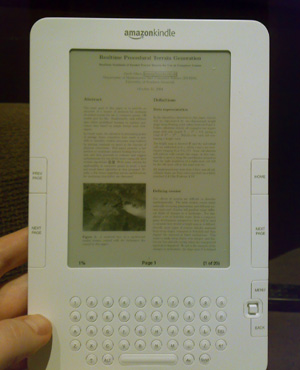
The included PDF reader for example has no zoom option. All you can do is toggle between portrait and landscape. Either way, normal sized text ends up tiny and barely readable.
</p>

<p>
Thankfully, we can still do it ourselves. Armed with PyPDF I wrote a simple script that takes a regular A4/Letter PDF and chops each page into four parts. You can pan through the document just by hitting next. Most of the stuff I read these days is academic, in the classic two column paper format, so this orders the sub-pages to match that.
</p>

<p>
The script is <a href="/files/kindle-zoom/rekindle.py.txt">available for download</a>. It requires Python and <a href="http://pybrary.net/pyPdf/">pyPdf</a>. Usage:
</p>
<p class="codeblock">
<code>python&nbsp;rekindle.py&nbsp;file.pdf
</code>
</p>

<p>
It will produce <code>file.kindle.pdf</code>. The code doesn't actually look at the contents, it just cuts blindy, so it might need adjustment for certain docs.

</p>

<p>
<img class="natural" src="/files/kindle-zoom/kindle.jpg" alt="Kindle Zoom" title="Just right" />
</p>

</div></div>
]]></content>
  </entry>
  
  <entry>
    <title type="html"><![CDATA[Using Web APIs for Research]]></title>
    <link href="https://acko.net/blog/using-web-apis-for-research/"/>
    <updated>2009-01-08T00:00:00+01:00</updated>
    <id>https://acko.net/blog/using-web-apis-for-research</id>
    <content type="html"><![CDATA[<div class="g8 i2 first"><div class="pad"><p>Recently we launched our new product at <a href="http://www.strutta.com/">Strutta</a>, a 'create your own contest site' web service. In each contest, users submit and vote on each other's videos, pictures, songs or writings.
</p>

<p>
As part of the research we did for the development, we wanted to examine our competition. So, I dove into YouTube to try and figure out some of their ideas and algorithms. For me, this wasn't entirely new: when I posted my <a href="/tag/line-rider">Line Rider</a> videos to YouTube, I followed up each video with manual statistics tracking and gained some insight into how a video becomes popular on YouTube. However, that only gave me a very narrow view of the community and its dynamics.
</p>

<p>
Since then though, things have changed a lot. YouTube now has a <a href="http://code.google.com/apis/youtube/overview.html">public API</a> as well as pre-made libraries to use. With these, it becomes very easy to collect statistics and perform your own analysis. So, armed with Python, I set out to investigate YouTube's ubiquitous 'related videos' feature.
</p>

<p>
<a href="http://blog.strutta.com/blog/six-degrees-of-youtube"><img class="natural" src="/files/youtube-degrees/six-degrees.png" alt="Six Degrees of YouTube" /></a>
</p>

<p>
<!--break-->
</p>

<p>
I found it interesting to analyse a big site through their own API rather than screen scraping. Traditionally, one first tries to collect as much data as possible, but the resulting data set can become very unwieldy. In this case, I already had full access and I could focus on exactly which queries I wanted to run, how to aggregate my data, and which measures to focus on.
</p>

<p>
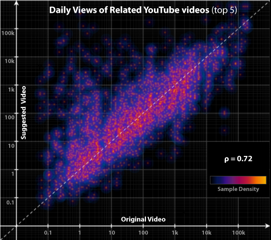
The results revealed some interesting conclusions. My big write-up can be found on the Strutta Blog, aptly titled <a href="http://blog.strutta.com/blog/six-degrees-of-youtube">Six Degrees of YouTube</a>.
</p>

</div></div>
]]></content>
  </entry>
  
</feed>