<?xml version="1.0" encoding="utf-8"?>
<feed xmlns="http://www.w3.org/2005/Atom">

  <title><![CDATA[Acko.net]]></title>
  <link href="http://acko.net/atom.xml" rel="self"/>
  <link href="http://acko.net/"/>
  <updated>2012-05-17T01:12:29-07:00</updated>
  <id>http://acko.net/</id>
  <author>
    <name><![CDATA[Steven Wittens]]></name>
    
  </author>

  
  <entry>
    <title type="html"><![CDATA[My JS1K Demo - The Making Of]]></title>
    <link href="http://acko.net/blog/js1k-demo-the-making-of/"/>
    <updated>2010-08-06T00:00:00-07:00</updated>
    <id>http://acko.net/blog/js1k-demo-the-making-of</id>
    <content type="html"><![CDATA[<div class='g8 i2 first'><div class='pad'>
  
<h1>My JS1K Demo - The Making Of</h1>

<p>If you haven't seen it yet, check out the <a href='http://js1k.com'>JS1K demo contest</a>. The goal is to do something neat in 1 kilobyte of JavaScript code.</p>
<p>I couldn't resist making one myself, so I pulled out my bag of tricks from my <a href='/design/avs'>Winamp music visualization</a> days and started coding. I'm really happy with how it turned out. And no, it won't work in Internet Explorer 8 or less.</p>

<p><em>Edit: OH SNAP! I just rewrote the demo to include volumetric light beams and still fit in 1K:</em></p>

</div></div><div class='g6'><div class='pad'>

<h3>Original Version</h3>
<p><iframe frameborder='0' height='345' id='1kjs' src='about:blank' style='background:#000;border:0' width='510' /></p>
<p><button id='1kjs-stop' onclick='$(&apos;#1kjs&apos;).attr(&apos;src&apos;,&apos;about:blank&apos;);$(this).hide();$(&apos;#1kjs-start&apos;).show();' style='display: none'>Stop Demo</button><button id='1kjs-start' onclick='$(&apos;#1kjs&apos;).attr(&apos;src&apos;,&apos;/files/making-of-js1k/1022b.html&apos;);$(this).hide();$(&apos;#1kjs-stop&apos;).show();'>Start Demo</button><button onclick='$(&apos;#1kjs&apos;).attr(&apos;src&apos;,&apos;/files/making-of-js1k/1022s.html&apos;);$(&apos;#1kjs-start&apos;).show();$(&apos;#1kjs-stop&apos;).hide();'>View Source</button></p>

</div></div><div class='g6'><div class='pad'>

<h3>Improved Version</h3>

<p><iframe frameborder='0' height='345' id='1kjs2' src='about:blank' style='background:#000;border:0' width='510' /></p>
<p><button id='1kjs2-stop' onclick='$(&apos;#1kjs2&apos;).attr(&apos;src&apos;,&apos;about:blank&apos;);$(this).hide();$(&apos;#1kjs2-start&apos;).show();' style='display: none'>Stop Demo</button><button id='1kjs2-start' onclick='$(&apos;#1kjs2&apos;).attr(&apos;src&apos;,&apos;/files/making-of-js1k/1024b.html&apos;);$(this).hide();$(&apos;#1kjs2-stop&apos;).show();'>Start Demo</button><button onclick='$(&apos;#1kjs2&apos;).attr(&apos;src&apos;,&apos;/files/making-of-js1k/1024s.html&apos;);$(&apos;#1kjs2-start&apos;).show();$(&apos;#1kjs2-stop&apos;).hide();'>View Source</button></p>

</div></div><div class='g8 i2'><div class='pad'>

<p>Now, whenever size is an issue, the best way to make a small program is to generate all data on the fly, i.e. procedurally. This saves valuable storage space. While this might seem like a black art, often it just comes down to clever use of (high school) math. And as is often the case, the best tricks are also the simplest, as they use the least amount of code.</p>
<p>To illustrate this, I'm going to break down my demo and show you all the major pieces and shortcuts used. Unlike the actual 1K demo, the code snippets here will feature legible spacing and descriptive variable names.</p>

<h3>Initialization</h3>

<p>JS1K's rules give you a Canvas tag to work with, so the first piece of code initializes it and makes it fill the window.</p>
<p>From then on, it just renders frames of the demo. There are four major parts to this:</p>
<ul>
<li>Animating the wires</li>
<li>Rotating and projecting the wires into the camera view</li>
<li>Coloring the wires</li>
<li>Animating the camera</li>
</ul>
<p>All of this is done 30 times per second, using a normal <code>setInterval</code> timer:</p>
<p class='codeblock'><code>setInterval(function () { ... }, 33);</code></p>

<h3>Drawing Wires</h3>

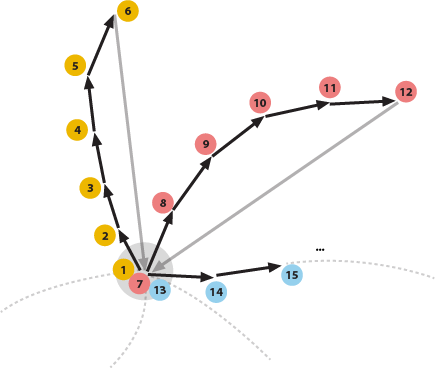
<p>The most obvious trick is that everything in the demo is drawn using only a single primitive: a line segment of varying color and stroke width. This allows the whole drawing process to be streamlined into two tight, nested loops. Each inner iteration draws a new line segment from where the previous one ended, while the outer iteration loops over the different wires.</p>

<p><img alt='drawing process for demo' src='/files/making-of-js1k/drawing-process.png' title='Drawing each wire in sequence.' /></p>

<p>The lines are blended additively, using the built-in 'lighten' mode, which means they can be drawn in any order. This avoids having to manually sort them back-to-front.</p>
<p>To simplify the perspective transformations, I use a coordinate system that places the point (0, 0) in the center of the canvas and ranges from -1 to 1 in both coordinates. This is a compact and convenient way of dealing with varying window sizes, without using up a lot of code:</p>
<p class='codeblock'><code>with (graphics) {<br />&nbsp; ratio = width / height;<br />&nbsp; globalCompositeOperation = &#039;lighter&#039;;<br />&nbsp; scale(width / 2 / ratio, height / 2);<br />&nbsp; translate(ratio, 1);<br />&nbsp; lineWidthFactor = 45 / height;<br />&nbsp; ...</code></p>
<p>I also add a correction <code>ratio</code> for non-square windows and calculate a reference line width <code>lineWidthFactor</code> for later.</p>
<p>Then there's the two nested <code>for</code> loops: one iterating over the wires, and one iterating over the individual points along each wire. In pseudo-code they look like:</p>
<p class='codeblock'><code>For (12 wires =&gt; wireIndex) {<br />&nbsp; Begin new wire<br />&nbsp; For (45 points along each wire =&gt; pointIndex) {<br />&nbsp;&nbsp;&nbsp; Calculate path of point on a sphere: (x,y,z)<br />&nbsp;&nbsp;&nbsp; Extrude outwards in swooshes: (x,y,z)<br />&nbsp;&nbsp;&nbsp; Translate and Rotate into camera view: (x,y,z)<br />&nbsp;&nbsp;&nbsp; Project to 2D: (x,y)<br />&nbsp;&nbsp;&nbsp; Calculate color, width and luminance of this line: (r,g,b) (w,l)<br />&nbsp;&nbsp;&nbsp; If (this point is in front of the camera) {<br />&nbsp;&nbsp;&nbsp;&nbsp;&nbsp; If (the last point was visible) {<br />&nbsp;&nbsp;&nbsp;&nbsp;&nbsp;&nbsp;&nbsp; Draw line segment from last point to (x,y)<br />&nbsp;&nbsp;&nbsp;&nbsp;&nbsp; }<br />&nbsp;&nbsp;&nbsp; }<br />&nbsp;&nbsp;&nbsp; else {<br />&nbsp;&nbsp;&nbsp;&nbsp;&nbsp; Mark this point as invisible<br />&nbsp;&nbsp;&nbsp; }<br />&nbsp;&nbsp;&nbsp; Mark beginning of new line segment at (x,y)<br />&nbsp; }<br />}</code></p>

<h3>Mathbending</h3>

<p>To generate the wires, I start with a formula which generates a sinuous path on a sphere, using latitude/longitude. This controls the tip of each wire and looks like:</p>
<p class='codeblock'><code>offset = time - pointIndex * 0.03 - wireIndex * 3;<br />longitude = cos(offset + sin(offset * 0.31)) * 2<br />&nbsp;&nbsp;&nbsp;&nbsp;&nbsp;&nbsp;&nbsp;&nbsp;&nbsp; + sin(offset * 0.83) * 3 + offset * 0.02;<br />latitude = sin(offset * 0.7) - cos(3 + offset * 0.23) * 3;</code></p>
<p>This is classic procedural coding at its best: take a time-based <code>offset</code> and plug it into a random mish-mash of easily available functions like cosine and sine. Tweak it until it 'does the right thing'. It's a very cheap way of creating interesting, organic looking patterns.</p>
<p>This is more art than science, and mostly just takes practice. Any time spent with a graphical calculator will definitely pay off, as you will know better which mathematical ingredients result in which shapes or patterns. Also, there are a couple of things you can do to maximize the appeal of these formulas.</p>
<p>First, always include some non-linear combinations of operators, e.g. nesting the sin() inside the cos() call. Combined, they are more interesting than when one is merely overlaid on the other. In this case, it turns regular oscillations into time-varying frequencies.</p>
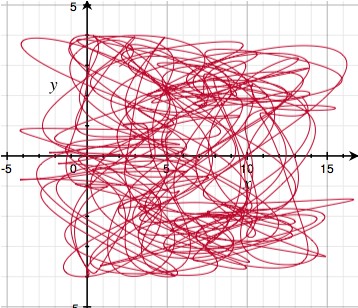
<p>Second, always scale different wave periods using prime numbers. Because primes have no factors in common, this ensures that it takes a very long time before there is a perfect repetition of all the individual periods. Mathematically, the <a href='http://www.wolframalpha.com/input/?i=%28least+common+multiple+of+%28100+31+83+70+23%29%29+%2F+100'>least common multiple of the chosen periods</a> is huge (414253 units ~ 4.8 hours). Plotting the longitude/latitude for <code>offset = 0..600</code> you get:</p>
<p><img alt='a pseudo-random set of oscillations' src='/files/making-of-js1k/js1k-2.jpg' title='Looks pretty random' /></p>
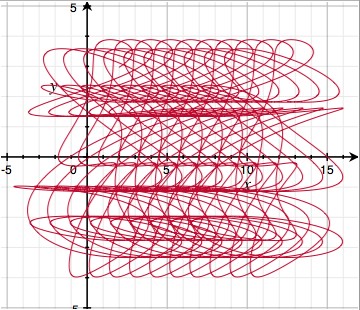
<p>The graph looks like a random tangled curve, with no apparent structure, which makes for motions that never seem to repeat. If however, you reduce each constant to only a single significant digit (e.g. 0.31 -> 0.3, 0.83 -> 0.8), then suddenly repetition becomes apparent:</p>
<p><img alt='a not so pseudo-random set of oscillations' src='/files/making-of-js1k/js1k-3.jpg' title='Not so random' /></p>
<p>This is because the least common multiple has <a href='http://www.wolframalpha.com/input/?i=%28least+common+multiple+of+%28100+30+80+70+20%29%29+%2F+100'>dropped to 84 units ~ 3.5 seconds</a>. Note that both formulas have the same code complexity, but radically different results. This is why all procedural coding involves some degree of creative fine tuning.</p>
<h3>Extrusion</h3>

<p>Given the formula for the tip of each wire, I can generate the rest of the wire by sweeping its tail behind it, delayed in time. This is why <code>pointIndex</code> appears as a negative in the formula for <code>offset</code> above. At the same time, I move the points outwards to create long tails.</p>
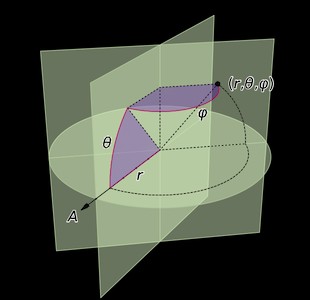
<p>I also need to convert from lat/long to regular 3D XYZ, which is done using the <a href='http://en.wikipedia.org/wiki/Spherical_coordinate_system'>spherical coordinate transform</a>:</p>
<p><img alt='spherical coordinates' src='/files/making-of-js1k/js1k-4.jpg' /><center>Source: <a href='http://en.wikipedia.org/wiki/File:Coord_system_SE_0.svg'>Wikipedia</a></center></p>
<p class='codeblock'><code>distance = f.sqrt(pointIndex+.2);<br />x = cos(longitude) * cos(latitude) * distance;<br />y = sin(longitude) * cos(latitude) * distance;<br />z = sin(latitude) * distance;</code></p>
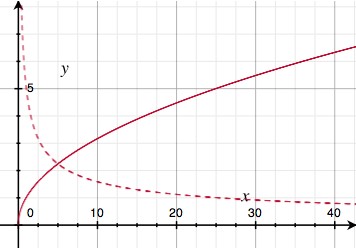
<p>You might notice that rather than making <code>distance</code> a straight up function of the length <code>pointIndex</code> along the wire, I applied a square root. This is another one of those procedural tricks that seems arbitrary, but actually serves an important visual purpose. This is what the square root looks like (solid curve):</p>
<p><img alt='square root' src='/files/making-of-js1k/js1k-5.jpg' /></p>
<p>The dotted curve is the square root's derivative, i.e. it indicates the slope of the solid curve. Because the slope goes down with increasing distance, this trick has the effect of slowing down the outward motion of the wires the further they get. In practice, this means the wires are more tense in the middle, and more slack on the outside. It adds just enough faux-physics to make the effect visually appealing.</p>
<h3>Rotation and Projection</h3>

<p>Once I have absolute 3D coordinates for a point on a wire, I have to render it from the camera's point of view. This is done by moving the origin to the camera's position (X,Y,Z), and applying two rotations: one around the vertical (yaw) and one around the horizontal (pitch). It's like spinning on a wheely chair, while tilting your head up/down.</p>
<p class='codeblock'><code>x -= X; y -= Y; z -= Z;<br /><br />x2 = x * cos(yaw) + z * sin(yaw);<br />y2 = y;<br />z2 = z * cos(yaw) - x * sin(yaw);<br /><br />x3 = x2;<br />y3 = y2 * cos(pitch) + z2 * sin(pitch);<br />z3 = z2 * cos(pitch) - y2 * sin(pitch);</code></p>
<p>The camera-relative coordinates are projected in perspective by dividing by Z — the further away an object, the smaller it is. Lines with negative Z are behind the camera and shouldn't be drawn. The width of the line is also scaled proportional to distance, and the first line segment of each wire is drawn thicker, so it looks like a plug of some kind:</p>
<p class='codeblock'><code>plug = !pointIndex;<br />lineWidth = lineWidthFactor * (2 + plug) / z3;<br />x = x3 / z3;<br />y = y3 / z3;<br /><br />lineTo(x, y);<br />if (z3 &gt; 0.1) {<br />&nbsp; if (lastPointVisible) {<br />&nbsp;&nbsp;&nbsp; stroke();<br />&nbsp; }<br />&nbsp; else {<br />&nbsp;&nbsp;&nbsp; lastPointVisible = true;<br />&nbsp; }<br />}<br />else {<br />&nbsp; lastPointVisible = false;<br />}<br />beginPath();<br />moveTo(x, y);</code></p>
<h3>Coloring</h3>
<p>Each line segment also needs an appropriate coloring. Again, I used some trial and error to find a simple formula that works well. It uses a sine wave to rotate overall luminance in and out of the (Red, Green, Blue) channels in a deliberately skewed fashion, and shifts the R component slowly over time. This results in a nice varied palette that isn't overly saturated.</p>
<p class='codeblock'><code>pulse = max(0, sin(time * 6 - pointIndex / 8) - 0.95) * 70;<br />luminance = round(45 - pointIndex) * (1 + plug + pulse);<br />strokeStyle=&#039;rgb(&#039; + <br />&nbsp; round(luminance * (sin(plug + wireIndex + time * 0.15) + 1)) + &#039;,&#039; + <br />&nbsp; round(luminance * (plug + sin(wireIndex - 1) + 1)) + &#039;,&#039; +<br />&nbsp; round(luminance * (plug + sin(wireIndex - 1.3) + 1)) +<br />&nbsp; &#039;)&#039;;</code></p>
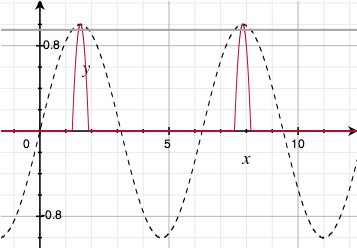
<p>Here, <code>pulse</code> causes bright pulses to run across the wires. I start with a regular sine wave over the length of the wire, but truncate off everything but the last 5% of each crest to turn it into a sparse pulse train:</p>
<p><img alt='sine pulse train' src='/files/making-of-js1k/js1k-6.jpg' /></p>
<h3>Camera Motion</h3>

<p>With the main visual in place, almost all my code budget is gone, leaving very little room for the camera. I need a simple way to create consistent motion of the camera's X, Y and Z coordinates. So, I use a neat low-tech trick: repeated interpolation. It looks like this:</p>
<p class='codeblock'><code>sample += (target - sample) * fraction</code></p>
<p><code>target</code> is set to a random value. Then, every frame, <code>sample</code> is moved a certain fraction towards it (e.g. <code>0.1</code>). This turns <code>sample</code> into a smoothed version of <code>target</code>. Technically, this is a <em>one-pole low-pass filter</em>.</p>
<p>This works even better when you apply it twice in a row, with an intermediate value being interpolated as well:</p>
<p class='codeblock'><code>intermediate += (target - intermediate) * fraction<br />sample += (intermediate - sample) * fraction</code></p>
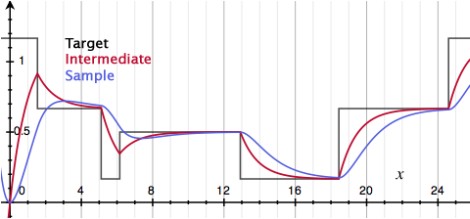
<p>A sample run with <code>target</code> being changed at random might look like this:</p>
<p><img alt='sine pulse train' src='/files/making-of-js1k/js1k-7.jpg' /></p>
<p>You can see that with each interpolation pass, more discontinuities get filtered out. First, jumps are turned into kinks. Then, those are smoothed out into nice bumps.</p>
<p>In my demo, this principle is applied separately to the camera's X, Y and Z positions. Every ~2.5 seconds a new target position is chosen:</p>
<p class='codeblock'><code>if (frames++ &gt; 70) {<br />&nbsp; Xt = random() * 18 - 9;<br />&nbsp; Yt = random() * 18 - 9;<br />&nbsp; Zt = random() * 18 - 9;<br />&nbsp; frames = 0;<br />}<br /><br />function interpolate(a,b) {<br />&nbsp; return a + (b-a) * 0.04;<br />}<br /><br />Xi = interpolate(Xi, Xt);<br />Yi = interpolate(Yi, Yt);<br />Zi = interpolate(Zi, Zt);<br /><br />X&nbsp; = interpolate(X,&nbsp; Xi);<br />Y&nbsp; = interpolate(Y,&nbsp; Yi);<br />Z&nbsp; = interpolate(Z,&nbsp; Zi);</code></p>
<p>The resulting path is completely smooth and feels quite dynamic.</p>
<h3>Camera Rotation</h3>

<p>The final piece is orienting the camera properly. The simplest solution would be to point the camera straight at the center of the object, by calculating the appropriate <code>pitch</code> and <code>yaw</code> directly off the camera's position (X,Y,Z):</p>
<p class='codeblock'><code>yaw&nbsp;&nbsp; = atan2(Z, -X);<br />pitch = atan2(Y, sqrt(X * X + Z * Z));</code></p>
<p>However, this gives the demo a very static, artificial appearance. What's better is making the camera point in the right direction, but with just enough freedom to pan around a bit.</p>
<p>Unfortunately, the 1K limit is unforgiving, and I don't have any space to waste on more 'magic' formulas or interpolations. So instead, I cheat by replacing the formulas above with:</p>
<p class='codeblock'><code>yaw&nbsp;&nbsp; = atan2(Z, -X * 2);<br />pitch = atan2(Y * 2, sqrt(X * X + Z * Z));</code></p>
<p>By multiplying X and Y by 2 strategically, the formula is 'wrong', but the error is limited to about 45 degrees and varies smoothly. Essentially, I gave the camera a lazy eye, and got the perfect dynamic motion with only 4 bytes extra!</p>
<h3>Addendum</h3>

<p>After seeing the other demos in the contest, I wasn't so sure about my entry, so I started working on a version 2. The main difference is the addition of glowy light beams around the object.</p>
<p>As you might suspect, I'm cheating massively here: rather than do physically correct light scattering calculations, I'm just using a 2D effect. Thankfully it comes out looking great.</p>
<p>Essentially, I take the rendered image, and process it in a second Canvas that is hidden. This new image is then layered on the original.</p>
<p>I take the image and repeatedly blend it with a zoomed out copy of itself. With every pass the number of copies doubles, and the zoom factor is squared every time. After 3 passes, the image has been smeared out into an 8 = 2<sup>3</sup> 'tap' radial blur. I lock the zooming to the center of the 3D object. This makes the beams look like they're part of the 3D world rather than drawn on later.</p>
<p>For additional speed, the beam image is processed at half the resolution. As a side effect, the scaling down acts like a slight blur filter for the beams.</p>
<p>Unfortunately, this effect was not very compact, as it required a lot of drawing mode changes and context switches. I had no room for it  in the source code.</p>
<p>So, I had to squeeze out some more room in the original. First, I simplified the various formulas to the bare minimum required for interesting visuals. I replaced the camera code with a much simpler one, and started aggressively shaving off every single byte I could find. Then I got creative, and ended up recreating the secondary canvas every frame just to avoid switching back its state to the default.</p>
<p>Eventually, after a lot of bit twiddling, a version came out that was 1024 bytes long. I had to do a lot of unholy things to get it to fit, but I think the end result is worth it ;). </p>
<h3>Closing Thoughts</h3>

<p>I've long been a fan of the demo scene, and fondly remember <a href='http://www.youtube.com/watch?v=dQveVMQDJlg'>Second Reality</a> in 1993 as my introduction to the genre. Since then, I've always looked at math as a tool to be mastered and wielded rather than subject matter to be absorbed.</p>
<p>With this blog post, I hope to inspire you to take the plunge and see where some simple formulas can take you.</p>

</div></div>]]></content>
  </entry>
  
  <entry>
    <title type="html"><![CDATA[Making Worlds 4 - The Devil's in the Details]]></title>
    <link href="http://acko.net/blog/making-worlds-4-the-devils-in-the-details/"/>
    <updated>2009-12-25T00:00:00-08:00</updated>
    <id>http://acko.net/blog/making-worlds-4-the-devils-in-the-details</id>
    <content type="html"><![CDATA[<div class='g8 i2 first'><div class='pad'><h1>Making Worlds 4 - The Devil's in the Details</h1>
  
<aside class='r'><img alt='' src='/files/making-worlds/planet-3-th.jpg' /></aside>

<p>Last time I'd reached a pretty neat milestone: being able to render a somewhat realistic rocky surface from space. The next step is to add more detail, so it still looks good up close.
</p>

<p>
Adding detail is, at its core, quite straightforward. I need to increase the resolution of the surface textures, and further subdivide the geometry. Unfortunately I can't just crank both up, because the resulting data is too big to fit in graphics memory. Getting around this will require several changes.
</p>

<h3>Strategy</h3>

<p>
Until now, the level-of-detail selection code has only been there to decide which portions of the planet should be <em>drawn</em> on screen. But the geometry and textures to choose from are all prepared up front, at various scales, before the first frame is started. The surface is generated as one high-res planet-wide map, using typical cube map rendering:
</p>

<p>
<img alt='' src='/files/making-worlds/cubemap-rendering.png' title='Rendering an entire cube face at a time' />
</p>

<p>
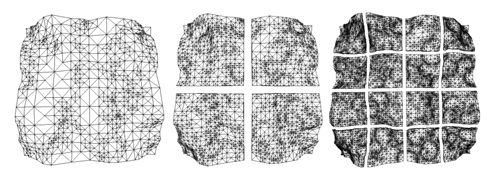
This map is then divided into a quad-tree structure of surface tiles. It allows me to adaptively draw the surface at several pre-defined levels of detail, in chunks of various sizes.
<!--break-->
</p>

<p class='tc'>
<img alt='Quadtree terrain' src='/files/making-worlds/planets-1-quadtree.png' /><small><a href='http://tulrich.com/geekstuff/sig-notes.pdf'>Source</a></small>
</p>

<p>
This strategy won't suffice, because each new level of detail doubles the work up-front, resulting in exponentially increasing time and memory cost. Instead, I need to write an adaptive system to generate and represent the surface on the fly. This process is driven by the Level-of-Detail algorithm deciding if it needs more detail in a certain area. Unlike before, it will no longer be able to make snap decisions and instant transitions between pre-loaded data: it will need to wait several frames before higher detail data is available.
</p>

<p>
<img alt='Configuration of chunks to render' src='/files/making-worlds/planet-lod-tree.png' />
</p>

<p>
Uncontrolled growth of increasingly detailed tiles is not acceptable either: I only wish to maintain tiles useful for rendering views from the current camera position. So if a specific detailed portion of the planet is no longer being used—because the camera has moved away from it—it will be discarded to make room for other data.
</p>

<h2>Generating Individual Tiles</h2>

<p>
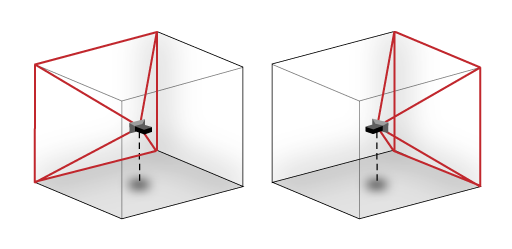
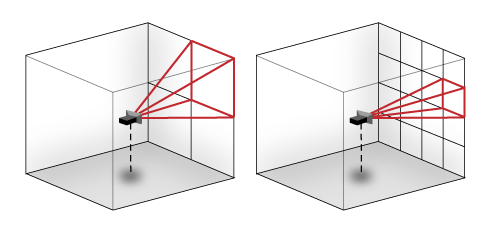
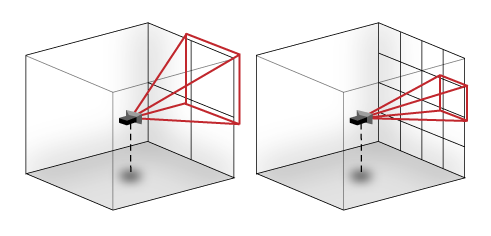
The first step is to be able to generate small portions of the surface on demand. Thankfully, I don't need to change all that much. Until now, I've been generating the cube map one cube face at a time, using a virtual camera at the middle of the cube. To generate only a portion of the surface, I have to narrow the virtual camera's viewing cone and skew it towards a specific point, like so:
</p>

<p>
<img alt='' src='/files/making-worlds/cubemap-rendering-subdivision.png' title='Rendering one face tile at a time' />
</p>

<p>
This is easy using a mathematical trick called <a href='http://en.wikipedia.org/wiki/Homogeneous_coordinates'>homogeneous coordinates</a>, which are commonly used in 3D engines. This turns 2D and 3D vectors into respectively 3D and 4D. Through this dimensional redundancy, we can then represent most geometrical transforms as a 4x4 matrix multiplication. This covers all transforms that translate, scale, rotate, shear and project, in any combination. The right sequence (i.e. multiplication) of transforms will map regular 3D space onto the skewed camera viewing cone.
</p>

<p>
Given the usual centered-axis projection matrix, the off-axis projection matrix is found by multiplying with a scale and translate matrix in so-called "screen space", i.e. at the very end. The thing with homogeneous coordinates is that it seems like absolute crazy talk until you get it. I can only recommend you read a <a href='http://www.cim.mcgill.ca/~langer/558/lecture3.pdf'>good introduction to the concept</a>.
</p>

<p>
With this in place, I can generate a zoomed height map tile anywhere on the surface. As long as the underlying brushes are detailed enough, I get arbitrarily detailed height textures for the surface. The normal map requires a bit more work however. 
</p>

<h3>Normals and Edges</h3>

<p>
As I described in <a href='http://acko.net/blog/making-worlds-3-thats-no-moon'>my last entry</a>, normals are generated by comparing neighbouring samples in the height map. At the edges of the height map texture, there are no neighbouring samples to use. This wasn't an issue before, because the height map was a seamless planet-wide cube map, and samples were fetched automatically from adjacent cube faces. In an adaptive system however, the map resolution varies across the surface, and there's no guarantee that those neighbouring tiles will be available at the desired resolution.
</p>

<p>
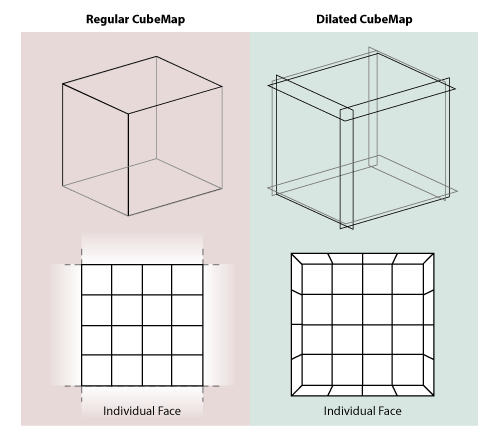
The easy way out is to make sure the process of generating any single tile is entirely self-sufficient. To do this, I expand each tile with a 1 pixel border when generating it. Each such tile is a perfectly dilated version of its footprint and overlaps with its neighbours in the border area:
</p>

<p>
<img alt='' src='/files/making-worlds/cubemap-rendering-subdivision-dilated.png' title='Rendering one face tile at a time' />
</p>

<p>
This way all the pixels in the undilated area have easily accessible neighbour pixels to sample from. This border is only used during tile generation, and cropped out at the end. Luckily I did something similar when I <a href='http://acko.net/blog/making-worlds-2-scaling-heights'>played with dilated cube maps</a> before, so I already had the technique down. When done correctly, the tiles match up seamlessly without any additional correction.
</p>

<h3>Adaptive Tree</h3>

<p>
Now I need to change the data structure holding the mesh. To make it adaptive, I've rewritten it in terms of real-time 'split' and 'merge' operations.
</p>

<p>
Just like before, the Level-of-Detail algorithm traverses the tree to determine which tiles to render. But if the detail available is not sufficient, the algorithm can decide that a certain tile in the tree needs a more detailed surface texture, or that its geometry should be split up further. Starting with only a single root tile for each cube face, the algorithm divides up the planet surface recursively, quickly converging to a stable configuration around the camera.
</p>

<p>
As the camera moves around, new tiles are generated, increasing memory usage. To counter this steady stream of new data, the code identifies tiles that fall into disuse and merges them back into their parent. The overall effect is that the tree grows and shrinks depending on the camera position and angle.
</p>

<h3>Queuing and scheduling</h3>

<p>
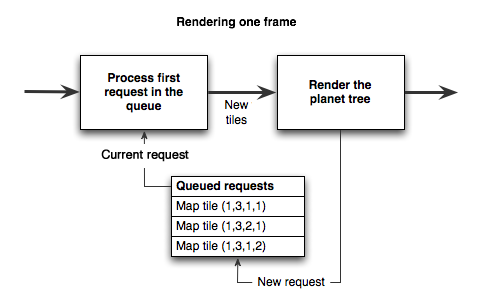
To do all this real-time, I need to queue up the various operations that modify the tree, such as 'split', 'merge' and 'generate new tile'. They need to be executed in between rendering regular frames on screen. Whenever the renderer decides a certain tile is not detailed enough, a request is placed in a job queue to address this.
</p>

<p>
While continuing to render regular frames, these requests need to be processed. This is harder than it sounds, because both planet rendering and planet generation have to share the GPU, preferably without causing major stutters in rendering speed.
</p>

<p>
The solution is to spread this process over enough visible frames so that the overal rendering speed is not significantly affected. For example, if a new surface texture is requested, several passes are made. First the height map is rendered, the next frame the normal map is derived from it, then the height/normal maps are analyzed and put into the tree, after which they will finally appear on screen:
</p>

<p>
<img alt='' src='/files/making-worlds/queued-frame-pipeline.png' title='Rendering one frame' />
</p>

<p>
I took some inspiration from <a href='http://s09.idav.ucdavis.edu/talks/05-JP_id_Tech_5_Challenges.pdf'>id Tech 5</a>, the next engine coming from technology powerhouse id Software. They describe a queued job system that covers any frame-to-frame computation in a game engine (from texture management to collision detection), and which schedules tasks intelligently.
</p>

<h2>Do the Google Earth</h2>

<p>
With all the above in place, the engine can now progressively increase the detail of the planet across several orders of magnitude. Here's a video that highlights it:
</p>

<p>
<object height='380' width='560'><param name='movie' value='http://www.youtube.com/v/ck27Xu5XAJE&amp;hl=en_US&amp;fs=1&amp;' /><param name='allowFullScreen' value='true' /><param name='allowscriptaccess' value='always' /><embed allowfullscreen='true' allowscriptaccess='always' height='380' src='http://www.youtube.com/v/ck27Xu5XAJE&amp;hl=en_US&amp;fs=1&amp;' type='application/x-shockwave-flash' width='560' /></object>
</p>

<p>
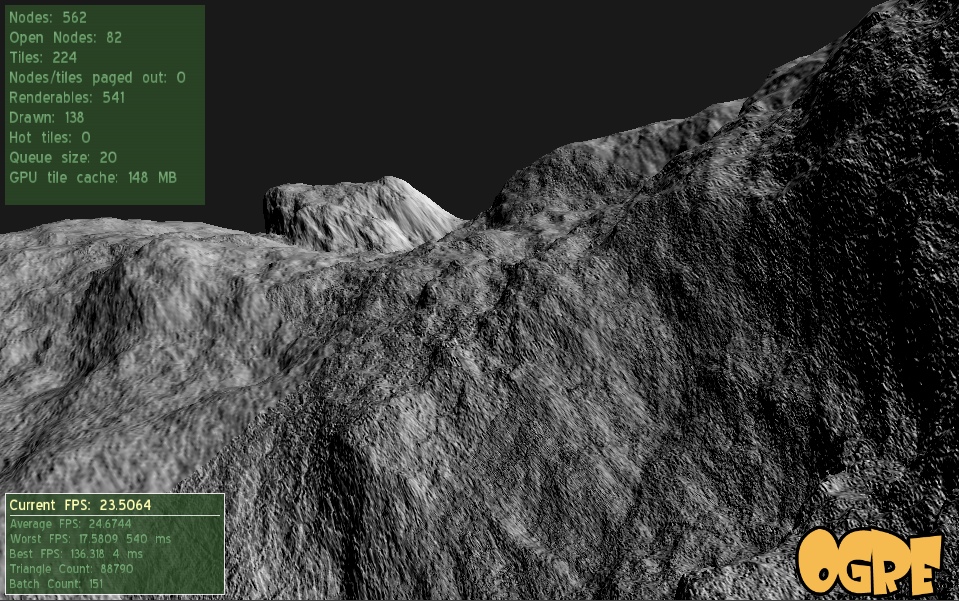
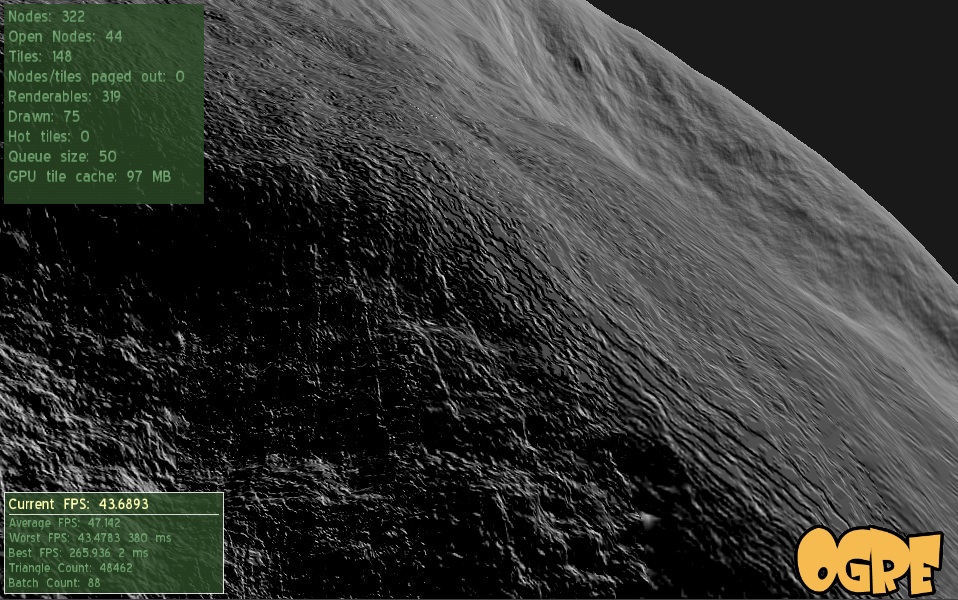
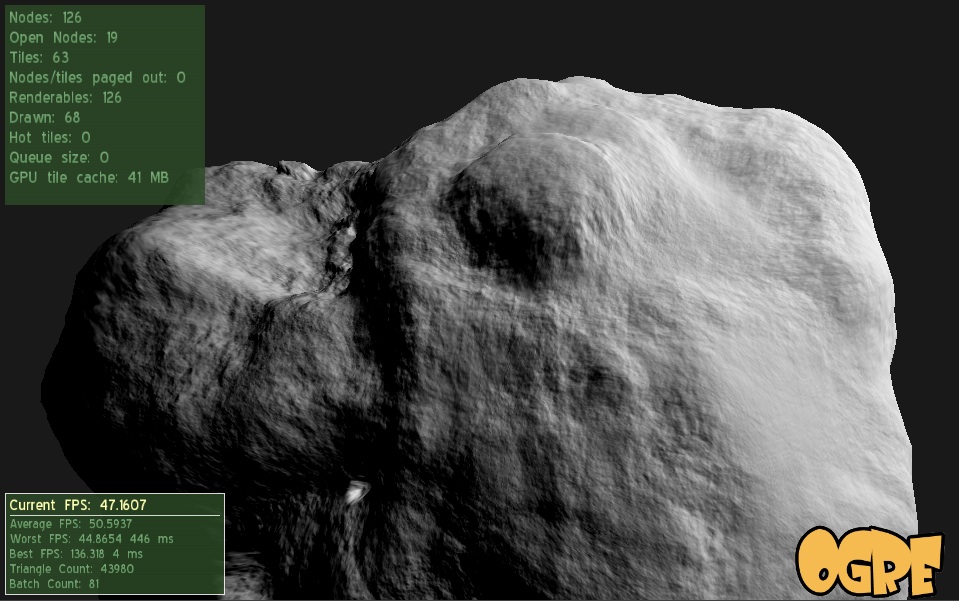
And some shots that show off the detail:
</p>

</div></div><div class='g12'><div class='pad'>

<p class='flat'>
<img alt='' src='/files/making-worlds/planet-1.jpg' />
</p>

<p class='flat'>
<img alt='' src='/files/making-worlds/planet-2.jpg' />
</p>

<p class='flat'>
<img alt='' src='/files/making-worlds/planet-3.jpg' />
</p>

</div></div><div class='g8 i2'><div class='pad'>

<p>
W00t, certainly one of the niftiest things I've built.
</p>

<h3>Engine tweaks</h3>

<p>
Along with the architecture changes, I implemented some engine tweaks, noted here for completeness.
</p>

<p>
In previous comments, <a href='/blog/making-worlds-part-1-of-spheres-and-cubes'> Erlend suggested</a> using displacement mapping, so I gave it a shot. Before, the mesh for every tile was calculated on the CPU once, then copied into GPU memory. However, this mesh data was redundant, because it was derived literally from the height map data. Instead I changed it so that now, the transformation of mesh points onto the sphere surface happens real-time on the GPU in a per-vertex program.
</p>

<p>
This saves memory and pre-calculation time, but increases the rendering load. I'll have to see whether this technique is sustainable, but overall, it seems to be performing just fine. As a side effect, the terrain height map can be changed real-time with very low cost.
</p>

<h3>Technical hurdles</h3>

<p>
I spent some time tweaking the engine to run faster, but there's still plenty of work and some technical hurdles to cover.
</p>

<p>
One involves the Ogre Scene Manager, which is the code object that manages the location of objects in space. In my case, I have to deal with both the 'real world' in space as well as the 'virtual world' of brushes that generate the planet's surface. I chose to use two independent scene managers to represent this, as it seemed like a natural choice. However, it turns out this is <a href='http://www.ogre3d.org/mantis/view.php?id=130'>unsupported</a> by Ogre and causes <a href='http://www.ogre3d.org/forums/viewtopic.php?p=189032'>random crashes and edge cases</a>. Argh. It looks like I'll have to refactor my code to fix this.
</p>

<p>
Another major hurdle involves the planet surface itself. Currently I'm still just using a single distored-crater-brush to create it, and the lack of variation is showing.
</p>

<p>
Finally, surfaces are being generated using 16-bit floating point height values, and their accuracy is not sufficient beyond a couple levels of zooming. This results in ugly bands of flat terrain. To fix this I'll need to increase the surface accuracy.
</p>

<h2>Future steps</h2>

<p>
With the basic planet surface covered, I can now start looking at color, atmosphere and clouds. I have plenty of reading and experimentation to do. Thankfully the web is keeping me supplied with a steady stream of awesome papers... nVidia's GPU Gems series has proven to be a gold mine, for example.
</p>

<p>
Random factoid: what game developers call a "cube map", cartographers call a "cubic gnomonic grid". It turns out that knowing the right terminology is important when you're looking for reference material...
</p>

<h3>Code</h3>

<p>
The code is <a href='https://github.com/unconed/NFSpace'>available on GitHub</a>.
</p>

<h3>References</h3>

<p>
Great ideas are best discovered when standing on the shoulders of giants:
</p>

<ul>
<li><a href='http://s09.idav.ucdavis.edu/talks/05-JP_id_Tech_5_Challenges.pdf'>id Tech 5 Challenges, From Texture Virtualization to Massive Parallelization</a>, J.M.P. van Waveren, id Software</li>
<li><a href='http://developer.nvidia.com/object/gpu_gems_home.html'>GPU Gems</a>, nVidia</li>
</ul>

</div></div>]]></content>
  </entry>
  
  <entry>
    <title type="html"><![CDATA[Making Worlds - Intermission]]></title>
    <link href="http://acko.net/blog/making-worlds-intermission/"/>
    <updated>2009-11-07T00:00:00-08:00</updated>
    <id>http://acko.net/blog/making-worlds-intermission</id>
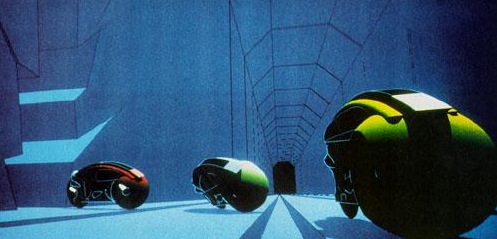
    <content type="html"><![CDATA[<div class='g8 i2 first'><div class='pad'><h1>Making Worlds - Intermission</h1><p>Today at <a href='http://bazcampyvr.pbworks.com'>BazCamp YVR</a> I gave a short presentation and demo of my "Making Worlds" project, as well as an overview of procedural content generation in general.
</p>

<p>
The <a href='/files/making-worlds/Making-Worlds-BazCampYVR.pdf'>slides are available for download</a>.
</p>

<p>
<img alt='Tron' src='/files/making-worlds/lightcycles.jpg' />
</p>

</div></div>]]></content>
  </entry>
  
  <entry>
    <title type="html"><![CDATA[Making Worlds 2 - Scaling Heights]]></title>
    <link href="http://acko.net/blog/making-worlds-2-scaling-heights/"/>
    <updated>2009-08-31T00:00:00-07:00</updated>
    <id>http://acko.net/blog/making-worlds-2-scaling-heights</id>
    <content type="html"><![CDATA[<div class='g8 i2 first'><div class='pad'>
<h1>Making Worlds 2 - Scaling Heights</h1>

<p>Last time, I had a working, smooth sphere mesh. The next step is to create terrain.
</p>

<h2>Scale</h2>

<p>
Though my goal is to render at a huge range of scales, I'm going to focus on views from space first. That strongly limits how much detail I need to store and render. Aside from being a good initial sandbox in terms of content generation, it also means I can comfortably keep using my current code, which doesn't do any sophisticated memory or resource management yet. I'd much rather work on getting something interesting up first rather than work on invisible infrastructure.
</p>

<p>
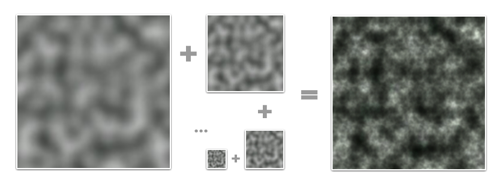
That said, this is not necessarily a limitation. The interesting thing about procedural content is that every generator you build can be combined with many others, including a copy of itself. In the case of terrain, there are definite fractal properties, like self-similarity at different levels of scale. This means that once I've generated the lowest resolution terrain, I can generate smaller scale variations and combine them with the larger levels for more detail. This can be repeated indefinitely and is only limited by the amount of memory available.
</p>

<p class='tc'><img alt='Example of Perlin Noise' src='/files/making-worlds/planet-2-perlin-noise.png' />
<a href='http://en.wikipedia.org/wiki/Perlin_noise'>Perlin Noise</a> is a celebrated classic procedural algorithm,<br />
often used as a fractal generator.
</p>

<h2>Height</h2>
<p>
To build terrain, I need to create heightmaps for all 6 cube faces. Shamelessly stealing more ideas from Spore, I'm doing this on the GPU instead of the CPU, for speed. The GPU normally processes colored pixels, but there's no reason why you can't bind a heightmap's contents as a grayscale (one channel) image and 'draw' into it. As long I build my terrain using simple, repeated drawing operations, this will run incredibly fast.
</p>

<p>
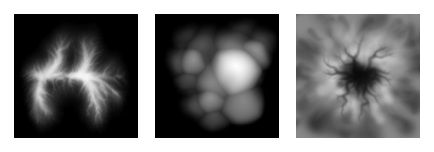
In this case, I'm stamping various brushes onto the sphere's surface to create bumps and pits. Each brush is a regular PNG image which is projected onto the surface around a particular point. The luminance of the brush's pixels determines whether to raise or lower terrain and by how much.
</p>

<p class='tc'>
<img alt='Brushes from Spore' src='/files/making-worlds/planet-2-spore-brushes.png' /><br />
Three example brushes from Spore. (<a href='http://www.cs.cmu.edu/~ajw/s2007/0251-SphericalWorlds.pdf'>source</a>)
</p>

<p>
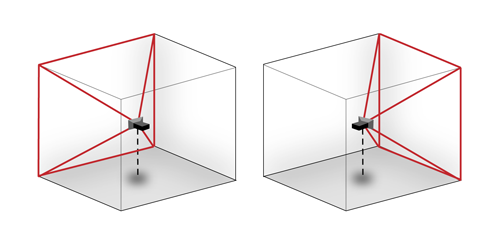
However, while the brushes need to appear seamless on the final sphere, the drawing area consists only of the straight, square set of cube map faces. It might seem tricky to make this work so that the terrain appears undistorted on the curved sphere grid, but in fact, this distortion is neatly compensated for by good old perspective. All I need to do is set up a virtual scene in 3D, where the brushes are actual shapes hovering around the origin and facing the center. Then, I place a camera in the middle and take a snapshot both ways along each of the main X, Y and Z directions with a perfect 90 degree field of view. The resulting 6 images can then be tiled to form a distortion-free cube map.
</p>

<p>
<img alt='Rendering a cubemap' src='/files/making-worlds/planet-2-cubemap-rendering.png' />
Rendering two different cube map faces. The red area is the camera's viewing cone/pyramid, which extends out to infinity.
</p>

<p>
To get started I built a very simple prototype, using Ogre's scene manager facilities. I'm starting with just a simple, smooth crater/dent brush. I generate all 6 faces in sequence on the GPU, pull the images back to the CPU to create the actual mesh, and push the resulting chunks of geometry into GPU memory. This is only done once at the beginning, although the possibility is there to implement live updates as well.
</p>

<p>
Here's a demo showing a planet and the brushes that created it, hovering over the surface. I haven't implemented any shading yet, so I have to toggle back and forth to wireframe mode so you can see the dents made by the brushes:
</p>

<p>
<object height='380' width='560'><param name='movie' value='http://www.youtube.com/v/AX_LiBnZJTc&amp;hl=en&amp;fs=1&amp;' /><param name='allowFullScreen' value='true' /><param name='allowscriptaccess' value='always' /><embed allowfullscreen='true' allowscriptaccess='always' height='380' src='http://www.youtube.com/v/AX_LiBnZJTc&amp;hl=en&amp;fs=1&amp;' type='application/x-shockwave-flash' width='560' /></object>
</p>

<p>
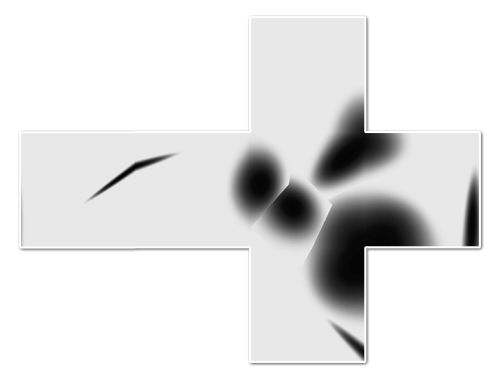
The cubemap for this 'planet' looks like this when flattened. You can see that I haven't actually implemented real terrain carving, because brushes cause sharp edges when they overlap:
</p>

<p>
<img alt='Generated planet cubemap' src='/files/making-worlds/planet-2-cubemap.png' />
</p>

<p>
The narrow dent on the left gets distorted and angular where it crosses the cube edge. This is a normal consequence of the cubemapping, as it looks perfectly normal when mapped onto the sphere in the video.
</p>

<h2>Engine Tweaks</h2>

<p>
The demo above also incorporates a couple of engine improvements. With a real heightmap in place, I can implement real level-of-detail selection. That means the resolution of any terrain tile is decided based on how much detail would be lost if a simpler tile was used. The flatter a tile, the less detail is necessary. This ensures complex geometry is used only on those sections that really need it. This is great for visual fidelity, but causes a lot of geometry to pop up if sharp ridges are present in the terrain. In this case, my rendering engine was happily trying to push 700k triangles through the GPU per frame. While even my laptop GPU can actually do that at pretty smooth frame rates nowadays, some optimizations are in order to give me some breathing room.
</p>

<p>
The culprit was that I wasn't really doing any early removal of geometry that was hidden or otherwise out of frame. To fix that, I now do visibility checks together with the level-of-detail selection. First it checks if a chunk is over the horizon or not before considering it for selection. This is easy to calculate and eliminates a lot of unnecessary drawing, especially when looking straight down. If that first visibility check passes, I perform a tighter check using the camera's viewing cone. With these two measures in place, I'm only averaging about 50,000-100,000 triangles visible per frame, with room for more optimization. These optimizations only remove geometry that's already off screen, so there is no visual difference.
</p>

<h3>Cubemap Seams and Dilation</h3>

<p>
When rendering into cube maps, each side is rendered independently. In theory each face should match perfectly with adjacent ones due to the way they've been created. In practice however, slight mismatches can occur due to rounding errors at the edges, creating seams. This can be fixed by explicitly copying one pixel-wide edges from one face into the adjacent ones, until they all match up.
</p>

<p>
The next big step is to start shading the surface, but in order to do that I need to be able to run filters on the cube map. Specifically, I need to be able to compare neighbouring height samples anywhere on the surface. In the straight forward cubemap scenario this is non-trivial, because neighbouring samples at the edges need to be fetched from different cube faces at different orientations in space.
</p>

<p>
I decided to implement something I call 'dilated cubemaps'. I've never really heard this described formally, though I doubt it's never been thought of before:
</p>

<p>
<img alt='A dilated cubemap' src='/files/making-worlds/planet-2-dilated-cubemap.png' />
</p>

<p>
Instead of every face neatly matching with the next, I dilate the cube faces so they stick through eachother. At the same time, I use a larger texture size to compensate, and I adjust the field-of-view of the rendering camera to match. If done right, the resulting cubemap is a pixel-perfect expanded version of the undilated map.
</p>

<p>
The dilated cubemap provides reliable neighbouring samples for all samples in the original cube map up to a distance as wide as the new border. Unlike regular cubemap wrapping, the dilated regions are distorted to conform to the current face's grid. This matches the real change in grid direction that occurs on the final sphere mesh and lets you sample exactly across cube map edges.
</p>

<p>
I played with the cubemap dilation because I was thinking of some complicated filters to run that require regular grids (like CFD). But in retrospect, I probably don't need the exact spacing of sample points at the edges for this, so regular undilated cubemapping will probably do. Still, it's good to have around, and certainly was an interesting exercise in pixel-exact rendering.
</p>

<h2>What Next?</h2>

<p>
With basic heightmap generation in place, I can now start putting in some 'tech artist' time to play with various brushes and drawing behaviour. Lighting and shading is another big one and should provide a massive improvement to the visuals.
</p>

<p>
Right now I've taken a week between postings, though it remains to be seen whether I can maintain that. Creating these blog entries is turning into a pretty time consuming endeavour, especially as I get into territory where I have to make my own diagrams and illustrations.
</p>

<h3>References</h3>

<p>
The techniques I used were pioneered by people smarter and older than me, I'm just building my own little digital machine with them.
</p>

<ul>
<li><a href='http://www.cs.cmu.edu/~ajw/s2007/0251-SphericalWorlds.pdf'>Creating Spherical Worlds</a>, Maxis/Electronic Arts. (<a href='http://www.andrewwillmott.com/s2007'>source</a>).</li>
<li><a href='http://en.wikipedia.org/wiki/Ken_Perlin'>Ken Perlin</a>, who invented a lot of this stuff.</li>
</ul>

</div></div>]]></content>
  </entry>
  
  <entry>
    <title type="html"><![CDATA[Making Worlds 1 - Of Spheres and Cubes]]></title>
    <link href="http://acko.net/blog/making-worlds-1-of-spheres-and-cubes/"/>
    <updated>2009-08-23T00:00:00-07:00</updated>
    <id>http://acko.net/blog/making-worlds-1-of-spheres-and-cubes</id>
    <content type="html"><![CDATA[<div class='g8 i2 first'><div class='pad'>
  
<h1>Making Worlds 1 - Of Spheres and Cubes</h1><p>Let's start making some planets! Now, while this started as a random idea kind of project, it was clear from the start that I'd actually need to do a lot of homework for this. Before I could get anywhere, I needed to define exactly what I was aiming for.
</p>

<p>
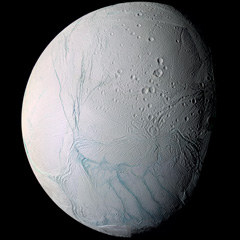
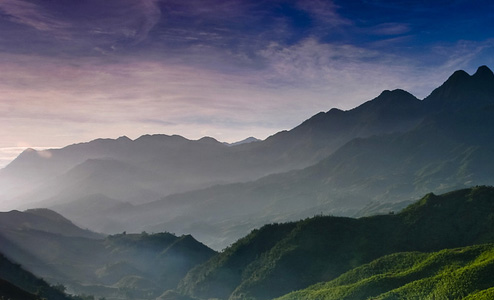
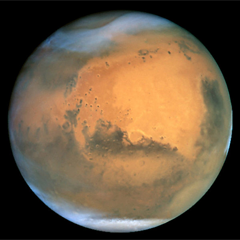
The first step in this was to shop around for some inspirational art and reference pictures. While there is plenty space art to be found online, in this case, nothing can substitute for the real thing. So I focused my search on real pictures, both of landscapes (terran or otherwise) as well as from space. I found classy shots like these:
</p>

</div></div><div class='g3 m1'><div class='pad'>
  
  <p>
    <a href='http://en.wikipedia.org/wiki/Enceladus_(moon)'><img alt='The moon Enceladus' class='inline' src='/files/making-worlds/planets-1-enceladus.jpg' /></a>
  </p>

</div></div><div class='g6'><div class='pad'>

<p class='flat'>
  <img alt='Landscape' src='/files/making-worlds/planets-1-landscape.jpg' />
</p>

</div></div><div class='g3 m1'><div class='pad'>
  
  <p>
    <a href='http://en.wikipedia.org/wiki/Mars'><img alt='Mars' class='inline' src='/files/making-worlds/planets-1-mars.png' /></a>
  </p>

</div></div><div class='g8 i2'><div class='pad'>
<p>
Hopefully I'll be able to render something similar in a while. At the same time, I eagerly devoured any paper I could find on rendering techniques from the past decade, some intended for real-time rendering, some old enough to be real-time today.
<!--break-->
Out of all this, I quickly settled on my goals:
<ul>
  <li>Represent spherical or lumpy heavenly bodies from asteroids to suns.</li>
  <li>With realistic looking topography and features.</li>
  <li>Viewable across all scales from surface to space.</li>
  <li>At flight-simulator levels of detail.</li>
  <li>Rendered with convincing atmosphere, water, clouds, haze.</li>
</ul>
</p>

<p>
For most of these points, I found one or more papers describing a useful technique I could use or adapt. At the same time, there are still plenty of unknowns I'll need to figure out along the way, not to mention significant amounts of fudging and experimentation.
</p>

<h3>The Spherical Grid</h3>

<p>
To get started I needed to build some geometry, and to do that I needed to figure out what geometry I should use. After reviewing some options, I quickly settled on a regular spherical displacement map (AKA a heightmap). That is, starting with a smooth sphere, move every surface point up or down, perpendicular to the surface, to create terrain on the surface.
</p>

<p>
If these vertical displacements are very small compared to the sphere radius, this can represent the surface of a typical planet (like Earth) at the levels of detail I'm looking for. If the displacements are of the same order as the sphere radius, you can deform it into very irregular potato-like shapes. The only thing heightmaps can't do is caves, tunnels, overhang and other kinds of holes, which is fine for now.
</p>

<p>
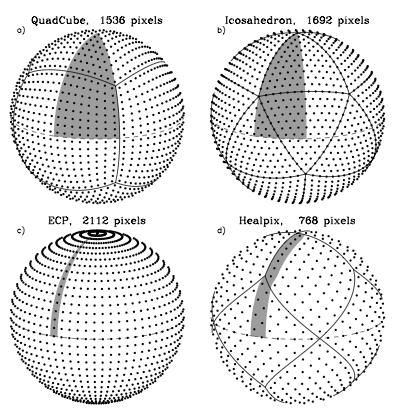
The big question is, how should the spherical surface be divided up and represented? With a sphere, this is not an easy question, because there is no single obvious way to divide a spherical surface into regular sections or grids. Various techniques exist, each with their own benefits and specific use cases, and I spent quite some time looking into them. Here's a comparison between four different tesselations:
</p>

<p class='tr'>
<img alt='Different tesselations of a sphere' src='/files/making-worlds/planets-1-sphere-tesselations.png' /><small><a href='http://adsabs.harvard.edu/cgi-bin/nph-bib_query?bibcode=2005ApJ...622..759G'>Source</a></small>
</p>

<p>
Note that the tesselation labeled ECP is just the regular geographic latitude-longitude grid.
</p>

<p>
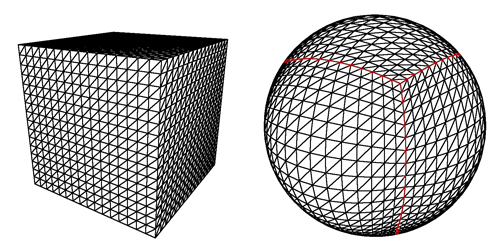
The main features I was looking for were speed and simplicity, so I settled on the 'quadcube'. This is where you start with a cube whose faces have been divided into regular grids, and project every surface point out from the middle to an enclosing sphere. This results in a perfectly smooth sphere, built out of 6 identical round shells with curved edges. This arrangement is better known as the 'cube map' and often used for storing arbitrary 360 degree panorama views.
</p>

<p>
Here's a cube and its spherical projection:
</p>

<p>
<img alt='Mapping a cube to a sphere' src='/files/making-worlds/planets-1-cubemap.png' />
<small>The projected cube edges are indicated in red. Note that the resulting sphere is perfectly smooth and round, even though the grid has a bulgy appearance.</small>
</p>

<p>
Cube maps are great, because they are very easy to calculate and do not require complicated trigonometry. In reverse, mapping arbitrary spherical points back onto the cube is even simpler and in fact natively supported by GPUs as a texture mapping feature.
</p>

<p>
This is important, because I'll be generating the surface terrain and texture dynamically and will need to index and access each surface 'pixel' efficiently. Using a cube map, I simply identify the corresponding face, and then index it using x/y coordinates on the face's grid.
</p>

<p>
The downside of cube maps is that the distance and area between points varies along the grid, which makes it harder to perform certain operations on a surface equally. However, these area distortions are much smaller than e.g. a lat-long grid, where the grid spacing actually approaches zero near the poles. Even more, the distortions made by a cube map are the exact opposite of those you get with a regular perspective projection. This makes it easy to render into cube maps, which will be useful for texture generation.
</p>

<h3>Level of Detail</h3>

<p>
There's another reason I picked the cube map approach, and that has to do with the level of detail requirements. My goal is to make a planet that can be viewed from the ground, the air as well as from space. It would be incredibly slow to always render everything at maximum detail, so I need to adaptively add and remove detail as the viewer gets closer to the surface.
</p>

<p>
However, increasing the level of detail uniformly across the entire sphere is not enough, because I only want to render detail where the viewer will see it. To a viewer on the ground, most of the planet is hidden by the horizon, and the engine should be able to effectively cut away the unseen pieces, so no wasteful processing takes place.
</p>

<p>
It is here that I get a huge benefit from the cube map layout of the sphere, because it lets me apply the well-researched realm of grid-based flat terrain rendering with only minor adjustments. Specifically, I am using a 'chunked LOD' approach. Every face of the cube map becomes a quadtree, with each level splitting four ways to form the next level with more detail:
</p>

<p class='tr'>
<img alt='Quadtree terrain' src='/files/making-worlds/planets-1-quadtree.png' /><small><a href='http://tulrich.com/geekstuff/sig-notes.pdf'>Source</a></small>
</p>

<p>
The chunks for the various levels of detail are all loaded into GPU memory, ready to be accessed at any time. When the terrain has to be rendered, the engine walks down the quad-tree, determines the appropriate level-of-detail for each section, and outputs the list of chunks to be rendered for a particular frame. Then, the GPU does its work, blasting through each chunk at a blistering pace, leaving the CPU to do other things.
</p>

<p>
<img alt='Configuration of chunks to render' src='/files/making-worlds/planet-lod-tree.png' />
</p>

<p>
Because all the data is already in memory, changing the level of detail just means rendering a different set of chunks. Each chunk has the same geometrical complexity, and performance is directly proportional to how many are rendered on screen. More detail means more chunks, but that usually also means you can cut away pieces of the terrain that are far away.
</p>

<p>
The chunked approach is also very easy to work with, because there is no data dependency between the different chunks. Each chunk has a copy of its own vertex data, which means individual chunks can be paged in and out of GPU memory at will. This is important for keeping memory usage down while still being able to scale to massive sizes.
</p>

<h3>Putting It All Together</h3>

<p>
At this point, I have all the pieces in place to render an adaptive sphere mesh. This is what it looks like (sorry, the video capture is a bit jerky):
</p>

<p>
<object height='380' width='560'><param name='movie' value='http://www.youtube.com/v/LxZhWrSmrOY&amp;hl=en&amp;fs=1&amp;' /><param name='allowFullScreen' value='true' /><param name='allowscriptaccess' value='always' /><embed allowfullscreen='true' allowscriptaccess='always' height='380' src='http://www.youtube.com/v/LxZhWrSmrOY&amp;hl=en&amp;fs=1&amp;' type='application/x-shockwave-flash' width='560' /></object>
</p>

<p>
The detail increases as the camera gets closer to the sphere and shifts around the surface as it moves.
</p>

<p>
Far from being a little coding experiment, it actually took me quite some time to get to this point, because I was learning OGRE, sharpening my C++ skills, as well as researching the techniques to use.
</p>

<p>
The next step is to look at generating heightmaps and textures for the surface.
</p>

<h3>References</h3>

<p>
The techniques I used were pioneered by people smarter and older than me, I'm just building my own little digital machine with them.
</p>

<ul>
<li><a href='http://www.cs.cmu.edu/~ajw/s2007/0251-SphericalWorlds.pdf'>Creating Spherical Worlds</a>, Maxis/Electronic Arts. (<a href='http://www.andrewwillmott.com/s2007'>source</a>).</li>
<li><a href='http://tulrich.com/geekstuff/sig-notes.pdf'>Rendering Massive Terrains using Chunked Level of Detail Control</a>, Thatcher Ulrich. (<a href='http://tulrich.com/geekstuff/chunklod.html'>source</a>)</li>
</ul>

</div></div>]]></content>
  </entry>
  
  <entry>
    <title type="html"><![CDATA[Making Worlds: Introduction]]></title>
    <link href="http://acko.net/blog/making-worlds-introduction/"/>
    <updated>2009-08-22T00:00:00-07:00</updated>
    <id>http://acko.net/blog/making-worlds-introduction</id>
    <content type="html"><![CDATA[<div class='g8 i2 first'><div class='pad'><h1>Making Worlds: Introduction</h1><p>For the past year or so I've been reacquainting myself with an old friend: C++.
</p>

<p>
More specifically, I've been exploring graphics programming again, this time with the luxurious flexibility of the modern GPU at my fingertips. To get me started, I shopped around for an open source engine to play with. After trying Irrlicht and finding its promises to be a bit lacking, <a href='http://www.ogre3d.org'>Ogre</a> turned out to be a really good choice. Though its architecture is a bit intimidating at first, it is all the more sound. More importantly, it seems to have a relatively healthy open-source community around it.
</p>

<p>
So with Ogre as my weapon of choice, I've started a new project: Making Worlds. More specifically, I want to procedurally generate a 3D planet, viewable from outer space as well as the ground (at flight-sim levels of detail), which can be rendered real-time on recent graphics hardware.
</p>

<p>
Why? Because I really like procedural content generation. It's an odd discipline where anything goes, and techniques from across mathematics, engineering and physics are applied. Then, you add a good dose of creativity and artistic sense, and perhaps mix in some real-world data too, until you find something that looks right.
</p>

<p>
Plus, far from being an exercise in pointlessness, procedural content is <a href='http://www.escapistmagazine.com/articles/view/columns/experienced-points/6418-The-Future-is-Procedural'>gaining in popularity</a>, especially for video games.
</p>

<p>
So, in the style of Shamus Young's excellent <a href='http://www.shamusyoung.com/twentysidedtale/?p=2940'>Procedural city</a> series, I'm going to start blogging about Making Planets. Unlike him however, I'm not going to adhere to a strict schedule.
</p>

<p>
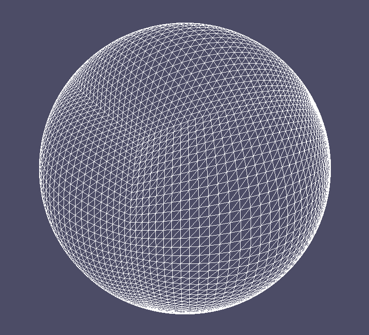
<img alt='Geosphere' src='/files/making-worlds/geosphere.png' />
</p>

<p>
Here's a teaser for the first installment.
</p>

</div></div>]]></content>
  </entry>
  
</feed>