<?xml version="1.0" encoding="utf-8"?>
<feed xmlns="http://www.w3.org/2005/Atom">

  <title><![CDATA[Acko.net]]></title>
  <link href="http://acko.net/atom.xml" rel="self"/>
  <link href="http://acko.net/"/>
  <updated>2013-05-10T11:50:48-07:00</updated>
  <id>http://acko.net/</id>
  <author>
    <name><![CDATA[Steven Wittens]]></name>
    
  </author>

  
  <entry>
    <title type="html"><![CDATA[Introducing Facing.me]]></title>
    <link href="http://acko.net/blog/introducing-facing-me/"/>
    <updated>2012-04-25T00:00:00-07:00</updated>
    <id>http://acko.net/blog/introducing-facing-me</id>
    <content type="html"><![CDATA[<div class='g8 i2 first'><div class='pad'>

  <h1>Introducing Facing.me</h1>
  <h2>A unique way to meet people</h2>

</div></div><div class='c' /><aside class='g5'>
  <p class='tc'>
    <img alt='Facing.me' src='/files/fme/facing.me.face.jpg' style='top: 0' />
  </p>
</aside><div class='g7'><div class='pad'>

<p>
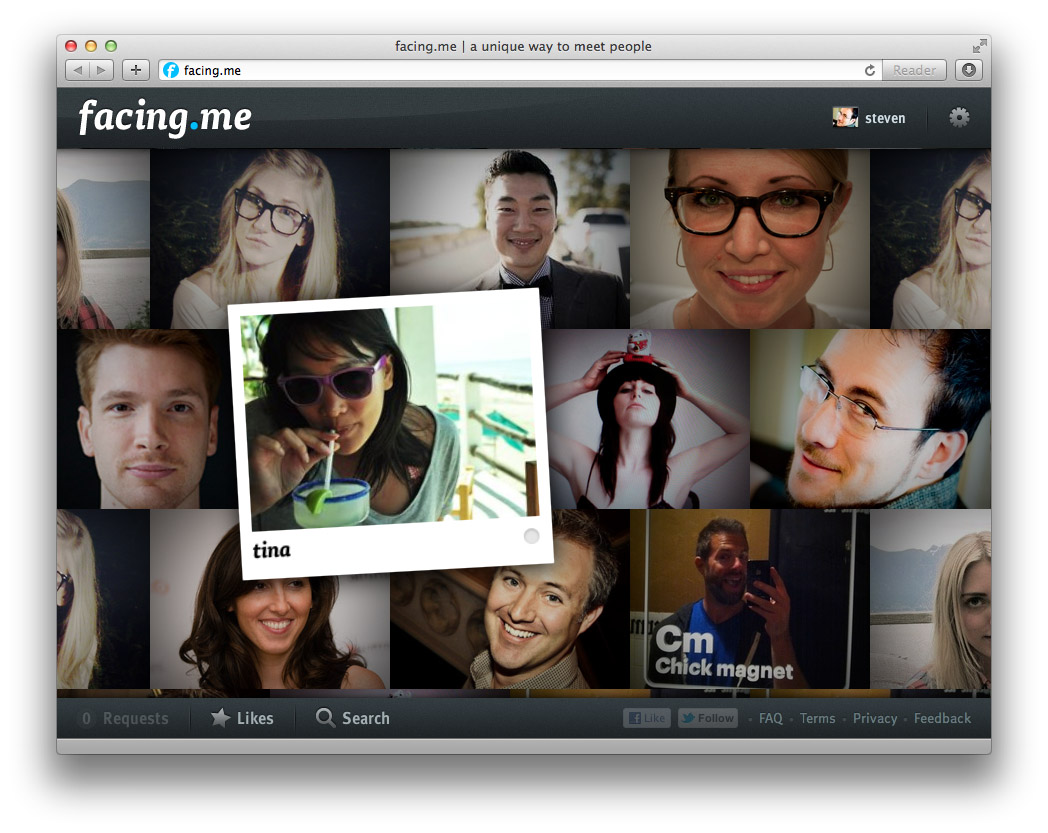
We've been sending out whispers for a while now, but it's finally out: a new web site called <a href='http://facing.me'>Facing.me</a>. Coded and designed by <a href='http://mikejholly.com'>Michael Holly</a>, <a href='http://rosshj.com/'>Ross Howard-Jones</a> and myself, it promises a <em>unique way to meet people online</em>. This would be the point where the obvious question is dropped: wait, what… you built a <em>dating site</em>?</p>

<p>Sort of. Let me explain.</p>

<p>Having spent many years in the web world, we'd all gotten a bit complacent. The web has settled into its comfortable rhythms. Sites and applications can be modelled quickly and coded on your framework of choice. And nowadays, Web 2.0 cred comes baked in: clean URLs, semantic HTML, AJAX, data feeds, APIs, etc. Isn't this what we all wanted?</p>

<p>But the web continues to evolve, and giants are roaming the playground. Sites like Facebook and Twitter hold people's attention with surgical precision, while engines like Google answer your queries with lightning speed. Given that we've all slotted such services into our workflows and indeed lives, it seems only natural that 'indie' developers should keep up. We can't pretend that a 2000-era style web-page-with-ajax-sprinkles is the pinnacle of modern interactive design.</p>

<p>So we set out to try something different.</p>

</div></div><div class='img12'>
  <a href='http://facing.me'><img alt='Facing.me website' src='/files/fme/facing.me.site.jpg' /></a>
</div><!--
<div class="g8 i2 first"><div class="pad">  

</div></div>
--><div class='g6'><div class='pad'>

<h2>A Guy Walks into a Bar...</h2>

<p>If you've managed to score an invite, the first thing you'll see is the wall of faces that loads and fills the screen. The second thing you'll notice—we hope at least—is the lack of everything else.</p>

<p>The metaphor we kept in mind was the idea of walking into a bar, and looking around. If you see someone you like, you can go up to them and strike up a conversation. So that's exactly what the app lets you do, through video chat. You can pan around to see more people, and just keep going. If you're looking for something specific, you can filter your view with a simple "I'm looking for…" dialog.</p>

<p>As you mouse around, you can see who's online, and flip open their profile. If you want to strike up a video chat, it happens right there too. If the person is online, they'll see your request immediately in a popup and can choose to accept or decline after reviewing your profile. If they're offline, they'll see your request next time they visit.</p>

<p>To avoid missed connections, you can 'like' people you're interested in. You'll see (and hear) a notification pop up the moment they're online. You can keep the app open in a background tab and never miss a thing.</p>

<p>Aside from some minor social glue and a few fun little extras for you to discover, that's it. It's our twist on a <em>minimally viable product</em> if you will. Studies have shown that online matching algorithms are a poor predictor for how well people mesh in person. Until you meet face-to-face, you just don't know. We think direct, spontaneous video chat is a better first step rather than endless profile matching and messaging.</p>

</div></div><aside class='g6 m1'>
  <p class='p0'><img alt='Facing.me welcome screen' src='/files/fme/facing.me.start.jpg' /></p>

  <p class='p0'><img alt='Facing.me welcome screen' src='/files/fme/facing.me.profile.jpg' /></p>

  <p class='p0'><img alt='Facing.me notification' src='/files/fme/facing.me.growl.jpg' /></p>

  <p class='p0'><img alt='Facing.me liking' src='/files/fme/facing.me.like.jpg' /></p>
</aside><div class='g8 i2'><div class='pad'>

<h2>Polishing Bacon</h2>

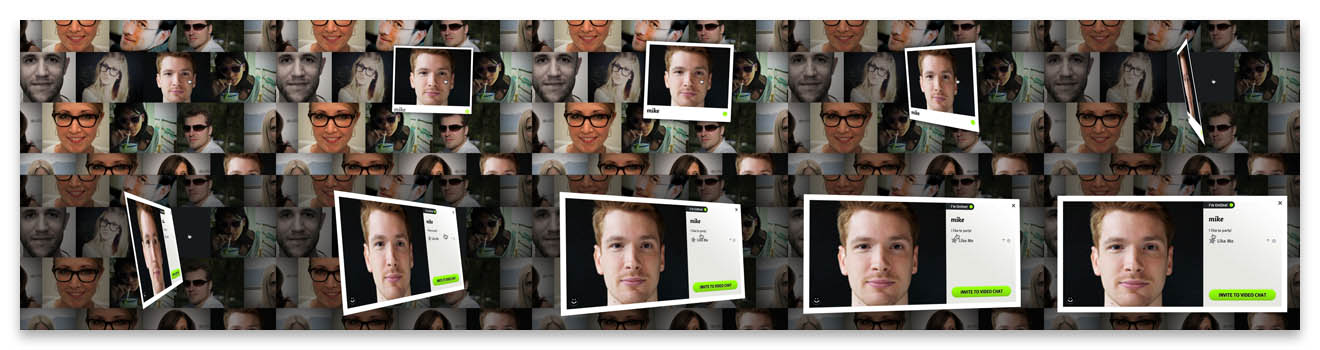
<p>But despite its minimalism, a big aspect of Facing.me is the effort and care we put into it. Our goal was to achieve a level of polish typically reserved for premium iPhone apps and bring it into the browser. We wrapped the whole thing in a crisp design, enhanced with tasteful web fonts. But most importantly, we sought to expose the app's functionality with as little interruption as possible. To do that, we layered on plenty of transitions driven by CSS3 and JavaScript, and stream in data and content as needed.</p>

<p>Based on previous work in custom animations—and <a href='/blog/abusing-jquery-animate-for-fun-and-profit-and-bacon'>bacon</a>—we refined the approach of using jQuery as an animation helper for completely custom transitions. We tell jQuery to animate placeholder properties on orphaned proxy divs, and key off those animations with per-frame code to drive the fancy stuff.</p>

</div></div><div class='img12'>
  <img alt='facing.me animation example' src='/files/fme/transition.jpg' />
</div><div class='g8 i2'><div class='pad'>
<p>As a result, we can have a photo grow a picture frame as you pick it up, and then flip it around to show a person's full profile. This careful choreography involves animating about a dozen CSS properties, including borders, shadows, margins and 3D transforms, all with custom expressions and hand-tuned animation curves. Similar transitions are used for lightbox dialogs.</p>

<p>Throughout all of this, the animations remain eminently manageable. We can interrupt and reverse them at any point, and run multiple copies at the same time, thanks to pervasive use of view controllers. Far from being a useless tech demo, it actually enables us to craft the user experience exactly the way we like it: being able to acknowledge user intentions with intuitive feedback no matter what's going on, and firing off new events and requests without worrying about the internal state. Gone are the fragile jQuery behavior soups of old.</p>

<p>The one downside is that only the newer browsers—i.e. Chrome, Safari and Firefox—get to see everything the way it was intended. And actually the performance in Firefox is still a bit disappointing. IE9 users will have to be satisfied with a crude 2D approximation until IE10 comes out.</p>

</div></div><div class='g8 first'><div class='pad'>

<h2>Rapid Rails and Real-Time Node</h2>

<p>To make all this work effectively on the server-side, we used a dual-mode stack of Rails and Node.js.</p>

<p>The Rails side houses the app's models and controllers, and provides an API for all the client-side JavaScript to do its job. Video chats are handled through Flash and routed through its built-in peer-to-peer functionality.</p>

<p>The node.js component acts as a real-time presence daemon which users connect to over socket.io. It's used to drive the status notifications and to coordinate the video chats. We can exchange any sort of notifications between users with a publish-subscribe model, opening up many interesting avenues for future development.</p>

<p>Overall, this approach has worked out great. Rails' ActiveRecord and the stack around it allowed us to build out functionality quickly and with just the right amount of necessary baggage. We made generous use of Ruby Gems to save time while still maintaining full control.</p>

<p>Node.js's event-driven model adds real-time signalling with no hassle. For the few cases where node.js needs to interface with the Rails database directly, we slot in some manual SQL to take care of that. For everything else, Rails and node.js exchange signed data through the browser.</p>

</div></div><aside class='g4 m1'><div class='pad'>
  <p><img alt='Node.js' src='/files/fme/nodejs.png' /></p>

  <p><img alt='Rails' src='/files/fme/rails.jpg' /></p>
</div></aside><div class='g8 i2 first'><div class='pad'>

<h2>Come Take it for a Spin</h2>

<p>Finally, we also put our heads together and made a promo video, voiced by the lovely <a href='https://twitter.com/t1nah'>Tina Hoang</a>:</p>

</div></div><pre class='markdown-html-error' style='border: solid 3px red; background-color: pink'>REXML could not parse this XML/HTML: 
&lt;div style=&quot;max-width: 854px; width: 100%; margin: 0 auto&quot;&gt;

&lt;!--
&lt;iframe width=&quot;854&quot; height=&quot;480&quot; src=&quot;http://www.youtube.com/embed/Ua67Hf1T7yI?rel=0&quot; frameborder=&quot;0&quot; allowfullscreen&gt;&lt;/iframe&gt;
--&gt;
&lt;iframe src=&quot;http://player.vimeo.com/video/41056588?title=0&amp;amp;byline=0&amp;amp;portrait=0&quot; width=&quot;854&quot; height=&quot;480&quot; frameborder=&quot;0&quot; webkitAllowFullScreen mozallowfullscreen allowFullScreen&gt;&lt;/iframe&gt;

&lt;/div&gt;</pre><div class='g8 i2'><div class='pad'>

<p>Built in our spare time by just 3 guys in a virtual garage, we're pretty proud of the end result. We'd love for you to take it for a spin, so <a href='http://facing.me'>head over to facing.me</a> and grab yourself an invite. There's a feedback form built-in, and any suggestions are welcome.</p>

<p>Discuss on <a href='https://plus.google.com/112457107445031703644/posts/efHMJE1Wxx2'>Google Plus</a>.</p>

</div></div>]]></content>
  </entry>
  
  <entry>
    <title type="html"><![CDATA[On TermKit]]></title>
    <link href="http://acko.net/blog/on-termkit/"/>
    <updated>2011-05-17T00:00:00-07:00</updated>
    <id>http://acko.net/blog/on-termkit</id>
    <content type="html"><![CDATA[<div class='g8 i2 first'><div class='pad'>
  
<h1>On TermKit</h1>

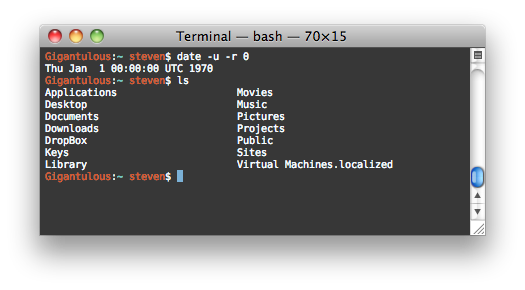
<p>I've been administering Unix machines for many years now, and frankly, it kinda sucks. It makes me wonder, when sitting in front of a crisp, 2.3 million pixel display (i.e. a laptop) why I'm telling those pixels to draw me a computer terminal from the 80s.
</p>

<p>
<img alt='Regular bash terminal' src='/files/termkit/termkit-1.png' />
</p>

<p>
And yet, that's what us tech nerds do every day. The default Unix toolchain, marked in time by the 1970 epoch, operates in a world where data is either binary or text, and text is displayed in monospace chunks. The interaction is strictly limited to a linear flow of keystrokes, always directed at only one process. And that process is capable of communicating only in short little grunts of text, perhaps coalescing into a cutesy little ASCII art imitation of things that grown-ups call "dialogs", "progress bars", "tables" and "graphs".
</p>

<p>
The <a href='http://www.faqs.org/docs/artu/ch01s06.html'>Unix philosophy</a> talks about software as a toolset, about tiny programs that can be composed seamlessly. The principles are sound, and have indeed stood the test of time. But they were implemented in a time when computing resources were orders of magnitude smaller, and computer interaction was undiscovered country.
</p>

<p>
In the meantime, we've gotten a lot better at displaying information. We've also learned a lot of lessons through the web about data interchange, network transparency, API design, and more. We know better how small tweaks in an implementation can make a world of difference in usability.
</p>

<p>
And yet the world of Unix is rife with jargon, invisible processes, traps and legacy bits. Every new adept has to pass a constant trial by fire, of not destroying their system at every opportunity it gives them.
</p>

<p>
So while I agree that having a flexible toolbox is great, in my opinion, those pieces could be built a lot better. I don't want the computer equivalent of a screwdriver and a hammer, I want a tricorder and a laser saw. TermKit is my attempt at making these better tools and addresses a couple of major pain points.
</p>

<p>
I see TermKit as an extension of what Apple did with OS X, in particular the system tools like Disk Utility and Activity Monitor. Tech stuff doesn't have to look like it comes from the Matrix.
</p>

<h2>Rich Display</h2>

<p>
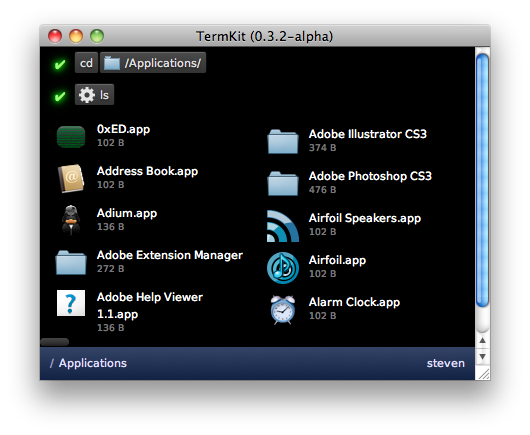
It's 2011, and monospace text just doesn't cut it anymore. In the default ANSI color palette, barely any of the possible color combinations are even readable. We can't display graphs, mathematical formulas, tables, etc. We can't use the principles of modern typography to lay out information in a readable, balanced way.
</p>

<p>
<img alt='TermKit example' src='/files/termkit/termkit-2.png' />
</p>

<p>
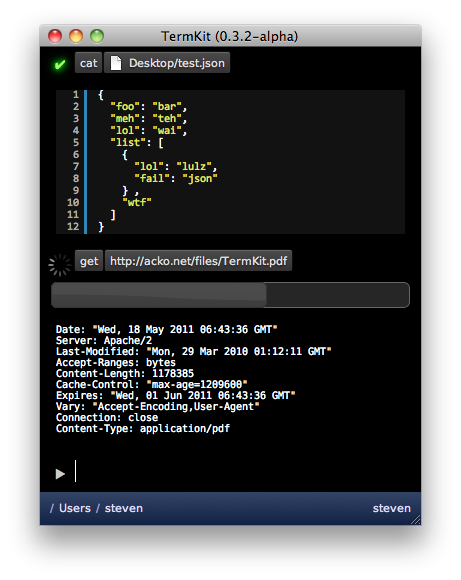
So instead, I opted for a front-end built in WebKit. Programs can display anything that a browser can, including HTML5 media. The output is built out of generic widgets (lists, tables, images, files, progress bars, etc.). The goal is to offer a rich enough set for the common data types of Unix, extensible with plug-ins. The back-end streams display output to the front-end, as a series of objects and commands.
</p>

<p>
I should stress that despite WebKit it is not my intent to make HTML the lingua franca of Unix. The front-end is merely implemented in it, as it makes it instantly accessible to anyone with HTML/CSS knowledge.
</p>

<h2>Pipes</h2>

<p>
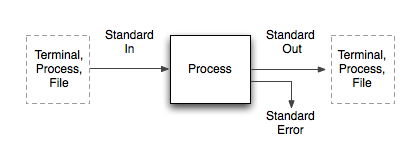
  Unix pipes are anonymous binary streams, and each process comes with at least three: Standard In, Standard Out and Standard Error. This corresponds to the typical <em>Input</em> > <em>Processing</em> > <em>Output</em> model, with an additional error channel. However, in actual usage, there are two very different scenarios.
</p>

<p>
<img alt='' src='/files/termkit/termkit-3.png' />
</p>

<p>
One is the case of interactive usage: a human watches the program output (from Std Out) on a display, and types keystrokes to interact with it (into Std In). Another case is the data processing job: a program accepts a data stream in a particular format on Std In, and immediately outputs a related data stream on Std Out. These two can be mixed, in that a chain of piped commands can have a human at either end, though usually this implies non-interactive operation.
</p>

<p>
These two cases are shoehorned into the same pipes, but happen quite differently. Human input is spontaneous, sporadic and error prone. Data input is strictly formatted and continuous. Human output is ambiguous, spaced out and wordy. Data output is conservative and monolithic.
</p>

<p>
As a result, many Unix programs have to be careful about data. For example, many tools dynamically detect whether they are running in interactive mode, and adjust their output to be more human-friendly or computer-friendly. Other tools come with flags to request the input/output in specific formats.
</p>

<p>
This has lead to "somewhat parseable text" being the default interchange format of choice. This seems like an okay choice, until you start to factor in the biggest lesson learned on the web: there is no such thing as plain text. Text is messy. Text-based formats lie at the basis of every SQL injection, XSS exploit and encoding error. And it's in text-parsing code where you'll likely find buffer overflows.
</p>

<p>
What this means in practice is that in every context, there are some forbidden characters, either by convention or by spec. For example, no Unicode or spaces in filenames. In theory, it's perfectly fine, but in practice, there's at least one shell script on your system that would blow up if you tried. Despite the promise of text as the universal interchange format, we've been forced to impose tons of vague limits.
</p>

<p>
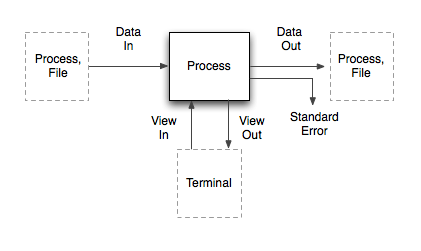
So how do we fix this? By separating the "data" part from the "human" part. Then we can use messy text for humans, and pure data for the machines. Enter "Data In/Out", "View In/Out".
</p>

<p>
<img alt='TermKit data flow diagram' src='/files/termkit/termkit-4.png' />
</p>

<p>
The data pipes correspond to the classical Std pipes, with one difference: the stream is prefixed with MIME-like headers (Content-Type, Content-Length, etc). Of these, only the 'Content-Type' is required. It allows programs to know what kind of input they're receiving, and handle it graciously without sniffing. Aside from that, the data on the pipe is a raw binary stream.
</p>

<p>
The view pipes carry the display output and interaction to the front-end. Widgets and UI commands are streamed back and forth as JSON messages over the view pipes.
</p>

<p>
The real magic happens when these two are combined. The last dangling Std Out pipe of any command chain needs to go into the Terminal, to be displayed as output. But the data coming out of Data Out is not necessarily human-friendly.
</p>

<p>
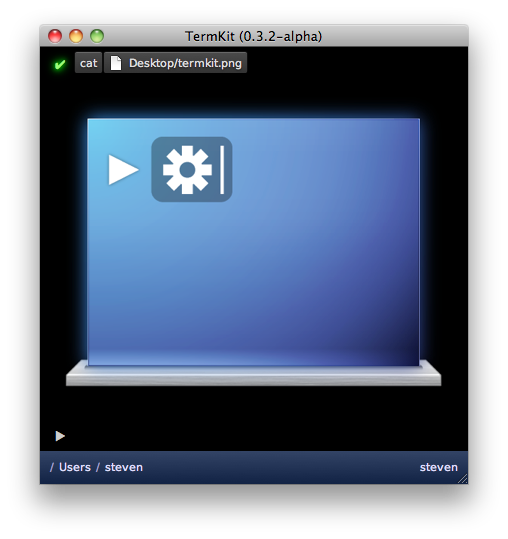
Thanks to the MIME-types, we can solve this universally. TermKit contains a library of output formatters which each handle a certain type of content (text, code, images, ...). It selects the right formatter based on the Content-Type, which then generates a stream of view updates. These go over the View Out pipe and are added to the command output.
</p>

<p>
<img alt='Cat&apos;ing an image' src='/files/termkit/termkit-7.png' />
</p>

<p>
As a result, you can <code>cat</code> a PNG and have it just work. TermKit <code>cat</code> doesn't know how to process PNGs or HTML—it only guesses the MIME type based on the filename and pipes the raw data to the next process. Then the formatter sends the image to the front-end. If you <code>cat</code> a source code file, it gets printed with line numbers and syntax highlighting.
</p>

<p>
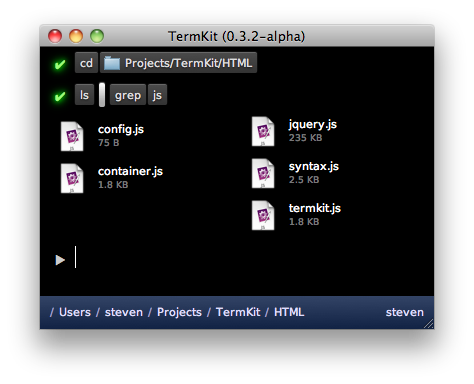
So where does "somewhat parseable text" fit in? It turns out to be mostly unnecessary. Commands like <code>ls</code> output structured data by nature, i.e. a listing of files from one or more locations. It makes sense to pipe around this data in machine-form. Output flags like <code>ls&nbsp;-l</code> become mere hints for the final display, which can toggle on-the-fly between compact and full listing.
</p>

<p>
In TermKit's case, JSON is the interchange format of choice. The <code>Content-Type</code> for file listings is <code>application/json;&nbsp;schema=termkit.files</code>. The <code>schema</code> acts as a marker to select the right output plug-in. In this case, we want the file formatter rather than the generic raw JSON formatter.
</p>

<p>
<img alt='Formatting data in TermKit' src='/files/termkit/termkit-8.png' />
</p>

<p>
Isn't JSON data harder to work with than lines of text? Only in some ways, but parsing JSON is trivial these days in any language. Because of this, I built TermKit <code>grep</code> so it supports grepping JSON data recursively. This happens transparently when the input is <code>application/json</code> instead of <code>text/plain</code>. As a result <code>ls&nbsp;|&nbsp;grep</code> works as you'd expect it to.
</p>

<p>
To slot in traditional Unix utilities in this model, we can pipe their data as <code>application/octet-stream</code> to start with, and enhance specific applications with type hints and wrapper scripts.
</p>

<p>
<img alt='' src='/files/termkit/termkit-6.png' />
</p>

<p>
Finally, having type annotations on pipes opens up another opportunity: it allows us to pipe in HTTP GET / POST requests almost transparently. Getting a URL becomes no different from catting a file, and both can have fancy progress bars, even when inside a pipe chain like <code>get&nbsp;|&nbsp;grep</code>.
</p>

<h2>Synchronous interaction</h2>

<p>
All interaction in a traditional terminal is synchronous. Only one process is interactive at a time, and each keystroke must be processed by the remote shell before it is displayed. This leads to an obvious daily frustration: SSH keystroke lag.
</p>

<p>
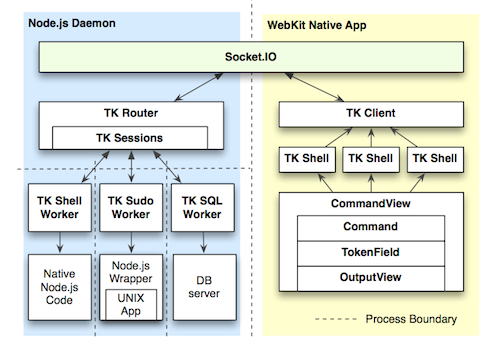
To fix this, TermKit is built out of a separate front-end and back-end. The front-end can run locally, controlling a back-end on a remote machine. The connection can be tunneled over SSH for security.
</p>

<p class='tc'>
<a href='https://github.com/unconed/TermKit/raw/master/Mockups/Architecture.pdf'><img alt='TermKit architecture' src='/files/termkit/termkit-9.png' />Architecture diagram</a> (TK stands for TermKit)
</p>

<p>
Additionally, all display updates and queries are asynchronous. The WebKit-based HTML display is split up into component views, and the view pipes of each subprocess are routed to their own view. Vice-versa, any interactive widgets inside a view can send callback messages back to their origin process, as long as it's still running.
</p>

<p>
This also allows background processes to work without overflowing the command prompt.
</p>

<h2>String-based command line</h2>

<p>
A lot of my frustration comes from bash's arcane syntax. It has a particularly nasty variant of C-style escaping. Just go ahead and <em>try</em> to match a regular expression involving both types of quotes.
</p>

<p>
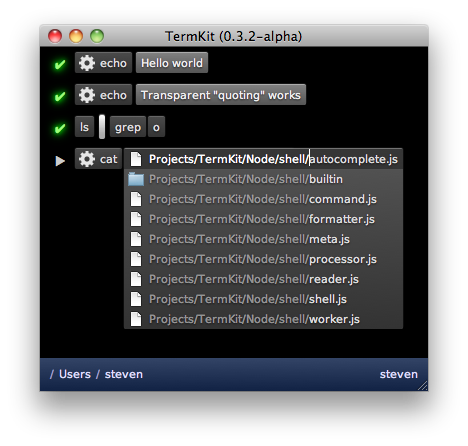
But at its core, a bash command is a series of tokens. Some tokens are single words, some are flags, some are quoted strings, some are modifiers (like | and >). It makes sense for the input to reflect this.
</p>

<p>
<img alt='TermKit command-line' src='/files/termkit/termkit-5.png' />
</p>

<p>
TermKit's input revolves around tokenfield.js, a new snappy widget with plenty of tricks. It can do auto-quoting, inline autocomplete, icon badges, and more. It avoids the escaping issue altogether, by always processing the command as tokens rather than text. Keys that trigger special behaviors (like a quote) can be pressed again to undo the behavior and just type one character.
</p>

<p>
The behaviors are encoded in a series of objects and regexp-based triggers, which transform and split tokens as they are typed. That means it's extensible too.
</p>

<h2>Usability</h2>

<p>
At the end of the day, Unix just has bad usability. It tricks us with unnecessary abbreviations, inconsistent arguments (-r vs -R) and nitpicky syntax. Additionally, Unix has a habit of giving you raw data, but not telling you useful facts, e.g. 'r-xr-xr-x' instead of "You can't touch this" (<em>ba-dum tsshh</em>).
</p>

<p>
One of the Unix principles is nobly called "Least Surprise", but in practice, from having observed new Unix users, I think it often becomes "Maximum Confusion". We should be more pro-active in nudging our users in the right direction, and our tools should be designed for maximum discoverability.
</p>

<p>
For example, I want to see the relevant part of a man page in a tooltip when I'm typing argument switches. I'd love for dangerous flags to be highlighted in red. I'd love to see regexp hints of possible patterns inline.
</p>

<p>
There's tons to be done here, but we can't do anything without modern UI abilities.
</p>

<h2>Focus and Status</h2>

<p>
With a project like TermKit, it's easy to look at the shiny exterior and think "meh", or that I'm just doing things differently for difference's sake. But to me, the real action is under the hood. With a couple of tweaks and some uncompromising spring cleaning, we can get Unix to do a lot more for us.
</p>

<p>
The current version of TermKit is just a rough alpha, and what it does is in many ways just parlour tricks compared to what it could be doing in a few months. The architecture definitely supports it.
</p>

<p>
I've worked on TermKit off and on for about a year now, so I'd love to hear feedback and ideas. Please <a href='http://github.com/unconed/TermKit'>go check out the code</a>.
</p>

<p>
TermKit owes its existence to Node.js, Socket.IO, jQuery and WebKit. Thanks to everyone who has contributed to those projects.
</p>

<p>
<em>Edit, a couple of quick points:</em>
</p>

<ul>
<li>A Linux port will definitely happen, since it's built out of WebKit and Node.js. Whoever does it first gets a cookie.</li>
<li>TermKit is not tied to JSON except in its own internal communication channels. TermKit Pipes can be in any format, and old-school plain-text still works. JSON just happens to be very handy and very lightweight.</li>
<li>The current output is just a proof of concept and lacks many planned usability enhancements. There are mockups on github.</li>
<li>If you're going to tell me I'm stupid, please read all the other 100 comments doing so first, so we can keep this short for everyone else.</li>
</ul>

<p>
<em>Edit, random fun:</em>
</p>

<p>Someone asked for AVS instead of TermKit in the comments... best I could do was JS1K with a PDF surprise:</p>

<iframe allowfullscreen='allowfullscreen' frameborder='0' height='349' src='http://www.youtube.com/embed/dAeZTgRuWsU' style='margin: 0 auto;' width='425' />

<iframe allowfullscreen='allowfullscreen' frameborder='0' height='349' src='http://www.youtube.com/embed/_6Z5dnlfcls' width='560' />

</div></div>]]></content>
  </entry>
  
</feed>