<?xml version="1.0" encoding="utf-8"?>
<feed xmlns="http://www.w3.org/2005/Atom">

  <title><![CDATA[Acko.net]]></title>
  <link href="https://acko.net/atom.xml" rel="self"/>
  <link href="https://acko.net/"/>
  <updated>2026-03-05T12:10:39+01:00</updated>
  <id>https://acko.net</id>
  <author>
    <name><![CDATA[Steven Wittens]]></name>
    
  </author>

  
  <entry>
    <title type="html"><![CDATA[Projective Texturing with Canvas]]></title>
    <link href="https://acko.net/blog/projective-texturing-with-canvas/"/>
    <updated>2008-11-11T00:00:00+01:00</updated>
    <id>https://acko.net/blog/projective-texturing-with-canvas</id>
    <content type="html"><![CDATA[<div class="g8 i2 first"><div class="pad">

<p><em>Update: People keep asking me to use this code, apparently unaware this has been made obsolete by CSS 3D. So it's gone now.</em></p>
  
<p>The <a href="http://en.wikipedia.org/wiki/Canvas_(HTML_element)">Canvas</a> tag's popularity is slowly increasing around the web. I've seen big sites use it for <a href="http://code.google.com/p/jquery-rotate/">image rotation</a>, <a href="http://code.google.com/p/flot/">graph plotting</a>, <a href="http://ajaxian.com/archives/canvas-reflectionjs">reflection effects</a> and much more.
</p>

<p>
However, Canvas is still limited to 2D: its drawing operations can only do typical vector graphics with so-called affine transformations, i.e. scaling, rotating, skewing and translation. Though there have been <a href="https://wiki.mozilla.org/Canvas:3D">some efforts</a> to try and add a 3D context to Canvas, these efforts are still experimental and only available for a minority of browsers through plug-ins.
</p>

<p>
So when my colleague <a href="http://rosshj.com/">Ross</a> asked me if we could build a <a href="http://en.wikipedia.org/wiki/Cover_Flow">Cover Flow</a>-like widget with JavaScript, my initial reaction was no... but really, that's just a cop out. All you need are textured rectangles drawn in a convincing perspective: a much simpler scenario than full blown 3D.
</p>

<p>
<a href="/files/projective-canvas/index.html"><img class="natural" src="/files/projective-canvas/projective-transform.png" alt="" /></a>
</p>

<p>
<!--break-->
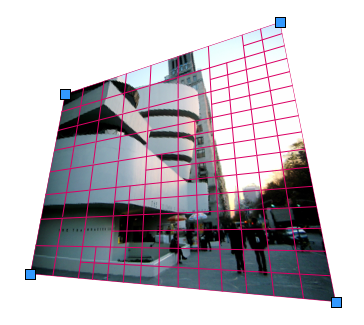
Perspective views are described by so-called <em>projective transforms</em>, which Canvas2D does not support. However, it does support arbitrary clipping masks as well as affine transforms of both entire and partial images. These can be used to do a fake projective transform: you cut up your textured surface into a bunch of smaller patches (which are almost-affine) and render each with a normal affine transform. Of course you need to place the patches just right, so as to cover any possible gaps. As long as the divisions are small enough, this looks convincingly 3D.
</p>

<p>
So some hacking later, I have a <a href="/files/projective-canvas/index.html">working projective transform renderer</a> in JavaScript. The algorithm uses adaptive subdivision to maintain quality and can be tuned for detail or performance. At its core it's really just a lot of linear algebra, though I did have to add a bunch of tweaks to make it look seamless due to annoying aliasing effects.
</p>

<p>
Unfortunately Safari seems to be the only browser that can render it at an acceptable speed, so this technique is just a curiosity for now. The current code was mostly written for readability rather than performance though, so it's possible it could be optimized to a more useful state. <strike>Feel free to <a href="/files/projective-canvas/projective.js">browse the code</a></strike>.
</p>

<p>
A real 3D Canvas in the browser would obviously rock, but you can still do some nifty things if you know the right tricks...</p></div></div>
]]></content>
  </entry>
  
  <entry>
    <title type="html"><![CDATA[Abusing jQuery.animate for fun and profit (and bacon)]]></title>
    <link href="https://acko.net/blog/abusing-jquery-animate-for-fun-and-profit-and-bacon/"/>
    <updated>2008-09-22T00:00:00+02:00</updated>
    <id>https://acko.net/blog/abusing-jquery-animate-for-fun-and-profit-and-bacon</id>
    <content type="html"><![CDATA[<div class="g8 i2 first"><div class="pad"><p>The days of static UIs that only have jarring transitions between pages are pretty much over. With frameworks like <a href="http://developer.apple.com/documentation/Cocoa/Conceptual/CoreAnimation_guide/Introduction/Introduction.html">CoreAnimation</a> or <a href="http://jquery.com">jQuery</a>, it's easy to add useful animations to applications and webpages. In the case of jQuery, you can easily animate any CSS property, and you get free work-arounds for browser bugs to boot. You can run multiple animations (of arbitrary duration) at the same time, queue animations and even animate complex properties like colors or clipping rectangles.
</p>


<aside class="r m1"><img class="natural" src="/files/bacon/bacon1.png" style="width: 100px" alt="Strip of bacon" /></aside>

<p>But what if you want to go beyond mere CSS? You might have a custom widget that is drawn using <code>&lt;canvas&gt;</code>, whose contents are controlled by internal variables; maybe you're using 3D transformations to scale and position images on a page, and simple 2D tweening just doesn't cut it.
</p>

<p>
In that case, it would seem you are out of luck: jQuery's .animate() method can only be applied to a collection of DOM elements, and relies heavily on the browser's own semantics for processing CSS values and their units. However thanks to JavaScript's flexibility and jQuery's architecture, we can work around this, and re-use jQuery's excellent animation core for our own nefarious purposes.
</p>

<h2>Hackity hack hack</h2>

<p>
First, we need an object to store all the variables we wish to animate. We use an anonymous <code>&lt;div&gt;</code> outside of the main document, so that jQuery's DOM calls still work on it. We simply add our own properties to it:
</p>

<p class="codeblock">
<code>var&nbsp;vars&nbsp;=&nbsp;$.extend($('&lt;div&gt;')[0],&nbsp;{<br />
&nbsp;&nbsp;foo:&nbsp;1,<br />
&nbsp;&nbsp;bar:&nbsp;2,<br />
<br />
&nbsp;&nbsp;customAnimate:&nbsp;true,<br />
&nbsp;&nbsp;updated:&nbsp;true<br />
});<br />
</code>
</p>

<p>
In this case, our properties are <code>foo</code> and <code>bar</code>. We also set <code>customAnimate</code> and <code>updated</code> to identify this object (see below).
</p>

<p>
Next we need to override jQuery's default step function, which gets called for every step of an animation, and applies new values to an element's CSS properties.
</p>

<p class="codeblock">
<code>&nbsp;&nbsp;&nbsp;//&nbsp;jQuery.fx.step._default<br />
&nbsp;&nbsp;&nbsp;&nbsp;_default:&nbsp;function(fx)&nbsp;{<br />
&nbsp;&nbsp;&nbsp;&nbsp;&nbsp;&nbsp;fx.elem.style[fx.prop]&nbsp;=&nbsp;fx.now&nbsp;+&nbsp;fx.unit;<br />
&nbsp;&nbsp;&nbsp;&nbsp;}<br />
</code>
</p>

<p>
We can replace it using the following snippet:
</p>

<p class="codeblock">
<code>var&nbsp;$_fx_step_default&nbsp;=&nbsp;$.fx.step._default;<br />
$.fx.step._default&nbsp;=&nbsp;function&nbsp;(fx)&nbsp;{<br />
&nbsp;&nbsp;if&nbsp;(!fx.elem.customAnimate)&nbsp;return&nbsp;$_fx_step_default(fx);<br />
&nbsp;&nbsp;fx.elem[fx.prop]&nbsp;=&nbsp;fx.now;<br />
&nbsp;&nbsp;fx.elem.updated&nbsp;=&nbsp;true;<br />
};<br />
</code>
</p>

<p>
With the new step function, jQuery will check for the presence of a <code>customAnimate</code> property on any element it is animating. If present, it will assign the (unit-less) value to <code>element.property</code> rather than <code>element.style.property</code> and mark the element by setting <code>element.updated</code> to true.
</p>

<p>
Now we're ready to animate, using the normal <code>$.animate</code> syntax:
</p>

<p class="codeblock">
<code>$(vars).animate({&nbsp;foo:&nbsp;5,&nbsp;bar:&nbsp;10&nbsp;},&nbsp;{&nbsp;duration:&nbsp;1000&nbsp;});<br />
</code>
</p>

<p>
The values <code>vars.foo</code> and <code>vars.bar</code> will now smoothly change over time. You can use any of <a href="http://docs.jquery.com/Effects/animate">jQuery's animation abilities</a> as usual.
</p>

<p>
Now what about that <code>updated</code> variable? Well to actually use these animated values, you will need some kind of timer or step callback to read them back and draw them on the page. If you're using <code>&lt;canvas&gt;</code>, you need to redraw your entire widget for every change, but you don't want to be wasting CPU time by constantly refreshing it. Furthermore, if you're running multiple animations at the same time, you'll want to aggregate all your property changes into a single redraw per frame. This is easy with the <code>updated</code> property and a simple timer:
</p>

<p class="codeblock">
<code>setInterval(function&nbsp;()&nbsp;{<br />
&nbsp;&nbsp;if&nbsp;(!vars.updated)&nbsp;return;<br />
&nbsp;&nbsp;vars.updated&nbsp;=&nbsp;false;<br />
&nbsp;&nbsp;<br />
&nbsp;&nbsp;drawWidget();<br />
},&nbsp;30);<br />
</code>
</p>

<p>
Now your widget will only refresh itself when its values are changed by the animation step function we defined earlier, and very few CPU cycles are wasted. As a plus, you can render updates as fast or as slow as you want, without affecting the duration of your animations.
</p>

<h2>Demo</h2>

<p>
I whipped up a quick demo which renders a <a href="/files/bacon/animation-demo.html">cloud of bacon</a> using <code>&lt;canvas&gt;</code>. All the motion in the demo is created through <code>$.animate()</code>, with a bunch of animations running at once.
</p>

<p>
<small><em>This demo will not work in Internet Explorer, and has only been tested in Firefox 3 and Safari 3.</em></small>
</p>

<p>
This is a rather esoteric example, but there are plenty of useful ways to apply this technique. I've used it to implement <a href="/files/bacon/omgpizza.mov">smooth, beautiful, usable widgets</a>. You can combine multiple motion and opacity animations triggered by clicks and hovers without issues.
</p>
 
<h2>Final notes</h2>

<p>
While this technique works great, there is one big caveat. You should avoid animating any property that exists in CSS ('float', 'display', 'opacity', ...) because these have unexpected side effects depending on the browser.
</p>

<p>
There are also a couple of weaknesses:
</p>

<ul>
  <li>jQuery does not support continued easing. That is, when you override an animation that is already in progress, the variable being animated will instantly stop and restart from its current position. The rate of change is not continuous between the two animations.</li>
  <li>Animating angles is tricky. E.g. when animating from 350˚ to 0˚, you want it to animate across 10˚ and not the long way around. This requires manual correction.</li>
</ul>

<p>
And obviously, it would be cleaner if jQuery's animation core was refactored to separate out the CSS-specific code instead...
</p>

</div></div>
]]></content>
  </entry>
  
  <entry>
    <title type="html"><![CDATA[jQuery OSCMS presentation slides]]></title>
    <link href="https://acko.net/blog/jquery-oscms-presentation-slides/"/>
    <updated>2007-03-23T00:00:00+01:00</updated>
    <id>https://acko.net/blog/jquery-oscms-presentation-slides</id>
    <content type="html"><![CDATA[<div class="g8 i2 first"><div class="pad"><p><em><strong>Update</strong>: a raw <a href="http://video.google.com/videoplay?docid=8359290939840291444&amp;hl=en">video</a> is now available of (almost) the entire session. Thanks to Jon F Hancock for recording it.</em>
</p>

<p>
Today I did my second session at OSCMS, which was basically a repeat of the <a href="/blog/jquery-drupalcon-talk">jQuery talk</a> I did at DrupalCon Brussels.
</p>

<p>
You can <a href="/files/drupalcon-jquery/jQuery - 23 March 2007.pdf">download a PDF</a> (2.2MB) of the (slightly tweaked) presentation slides.</p></div></div>
]]></content>
  </entry>
  
  <entry>
    <title type="html"><![CDATA[ComicJuice gets even better]]></title>
    <link href="https://acko.net/blog/comicjuice-gets-even-better/"/>
    <updated>2007-03-09T00:00:00+01:00</updated>
    <id>https://acko.net/blog/comicjuice-gets-even-better</id>
    <content type="html"><![CDATA[<div class="g8 i2 first"><div class="pad"><p>I finished some more tweaks to ComicJuice:
</p>

<ul>
<li>
<p>IE6 and 7 are now supported, thanks to the amazing <a href="http://excanvas.sourceforge.net/">ExplorerCanvas</a> by Google. It emulates the <a href="http://developer.mozilla.org/en/docs/Drawing_Graphics_with_Canvas">&lt;canvas&gt; tag</a> in IE, meaning that client-side scriptable vector graphics are now available on all the major browsers (IE, Firefox, Safari, Opera). I doubt Konqueror will be far behind.
</p>

<p>
This opens up some cool abilities, like dynamic in-page graphs, mini-widgets (sliders, dials, maps, ...) and even pure JS games. There's a bunch of examples linked on <a href="http://en.wikipedia.org/wiki/Canvas_(HTML_element)">Wikipedia</a> (though most don't use ExplorerCanvas yet).</p>
</li>
<li>
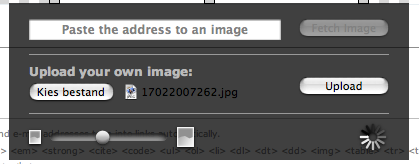
<p>I added support for uploading your own images rather than using pictures on the web. It uses a customized and themed version of core's JS uploader.
</p>
<p class="tc"><img class="natural" src="/files/comicjuice/comicjuice.png" alt="comic juice" /></p>
</li>
<li>I improved the clipping of speech bubbles so there should be less useless whitespace around comics, especially when embedding them.</li>
</ul>

</div></div>
]]></content>
  </entry>
  
  <entry>
    <title type="html"><![CDATA[Expanding Textareas]]></title>
    <link href="https://acko.net/blog/expanding-textareas/"/>
    <updated>2007-01-20T00:00:00+01:00</updated>
    <id>https://acko.net/blog/expanding-textareas</id>
    <content type="html"><![CDATA[<div class="g8 i2 first"><div class="pad"><p>See the <a href="http://drupal.org/node/111308">Drupal.org issue</a>.
</p>

<p>
<div style="padding-bottom: 2em;">
<object classid="clsid:02BF25D5-8C17-4B23-BC80-D3488ABDDC6B" codebase="http://www.apple.com/qtactivex/qtplugin.cab" width="478" height="344">
 <param name="src" value="/files/drupal-expand/jQuery-expand.mov" />
 <param name="controller" value="true" />
 <param name="autostart" value="false" />
 <object type="video/quicktime" data="/files/drupal-expand/jQuery-expand.mov" width="478" height="344" class="mov">
  <param name="controller" value="true" />
  <param name="autostart" value="false" />
  Quicktime embedding doesn't seem to be working. Try <a href="/files/drupal-expand/jQuery-expand.mov">downloading the file.</a>
 </object>
</object>
</div></p></div></div>
]]></content>
  </entry>
  
  <entry>
    <title type="html"><![CDATA[On Breaking Things]]></title>
    <link href="https://acko.net/blog/on-breaking-things/"/>
    <updated>2007-01-05T00:00:00+01:00</updated>
    <id>https://acko.net/blog/on-breaking-things</id>
    <content type="html"><![CDATA[<div class="g8 i2 first"><div class="pad"><p>See the <a href="http://drupal.org/node/107061">Drupal.org issue</a>.
</p>

<p>
<div style="padding-bottom: 2em;">
<object classid="clsid:02BF25D5-8C17-4B23-BC80-D3488ABDDC6B" codebase="http://www.apple.com/qtactivex/qtplugin.cab" width="478" height="394">
 <param name="src" value="/files/drupal-splitter/jQuery-splitter.mov" />
 <param name="controller" value="true" />
 <param name="autostart" value="false" />
 <object type="video/quicktime" data="/files/drupal-splitter/jQuery-splitter.mov" width="478" height="394" class="mov">
  <param name="controller" value="true" />
  <param name="autostart" value="false" />
  Quicktime embedding doesn't seem to be working. Try <a href="/files/drupal-splitter/jQuery-splitter.mov">downloading the file.</a>
 </object>
</object>
</div></p></div></div>
]]></content>
  </entry>
  
  <entry>
    <title type="html"><![CDATA[jQuery Menu Scout]]></title>
    <link href="https://acko.net/blog/jquery-menu-scout/"/>
    <updated>2006-12-07T00:00:00+01:00</updated>
    <id>https://acko.net/blog/jquery-menu-scout</id>
    <content type="html"><![CDATA[<div class="g8 i2 first"><div class="pad"><p><em><strong>Updated video</strong>: now also highlights deep links (though gray, not white), bubbles are prettier and aligned better and video capture is smoother. I also changed the music to please termie.</em>
</p>

<p>
Out of a whacky conversation on IRC comes the latest treat for <a href="http://drupal.org/">Drupal 5.0</a>.
</p>

<p>
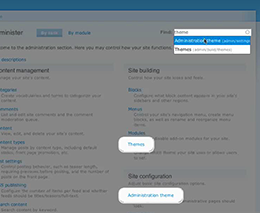
The new administration section is nice, but it's a big adjustment for 4.7 users. It's not immediately obvious where to go to find a certain option. Wouldn't it be handy if you could find any administration page with a couple of keystrokes? Something like Apple Spotlight?
</p>

<p>
Today's usability special: a nice slice of jQuery with some search module on the side, sprinkled with menu magic and topped off with some sexy CSS. Feast your eyes on this:
</p>

<p>
<div style="text-align: center;">
<a href="/files/drupal-menu-scout/Drupal%20Menu%20Scout.mp4"><img class="natural" src="/files/drupal-menu-scout/help_guide.png" alt="jQuery/Search module powered menu scout." /></a><br />(MPEG-4 movie)
</div>
</p>

<p>
Patch is <a href="http://drupal.org/node/102254">available on drupal.org</a>.</p></div></div>
]]></content>
  </entry>
  
  <entry>
    <title type="html"><![CDATA[fQuery]]></title>
    <link href="https://acko.net/blog/fquery/"/>
    <updated>2006-11-23T00:00:00+01:00</updated>
    <id>https://acko.net/blog/fquery</id>
    <content type="html"><![CDATA[<div class="g8 i2 first"><div class="pad">
<h1>fQuery</h1>

<p>fQuery is a <a href="http://drupal.org/">Drupal</a> module to help you deal with Form API arrays. Inspired by the <a href="http://jquery.com/">jQuery library</a>, it lets you find form elements using a simple and intuitive selector scheme, based on CSS.</p>

<h2>Download</h2>
<p>fQuery is maintained in the Drupal.org Contributions repository. Downloads are on the <a href="http://drupal.org/project/fquery">fQuery project page</a>.</p>

<p><em>To check out the included demo, install the module, copy <code>example.php</code> to the site root and visit it with your browser.</em></p>

<h2>Usage</h2>

<p>When fQuery is installed and enabled, use the <code>f();</code> function to make queries. For example, selecting all collapsible fieldsets in a form is done using:</p>

<p class="codeblock"><code>&lt;?php<br />
$query = f("fieldset.collapsible", $form);<br />
foreach ($query as &amp;$element) {<br />
  ...<br />
}<br />
?&gt;
</code></p>

<p>Any module that uses fQuery should indicate its dependency in its <a href="http://drupal.org/node/64279#info">.info file</a>.</p>

<h2>Overview</h2>

<p>The following table summarizes how fQuery maps CSS concepts to Form API:</p>
  
<table style="margin: 0 auto;">
<tr><th>CSS</th><th>Form API</th></tr>
<tr class="odd"><td>Tag names</td><td>Field types<br />
e.g. <code>textfield</code></td></tr>
<tr class="even"><td>Class names</td><td>Binary field attributes<br />e.g. <code>.collapsible</code></td></tr>
<tr class="odd"><td>IDs</td><td>Field array keys<br />e.g. <code>'status'</code></td></tr>
<tr class="even"><td>HTML attributes</td><td>Field properties<br />e.g. <code>#size</code><br />
HTML attributes<br />e.g. <code>class</code>.</td></tr>
</table>

<p>Here are some example queries:</p>

<table style="margin-left: auto; margin-right: auto; font-size: 0.9em">
<tr class="even"><td>fieldset</td><td>All fieldsets</td></tr>
<tr class="odd"><td>[#type=fieldset]</td><td>All fieldsets (alternative)</td></tr>
<tr class="even"><td>#status</td><td>All elements with array key name 'status'</td></tr>
<tr class="odd"><td>.resizable</td><td>All items with '#resizable' set to true.</td></tr>
<tr class="even"><td>[#resizable]</td><td>All items with '#resizable' set to a non-empty value when cast to string.</td></tr>
<tr class="odd"><td>[#title=Authored by]</td><td>All elements whose title is 'Authored by'</td></tr>
<tr class="even"><td>[#description*=http://drupal.org/]</td><td>All elements who link to drupal.org in their description.</td></tr>
<tr class="odd"><td>[class~=ponies]</td><td>All elements whose #attributes =&gt; ('class' =&gt; '...') property contains the word ponies</td></tr>
<tr class="even"><td>fieldset:not(.collapsible)</td><td>All fieldsets which aren't collapsible (:not cannot be nested)</td></tr>
<tr class="odd"><td>fieldset &gt; textfield:first-child</td><td>All textfields that are at the beginning of a fieldset</td></tr>
<tr class="even"><td>textfield + textfield</td><td>All textfields that come right after another textfield.</td></tr>
<tr class="odd"><td>textfield ~ textfield</td><td>All textfields that are preceded by at least one other textfield (siblings only).</td></tr>
</table>


<h2>Supported operators</h2>

<p>These operators can be combined into complex selectors, according to the CSS syntax. See the examples above.</p>

<p><strong>Note:</strong> All the <code>[...]</code> operators can be applied both with and without '#' in the attribute name to select Form API properties (like '#required' or '#size') instead of HTML attributes (like 'class' or 'title').</p>

<dl>
<dt>*</dt><dd>Any element</dd>
<dt>foo</dt><dd>An element of type foo</dd>
<dt>[foo]</dt><dd>An element with a "foo" HTML attribute</dd>
<dt>[foo="bar"]</dt><dd>An element whose "foo" HTML attribute value is exactly equal to "bar"</dd>
<dt>[foo~="bar"]</dt><dd>An element whose "foo" HTML attribute value is a list of space-separated values, one of which is exactly equal to "bar"</dd>
<dt>[foo^="bar"]</dt><dd>An element whose "foo" HTML attribute value begins exactly with the string "bar"</dd>
<dt>[foo$="bar"]</dt><dd>An element whose "foo" HTML attribute value ends exactly with the string "bar"</dd>
<dt>[foo*="bar"]</dt><dd>An element whose "foo" HTML attribute value contains the substring "bar"</dd>
<dt>:nth-child(n)</dt><dd>An element, the n-th child of its parent</dd>
<dt>:nth-last-child(n)</dt><dd>An element, the n-th child of its parent, counting from the last one</dd>
<dt>:first-child</dt><dd>An element, first child of its parent</dd>
<dt>:last-child</dt><dd>An element, last child of its parent</dd>
<dt>:only-child</dt><dd>An element, only child of its parent</dd>
<dt>:empty</dt><dd>An element that has no children</dd>
<dt>.foo</dt><dd>An element whose binary property "#foo" is true</dd>
<dt>#foo</dt><dd>An element with array key equal to "foo"</dd>
<dt>:not(s)</dt><dd>An element that does not match <em>simple</em> selector s (the operators below are not allowed)</dd>
<dt>E F</dt><dd>An F element <em>descendant</em> of an E element</dd>
<dt>E &gt; F</dt><dd>An F element <em>child</em> of an E element</dd>
<dt>E ~ F</dt><dd>An F element <em>preceded</em> by an E element</dd>
<dt>E + F</dt><dd>An F element <em>immediately preceded</em> by an E element</dd>
</dl>

</div></div>
]]></content>
  </entry>
  
  <entry>
    <title type="html"><![CDATA[Mouse Handling and Absolute Positions in JavaScript]]></title>
    <link href="https://acko.net/blog/mouse-handling-and-absolute-positions-in-javascript/"/>
    <updated>2006-10-27T00:00:00+02:00</updated>
    <id>https://acko.net/blog/mouse-handling-and-absolute-positions-in-javascript</id>
    <content type="html"><![CDATA[<div class="g8 i2 first"><div class="pad"><p>As I was working on the new <a href="http://acko.net/garland/?q=admin/build/themes/settings/garland">recolorable Garland Drupal theme</a>, I noticed that suddenly my Farbtastic color picker wasn't working right anymore in IE. A lot of headscratching later, I found the cause and discovered a useful trick for dealing with mouse coordinates in JavaScript.
<!--break-->
Essentially, when you click on Farbtastic, the mouse position is compared to the position of the color picker, so we can determine which color you clicked. Sounds simple? Well, no. There is no direct DOM API to get an elements's absolute position on the page. The most common technique to find it is to iterate through an element's offsetParents until you reach the root, and add together all the offsets:
<code><br />
&nbsp;&nbsp;function&nbsp;getAbsolutePosition(element)&nbsp;{<br />
&nbsp;&nbsp;&nbsp;&nbsp;var&nbsp;r&nbsp;=&nbsp;{&nbsp;x:&nbsp;element.offsetLeft,&nbsp;y:&nbsp;element.offsetTop&nbsp;};<br />
&nbsp;&nbsp;&nbsp;&nbsp;if&nbsp;(element.offsetParent)&nbsp;{<br />
&nbsp;&nbsp;&nbsp;&nbsp;&nbsp;&nbsp;var&nbsp;tmp&nbsp;=&nbsp;getAbsolutePosition(element.offsetParent);<br />
&nbsp;&nbsp;&nbsp;&nbsp;&nbsp;&nbsp;r.x&nbsp;+=&nbsp;tmp.x;<br />
&nbsp;&nbsp;&nbsp;&nbsp;&nbsp;&nbsp;r.y&nbsp;+=&nbsp;tmp.y;<br />
&nbsp;&nbsp;&nbsp;&nbsp;}<br />
&nbsp;&nbsp;&nbsp;&nbsp;return&nbsp;r;<br />
&nbsp;&nbsp;};<br />
</code>
</p>

<p>
Unfortunately, even this does not work well. Various browsers have various quirks, but (no surprise) IE wins the contest hands down. When you try to resolve absolute positions in any sort of advanced CSS-based layout, the return coordinates are often completely wrong. This is exactly what was happening in the new (completely tableless) Garland theme.
</p>

<p>
After trying various ways to correct the absolute values, I decided I didn't want to waste hours of my life cleaning up after somebody elses mess. And of course, hardcoding in the correction is mostly useless in a dynamic CMS like Drupal.
</p>

<p>
I did come up with an alternative which works well enough, and is perfectly suited for making self-contained HTML widgets: that's the most common use case after all.
</p>

<p>
You see, aside from the absolute mouse position (event.pageX/Y) we often also get the mouse position relative to the clicked element (event.offsetX/Y). Now, if we try to resolve these coordinates back to the root of the page, we end up with the same problem. The trick is to realize that we often don't need completely absolute coordinates: all we need is coordinates relative to a common reference frame. So, we need to find the closest, common offsetParent for the clicked element and the reference element, and then compare the coordinates in that frame.
</p>

<p>
The snippet below achieves this. As most of the bad offsetParent numbers are located very high up in the page hierarchy, they are practically never used with this approach. Typically you only go up one or two offsetParents and there is no error.
</p>

<p>
Some browsers don't provide the offsetX/Y information (e.g. Firefox) or tend to screw it up (e.g. Opera), but luckily they are the ones that provide (mostly) accurate pageX/Y coordinates, even in exotic layouts. So using that as a fallback, we end up with the following function, which works in every browser I've tried:
</p>

<p>
<code><br />
&nbsp;&nbsp;/**<br />
&nbsp;&nbsp;&nbsp;*&nbsp;Retrieve&nbsp;the&nbsp;coordinates&nbsp;of&nbsp;the&nbsp;given&nbsp;event&nbsp;relative&nbsp;to&nbsp;the&nbsp;center<br />
&nbsp;&nbsp;&nbsp;*&nbsp;of&nbsp;the&nbsp;widget.<br />
&nbsp;&nbsp;&nbsp;*<br />
&nbsp;&nbsp;&nbsp;*&nbsp;@param&nbsp;event<br />
&nbsp;&nbsp;&nbsp;*&nbsp;&nbsp;&nbsp;A&nbsp;mouse-related&nbsp;DOM&nbsp;event.<br />
&nbsp;&nbsp;&nbsp;*&nbsp;@param&nbsp;reference<br />
&nbsp;&nbsp;&nbsp;*&nbsp;&nbsp;&nbsp;A&nbsp;DOM&nbsp;element&nbsp;whose&nbsp;position&nbsp;we&nbsp;want&nbsp;to&nbsp;transform&nbsp;the&nbsp;mouse&nbsp;coordinates&nbsp;to.<br />
&nbsp;&nbsp;&nbsp;*&nbsp;@return<br />
&nbsp;&nbsp;&nbsp;*&nbsp;&nbsp;&nbsp;&nbsp;A&nbsp;hash&nbsp;containing&nbsp;keys&nbsp;'x'&nbsp;and&nbsp;'y'.<br />
&nbsp;&nbsp;&nbsp;*/<br />
&nbsp;&nbsp;function&nbsp;=&nbsp;getRelativeCoordinates(event,&nbsp;reference)&nbsp;{<br />
&nbsp;&nbsp;&nbsp;&nbsp;var&nbsp;x,&nbsp;y;<br />
&nbsp;&nbsp;&nbsp;&nbsp;event&nbsp;=&nbsp;event&nbsp;||&nbsp;window.event;<br />
&nbsp;&nbsp;&nbsp;&nbsp;var&nbsp;el&nbsp;=&nbsp;event.target&nbsp;||&nbsp;event.srcElement;<br />
<br />
&nbsp;&nbsp;&nbsp;&nbsp;if&nbsp;(!window.opera&nbsp;&amp;&amp;&nbsp;typeof&nbsp;event.offsetX&nbsp;!=&nbsp;'undefined')&nbsp;{<br />
&nbsp;&nbsp;&nbsp;&nbsp;&nbsp;&nbsp;//&nbsp;Use&nbsp;offset&nbsp;coordinates&nbsp;and&nbsp;find&nbsp;common&nbsp;offsetParent<br />
&nbsp;&nbsp;&nbsp;&nbsp;&nbsp;&nbsp;var&nbsp;pos&nbsp;=&nbsp;{&nbsp;x:&nbsp;event.offsetX,&nbsp;y:&nbsp;event.offsetY&nbsp;};<br />
<br />
&nbsp;&nbsp;&nbsp;&nbsp;&nbsp;&nbsp;//&nbsp;Send&nbsp;the&nbsp;coordinates&nbsp;upwards&nbsp;through&nbsp;the&nbsp;offsetParent&nbsp;chain.<br />
&nbsp;&nbsp;&nbsp;&nbsp;&nbsp;&nbsp;var&nbsp;e&nbsp;=&nbsp;el;<br />
&nbsp;&nbsp;&nbsp;&nbsp;&nbsp;&nbsp;while&nbsp;(e)&nbsp;{<br />
&nbsp;&nbsp;&nbsp;&nbsp;&nbsp;&nbsp;&nbsp;&nbsp;e.mouseX&nbsp;=&nbsp;pos.x;<br />
&nbsp;&nbsp;&nbsp;&nbsp;&nbsp;&nbsp;&nbsp;&nbsp;e.mouseY&nbsp;=&nbsp;pos.y;<br />
&nbsp;&nbsp;&nbsp;&nbsp;&nbsp;&nbsp;&nbsp;&nbsp;pos.x&nbsp;+=&nbsp;e.offsetLeft;<br />
&nbsp;&nbsp;&nbsp;&nbsp;&nbsp;&nbsp;&nbsp;&nbsp;pos.y&nbsp;+=&nbsp;e.offsetTop;<br />
&nbsp;&nbsp;&nbsp;&nbsp;&nbsp;&nbsp;&nbsp;&nbsp;e&nbsp;=&nbsp;e.offsetParent;<br />
&nbsp;&nbsp;&nbsp;&nbsp;&nbsp;&nbsp;}<br />
<br />
&nbsp;&nbsp;&nbsp;&nbsp;&nbsp;&nbsp;//&nbsp;Look&nbsp;for&nbsp;the&nbsp;coordinates&nbsp;starting&nbsp;from&nbsp;the&nbsp;reference&nbsp;element.<br />
&nbsp;&nbsp;&nbsp;&nbsp;&nbsp;&nbsp;var&nbsp;e&nbsp;=&nbsp;reference;<br />
&nbsp;&nbsp;&nbsp;&nbsp;&nbsp;&nbsp;var&nbsp;offset&nbsp;=&nbsp;{&nbsp;x:&nbsp;0,&nbsp;y:&nbsp;0&nbsp;}<br />
&nbsp;&nbsp;&nbsp;&nbsp;&nbsp;&nbsp;while&nbsp;(e)&nbsp;{<br />
&nbsp;&nbsp;&nbsp;&nbsp;&nbsp;&nbsp;&nbsp;&nbsp;if&nbsp;(typeof&nbsp;e.mouseX&nbsp;!=&nbsp;'undefined')&nbsp;{<br />
&nbsp;&nbsp;&nbsp;&nbsp;&nbsp;&nbsp;&nbsp;&nbsp;&nbsp;&nbsp;x&nbsp;=&nbsp;e.mouseX&nbsp;-&nbsp;offset.x;<br />
&nbsp;&nbsp;&nbsp;&nbsp;&nbsp;&nbsp;&nbsp;&nbsp;&nbsp;&nbsp;y&nbsp;=&nbsp;e.mouseY&nbsp;-&nbsp;offset.y;<br />
&nbsp;&nbsp;&nbsp;&nbsp;&nbsp;&nbsp;&nbsp;&nbsp;&nbsp;&nbsp;break;<br />
&nbsp;&nbsp;&nbsp;&nbsp;&nbsp;&nbsp;&nbsp;&nbsp;}<br />
&nbsp;&nbsp;&nbsp;&nbsp;&nbsp;&nbsp;&nbsp;&nbsp;offset.x&nbsp;+=&nbsp;e.offsetLeft;<br />
&nbsp;&nbsp;&nbsp;&nbsp;&nbsp;&nbsp;&nbsp;&nbsp;offset.y&nbsp;+=&nbsp;e.offsetTop;<br />
&nbsp;&nbsp;&nbsp;&nbsp;&nbsp;&nbsp;&nbsp;&nbsp;e&nbsp;=&nbsp;e.offsetParent;<br />
&nbsp;&nbsp;&nbsp;&nbsp;&nbsp;&nbsp;}<br />
<br />
&nbsp;&nbsp;&nbsp;&nbsp;&nbsp;&nbsp;//&nbsp;Reset&nbsp;stored&nbsp;coordinates<br />
&nbsp;&nbsp;&nbsp;&nbsp;&nbsp;&nbsp;e&nbsp;=&nbsp;el;<br />
&nbsp;&nbsp;&nbsp;&nbsp;&nbsp;&nbsp;while&nbsp;(e)&nbsp;{<br />
&nbsp;&nbsp;&nbsp;&nbsp;&nbsp;&nbsp;&nbsp;&nbsp;e.mouseX&nbsp;=&nbsp;undefined;<br />
&nbsp;&nbsp;&nbsp;&nbsp;&nbsp;&nbsp;&nbsp;&nbsp;e.mouseY&nbsp;=&nbsp;undefined;<br />
&nbsp;&nbsp;&nbsp;&nbsp;&nbsp;&nbsp;&nbsp;&nbsp;e&nbsp;=&nbsp;e.offsetParent;<br />
&nbsp;&nbsp;&nbsp;&nbsp;&nbsp;&nbsp;}<br />
&nbsp;&nbsp;&nbsp;&nbsp;}<br />
&nbsp;&nbsp;&nbsp;&nbsp;else&nbsp;{<br />
&nbsp;&nbsp;&nbsp;&nbsp;&nbsp;&nbsp;//&nbsp;Use&nbsp;absolute&nbsp;coordinates<br />
&nbsp;&nbsp;&nbsp;&nbsp;&nbsp;&nbsp;var&nbsp;pos&nbsp;=&nbsp;getAbsolutePosition(reference);<br />
&nbsp;&nbsp;&nbsp;&nbsp;&nbsp;&nbsp;x&nbsp;=&nbsp;event.pageX&nbsp;&nbsp;-&nbsp;pos.x;<br />
&nbsp;&nbsp;&nbsp;&nbsp;&nbsp;&nbsp;y&nbsp;=&nbsp;event.pageY&nbsp;-&nbsp;pos.y;<br />
&nbsp;&nbsp;&nbsp;&nbsp;}<br />
&nbsp;&nbsp;&nbsp;&nbsp;//&nbsp;Subtract&nbsp;distance&nbsp;to&nbsp;middle<br />
&nbsp;&nbsp;&nbsp;&nbsp;return&nbsp;{&nbsp;x:&nbsp;x,&nbsp;y:&nbsp;y&nbsp;};<br />
&nbsp;&nbsp;}<br />
</code>
</p>

<p>
Obviously if the elements you apply it to have an exotic positioning, it'll still go sour, but the above code at least improves the situation massively in Internet Explorer. Here's a little <a href="http://www.acko.net/files/mouse-positioning.html">example</a>.</p></div></div>
]]></content>
  </entry>
  
  <entry>
    <title type="html"><![CDATA[fQuery Sneak Preview]]></title>
    <link href="https://acko.net/blog/fquery-sneak-preview/"/>
    <updated>2006-09-29T00:00:00+02:00</updated>
    <id>https://acko.net/blog/fquery-sneak-preview</id>
    <content type="html"><![CDATA[<div class="g8 i2 first"><div class="pad"><p><em><strong>Update:</strong> fQuery <a href="/blog/fquery">has been released</a>.</em>
</p>

<p>
Here's a sneak preview of something I've been working on since DrupalCon Brussels...
</p>

<p>
I've noticed that most hook_form_alter() uses need to look for certain elements in the $form array. For example, you want to make all resizable textareas fixed height. This means you have to iterate over $form and do recursion, find the matching elements and change them. That sucks.
</p>

<p>
What if you could just find all elements with certain properties with one line of code, and do stuff with them? Doesn't this sound at all <a href="http://jquery.com">familiar</a>?
</p>

<p>
Enter fQuery. In a hook_form_alter(), you could do:
</p>

<p class="codeblock"><code>&lt;?php<br />
$query&nbsp;=&nbsp;f('textarea.resizable',&nbsp;$form);<br />
foreach&nbsp;($query&nbsp;as&nbsp;&amp;$element)&nbsp;{<br />
&nbsp;&nbsp;$element['#resizable']&nbsp;=&nbsp;FALSE;<br />
}<br />
?&gt;</code></p>

<p>
Neat huh?</p></div></div>
]]></content>
  </entry>
  
  <entry>
    <title type="html"><![CDATA[jQuery DrupalCon Talk]]></title>
    <link href="https://acko.net/blog/jquery-drupalcon-talk/"/>
    <updated>2006-09-23T00:00:00+02:00</updated>
    <id>https://acko.net/blog/jquery-drupalcon-talk</id>
    <content type="html"><![CDATA[<div class="g8 i2 first"><div class="pad"><p><div style="float: left; margin-right: 1em;"><a href="http://www.flickr.com/photos/dries-knapen/250303495/"><img class="natural" alt="" src="http://static.flickr.com/91/250303495_d8bc28b7dc_m_d.jpg" /></a></div><p>Greetings from DrupalCon. I just finished my jQuery talk (and got a lot of positive response). If you're interested in the slides, you can <a href="/files/drupalcon-jquery/DrupalCon%20Brussels%20-%20jQuery%20and%20Drupal%20(Steven%20Wittens).pdf">download them in PDF format</a>.</p>

<p>A video of the presentation will be made available in time, once the tapes reach the editor and get put online. Thanks to the volunteers responsible for this!</p>

<p><small>(photo by Dries Knapen)</small></p></p></div></div>
]]></content>
  </entry>
  
  <entry>
    <title type="html"><![CDATA[jQuery is in Drupal core!]]></title>
    <link href="https://acko.net/blog/jquery-is-in-drupal-core/"/>
    <updated>2006-09-01T00:00:00+02:00</updated>
    <id>https://acko.net/blog/jquery-is-in-drupal-core</id>
    <content type="html"><![CDATA[<div class="g8 i2 first"><div class="pad"><p>After a long wait, the awesome <a href="http://jquery.com">jQuery library</a> has finally been committed to <a href="http://drupal.org">Drupal</a> core. jQuery 1.0 will be part of the next major Drupal release, for which the code freeze is about to begin.
</p>

<p>
While we did take advantage of jQuery to add some minor glitter to our JavaScript features, the main advantage is that it makes it easier to develop JavaScript features. Using a simple CSS-based syntax, you can manipulate any element in the page easily. Loading in chunks of HTML through Ajax is a snap too.
</p>

<p>
Hopefully jQuery will help more Drupal developers look at using JavaScript to build kick-ass interfaces in the browser.
</p>

<p>
Thanks to <a href="http://ejohn.org">John Resig</a> and the jQuery community for making such an awesome library. On the Drupal site, thanks to: <a href="http://drupal.org/user/14572">Konstantin</a>, <a href="http://drupal.org/user/45890">Steve</a>, <a href="http://drupal.org/user/24967">Angie</a>, <a href="http://drupal.org/user/12932">Ted</a>, <a href="http://drupal.org/user/16496">Jeff</a> and everyone else who tested the patch.
</p>

<p>
<small>See also: <a href="http://acko.net/blog/new-wave-javascript-in-drupal-jquery">'New Wave' JavaScript in Drupal: jQuery</a>.</small>
</p>

<p>
<small>PS: There will still be some bugs in there that I haven't found, but that's what the code freeze is for ;).</small></p></div></div>
]]></content>
  </entry>
  
  <entry>
    <title type="html"><![CDATA[Farbtastic Color Picker]]></title>
    <link href="https://acko.net/blog/farbtastic-jquery-color-picker-plug-in/"/>
    <updated>2006-07-14T00:00:00+02:00</updated>
    <id>https://acko.net/blog/farbtastic-jquery-color-picker-plug-in</id>
    <content type="html"><![CDATA[<div class="g8 i2 first"><div class="pad">
  
<h2 class="sub">jQuery Plug-in</h2>

<p>
Farbtastic is a <a href="http://www.jquery.com/">jQuery</a> plug-in that can add one or more color picker widgets into a page through JavaScript. Each widget is then linked to an existing element (e.g. a text field) and will update the element's value when a color is selected.
</p>

<p>
<a href="/files/farbtastic/farbtastic12.zip">Download Farbtastic 1.2</a> - January 8, 2007 (License: <a href="http://www.gnu.org/copyleft/gpl.html">GPL</a>).
</p>

</div></div>

<div class="g5 i2"><div class="pad">

<h2>Demo</h2>

<p>
Farbtastic uses layered transparent PNGs to render a saturation/luminance gradient inside of a hue circle. No Flash, no pixel sized divs.
</p>

<p>
Click and drag over the selector to try it out.
</p>

<p>
<form action="">
  <div class="form-item"><label for="color">Color:</label><input type="text" id="color" name="color" value="#123456" style="width: 195px" /></div>
</form>
</p>

</div></div>

<div class="g3"><div class="pad m3">

<link rel="stylesheet" type="text/css" media="screen" href="/files/farbtastic/demo/farbtastic.css" />

<script type="text/javascript" charset="utf-8" src="/files/farbtastic/jquery.min.js"></script>

<script type="text/javascript" charset="utf-8" src="/files/farbtastic/demo/farbtastic.js"></script>

<script type="text/javascript" charset="utf-8">
Acko.queue(function() {
  jQuery.farbtastic('#picker').linkTo('#color');
});
</script>

<div id="picker"></div>

</div></div>

<div class="g8 i2"><div class="pad">

<h2>Basic Usage</h2>
<ol>
<li>
  <p>Include farbtastic.js and farbtastic.css in your HTML:</p>
<p class="codeblock">
<code>&lt;script&nbsp;type=&quot;text/javascript&quot;&nbsp;src=&quot;farbtastic.js&quot;&gt;&lt;/script&gt;<br />
&lt;link&nbsp;rel=&quot;stylesheet&quot;&nbsp;href=&quot;farbtastic.css&quot;&nbsp;type=&quot;text/css&quot;&nbsp;/&gt;
</code></p>
</li><li>
  <p>Add a placeholder div and a text field to your HTML, and give each an ID:</p>
<p class="codeblock"><code>&lt;form&gt;&lt;input&nbsp;type=&quot;text&quot;&nbsp;id=&quot;color&quot;&nbsp;name=&quot;color&quot;&nbsp;value=&quot;#123456&quot;&nbsp;/&gt;&lt;/form&gt;<br />
&lt;div&nbsp;id=&quot;colorpicker&quot;&gt;&lt;/div&gt;<br />
</code></p>
</li>
<li>
  <p>Add a ready() handler to the document which initializes the color picker and link it to the text field with the following syntax:</p>
<p class="codeblock"><code>&lt;script&nbsp;type=&quot;text/javascript&quot;&gt;<br />
&nbsp;&nbsp;$(document).ready(function()&nbsp;{<br />
&nbsp;&nbsp;&nbsp;&nbsp;$('#colorpicker').farbtastic('#color');<br />
&nbsp;&nbsp;});<br />
&lt;/script&gt;<br />
</code></p>
</li></ol>

<p>
See demo1.html and demo2.html for an example (jquery.js is not included!).
</p>

<h2>Styling</h2>

<p>
The color picker is a block-level element and is 195x195 pixels large. You can control the position by styling your placeholder (e.g. floating it).
</p>

<p>
Note that the black/white gradients inside wheel.png and mask.png were generated programmatically and cannot be recreated easily in an image editing program.
</p>

<h2>Advanced Usage</h2>

<h3>jQuery Method</h3>
<dl>
<dt>$(...).farbtastic()
$(...).farbtastic(callback)</dt>
<dd>This creates color pickers in the selected objects. <code>callback</code> is optional and can be a:
<ul>
<li><em>DOM Node</em>, <em>jQuery object</em> or <em>jQuery selector</em>: the color picker will be linked to the selected element(s) by syncing the value (for form elements) and color (all elements).</li>
<li><p><em>Function</em>: this function will be called whenever the user chooses a different color. It should have the following signature:
</p>

<p class="codeblock"><code>function&nbsp;callback(color)&nbsp;{&nbsp;...&nbsp;}</code>
</p>

<p>
With <code>color</code> the chosen color in hex representation (e.g. '#123456').
</p>
</li>
</ul>
</dd>
</dl>

<h3>Object</h3>
<dl>
<dt>$.farbtastic(placeholder)
$.farbtastic(placeholder, callback)
</dt>
<dd><p>Invoking <code>$.farbtastic(placeholder)</code> is the same as using <code>$(placeholder).farbtastic()</code> except that the Farbtastic object is returned instead of the jQuery object. This allows you to use the Farbtastic methods and properties below.
</p>

<p>
Note that there is only one Farbtastic object per placeholder. If you call <code>$.farbtastic(placeholder)</code> twice <em>with the same placeholder</em>, you will get the same object back each time.
</p>

<p>
The optional <code>callback</code> argument behaves exactly as for the jQuery method.
</p>
</dd>
</dl>

<h3>Methods</h3>
<dl>
<dt>.linkTo(callback)</dt>
<dd>Allows you to set a new callback. Any existing callbacks are removed. See above for the meaning of <code>callback</code>.</dd>
<dt>.setColor(string)</dt>
<dd>Sets the picker color to the given color in hex representation (e.g. '#123456').</dd>
<dt>.setColor([h, s, l])</dt>
<dd>Sets the picker color to the given color in normalized HSL (0..1 scale).</dd>
</dl>

<h3>Properties</h3>
<dl>
<dt>.linked</dt>
<dd>The elements (jQuery object) or callback function this picker is linked to.</dd>
<dt>.color</dt>
<dd>Current color in hex representation (e.g. '#123456').</dd>
<dt>.hsl</dt>
<dd>Current color in normalized HSL (e.g. [0.3, 0.4, 0.5]).</dd>
</dl>

</div></div>
]]></content>
  </entry>
  
  <entry>
    <title type="html"><![CDATA[A Taste of Things to Come]]></title>
    <link href="https://acko.net/blog/a-taste-of-things-to-come/"/>
    <updated>2006-06-29T00:00:00+02:00</updated>
    <id>https://acko.net/blog/a-taste-of-things-to-come</id>
    <content type="html"><![CDATA[<div class="g8 i2 first"><div class="pad"><p><div style="padding-bottom: 2em;">
<object classid="clsid:02BF25D5-8C17-4B23-BC80-D3488ABDDC6B" codebase="http://www.apple.com/qtactivex/qtplugin.cab" width="492" height="380">
 <param name="src" value="/files/drupal-videos/Drupal%20jQuery.mov" />
 <param name="controller" value="true" />
 <param name="autostart" value="false" />
 <object type="video/quicktime" data="/files/drupal-videos/Drupal%20jQuery.mov" width="492" height="380" class="mov">
  <param name="controller" value="true" />
  <param name="autostart" value="false" />
  Quicktime embedding doesn't seem to be working. Try <a href="http://acko.net/files/Drupal%20jQuery.mov">downloading the file.</a>
 </object>
</object>
</div></p></div></div>
]]></content>
  </entry>
  
  <entry>
    <title type="html"><![CDATA['New Wave' JavaScript in Drupal: jQuery]]></title>
    <link href="https://acko.net/blog/new-wave-javascript-in-drupal-jquery/"/>
    <updated>2006-06-23T00:00:00+02:00</updated>
    <id>https://acko.net/blog/new-wave-javascript-in-drupal-jquery</id>
    <content type="html"><![CDATA[<div class="g8 i2 first"><div class="pad"><p>After an Ajax related chat today, a battle plan has been created for integrating the <a href="http://jquery.com/">jQuery Javascript library</a> into Drupal. As this is the result of a long discussion in private mails and on <a href="http://groups.drupal.org/node/665">Drupal Groups</a>, I wanted to jot down the reasons in one place for future reference.
</p>

<p>
Though several people have suggested integrating third party JavaScript libraries in Drupal, I rarely heard good arguments for doing so. The last thing we want is just to add some 'bells and whistles'. I wanted a good, small platform that would serve as a suitable base for both the (relatively small) core JavaScript work as well as the extended needs of the Drupal community at large.
</p>

<p>
The most important thing is to keep in mind the context of the Drupal system. We have a very advanced code base on the server-side already: text filtering, access control, localization, form API, theming, etc. A well-written, Drupal-like module has to use these systems to integrate with Drupal. Heavy client-side JavaScript applications are not likely to happen soon, as that will lead to self-contained functionality that does not 'play nice' with others.
</p>

<p>
This means that browser platforms such as Dojo are not good candidates. Though well written, they are simply overkill for what we need. When we look for small, functional libraries, jQuery stands out as the most suitable:
<ul>
<li><strong>It focuses on making common JS tasks easy to do, without much fuss or overkill</strong>. There are no grand claims, just a set of well written, self-contained utilities. This means you can focus on your functionality.</li>
<li><strong>It is centered around CSS-like queries</strong>. Finding and interacting with DOM elements is done with a CSS selector. This means it is easy to pick-up even for those with no JavaScript knowledge.</li>
<li><strong>It provides much bang for your buck</strong>. In only 10KB, you get the CSS-query system, basic Ajax, basic animations and smart events.</li>
<li><strong>It is built by smart, dedicated people</strong>. In fact, John Resig (the author) has personally gotten involved in discussions and answered our many questions.</li>
<li><strong>It has a modular plug-in system</strong>. This means that contributed module authors can easily include advanced functionality, while we can keep core simple. Including an existing or custom plug-in is as simple as adding in another .js file.</li>
</ul>
</p>

<p>
To summarize: we chose jQuery because it is compact enough for core, easy enough for non-JS experts and because it provides a broad platform onto which rich contributed modules can be built.
</p>

<p>
The concrete steps for getting this stuff into Drupal:
<ol>
<li>Remove those parts of drupal.js that have equivalents in jQuery, and rewrite the left-overs to use jQuery's APIs.</li>
<li>Rewrite the other .js files in core to use jQuery functionality. This is mostly the replacing of complicated code with very simple calls.</li>
<li>Add in new functionality that jQuery makes easy, thus proving how this was a smart move.</li>
</ol>
</p>

<p>
I'm confident we can get this done for Drupal 4.8.</p></div></div>
]]></content>
  </entry>
  
</feed>