<?xml version="1.0" encoding="utf-8"?>
<feed xmlns="http://www.w3.org/2005/Atom">

  <title><![CDATA[Acko.net]]></title>
  <link href="http://acko.net/atom.xml" rel="self"/>
  <link href="http://acko.net/"/>
  <updated>2013-05-10T11:50:48-07:00</updated>
  <id>http://acko.net/</id>
  <author>
    <name><![CDATA[Steven Wittens]]></name>
    
  </author>

  
  <entry>
    <title type="html"><![CDATA[JavaScript audio synthesis with HTML 5]]></title>
    <link href="http://acko.net/blog/javascript-audio-synthesis-with-html-5/"/>
    <updated>2009-08-12T00:00:00-07:00</updated>
    <id>http://acko.net/blog/javascript-audio-synthesis-with-html-5</id>
    <content type="html"><![CDATA[<div class='g8 i2 first'><div class='pad'><h1>JavaScript audio synthesis with HTML 5</h1>
  
<aside class='r'><a href='http://acko.net/files/audiosynth/index.html'><img alt='Audio wave' src='/files/audiosynth/audio.png' /></a></aside>

<p>
  HTML5 gives us a couple new toys to play with, such as &lt;AUDIO&gt; and &lt;VIDEO&gt; tags. On the visual side, we've already seen <a href='https://developer.mozilla.org/samples/video/chroma-key/index.xhtml'>live green-screening</a> with Canvas and JS, and in terms of audio there's been several JS <a href='http://www.randomthink.net/labs/html5drums/'>drum machines</a> already. But the question I was interested in was: can you use JavaScript to stream live data into these media tags?
</p>

<p>
Enter the <a href='http://acko.net/files/audiosynth/index.html'>JavaScript audio synth</a>. It generates a handful of samples using very basic time-domain synthesis, wraps them up in a WAVE file header and embeds them in &lt;AUDIO&gt; tags using base64-encoded data URIs. Each sample is then triggered using timers to play the drum pattern. It's quite simple to do and runs fast enough in HTML5 capable browsers to be unnoticeable. Yes, it sounds tinny, but that's just because I'm too lazy to design proper filters for toys like this.
<!--break-->
Unfortunately, while the synthesis is fast enough to run real-time, you can't actually use it for a full live audio stream, as there is no way to queue up chunks of synthesized audio for seamless playback. I tried triggering multiple &lt;AUDIO&gt; tags in parallel to address this, but that didn't work either.
</p>

<p>
My final attempt was to generate tons of periodic audio loops only a couple of ms long, and to play them back with looping turned on while altering each tag's volume in real time, hence doing a sort of additive wavetable synthesis. Unfortunately, looping is not a fully supported feature, and the only browser I found that does it (Safari) doesn't loop seamlessly at all.
</p>

<p>
All in all, my first brush with the &lt;AUDIO&gt; tag was a major disappointment. The &lt;VIDEO&gt; tag's high-level approach leads to similar limitations, but they are offset by the flexibility and power of the &lt;CANVAS&gt; tag. Unfortunately, there is no 'audio canvas' to solve similar problems with audio.
</p>

</div></div>]]></content>
  </entry>
  
  <entry>
    <title type="html"><![CDATA[Projective Texturing with Canvas]]></title>
    <link href="http://acko.net/blog/projective-texturing-with-canvas/"/>
    <updated>2008-11-11T00:00:00-08:00</updated>
    <id>http://acko.net/blog/projective-texturing-with-canvas</id>
    <content type="html"><![CDATA[<div class='g8 i2 first'><div class='pad'><h1>Projective Texturing with Canvas</h1>

<p><em>Update: People keep asking me to use this code, apparently unaware this has been made obsolete by CSS 3D. So it's gone now.</em></p>
  
<p>The <a href='http://en.wikipedia.org/wiki/Canvas_(HTML_element)'>Canvas</a> tag's popularity is slowly increasing around the web. I've seen big sites use it for <a href='http://code.google.com/p/jquery-rotate/'>image rotation</a>, <a href='http://code.google.com/p/flot/'>graph plotting</a>, <a href='http://ajaxian.com/archives/canvas-reflectionjs'>reflection effects</a> and much more.
</p>

<p>
However, Canvas is still limited to 2D: its drawing operations can only do typical vector graphics with so-called affine transformations, i.e. scaling, rotating, skewing and translation. Though there have been <a href='https://wiki.mozilla.org/Canvas:3D'>some efforts</a> to try and add a 3D context to Canvas, these efforts are still experimental and only available for a minority of browsers through plug-ins.
</p>

<p>
So when my colleague <a href='http://rosshj.com/'>Ross</a> asked me if we could build a <a href='http://en.wikipedia.org/wiki/Cover_Flow'>Cover Flow</a>-like widget with JavaScript, my initial reaction was no... but really, that's just a cop out. All you need are textured rectangles drawn in a convincing perspective: a much simpler scenario than full blown 3D.
</p>

<p>
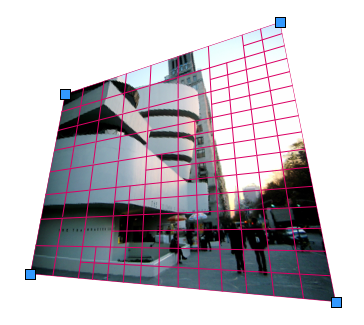
<a href='/files/projective-canvas/index.html'><img alt='' src='/files/projective-canvas/projective-transform.png' /></a>
</p>

<p>
<!--break-->
Perspective views are described by so-called <em>projective transforms</em>, which Canvas2D does not support. However, it does support arbitrary clipping masks as well as affine transforms of both entire and partial images. These can be used to do a fake projective transform: you cut up your textured surface into a bunch of smaller patches (which are almost-affine) and render each with a normal affine transform. Of course you need to place the patches just right, so as to cover any possible gaps. As long as the divisions are small enough, this looks convincingly 3D.
</p>

<p>
So some hacking later, I have a <a href='/files/projective-canvas/index.html'>working projective transform renderer</a> in JavaScript. The algorithm uses adaptive subdivision to maintain quality and can be tuned for detail or performance. At its core it's really just a lot of linear algebra, though I did have to add a bunch of tweaks to make it look seamless due to annoying aliasing effects.
</p>

<p>
Unfortunately Safari seems to be the only browser that can render it at an acceptable speed, so this technique is just a curiosity for now. The current code was mostly written for readability rather than performance though, so it's possible it could be optimized to a more useful state. <strike>Feel free to <a href='/files/projective-canvas/projective.js'>browse the code</a></strike>.
</p>

<p>
A real 3D Canvas in the browser would obviously rock, but you can still do some nifty things if you know the right tricks...</p></div></div>]]></content>
  </entry>
  
  <entry>
    <title type="html"><![CDATA[Noir meets web]]></title>
    <link href="http://acko.net/blog/noir-meets-web/"/>
    <updated>2008-10-23T00:00:00-07:00</updated>
    <id>http://acko.net/blog/noir-meets-web</id>
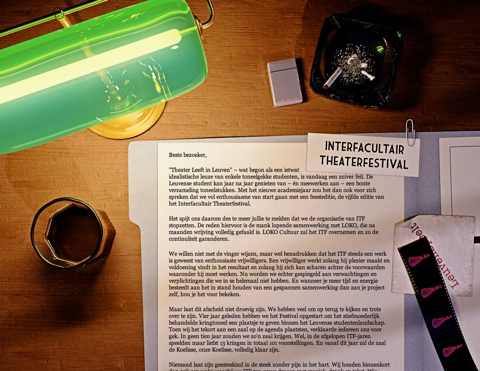
    <content type="html"><![CDATA[<div class='g8 i2 first'><div class='pad'><h1>Noir meets web</h1><p>After 4 years of LeuvenSpeelt.be aka the <em>Interfacultair Theaterfestival</em> at my old university, the organisers are calling it quits. I was their resident web monkey, and designed a <a href='/tag/theater'>new site and poster every year</a>. I always saw these designs as an opportunity to explore unconventional web design, as the sites were low on content and high on marketing — essentially being fancy brochures with a news feed.
</p>

<p>
With a track record of originality, I figured we should end it in style, so I whipped up a new page which explains the reasons for quitting (i.e. the politics) and highlights the work done with a timeline and some photos.
</p>

<p class='tc'>
<a href='/files/leuvenspeelt/2009/index.html'><img alt='' src='/files/leuvenspeelt/itf2009.jpg' /></a>
</p>

<p>
I wanted the reader to get a sense of ambiguity and dread that comes with ending big projects, so for inspiration I looked to Film Noir, known for its mystery and shady morals. The scene is meant to look like the desk of the typical private detective, who is trying to make sense of a case.
</p>

<p>
The end result was pretty close to how I imagined it, though the limitations of the web as a medium required me to tone down the contrast quite a bit for readability. This makes it lose some of the noir-ness, but overall the cohesion of the piece is still right. Because it's just a good-bye page, it probably won't get as much exposure as the previous editions, but it's the thought that counts.
</p>

<p>
I think it's a fitting end to a project that, more than anything else, has taught me about graphical design and style.
</p>

<p>
Tools used: 3D Studio Max (with Mental Ray), Photoshop, TextMate
</p></div></div>]]></content>
  </entry>
  
  <entry>
    <title type="html"><![CDATA[Abusing jQuery.animate for fun and profit (and bacon)]]></title>
    <link href="http://acko.net/blog/abusing-jquery-animate-for-fun-and-profit-and-bacon/"/>
    <updated>2008-09-22T00:00:00-07:00</updated>
    <id>http://acko.net/blog/abusing-jquery-animate-for-fun-and-profit-and-bacon</id>
    <content type="html"><![CDATA[<div class='g8 i2 first'><div class='pad'><h1>Abusing jQuery.animate for fun and profit (and bacon)</h1><p>The days of static UIs that only have jarring transitions between pages are pretty much over. With frameworks like <a href='http://developer.apple.com/documentation/Cocoa/Conceptual/CoreAnimation_guide/Introduction/Introduction.html'>CoreAnimation</a> or <a href='http://jquery.com'>jQuery</a>, it's easy to add useful animations to applications and webpages. In the case of jQuery, you can easily animate any CSS property, and you get free work-arounds for browser bugs to boot. You can run multiple animations (of arbitrary duration) at the same time, queue animations and even animate complex properties like colors or clipping rectangles.
</p>


<aside class='r m1'><img alt='Strip of bacon' src='/files/bacon/bacon1.png' style='width: 100px' /></aside>

<p>But what if you want to go beyond mere CSS? You might have a custom widget that is drawn using <code>&lt;canvas&gt;</code>, whose contents are controlled by internal variables; maybe you're using 3D transformations to scale and position images on a page, and simple 2D tweening just doesn't cut it.
</p>

<p>
In that case, it would seem you are out of luck: jQuery's .animate() method can only be applied to a collection of DOM elements, and relies heavily on the browser's own semantics for processing CSS values and their units. However thanks to JavaScript's flexibility and jQuery's architecture, we can work around this, and re-use jQuery's excellent animation core for our own nefarious purposes.
</p>

<h2>Hackity hack hack</h2>

<p>
First, we need an object to store all the variables we wish to animate. We use an anonymous <code>&lt;div&gt;</code> outside of the main document, so that jQuery's DOM calls still work on it. We simply add our own properties to it:
</p>

<p class='codeblock'>
<code>var&nbsp;vars&nbsp;=&nbsp;$.extend($('&lt;div&gt;')[0],&nbsp;{<br />
&nbsp;&nbsp;foo:&nbsp;1,<br />
&nbsp;&nbsp;bar:&nbsp;2,<br />
<br />
&nbsp;&nbsp;customAnimate:&nbsp;true,<br />
&nbsp;&nbsp;updated:&nbsp;true<br />
});<br />
</code>
</p>

<p>
In this case, our properties are <code>foo</code> and <code>bar</code>. We also set <code>customAnimate</code> and <code>updated</code> to identify this object (see below).
</p>

<p>
Next we need to override jQuery's default step function, which gets called for every step of an animation, and applies new values to an element's CSS properties.
</p>

<p class='codeblock'>
<code>&nbsp;&nbsp;&nbsp;//&nbsp;jQuery.fx.step._default<br />
&nbsp;&nbsp;&nbsp;&nbsp;_default:&nbsp;function(fx)&nbsp;{<br />
&nbsp;&nbsp;&nbsp;&nbsp;&nbsp;&nbsp;fx.elem.style[fx.prop]&nbsp;=&nbsp;fx.now&nbsp;+&nbsp;fx.unit;<br />
&nbsp;&nbsp;&nbsp;&nbsp;}<br />
</code>
</p>

<p>
We can replace it using the following snippet:
</p>

<p class='codeblock'>
<code>var&nbsp;$_fx_step_default&nbsp;=&nbsp;$.fx.step._default;<br />
$.fx.step._default&nbsp;=&nbsp;function&nbsp;(fx)&nbsp;{<br />
&nbsp;&nbsp;if&nbsp;(!fx.elem.customAnimate)&nbsp;return&nbsp;$_fx_step_default(fx);<br />
&nbsp;&nbsp;fx.elem[fx.prop]&nbsp;=&nbsp;fx.now;<br />
&nbsp;&nbsp;fx.elem.updated&nbsp;=&nbsp;true;<br />
};<br />
</code>
</p>

<p>
With the new step function, jQuery will check for the presence of a <code>customAnimate</code> property on any element it is animating. If present, it will assign the (unit-less) value to <code>element.property</code> rather than <code>element.style.property</code> and mark the element by setting <code>element.updated</code> to true.
</p>

<p>
Now we're ready to animate, using the normal <code>$.animate</code> syntax:
</p>

<p class='codeblock'>
<code>$(vars).animate({&nbsp;foo:&nbsp;5,&nbsp;bar:&nbsp;10&nbsp;},&nbsp;{&nbsp;duration:&nbsp;1000&nbsp;});<br />
</code>
</p>

<p>
The values <code>vars.foo</code> and <code>vars.bar</code> will now smoothly change over time. You can use any of <a href='http://docs.jquery.com/Effects/animate'>jQuery's animation abilities</a> as usual.
</p>

<p>
Now what about that <code>updated</code> variable? Well to actually use these animated values, you will need some kind of timer or step callback to read them back and draw them on the page. If you're using <code>&lt;canvas&gt;</code>, you need to redraw your entire widget for every change, but you don't want to be wasting CPU time by constantly refreshing it. Furthermore, if you're running multiple animations at the same time, you'll want to aggregate all your property changes into a single redraw per frame. This is easy with the <code>updated</code> property and a simple timer:
</p>

<p class='codeblock'>
<code>setInterval(function&nbsp;()&nbsp;{<br />
&nbsp;&nbsp;if&nbsp;(!vars.updated)&nbsp;return;<br />
&nbsp;&nbsp;vars.updated&nbsp;=&nbsp;false;<br />
&nbsp;&nbsp;<br />
&nbsp;&nbsp;drawWidget();<br />
},&nbsp;30);<br />
</code>
</p>

<p>
Now your widget will only refresh itself when its values are changed by the animation step function we defined earlier, and very few CPU cycles are wasted. As a plus, you can render updates as fast or as slow as you want, without affecting the duration of your animations.
</p>

<h2>Demo</h2>

<p>
I whipped up a quick demo which renders a <a href='/files/bacon/animation-demo.html'>cloud of bacon</a> using <code>&lt;canvas&gt;</code>. All the motion in the demo is created through <code>$.animate()</code>, with a bunch of animations running at once.
</p>

<p>
<small><em>This demo will not work in Internet Explorer, and has only been tested in Firefox 3 and Safari 3.</em></small>
</p>

<p>
This is a rather esoteric example, but there are plenty of useful ways to apply this technique. I've used it to implement <a href='/files/bacon/omgpizza.mov'>smooth, beautiful, usable widgets</a>. You can combine multiple motion and opacity animations triggered by clicks and hovers without issues.
</p>
 
<h2>Final notes</h2>

<p>
While this technique works great, there is one big caveat. You should avoid animating any property that exists in CSS ('float', 'display', 'opacity', ...) because these have unexpected side effects depending on the browser.
</p>

<p>
There are also a couple of weaknesses:
</p>

<ul>
  <li>jQuery does not support continued easing. That is, when you override an animation that is already in progress, the variable being animated will instantly stop and restart from its current position. The rate of change is not continuous between the two animations.</li>
  <li>Animating angles is tricky. E.g. when animating from 350˚ to 0˚, you want it to animate across 10˚ and not the long way around. This requires manual correction.</li>
</ul>

<p>
And obviously, it would be cleaner if jQuery's animation core was refactored to separate out the CSS-specific code instead...
</p>

</div></div>]]></content>
  </entry>
  
  <entry>
    <title type="html"><![CDATA[Welcome to the World of Tomorrow!]]></title>
    <link href="http://acko.net/blog/welcome-to-the-world-of-tomorrow/"/>
    <updated>2008-07-20T00:00:00-07:00</updated>
    <id>http://acko.net/blog/welcome-to-the-world-of-tomorrow</id>
    <content type="html"><![CDATA[<div class='g8 i2 first'><div class='pad'><h1>Welcome to the World of Tomorrow!</h1><p><small>(with apologies to <a href='http://en.wikipedia.org/wiki/Futurama'>Matt Groening</a>)</small>
</p>

<p>
After about <a href='/blog/new-design-for-acko-net'>two years</a>, it's time for another make-over of my site.
</p>

<p>
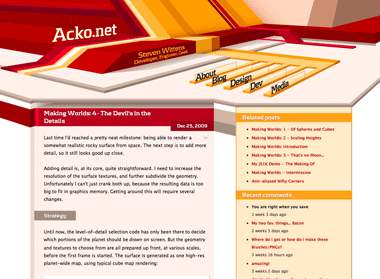
My last design had a relatively quirky look, with a bold red/yellow theme built from various irregular vector shapes. The idea was to step away from the typical mold of rectangular aligned frames on a page. I tried to incorporate some elements of perspective into the page composition, but it ended up being a relatively flat, geometrical theme.
</p>

<p>
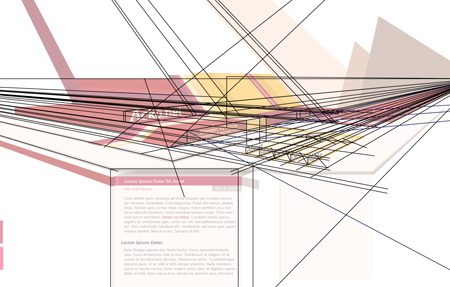
This time I wanted to work on the depth aspect and try to create something that feels spacious. To do this, I based the entire redesign on a two-point perspective. While the content itself is normal 2D markup, it sits in a 3D frame.
</p>

<p>
<img alt='' src='/files/redesign-2008/wirepron.png' title='Some of the guide lines used in the construction process.' /></p>

<p>
<img alt='' src='/files/making-love-to-webkit/old-acko.png' /></p>

<p>
The header image is a regular illustration file (which is 100% manual vector work) and the content is typical HTML/CSS. However there is a twist: the perspective from the header is continued into the content with some simple 3D decorations, created on-demand with Canvas tags and JavaScript (<a href='javascript:void(0);' onclick='highlightCanvases();return false;'>highlight canvases</a>, check out the footer).
</p>

<p>
While this perspective works perfectly near the top, the further down you go, the more vertically stretched the shapes get and it ends up looking weird. To compromise, the projection actually gets more and more isometric the further down you go. This creates an interesting effect when scrolling down.
</p>

<p>
The design also uses various CSS3 methods (@font-face, text-shadow, box-shadow) throughout, and uses sIFR 3 as a fallback for the headline font. Unfortunately CSS3 is still mostly unsupported in the browserscape, so only Safari 3.1 users get the luxury combo of <em>pretty, fast and no Flash</em>. Everyone else will have to suffer through hacks.
</p>

<p>
As a total surprise, the canvas-rocket-science trickery even works in IE6 thanks to Google's <a href='http://excanvas.sourceforge.net/'>ExplorerCanvas</a> library.
</p>

<p>
I'll probably be tweaking it a bit more in the days to come, but feedback is appreciated.
</p>

</div></div>]]></content>
  </entry>
  
  <entry>
    <title type="html"><![CDATA[ComicJuice gets even better]]></title>
    <link href="http://acko.net/blog/comicjuice-gets-even-better/"/>
    <updated>2007-03-09T00:00:00-08:00</updated>
    <id>http://acko.net/blog/comicjuice-gets-even-better</id>
    <content type="html"><![CDATA[<div class='g8 i2 first'><div class='pad'><h1>ComicJuice gets even better</h1><p>I finished some more tweaks to ComicJuice:
</p>

<ul>
<li>
<p>IE6 and 7 are now supported, thanks to the amazing <a href='http://excanvas.sourceforge.net/'>ExplorerCanvas</a> by Google. It emulates the <a href='http://developer.mozilla.org/en/docs/Drawing_Graphics_with_Canvas'>&lt;canvas&gt; tag</a> in IE, meaning that client-side scriptable vector graphics are now available on all the major browsers (IE, Firefox, Safari, Opera). I doubt Konqueror will be far behind.
</p>

<p>
This opens up some cool abilities, like dynamic in-page graphs, mini-widgets (sliders, dials, maps, ...) and even pure JS games. There's a bunch of examples linked on <a href='http://en.wikipedia.org/wiki/Canvas_(HTML_element)'>Wikipedia</a> (though most don't use ExplorerCanvas yet).</p>
</li>
<li>
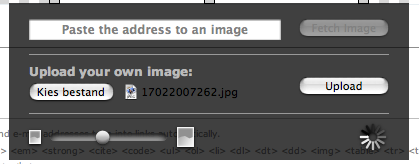
<p>I added support for uploading your own images rather than using pictures on the web. It uses a customized and themed version of core's JS uploader.
</p>
<p class='tc'><img alt='comic juice' src='/files/comicjuice/comicjuice.png' /></p>
</li>
<li>I improved the clipping of speech bubbles so there should be less useless whitespace around comics, especially when embedding them.</li>
</ul>

</div></div>]]></content>
  </entry>
  
</feed>