<?xml version="1.0" encoding="utf-8"?>
<feed xmlns="http://www.w3.org/2005/Atom">

  <title><![CDATA[Acko.net]]></title>
  <link href="https://acko.net/atom.xml" rel="self"/>
  <link href="https://acko.net/"/>
  <updated>2026-03-05T12:10:39+01:00</updated>
  <id>https://acko.net</id>
  <author>
    <name><![CDATA[Steven Wittens]]></name>
    
  </author>

  
  <entry>
    <title type="html"><![CDATA[MathBox²]]></title>
    <link href="https://acko.net/blog/mathbox2/"/>
    <updated>2015-09-27T00:00:00+02:00</updated>
    <id>https://acko.net/blog/mathbox2</id>
    <content type="html"><![CDATA[<script src="/files/katex/katex.min.js"></script>

<script src="/files/katex/contrib/auto-render.min.js"></script>

<link rel="stylesheet" type="text/css" href="/files/katex/katex.min.css" />

<script type="text/javascript">
Acko.queue(function () {
  renderMathInElement(document.querySelector('article'), {delimiters: [
    {left: "$$", right: "$$", display: true},
    {left: "($", right: "$)", display: false},
  ]});
});
</script>

<div class="g8 i2 first"><div class="pad">

<h2 class="sub">PowerPoint Must Die</h2>

</div></div>

<div class="c"></div>

<div class="g12"><div class="pad">

<blockquote class="m2">
  <em class="big">"<strong>I think a lot of mathematics is really about how you understand things in your head.</strong> It's people that did mathematics, we're not just general purpose machines, we're people. We see things, we feel things, we think of things. A lot of what I have done in my mathematical career has had to do with finding new ways to build models, to see things, do computations. Really get a feel for stuff.<br /><br />
It may seem unimportant, but when I started out people drew pictures of 3-manifolds one way and I started drawing them a different way. People drew pictures of surfaces one way and I started drawing them a different way. <strong>There's something significant about how the representation in your head profoundly changes how you think.</strong><br /><br />
It's very hard to do a brain dump. Very hard to do that. But I'm still going to try to do something to give a feel for 3-manifolds. Words are one thing, we can talk about geometric structures. There are many precise mathematical words that could be used, but they don't automatically convey a feeling for it. <strong>I probably can't convey a feeling for it either, but I want to try.</strong>"</em>
<div class="tr m1">– <a href="https://duckduckgo.com/?q=William+Thurston" target="_blank">William Thurston</a>, The Mystery of 3-Manifolds (<a href="https://www.youtube.com/watch?v=4jdmkUQDWtQ&amp;t=168s" target="_blank">Video</a>)</div>
</blockquote>

</div></div>

<div class="g8 i2 m2"><div class="pad">

<p>How do you convince web developers—heck, people in general—to care about math? This was the challenge underlying <a href="/tv/wdcode/">Making Things With Maths</a>, a talk I gave three years ago. I didn't know either, I just knew why I liked this stuff: demoscene, games, simulation, physics, VR, … It had little to do with what passed for mathematics in my own engineering education. There we were served only eyesore PowerPoints or handwritten overhead transparencies, with simplified graphs, abstract flowcharts and rote formulas, available on black and white photocopies.</p>

<p>Smart people who were supposed to teach us about technology seemed unable to teach us <em>with</em> technology. Fixing this felt like a huge challenge where I'd have to start from scratch. This is why the focus was entirely on showing rather than telling, and why MathBox 1 was born. It's how this stuff looks and feels in my head, and how I got my degree: by translating formulas into mental pictures, which I could replay and reason about on demand.</p>

<h2>PowerPoint Syndrome</h2>

<p>Initially I used MathBox like an embedded image or video: compact diagrams, each a point or two in a presentation. My style quickly shifted though. I kept on finding ways to transform from one visualization to another. Not for show, but to reveal the similarities and relationships underneath. MathBox encouraged me to animate things correctly, leveraging the actual models themselves, instead of doing a visual morph from A to B. Each animation became a continuous stream of valid examples, a quality both captivating and revealing.</p>

</div></div>

<div class="c"></div>

<div class="wide mt2">
    <a target="_blank" href="/blog/how-to-fold-a-julia-fractal/"><img src="/files/mathbox2/julia-fractal.jpg" alt="How to Fold a Julia Fractal" /></a>
</div>

<div class="g8 i2 m2"><div class="pad">

<p>For instance, <a href="/blog/how-to-fold-a-julia-fractal/">How to Fold a Julia Fractal</a> is filled with animations of complex exponentials, right from the get go. This way I avoid the scare that ($ e^{i\pi} $) is a meaningful expression; symbology and tau-tology never have a chance to obscure geometrical workings. Instead a web page that casually demonstrates conformal mapping and complex differential equations got 340,000 visits. Despite spotty web browser support and excluding all mobile phones for years.</p>

</div></div>

<aside class="g4 m3 ti tc muted"><div class="pad">
  <img src="/files/mathbox2/elsevier.png" style="max-width: 75%; margin: 0 auto;" alt="Elsevier $42 per PDF paywall" />
  <p>Meanwhile academics voluntarily published their writings behind a&nbsp;<a href="http://www.elsevier.com" rel="nofollow">$42&nbsp;per&nbsp;PDF</a> paywall, the&nbsp;<em>colossal&nbsp;idiots</em>.</p>
</div></aside>

<div class="g7 m1"><div class="pad">

<p>The next talk, <a href="/tv/webglmath/">Making WebGL Dance</a>, contained elaborate <em>long takes</em> worthy of an Alfonso Cuarón film, with only 3 separate shots for the bulk of a 30 minute talk. The lesson seemed obvious: the slides shouldn't have graphics in them, rather, <em>the graphics should have slides in them</em>. The diagnosis of PowerPoint syndrome is then the constant trashing of context from one slide to the next. A traditional blackboard doesn't have this problem: you build up diagrams slowly, by hand, across a large surface, erasing selectively and only when you run out of space.</p>

</div></div>

<div class="c"></div>

<div class="g8 i2 m2"><div class="pad">

<p>It's not just about permanence and progression though, it's also about leveraging our natural understanding of shape, scale, color and motion. Think of how a toddler learns to interact with the world: poke, grab, chew, spit, smash. Which evolves into run, jump, fall, get back up again. Humans are naturals at taking multiple cases of "If I do this, that will happen" and turning it into a consistent, functional model of how things work. We learn language by bootstrapping random jibberish into situational meaning, converging on a shared protocol.</p>

<p>That said, I find the usual descriptions of how people experience language and thought foreign. Instead, when <a href="http://grandin.com" target="_blank">Temple Grandin</a> speaks about visual thinking, I nod vigorously. Thought to me is analog concepts and sensory memories, remixed with visual and other simulations. It builds off the quantities and qualities present in spatial and temporal notions, which appear built-in to us.</p>

</div></div>

<div class="g8 m1"><div class="pad">

<p>Speech and writing is then a program designed to reconstruct particular thoughts in a compatible brain. There are a multitude of evolving languages, they can be used elegantly, bluntly, incomprehensibly, but the desired output remains the same. In my talks, armed with weapons-grade <a href="https://duckduckgo.com/?q=c2+continuous" target="_blank">C2-continuous</a> animations, it is easy to transcode my film reel into words, because the slides run themselves. The string of concepts already hangs in the air, I only add the missing grammar that links them up. This is a puzzle our brains are so good at solving, we usually do it <em>without</em> thinking.</p>

<p>Language is the ability of thoughts to compute their own source code.</p>

<p>(It's not proof, I just supply pudding.)</p>

</div></div>

<aside class="g4 m2"><div class="pad">
  <img src="/files/mathbox2/remote.jpg" alt="powerpoint remote" style="max-width: 50%; margin: 0 auto" />
  <p class="tc">Tip: Powerpoint remotes are 4-key USB keyboards with <kbd>PageUp</kbd>/<kbd>PageDown</kbd>, <kbd>F5</kbd> and <kbd>.</kbd> keys.<br /><br />Comes with dongle.</p>
</div></aside>

<div class="c"></div>

<div class="g6 m3"><div class="pad">
  <img src="/files/mathbox2/sketch1.jpg" alt="mathbox presentation slide sketches" />
</div></div>
<div class="g6 m2"><div class="pad">
  <img src="/files/mathbox2/sketch2.jpg" alt="mathbox presentation slide sketches" />
</div></div>

<aside class="g12"><div class="pad">
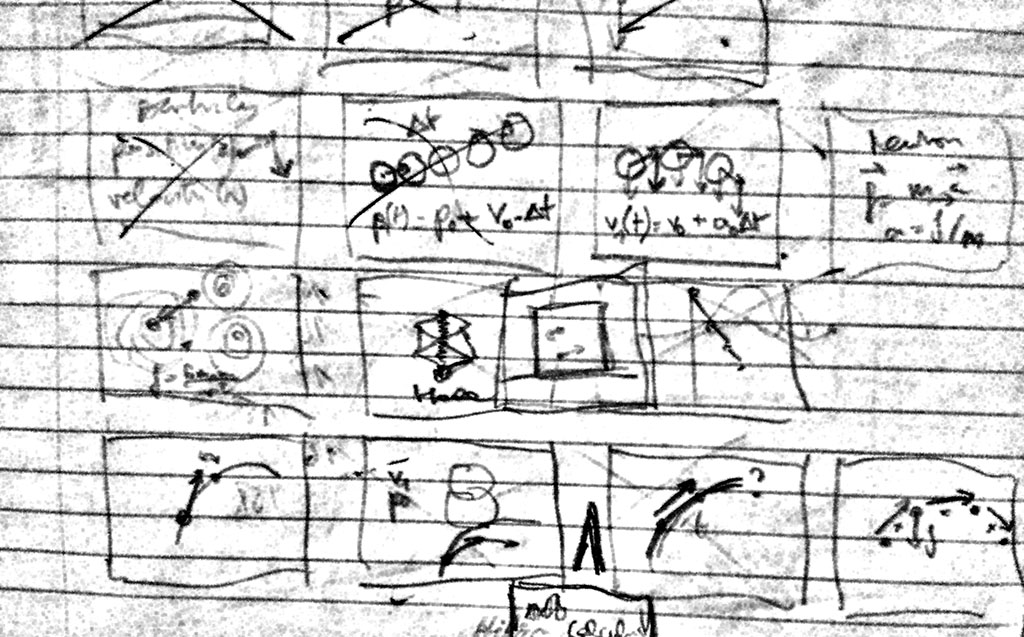
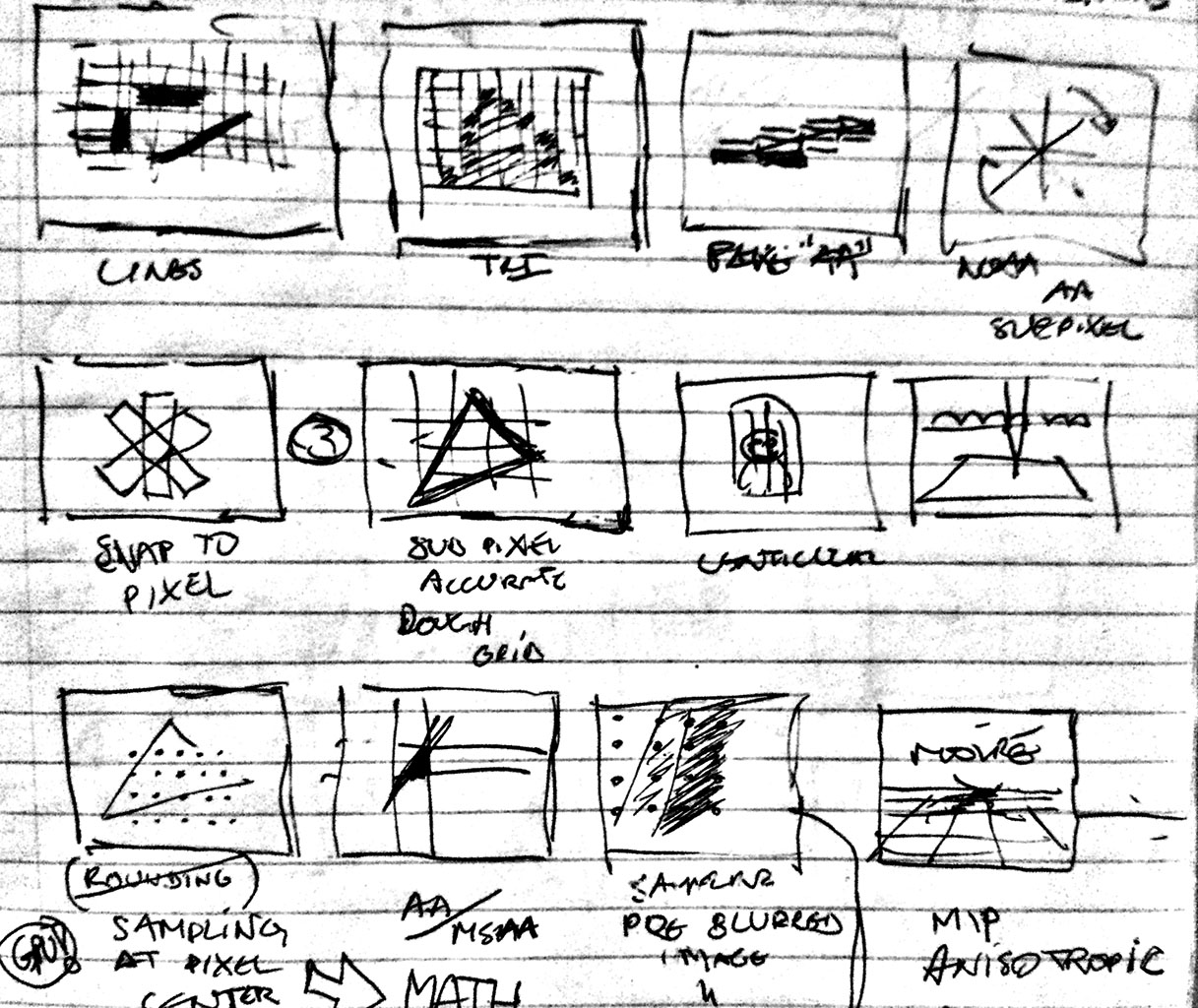
  <p class="tc">I sketch rough thumbnails, then start animating until I hit a dead end. Then start another one. Titles and overlays always come last.</p>
</div></aside>

<div class="g8 i2 m2"><div class="pad">

<h2>Manifold Dreams</h2>

<p>I don't say all this to up my Rain Man cred, but to lay to rest the recurring question of where my work comes from. I translate the pictures in my head to HD, in order to learn from and refine the view. As I did with <a href="/blog/animate-your-way-to-glory-pt2/#quaternions">quaternions</a>: I struggled to grok the hypersphere, it wouldn't fit together right. So I wrote the code to trace out geodesics in color and fly around in it, and suddenly the twisting made sense. Hence my entire tutorial was built to replicate the same discovery process I went through myself.</p>

</div></div>

<div class="c"></div>

<aside class="wide full">

  <div class="iframe c m1">
    <iframe src="/files/mathbox2/iframe-quat.html?c3d6624d" class="mathbox autosize janky" height="320"></iframe>

    <p class="tc">For visualizing the 4D hypersphere, quaternions are a natural fit.<br />They reveal their underlying cyclic symmetry under 4D stereographic projection.</p>
  </div>

</aside>

<div class="g8 i2"><div class="pad">

<p>There was one big problem: scenes now consisted of <em>diagrams of diagrams</em>, which meant working around MathBox more than with it. Performance issues arose as complexity grew. Above all there was a total lack of composability in the components. None of this could be fixed without ripping out significant pieces, so doing it incrementally seemed futile. I started from scratch and set off to reinvent all the wheels.</p>

<p class="tc">$$ \text{MathBox}^2 = \int_1^2 \text{code}(v) dv $$</p>

<p>MathBox 2 was inevitably going to suffer <em>second-system syndrome</em>, parts would be overengineered. Rather than fight it, I embraced it and effectively wrote a strange vector GPU driver in CoffeeScript. (Such is life, this is a blueprint meant to be simplified and made obsolete over time, not expanded upon.) It's a freight train straight to the heart of a graphics card, combining low-level and high-level in a way that feels novel <span style="font-size:0;opacity:0;width:0;position:absolute;left:-10000px;">🐴</span> when you use it, squeezing <span style="font-size:0;opacity:0;width:0;position:absolute;left:-10000px;">🐴</span> through a very small opening.</p>

<p>What was tedious before, now falls out naturally. If I format the scene above as XML/JSX, it becomes:</p>

</div></div>

<div class="g8 i2"><div class="pad">
  <!--first-->

<pre><code class="language-jsx wrap small"><span style="color:rgb(128,0,128)">&lt;root&gt;
  <span style="color:rgb(0,70,156)">&lt;!-- Place the camera --&gt;</span>
  &lt;camera /&gt;
  <span style="color:rgb(0,70,156)">&lt;!-- Change clock speed --&gt;</span>
  &lt;clock&gt;
    <span style="color:rgb(0,70,156)">&lt;!-- 4D Stereographic projection --&gt;</span>
    &lt;stereographic4&gt;
      <span style="color:rgb(0,70,156)">&lt;!-- Custom 4D rotation shader --&gt;</span>
      &lt;shader /&gt;
      <span style="color:rgb(0,70,156)">&lt;!-- Move vertices --&gt;</span>
      &lt;vertex&gt;
        <span style="color:rgb(0,70,156)">&lt;!-- Sample an area --&gt;</span>
        <span style="color:rgb(0,70,156)">&lt;!-- Draw a set of lines --&gt;</span>
        <span style="color:rgb(32,128,240)">&lt;area /&gt;</span>
        <span style="color:rgb(32,128,240)">&lt;line /&gt;</span>

        <span style="color:rgb(0,70,156)">&lt;!-- Sample an area --&gt;</span>
        <span style="color:rgb(0,70,156)">&lt;!-- Draw a set of lines --&gt;</span>
        <span style="color:rgb(32,140,0)">&lt;area /&gt;</span>
        <span style="color:rgb(32,140,0)">&lt;line /&gt;</span>

        <span style="color:rgb(0,70,156)">&lt;!-- Sample an area --&gt;</span>
        <span style="color:rgb(0,70,156)">&lt;!-- Draw a set of lines --&gt;</span>
        <span style="color:rgb(203,32,0)">&lt;area /&gt;</span>
        <span style="color:rgb(203,32,0)">&lt;line /&gt;</span>
      &lt;/vertex&gt;
    &lt;/stereographic4&gt;
  &lt;/clock&gt;
&lt;/root&gt;</span></code></pre>

</div></div>

<div class="c"></div>

<div class="g12 m1"><div class="pad">
  
<p>In order to make these pieces behave, a bunch of additional attributes are applied, most of which are strings or values, some of which are functions/code, either JavaScript or GLSL:</p>

</div></div>

<div class="g12"><div class="pad">
  <!--second-->

<pre><code class="language-jsx wrap small"><span></span><span style="color:rgb(128,0,128)">&lt;root </span><span style="color:rgb(144,64,0)">id</span><span style="color:rgb(128,0,128)">=&quot;</span><span style="color:rgb(0,0,192)">1</span><span style="color:rgb(128,0,128)">&quot; </span><span style="color:rgb(144,64,0)">scale</span><span style="color:rgb(128,0,128)">=</span><span style="color:rgb(0,70,156)">{300}</span><span style="color:rgb(128,0,128)"></span><span style="color:rgb(128,0,128)">&gt;</span><span style="color:inherit">
 </span><span style="color:rgb(144,64,0)"> </span><span style="color:rgb(144,64,0)"></span><span style="color:rgb(128,0,128)">&lt;camera </span><span style="color:rgb(144,64,0)">id</span><span style="color:rgb(128,0,128)">=&quot;</span><span style="color:rgb(0,0,192)">2</span><span style="color:rgb(128,0,128)">&quot; </span><span style="color:rgb(144,64,0)">proxy</span><span style="color:rgb(128,0,128)">=</span><span style="color:rgb(0,70,156)">{true}</span><span style="color:rgb(128,0,128)"> </span><span style="color:rgb(144,64,0)">position</span><span style="color:rgb(128,0,128)">=</span><span style="color:rgb(0,70,156)">{[0, 0, 3]}</span><span style="color:rgb(128,0,128)"> </span><span style="color:rgb(144,64,0)">/</span><span style="color:rgb(128,0,128)">&gt;</span><span style="color:inherit">
 </span><span style="color:rgb(144,64,0)"> </span><span style="color:rgb(144,64,0)"></span><span style="color:rgb(128,0,128)">&lt;clock </span><span style="color:rgb(144,64,0)">id</span><span style="color:rgb(128,0,128)">=&quot;</span><span style="color:rgb(0,0,192)">3</span><span style="color:rgb(128,0,128)">&quot; </span><span style="color:rgb(144,64,0)">speed</span><span style="color:rgb(128,0,128)">=</span><span style="color:rgb(0,70,156)">{1/4}</span><span style="color:rgb(128,0,128)"></span><span style="color:rgb(128,0,128)">&gt;</span><span style="color:inherit">
 </span><span style="color:rgb(144,64,0)"> </span><span style="color:rgb(144,64,0)"> </span><span style="color:rgb(144,64,0)"> </span><span style="color:rgb(144,64,0)"></span><span style="color:rgb(128,0,128)">&lt;stereographic4 </span><span style="color:rgb(144,64,0)">id</span><span style="color:rgb(128,0,128)">=&quot;</span><span style="color:rgb(0,0,192)">4</span><span style="color:rgb(128,0,128)">&quot; </span><span style="color:rgb(144,64,0)">bend</span><span style="color:rgb(128,0,128)">=</span><span style="color:rgb(0,70,156)">{1}</span><span style="color:rgb(128,0,128)"></span><span style="color:rgb(128,0,128)">&gt;</span><span style="color:inherit">
 </span><span style="color:rgb(144,64,0)"> </span><span style="color:rgb(144,64,0)"> </span><span style="color:rgb(144,64,0)"> </span><span style="color:rgb(144,64,0)"> </span><span style="color:rgb(144,64,0)"> </span><span style="color:rgb(144,64,0)"></span><span style="color:rgb(128,0,128)">&lt;shader </span><span style="color:rgb(144,64,0)">id</span><span style="color:rgb(128,0,128)">=&quot;</span><span style="color:rgb(0,0,192)">5</span><span style="color:rgb(128,0,128)">&quot; </span><span style="color:rgb(144,64,0)">code</span><span style="color:rgb(128,0,128)">=&quot;</span><span style="color:rgb(0,0,192)">
uniform float cos1;
uniform float sin1;
uniform float cos2;
uniform float sin2;
uniform float cos3;
uniform float sin3;
uniform float cos4;
uniform float sin4;

vec4 getRotate4D(vec4 xyzw, inout vec4 stpq) {
  xyzw.xy = xyzw.xy * mat2(cos1, sin1, -sin1, cos1);
  xyzw.zw = xyzw.zw * mat2(cos2, sin2, -sin2, cos2);
  xyzw.xz = xyzw.xz * mat2(cos3, sin3, -sin3, cos3);
  xyzw.yw = xyzw.yw * mat2(cos4, sin4, -sin4, cos4);

  return xyzw;
}</span><span style="color:rgb(128,0,128)">&quot;
 </span><span style="color:rgb(144,64,0)">cos1</span><span style="color:rgb(128,0,128)">=&gt;</span><span style="color:rgb(0,70,156)">{(t) =&gt; Math.cos(t * .111)}</span><span style="color:rgb(128,0,128)"> </span><span style="color:rgb(144,64,0)">sin1</span><span style="color:rgb(128,0,128)">=&gt;</span><span style="color:rgb(0,70,156)">{(t) =&gt; Math.sin(t * .111)}</span><span style="color:rgb(128,0,128)"> </span><span style="color:rgb(144,64,0)">cos2</span><span style="color:rgb(128,0,128)">=&gt;</span><span style="color:rgb(0,70,156)">{(t) =&gt; Math.cos(t * .151 + 1)}</span><span style="color:rgb(128,0,128)"> </span><span style="color:rgb(144,64,0)">sin2</span><span style="color:rgb(128,0,128)">=&gt;</span><span style="color:rgb(0,70,156)">{(t) =&gt; Math.sin(t * .151 + 1)}</span><span style="color:rgb(128,0,128)"> </span><span style="color:rgb(144,64,0)">cos3</span><span style="color:rgb(128,0,128)">=&gt;</span><span style="color:rgb(0,70,156)">{(t) =&gt; Math.cos(t * .071 + Math.sin(t * .081))}</span><span style="color:rgb(128,0,128)"> </span><span style="color:rgb(144,64,0)">sin3</span><span style="color:rgb(128,0,128)">=&gt;</span><span style="color:rgb(0,70,156)">{(t) =&gt; Math.sin(t * .071 + Math.sin(t * .081))}</span><span style="color:rgb(128,0,128)"> </span><span style="color:rgb(144,64,0)">cos4</span><span style="color:rgb(128,0,128)">=&gt;</span><span style="color:rgb(0,70,156)">{(t) =&gt; Math.cos(t * .053 + Math.sin(t * .066) + 1)}</span><span style="color:rgb(128,0,128)"> </span><span style="color:rgb(144,64,0)">sin4</span><span style="color:rgb(128,0,128)">=&gt;</span><span style="color:rgb(0,70,156)">{(t) =&gt; Math.sin(t * .053 + Math.sin(t * .066) + 1)}</span><span style="color:rgb(128,0,128)"> </span><span style="color:rgb(144,64,0)">/</span><span style="color:rgb(128,0,128)">&gt;</span><span style="color:inherit">
 </span><span style="color:rgb(144,64,0)"> </span><span style="color:rgb(144,64,0)"> </span><span style="color:rgb(144,64,0)"> </span><span style="color:rgb(144,64,0)"> </span><span style="color:rgb(144,64,0)"> </span><span style="color:rgb(144,64,0)"></span><span style="color:rgb(128,0,128)">&lt;vertex </span><span style="color:rgb(144,64,0)">id</span><span style="color:rgb(128,0,128)">=&quot;</span><span style="color:rgb(0,0,192)">6</span><span style="color:rgb(128,0,128)">&quot;</span><span style="color:rgb(128,0,128)">&gt;</span><span style="color:inherit">
 </span><span style="color:rgb(144,64,0)"> </span><span style="color:rgb(144,64,0)"> </span><span style="color:rgb(144,64,0)"> </span><span style="color:rgb(144,64,0)"> </span><span style="color:rgb(144,64,0)"> </span><span style="color:rgb(144,64,0)"> </span><span style="color:rgb(144,64,0)"> </span><span style="color:rgb(144,64,0)"></span><span style="color:rgb(128,0,128)">&lt;area </span><span style="color:rgb(144,64,0)">id</span><span style="color:rgb(128,0,128)">=&quot;</span><span style="color:rgb(0,0,192)">7</span><span style="color:rgb(128,0,128)">&quot; </span><span style="color:rgb(144,64,0)">rangeX</span><span style="color:rgb(128,0,128)">=</span><span style="color:rgb(0,70,156)">{[-π/2, π/2]}</span><span style="color:rgb(128,0,128)"> </span><span style="color:rgb(144,64,0)">rangeY</span><span style="color:rgb(128,0,128)">=</span><span style="color:rgb(0,70,156)">{[0, τ]}</span><span style="color:rgb(128,0,128)"> </span><span style="color:rgb(144,64,0)">width</span><span style="color:rgb(128,0,128)">=</span><span style="color:rgb(0,70,156)">{129}</span><span style="color:rgb(128,0,128)"> </span><span style="color:rgb(144,64,0)">height</span><span style="color:rgb(128,0,128)">=</span><span style="color:rgb(0,70,156)">{65}</span><span style="color:rgb(128,0,128)"> </span><span style="color:rgb(144,64,0)">expr</span><span style="color:rgb(128,0,128)">=</span><span style="color:rgb(0,70,156)">{(emit, θ, ϕ, i, j) =&gt; {
        q1.set(0, 0, Math.sin(θ), Math.cos(θ));
        q2.set(0, Math.sin(ϕ), 0, Math.cos(ϕ));
        q1.multiply(q2);
        emit(q1.x, q1.y, q1.z, q1.w);
      }}</span><span style="color:rgb(128,0,128)"> </span><span style="color:rgb(144,64,0)">live</span><span style="color:rgb(128,0,128)">=</span><span style="color:rgb(0,70,156)">{false}</span><span style="color:rgb(128,0,128)"> </span><span style="color:rgb(144,64,0)">channels</span><span style="color:rgb(128,0,128)">=</span><span style="color:rgb(0,70,156)">{4}</span><span style="color:rgb(128,0,128)"> </span><span style="color:rgb(144,64,0)">/</span><span style="color:rgb(128,0,128)">&gt;</span><span style="color:inherit">
 </span><span style="color:rgb(144,64,0)"> </span><span style="color:rgb(144,64,0)"> </span><span style="color:rgb(144,64,0)"> </span><span style="color:rgb(144,64,0)"> </span><span style="color:rgb(144,64,0)"> </span><span style="color:rgb(144,64,0)"> </span><span style="color:rgb(144,64,0)"> </span><span style="color:rgb(144,64,0)"></span><span style="color:rgb(128,0,128)">&lt;line </span><span style="color:rgb(144,64,0)">id</span><span style="color:rgb(128,0,128)">=&quot;</span><span style="color:rgb(0,0,192)">8</span><span style="color:rgb(128,0,128)">&quot; </span><span style="color:rgb(144,64,0)">color</span><span style="color:rgb(128,0,128)">=&quot;</span><span style="color:rgb(32,128,240)">#3090FF</span><span style="color:rgb(128,0,128)">&quot; </span><span style="color:rgb(144,64,0)">/</span><span style="color:rgb(128,0,128)">&gt;</span><span style="color:inherit">
 </span><span style="color:rgb(144,64,0)"> </span><span style="color:rgb(144,64,0)"> </span><span style="color:rgb(144,64,0)"> </span><span style="color:rgb(144,64,0)"> </span><span style="color:rgb(144,64,0)"> </span><span style="color:rgb(144,64,0)"> </span><span style="color:rgb(144,64,0)"> </span><span style="color:rgb(144,64,0)"></span><span style="color:rgb(128,0,128)">&lt;area </span><span style="color:rgb(144,64,0)">id</span><span style="color:rgb(128,0,128)">=&quot;</span><span style="color:rgb(0,0,192)">9</span><span style="color:rgb(128,0,128)">&quot; </span><span style="color:rgb(144,64,0)">rangeX</span><span style="color:rgb(128,0,128)">=</span><span style="color:rgb(0,70,156)">{[-π/2, π/2]}</span><span style="color:rgb(128,0,128)"> </span><span style="color:rgb(144,64,0)">rangeY</span><span style="color:rgb(128,0,128)">=</span><span style="color:rgb(0,70,156)">{[0, τ]}</span><span style="color:rgb(128,0,128)"> </span><span style="color:rgb(144,64,0)">width</span><span style="color:rgb(128,0,128)">=</span><span style="color:rgb(0,70,156)">{129}</span><span style="color:rgb(128,0,128)"> </span><span style="color:rgb(144,64,0)">height</span><span style="color:rgb(128,0,128)">=</span><span style="color:rgb(0,70,156)">{65}</span><span style="color:rgb(128,0,128)"> </span><span style="color:rgb(144,64,0)">expr</span><span style="color:rgb(128,0,128)">=</span><span style="color:rgb(0,70,156)">{(emit, θ, ϕ, i, j) =&gt; {
        q1.set(0, Math.sin(θ), 0, Math.cos(θ));
        q2.set(Math.sin(ϕ), 0, 0, Math.cos(ϕ));
        q1.multiply(q2);
        emit(q1.x, q1.y, q1.z, q1.w);
      }}</span><span style="color:rgb(128,0,128)"> </span><span style="color:rgb(144,64,0)">live</span><span style="color:rgb(128,0,128)">=</span><span style="color:rgb(0,70,156)">{false}</span><span style="color:rgb(128,0,128)"> </span><span style="color:rgb(144,64,0)">channels</span><span style="color:rgb(128,0,128)">=</span><span style="color:rgb(0,70,156)">{4}</span><span style="color:rgb(128,0,128)"> </span><span style="color:rgb(144,64,0)">/</span><span style="color:rgb(128,0,128)">&gt;</span><span style="color:inherit">
 </span><span style="color:rgb(144,64,0)"> </span><span style="color:rgb(144,64,0)"> </span><span style="color:rgb(144,64,0)"> </span><span style="color:rgb(144,64,0)"> </span><span style="color:rgb(144,64,0)"> </span><span style="color:rgb(144,64,0)"> </span><span style="color:rgb(144,64,0)"> </span><span style="color:rgb(144,64,0)"></span><span style="color:rgb(128,0,128)">&lt;line </span><span style="color:rgb(144,64,0)">id</span><span style="color:rgb(128,0,128)">=&quot;</span><span style="color:rgb(0,0,192)">10</span><span style="color:rgb(128,0,128)">&quot; </span><span style="color:rgb(144,64,0)">color</span><span style="color:rgb(128,0,128)">=&quot;</span><span style="color:rgb(32,140,0)">#20A000</span><span style="color:rgb(128,0,128)">&quot; </span><span style="color:rgb(144,64,0)">/</span><span style="color:rgb(128,0,128)">&gt;</span><span style="color:inherit">
 </span><span style="color:rgb(144,64,0)"> </span><span style="color:rgb(144,64,0)"> </span><span style="color:rgb(144,64,0)"> </span><span style="color:rgb(144,64,0)"> </span><span style="color:rgb(144,64,0)"> </span><span style="color:rgb(144,64,0)"> </span><span style="color:rgb(144,64,0)"> </span><span style="color:rgb(144,64,0)"></span><span style="color:rgb(128,0,128)">&lt;area </span><span style="color:rgb(144,64,0)">id</span><span style="color:rgb(128,0,128)">=&quot;</span><span style="color:rgb(0,0,192)">11</span><span style="color:rgb(128,0,128)">&quot; </span><span style="color:rgb(144,64,0)">rangeX</span><span style="color:rgb(128,0,128)">=</span><span style="color:rgb(0,70,156)">{[-π/2, π/2]}</span><span style="color:rgb(128,0,128)"> </span><span style="color:rgb(144,64,0)">rangeY</span><span style="color:rgb(128,0,128)">=</span><span style="color:rgb(0,70,156)">{[0, τ]}</span><span style="color:rgb(128,0,128)"> </span><span style="color:rgb(144,64,0)">width</span><span style="color:rgb(128,0,128)">=</span><span style="color:rgb(0,70,156)">{129}</span><span style="color:rgb(128,0,128)"> </span><span style="color:rgb(144,64,0)">height</span><span style="color:rgb(128,0,128)">=</span><span style="color:rgb(0,70,156)">{65}</span><span style="color:rgb(128,0,128)"> </span><span style="color:rgb(144,64,0)">expr</span><span style="color:rgb(128,0,128)">=</span><span style="color:rgb(0,70,156)">{(emit, θ, ϕ, i, j) =&gt; {
        q1.set(Math.sin(θ), 0, 0, Math.cos(θ));
        q2.set(0, 0, Math.sin(ϕ), Math.cos(ϕ));
        q1.multiply(q2);
        emit(q1.x, q1.y, q1.z, q1.w);
      }}</span><span style="color:rgb(128,0,128)"> </span><span style="color:rgb(144,64,0)">live</span><span style="color:rgb(128,0,128)">=</span><span style="color:rgb(0,70,156)">{false}</span><span style="color:rgb(128,0,128)"> </span><span style="color:rgb(144,64,0)">channels</span><span style="color:rgb(128,0,128)">=</span><span style="color:rgb(0,70,156)">{4}</span><span style="color:rgb(128,0,128)"> </span><span style="color:rgb(144,64,0)">/</span><span style="color:rgb(128,0,128)">&gt;</span><span style="color:inherit">
 </span><span style="color:rgb(144,64,0)"> </span><span style="color:rgb(144,64,0)"> </span><span style="color:rgb(144,64,0)"> </span><span style="color:rgb(144,64,0)"> </span><span style="color:rgb(144,64,0)"> </span><span style="color:rgb(144,64,0)"> </span><span style="color:rgb(144,64,0)"> </span><span style="color:rgb(144,64,0)"></span><span style="color:rgb(128,0,128)">&lt;line </span><span style="color:rgb(144,64,0)">id</span><span style="color:rgb(128,0,128)">=&quot;</span><span style="color:rgb(0,0,192)">12</span><span style="color:rgb(128,0,128)">&quot; </span><span style="color:rgb(144,64,0)">color</span><span style="color:rgb(128,0,128)">=&quot;</span><span style="color:rgb(203,32,0)">#DF2000</span><span style="color:rgb(128,0,128)">&quot; </span><span style="color:rgb(144,64,0)">/</span><span style="color:rgb(128,0,128)">&gt;</span><span style="color:inherit">
 </span><span style="color:rgb(144,64,0)"> </span><span style="color:rgb(144,64,0)"> </span><span style="color:rgb(144,64,0)"> </span><span style="color:rgb(144,64,0)"> </span><span style="color:rgb(144,64,0)"> </span><span style="color:rgb(144,64,0)"></span><span style="color:rgb(128,0,128)">&lt;/vertex</span><span style="color:rgb(128,0,128)">&gt;</span><span style="color:inherit">
 </span><span style="color:rgb(144,64,0)"> </span><span style="color:rgb(144,64,0)"> </span><span style="color:rgb(144,64,0)"> </span><span style="color:rgb(144,64,0)"></span><span style="color:rgb(128,0,128)">&lt;/stereographic4</span><span style="color:rgb(128,0,128)">&gt;</span><span style="color:inherit">
 </span><span style="color:rgb(144,64,0)"> </span><span style="color:rgb(144,64,0)"></span><span style="color:rgb(128,0,128)">&lt;/clock</span><span style="color:rgb(128,0,128)">&gt;</span><span style="color:inherit">
</span><span style="color:rgb(128,0,128)">&lt;/root</span><span style="color:rgb(128,0,128)">&gt;</span><span style="color:inherit"></span></code></pre>

</div></div>

<div class="g8 i2"><div class="pad">

<p>Phew. That's how you make a 4D diagram with Hopf fibration as far as the eye can see. Except it's not actually JSX, that's just me and my pretty-printer pretending.</p>

<h2>Geometry Streaming</h2>

<p>The key is the data itself. It's an array of points mostly, but how that data is laid out and interpreted determines how useful it can be.</p>

<p>Most basic primitives come in fixed size chunks. Particles are single points, lines have two points, triangles have three points. Polygons and polylines have N points. So it made sense to have a <em>tuple of N points</em> be the basic logical unit. You can think in logical pieces of geometry, rather than raw points or individual triangles, unlike GL.</p>

<p>Each primitive maps over data in a standard way. Feed an <code>array</code> of points to a <code>line</code>, you get a polyline. Feed a <code>matrix</code> of points to a <code>surface</code> and you get a grid mesh. Simple. But feed a <code>voxel</code> to a <code>vector</code>, and you get a <em>3D vector field</em>. The general idea is that drawing 1 of something should be as easy as drawing 100×100×100.</p>

</div></div>

<div class="wide full">

  <div class="iframe c">
    <iframe src="/files/mathbox2/iframe-lineup.html?c3d6624d" class="mathbox autosize janky" height="320"></iframe>
  </div>

</div>

<div class="c"></div>

<div class="g8 i2 m1"><div class="pad">

<p>This is particularly useful for custom data expressions, which stream in live or procedural data. They now receive an <code>emit(x, y, z, w)</code> function, for emitting a 4-vector like XYZW or RGBA. This is little more than an inlineable call to fill a <code>floatArray[i++] = x</code>, quite a lot faster than returning an array or object.</p>

</div></div>

<div class="c"></div>

<div class="g8 m2"><div class="pad">

  <div class="iframe c">
    <iframe src="/files/mathbox2/iframe-vector.html?c3d6624d" class="mathbox janky" height="250" style="background: #fff; width: 100%;"></iframe>
  </div>

<pre><code class="language-javascript">mathbox
  .interval({
    expr: function (emit, x, i, t) {
      y = Math.sin(x + t);
      emit(x,  y);
      emit(x, -y);
    },
    width:   64,
    items:    2,
    channels: 2,
  })
  .vector({
    color: 0x3090FF,
    width: 3,
    start: true,
  });
</code></pre>

<div class="c"></div>

<p class="tc"><em>Emitting 64 2D vectors on an interval, 2 points each.</em></p>

<p>More importantly it lets you emit N points in one iteration, which makes the JS expressions themselves feel like geometry shaders. The result feeds into one or more styled drawing ops. The number of emit calls has to be constant, but you can always knock out or mask the excess geometry.</p>

</div></div>

<div class="g4 m3"><div class="pad">

  <pre><code class="language-javascript">emit = switch channels
  when 1 then (x) -&gt;
    array[i++] = x
    ++j
    return

  when 2 then (x, y) -&gt;
    array[i++] = x
    array[i++] = y
    ++j
    return

  when 3 then (x, y, z) -&gt;
    array[i++] = x
    array[i++] = y
    array[i++] = z
    ++j
    return

  when 4 then (x, y, z, w) -&gt;
    array[i++] = x
    array[i++] = y
    array[i++] = z
    array[i++] = w
    ++j
    return</code></pre>

  <div class="c"></div>
  
  <p><em>Both the <code>expr</code>ession and <code>emit</code>ter will be inlined into the stream's iteration loop.</em></p>

</div></div>

<div class="g12"><div class="pad">

  <pre><code class="language-javascript">consume = switch channels
  when 1 then (emit) -&gt;
    emit array[i++]
    ++j
    return

  when 2 then (emit) -&gt;
    emit array[i++], array[i++]
    ++j
    return

  when 3 then (emit) -&gt;
    emit array[i++], array[i++], array[i++]
    ++j
    return

  when 4 then (emit) -&gt;
    emit array[i++], array[i++], array[i++], array[i++]
    ++j
    return</code></pre>

  <div class="c"></div>
    
  <p class="tc m1"><em>Closures of Hanoi</em></p>

</div></div>

<div class="g8 i2"><div class="pad">

<h2>(4-in-1)²</h2>

<p>GPUs can operate on 4×1 vectors and 4×4 matrices, so working with 4D values is natural. Values can also be referenced by 4D indices. With one dimension reserved for the tuples, that leaves us 3 dimensions XYZ. Hence MathBox arrays are 3+1D. This is for <em>width</em>, <em>height</em>, <em>depth</em>, while the tuple dimension is called <em>items</em>. It does what it says on the tin, creating 1D W, 2D W×H and 3D W×H×D arrays of tuples. Each tuple is made of N vectors of up to 4 channels each.</p>

<p>Thanks to cyclic buffers and partial updates, history also comes baked in. You can use a spare dimension as a free time axis, retaining samples on the go. You can <code>.set('history', N)</code> to record a short log of a whole array over time, indefinitely.</p>

<p>All of this is modular: a data source is something that can be sampled by a 4D pointer from GLSL. Underneath, arrays end up packed into a regular 2D float texture, with "items × width" horizontally and "height × depth" vertically. Each 'pixel' holds a 1/2/3/4D point.</p>

<p>Mapping a 4D 'pointer' to the real 2D UV coordinates is just arithmetic, and so are operators like <code>transpose</code> and <code>repeat</code>. You just swap the XY indices and tell everyone downstream that it's now <em>this</em> big instead. They can't tell the difference.</p>

<p>You can create giant procedural arrays this way, including across rectangular texture size limits, as none of them actually exist except as transient values deep inside a GPU core. Until you materialize them by rendering to a texture using the <code>memo</code> primitive. Add in operators like interpolation and convolution and it's a pretty neat real-time finishing kit for data.</p>

</div></div>

<div class="wide full">

  <div class="iframe c">
    <iframe src="/files/mathbox2/iframe-volume.html?c3d6624d" class="mathbox autosize janky" height="320"></iframe>
  </div>

</div>

<div class="c"></div>

<div class="g10 i1 m4"><div class="pad">

<p><img src="/files/mathbox2/too-many-webgls.png" alt="Too many WebGL contexts" /></p>

</div></div>

<div class="g8 i2"><div class="pad">

<p><em><big><a href="/blog/mathbox2-pt2/">Continued in Part 2.</a></big></em></p>

</div></div>
]]></content>
  </entry>
  
  <entry>
    <title type="html"><![CDATA[MathBox²]]></title>
    <link href="https://acko.net/blog/mathbox2-pt2/"/>
    <updated>2015-09-27T00:00:00+02:00</updated>
    <id>https://acko.net/blog/mathbox2-pt2</id>
    <content type="html"><![CDATA[<script src="/files/katex/katex.min.js"></script>

<script src="/files/katex/contrib/auto-render.min.js"></script>

<link rel="stylesheet" type="text/css" href="/files/katex/katex.min.css" />

<div class="g8 i2 first"><div class="pad">

<h2 class="sub">Part 2</h2>

</div></div>

<div class="c"></div>

<div class="g8 i2"><div class="pad">

<a href="/blog/mathbox2/">Continued from Part 1.</a>

<h2>I-Can't-Believe-It's-Not-React</h2>

<p>Underneath sits a large codebase driving it, 200+ files in JS/CS alone, not including dependencies that aren't my own. Much of it is infrastructure necessary to pull off certain tricks consistently: you can draw 2.5D lines with grace, render arbitrary Unicode text in GL, sync HTML to GPU-computed geometry, and do all this with GLSL code composed on the fly, including your own. Nobody needs all of this.</p>

</div></div>

<div class="wide full">

  <div class="iframe c">
    <iframe src="/files/mathbox2/iframe-labels.html?c3d6624d" class="mathbox autosize janky" height="320"></iframe>
  </div>

</div>

<aside class="g8 i2"><div class="pad">

    <ul>
    <li><span style="color: rgb(48,192,255)">LaTeX HTML with KaTeX.</span></li>
    <li><span style="color: rgb(48,144,255)">Plain HTML DOM.</span></li>
    <li><span style="color: rgb(192,64,0)">Virtual HTML with DOM diff.</span></li>
    <li>Live Signed Distance Fields for GL.</li>
    </ul>
  
</div></aside>

<div class="g8 i2"><div class="pad">

<p>These wildly different strategies are actually all abstracted into the DOM path or the GL path, with a quacks-like-React component as the glue in the DOM path.</p>

</div></div>

<div class="g5"><div class="pad">

<pre><code class="language-jsx wrap small"><span style="color:rgb(128,0,128)">&lt;root&gt;
  <span style="color:rgb(0,70,156)">&lt;!-- Place the camera --&gt;</span>
  &lt;camera /&gt;
  <span style="color:rgb(0,70,156)">&lt;!-- 3D Polar view --&gt;</span>
  &lt;polar&gt;
      <span style="color:rgb(0,70,156)">&lt;!-- Sample an interval --&gt;</span>
      &lt;interval /&gt;
      <span style="color:rgb(0,70,156)">&lt;!-- Draw a line --&gt;</span>
      &lt;line /&gt;
      <span style="color:rgb(0,70,156)">&lt;!-- Resample along length --&gt;</span>
      &lt;resample /&gt;
      <span style="color:rgb(0,70,156)">&lt;!-- Draw a set of points --&gt;</span>
      &lt;point /&gt;
      <span style="color:rgb(0,70,156)">&lt;!-- Make HTML labels --&gt;</span>
      &lt;html /&gt;
      <span style="color:rgb(0,70,156)">&lt;!-- Draw HTML sprites --&gt;</span>
      &lt;dom /&gt;

      <span style="color:rgb(0,70,156)">...</span>      

      <span style="color:rgb(0,70,156)">&lt;!-- Sample an interval --&gt;</span>
      &lt;interval /&gt;
      <span style="color:rgb(0,70,156)">&lt;!-- Draw a line --&gt;</span>
      &lt;line /&gt;
      <span style="color:rgb(0,70,156)">&lt;!-- Resample along length --&gt;</span>
      &lt;resample /&gt;
      <span style="color:rgb(0,70,156)">&lt;!-- Draw a set of points --&gt;</span>
      &lt;point /&gt;
      <span style="color:rgb(0,70,156)">&lt;!-- Make GL text --&gt;</span>
      &lt;text /&gt;
      <span style="color:rgb(0,70,156)">&lt;!-- Generate colors --&gt;</span>
      &lt;array /&gt;
      <span style="color:rgb(0,70,156)">&lt;!-- Draw GL sprites --&gt;</span>
      &lt;label /&gt;

    &lt;/vertex&gt;
  &lt;/cartesian&gt;
&lt;/root&gt;</span></code></pre>

</div></div>

<aside class="g7"><div class="pad">

<pre><code class="language-javascript wrap small">// Define VDOM handler to clone real DOM elements
var clone = MathBox.DOM.createClass({
  render: function (el, props, children) {
    var element = children.cloneNode(true);
    return element;
  },
});

// Define VDOM handler to format 'latex' into an HTML span
var latex = MathBox.DOM.createClass({
  render: function (el) {
    this.props.innerHTML = katex.renderToString(this.children);
    return el('span', this.props);
  }
});</code></pre>

<div class="c"></div>

<p class="tc"><em>The interface with the HTML DOM.</em></p>

<p class="tc"><em>Appearances deceive however,<br />as MathBox's own DOM is an entirely different beast.</em></p>

</div></aside>

<div class="g8 i2"><div class="pad">

<p>Most of the code is for initialization only, building up a reactive machine by combining components. Once assembled it lets the GPU do most of the crunching, while relying on the JS VM to inline and optimize the chewy outside.</p>

<p>At the top level, MathBox is plain old JavaScript, used like this:</p>

</div></div>

<div class="g8"><div class="pad">
  <pre><code class="language-javascript" tabindex="0">/* Easy Mode */

// Bootstrap MathBox and Three.js
var mathbox = mathBox();
if (mathbox.fallback) { throw Error("No WebGL support.") };

// Make MathBox primitives
var view =
  mathbox
  .set({
    scale: null,
  })
  .camera({
    proxy: true,
    position: [0, 0, 3]
  })
  .polar({
    range: [[-2, 2], [-1, 1], [-1, 1]],
    scale: [2, 1, 1],
    bend: .25
  });

view.interval({
  width: 48,
  expr: function (emit, x, i, t) {
    // Emit sine wave
    y = Math.sin(x + t / 4) * .5 + .75;
    emit(x, y);
  },
  channels: 2,
})
.line({
  color: 0x30C0FF,
  width: 16,
})
.resample({
  width: 8,
})
.point({
  color: 0x30C0FF,
  size: 60,
})
.html({
  width:  8,
  expr: function (emit, el, i, j, k, l, t) {
    // Emit random latex
    var color = ['#30D0FF','#30A0FF'][i%2];
    var a = Math.round(t + i) % symbols.length;
    var b = Math.round(Math.sqrt(t * t + Math.sin(t + i * i) + 5));
    emit(el(latex, {style: {color: color}},
      '\\sqrt{\\text{LaTeX} + '+(i + b)+' \\pi^{'+symbols[a]+'}}'));
  },
})
.dom({
  snap: false,
  offset: [0, 32],
  depth: 0,
  zoom: 1,
  outline: 2,
  size: 20,
});

// ...
</code></pre>

</div></div>

<aside class="g4 m1">

  <div class="iframe c">
    <iframe src="/files/mathbox2/iframe-splash.html?c3d6624d" class="mathbox janky" height="250" style="background: #fff; width: 100%;"></iframe>

    <p class="tc">CSS 3D rims included.</p>
  </div>

</aside>

<aside class="g4">

  <div class="iframe c">
    <iframe src="/files/mathbox2/iframe-fallback.html?c3d6624d" class="mathbox janky" height="250" style="background: #fff; width: 100%;"></iframe>

    <p class="tc">The default fallback message.</p>
  </div>

</aside>

<div class="g8 i2"><div class="pad">
  
<p>The WebGL Canvas bootstrapper is a separate piece though, it's wrapping <a href="https://github.com/unconed/threestrap" target="_blank">Threestrap</a>, the little non-framework that could. It lets you spawn a fully functioning GL canvas in one exceedingly configurable call. It takes care of browser support, resizing with retina, CSS alignment, warm-up and more.</p>

<p>If you prefer instead, you can spawn a bare MathBox context in a Three.js scene of your choosing, but you'll have to babysit it:</p>

</div></div>

<div class="g12"><div class="pad">
  <pre><code class="language-javascript" tabindex="1">/* Simple Mode */

// Vanilla Three.js
var renderer = new THREE.WebGLRenderer();
var scene = new THREE.Scene();
var camera = new THREE.PerspectiveCamera(60, WIDTH / HEIGHT, .01, 1000);

// Insert into document
document.body.appendChild(renderer.domElement);

// MathBox context
var context = new MathBox.Context(renderer, scene, camera).init();
var mathbox = context.api;

// Set size
renderer.setSize(WIDTH, HEIGHT);
context.resize({ viewWidth: WIDTH, viewHeight: HEIGHT });

// Place camera and set background
camera.position.set(0, 0, 3);
renderer.setClearColor(new THREE.Color(0xFFFFFF), 1.0);

// MathBox elements
view = mathbox
.set({
  focus: 3,
})
.cartesian({
  range: [[-2, 2], [-1, 1], [-1, 1]],
  scale: [2, 1, 1],
});
// ...

// Render frames
var frame = function () {
  requestAnimationFrame(frame);
  context.frame();
  renderer.render(scene, camera);
};
requestAnimationFrame(frame);</code></pre>
</div></div>

<div class="g8 i2 m1"><div class="pad">

<p>Despite looking like a monolith, it really isn't, it was merely a matter of convenience and sanity to not decouple it more until its shape had stabilized. Minimal builds are, for now, left as an exercise to the reader. I've split up the thinking and design into several articles, mirroring the architecture. However, you don't need to know all this to <em>use</em> MathBox 2, they are for people who want to know the how and why... the <a href="/blog/a-dom-for-robots/">document model</a>, the <a href="/blog/yak-shading/">geometry core</a> and the <a href="/blog/shadergraph-2/">shader assembly</a>.</p>

<p>In putting it all together, the devil's in the details of course. Depending on your imagination, it's either much more or much less powerful than you want. There's still far too much to cover: slideshows, keyframe tracks, fov-calibrated units, z-indexes, atlas retexting, … Most of this is unsurprising in that it all works. You can define a keyframe interpolation between two value or emitter expressions, and watch the smoothly lerped data go. Animation tracks are tied to triggers like clocks and slides, which lets them fit naturally in presentations.</p>

</div></div>

<div class="c"></div>

<div class="g10 i1"><div class="pad">

<pre><code class="language-jsx wrap small"><span style="color:rgb(128,0,128)">&lt;root&gt;
  <span style="color:rgb(0,70,156)">&lt;!-- Present slides --&gt;</span>
  &lt;present <span style="color:rgb(144,64,0)">index</span><span style="color:rgb(128,0,128)">=</span><span style="color:rgb(0,70,156)">{1}</span>&gt;
    <span style="color:rgb(0,70,156)">&lt;!-- Slide 1 --&gt;</span>
    &lt;slide <span style="color:rgb(144,64,0)">steps</span><span style="color:rgb(128,0,128)">=</span><span style="color:rgb(0,70,156)">{2}</span>&gt;
      <span style="color:rgb(0,70,156)">&lt;!-- Transition effect --&gt;</span>
      &lt;reveal&gt;
        <span style="color:rgb(0,70,156)">&lt;!-- Sample an interval --&gt;</span>
        &lt;interval /&gt;
        <span style="color:rgb(0,70,156)">&lt;!-- Draw a line --&gt;</span>
        &lt;line /&gt;
        <span style="color:rgb(0,70,156)">&lt;!-- Step through keyframes --&gt;</span>
        &lt;step <span style="color:rgb(144,64,0)">script</span><span style="color:rgb(128,0,128)">=</span><span style="color:rgb(0,70,156)">{[
            {props: {color: 'red'}},
            {props: {color: 'blue'}},
          ]}</span> &gt;
      &lt;/reveal&gt;
    &lt;/slide&gt;
    <span style="color:rgb(0,70,156)">&lt;!-- Slide 2 --&gt;</span>
    &lt;slide&gt;
      <span style="color:rgb(0,70,156)">&lt;!-- Transition effect --&gt;</span>
      &lt;move&gt;
        <span style="color:rgb(0,70,156)">&lt;!-- Sample an interval --&gt;</span>
        &lt;interval /&gt;
        <span style="color:rgb(0,70,156)">&lt;!-- Play through keyframes --&gt;</span>
        &lt;play <span style="color:rgb(144,64,0)">script</span><span style="color:rgb(128,0,128)">=</span><span style="color:rgb(0,70,156)">{[
                       {props: {expr: (emit, x) =&gt; emit(x, Math.sin(x))}},
                       {props: {expr: (emit, x) =&gt; emit(x, Math.tan(x))}},
                      ]}</span> /&gt;
        <span style="color:rgb(0,70,156)">&lt;!-- Draw a line --&gt;</span>
        &lt;line /&gt;

        <span style="color:rgb(0,70,156)">&lt;!-- Slide 2.1 --&gt;</span>
        &lt;slide&gt;
        &lt;/slide&gt;
      &lt;/move&gt;
    &lt;/slide&gt;
    <span style="color:rgb(0,70,156)">&lt;!-- Slide 3 --&gt;</span>
    &lt;slide&gt;
      <span style="color:rgb(0,70,156)">&lt;!-- Transition effect --&gt;</span>
      &lt;reveal&gt;
        <span style="color:rgb(0,70,156)">&lt;!-- Sample an interval --&gt;</span>
        &lt;interval /&gt;
        <span style="color:rgb(0,70,156)">&lt;!-- Draw a line --&gt;</span>
        &lt;line /&gt;
      &lt;/reveal&gt;
    &lt;/slide&gt;
  &lt;/present&gt;
&lt;/root&gt;</span></code></pre>

</div></div>

<div class="g8 i2"><div class="pad">

<h2>One More Thing…</h2>

<p class="tc"><img src="/files/mathbox2/fridge.png" style="max-width: 30%; margin: 0 auto;" class="flat" alt="Fridge is cool" title="Fridge is cool" /></p>

<p>Images are data. So is audio. That means MathBox 2 is Winamp AVS, Milkdrop and the mythical Fridge all rolled into one. You can replicate your everyday trippy music visualizer with two operators: render-to-texture (<code>rtt</code>) and <code>compose</code>. It acts as an embedded scene, rendering all of its children to an off-screen image, while Compose renders a full-screen pass. This is where the model's expressiveness shines.</p>

<p>Milkdrop equals <code>mathbox.rtt(…).compose(…).….end().compose(…)</code>, that is, an image feeding back into itself, but also rendered to the screen. The necessary double buffering and swaps are abstracted away. Drop in shapes and shaders, add transforms, nest as you like. RTTs have a <code>history</code> parameter like arrays, so Turing patterns, self-propagating hypno spirals, and other cool partial diffy eqs are a shader away.</p>

</div></div>

<div class="c"></div>

<div class="wide full m2">

  <div class="iframe c">
    <iframe src="/files/mathbox2/iframe-rtt-history.html?c3d6624d" class="mathbox autosize janky" height="320"></iframe>
  </div>

</div>

<div class="c"></div>

<div class="g12"><div class="pad">
  <!--rtt history-->

<pre><code class="language-jsx wrap small"><span></span><span style="color:rgb(128,0,128)">&lt;root </span><span style="color:rgb(144,64,0)">id</span><span style="color:rgb(128,0,128)">=&quot;</span><span style="color:rgb(0,0,192)">1</span><span style="color:rgb(128,0,128)">&quot; </span><span style="color:rgb(144,64,0)">scale</span><span style="color:rgb(128,0,128)">=</span><span style="color:rgb(0,70,156)">{720}</span><span style="color:rgb(128,0,128)"></span><span style="color:rgb(128,0,128)">&gt;</span><span style="color:inherit">
 </span><span style="color:rgb(144,64,0)"> </span><span style="color:rgb(144,64,0)"></span><span style="color:rgb(128,0,128)">&lt;rtt </span><span style="color:rgb(144,64,0)">id</span><span style="color:rgb(128,0,128)">=&quot;</span><span style="color:rgb(0,0,192)">render</span><span style="color:rgb(128,0,128)">&quot; </span><span style="color:rgb(144,64,0)">minFilter</span><span style="color:rgb(128,0,128)">=&quot;</span><span style="color:rgb(0,0,192)">nearest</span><span style="color:rgb(128,0,128)">&quot; </span><span style="color:rgb(144,64,0)">magFilter</span><span style="color:rgb(128,0,128)">=&quot;</span><span style="color:rgb(0,0,192)">nearest</span><span style="color:rgb(128,0,128)">&quot; </span><span style="color:rgb(144,64,0)">type</span><span style="color:rgb(128,0,128)">=&quot;</span><span style="color:rgb(0,0,192)">unsignedByte</span><span style="color:rgb(128,0,128)">&quot;</span><span style="color:rgb(128,0,128)">&gt;</span><span style="color:inherit">
 </span><span style="color:rgb(144,64,0)"> </span><span style="color:rgb(144,64,0)"> </span><span style="color:rgb(144,64,0)"> </span><span style="color:rgb(144,64,0)"></span><span style="color:rgb(128,0,128)">&lt;camera </span><span style="color:rgb(144,64,0)">id</span><span style="color:rgb(128,0,128)">=&quot;</span><span style="color:rgb(0,0,192)">3</span><span style="color:rgb(128,0,128)">&quot; </span><span style="color:rgb(144,64,0)">lookAt</span><span style="color:rgb(128,0,128)">=</span><span style="color:rgb(0,70,156)">{[0, 0, 0]}</span><span style="color:rgb(128,0,128)"> </span><span style="color:rgb(144,64,0)">position</span><span style="color:rgb(128,0,128)">=&gt;</span><span style="color:rgb(0,70,156)">{(t) =&gt; { return [Math.cos(t) * 3, 0, Math.sin(t) * 3] }}</span><span style="color:rgb(128,0,128)"> </span><span style="color:rgb(144,64,0)">/</span><span style="color:rgb(128,0,128)">&gt;</span><span style="color:inherit">
 </span><span style="color:rgb(144,64,0)"> </span><span style="color:rgb(144,64,0)"> </span><span style="color:rgb(144,64,0)"> </span><span style="color:rgb(144,64,0)"></span><span style="color:rgb(128,0,128)">&lt;cartesian </span><span style="color:rgb(144,64,0)">id</span><span style="color:rgb(128,0,128)">=&quot;</span><span style="color:rgb(0,0,192)">4</span><span style="color:rgb(128,0,128)">&quot; </span><span style="color:rgb(144,64,0)">range</span><span style="color:rgb(128,0,128)">=</span><span style="color:rgb(0,70,156)">{[[-2, 2], [-1, 1], [-1, 1]]}</span><span style="color:rgb(128,0,128)"> </span><span style="color:rgb(144,64,0)">scale</span><span style="color:rgb(128,0,128)">=</span><span style="color:rgb(0,70,156)">{[2, 1, 1]}</span><span style="color:rgb(128,0,128)"></span><span style="color:rgb(128,0,128)">&gt;</span><span style="color:inherit">
 </span><span style="color:rgb(144,64,0)"> </span><span style="color:rgb(144,64,0)"> </span><span style="color:rgb(144,64,0)"> </span><span style="color:rgb(144,64,0)"> </span><span style="color:rgb(144,64,0)"> </span><span style="color:rgb(144,64,0)"></span><span style="color:rgb(128,0,128)">&lt;transform </span><span style="color:rgb(144,64,0)">id</span><span style="color:rgb(128,0,128)">=&quot;</span><span style="color:rgb(0,0,192)">5</span><span style="color:rgb(128,0,128)">&quot; </span><span style="color:rgb(144,64,0)">scale</span><span style="color:rgb(128,0,128)">=</span><span style="color:rgb(0,70,156)">{[7/10, 7/10, 7/10]}</span><span style="color:rgb(128,0,128)"></span><span style="color:rgb(128,0,128)">&gt;</span><span style="color:inherit">
 </span><span style="color:rgb(144,64,0)"> </span><span style="color:rgb(144,64,0)"> </span><span style="color:rgb(144,64,0)"> </span><span style="color:rgb(144,64,0)"> </span><span style="color:rgb(144,64,0)"> </span><span style="color:rgb(144,64,0)"> </span><span style="color:rgb(144,64,0)"> </span><span style="color:rgb(144,64,0)"></span><span style="color:rgb(128,0,128)">&lt;grid </span><span style="color:rgb(144,64,0)">id</span><span style="color:rgb(128,0,128)">=&quot;</span><span style="color:rgb(0,0,192)">6</span><span style="color:rgb(128,0,128)">&quot; </span><span style="color:rgb(144,64,0)">width</span><span style="color:rgb(128,0,128)">=</span><span style="color:rgb(0,70,156)">{5}</span><span style="color:rgb(128,0,128)"> </span><span style="color:rgb(144,64,0)">divideX</span><span style="color:rgb(128,0,128)">=</span><span style="color:rgb(0,70,156)">{2}</span><span style="color:rgb(128,0,128)"> </span><span style="color:rgb(144,64,0)">divideY</span><span style="color:rgb(128,0,128)">=</span><span style="color:rgb(0,70,156)">{2}</span><span style="color:rgb(128,0,128)"> </span><span style="color:rgb(144,64,0)">zBias</span><span style="color:rgb(128,0,128)">=</span><span style="color:rgb(0,70,156)">{10}</span><span style="color:rgb(128,0,128)"> </span><span style="color:rgb(144,64,0)">opacity</span><span style="color:rgb(128,0,128)">=</span><span style="color:rgb(0,70,156)">{1/4}</span><span style="color:rgb(128,0,128)"> </span><span style="color:rgb(144,64,0)">color</span><span style="color:rgb(128,0,128)">=</span><span style="color:rgb(0,70,156)">{16768992}</span><span style="color:rgb(128,0,128)"> </span><span style="color:rgb(144,64,0)">/</span><span style="color:rgb(128,0,128)">&gt;</span><span style="color:inherit">
 </span><span style="color:rgb(144,64,0)"> </span><span style="color:rgb(144,64,0)"> </span><span style="color:rgb(144,64,0)"> </span><span style="color:rgb(144,64,0)"> </span><span style="color:rgb(144,64,0)"> </span><span style="color:rgb(144,64,0)"></span><span style="color:rgb(128,0,128)">&lt;/transform</span><span style="color:rgb(128,0,128)">&gt;</span><span style="color:inherit">
 </span><span style="color:rgb(144,64,0)"> </span><span style="color:rgb(144,64,0)"> </span><span style="color:rgb(144,64,0)"> </span><span style="color:rgb(144,64,0)"></span><span style="color:rgb(128,0,128)">&lt;/cartesian</span><span style="color:rgb(128,0,128)">&gt;</span><span style="color:inherit">
 </span><span style="color:rgb(144,64,0)"> </span><span style="color:rgb(144,64,0)"></span><span style="color:rgb(128,0,128)">&lt;/rtt</span><span style="color:rgb(128,0,128)">&gt;</span><span style="color:inherit">
 </span><span style="color:rgb(144,64,0)"> </span><span style="color:rgb(144,64,0)"></span><span style="color:rgb(128,0,128)">&lt;rtt </span><span style="color:rgb(144,64,0)">id</span><span style="color:rgb(128,0,128)">=&quot;</span><span style="color:rgb(0,0,192)">rtt1</span><span style="color:rgb(128,0,128)">&quot; </span><span style="color:rgb(144,64,0)">history</span><span style="color:rgb(128,0,128)">=</span><span style="color:rgb(0,70,156)">{4}</span><span style="color:rgb(128,0,128)"> </span><span style="color:rgb(144,64,0)">type</span><span style="color:rgb(128,0,128)">=&quot;</span><span style="color:rgb(0,0,192)">unsignedByte</span><span style="color:rgb(128,0,128)">&quot; </span><span style="color:rgb(144,64,0)">minFilter</span><span style="color:rgb(128,0,128)">=&quot;</span><span style="color:rgb(0,0,192)">linear</span><span style="color:rgb(128,0,128)">&quot; </span><span style="color:rgb(144,64,0)">magFilter</span><span style="color:rgb(128,0,128)">=&quot;</span><span style="color:rgb(0,0,192)">linear</span><span style="color:rgb(128,0,128)">&quot;</span><span style="color:rgb(128,0,128)">&gt;</span><span style="color:inherit">
 </span><span style="color:rgb(144,64,0)"> </span><span style="color:rgb(144,64,0)"> </span><span style="color:rgb(144,64,0)"> </span><span style="color:rgb(144,64,0)"></span><span style="color:rgb(128,0,128)">&lt;shader </span><span style="color:rgb(144,64,0)">id</span><span style="color:rgb(128,0,128)">=&quot;</span><span style="color:rgb(0,0,192)">8</span><span style="color:rgb(128,0,128)">&quot; </span><span style="color:rgb(144,64,0)">code</span><span style="color:rgb(128,0,128)">=&quot;</span><span style="color:rgb(0,0,192)">
uniform vec3 dataResolution;
uniform vec3 dataSize;
uniform float cosine;
uniform float sine;
vec4 getSample(vec3 xyz);
vec4 getFramesSample(vec3 xyz) {
  vec2 pos = xyz.xy * dataResolution.xy - .5;
  pos = ((pos * dataSize.xy) * mat2(cosine, sine, -sine, cosine) * .999) / dataSize.xy;
  xyz.xy = (pos + .5) * dataSize.xy;
  vec4 c = getSample(xyz + vec3( 0.0, 0.0, 1.0));
  vec3 t = getSample(xyz + vec3( 0.0, 1.5, 0.0)).xyz;
  vec3 b = getSample(xyz + vec3( 0.0,-1.5, 0.0)).xyz;
  vec3 l = getSample(xyz + vec3(-1.5, 0.0, 0.0)).xyz;
  vec3 r = getSample(xyz + vec3( 1.5, 0.0, 0.0)).xyz;
  return vec4((t + b + l + r) / 2.0 - c.xyz, c.w);
}</span><span style="color:rgb(128,0,128)">&quot;
 </span><span style="color:rgb(144,64,0)">cosine</span><span style="color:rgb(128,0,128)">=&gt;</span><span style="color:rgb(0,70,156)">{(t) =&gt; Math.cos(Math.sin(t * .2) * .005)}</span><span style="color:rgb(128,0,128)"> </span><span style="color:rgb(144,64,0)">sine</span><span style="color:rgb(128,0,128)">=&gt;</span><span style="color:rgb(0,70,156)">{(t) =&gt; Math.sin(Math.sin(t * .2) * .005)}</span><span style="color:rgb(128,0,128)"> </span><span style="color:rgb(144,64,0)">/</span><span style="color:rgb(128,0,128)">&gt;</span><span style="color:inherit">
 </span><span style="color:rgb(144,64,0)"> </span><span style="color:rgb(144,64,0)"> </span><span style="color:rgb(144,64,0)"> </span><span style="color:rgb(144,64,0)"></span><span style="color:rgb(128,0,128)">&lt;resample </span><span style="color:rgb(144,64,0)">id</span><span style="color:rgb(128,0,128)">=&quot;</span><span style="color:rgb(0,0,192)">resample1</span><span style="color:rgb(128,0,128)">&quot; </span><span style="color:rgb(144,64,0)">indices</span><span style="color:rgb(128,0,128)">=</span><span style="color:rgb(0,70,156)">{3}</span><span style="color:rgb(128,0,128)"> </span><span style="color:rgb(144,64,0)">channels</span><span style="color:rgb(128,0,128)">=</span><span style="color:rgb(0,70,156)">{4}</span><span style="color:rgb(128,0,128)"> </span><span style="color:rgb(144,64,0)">/</span><span style="color:rgb(128,0,128)">&gt;</span><span style="color:inherit">
 </span><span style="color:rgb(144,64,0)"> </span><span style="color:rgb(144,64,0)"> </span><span style="color:rgb(144,64,0)"> </span><span style="color:rgb(144,64,0)"></span><span style="color:rgb(128,0,128)">&lt;compose </span><span style="color:rgb(144,64,0)">id</span><span style="color:rgb(128,0,128)">=&quot;</span><span style="color:rgb(0,0,192)">10</span><span style="color:rgb(128,0,128)">&quot; </span><span style="color:rgb(144,64,0)">/</span><span style="color:rgb(128,0,128)">&gt;</span><span style="color:inherit">
 </span><span style="color:rgb(144,64,0)"> </span><span style="color:rgb(144,64,0)"> </span><span style="color:rgb(144,64,0)"> </span><span style="color:rgb(144,64,0)"></span><span style="color:rgb(128,0,128)">&lt;compose </span><span style="color:rgb(144,64,0)">id</span><span style="color:rgb(128,0,128)">=&quot;</span><span style="color:rgb(0,0,192)">11</span><span style="color:rgb(128,0,128)">&quot; </span><span style="color:rgb(144,64,0)">source</span><span style="color:rgb(128,0,128)">=&quot;</span><span style="color:rgb(0,0,192)">#render</span><span style="color:rgb(128,0,128)">&quot; </span><span style="color:rgb(144,64,0)">blending</span><span style="color:rgb(128,0,128)">=&quot;</span><span style="color:rgb(0,0,192)">add</span><span style="color:rgb(128,0,128)">&quot; </span><span style="color:rgb(144,64,0)">/</span><span style="color:rgb(128,0,128)">&gt;</span><span style="color:inherit">
 </span><span style="color:rgb(144,64,0)"> </span><span style="color:rgb(144,64,0)"></span><span style="color:rgb(128,0,128)">&lt;/rtt</span><span style="color:rgb(128,0,128)">&gt;</span><span style="color:inherit">
 </span><span style="color:rgb(144,64,0)"> </span><span style="color:rgb(144,64,0)"></span><span style="color:rgb(128,0,128)">&lt;rtt </span><span style="color:rgb(144,64,0)">id</span><span style="color:rgb(128,0,128)">=&quot;</span><span style="color:rgb(0,0,192)">12</span><span style="color:rgb(128,0,128)">&quot; </span><span style="color:rgb(144,64,0)">minFilter</span><span style="color:rgb(128,0,128)">=&quot;</span><span style="color:rgb(0,0,192)">linear</span><span style="color:rgb(128,0,128)">&quot; </span><span style="color:rgb(144,64,0)">magFilter</span><span style="color:rgb(128,0,128)">=&quot;</span><span style="color:rgb(0,0,192)">linear</span><span style="color:rgb(128,0,128)">&quot; </span><span style="color:rgb(144,64,0)">type</span><span style="color:rgb(128,0,128)">=&quot;</span><span style="color:rgb(0,0,192)">unsignedByte</span><span style="color:rgb(128,0,128)">&quot;</span><span style="color:rgb(128,0,128)">&gt;</span><span style="color:inherit">
 </span><span style="color:rgb(144,64,0)"> </span><span style="color:rgb(144,64,0)"> </span><span style="color:rgb(144,64,0)"> </span><span style="color:rgb(144,64,0)"></span><span style="color:rgb(128,0,128)">&lt;shader </span><span style="color:rgb(144,64,0)">id</span><span style="color:rgb(128,0,128)">=&quot;</span><span style="color:rgb(0,0,192)">colormap</span><span style="color:rgb(128,0,128)">&quot; </span><span style="color:rgb(144,64,0)">code</span><span style="color:rgb(128,0,128)">=&quot;</span><span style="color:rgb(0,0,192)">
uniform float modulate1;
uniform float modulate2;
uniform float modulate3;
uniform float modulate4;
vec4 getSample(vec3 xyz);
vec4 getFramesSample(vec3 xyz) {
  vec4 color = (
    getSample(xyz) +
    getSample(xyz + vec3(0.0, 0.0, 1.0)) +
    getSample(xyz + vec3(0.0, 0.0, 2.0)) +
    getSample(xyz + vec3(0.0, 0.0, 3.0))
  ) / 4.0;
  color = color * color * color * 1.15;
  float v = color.x + color.y + color.z;
  vec3 c = vec3(v*v + color.x * .2, v*v, v*v*v + color.z) * .333;
  c = mix(c, mix(sqrt(c.yzx * c), c.zxy, modulate1), modulate2);
  c = mix(c, mix(c.yzx, c.zxy, modulate1), modulate2);
  c = mix(c, mix(abs(sin(c.yxz * 2.0)), c.zyx, modulate3), modulate4);
  return vec4(c, 1.0);
}</span><span style="color:rgb(128,0,128)">&quot;
 </span><span style="color:rgb(144,64,0)">modulate1</span><span style="color:rgb(128,0,128)">=&gt;</span><span style="color:rgb(0,70,156)">{(t) =&gt; Math.cos(t * .417) * .5 + .5}</span><span style="color:rgb(128,0,128)"> </span><span style="color:rgb(144,64,0)">modulate2</span><span style="color:rgb(128,0,128)">=&gt;</span><span style="color:rgb(0,70,156)">{(t) =&gt; Math.cos(t * .617 + Math.sin(t * .133)) * .5 + .5}</span><span style="color:rgb(128,0,128)"> </span><span style="color:rgb(144,64,0)">modulate3</span><span style="color:rgb(128,0,128)">=&gt;</span><span style="color:rgb(0,70,156)">{(t) =&gt; Math.cos(t * .217 + 2.0) * .5 + .5}</span><span style="color:rgb(128,0,128)"> </span><span style="color:rgb(144,64,0)">modulate4</span><span style="color:rgb(128,0,128)">=&gt;</span><span style="color:rgb(0,70,156)">{(t) =&gt; Math.cos(t * .117 + 3.0 + Math.sin(t * .133)) * .5 + .5}</span><span style="color:rgb(128,0,128)"> </span><span style="color:rgb(144,64,0)">/</span><span style="color:rgb(128,0,128)">&gt;</span><span style="color:inherit">
 </span><span style="color:rgb(144,64,0)"> </span><span style="color:rgb(144,64,0)"> </span><span style="color:rgb(144,64,0)"> </span><span style="color:rgb(144,64,0)"></span><span style="color:rgb(128,0,128)">&lt;resample </span><span style="color:rgb(144,64,0)">id</span><span style="color:rgb(128,0,128)">=&quot;</span><span style="color:rgb(0,0,192)">resample2</span><span style="color:rgb(128,0,128)">&quot; </span><span style="color:rgb(144,64,0)">source</span><span style="color:rgb(128,0,128)">=&quot;</span><span style="color:rgb(0,0,192)">#rtt1</span><span style="color:rgb(128,0,128)">&quot; </span><span style="color:rgb(144,64,0)">indices</span><span style="color:rgb(128,0,128)">=</span><span style="color:rgb(0,70,156)">{3}</span><span style="color:rgb(128,0,128)"> </span><span style="color:rgb(144,64,0)">channels</span><span style="color:rgb(128,0,128)">=</span><span style="color:rgb(0,70,156)">{4}</span><span style="color:rgb(128,0,128)"> </span><span style="color:rgb(144,64,0)">/</span><span style="color:rgb(128,0,128)">&gt;</span><span style="color:inherit">
 </span><span style="color:rgb(144,64,0)"> </span><span style="color:rgb(144,64,0)"> </span><span style="color:rgb(144,64,0)"> </span><span style="color:rgb(144,64,0)"></span><span style="color:rgb(128,0,128)">&lt;compose </span><span style="color:rgb(144,64,0)">id</span><span style="color:rgb(128,0,128)">=&quot;</span><span style="color:rgb(0,0,192)">15</span><span style="color:rgb(128,0,128)">&quot; </span><span style="color:rgb(144,64,0)">/</span><span style="color:rgb(128,0,128)">&gt;</span><span style="color:inherit">
 </span><span style="color:rgb(144,64,0)"> </span><span style="color:rgb(144,64,0)"></span><span style="color:rgb(128,0,128)">&lt;/rtt</span><span style="color:rgb(128,0,128)">&gt;</span><span style="color:inherit">
 </span><span style="color:rgb(144,64,0)"> </span><span style="color:rgb(144,64,0)"></span><span style="color:rgb(128,0,128)">&lt;shader </span><span style="color:rgb(144,64,0)">id</span><span style="color:rgb(128,0,128)">=&quot;</span><span style="color:rgb(0,0,192)">16</span><span style="color:rgb(128,0,128)">&quot; </span><span style="color:rgb(144,64,0)">code</span><span style="color:rgb(128,0,128)">=&quot;</span><span style="color:rgb(0,0,192)">
vec4 getSample(vec2 xy);
vec4 getFramesSample(vec2 xy) {
  return getSample(xy + vec2(0.5, 0.5));
}</span><span style="color:rgb(128,0,128)">&quot;
 </span><span style="color:rgb(144,64,0)">/</span><span style="color:rgb(128,0,128)">&gt;</span><span style="color:inherit">
 </span><span style="color:rgb(144,64,0)"> </span><span style="color:rgb(144,64,0)"></span><span style="color:rgb(128,0,128)">&lt;resample </span><span style="color:rgb(144,64,0)">id</span><span style="color:rgb(128,0,128)">=&quot;</span><span style="color:rgb(0,0,192)">resample3</span><span style="color:rgb(128,0,128)">&quot; </span><span style="color:rgb(144,64,0)">indices</span><span style="color:rgb(128,0,128)">=</span><span style="color:rgb(0,70,156)">{2}</span><span style="color:rgb(128,0,128)"> </span><span style="color:rgb(144,64,0)">channels</span><span style="color:rgb(128,0,128)">=</span><span style="color:rgb(0,70,156)">{4}</span><span style="color:rgb(128,0,128)"> </span><span style="color:rgb(144,64,0)">/</span><span style="color:rgb(128,0,128)">&gt;</span><span style="color:inherit">
 </span><span style="color:rgb(144,64,0)"> </span><span style="color:rgb(144,64,0)"></span><span style="color:rgb(128,0,128)">&lt;compose </span><span style="color:rgb(144,64,0)">id</span><span style="color:rgb(128,0,128)">=&quot;</span><span style="color:rgb(0,0,192)">18</span><span style="color:rgb(128,0,128)">&quot; </span><span style="color:rgb(144,64,0)">source</span><span style="color:rgb(128,0,128)">=&quot;</span><span style="color:rgb(0,0,192)">#resample2</span><span style="color:rgb(128,0,128)">&quot; </span><span style="color:rgb(144,64,0)">/</span><span style="color:rgb(128,0,128)">&gt;</span><span style="color:inherit">
</span><span style="color:rgb(128,0,128)">&lt;/root</span><span style="color:rgb(128,0,128)">&gt;</span><span style="color:inherit"></span></code></pre>

</div></div>

<div class="c"></div>

<div class="g8 i2 m2"><div class="pad">

<p>The difference compared to AVS is that the <code>.rtt()</code> is inert to its container by default. Until you add on a <code>.compose()</code> pass, it's just a dangling data source. Meanwhile the <code>.compose()</code> op offers the necessary  GL blend modes, opacity and color tints through style properties. Document order defines drawing order, so the decomposition into render passes is direct. On top, <code>zOrder</code> can be overridden (drawing order), as can <code>zIndex</code> (2D stacking order) and <code>zBias</code> (3D stacking order).</p>

<p>You can nest effects and compose shaders to create recursive visualizations, sampling from themselves or each other:</p>

</div></div>

<div class="c"></div>

<div class="wide full m2">

  <div class="iframe c">
    <iframe src="/files/mathbox2/iframe-readyornot.html?c3d6624d" class="mathbox autosize janky" height="320" allowfullscreen="allowfullscreen"></iframe>
  </div>
  
  <div class="c"></div>
  
  <p class="tc"><a href="http://acko.net/files/mathbox2/iframe-readyornot.html?1" target="_blank">Open in New Window</a><br /><em>(Burn that fillrate, baby.)</em></p>
  
  <p class="tc m2">Bonus: <a href="http://fm.acko.net/" target="_blank">Endless Visualizer</a>.</p>
</div>

<div class="g12"><div class="pad">


  <!--vertex feedback-->
<pre><code class="language-jsx wrap small"><span></span><span style="color:rgb(128,0,128)">&lt;root </span><span style="color:rgb(144,64,0)">id</span><span style="color:rgb(128,0,128)">=&quot;</span><span style="color:rgb(0,0,192)">1</span><span style="color:rgb(128,0,128)">&quot; </span><span style="color:rgb(144,64,0)">scale</span><span style="color:rgb(128,0,128)">=</span><span style="color:rgb(0,70,156)">{720}</span><span style="color:rgb(128,0,128)"></span><span style="color:rgb(128,0,128)">&gt;</span><span style="color:inherit">
 </span><span style="color:rgb(144,64,0)"> </span><span style="color:rgb(144,64,0)"></span><span style="color:rgb(128,0,128)">&lt;camera </span><span style="color:rgb(144,64,0)">id</span><span style="color:rgb(128,0,128)">=&quot;</span><span style="color:rgb(0,0,192)">2</span><span style="color:rgb(128,0,128)">&quot; </span><span style="color:rgb(144,64,0)">proxy</span><span style="color:rgb(128,0,128)">=</span><span style="color:rgb(0,70,156)">{true}</span><span style="color:rgb(128,0,128)"> </span><span style="color:rgb(144,64,0)">position</span><span style="color:rgb(128,0,128)">=</span><span style="color:rgb(0,70,156)">{[3/10, 1/10, 2]}</span><span style="color:rgb(128,0,128)"> </span><span style="color:rgb(144,64,0)">/</span><span style="color:rgb(128,0,128)">&gt;</span><span style="color:inherit">
 </span><span style="color:rgb(144,64,0)"> </span><span style="color:rgb(144,64,0)"></span><span style="color:rgb(128,0,128)">&lt;group </span><span style="color:rgb(144,64,0)">id</span><span style="color:rgb(128,0,128)">=&quot;</span><span style="color:rgb(0,0,192)">3</span><span style="color:rgb(128,0,128)">&quot;</span><span style="color:rgb(128,0,128)">&gt;</span><span style="color:inherit">
 </span><span style="color:rgb(144,64,0)"> </span><span style="color:rgb(144,64,0)"> </span><span style="color:rgb(144,64,0)"> </span><span style="color:rgb(144,64,0)"></span><span style="color:rgb(128,0,128)">&lt;array </span><span style="color:rgb(144,64,0)">id</span><span style="color:rgb(128,0,128)">=&quot;</span><span style="color:rgb(0,0,192)">audioTime</span><span style="color:rgb(128,0,128)">&quot; </span><span style="color:rgb(144,64,0)">data</span><span style="color:rgb(128,0,128)">=</span><span style="color:rgb(0,70,156)">{[]}</span><span style="color:rgb(128,0,128)"> </span><span style="color:rgb(144,64,0)">width</span><span style="color:rgb(128,0,128)">=</span><span style="color:rgb(0,70,156)">{1024}</span><span style="color:rgb(128,0,128)"> </span><span style="color:rgb(144,64,0)">channels</span><span style="color:rgb(128,0,128)">=</span><span style="color:rgb(0,70,156)">{1}</span><span style="color:rgb(128,0,128)"> </span><span style="color:rgb(144,64,0)">/</span><span style="color:rgb(128,0,128)">&gt;</span><span style="color:inherit">
 </span><span style="color:rgb(144,64,0)"> </span><span style="color:rgb(144,64,0)"> </span><span style="color:rgb(144,64,0)"> </span><span style="color:rgb(144,64,0)"></span><span style="color:rgb(128,0,128)">&lt;array </span><span style="color:rgb(144,64,0)">id</span><span style="color:rgb(128,0,128)">=&quot;</span><span style="color:rgb(0,0,192)">audioFreq</span><span style="color:rgb(128,0,128)">&quot; </span><span style="color:rgb(144,64,0)">data</span><span style="color:rgb(128,0,128)">=</span><span style="color:rgb(0,70,156)">{[]}</span><span style="color:rgb(128,0,128)"> </span><span style="color:rgb(144,64,0)">width</span><span style="color:rgb(128,0,128)">=</span><span style="color:rgb(0,70,156)">{512}</span><span style="color:rgb(128,0,128)"> </span><span style="color:rgb(144,64,0)">channels</span><span style="color:rgb(128,0,128)">=</span><span style="color:rgb(0,70,156)">{1}</span><span style="color:rgb(128,0,128)"> </span><span style="color:rgb(144,64,0)">/</span><span style="color:rgb(128,0,128)">&gt;</span><span style="color:inherit">
 </span><span style="color:rgb(144,64,0)"> </span><span style="color:rgb(144,64,0)"></span><span style="color:rgb(128,0,128)">&lt;/group</span><span style="color:rgb(128,0,128)">&gt;</span><span style="color:inherit">
 </span><span style="color:rgb(144,64,0)"> </span><span style="color:rgb(144,64,0)"></span><span style="color:rgb(128,0,128)">&lt;rtt </span><span style="color:rgb(144,64,0)">id</span><span style="color:rgb(128,0,128)">=&quot;</span><span style="color:rgb(0,0,192)">render</span><span style="color:rgb(128,0,128)">&quot; </span><span style="color:rgb(144,64,0)">width</span><span style="color:rgb(128,0,128)">=</span><span style="color:rgb(0,70,156)">{256}</span><span style="color:rgb(128,0,128)"> </span><span style="color:rgb(144,64,0)">height</span><span style="color:rgb(128,0,128)">=</span><span style="color:rgb(0,70,156)">{144}</span><span style="color:rgb(128,0,128)"> </span><span style="color:rgb(144,64,0)">type</span><span style="color:rgb(128,0,128)">=&quot;</span><span style="color:rgb(0,0,192)">unsignedByte</span><span style="color:rgb(128,0,128)">&quot; </span><span style="color:rgb(144,64,0)">minFilter</span><span style="color:rgb(128,0,128)">=&quot;</span><span style="color:rgb(0,0,192)">nearest</span><span style="color:rgb(128,0,128)">&quot; </span><span style="color:rgb(144,64,0)">magFilter</span><span style="color:rgb(128,0,128)">=&quot;</span><span style="color:rgb(0,0,192)">nearest</span><span style="color:rgb(128,0,128)">&quot;</span><span style="color:rgb(128,0,128)">&gt;</span><span style="color:inherit">
 </span><span style="color:rgb(144,64,0)"> </span><span style="color:rgb(144,64,0)"> </span><span style="color:rgb(144,64,0)"> </span><span style="color:rgb(144,64,0)"></span><span style="color:rgb(128,0,128)">&lt;camera </span><span style="color:rgb(144,64,0)">id</span><span style="color:rgb(128,0,128)">=&quot;</span><span style="color:rgb(0,0,192)">7</span><span style="color:rgb(128,0,128)">&quot; </span><span style="color:rgb(144,64,0)">position</span><span style="color:rgb(128,0,128)">=</span><span style="color:rgb(0,70,156)">{[0, 0, 5/2]}</span><span style="color:rgb(128,0,128)"> </span><span style="color:rgb(144,64,0)">/</span><span style="color:rgb(128,0,128)">&gt;</span><span style="color:inherit">
 </span><span style="color:rgb(144,64,0)"> </span><span style="color:rgb(144,64,0)"> </span><span style="color:rgb(144,64,0)"> </span><span style="color:rgb(144,64,0)"></span><span style="color:rgb(128,0,128)">&lt;group </span><span style="color:rgb(144,64,0)">id</span><span style="color:rgb(128,0,128)">=&quot;</span><span style="color:rgb(0,0,192)">8</span><span style="color:rgb(128,0,128)">&quot;</span><span style="color:rgb(128,0,128)">&gt;</span><span style="color:inherit">
 </span><span style="color:rgb(144,64,0)"> </span><span style="color:rgb(144,64,0)"> </span><span style="color:rgb(144,64,0)"> </span><span style="color:rgb(144,64,0)"> </span><span style="color:rgb(144,64,0)"> </span><span style="color:rgb(144,64,0)"></span><span style="color:rgb(128,0,128)">&lt;swizzle </span><span style="color:rgb(144,64,0)">id</span><span style="color:rgb(128,0,128)">=&quot;</span><span style="color:rgb(0,0,192)">9</span><span style="color:rgb(128,0,128)">&quot; </span><span style="color:rgb(144,64,0)">source</span><span style="color:rgb(128,0,128)">=&quot;</span><span style="color:rgb(0,0,192)">#audioTime</span><span style="color:rgb(128,0,128)">&quot; </span><span style="color:rgb(144,64,0)">order</span><span style="color:rgb(128,0,128)">=&quot;</span><span style="color:rgb(0,0,192)">yx</span><span style="color:rgb(128,0,128)">&quot; </span><span style="color:rgb(144,64,0)">/</span><span style="color:rgb(128,0,128)">&gt;</span><span style="color:inherit">
 </span><span style="color:rgb(144,64,0)"> </span><span style="color:rgb(144,64,0)"> </span><span style="color:rgb(144,64,0)"> </span><span style="color:rgb(144,64,0)"> </span><span style="color:rgb(144,64,0)"> </span><span style="color:rgb(144,64,0)"></span><span style="color:rgb(128,0,128)">&lt;spread </span><span style="color:rgb(144,64,0)">id</span><span style="color:rgb(128,0,128)">=&quot;</span><span style="color:rgb(0,0,192)">10</span><span style="color:rgb(128,0,128)">&quot; </span><span style="color:rgb(144,64,0)">width</span><span style="color:rgb(128,0,128)">=</span><span style="color:rgb(0,70,156)">{[861/250, 0, 0, 0]}</span><span style="color:rgb(128,0,128)"> </span><span style="color:rgb(144,64,0)">/</span><span style="color:rgb(128,0,128)">&gt;</span><span style="color:inherit">
 </span><span style="color:rgb(144,64,0)"> </span><span style="color:rgb(144,64,0)"> </span><span style="color:rgb(144,64,0)"> </span><span style="color:rgb(144,64,0)"> </span><span style="color:rgb(144,64,0)"> </span><span style="color:rgb(144,64,0)"></span><span style="color:rgb(128,0,128)">&lt;shader </span><span style="color:rgb(144,64,0)">id</span><span style="color:rgb(128,0,128)">=&quot;</span><span style="color:rgb(0,0,192)">11</span><span style="color:rgb(128,0,128)">&quot; </span><span style="color:rgb(144,64,0)">code</span><span style="color:rgb(128,0,128)">=&quot;</span><span style="color:rgb(0,0,192)">
vec4 getSample(vec4 xyzw);
vec4 getColor(vec4 xyzw) {
  float h = getSample(xyzw).y;
  return vec4(vec3(h), 1.0);
}</span><span style="color:rgb(128,0,128)">&quot;
 </span><span style="color:rgb(144,64,0)">/</span><span style="color:rgb(128,0,128)">&gt;</span><span style="color:inherit">
 </span><span style="color:rgb(144,64,0)"> </span><span style="color:rgb(144,64,0)"> </span><span style="color:rgb(144,64,0)"> </span><span style="color:rgb(144,64,0)"> </span><span style="color:rgb(144,64,0)"> </span><span style="color:rgb(144,64,0)"></span><span style="color:rgb(128,0,128)">&lt;resample </span><span style="color:rgb(144,64,0)">id</span><span style="color:rgb(128,0,128)">=&quot;</span><span style="color:rgb(0,0,192)">12</span><span style="color:rgb(128,0,128)">&quot; </span><span style="color:rgb(144,64,0)">/</span><span style="color:rgb(128,0,128)">&gt;</span><span style="color:inherit">
 </span><span style="color:rgb(144,64,0)"> </span><span style="color:rgb(144,64,0)"> </span><span style="color:rgb(144,64,0)"> </span><span style="color:rgb(144,64,0)"> </span><span style="color:rgb(144,64,0)"> </span><span style="color:rgb(144,64,0)"></span><span style="color:rgb(128,0,128)">&lt;transform </span><span style="color:rgb(144,64,0)">id</span><span style="color:rgb(128,0,128)">=&quot;</span><span style="color:rgb(0,0,192)">13</span><span style="color:rgb(128,0,128)">&quot; </span><span style="color:rgb(144,64,0)">scale</span><span style="color:rgb(128,0,128)">=</span><span style="color:rgb(0,70,156)">{[1, 3/4, 1]}</span><span style="color:rgb(128,0,128)"></span><span style="color:rgb(128,0,128)">&gt;</span><span style="color:inherit">
 </span><span style="color:rgb(144,64,0)"> </span><span style="color:rgb(144,64,0)"> </span><span style="color:rgb(144,64,0)"> </span><span style="color:rgb(144,64,0)"> </span><span style="color:rgb(144,64,0)"> </span><span style="color:rgb(144,64,0)"> </span><span style="color:rgb(144,64,0)"> </span><span style="color:rgb(144,64,0)"></span><span style="color:rgb(128,0,128)">&lt;line </span><span style="color:rgb(144,64,0)">id</span><span style="color:rgb(128,0,128)">=&quot;</span><span style="color:rgb(0,0,192)">14</span><span style="color:rgb(128,0,128)">&quot; </span><span style="color:rgb(144,64,0)">points</span><span style="color:rgb(128,0,128)">=&quot;</span><span style="color:rgb(0,0,192)">&lt;&lt;</span><span style="color:rgb(128,0,128)">&quot; </span><span style="color:rgb(144,64,0)">colors</span><span style="color:rgb(128,0,128)">=&quot;</span><span style="color:rgb(0,0,192)">&lt;</span><span style="color:rgb(128,0,128)">&quot; </span><span style="color:rgb(144,64,0)">width</span><span style="color:rgb(128,0,128)">=</span><span style="color:rgb(0,70,156)">{5}</span><span style="color:rgb(128,0,128)"> </span><span style="color:rgb(144,64,0)">color</span><span style="color:rgb(128,0,128)">=</span><span style="color:rgb(0,70,156)">{16777215}</span><span style="color:rgb(128,0,128)"> </span><span style="color:rgb(144,64,0)">opacity</span><span style="color:rgb(128,0,128)">=</span><span style="color:rgb(0,70,156)">{2/5}</span><span style="color:rgb(128,0,128)"> </span><span style="color:rgb(144,64,0)">blending</span><span style="color:rgb(128,0,128)">=&quot;</span><span style="color:rgb(0,0,192)">add</span><span style="color:rgb(128,0,128)">&quot; </span><span style="color:rgb(144,64,0)">/</span><span style="color:rgb(128,0,128)">&gt;</span><span style="color:inherit">
 </span><span style="color:rgb(144,64,0)"> </span><span style="color:rgb(144,64,0)"> </span><span style="color:rgb(144,64,0)"> </span><span style="color:rgb(144,64,0)"> </span><span style="color:rgb(144,64,0)"> </span><span style="color:rgb(144,64,0)"></span><span style="color:rgb(128,0,128)">&lt;/transform</span><span style="color:rgb(128,0,128)">&gt;</span><span style="color:inherit">
 </span><span style="color:rgb(144,64,0)"> </span><span style="color:rgb(144,64,0)"> </span><span style="color:rgb(144,64,0)"> </span><span style="color:rgb(144,64,0)"></span><span style="color:rgb(128,0,128)">&lt;/group</span><span style="color:rgb(128,0,128)">&gt;</span><span style="color:inherit">
 </span><span style="color:rgb(144,64,0)"> </span><span style="color:rgb(144,64,0)"> </span><span style="color:rgb(144,64,0)"> </span><span style="color:rgb(144,64,0)"></span><span style="color:rgb(128,0,128)">&lt;cartesian </span><span style="color:rgb(144,64,0)">id</span><span style="color:rgb(128,0,128)">=&quot;</span><span style="color:rgb(0,0,192)">15</span><span style="color:rgb(128,0,128)">&quot; </span><span style="color:rgb(144,64,0)">range</span><span style="color:rgb(128,0,128)">=</span><span style="color:rgb(0,70,156)">{[[-2, 2], [-1, 1], [-1, 1]]}</span><span style="color:rgb(128,0,128)"> </span><span style="color:rgb(144,64,0)">scale</span><span style="color:rgb(128,0,128)">=</span><span style="color:rgb(0,70,156)">{[1/2, 1/4, 1/4]}</span><span style="color:rgb(128,0,128)"> </span><span style="color:rgb(144,64,0)">quaternion</span><span style="color:rgb(128,0,128)">=&gt;</span><span style="color:rgb(0,70,156)">{(t) =&gt; {
          c = Math.cos(t / 3);
          s = Math.sin(t / 3);
          c2 = Math.cos(t / 8.71);
          s2 = Math.sin(t / 8.71);
          return [s * s2, s * c2, .2, c];
        }}</span><span style="color:rgb(128,0,128)"></span><span style="color:rgb(128,0,128)">&gt;</span><span style="color:inherit">
 </span><span style="color:rgb(144,64,0)"> </span><span style="color:rgb(144,64,0)"> </span><span style="color:rgb(144,64,0)"> </span><span style="color:rgb(144,64,0)"> </span><span style="color:rgb(144,64,0)"> </span><span style="color:rgb(144,64,0)"></span><span style="color:rgb(128,0,128)">&lt;grid </span><span style="color:rgb(144,64,0)">id</span><span style="color:rgb(128,0,128)">=&quot;</span><span style="color:rgb(0,0,192)">16</span><span style="color:rgb(128,0,128)">&quot; </span><span style="color:rgb(144,64,0)">divideX</span><span style="color:rgb(128,0,128)">=</span><span style="color:rgb(0,70,156)">{4}</span><span style="color:rgb(128,0,128)"> </span><span style="color:rgb(144,64,0)">divideY</span><span style="color:rgb(128,0,128)">=</span><span style="color:rgb(0,70,156)">{4}</span><span style="color:rgb(128,0,128)"> </span><span style="color:rgb(144,64,0)">zBias</span><span style="color:rgb(128,0,128)">=</span><span style="color:rgb(0,70,156)">{10}</span><span style="color:rgb(128,0,128)"> </span><span style="color:rgb(144,64,0)">opacity</span><span style="color:rgb(128,0,128)">=</span><span style="color:rgb(0,70,156)">{1/10}</span><span style="color:rgb(128,0,128)"> </span><span style="color:rgb(144,64,0)">color</span><span style="color:rgb(128,0,128)">=</span><span style="color:rgb(0,70,156)">{16768992}</span><span style="color:rgb(128,0,128)"> </span><span style="color:rgb(144,64,0)">width</span><span style="color:rgb(128,0,128)">=</span><span style="color:rgb(0,70,156)">{6}</span><span style="color:rgb(128,0,128)"> </span><span style="color:rgb(144,64,0)">/</span><span style="color:rgb(128,0,128)">&gt;</span><span style="color:inherit">
 </span><span style="color:rgb(144,64,0)"> </span><span style="color:rgb(144,64,0)"> </span><span style="color:rgb(144,64,0)"> </span><span style="color:rgb(144,64,0)"></span><span style="color:rgb(128,0,128)">&lt;/cartesian</span><span style="color:rgb(128,0,128)">&gt;</span><span style="color:inherit">
 </span><span style="color:rgb(144,64,0)"> </span><span style="color:rgb(144,64,0)"></span><span style="color:rgb(128,0,128)">&lt;/rtt</span><span style="color:rgb(128,0,128)">&gt;</span><span style="color:inherit">
 </span><span style="color:rgb(144,64,0)"> </span><span style="color:rgb(144,64,0)"></span><span style="color:rgb(128,0,128)">&lt;rtt </span><span style="color:rgb(144,64,0)">id</span><span style="color:rgb(128,0,128)">=&quot;</span><span style="color:rgb(0,0,192)">rtt1</span><span style="color:rgb(128,0,128)">&quot; </span><span style="color:rgb(144,64,0)">history</span><span style="color:rgb(128,0,128)">=</span><span style="color:rgb(0,70,156)">{4}</span><span style="color:rgb(128,0,128)"> </span><span style="color:rgb(144,64,0)">width</span><span style="color:rgb(128,0,128)">=</span><span style="color:rgb(0,70,156)">{256}</span><span style="color:rgb(128,0,128)"> </span><span style="color:rgb(144,64,0)">height</span><span style="color:rgb(128,0,128)">=</span><span style="color:rgb(0,70,156)">{144}</span><span style="color:rgb(128,0,128)"> </span><span style="color:rgb(144,64,0)">type</span><span style="color:rgb(128,0,128)">=&quot;</span><span style="color:rgb(0,0,192)">unsignedByte</span><span style="color:rgb(128,0,128)">&quot;</span><span style="color:rgb(128,0,128)">&gt;</span><span style="color:inherit">
 </span><span style="color:rgb(144,64,0)"> </span><span style="color:rgb(144,64,0)"> </span><span style="color:rgb(144,64,0)"> </span><span style="color:rgb(144,64,0)"></span><span style="color:rgb(128,0,128)">&lt;shader </span><span style="color:rgb(144,64,0)">id</span><span style="color:rgb(128,0,128)">=&quot;</span><span style="color:rgb(0,0,192)">18</span><span style="color:rgb(128,0,128)">&quot; </span><span style="color:rgb(144,64,0)">code</span><span style="color:rgb(128,0,128)">=&quot;</span><span style="color:rgb(0,0,192)">#map-rotate</span><span style="color:rgb(128,0,128)">&quot; </span><span style="color:rgb(144,64,0)">/</span><span style="color:rgb(128,0,128)">&gt;</span><span style="color:inherit">
 </span><span style="color:rgb(144,64,0)"> </span><span style="color:rgb(144,64,0)"> </span><span style="color:rgb(144,64,0)"> </span><span style="color:rgb(144,64,0)"></span><span style="color:rgb(128,0,128)">&lt;resample </span><span style="color:rgb(144,64,0)">id</span><span style="color:rgb(128,0,128)">=&quot;</span><span style="color:rgb(0,0,192)">resample1</span><span style="color:rgb(128,0,128)">&quot; </span><span style="color:rgb(144,64,0)">indices</span><span style="color:rgb(128,0,128)">=</span><span style="color:rgb(0,70,156)">{3}</span><span style="color:rgb(128,0,128)"> </span><span style="color:rgb(144,64,0)">channels</span><span style="color:rgb(128,0,128)">=</span><span style="color:rgb(0,70,156)">{4}</span><span style="color:rgb(128,0,128)"> </span><span style="color:rgb(144,64,0)">/</span><span style="color:rgb(128,0,128)">&gt;</span><span style="color:inherit">
 </span><span style="color:rgb(144,64,0)"> </span><span style="color:rgb(144,64,0)"> </span><span style="color:rgb(144,64,0)"> </span><span style="color:rgb(144,64,0)"></span><span style="color:rgb(128,0,128)">&lt;compose </span><span style="color:rgb(144,64,0)">id</span><span style="color:rgb(128,0,128)">=&quot;</span><span style="color:rgb(0,0,192)">20</span><span style="color:rgb(128,0,128)">&quot; </span><span style="color:rgb(144,64,0)">color</span><span style="color:rgb(128,0,128)">=&quot;</span><span style="color:rgb(0,0,192)">#ffffff</span><span style="color:rgb(128,0,128)">&quot; </span><span style="color:rgb(144,64,0)">zWrite</span><span style="color:rgb(128,0,128)">=</span><span style="color:rgb(0,70,156)">{false}</span><span style="color:rgb(128,0,128)"> </span><span style="color:rgb(144,64,0)">/</span><span style="color:rgb(128,0,128)">&gt;</span><span style="color:inherit">
 </span><span style="color:rgb(144,64,0)"> </span><span style="color:rgb(144,64,0)"> </span><span style="color:rgb(144,64,0)"> </span><span style="color:rgb(144,64,0)"></span><span style="color:rgb(128,0,128)">&lt;compose </span><span style="color:rgb(144,64,0)">id</span><span style="color:rgb(128,0,128)">=&quot;</span><span style="color:rgb(0,0,192)">21</span><span style="color:rgb(128,0,128)">&quot; </span><span style="color:rgb(144,64,0)">source</span><span style="color:rgb(128,0,128)">=&quot;</span><span style="color:rgb(0,0,192)">#render</span><span style="color:rgb(128,0,128)">&quot; </span><span style="color:rgb(144,64,0)">blending</span><span style="color:rgb(128,0,128)">=&quot;</span><span style="color:rgb(0,0,192)">add</span><span style="color:rgb(128,0,128)">&quot; </span><span style="color:rgb(144,64,0)">color</span><span style="color:rgb(128,0,128)">=&quot;</span><span style="color:rgb(0,0,192)">#ffffff</span><span style="color:rgb(128,0,128)">&quot; </span><span style="color:rgb(144,64,0)">zWrite</span><span style="color:rgb(128,0,128)">=</span><span style="color:rgb(0,70,156)">{false}</span><span style="color:rgb(128,0,128)"> </span><span style="color:rgb(144,64,0)">/</span><span style="color:rgb(128,0,128)">&gt;</span><span style="color:inherit">
 </span><span style="color:rgb(144,64,0)"> </span><span style="color:rgb(144,64,0)"></span><span style="color:rgb(128,0,128)">&lt;/rtt</span><span style="color:rgb(128,0,128)">&gt;</span><span style="color:inherit">
 </span><span style="color:rgb(144,64,0)"> </span><span style="color:rgb(144,64,0)"></span><span style="color:rgb(128,0,128)">&lt;rtt </span><span style="color:rgb(144,64,0)">id</span><span style="color:rgb(128,0,128)">=&quot;</span><span style="color:rgb(0,0,192)">rtt2</span><span style="color:rgb(128,0,128)">&quot; </span><span style="color:rgb(144,64,0)">width</span><span style="color:rgb(128,0,128)">=</span><span style="color:rgb(0,70,156)">{256}</span><span style="color:rgb(128,0,128)"> </span><span style="color:rgb(144,64,0)">height</span><span style="color:rgb(128,0,128)">=</span><span style="color:rgb(0,70,156)">{144}</span><span style="color:rgb(128,0,128)"> </span><span style="color:rgb(144,64,0)">type</span><span style="color:rgb(128,0,128)">=&quot;</span><span style="color:rgb(0,0,192)">float</span><span style="color:rgb(128,0,128)">&quot;</span><span style="color:rgb(128,0,128)">&gt;</span><span style="color:inherit">
 </span><span style="color:rgb(144,64,0)"> </span><span style="color:rgb(144,64,0)"> </span><span style="color:rgb(144,64,0)"> </span><span style="color:rgb(144,64,0)"></span><span style="color:rgb(128,0,128)">&lt;camera </span><span style="color:rgb(144,64,0)">id</span><span style="color:rgb(128,0,128)">=&quot;</span><span style="color:rgb(0,0,192)">23</span><span style="color:rgb(128,0,128)">&quot; </span><span style="color:rgb(144,64,0)">position</span><span style="color:rgb(128,0,128)">=</span><span style="color:rgb(0,70,156)">{[0, 0, 5/2]}</span><span style="color:rgb(128,0,128)"> </span><span style="color:rgb(144,64,0)">/</span><span style="color:rgb(128,0,128)">&gt;</span><span style="color:inherit">
 </span><span style="color:rgb(144,64,0)"> </span><span style="color:rgb(144,64,0)"> </span><span style="color:rgb(144,64,0)"> </span><span style="color:rgb(144,64,0)"></span><span style="color:rgb(128,0,128)">&lt;clock </span><span style="color:rgb(144,64,0)">id</span><span style="color:rgb(128,0,128)">=&quot;</span><span style="color:rgb(0,0,192)">24</span><span style="color:rgb(128,0,128)">&quot; </span><span style="color:rgb(144,64,0)">seek</span><span style="color:rgb(128,0,128)">=&gt;</span><span style="color:rgb(0,70,156)">{(t) =&gt; audio ? audio.currentTime : t}</span><span style="color:rgb(128,0,128)"></span><span style="color:rgb(128,0,128)">&gt;</span><span style="color:inherit">
 </span><span style="color:rgb(144,64,0)"> </span><span style="color:rgb(144,64,0)"> </span><span style="color:rgb(144,64,0)"> </span><span style="color:rgb(144,64,0)"> </span><span style="color:rgb(144,64,0)"> </span><span style="color:rgb(144,64,0)"></span><span style="color:rgb(128,0,128)">&lt;shader </span><span style="color:rgb(144,64,0)">id</span><span style="color:rgb(128,0,128)">=&quot;</span><span style="color:rgb(0,0,192)">25</span><span style="color:rgb(128,0,128)">&quot; </span><span style="color:rgb(144,64,0)">code</span><span style="color:rgb(128,0,128)">=&quot;</span><span style="color:rgb(0,0,192)">#map-temporal-blur</span><span style="color:rgb(128,0,128)">&quot; </span><span style="color:rgb(144,64,0)">time</span><span style="color:rgb(128,0,128)">=&gt;</span><span style="color:rgb(0,70,156)">{(t) =&gt; t * 16.0}</span><span style="color:rgb(128,0,128)"> </span><span style="color:rgb(144,64,0)">modulate</span><span style="color:rgb(128,0,128)">=&gt;</span><span style="color:rgb(0,70,156)">{(t) =&gt; {
            var bang = ((t &gt; 69.229311)  &amp;&amp; (t &lt; 88.922656)) ||
                       ((t &gt; 88.922656)  &amp;&amp; (t &lt; 148.9143)) ||
                       ((t &gt; 148.9143)   &amp;&amp; (t &lt; 158.2)) ||
                       ((t &gt; 168.284427) &amp;&amp; (t &lt; 188.00)) ? 1 : 0;
            if ((t &gt; 88.922656)  &amp;&amp; (t &lt; 148.9143)) {
              bang *= .5 + .45 * Math.cos(t / 3);
            }
            if ((t &gt; 168)) {
              bang *= .85 + .15 * Math.cos(t);
            }
            modulate = modulate + (bang - modulate) * .1;
            return modulate;
          }}</span><span style="color:rgb(128,0,128)"> </span><span style="color:rgb(144,64,0)">pattern</span><span style="color:rgb(128,0,128)">=&gt;</span><span style="color:rgb(0,70,156)">{(t) =&gt; {
            var bang = ((t &gt; 88.922656) &amp;&amp; (t &lt; 148.9143));
            pattern = pattern + (bang - pattern) * .1;
            if ((t &gt; 168)) {
              pattern = .5 + .4 * Math.cos(t * 2.311);
            }
            return pattern;
          }}</span><span style="color:rgb(128,0,128)"> </span><span style="color:rgb(144,64,0)">warp</span><span style="color:rgb(128,0,128)">=&gt;</span><span style="color:rgb(0,70,156)">{(t) =&gt; {
            var bang = (t &gt; 148.9143);
            if ((t &gt; 168)) {
              warp *= 1 + .5 * Math.cos(t * .556);
            }
            if ((t &gt; 148.2) &amp;&amp; (t &lt; 158.2)) warp = warp + .75 + .25 * Math.cos((t - 158.2));
            warp = warp + (bang - warp) * .1;
            return warp;
          }}</span><span style="color:rgb(128,0,128)"> </span><span style="color:rgb(144,64,0)">shift</span><span style="color:rgb(128,0,128)">=&gt;</span><span style="color:rgb(0,70,156)">{(t) =&gt; {
            var bang = (t &gt; 168) ? Math.max(0, Math.min(1, .1 * (t - 168))) : 0;
            bang *= .75 + .25 * Math.cos(t * .731);
            warp = warp + (bang - warp) * .1;
            return warp;
          }}</span><span style="color:rgb(128,0,128)"> </span><span style="color:rgb(144,64,0)">/</span><span style="color:rgb(128,0,128)">&gt;</span><span style="color:inherit">
 </span><span style="color:rgb(144,64,0)"> </span><span style="color:rgb(144,64,0)"> </span><span style="color:rgb(144,64,0)"> </span><span style="color:rgb(144,64,0)"> </span><span style="color:rgb(144,64,0)"> </span><span style="color:rgb(144,64,0)"></span><span style="color:rgb(128,0,128)">&lt;resample </span><span style="color:rgb(144,64,0)">id</span><span style="color:rgb(128,0,128)">=&quot;</span><span style="color:rgb(0,0,192)">resample2</span><span style="color:rgb(128,0,128)">&quot; </span><span style="color:rgb(144,64,0)">source</span><span style="color:rgb(128,0,128)">=&quot;</span><span style="color:rgb(0,0,192)">#rtt1</span><span style="color:rgb(128,0,128)">&quot; </span><span style="color:rgb(144,64,0)">indices</span><span style="color:rgb(128,0,128)">=</span><span style="color:rgb(0,70,156)">{3}</span><span style="color:rgb(128,0,128)"> </span><span style="color:rgb(144,64,0)">channels</span><span style="color:rgb(128,0,128)">=</span><span style="color:rgb(0,70,156)">{4}</span><span style="color:rgb(128,0,128)"> </span><span style="color:rgb(144,64,0)">/</span><span style="color:rgb(128,0,128)">&gt;</span><span style="color:inherit">
 </span><span style="color:rgb(144,64,0)"> </span><span style="color:rgb(144,64,0)"> </span><span style="color:rgb(144,64,0)"> </span><span style="color:rgb(144,64,0)"> </span><span style="color:rgb(144,64,0)"> </span><span style="color:rgb(144,64,0)"></span><span style="color:rgb(128,0,128)">&lt;compose </span><span style="color:rgb(144,64,0)">id</span><span style="color:rgb(128,0,128)">=&quot;</span><span style="color:rgb(0,0,192)">27</span><span style="color:rgb(128,0,128)">&quot; </span><span style="color:rgb(144,64,0)">color</span><span style="color:rgb(128,0,128)">=&quot;</span><span style="color:rgb(0,0,192)">#fff</span><span style="color:rgb(128,0,128)">&quot; </span><span style="color:rgb(144,64,0)">zWrite</span><span style="color:rgb(128,0,128)">=</span><span style="color:rgb(0,70,156)">{false}</span><span style="color:rgb(128,0,128)"> </span><span style="color:rgb(144,64,0)">/</span><span style="color:rgb(128,0,128)">&gt;</span><span style="color:inherit">
 </span><span style="color:rgb(144,64,0)"> </span><span style="color:rgb(144,64,0)"> </span><span style="color:rgb(144,64,0)"> </span><span style="color:rgb(144,64,0)"></span><span style="color:rgb(128,0,128)">&lt;/clock</span><span style="color:rgb(128,0,128)">&gt;</span><span style="color:inherit">
 </span><span style="color:rgb(144,64,0)"> </span><span style="color:rgb(144,64,0)"> </span><span style="color:rgb(144,64,0)"> </span><span style="color:rgb(144,64,0)"></span><span style="color:rgb(128,0,128)">&lt;transform </span><span style="color:rgb(144,64,0)">id</span><span style="color:rgb(128,0,128)">=&quot;</span><span style="color:rgb(0,0,192)">28</span><span style="color:rgb(128,0,128)">&quot; </span><span style="color:rgb(144,64,0)">scale</span><span style="color:rgb(128,0,128)">=</span><span style="color:rgb(0,70,156)">{[1, 1/4, 1]}</span><span style="color:rgb(128,0,128)"></span><span style="color:rgb(128,0,128)">&gt;</span><span style="color:inherit">
 </span><span style="color:rgb(144,64,0)"> </span><span style="color:rgb(144,64,0)"> </span><span style="color:rgb(144,64,0)"> </span><span style="color:rgb(144,64,0)"> </span><span style="color:rgb(144,64,0)"> </span><span style="color:rgb(144,64,0)"></span><span style="color:rgb(128,0,128)">&lt;swizzle </span><span style="color:rgb(144,64,0)">id</span><span style="color:rgb(128,0,128)">=&quot;</span><span style="color:rgb(0,0,192)">29</span><span style="color:rgb(128,0,128)">&quot; </span><span style="color:rgb(144,64,0)">source</span><span style="color:rgb(128,0,128)">=&quot;</span><span style="color:rgb(0,0,192)">#audioTime</span><span style="color:rgb(128,0,128)">&quot; </span><span style="color:rgb(144,64,0)">order</span><span style="color:rgb(128,0,128)">=&quot;</span><span style="color:rgb(0,0,192)">yx</span><span style="color:rgb(128,0,128)">&quot; </span><span style="color:rgb(144,64,0)">/</span><span style="color:rgb(128,0,128)">&gt;</span><span style="color:inherit">
 </span><span style="color:rgb(144,64,0)"> </span><span style="color:rgb(144,64,0)"> </span><span style="color:rgb(144,64,0)"> </span><span style="color:rgb(144,64,0)"> </span><span style="color:rgb(144,64,0)"> </span><span style="color:rgb(144,64,0)"></span><span style="color:rgb(128,0,128)">&lt;spread </span><span style="color:rgb(144,64,0)">id</span><span style="color:rgb(128,0,128)">=&quot;</span><span style="color:rgb(0,0,192)">30</span><span style="color:rgb(128,0,128)">&quot; </span><span style="color:rgb(144,64,0)">width</span><span style="color:rgb(128,0,128)">=</span><span style="color:rgb(0,70,156)">{[861/250, 0, 0, 0]}</span><span style="color:rgb(128,0,128)"> </span><span style="color:rgb(144,64,0)">/</span><span style="color:rgb(128,0,128)">&gt;</span><span style="color:inherit">
 </span><span style="color:rgb(144,64,0)"> </span><span style="color:rgb(144,64,0)"> </span><span style="color:rgb(144,64,0)"> </span><span style="color:rgb(144,64,0)"> </span><span style="color:rgb(144,64,0)"> </span><span style="color:rgb(144,64,0)"></span><span style="color:rgb(128,0,128)">&lt;shader </span><span style="color:rgb(144,64,0)">id</span><span style="color:rgb(128,0,128)">=&quot;</span><span style="color:rgb(0,0,192)">31</span><span style="color:rgb(128,0,128)">&quot; </span><span style="color:rgb(144,64,0)">code</span><span style="color:rgb(128,0,128)">=&quot;</span><span style="color:rgb(0,0,192)">
vec4 getSample(vec4 xyzw);
vec4 getColor(vec4 xyzw) {
  float h = getSample(xyzw).y;
  return vec4(vec3(h) * .2, 1.0);
}</span><span style="color:rgb(128,0,128)">&quot;
 </span><span style="color:rgb(144,64,0)">/</span><span style="color:rgb(128,0,128)">&gt;</span><span style="color:inherit">
 </span><span style="color:rgb(144,64,0)"> </span><span style="color:rgb(144,64,0)"> </span><span style="color:rgb(144,64,0)"> </span><span style="color:rgb(144,64,0)"> </span><span style="color:rgb(144,64,0)"> </span><span style="color:rgb(144,64,0)"></span><span style="color:rgb(128,0,128)">&lt;resample </span><span style="color:rgb(144,64,0)">id</span><span style="color:rgb(128,0,128)">=&quot;</span><span style="color:rgb(0,0,192)">32</span><span style="color:rgb(128,0,128)">&quot; </span><span style="color:rgb(144,64,0)">/</span><span style="color:rgb(128,0,128)">&gt;</span><span style="color:inherit">
 </span><span style="color:rgb(144,64,0)"> </span><span style="color:rgb(144,64,0)"> </span><span style="color:rgb(144,64,0)"> </span><span style="color:rgb(144,64,0)"> </span><span style="color:rgb(144,64,0)"> </span><span style="color:rgb(144,64,0)"></span><span style="color:rgb(128,0,128)">&lt;line </span><span style="color:rgb(144,64,0)">id</span><span style="color:rgb(128,0,128)">=&quot;</span><span style="color:rgb(0,0,192)">33</span><span style="color:rgb(128,0,128)">&quot; </span><span style="color:rgb(144,64,0)">points</span><span style="color:rgb(128,0,128)">=&quot;</span><span style="color:rgb(0,0,192)">&lt;&lt;</span><span style="color:rgb(128,0,128)">&quot; </span><span style="color:rgb(144,64,0)">colors</span><span style="color:rgb(128,0,128)">=&quot;</span><span style="color:rgb(0,0,192)">&lt;</span><span style="color:rgb(128,0,128)">&quot; </span><span style="color:rgb(144,64,0)">width</span><span style="color:rgb(128,0,128)">=</span><span style="color:rgb(0,70,156)">{50}</span><span style="color:rgb(128,0,128)"> </span><span style="color:rgb(144,64,0)">color</span><span style="color:rgb(128,0,128)">=</span><span style="color:rgb(0,70,156)">{16777215}</span><span style="color:rgb(128,0,128)"> </span><span style="color:rgb(144,64,0)">opacity</span><span style="color:rgb(128,0,128)">=</span><span style="color:rgb(0,70,156)">{1}</span><span style="color:rgb(128,0,128)"> </span><span style="color:rgb(144,64,0)">blending</span><span style="color:rgb(128,0,128)">=&quot;</span><span style="color:rgb(0,0,192)">add</span><span style="color:rgb(128,0,128)">&quot; </span><span style="color:rgb(144,64,0)">/</span><span style="color:rgb(128,0,128)">&gt;</span><span style="color:inherit">
 </span><span style="color:rgb(144,64,0)"> </span><span style="color:rgb(144,64,0)"> </span><span style="color:rgb(144,64,0)"> </span><span style="color:rgb(144,64,0)"></span><span style="color:rgb(128,0,128)">&lt;/transform</span><span style="color:rgb(128,0,128)">&gt;</span><span style="color:inherit">
 </span><span style="color:rgb(144,64,0)"> </span><span style="color:rgb(144,64,0)"></span><span style="color:rgb(128,0,128)">&lt;/rtt</span><span style="color:rgb(128,0,128)">&gt;</span><span style="color:inherit">
 </span><span style="color:rgb(144,64,0)"> </span><span style="color:rgb(144,64,0)"></span><span style="color:rgb(128,0,128)">&lt;resample </span><span style="color:rgb(144,64,0)">id</span><span style="color:rgb(128,0,128)">=&quot;</span><span style="color:rgb(0,0,192)">34</span><span style="color:rgb(128,0,128)">&quot; </span><span style="color:rgb(144,64,0)">width</span><span style="color:rgb(128,0,128)">=</span><span style="color:rgb(0,70,156)">{129}</span><span style="color:rgb(128,0,128)"> </span><span style="color:rgb(144,64,0)">height</span><span style="color:rgb(128,0,128)">=</span><span style="color:rgb(0,70,156)">{73}</span><span style="color:rgb(128,0,128)"> </span><span style="color:rgb(144,64,0)">/</span><span style="color:rgb(128,0,128)">&gt;</span><span style="color:inherit">
 </span><span style="color:rgb(144,64,0)"> </span><span style="color:rgb(144,64,0)"></span><span style="color:rgb(128,0,128)">&lt;repeat </span><span style="color:rgb(144,64,0)">id</span><span style="color:rgb(128,0,128)">=&quot;</span><span style="color:rgb(0,0,192)">lerp</span><span style="color:rgb(128,0,128)">&quot; </span><span style="color:rgb(144,64,0)">depth</span><span style="color:rgb(128,0,128)">=</span><span style="color:rgb(0,70,156)">{2}</span><span style="color:rgb(128,0,128)"> </span><span style="color:rgb(144,64,0)">/</span><span style="color:rgb(128,0,128)">&gt;</span><span style="color:inherit">
 </span><span style="color:rgb(144,64,0)"> </span><span style="color:rgb(144,64,0)"></span><span style="color:rgb(128,0,128)">&lt;shader </span><span style="color:rgb(144,64,0)">id</span><span style="color:rgb(128,0,128)">=&quot;</span><span style="color:rgb(0,0,192)">36</span><span style="color:rgb(128,0,128)">&quot; </span><span style="color:rgb(144,64,0)">code</span><span style="color:rgb(128,0,128)">=&quot;</span><span style="color:rgb(0,0,192)">#map-xy-to-xyz</span><span style="color:rgb(128,0,128)">&quot; </span><span style="color:rgb(144,64,0)">/</span><span style="color:rgb(128,0,128)">&gt;</span><span style="color:inherit">
 </span><span style="color:rgb(144,64,0)"> </span><span style="color:rgb(144,64,0)"></span><span style="color:rgb(128,0,128)">&lt;resample </span><span style="color:rgb(144,64,0)">id</span><span style="color:rgb(128,0,128)">=&quot;</span><span style="color:rgb(0,0,192)">37</span><span style="color:rgb(128,0,128)">&quot; </span><span style="color:rgb(144,64,0)">indices</span><span style="color:rgb(128,0,128)">=</span><span style="color:rgb(0,70,156)">{3}</span><span style="color:rgb(128,0,128)"> </span><span style="color:rgb(144,64,0)">channels</span><span style="color:rgb(128,0,128)">=</span><span style="color:rgb(0,70,156)">{3}</span><span style="color:rgb(128,0,128)"> </span><span style="color:rgb(144,64,0)">/</span><span style="color:rgb(128,0,128)">&gt;</span><span style="color:inherit">
 </span><span style="color:rgb(144,64,0)"> </span><span style="color:rgb(144,64,0)"></span><span style="color:rgb(128,0,128)">&lt;transpose </span><span style="color:rgb(144,64,0)">id</span><span style="color:rgb(128,0,128)">=&quot;</span><span style="color:rgb(0,0,192)">transpose</span><span style="color:rgb(128,0,128)">&quot; </span><span style="color:rgb(144,64,0)">order</span><span style="color:rgb(128,0,128)">=&quot;</span><span style="color:rgb(0,0,192)">xywz</span><span style="color:rgb(128,0,128)">&quot; </span><span style="color:rgb(144,64,0)">/</span><span style="color:rgb(128,0,128)">&gt;</span><span style="color:inherit">
 </span><span style="color:rgb(144,64,0)"> </span><span style="color:rgb(144,64,0)"></span><span style="color:rgb(128,0,128)">&lt;transpose </span><span style="color:rgb(144,64,0)">id</span><span style="color:rgb(128,0,128)">=&quot;</span><span style="color:rgb(0,0,192)">color</span><span style="color:rgb(128,0,128)">&quot; </span><span style="color:rgb(144,64,0)">source</span><span style="color:rgb(128,0,128)">=&quot;</span><span style="color:rgb(0,0,192)">#lerp</span><span style="color:rgb(128,0,128)">&quot; </span><span style="color:rgb(144,64,0)">order</span><span style="color:rgb(128,0,128)">=&quot;</span><span style="color:rgb(0,0,192)">xywz</span><span style="color:rgb(128,0,128)">&quot; </span><span style="color:rgb(144,64,0)">/</span><span style="color:rgb(128,0,128)">&gt;</span><span style="color:inherit">
 </span><span style="color:rgb(144,64,0)"> </span><span style="color:rgb(144,64,0)"></span><span style="color:rgb(128,0,128)">&lt;clock </span><span style="color:rgb(144,64,0)">id</span><span style="color:rgb(128,0,128)">=&quot;</span><span style="color:rgb(0,0,192)">40</span><span style="color:rgb(128,0,128)">&quot; </span><span style="color:rgb(144,64,0)">seek</span><span style="color:rgb(128,0,128)">=&gt;</span><span style="color:rgb(0,70,156)">{(t) =&gt; audio ? audio.currentTime : t}</span><span style="color:rgb(128,0,128)"></span><span style="color:rgb(128,0,128)">&gt;</span><span style="color:inherit">
 </span><span style="color:rgb(144,64,0)"> </span><span style="color:rgb(144,64,0)"> </span><span style="color:rgb(144,64,0)"> </span><span style="color:rgb(144,64,0)"></span><span style="color:rgb(128,0,128)">&lt;clock </span><span style="color:rgb(144,64,0)">id</span><span style="color:rgb(128,0,128)">=&quot;</span><span style="color:rgb(0,0,192)">disco</span><span style="color:rgb(128,0,128)">&quot; </span><span style="color:rgb(144,64,0)">speed</span><span style="color:rgb(128,0,128)">=&gt;</span><span style="color:rgb(0,70,156)">{(t) =&gt; {
        var bang = ((t &gt; 69.329311)  &amp;&amp; (t &lt; 89.122656)) ||
                   ((t &gt; 148.9143)   &amp;&amp; (t &lt; 158.0)) ||
                   ((t &gt; 168.284427) &amp;&amp; (t &lt; 188.077772));
        return bang ? 1 : .2;
      }}</span><span style="color:rgb(128,0,128)"></span><span style="color:rgb(128,0,128)">&gt;</span><span style="color:inherit">
 </span><span style="color:rgb(144,64,0)"> </span><span style="color:rgb(144,64,0)"> </span><span style="color:rgb(144,64,0)"> </span><span style="color:rgb(144,64,0)"> </span><span style="color:rgb(144,64,0)"> </span><span style="color:rgb(144,64,0)"></span><span style="color:rgb(128,0,128)">&lt;shader </span><span style="color:rgb(144,64,0)">id</span><span style="color:rgb(128,0,128)">=&quot;</span><span style="color:rgb(0,0,192)">42</span><span style="color:rgb(128,0,128)">&quot; </span><span style="color:rgb(144,64,0)">code</span><span style="color:rgb(128,0,128)">=&quot;</span><span style="color:rgb(0,0,192)">#map-z-to-color</span><span style="color:rgb(128,0,128)">&quot; </span><span style="color:rgb(144,64,0)">modulate1</span><span style="color:rgb(128,0,128)">=&gt;</span><span style="color:rgb(0,70,156)">{(t) =&gt; Math.cos((t + 1) * .417) * .5 + .5}</span><span style="color:rgb(128,0,128)"> </span><span style="color:rgb(144,64,0)">modulate2</span><span style="color:rgb(128,0,128)">=&gt;</span><span style="color:rgb(0,70,156)">{(t) =&gt; Math.cos((t + 1) * .617 + Math.sin(t * .133)) * .5 + .5}</span><span style="color:rgb(128,0,128)"> </span><span style="color:rgb(144,64,0)">modulate3</span><span style="color:rgb(128,0,128)">=&gt;</span><span style="color:rgb(0,70,156)">{(t) =&gt; Math.cos((t + 1) * .217 + 2.0) * .5 + .5}</span><span style="color:rgb(128,0,128)"> </span><span style="color:rgb(144,64,0)">modulate4</span><span style="color:rgb(128,0,128)">=&gt;</span><span style="color:rgb(0,70,156)">{(t) =&gt; Math.cos((t + 1) * .117 + 3.0 + Math.sin(t * .133)) * .5 + .5}</span><span style="color:rgb(128,0,128)"> </span><span style="color:rgb(144,64,0)">/</span><span style="color:rgb(128,0,128)">&gt;</span><span style="color:inherit">
 </span><span style="color:rgb(144,64,0)"> </span><span style="color:rgb(144,64,0)"> </span><span style="color:rgb(144,64,0)"> </span><span style="color:rgb(144,64,0)"> </span><span style="color:rgb(144,64,0)"> </span><span style="color:rgb(144,64,0)"></span><span style="color:rgb(128,0,128)">&lt;resample </span><span style="color:rgb(144,64,0)">id</span><span style="color:rgb(128,0,128)">=&quot;</span><span style="color:rgb(0,0,192)">color1</span><span style="color:rgb(128,0,128)">&quot; </span><span style="color:rgb(144,64,0)">source</span><span style="color:rgb(128,0,128)">=&quot;</span><span style="color:rgb(0,0,192)">#lerp</span><span style="color:rgb(128,0,128)">&quot; </span><span style="color:rgb(144,64,0)">indices</span><span style="color:rgb(128,0,128)">=</span><span style="color:rgb(0,70,156)">{2}</span><span style="color:rgb(128,0,128)"> </span><span style="color:rgb(144,64,0)">channels</span><span style="color:rgb(128,0,128)">=</span><span style="color:rgb(0,70,156)">{4}</span><span style="color:rgb(128,0,128)"> </span><span style="color:rgb(144,64,0)">/</span><span style="color:rgb(128,0,128)">&gt;</span><span style="color:inherit">
 </span><span style="color:rgb(144,64,0)"> </span><span style="color:rgb(144,64,0)"> </span><span style="color:rgb(144,64,0)"> </span><span style="color:rgb(144,64,0)"> </span><span style="color:rgb(144,64,0)"> </span><span style="color:rgb(144,64,0)"></span><span style="color:rgb(128,0,128)">&lt;shader </span><span style="color:rgb(144,64,0)">id</span><span style="color:rgb(128,0,128)">=&quot;</span><span style="color:rgb(0,0,192)">44</span><span style="color:rgb(128,0,128)">&quot; </span><span style="color:rgb(144,64,0)">code</span><span style="color:rgb(128,0,128)">=&quot;</span><span style="color:rgb(0,0,192)">#map-z-to-color-2</span><span style="color:rgb(128,0,128)">&quot; </span><span style="color:rgb(144,64,0)">modulate1</span><span style="color:rgb(128,0,128)">=&gt;</span><span style="color:rgb(0,70,156)">{(t) =&gt; Math.cos((t + 1) * .417) * .5 + .5}</span><span style="color:rgb(128,0,128)"> </span><span style="color:rgb(144,64,0)">modulate2</span><span style="color:rgb(128,0,128)">=&gt;</span><span style="color:rgb(0,70,156)">{(t) =&gt; Math.cos((t + 1) * .617 + Math.sin(t * .133)) * .5 + .5}</span><span style="color:rgb(128,0,128)"> </span><span style="color:rgb(144,64,0)">modulate3</span><span style="color:rgb(128,0,128)">=&gt;</span><span style="color:rgb(0,70,156)">{(t) =&gt; Math.cos((t + 1) * .217 + 2.0) * .5 + .5}</span><span style="color:rgb(128,0,128)"> </span><span style="color:rgb(144,64,0)">modulate4</span><span style="color:rgb(128,0,128)">=&gt;</span><span style="color:rgb(0,70,156)">{(t) =&gt; Math.cos((t + 1) * .117 + 3.0 + Math.sin(t * .133)) * .5 + .5}</span><span style="color:rgb(128,0,128)"> </span><span style="color:rgb(144,64,0)">/</span><span style="color:rgb(128,0,128)">&gt;</span><span style="color:inherit">
 </span><span style="color:rgb(144,64,0)"> </span><span style="color:rgb(144,64,0)"> </span><span style="color:rgb(144,64,0)"> </span><span style="color:rgb(144,64,0)"> </span><span style="color:rgb(144,64,0)"> </span><span style="color:rgb(144,64,0)"></span><span style="color:rgb(128,0,128)">&lt;resample </span><span style="color:rgb(144,64,0)">id</span><span style="color:rgb(128,0,128)">=&quot;</span><span style="color:rgb(0,0,192)">color2</span><span style="color:rgb(128,0,128)">&quot; </span><span style="color:rgb(144,64,0)">source</span><span style="color:rgb(128,0,128)">=&quot;</span><span style="color:rgb(0,0,192)">#lerp</span><span style="color:rgb(128,0,128)">&quot; </span><span style="color:rgb(144,64,0)">indices</span><span style="color:rgb(128,0,128)">=</span><span style="color:rgb(0,70,156)">{2}</span><span style="color:rgb(128,0,128)"> </span><span style="color:rgb(144,64,0)">channels</span><span style="color:rgb(128,0,128)">=</span><span style="color:rgb(0,70,156)">{4}</span><span style="color:rgb(128,0,128)"> </span><span style="color:rgb(144,64,0)">/</span><span style="color:rgb(128,0,128)">&gt;</span><span style="color:inherit">
 </span><span style="color:rgb(144,64,0)"> </span><span style="color:rgb(144,64,0)"> </span><span style="color:rgb(144,64,0)"> </span><span style="color:rgb(144,64,0)"></span><span style="color:rgb(128,0,128)">&lt;/clock</span><span style="color:rgb(128,0,128)">&gt;</span><span style="color:inherit">
 </span><span style="color:rgb(144,64,0)"> </span><span style="color:rgb(144,64,0)"> </span><span style="color:rgb(144,64,0)"> </span><span style="color:rgb(144,64,0)"></span><span style="color:rgb(128,0,128)">&lt;cartesian </span><span style="color:rgb(144,64,0)">id</span><span style="color:rgb(128,0,128)">=&quot;</span><span style="color:rgb(0,0,192)">46</span><span style="color:rgb(128,0,128)">&quot; </span><span style="color:rgb(144,64,0)">range</span><span style="color:rgb(128,0,128)">=</span><span style="color:rgb(0,70,156)">{[[-1.7788, 1.7788], [-1, 1], [-1, 1]]}</span><span style="color:rgb(128,0,128)"> </span><span style="color:rgb(144,64,0)">scale</span><span style="color:rgb(128,0,128)">=</span><span style="color:rgb(0,70,156)">{[16/9, 1, 1]}</span><span style="color:rgb(128,0,128)"> </span><span style="color:rgb(144,64,0)">quaternion</span><span style="color:rgb(128,0,128)">=&gt;</span><span style="color:rgb(0,70,156)">{(t) =&gt; {
        t = t / 3;
        c = Math.cos(t / 4);
        s = Math.sin(t / 4);
        c2 = Math.cos(t / 11.71) * 1.71;
        s2 = Math.sin(t / 11.71) * 1.71;
        return [s * s2, s * c2, -.2, c];
      }}</span><span style="color:rgb(128,0,128)"></span><span style="color:rgb(128,0,128)">&gt;</span><span style="color:inherit">
 </span><span style="color:rgb(144,64,0)"> </span><span style="color:rgb(144,64,0)"> </span><span style="color:rgb(144,64,0)"> </span><span style="color:rgb(144,64,0)"> </span><span style="color:rgb(144,64,0)"> </span><span style="color:rgb(144,64,0)"></span><span style="color:rgb(128,0,128)">&lt;lerp </span><span style="color:rgb(144,64,0)">id</span><span style="color:rgb(128,0,128)">=&quot;</span><span style="color:rgb(0,0,192)">47</span><span style="color:rgb(128,0,128)">&quot; </span><span style="color:rgb(144,64,0)">source</span><span style="color:rgb(128,0,128)">=&quot;</span><span style="color:rgb(0,0,192)">#transpose</span><span style="color:rgb(128,0,128)">&quot; </span><span style="color:rgb(144,64,0)">width</span><span style="color:rgb(128,0,128)">=</span><span style="color:rgb(0,70,156)">{33}</span><span style="color:rgb(128,0,128)"> </span><span style="color:rgb(144,64,0)">height</span><span style="color:rgb(128,0,128)">=</span><span style="color:rgb(0,70,156)">{19}</span><span style="color:rgb(128,0,128)"> </span><span style="color:rgb(144,64,0)">/</span><span style="color:rgb(128,0,128)">&gt;</span><span style="color:inherit">
 </span><span style="color:rgb(144,64,0)"> </span><span style="color:rgb(144,64,0)"> </span><span style="color:rgb(144,64,0)"> </span><span style="color:rgb(144,64,0)"> </span><span style="color:rgb(144,64,0)"> </span><span style="color:rgb(144,64,0)"></span><span style="color:rgb(128,0,128)">&lt;lerp </span><span style="color:rgb(144,64,0)">id</span><span style="color:rgb(128,0,128)">=&quot;</span><span style="color:rgb(0,0,192)">48</span><span style="color:rgb(128,0,128)">&quot; </span><span style="color:rgb(144,64,0)">source</span><span style="color:rgb(128,0,128)">=&quot;</span><span style="color:rgb(0,0,192)">#color2</span><span style="color:rgb(128,0,128)">&quot; </span><span style="color:rgb(144,64,0)">width</span><span style="color:rgb(128,0,128)">=</span><span style="color:rgb(0,70,156)">{33}</span><span style="color:rgb(128,0,128)"> </span><span style="color:rgb(144,64,0)">height</span><span style="color:rgb(128,0,128)">=</span><span style="color:rgb(0,70,156)">{19}</span><span style="color:rgb(128,0,128)"> </span><span style="color:rgb(144,64,0)">/</span><span style="color:rgb(128,0,128)">&gt;</span><span style="color:inherit">
 </span><span style="color:rgb(144,64,0)"> </span><span style="color:rgb(144,64,0)"> </span><span style="color:rgb(144,64,0)"> </span><span style="color:rgb(144,64,0)"> </span><span style="color:rgb(144,64,0)"> </span><span style="color:rgb(144,64,0)"></span><span style="color:rgb(128,0,128)">&lt;transform </span><span style="color:rgb(144,64,0)">id</span><span style="color:rgb(128,0,128)">=&quot;</span><span style="color:rgb(0,0,192)">49</span><span style="color:rgb(128,0,128)">&quot;</span><span style="color:rgb(128,0,128)">&gt;</span><span style="color:inherit">
 </span><span style="color:rgb(144,64,0)"> </span><span style="color:rgb(144,64,0)"> </span><span style="color:rgb(144,64,0)"> </span><span style="color:rgb(144,64,0)"> </span><span style="color:rgb(144,64,0)"> </span><span style="color:rgb(144,64,0)"> </span><span style="color:rgb(144,64,0)"> </span><span style="color:rgb(144,64,0)"></span><span style="color:rgb(128,0,128)">&lt;line </span><span style="color:rgb(144,64,0)">id</span><span style="color:rgb(128,0,128)">=&quot;</span><span style="color:rgb(0,0,192)">50</span><span style="color:rgb(128,0,128)">&quot; </span><span style="color:rgb(144,64,0)">points</span><span style="color:rgb(128,0,128)">=&quot;</span><span style="color:rgb(0,0,192)">&lt;&lt;</span><span style="color:rgb(128,0,128)">&quot; </span><span style="color:rgb(144,64,0)">colors</span><span style="color:rgb(128,0,128)">=&quot;</span><span style="color:rgb(0,0,192)">&lt;</span><span style="color:rgb(128,0,128)">&quot; </span><span style="color:rgb(144,64,0)">color</span><span style="color:rgb(128,0,128)">=&quot;</span><span style="color:rgb(0,0,192)">#ffffff</span><span style="color:rgb(128,0,128)">&quot; </span><span style="color:rgb(144,64,0)">width</span><span style="color:rgb(128,0,128)">=</span><span style="color:rgb(0,70,156)">{2}</span><span style="color:rgb(128,0,128)"> </span><span style="color:rgb(144,64,0)">zBias</span><span style="color:rgb(128,0,128)">=</span><span style="color:rgb(0,70,156)">{5}</span><span style="color:rgb(128,0,128)"> </span><span style="color:rgb(144,64,0)">/</span><span style="color:rgb(128,0,128)">&gt;</span><span style="color:inherit">
 </span><span style="color:rgb(144,64,0)"> </span><span style="color:rgb(144,64,0)"> </span><span style="color:rgb(144,64,0)"> </span><span style="color:rgb(144,64,0)"> </span><span style="color:rgb(144,64,0)"> </span><span style="color:rgb(144,64,0)"></span><span style="color:rgb(128,0,128)">&lt;/transform</span><span style="color:rgb(128,0,128)">&gt;</span><span style="color:inherit">
 </span><span style="color:rgb(144,64,0)"> </span><span style="color:rgb(144,64,0)"> </span><span style="color:rgb(144,64,0)"> </span><span style="color:rgb(144,64,0)"> </span><span style="color:rgb(144,64,0)"> </span><span style="color:rgb(144,64,0)"></span><span style="color:rgb(128,0,128)">&lt;play </span><span style="color:rgb(144,64,0)">id</span><span style="color:rgb(128,0,128)">=&quot;</span><span style="color:rgb(0,0,192)">51</span><span style="color:rgb(128,0,128)">&quot; </span><span style="color:rgb(144,64,0)">script</span><span style="color:rgb(128,0,128)">=</span><span style="color:rgb(0,70,156)">{<span></span>{19: {position: [0, 0, 0]}, 39: {position: [0, 0, 2]}, 57: {position: [0, 0, 0]}}}</span><span style="color:rgb(128,0,128)"> </span><span style="color:rgb(144,64,0)">/</span><span style="color:rgb(128,0,128)">&gt;</span><span style="color:inherit">
 </span><span style="color:rgb(144,64,0)"> </span><span style="color:rgb(144,64,0)"> </span><span style="color:rgb(144,64,0)"> </span><span style="color:rgb(144,64,0)"> </span><span style="color:rgb(144,64,0)"> </span><span style="color:rgb(144,64,0)"></span><span style="color:rgb(128,0,128)">&lt;transpose </span><span style="color:rgb(144,64,0)">id</span><span style="color:rgb(128,0,128)">=&quot;</span><span style="color:rgb(0,0,192)">52</span><span style="color:rgb(128,0,128)">&quot; </span><span style="color:rgb(144,64,0)">source</span><span style="color:rgb(128,0,128)">=&quot;</span><span style="color:rgb(0,0,192)">&lt;&lt;</span><span style="color:rgb(128,0,128)">&quot; </span><span style="color:rgb(144,64,0)">order</span><span style="color:rgb(128,0,128)">=&quot;</span><span style="color:rgb(0,0,192)">yxzw</span><span style="color:rgb(128,0,128)">&quot; </span><span style="color:rgb(144,64,0)">/</span><span style="color:rgb(128,0,128)">&gt;</span><span style="color:inherit">
 </span><span style="color:rgb(144,64,0)"> </span><span style="color:rgb(144,64,0)"> </span><span style="color:rgb(144,64,0)"> </span><span style="color:rgb(144,64,0)"> </span><span style="color:rgb(144,64,0)"> </span><span style="color:rgb(144,64,0)"></span><span style="color:rgb(128,0,128)">&lt;transpose </span><span style="color:rgb(144,64,0)">id</span><span style="color:rgb(128,0,128)">=&quot;</span><span style="color:rgb(0,0,192)">53</span><span style="color:rgb(128,0,128)">&quot; </span><span style="color:rgb(144,64,0)">source</span><span style="color:rgb(128,0,128)">=&quot;</span><span style="color:rgb(0,0,192)">&lt;&lt;</span><span style="color:rgb(128,0,128)">&quot; </span><span style="color:rgb(144,64,0)">order</span><span style="color:rgb(128,0,128)">=&quot;</span><span style="color:rgb(0,0,192)">yxzw</span><span style="color:rgb(128,0,128)">&quot; </span><span style="color:rgb(144,64,0)">/</span><span style="color:rgb(128,0,128)">&gt;</span><span style="color:inherit">
 </span><span style="color:rgb(144,64,0)"> </span><span style="color:rgb(144,64,0)"> </span><span style="color:rgb(144,64,0)"> </span><span style="color:rgb(144,64,0)"> </span><span style="color:rgb(144,64,0)"> </span><span style="color:rgb(144,64,0)"></span><span style="color:rgb(128,0,128)">&lt;transform </span><span style="color:rgb(144,64,0)">id</span><span style="color:rgb(128,0,128)">=&quot;</span><span style="color:rgb(0,0,192)">54</span><span style="color:rgb(128,0,128)">&quot;</span><span style="color:rgb(128,0,128)">&gt;</span><span style="color:inherit">
 </span><span style="color:rgb(144,64,0)"> </span><span style="color:rgb(144,64,0)"> </span><span style="color:rgb(144,64,0)"> </span><span style="color:rgb(144,64,0)"> </span><span style="color:rgb(144,64,0)"> </span><span style="color:rgb(144,64,0)"> </span><span style="color:rgb(144,64,0)"> </span><span style="color:rgb(144,64,0)"></span><span style="color:rgb(128,0,128)">&lt;line </span><span style="color:rgb(144,64,0)">id</span><span style="color:rgb(128,0,128)">=&quot;</span><span style="color:rgb(0,0,192)">55</span><span style="color:rgb(128,0,128)">&quot; </span><span style="color:rgb(144,64,0)">points</span><span style="color:rgb(128,0,128)">=&quot;</span><span style="color:rgb(0,0,192)">&lt;&lt;</span><span style="color:rgb(128,0,128)">&quot; </span><span style="color:rgb(144,64,0)">colors</span><span style="color:rgb(128,0,128)">=&quot;</span><span style="color:rgb(0,0,192)">&lt;</span><span style="color:rgb(128,0,128)">&quot; </span><span style="color:rgb(144,64,0)">color</span><span style="color:rgb(128,0,128)">=&quot;</span><span style="color:rgb(0,0,192)">#ffffff</span><span style="color:rgb(128,0,128)">&quot; </span><span style="color:rgb(144,64,0)">width</span><span style="color:rgb(128,0,128)">=</span><span style="color:rgb(0,70,156)">{2}</span><span style="color:rgb(128,0,128)"> </span><span style="color:rgb(144,64,0)">zBias</span><span style="color:rgb(128,0,128)">=</span><span style="color:rgb(0,70,156)">{5}</span><span style="color:rgb(128,0,128)"> </span><span style="color:rgb(144,64,0)">/</span><span style="color:rgb(128,0,128)">&gt;</span><span style="color:inherit">
 </span><span style="color:rgb(144,64,0)"> </span><span style="color:rgb(144,64,0)"> </span><span style="color:rgb(144,64,0)"> </span><span style="color:rgb(144,64,0)"> </span><span style="color:rgb(144,64,0)"> </span><span style="color:rgb(144,64,0)"></span><span style="color:rgb(128,0,128)">&lt;/transform</span><span style="color:rgb(128,0,128)">&gt;</span><span style="color:inherit">
 </span><span style="color:rgb(144,64,0)"> </span><span style="color:rgb(144,64,0)"> </span><span style="color:rgb(144,64,0)"> </span><span style="color:rgb(144,64,0)"> </span><span style="color:rgb(144,64,0)"> </span><span style="color:rgb(144,64,0)"></span><span style="color:rgb(128,0,128)">&lt;play </span><span style="color:rgb(144,64,0)">id</span><span style="color:rgb(128,0,128)">=&quot;</span><span style="color:rgb(0,0,192)">56</span><span style="color:rgb(128,0,128)">&quot; </span><span style="color:rgb(144,64,0)">script</span><span style="color:rgb(128,0,128)">=</span><span style="color:rgb(0,70,156)">{<span></span>{19: {position: [0, 0, 0]}, 39: {position: [0, 0, -2]}, 57: {position: [0, 0, 0]}}}</span><span style="color:rgb(128,0,128)"> </span><span style="color:rgb(144,64,0)">/</span><span style="color:rgb(128,0,128)">&gt;</span><span style="color:inherit">
 </span><span style="color:rgb(144,64,0)"> </span><span style="color:rgb(144,64,0)"> </span><span style="color:rgb(144,64,0)"> </span><span style="color:rgb(144,64,0)"> </span><span style="color:rgb(144,64,0)"> </span><span style="color:rgb(144,64,0)"></span><span style="color:rgb(128,0,128)">&lt;transform </span><span style="color:rgb(144,64,0)">id</span><span style="color:rgb(128,0,128)">=&quot;</span><span style="color:rgb(0,0,192)">57</span><span style="color:rgb(128,0,128)">&quot;</span><span style="color:rgb(128,0,128)">&gt;</span><span style="color:inherit">
 </span><span style="color:rgb(144,64,0)"> </span><span style="color:rgb(144,64,0)"> </span><span style="color:rgb(144,64,0)"> </span><span style="color:rgb(144,64,0)"> </span><span style="color:rgb(144,64,0)"> </span><span style="color:rgb(144,64,0)"> </span><span style="color:rgb(144,64,0)"> </span><span style="color:rgb(144,64,0)"></span><span style="color:rgb(128,0,128)">&lt;point </span><span style="color:rgb(144,64,0)">id</span><span style="color:rgb(128,0,128)">=&quot;</span><span style="color:rgb(0,0,192)">58</span><span style="color:rgb(128,0,128)">&quot; </span><span style="color:rgb(144,64,0)">points</span><span style="color:rgb(128,0,128)">=&quot;</span><span style="color:rgb(0,0,192)">&lt;&lt;</span><span style="color:rgb(128,0,128)">&quot; </span><span style="color:rgb(144,64,0)">colors</span><span style="color:rgb(128,0,128)">=&quot;</span><span style="color:rgb(0,0,192)">&lt;</span><span style="color:rgb(128,0,128)">&quot; </span><span style="color:rgb(144,64,0)">color</span><span style="color:rgb(128,0,128)">=&quot;</span><span style="color:rgb(0,0,192)">#ffffff</span><span style="color:rgb(128,0,128)">&quot; </span><span style="color:rgb(144,64,0)">size</span><span style="color:rgb(128,0,128)">=</span><span style="color:rgb(0,70,156)">{10}</span><span style="color:rgb(128,0,128)"> </span><span style="color:rgb(144,64,0)">zBias</span><span style="color:rgb(128,0,128)">=</span><span style="color:rgb(0,70,156)">{5}</span><span style="color:rgb(128,0,128)"> </span><span style="color:rgb(144,64,0)">zOrder</span><span style="color:rgb(128,0,128)">=</span><span style="color:rgb(0,70,156)">{1}</span><span style="color:rgb(128,0,128)"> </span><span style="color:rgb(144,64,0)">blending</span><span style="color:rgb(128,0,128)">=&quot;</span><span style="color:rgb(0,0,192)">add</span><span style="color:rgb(128,0,128)">&quot; </span><span style="color:rgb(144,64,0)">zWrite</span><span style="color:rgb(128,0,128)">=</span><span style="color:rgb(0,70,156)">{false}</span><span style="color:rgb(128,0,128)"> </span><span style="color:rgb(144,64,0)">/</span><span style="color:rgb(128,0,128)">&gt;</span><span style="color:inherit">
 </span><span style="color:rgb(144,64,0)"> </span><span style="color:rgb(144,64,0)"> </span><span style="color:rgb(144,64,0)"> </span><span style="color:rgb(144,64,0)"> </span><span style="color:rgb(144,64,0)"> </span><span style="color:rgb(144,64,0)"></span><span style="color:rgb(128,0,128)">&lt;/transform</span><span style="color:rgb(128,0,128)">&gt;</span><span style="color:inherit">
 </span><span style="color:rgb(144,64,0)"> </span><span style="color:rgb(144,64,0)"> </span><span style="color:rgb(144,64,0)"> </span><span style="color:rgb(144,64,0)"> </span><span style="color:rgb(144,64,0)"> </span><span style="color:rgb(144,64,0)"></span><span style="color:rgb(128,0,128)">&lt;play </span><span style="color:rgb(144,64,0)">id</span><span style="color:rgb(128,0,128)">=&quot;</span><span style="color:rgb(0,0,192)">59</span><span style="color:rgb(128,0,128)">&quot; </span><span style="color:rgb(144,64,0)">script</span><span style="color:rgb(128,0,128)">=</span><span style="color:rgb(0,70,156)">{<span></span>{19: {position: [0, 0, 0]}, 39: {position: [0, 0, -1]}, 57: {position: [0, 0, 0]}}}</span><span style="color:rgb(128,0,128)"> </span><span style="color:rgb(144,64,0)">/</span><span style="color:rgb(128,0,128)">&gt;</span><span style="color:inherit">
 </span><span style="color:rgb(144,64,0)"> </span><span style="color:rgb(144,64,0)"> </span><span style="color:rgb(144,64,0)"> </span><span style="color:rgb(144,64,0)"> </span><span style="color:rgb(144,64,0)"> </span><span style="color:rgb(144,64,0)"></span><span style="color:rgb(128,0,128)">&lt;transform </span><span style="color:rgb(144,64,0)">id</span><span style="color:rgb(128,0,128)">=&quot;</span><span style="color:rgb(0,0,192)">60</span><span style="color:rgb(128,0,128)">&quot;</span><span style="color:rgb(128,0,128)">&gt;</span><span style="color:inherit">
 </span><span style="color:rgb(144,64,0)"> </span><span style="color:rgb(144,64,0)"> </span><span style="color:rgb(144,64,0)"> </span><span style="color:rgb(144,64,0)"> </span><span style="color:rgb(144,64,0)"> </span><span style="color:rgb(144,64,0)"> </span><span style="color:rgb(144,64,0)"> </span><span style="color:rgb(144,64,0)"></span><span style="color:rgb(128,0,128)">&lt;point </span><span style="color:rgb(144,64,0)">id</span><span style="color:rgb(128,0,128)">=&quot;</span><span style="color:rgb(0,0,192)">61</span><span style="color:rgb(128,0,128)">&quot; </span><span style="color:rgb(144,64,0)">points</span><span style="color:rgb(128,0,128)">=&quot;</span><span style="color:rgb(0,0,192)">#transpose</span><span style="color:rgb(128,0,128)">&quot; </span><span style="color:rgb(144,64,0)">colors</span><span style="color:rgb(128,0,128)">=&quot;</span><span style="color:rgb(0,0,192)">#color2</span><span style="color:rgb(128,0,128)">&quot; </span><span style="color:rgb(144,64,0)">color</span><span style="color:rgb(128,0,128)">=&quot;</span><span style="color:rgb(0,0,192)">#ffffff</span><span style="color:rgb(128,0,128)">&quot; </span><span style="color:rgb(144,64,0)">size</span><span style="color:rgb(128,0,128)">=</span><span style="color:rgb(0,70,156)">{5}</span><span style="color:rgb(128,0,128)"> </span><span style="color:rgb(144,64,0)">zBias</span><span style="color:rgb(128,0,128)">=</span><span style="color:rgb(0,70,156)">{5}</span><span style="color:rgb(128,0,128)"> </span><span style="color:rgb(144,64,0)">zOrder</span><span style="color:rgb(128,0,128)">=</span><span style="color:rgb(0,70,156)">{1}</span><span style="color:rgb(128,0,128)"> </span><span style="color:rgb(144,64,0)">blending</span><span style="color:rgb(128,0,128)">=&quot;</span><span style="color:rgb(0,0,192)">add</span><span style="color:rgb(128,0,128)">&quot; </span><span style="color:rgb(144,64,0)">zWrite</span><span style="color:rgb(128,0,128)">=</span><span style="color:rgb(0,70,156)">{false}</span><span style="color:rgb(128,0,128)"> </span><span style="color:rgb(144,64,0)">/</span><span style="color:rgb(128,0,128)">&gt;</span><span style="color:inherit">
 </span><span style="color:rgb(144,64,0)"> </span><span style="color:rgb(144,64,0)"> </span><span style="color:rgb(144,64,0)"> </span><span style="color:rgb(144,64,0)"> </span><span style="color:rgb(144,64,0)"> </span><span style="color:rgb(144,64,0)"></span><span style="color:rgb(128,0,128)">&lt;/transform</span><span style="color:rgb(128,0,128)">&gt;</span><span style="color:inherit">
 </span><span style="color:rgb(144,64,0)"> </span><span style="color:rgb(144,64,0)"> </span><span style="color:rgb(144,64,0)"> </span><span style="color:rgb(144,64,0)"> </span><span style="color:rgb(144,64,0)"> </span><span style="color:rgb(144,64,0)"></span><span style="color:rgb(128,0,128)">&lt;play </span><span style="color:rgb(144,64,0)">id</span><span style="color:rgb(128,0,128)">=&quot;</span><span style="color:rgb(0,0,192)">62</span><span style="color:rgb(128,0,128)">&quot; </span><span style="color:rgb(144,64,0)">script</span><span style="color:rgb(128,0,128)">=</span><span style="color:rgb(0,70,156)">{<span></span>{9: {position: [0, 0, 0]}, 39: {position: [0, 0, 1]}, 57: {position: [0, 0, 0]}}}</span><span style="color:rgb(128,0,128)"> </span><span style="color:rgb(144,64,0)">/</span><span style="color:rgb(128,0,128)">&gt;</span><span style="color:inherit">
 </span><span style="color:rgb(144,64,0)"> </span><span style="color:rgb(144,64,0)"> </span><span style="color:rgb(144,64,0)"> </span><span style="color:rgb(144,64,0)"> </span><span style="color:rgb(144,64,0)"> </span><span style="color:rgb(144,64,0)"></span><span style="color:rgb(128,0,128)">&lt;vector </span><span style="color:rgb(144,64,0)">id</span><span style="color:rgb(128,0,128)">=&quot;</span><span style="color:rgb(0,0,192)">63</span><span style="color:rgb(128,0,128)">&quot; </span><span style="color:rgb(144,64,0)">points</span><span style="color:rgb(128,0,128)">=&quot;</span><span style="color:rgb(0,0,192)">#transpose</span><span style="color:rgb(128,0,128)">&quot; </span><span style="color:rgb(144,64,0)">colors</span><span style="color:rgb(128,0,128)">=&quot;</span><span style="color:rgb(0,0,192)">#color1</span><span style="color:rgb(128,0,128)">&quot; </span><span style="color:rgb(144,64,0)">color</span><span style="color:rgb(128,0,128)">=&quot;</span><span style="color:rgb(0,0,192)">#ffffff</span><span style="color:rgb(128,0,128)">&quot; </span><span style="color:rgb(144,64,0)">start</span><span style="color:rgb(128,0,128)">=</span><span style="color:rgb(0,70,156)">{false}</span><span style="color:rgb(128,0,128)"> </span><span style="color:rgb(144,64,0)">end</span><span style="color:rgb(128,0,128)">=</span><span style="color:rgb(0,70,156)">{false}</span><span style="color:rgb(128,0,128)"> </span><span style="color:rgb(144,64,0)">width</span><span style="color:rgb(128,0,128)">=</span><span style="color:rgb(0,70,156)">{40}</span><span style="color:rgb(128,0,128)"> </span><span style="color:rgb(144,64,0)">opacity</span><span style="color:rgb(128,0,128)">=</span><span style="color:rgb(0,70,156)">{3/100}</span><span style="color:rgb(128,0,128)"> </span><span style="color:rgb(144,64,0)">blending</span><span style="color:rgb(128,0,128)">=&quot;</span><span style="color:rgb(0,0,192)">add</span><span style="color:rgb(128,0,128)">&quot; </span><span style="color:rgb(144,64,0)">zWrite</span><span style="color:rgb(128,0,128)">=</span><span style="color:rgb(0,70,156)">{false}</span><span style="color:rgb(128,0,128)"> </span><span style="color:rgb(144,64,0)">zOrder</span><span style="color:rgb(128,0,128)">=</span><span style="color:rgb(0,70,156)">{-2}</span><span style="color:rgb(128,0,128)"> </span><span style="color:rgb(144,64,0)">/</span><span style="color:rgb(128,0,128)">&gt;</span><span style="color:inherit">
 </span><span style="color:rgb(144,64,0)"> </span><span style="color:rgb(144,64,0)"> </span><span style="color:rgb(144,64,0)"> </span><span style="color:rgb(144,64,0)"></span><span style="color:rgb(128,0,128)">&lt;/cartesian</span><span style="color:rgb(128,0,128)">&gt;</span><span style="color:inherit">
 </span><span style="color:rgb(144,64,0)"> </span><span style="color:rgb(144,64,0)"></span><span style="color:rgb(128,0,128)">&lt;/clock</span><span style="color:rgb(128,0,128)">&gt;</span><span style="color:inherit">
</span><span style="color:rgb(128,0,128)">&lt;/root</span><span style="color:rgb(128,0,128)">&gt;</span><span style="color:inherit"></span></code></pre>
  
</div></div>

<div class="c"></div>

<div class="g8 i2 m2"><div class="pad">

<h2>Full Stack</h2>

<p>What's left is basically kicking the tires and fixing the blind spots. As such this is not MathBox 2.0, this is MathBox 2 Alpha 1. It's still rough in the compatibility department, easily letting you exceed GL limits satisfied by only 70-80% of WebGL implementations in the wild, without warning. My own goal for public release was to be able to make another one of <em>those</em> presentations with it, only this time, 100% idiosyncratic MathBox. Result, <a href="http://acko.net/tv/pixelfactory/" target="_blank">The Pixel Factory</a>.</p>

<p>Some people have assumed this talk was another tour-de-force of multi-week autism, but in fact, rebuilding my old slides for v2 was easy and obvious. The RGBA subpixels and their labels are animated lambdas and GLSL. The multi-samples, the depth buffer columns, the tangents and normals, same thing. JavaScript twiddles the knobs while the GPU visualizes the visualizer, and in doing so, itself.</p>

<p><a href="https://gitgud.io/unconed/mathbox" target="_blank">Here the code be</a>.</p>

<p><em>To give it a whirl in your browser, open the <a target="_blank" href="http://jsbin.com/hasuhaw/edit?html,output">JSBin Sandbox</a>. There is a <a target="_blank" href="https://gitgud.io/unconed/mathbox/blob/master/docs/intro.md">quick start introduction</a> and a <a target="_blank" href="https://gitgud.io/unconed/mathbox/blob/master/docs/primitives.md">list of legos</a>.</em></p>

<ul>
  <li><em>MathBox² - PowerPoint Must Die</em></li>
  <li><a href="/blog/a-dom-for-robots/">A DOM for Robots - Modelling Live Data</a></li>
  <li><a href="/blog/yak-shading/">Yak Shading - Data Driven Geometry</a></li>
  <li><a href="/blog/shadergraph-2/">ShaderGraph 2 - Functional GLSL</a></li>
</ul>


</div></div>
]]></content>
  </entry>
  
  <entry>
    <title type="html"><![CDATA[Animate Your Way to Glory]]></title>
    <link href="https://acko.net/blog/animate-your-way-to-glory/"/>
    <updated>2013-09-13T00:00:00+02:00</updated>
    <id>https://acko.net/blog/animate-your-way-to-glory</id>
    <content type="html"><![CDATA[<script type="text/x-mathjax-config">
MathJax.Hub.Config({
  "HTML-CSS": { availableFonts: ["TeX"] },
  extensions: ["tex2jax.js"],
  jax: ["input/TeX","output/HTML-CSS"],
  tex2jax: {inlineMath: [["$","$"],["\\(","\\)"]]},
});
</script>

<script type="text/javascript" src="https://cdn.mathjax.org/mathjax/latest/MathJax.js?config=TeX-AMS_HTML.js">
</script>

<script type="text/javascript">
// <!--
window.MathJax && MathJax.Hub.Queue(["Typeset",MathJax.Hub]);
Acko.queue(function () { Acko.Fallback.warnWebGL(); });
// -->
</script>

<div class="g8 i2"><div class="pad">

<h2 class="sub">Math and Physics in Motion</h2>

</div></div>

<div class="c"></div>

<div class="g12"><div class="pad">

<blockquote class="m2 tc">
  <em class="bigger">“The last time that I stood here was seven years ago.”<br />
  “Seven years ago! How little do you mortals understand time.<br />Must you be so linear, Jean-Luc?”</em>
  <div class="tr m1">– Picard and Q, <a href="http://en.memory-alpha.org/wiki/All_Good_Things..._(episode)">All Good Things</a>, Star Trek: The Next Generation</div>
</blockquote>

</div></div>

<div class="g10 i1 m2"><div class="pad">

<p><em>Note: This article is significantly longer than previous instalments. It features 4 interactive slideshows, each introducing a new tool as well as related concepts around it. In one way, it's just another math guide, but going much deeper. In another, it's a thesis on everything I know about animating. Their intersection is a handbook for anyone who wants to make things move with code, but I hope it's an interesting read even if that's not your goal.</em></p>

</div></div>

<div class="g8 i2 m2"><div class="pad">

<p>Developers have a tough job these days. A seamless experience is mandatory, polish is expected. On touch devices, they are expected to become magicians. The trick is to make an electronic screen look and feel like something you can physically manipulate. Animation is the key to all of this.</p>

<p>Not just any animation though. Flash intros were hated for a reason. The <code>&lt;blink&gt;</code> tag is not your friend, and flashing banner ads only annoy rather than invite. If elaborately designed effects distract from the content, or worse, ruin smoothness and performance, it'll turn people off rather than endear. Animation can only add value when its fast and fluid enough to be responsive.</p>

<p>It's not mere polish either, a finishing touch. Animation–and UI in general—should always be an additional conversation with the user, not a representation of internal software or hardware state. When we press Play in a streaming music app, the app should respond immediately by showing a Pause control, even if the music won't actually start playing for another second. When we enable Airplane Mode on our phones, we don't care that it'll take a few seconds to say good bye to the cell tower and turn off the radio. The UI is there to respond to our wishes: it should act like a personal assistant, not a reluctant helper, or worse, a demanding master.</p>

</div></div>

<div class="c"></div>

<aside class="g5 mt2 tc l"><div class="pad">
  <img src="https://acko.net/files/animating/genie.jpg" alt="Apple Genie Effect" />
  <p>The OS X 'genie' effect. Ridiculed, but it leaves no question where the window went.</p>
</div></aside>

<div class="g7 r mt1"><div class="pad">

<p>Hence animation is visual language and communicates both explicitly and implicitly. It establishes an unspoken trust and confidence between designer and user: we promise nothing will appear, change or disappear without explanation. It can show where to find things, like an application that minimizes into place in the dock, or a picture sliding into a thumbnail strip. It can tell miniature stories, like a Download button turning into a progress bar turning into a checkmark. More simply just the act of scrolling around a live document, creating the illusion of viewing an infinite canvas, persisting in space and time. Here, page layout is the use of placement and style to denote hierarchy and meaning in a 2D space.</p>

<p>As with any conversation, tone matters, in this case expressed through choreography. Items can fade into the background or pop to demand our attention, expressing calm or assertiveness. Elements can complement or oppose, creating harmony or dissonance. Animations can be minimalist or baroque, ordered or parallel, independent or layered. The proper term for this is <em>staging</em>, and research shows that it can significantly increase our understanding of diagrams and graphs when applied carefully. Whenever elements transition, preferably one at a time, it is easier to gauge changes in color, size, shape and position than when we are only shown a before and after shot.</p>

<p>This is important everywhere, but especially so for abstract topics like data visualization and mathematics. When we have no natural mental model of something, we build our understanding based on the interface we use to examine it. The more those interfaces act like real objects, the less surprising they are.</p>

<p>In doing so, we replace explicit explanations with implicit metaphors from the natural world: distance, direction, scale, shadow, color, contrast. These are the cues our brains evolved to be excellent at interpreting. By imbuing virtual objects with these properties, we make them more realistic and thus more understandable. Mind you, this is not a call for <em>skeuomorphism</em>, far from it. The properties we are seeking to mimic are far more basic, far more important, than some faux leather and stitching.</p>

</div></div>

<aside class="g5 mt1 tc l cl"><div class="pad">
  <a href="http://bl.ocks.org/mbostock/1062288"><img src="https://acko.net/files/animating/d3.jpg" alt="Apple Genie Effect" /></a>
  <p>D3.js Force Directed Graph — <a href="http://bl.ocks.org/mbostock/1062288">Mike Bostock</a></p>
</div></aside>

<aside class="g5 mt1 tc l cl"><div class="pad">
  <img src="https://acko.net/files/animating/padd.jpg" alt="PADD" />
  <p>Star Trek TNG PADD, aka the iPad. Arrived slightly before the 2360s.</p>
</div></aside>

<div class="c"></div>

<div class="g8 i2"><div class="pad">

<p>The clearest example of this has to be inertial scrolling. Compared to an ordinary mouse wheel, scrolling on a tablet is actually much more complicated. We can flick and grab, go as fast or slow as we want. When skimming through a list, often we never wait for the page to stop moving, in theory requiring more effort to read. Yet everyone who's seen a toddler with an iPad can attest to its uncanny ease of use and efficiency, offering improved control and comprehension. Our brains are very good at tracking and manipulating objects in motion, particularly when they obey the laws of physics: moving with <em>consistent inertia and force</em>.</p>

<p>Which brings me to the actual topic of this post: how animation works on a fundamental level. I'd like to teach a mental model based on physics and math, and how to precisely control it. Along the way, we'll come to understand why Apple built a physics engine into iOS 7's UI, reveal some secrets of the demoscene, compose fluid keyframe animations, and defeat the final boss: seamless rotation in 3D. In doing so, we'll also go beyond just visual animation. The techniques described here work equally well for manipulating audio, processing data or driving meatspace devices. In a world of data, animation is just a different word for <em>precise control</em>.</p>

<h2 id="physics">A Matter of Time</h2>

<p>An animation is something that <em>changes over time</em>. As it so happens, these three humble words are a veritable Pandora's box of mathematics. They open up to the strange world of the continuously and infinitely dividable, also known as <em>calculus</em>.</p>

<p>In a <a href="/blog/to-infinity-and-beyond/">previous article</a>, I covered the origins of calculus and how to approach the concept of infinity. In what follows, we won't be needing it much though. We'll be working with finite steps throughout, with <em>discrete</em> time. This makes it vastly easier to understand, and is an eminently useful stepping stone to the true theory of continuous motion, which you can find in any good physics textbook.</p>

<p>Math class hates it when we just punch numbers into our calculator instead of deducing the exact result: a decimal number is meaningless on its own. On that, I can agree. But when we punch in a couple thousand numbers and look at them in aggregate, it can tell us just as much. This page will be your calculator.</p>

</div></div>

<div class="wide slideshow full">

  <div class="iframe c">
    <iframe src="/files/animating/mb-1-ease.html" class="mathbox paged autosize" height="320"></iframe>
  </div>

  <div class="steps">

    <div class="step">
      <p>Let's start where Isaac Newton supposedly did, with an apple.</p>
    </div>

    <div class="step">
      <p>Gravity kicks in. The apple bounces off the ground, losing some energy in the process. After a few bounces, its kinetic energy (speed) and potential energy (height) have both dissipated, and the apple is at rest.</p>
    </div>

    <div class="step">
      <p>But analyzing motion by watching it in real-time is tricky. It's better to visualize time as its own dimension, here horizontal, and look at the entire animation as a whole.</p>
    </div>

    <div class="step">
      <div class="extra top right" data-delay="4"><big><big>$$ \class{blue}{p(t)} $$</big></big></div>
      <p>The apple's position $ \class{blue}{p(t)} $ moves through space and time, along arcs of decreasing height and duration. Once at rest, it continues advancing through time, without moving in space. In common parlance, this is the animation's easing curve.</p>
    </div>

    <div class="step">
      <div class="extra top right" data-delay="2"><big><big>$$ \class{blue}{p_i}, \, t_i $$</big></big></div>
      <p>It's worth pointing out they're not really arcs. This animation consists of individually numbered frames $ i $, switching 60 times per second. While a frame is displayed, the position $ \class{blue}{p_i} $ of the apple is constant. In between its value changes instantly, at times $ t_i $.</p>
    </div>

    <div class="step">
      <p>For convenience's sake, it's reasonable to consider this a curve, approximated by a series of straight lines. After all, that's the illusion that the animation successfully tricks us into seeing. The discrete nature of the curve will let us dissect it more easily. We're interested in the physics of this motion.</p>
    </div>

    <div class="step">
      <div class="extra top left" data-delay="2"><big>$$ \class{green}{v_{i→}} = \frac{\class{blue}{p_{i+1}} - \class{blue}{p_{i}}}{t_{i+1} - t_i} $$</big></div>
      <p>To determine the speed of the apple, we find the slope of a line segment: <span class="purple">vertical divided by horizontal</span>. Dividing distance by time gives us <em>speed</em>, e.g. meters per second. But actually, we're dealing with its cousin <span class="green">velocity</span> which has a direction too. Positive slope means going up, negative slope means going down. This operation is called a <em>forward or backward difference</em>, depending on whether you look forward ($ \class{green}{v_{i→}} $) or backward ($ \class{green}{v_{←i}} $) around a point.</p>
    </div>

    <div class="step">
      <div class="extra top left" data-delay="2"><big>$$ \class{green}{v_{i↓}} = \frac{\class{blue}{p_{i+1}} - \class{blue}{p_{i-1}}}{t_{i+1} - t_{i-1}} $$</big></div>
      <p>Forward differences tell us about what's happening <em>between</em> two adjacent points. We're more interested in what's happening at the points themselves. To fix this, we can take a <em>central difference</em> $ \class{green}{v_{i↓}} $, spanning two frames instead. We now get a good approximation for the slope directly at a point of interest, and thus the <span class="green">velocity</span>.</p>
    </div>

    <div class="step">
      <div class="extra top right" data-delay="4" data-hold="1"><big>$$ \class{blue}{p_i}, \, \class{green}{v_{i↓}} $$</big></div>
      <p>If we apply this procedure along the entire curve, we can graph the apple's <span class="green">velocity</span> over time, in sync with its <span class="blue">position</span>. This is the discrete version of <em>taking the derivative</em> in calculus, or <em>differentiation</em> and shows these two quantities are intimately related.</p>
    </div>

    <div class="step">
      <p>While in the air, the apple's <span class="green">velocity</span> decreases along a straight line, first positive, then negative. On impact, the velocity suddenly reverses, though only to a portion of its previous value. At the top of each arc, the velocity passes through zero, which means the apple essentially hangs motionless in the air for a fraction of a second.</p>
    </div>

    <div class="step">
      <div class="extra top right" data-delay="4" data-hold="1"><big>$$ \class{blue}{p_i}, \, \class{green}{v_{i↓}}, \, \class{orangered}{a_{i↓}} $$</big></div>
      <p>To further analyze this, we can repeat the procedure, and find the slope of the <span class="green">velocity</span>. This is the <em>change in velocity over time</em>, better known as <span class="orangered">acceleration</span>. It can be expressed in <em>meters&nbsp;per&nbsp;second&nbsp;per&nbsp;second</em>, that is, $ m / s^2 $. According to Newton, acceleration is <em>force divided by mass</em>: the heavier something is, the less effect the same force has.</p>
    </div>

    <div class="step">
      <p>What looked like a complicated animation at the <span class="blue">position</span> level is now revealed to be very simple: the apple undergoes a small constant <span class="orangered">acceleration</span> downwards from gravity. It also experiences a short burst of much stronger acceleration upwards whenever it bounces. Once the upward force goes below a critical threshold, the apple stops moving. At the end, gravity is countered by the apple's resistance to being squished, and the net acceleration is zero.</p>
    </div>

    <div class="step">
      <p>Suppose we were given only the <span class="orangered">acceleration</span>, and wanted to reconstruct the animation. Can we do that?</p>
    </div>
    
    <div class="step">
      <div class="extra bottom right" data-delay="2"><big>$$ \class{green}{v_{i+1→}} = \class{green}{v_{i→}} + \class{orangered}{a_{i→}} \cdot (t_{i+1} - t_i) $$</big></div>
      <p>Yep, we just work our way back up. If the <span class="orangered">acceleration</span> represents a difference in <span class="green">velocity</span> over time, then we can track the velocity by adding these differences back, accumulating them one step at a time. Since we divided the differences by time initially, we'll now have to multiply <span class="orangered">each value</span> by the time between frames. Technically we need forward differences ($ \class{orangered}{a_{i→}} $) for this, not central ones ($ \class{orangered}{a_{i↓}} $), but the error will be minor.</p>
    </div>

    <div class="step">
      <div class="extra bottom right" data-delay="6.5"><big>$$ \class{green}{v_{i+1→}} = \sum\limits_{k=0}^i\class{orangered}{a_{k→}} \cdot Δt $$</big></div>
      <p>In calculus, this accumulation process is called <em>integration</em>. In our case, it's a sum ($ \sum $). As we are multiplying the vertical value $ \class{orangered}{a_{k→}} $ by the horizontal time step $ Δt $, each term represents the area of a thin rectangle. By adding up all these signed areas, positive for up and negative for down, we can approximate the <em>integral</em> and get <span class="green">velocity</span> back. Integrals and areas under curves are very closely linked.</p>
    </div>

    <div class="step">
      <div class="extra top right" data-delay="6.5" data-hold="1">
        <big>$$ \class{green}{v_{i+1→}} = \class{green}{v_{0→}} + \sum\limits_{k=0}^i\class{orangered}{a_{k→}} \cdot Δt $$</big>
        <big>$$ \class{blue}{p_{i+1}} = \class{blue}{p_0} + \sum\limits_{k=0}^i\class{green}{v_{k→}} \cdot Δt $$</big>
      </div>
      <p>Similarly, we can integrate <span class="green">velocity</span> into <span class="blue">position</span> by adding up strips of area under the velocity curve, recreating the original bounce. Note that for both sums, we needed to manually specify the starting point. If we didn't set it correctly, the apple would drift, bounce on thin air or penetrate the ground.</p>
    </div>

    <div class="step">
      <p>We've produced real physical behavior from raw forces like gravity. That means we've just described a real physics engine. It's a one-dimensional one, but a physics engine none the less. It implements <em>Euler integration</em>, a fast but generally inaccurate method. In this case, the reconstruction is not perfect due to the earlier mentioned usage of <em>central</em> rather than <em>forward</em> differences.</p>
    </div>

    <div class="step">
      <p>We only need one of the three in order to produce a plausible copy of the other two. That means we can control animations on any of the three levels. If we want full control, we specify <span class="blue">position</span> directly. For simple constrained motions, we can manipulate <span class="green">velocity</span> and integrate once. For full-on physics, we set <span class="orangered">acceleration</span> from physical laws and integrate twice. This is why the Newtonian model of motion is so important.</p>
    </div>

    <div class="step">
      <p>It also reveals smoothness. A smooth animation isn't just continuous in its <span class="blue">path</span>. Its <span class="green">velocity</span> is continuous too, without sudden jumps. In some cases, we'll even want smooth acceleration too. An ordinary bounce effect is shown to involve a large <span class="orangered">acceleration</span>, a sudden <em>jerk</em>. This is a noticeable visual disruption, the kind we generally want to avoid. If you've ever tried to ignore a bouncing icon, you'll know how hard this is.</p>
    </div>

    <div class="step">
      <p>In fact, <span class="slate">jerk</span> is what we call the slope of <span class="orangered">acceleration</span>. That's three derivatives deep, and it's turtles all the way down. The next ones are imaginatively called <em>snap</em>, <em>crackle</em> and <em>pop</em>, though they signify little directly. A large <span class="slate">jerk</span> however implies a sudden, jarring <em>change in force</em>.</p>
    </div>

    <div class="step">
      <div class="extra top right">
        <big>$$ \class{purple}{E_p} = m \cdot g \cdot h $$</big>
      </div>
      <p>There's more physics hiding in plain sight. Earlier on, I mentioned energy: kinetic and potential. The apple's <span class="purple">available potential energy</span> $ \class{purple}{E_p} $ comes from gravity and is proportional to its height $ h $ above the ground, as well as the mass $ m $ and the local strength of gravity $ g $.</p>
    </div>

    <div class="step">
      <div class="extra top right">
        <big>$$ \class{cyan}{E_k} = \frac{1}{2} \cdot m \cdot v^2 $$</big>
      </div>
      <p>The <span class="cyan">kinetic energy</span> $ \class{cyan}{E_k} $ comes from its motion. It's proportional to the <span class="green">velocity</span> <em>squared</em>. That means each additional meter per second makes the previous ones more energetic, adding more kinetic energy the <em>faster it's already going</em>. To explain, we can imagine the force required to stop a moving object. By increasing the speed, you don't just add additional momentum: the impact also takes <em>less time</em>, concentrating it.</p>
    </div>
    
    <div class="step">
      <div class="extra top right">
        <big>$$ \class{purple}{E_p} = m \cdot g \cdot h $$</big>
        <big>$$ \class{cyan}{E_k} = \frac{1}{2} \cdot m \cdot v^2 $$</big>
      </div>
      <p>In a closed system, total momentum is conserved. As we are treating gravity as an outside force, this does not apply. Energy is conserved however. There's a vertical symmetry, where one energy level goes up as the other goes down, and vice versa. So we actually have a fourth level to control physics at: that of <em>energy</em> and <em>potential</em>. With some minor bookkeeping, we can create motion this way, called <em>Hamiltonian mechanics</em>.</p>
    </div>

    <div class="step">
      <div class="extra top right" data-hold="1">
        <big>$$ \class{royal}{E_t} = \class{purple}{E_p} + \class{cyan}{E_k} $$</big>
      </div>
      <p>The <span class="royal">total energy</span>, <span class="purple">potential</span> plus <span class="cyan">kinetic</span>, is perfectly constant between bounces. On impact, a significant amount is lost. Note that the dips towards zero are a side effect of the finite approximation: if the bounce occurs between two frames, the apple appears to slow down for a frame, instantly falling down and bouncing back to where it was one frame earlier. Finite differences are oblivious to this.</p>
    </div>

    <div class="step">
      <p>The energy levels follow a <span class="orangered">decaying exponential curve</span>. This is very typical: exponentials show up whenever a quantity is related to its rate of change. Hamiltonian models are useful for more complicated things like 3D roller coasters, where they allow you to abstract away complex interactions into a few concise relations like this.</p>
    </div>

    <div class="step">
      <p>In simple animation though, we'll generally stick to the direct Newtonian model. We can use it to analyze real use cases. Let's start with a common easing curve, cosine interpolation, used by default in <code>jQuery.animate()</code> and these slides too.</p>
    </div>

    <div class="step">
      <div class="extra right" data-delay="1.5">
        <big>$$ lerp(\class{orangered}{a}, \class{green}{b}, f) = \class{orangered}{a} + (\class{green}{b} - \class{orangered}{a}) \cdot f $$</big>
      </div>
      <p>We animate the apple's position, changing its Y coordinate. In practice, that means we apply <em>linear interpolation</em>, lerping, between the start $ \class{orangered}{a} $ and end $ \class{green}{b} $. We take the starting point and add a fraction $ f $ of the difference $ \class{green}{b} - \class{orangered}{a} $ to it. Half the difference gets us halfway there, and so on. As long as $ f $ is between 0 and 1, we end up somewhere in the middle. When $ f $ reaches 1, the animation is complete.</p>
    </div>

    <div class="step">
      <div class="extra bottom" data-delay="1.5">
        <big>$$ elerp(\class{orangered}{a}, \class{green}{b}, f) = \class{orangered}{a} + (\class{green}{b} - \class{orangered}{a}) \cdot  \class{blue}{ease(f)} $$</big>
        <big>$$ \class{blue}{ease(f)} = 0.5 - 0.5 \cdot \cos πf $$</big>
        <br /><br />
      </div>
      <p>The purpose of the easing curve is then to make the animation non-linear, not in space, but in time: in this case, the apple smoothly starts and stops. We can use any curve we like, e.g. half of a cosine wave of period 2. This <em>eased lerp</em> is the basic building block of any animation system.</p>
    </div>

    <div class="step">
      <div class="extra bottom" data-delay="4.5" data-hold="1">
        <big>$$ \class{blue}{p_i}, \, \class{green}{v_{i↓}}, \, \class{orangered}{a_{i↓}} $$</big>
      </div>
      <p>The effect of the easing curve is visible when we take central differences again, and look at <span class="green">velocity</span> and <span class="orangered">acceleration</span>. The acceleration has been divided by 3 to fit. This doesn't seem bad, all three quantities appear to change smoothly. This picture is deceptive though.</p>
    </div>

    <div class="step">
      <p>All curves continue before and after the animation. The smooth cosine ease turns out to be quite jarring in its <span class="orangered">acceleration</span>: it's like flooring the accelerator from standstill then easing off gently. At the halfway point you start braking, more and more until you stop. It's one of the most responsive animations possible that's still smooth at both ends. Smoother easing curves have smoother accelerations, but respond slower.</p>
    </div>

    <div class="step">
      <div class="extra bottom" data-delay="2">
        <big>$$ \class{blue}{ease(f)} = f^2 $$</big>
      </div>
      <p>A simpler example is the <em>half-ease</em>, here achieved with a quadratic curve $ \class{blue}{f^2} $. The <span class="green">velocity</span> is a linearly increasing ramp. The <span class="orangered">acceleration</span> is constant, except for a very large instant deceleration at the end. This is like flooring the accelerator from standstill, holding it down for the duration, and then crashing into a wall—the <em>suicide ease</em>. Due to this, half-easing is typically used for fading transitions, where the object is invisible–or the audio inaudible–at the start or end. </p>
    </div>

    <div class="step">
      <div class="extra bottom" data-delay="4">
        <big>$$
        \class{blue}{ease(f)} = 
        \left\{
        	\begin{array}{ll}
        		f^2  &amp; \mbox{if } f \leq 1 \\
        		2f - 1 &amp; \mbox{if } f &gt; 1
        	\end{array}
        \right.
        
        $$</big>
      </div>
      <p>But we can repurpose it quite easily. By tweaking this at the <span class="green">velocity</span> level, we can maintain a constant speed at the end. This is the <em>slow start</em>, and can be expressed directly as an open-ended easing curve. In this case, we allow $ f $ to exceed 1, and the linear interpolation turns into <em>extrapolation</em> for free, no extra charge. We can scale the curve vertically to change the final speed, and scale it horizontally to control the delay. The slow start (and stop) is used throughout these slides.</p>
    </div>

    <div class="step">
      <div class="extra bottom edge" data-delay="7">
        <big>$$
        \class{blue}{ease(f)} = \frac{1}{4} \cdot (1 - \cos 2πf)
        + \left\{
        	\begin{array}{ll}
        		f^2  &amp; \mbox{if } f \leq 1 \\
        		2f - 1 &amp; \mbox{if } f &gt; 1
        	\end{array}
        \right.
        $$</big>
      </div>
      <p>We can combine curves too. Here, we add a cosine wave to the slow start, creating perhaps the motion of a rising jellyfish. Adding up animations is an easy way to create variations on a theme, used often in the demoscene. The derivatives add straight up too, so all three curves shift up and down by a sine or cosine wave. You can see how a small shift in <span class="blue">position</span> can have a large effect on both <span class="green">velocity</span> and <span class="orangered">acceleration</span>. </p>
    </div>

    <div class="step">
      <p>The next example is a bit different. Any guesses as to what this is? The hint is in the vertical scale, now measured in pixels. This animation moves almost 1000 pixels in just over one second.</p>
    </div>

    <div class="step">
      <p>It's an inertial flick gesture, recorded on Mac OS X. We can plot <span class="green">velocity</span> and <span class="orangered">acceleration</span> again. There's a slight measurement error, visible as noisy ripples on the acceleration, even after smoothing out the data: derivatives are very sensitive to noise. The velocity and acceleration have also been scaled down to fit, as they are both quite large.</p>
    </div>

    <div class="step">
      <p>The <span class="cyan">first part</span> of the curve is not an animation at all: it was tracking the direct motion of my finger. Fingers move very smoothly: the <span class="orangered">acceleration</span> follows a curve up and down. This is more physics: of nerve signals causing muscle fibers to contract and digits to move. This <em>work</em> smoothly converts <em>chemical potential</em> into <em>kinetic energy</em>. The small jump in speed at time 0 is easy to explain: my finger was already moving when it touched the pad.</p>
    </div>

    <div class="step">
      <p>The <span class="cyan">second part</span> is the actual inertial animation. It kicks in as soon as the finger leaves the pad. All three values follow an exponential curve past that point, disregarding the noise. But the important one is <span class="green">velocity</span>: the animation starts with the last known velocity and smoothly decays it to zero. <span class="blue">Where we end up</span> depends on how fast we were going when the finger left the pad.</p>
    </div>

    <div class="step">
      <div class="extra" data-hold="1" data-delay=".5">
        $$ \class{green}{v_{i+1→}} = \class{green}{v_{i→}} \cdot (1 - \class{royal}{f}) $$
      </div>
      <p>Inertial scroll is easiest to control at the <span class="green">velocity</span> level. We can measure the initial velocity by finding the <span class="blue">position</span>'s slope, usually averaged over several frames. We then start at this velocity, but reduce it every frame by a fraction $ \class{royal}{f} $, which is a <span class="royal">coefficient of friction</span>. We don't need to care how far we'll go or how long it'll take: we can just keep animating until the <span class="green">velocity</span> gets close enough to 0.</p>
    </div>

    <div class="step">
      <p>Suppose we do care where we end up. We might be showing a list of items, each 100 pixels tall. It could be good to control the animation so it always stops right at an item. We can't violate the principle of smooth motion, so we can't just change the <span class="blue">position</span> or <span class="green">velocity</span> directly. We have to change the <span class="royal">coefficient of friction</span>.</p>
    </div>

    <div class="step">
      <div class="extra" data-delay="1">
        $$ \class{green}{v_{i→}} = \class{green}{v_{0→}} \cdot (1 - \class{royal}{f})^i $$
      </div>
      <p>As the <span class="green">velocity</span> follows a simple curve, we don't have to track it manually. We can express it over time as a direct relation, based on the initial velocity $ \class{green}{v_{0→}} $. The exponential nature is clear, with the frame number $ i $ appearing as the exponent of a number between 0 and 1.</p>
    </div>

    <div class="step">
      <div class="extra" data-delay="2">
        $$
        \begin{array}{rl}
          \class{blue}{p_{i}} &amp; = \class{blue}{p_0} + \sum\limits_{k=0}^{i} \class{green}{v_{0→} \cdot (1 - f)^k} \cdot Δt \\
                                &amp; = \class{blue}{p_0} + \class{green}{v_{0→}} \cdot Δt \cdot \class{purple}{\sum\limits_{k=0}^{i} (1 - f)^k}
        \end{array}
        $$
      </div>
      <p>The position at frame $ i $ is then the sum of all the <span class="green">previous velocities</span> times the <em>time&nbsp;step&nbsp;$ Δt $</em>, just like before, relative to the initial position $ \class{blue}{p_0} $. As the time step and initial velocity are constant, we can move both outside <span class="purple">the sum</span>.</p>
    </div>

    <div class="step">
      <div class="extra">
        $$
        \begin{array}{rl}
        \class{blue}{p_∞} &amp; = \class{blue}{p_0} + \class{green}{v_{0→}} \cdot Δt \cdot \class{purple}{\sum\limits_{k=0}^{∞} (1 - f)^k} \\
                           &amp; = \class{blue}{p_0} + \frac{\class{green}{v_{0→}} \cdot Δt}{\class{royal}{f}}
        \end{array}
        $$
      </div>
      <p>To find the <span class="blue">final resting position</span>, we theoretically have to continue the animation all the way to infinity. This can be done using a limit. For now, we'll just look up the formula for this infinite sum, a <span class="purple">geometric series</span>. We end up <em>dividing by the <span class="royal">coefficient of friction</span></em>: the lower it is, the further we go after all. If the coefficient were 0, there'd be no friction. We'd divide by zero, because there's no final resting position when you never slow down.</p>
    </div>

    <div class="step">
      <div class="extra" data-delay="1">
        $$
        \class{royal}{f} = \frac{\class{green}{v_{0→}} \cdot Δt}{\class{blue}{Δp}}
        $$
      </div>
      <p>We can invert this relationship to find the <span class="royal">coefficient of friction</span> required to stop at a given target. We just need the initial distance to the target, $ \class{blue}{Δp} $. To apply this in practice, we determine the friction needed to reach the next couple of items, and pick the one which is closest to the default case. The user won't notice the subtle change in friction—the UI will just magically seem better.</p>
    </div>

    <div class="step">
      <p>The simulation works identical in all cases and the velocities are still continuous and exponential, which means: <em>physical</em>. This effect only requires one additional calculation at the start, which makes it all the more strange that developers have come up with increasingly jarring ways to achieve something similar.</p>
    </div>

    <div class="step">
      <p>Now let's try animating in 2D.</p>
    </div>

    <div class="step">
      <div class="extra right">
        $$ x(t) = \sin t $$
        $$ y(t) = \sin t $$
      </div>
      <p>We can move the apple in 2D by animating its X and Y coordinates. Here we animate both in lockstep, using a sine wave: the apple moves diagonally, as X and Y are always equal. By adjusting their relative amplitudes, we can control the angle of motion.</p>
    </div>

    <div class="step">
      <div class="extra right">
        $$ x(t) = \sin t $$
        $$ y(t) = \sin \frac{7}{8}t $$
      </div>
      <p>If we animate X and Y separately, we create arbitrary paths. Here they both follow a sine wave, but with different frequencies. The <span class="blue">resulting path</span> is called a Lissajous curve. The sine waves drift in and out of phase, going from a diagonal to an oval to a circle, and back again.</p>
    </div>

    <div class="step">
      <div class="extra right edge">
        $$
        \class{blue}{\vec p(t)}
        
        =
        
        \begin{bmatrix}
          \class{blue}{p_x(t)} \\
          \class{blue}{p_y(t)}
        \end{bmatrix}
        
        =
        
        \begin{bmatrix}
          \sin t \\
          \sin \frac{7}{8}t
        \end{bmatrix}
        $$
      </div>
      <p>It makes more sense to picture the position as a 2D vector, an arrow. It has both a direction and a length, relative to the origin. While the calculation is equivalent—animating X and Y separately—the vector representation is more natural once we look at the derivatives.</p>
    </div>

    <div class="step">
      <div class="extra left edge" data-align-x=".9" data-delay="2" data-hold="1">
        <big>$$
          \class{green}{\vec v_{i→}} = \frac{\class{blue}{\vec p_{i+1}} - \class{blue}{\vec p_{i}}}{t_{i+1} - t_i}
        $$</big>
      </div>
      <p>What does slope and <span class="green">velocity</span> mean in this context? The same principle applies: we take the <span class="purple">difference in position</span> between two frames, and divide it by the difference in time $ Δt $. In this case, all quantities except time are vectors.</p>
    </div>

    <div class="step">
      <p>As a single frame is very short, the <span class="green">velocity</span> is quite large, and always tangent to the <span class="blue">path</span>. Its length directly represents speed.</p>
    </div>

    <div class="step">
      <p>If we center the velocity vector, it traces out its own <span class="green">Lissajous curve</span>. This one is slightly different and doubles back on itself at regular intervals.</p>
    </div>

    <div class="step">
      <div class="extra left edge" data-align-x=".9" data-delay=".5">
        <big>$$
          \class{orangered}{\vec a_{i→}} = \frac{\class{green}{\vec v_{i+1→}} - \class{green}{\vec v_{i→}}}{t_{i+1} - t_i}
        $$</big>
      </div>
      <p>We can apply finite differences again to dissect <span class="green">velocity</span> into <span class="orangered">acceleration</span>. It follows yet another Lissajous curve, a scaled and rotated version of the <span class="blue">position</span>.</p>
    </div>

    <div class="step">
      <p>Finally, we can disentangle these curves by plotting them out over time. <span class="blue">Position</span>, <span class="green">velocity</span> and <span class="orangered">acceleration</span> dance around each other. Despite its artificial construction, even this motion is physical: it's what happens when you take an object and hang it off independently moving horizontal and vertical springs of different stiffness. With the right visualization, raw physics is quite beautiful in its own right.</p>
    </div>
    
  </div>
  
</div>

<div class="c"></div>

<div class="g8 i2"><div class="pad">
  
<p>We've seen how to examine an animation at multiple levels of change: position, velocity, acceleration. Differences  approximate <em>derivatives</em> and let us to dissect our way down the chain. Accumulators approximate <em>integration</em> and let us construct higher levels from lower ones. Thus we can manipulate an animation at any level. By plugging in correct physical laws or arbitrary formulas, we can produce behavior that is as physical or unphysical as we like.</p>

<h2 id="filters">Customer is King</h2>

<p>Everything we've done so far has been independent animation, without interaction. Even inertial scrolling has this luxury: whenever the user is touching, there is no inertia and the animation system is inactive. It's only when you let go that the surface coasts.</p>

<p>In many cases, this is not enough: animations need to be scheduled and executed while retaining full interactivity. Often the animation needs to continue despite its target changing midway. In order to handle such situations, we need to build adaptive models that remain continuous and smooth, no matter what.</p>

<p>We'll also need to drop the assumption that the frame rate—the time step—is constant. In the real world, the frame rate might drop here or there, or be variable altogether. In either case, we'd prefer it if the effect of this was minimal. If we're adding music to an animation, this is essential to prevent desynchronization. It will also have some nasty consequences for our physics engine, and we need to level it up significantly.</p>

</div></div>

<div class="wide slideshow full">

  <div class="iframe c">
    <iframe src="/files/animating/mb-2-adaptive.html" class="mathbox paged autosize" height="320"></iframe>
  </div>

  <div class="steps">

    <div class="step">
      <p>So far, we've assumed a constant frame rate.</p>
    </div>

    <div class="step">
      <p>If our animation is defined by an <span class="blue">easing curve</span>, we can look up its value at any point along the way.</p>
    </div>

    <div class="step">
      <p>It seems at first, variable frame rates are trivial: we can evaluate the curve at arbitrary times instead of pre-set intervals. </p>
    </div>

    <div class="step">
      <div class="extra top left" data-delay="1">
        <br /><big>$$ \class{green}{v_{i→}} = \frac{\class{blue}{p_{i+1}} - \class{blue}{p_{i}}}{t_{i+1} - t_i} $$</big><br /><br /><br /><br /></div>
      <div class="extra top left" data-delay="2">
        <br /><big><br /><br /><br /><br />$$ \class{blue}{p_{i+1}} = \class{blue}{p_0} + \sum\limits_{k=0}^i\class{green}{v_{k→}} \cdot Δt_i $$</big>
      </div>
      <p>If we take forward differences to measure slope, we still get a smooth <span class="green">velocity curve</span>. We can accumulate—<em>integrate</em>—these differences back into <span class="blue">position</span> as long as we account for a variable time step $ Δt_i $. It seems our physics engine should be unbothered too. But there's a few problems.</p>
    </div>

    <div class="step">
      <div class="extra top right">
        $$ \class{green}{v_{i+1→}} = \class{green}{v_{i→}} \cdot (1 - \class{royal}{f}) $$
      </div>
      <p>First, if we implemented inertial scrolling like we did before, multiplying the <span class="green">velocity</span> by $ 1 - \class{royal}{f} $ every frame, we'd get the wrong curve. The amount of velocity lost per frame should now vary, we can no longer treat it as a convenient constant.</p>
    </div>

    <div class="step">
      <div class="extra top right" data-align-x=".8" data-delay="1">
        <big><big>$$ 
          \begin{array}{rcl}
        	
           (1 - \class{purple}{f_i})^\frac{t}{Δt_i} &amp; = &amp; (1 - \class{royal}{f})^\frac{t}{Δt} \\
            ⇔ \,\,\, \class{purple}{f_i} &amp; = &amp; 1 - e^{\frac{Δt_i}{Δt} \log_e (1 - \class{royal}{f})}
          
          \end{array}
          $$</big></big>
      </div>
      <p>If we do the math, we can find an expression for the correct amount of friction $ \class{purple}{f_i} $ per frame for a given step $ Δt_i $, relative to the default $ \class{royal}{f} $ and $ Δt $. Not pretty, and this is just one object experiencing one force. In more elaborate scenarios, finding exact expressions for positions or velocities can be hard or even impossible. This is what the physics engine is supposed to be doing for us.</p>
    </div>

    <div class="step">
      <p>There's another problem. If we integrate these curve segments to get position, we get an <span class="blue">exponential curve</span>, just as before. Did we achieve frame rate independence?</p>
    </div>

    <div class="step">
      <p>Well, no. If we change the time steps and run the algorithm again, it looks the same. However, the <span class="blue">new curve</span> and <span class="purple">old curve</span> don't match up. The difference is surprisingly large, as this animation is only half a second long and the average frame rate is identical in both cases. Such errors will compound the longer it runs, and make your program unpredictable.</p>
    </div>

    <div class="step">
      <p>Luckily we can have our cake and eat it too. We can achieve consistent physics and still render at arbitrary frame rates. We just have to decouple the <span class="cyan">physics clock</span> from the <span class="purple">rendering clock</span>.</p>
    </div>

    <div class="step">
      <p>Whenever we have to <span class="purple">render a new frame</span>, we compare both clocks. If the render clock has advanced past the physics clock, we do one or more <span class="blue">simulation steps</span> to catch up. Then we <span class="cyan">interpolate linearly</span> between the last two values until we run out of physics again.</p>
    </div>
    
    <div class="step">
      <p>
    This means the visuals are delayed by one physics frame, but this is usually acceptable. We can even <span class="blue">run our physics at half the frame rate</span> or less to conserve power. Though more error will creep in, this error will be identical between all runs, and we can manually compensate for it if needed.</p>
    </div>

    <div class="step">
      <p>
        When we implement variable frame rates correctly, we can produce an <span class="cyan">arbitrary number of frames</span> at arbitrary times. This buys us something very important, not for the end-user, but for the developer: the ability to skip to any point in time, or at least fast-forward as quickly as your computer can manage.
      </p>
    </div>

    <div class="step">
      <p>
        But just because the simulation is consistent, doesn't mean it's correct or even <em>stable</em>. Euler integration fits our intuitive model of how pieces add up, but it's actually quite terrible. For example, if we made our <span class="blue">bouncing apple</span> perfectly <em>elastic</em> in the physical sense—losing no energy at all—and apply Euler, it would start <span class="cyan">bouncing irregularly</span>, gaining height.
      </p>
    </div>

    <div class="step">
      <p>
        Which means the first bounce simulation wasn't using Euler at all. It couldn't have: the energy wouldn't have been conserved. All the finite differentiation and integration magic that followed only worked neatly because the <span class="blue">position</span> data was of a higher quality to begin with. We have to find the source of this phantom energy so we can correct for it, creating the <em>Verlet integration</em> that was used.
      </p>
    </div>

    <div class="step">
      <p>
        We're trying to simulate <span class="blue">this path</span>, the ideal curve we'd get if we could integrate with infinitely small steps. We imagine we start at the point in the middle, and would like to step forward by a large amount. The time step is exactly 1 second, so we can visually add accelerations and velocities like vectors, without having to scale them. Note that this is <em>not</em> a gravity arc, the downward force now varies.
      </p>
    </div>

    <div class="step">
      <div class="extra top left" data-delay="2" data-hold="1">
        <big>
          $$ \class{green}{v_{i+1→}} = \class{green}{v_{i→}} + \class{orangered}{a_{i→}} \cdot Δt $$
          $$ \class{blue}{p_{i+1}} = \class{blue}{p_{i}} + \class{green}{v_{i→}} \cdot Δt $$
        </big>
      </div>
      <p>
        Earlier, I said that if we used <span class="green">forward differences</span>, we could get the velocity between two points. And that we could make a reconstruction of <span class="blue">position</span> from forward <span class="green">velocity</span> by applying 'Euler integration'. While that's true, that's not actually what Euler integration <em>is</em>.
      </p>
    </div>

    <div class="step">
      <p>
        See, this is a chicken and egg problem. This <span class="green">velocity</span> isn't the slope at the start <em>or</em> the end or even the middle. It's the <em>average velocity over the entire time step</em>. We can't get this velocity without knowing the future <span class="blue">position</span>, and we can't get there without knowing the <span class="green">average velocity</span> in the first place.
      </p>
    </div>

    <div class="step">
      <div class="extra top left" data-delay="1" data-hold="1">
        <big>
          $$ \class{green}{v_{i+1↓}} = \class{green}{v_{i↓}} + \class{orangered}{a_{i↓}} \cdot Δt $$
          $$ \class{blue}{p_{i+1}} = \class{blue}{p_{i}} + \class{green}{v_{i↓}} \cdot Δt $$
        </big>
      </div>
      <p>
         The <span class="green">velocity</span> that we're actually tracking is for the <span class="blue">point itself</span>, at the start of the frame. Any force or <span class="orangered">acceleration</span> is calculated based on that single instant. If we integrate, we move forward along the <span class="cyan">curve's tangent</span>, not the curve itself. This is where the extra height comes from, and thus, phantom gravitational energy.
      </p>
    </div>

    <div class="step">
      <p>
        For any finite step, there will always be some overshooting, because we don't yet know what happens along the way. Euler actually made the same mistake we made earlier: he used a <em>central</em> difference where a <em>forward</em> one was required, because the forward difference can only be gotten <em>after the fact</em>. The 'central difference' here is the actual <span class="green">velocity</span> at a point, the true <em>derivative</em>.
      </p>
    </div>

    <div class="step">
      <div class="extra top left" data-delay="3">
        <big>
          $$ \class{green}{v_{i+1↓}} = \class{green}{v_{i↓}} + \class{orangered}{a_{i↓}} \cdot Δt $$
          $$ \class{blue}{p_{i+1}} = \class{blue}{p_{i}} + \frac{\class{green}{v_{i↓}} + \class{green}{v_{i+1↓}}}{2} \cdot Δt $$
        </big>
      </div>
      <p>
        As the acceleration changes in this particular scenario, we could try <span class="orangered">applying Euler</span>, and then averaging the <span class="green">start and end velocities</span> to get something in the middle. It fails, because the end velocity itself is totally wrong. Though we get closer than Euler did, we now <em>undershoot</em> by half the previous amount.
      </p>
    </div>

    <div class="step">
      <div class="extra top left" data-delay="2">
        <big>
          $$ \class{green}{v_{←i}} = \frac{\class{blue}{p_{i}} - \class{blue}{p_{i-1}}}{Δt} $$
        </big>
      </div>
      <p>
        To resolve the chicken and egg, we need to look to the past. We assume that rather than starting with one position, we start with <span class="blue">two known good frames</span>, defined by us. That means we can take a <em>backwards</em> difference and now know the <span class="green">average velocity</span> of the <em>previous frame</em>. How does this help?
      </p>
    </div>

    <div class="step">
      <p>
        Well, we assume that this velocity happens to be equal or close to the velocity at the <span class="purple">halfway point</span>. We also still assume the <span class="orangered">acceleration</span> is constant for the entire duration. If we then integrate from here to the <span class="cyan">next halfway point</span>, something magical happens.
      </p>
    </div>

    <div class="step">
      <div class="extra top left" data-delay="2.5">
        <big>
          $$ \class{green}{v_{i→}} = \class{green}{v_{←i}} + \class{orangered}{a_{i↓}} \cdot Δt $$
        </big>
      </div>
      <p>
        We get a <em>perfect prediction</em> for the next frame's <span class="green">average velocity</span>, the <em>forward</em> difference. By always remembering the previous position, we can repeat this indefinitely. That this works at all is amazing: we're applying the exact same operation as before—<span class="orangered">constant acceleration</span>—for the same amount of time. On just a <em>slightly</em> different concept of velocity. Without even knowing exactly when the object reaches that velocity. That's <em>Verlet integration</em>.
      </p>
    </div>
    
    <div class="step">
      <p>Euler integration failed on a simple <em>constant acceleration</em> like gravity and can only accurately replicate a linear ease $ f $. This motion is a <em>cubic ease</em> $ f^3 $, with <em>linear acceleration</em> that decreases. Verlet still nails it, even when leaping seconds at a time. Why does this work?</p>
    </div>

    <div class="step">
      <p>Euler integration applies a constant acceleration <span class="orangered">ahead of a point</span>. If there's any decrease in acceleration, it <span class="slate">overestimates</span> by a significant amount. That's on top of stepping in the <span class="green">wrong direction</span> to begin with. Both <span class="blue">position</span> and <span class="green">velocity</span> will instantly begin to drift away from their true values.
      </p>
    </div>

    <div class="step">
      <div class="extra left" data-delay="3">
        <big>
          $$ \class{blue}{p_{i+1}} = 2 \cdot \class{blue}{p_{i}} - \class{blue}{p_{i-1}} + \class{orangered}{a_{i↓}} \cdot Δt^2 $$
        </big>
      </div>
      <p>Verlet integration applies the same constant acceleration <span class="orangered">around a point</span>. If the acceleration is a perfect line, the error cancels out: the two triangles make up an equal <span class="cyan">positive</span> and <span class="slate">negative</span> area. By starting with a known good <span class="green">initial velocity</span> and cancelling out subsequent errors, we can precisely track velocity through a linear force. If we simplify the formula, velocity even disappears: we can work with <span class="blue">positions</span> and <span class="orangered">acceleration</span> directly.
      </p>
    </div>

    <div class="step">
      <p>As this captures the slope of acceleration, we only get errors if the acceleration <span class="orangered">curves</span>. In this case, the left and right areas don't cancel out exactly. The <span class="purple">missing area</span> however smoothly approaches 0 as the time step shrinks, a further sign of Verlet's error-defeating properties. If we do the math, we find the <span class="blue">position</span> has $ O(Δt^2) $ global error: decrease the time step $ Δt $ by a factor of 10, and it becomes 100× more accurate. Not bad.
      </p>
    </div>

    <div class="step">
      <p>
        For completeness, here's the 4th order <em>Runge-Kutta</em> method (RK4), which is a sophisticated modification of Euler integration. It involves taking full and half-frame steps and backtracking. It finds 4 estimates for the <span class="green">velocity</span> based on the <span class="orangered">acceleration</span> at the start, middle and end.
      </p>
    </div>
    
    <div class="step">
      <p>
        The physics can then be integrated from a weighted sum of these estimates, with coefficients $ [\frac{1}{6}, \frac{2}{6}, \frac{2}{6}, \frac{1}{6}] $. We end up in the <span class="blue">right place</span>, at the <span class="green">right speed</span>. This method offers an $ O(Δt^4) $ global error. Decrease the time step 10× and it becomes 10,000× more accurate. We have a choice of easy-and-good-enough (Verlet) or complicated-but-precise (RK4), at any frame rate. Each has its own perks, but Verlet is most attractive for games.
       </p>
    </div>

    <div class="step">
      <p>
        With physics under our belt, let's move on. Why not animate time itself? This is the <em>variable speed clock</em> and it's dead simple. It's also a great debugging tool: sync all your animations to a global clock and you can activate <em>bullet time</em> at will. You can tell right away if a glitch was an animation bug or a performance hiccup. On this site too: if you hold <kbd>Shift</kbd>, everything slows down 5×.
      </p>
    </div>

    <div class="step">
      <div class="extra top" data-delay="1">
        <big>$$ \class{green}{v_{←i}} = \frac{\class{blue}{t_i} - \class{blue}{t_{i-1}}}{\class{blue}{t_i} - \class{blue}{t_{i-1}}} = \frac{Δt_i}{Δt_i} = 1 $$</big>
      </div>
      <p>
        First, we differentiate the clock's <span class="blue">time</span> backwards—because in real-time applications, we don't know what the future holds. This is time's <span class="green">velocity</span> $ \class{green}{v_{←i}} $. As we have to divide by the time step too, the velocity is constant and equal to 1. Let's change that.
      </p>
    </div>

    <div class="step">
      <div class="extra top" data-delay="1.5" data-hold="1">
        <big>$$ \class{blue}{t'_i} = \sum\limits_{k=0}^i \class{green}{v'_{←k}} \cdot Δt_k $$</big>
      </div>
      <p>
        We can reduce the speed of time at will, by changing $ \class{green}{v_i} $. If we then multiply by the time step $ Δt_i $ again and <span class="green">add the pieces back together</span> incrementally, we get a <span class="blue">new clock $ t'_i $</span>. By <em>integrating</em> this way, we only need to worry about <span class="green">slope</span>, not <span class="blue">position</span>: time always advances consistently. This is also where variable frame rates pay off: going half the speed is the same job as rendering at twice the frame rate.
      </p>
    </div>

    <div class="step">
      <p>
        Using our other tricks, we can animate $ \class{green}{v_i} $ smoothly, easing in and out of slow motion, or speeding into fast-forward. If we didn't do this, then any animation cued off this clock would jerk at the transition point. This is the <em>chain rule</em> for derivatives in action: derivatives compound when you compose functions. Any jerks caused along the way will be visible in the end result.
      </p>
    </div>

    <div class="step">
      <p>If time is smooth, what about interruptions? Suppose we have a <span class="blue">cosine eased animation</span>. After half a second, the user interrupts and triggers a new animation. If we abort the animation and start a new one, we create a huge jerk. The object stops instantly and then slowly starts moving again.
      </p>
    </div>

    <div class="step">
      <p>One way to solve this is to layer on another animation: one that <span class="purple">blends between</span> the two easing curves in the middle. Here it's just another cosine ease, interpolating in the vertical direction, between <span class="blue">two changing values</span>. We blend across the entire animation for maximum smoothness. This has a downside though: if the blended animation itself is interrupted, we'd have to layer on another blend, one for each additional interruption. That's too much bookkeeping, particularly when using long animations.</p>
    </div>

    <div class="step">
      <p>We can fix this by mimicking inertial scrolling. We treat everything that came before as a black box, and assume nothing happens afterwards. We only look at one thing: <span class="green">velocity</span> at the time of interruption.</p>
    </div>

    <div class="step">
      <p>After determining the <span class="green">velocity</span> of any running animations, we can construct a <span class="blue">ramp</span> to match. We start from 0 to create a <em>relative animation</em>.</p>
    </div>

    <div class="step">
      <p>We can bend this <span class="blue">ramp</span> <span class="purple">back to zero</span> with another cosine ease, interpolating vertically. This time however, the first easing curve is no longer involved.</p>
    </div>

    <div class="step">
      <p>If we then add this to the <span class="blue">second animation</span>, it <span class="purple">perfectly fills the gap</span> at the corner. We only need to track two animations at a time: the currently active one, and a <span class="cyan">corrective bend</span>. If we get interrupted again, we measure the combined velocity, and construct a new bend that lets us forget everything that came before.
      </p>
    </div>

    <div class="step">
      <p>By using a <span class="cyan">different easing curve</span> for the correction, we can make it tighter, creating a slight wave at the end. Either way, it doesn't matter how the object was moving before, it will always recover correctly.</p>
    </div>

    <div class="step">
      <p>But what if we get interrupted all the time? We could be tracking a moving pointer, following a changing audio volume, or just have a fidgety user in the chair. We'd like to smooth out this data. The interrupted easing approach would be constantly missing its target, because there is never time for the value to settle. There is an easier way.
      </p>
    </div>

    <div class="step">
      <div class="extra top edge">
        <big>$$ \class{blue}{p_{i+1}} = lerp(\class{blue}{p_{i}}, \class{purple}{o_{i}}, \class{royal}{f}) $$</big>
      </div>
      <p>We use an <em>exponential decay</em>, just like with inertial scrolling. Only now we manipulate the <span class="blue">position $ p_{i} $</span> directly: we move it a certain constant fraction towards the target $ \class{purple}{o_{i}} $, chasing it. Here, $ \class{royal}{f} = 0.1 = 10\% $. This is a one-line feedback system that will keep trying to reach its target, no matter how or when it changes. When the <span class="purple">target</span> is constant, the <span class="blue">position</span> follows an exponential arc up or down.
      </p>
    </div>

    <div class="step">
      <div class="extra top edge">
        $$ \class{blue}{p_{i+1}} = lerp(\class{blue}{p_{i}}, \class{purple}{o_{i}}, \class{royal}{f}) $$
        $$ \class{cyan}{q_{i+1}} = lerp(\class{cyan}{q_{i}}, \class{blue}{p_{i}}, \class{royal}{f}) $$
      </div>
      <p> The <span class="blue">entire path</span> is continuous, but not <em>smooth</em>. That's fixable: we can apply <span class="cyan">exponential decay again</span>. This creates two linked pairs, each chasing the next, from $ \class{slate}{q_{i}} $ to $ \class{blue}{p_{i}} $ to $ \class{purple}{o_{i}} $. Each level appears to do something akin to <em>integration</em>: it smooths out discontinuities, one derivative at a time. Where a curve crosses its parent, it has a local maximum or minimum. These are signs that calculus is hiding somewhere.
      </p>
    </div>

    <div class="step">
      <div class="extra top edge" data-hold="1">
        $$ \class{blue}{p_{i+1}} = lerp(\class{blue}{p_{i}}, \class{purple}{o_{i}}, \class{royal}{f}) $$
        $$ \class{cyan}{q_{i+1}} = lerp(\class{cyan}{q_{i}}, \class{blue}{p_{i}}, \class{royal}{f}) $$
        $$ \class{slate}{r_{i+1}} = lerp(\class{slate}{r_{i}}, \class{cyan}{q_{i}}, \class{royal}{f}) $$
      </div>
      <p>That's not so surprising when you know these are <em>difference equations</em>: they describe a relation between a quantity and how it's changing from one to step to the next. These are the finite versions of <em>differential equations</em> from calculus. They can describe sophisticated behavior with remarkably few operations. Here I added a third feedback layer. The <span class="slate">path</span> gets smoother, but also lags more behind the target.
      </p>
    </div>

    <div class="step">
      <p>If we increase $ f $ to 0.25, the curves respond more quickly. Exponential decays are directly tuneable, and great for whiplash-like motions. The more levels, the more inertia, and the longer it takes to turn. 
      </p>
    </div>

    <div class="step">
      <div class="extra top edge">
        $$ \class{blue}{p_{i+1}} = lerp(\class{blue}{p_{i}}, \class{purple}{o_{i}}, \class{blue}{f_1}) $$
        $$ \class{cyan}{q_{i+1}} = lerp(\class{cyan}{q_{i}}, \class{blue}{p_{i}}, \class{cyan}{f_2}) $$
        $$ \class{slate}{r_{i+1}} = lerp(\class{slate}{r_{i}}, \class{cyan}{q_{i}}, \class{slate}{f_3}) $$
      </div>
      <p>We can also pick a different $ f_i $ for each stage. Remarkably, the order of the $ \class{royal}{f_i} $ values doesn't matter: <span class="blue">0.1</span>, <span class="cyan">0.2</span>, <span class="slate">0.3</span> has the <span class="slate">exact same result</span> as <span class="blue">0.3</span>, <span class="cyan">0.2</span>, <span class="slate">0.1</span>. That's because these filters are all <em>linear, time-invariant systems</em>, which have some very interesting properties.</p>
    </div>

    <div class="step">
      <p>
        If you shift or scale up/down a particular input signal, you'll get the exact same output back, just shifted and scaled in the same way. Even if you shift by less than a frame. We've created <em>filters</em> which manipulate the frequencies of signals directly. These are 1/2/3-pole <em>low-pass filters</em> that only allow slow changes. That's why this picture looks exactly like <em>sampling</em> continuous curves: the continuous and discrete are connected.</p>
    </div>

    <div class="step">
      <p>Exponential decays retain all their useful properties in 2D and 3D too. Unlike splines such as Bezier curves, they require no set up or garbage collection: just one variable per coordinate per level, no matter how long it runs. It works equally well for adding a tiny bit of mouse smoothing, or for creating grand, sweeping arcs. You can also use it to smooth existing curves, for example after randomly distorting them.</p>
    </div>

    <div class="step">
      <p>However there's one area where decay is constantly used where it really shouldn't be: download meters and load gauges. Suppose we start downloading a file. The <span class="purple">speed</span> is relatively constant, but noisy. After 1 second, it drops by 50%. This isn't all that uncommon. Many internet connections are <em>traffic shaped</em>, allowing short initial bursts to help with video streaming for example.</p>
    </div>

    <div class="step">
      <div class="extra bottom" data-align-y=".75">
        $$ \class{blue}{p_{i+1}} = lerp(\class{blue}{p_{i}}, \class{purple}{o_{i}}, \class{royal}{f}) $$
      </div>
      <p>Often developers apply <span class="blue">slow exponential easing</span> to try and get a stable reading. As you need to smooth quite a lot to get rid of all the noise, you end up with a long decaying tail. This gives a completely wrong impression, making it seem like the speed is still dropping, when it's actually been steady for several seconds. The same shape appears in Unix load meters: it's a lie.</p>
    </div>

    <div class="step">
      <div class="extra bottom" data-align-y=".75">
        $$ p'_{i+1} = lerp(p'_{i}, \class{purple}{o_{i}}, \class{royal}{f}) $$
        $$ \class{cyan}{q_{i+1}} = lerp(\class{cyan}{q_{i}}, p'_{i}, \class{royal}{f}) $$
      </div>
      <p>If we apply <span class="cyan">double exponential easing</span>, we can increase $ f $ to get a <em>shorter tail</em> for the same amount of smoothing. But we can't get rid of it entirely: the more levels of easing we add, the more the curve starts to lag behind the data. We can do much better.</p>
    </div>

    <div class="step">
      <p>We can analyze the filters by examining their response to a standard input. If we pass in a <span class="purple">single step</span> from 0 to 1, we get the <em>step response</em> for the <span class="blue">two</span> <span class="cyan">filters</span>.</p>
    </div>

    <div class="step">
      <p>Another good test pattern is a single <span class="orangered">one frame pulse</span>. This is the <em>impulse response</em> for <span class="green">both</span> <span class="gold">filters</span>. The impulse responses go on forever, decaying to 0, but never reaching it. This shows these filters effectively compute a weighted average of every single value they've ever seen before: they have a <em>memory</em>, an <em>infinite impulse response</em> (IIR).</p>
    </div>

    <div class="step">
      <p>Doesn't this look somewhat familiar? It turns out, the step response is the <em>integral</em> of the impulse response. It's a <span class="blue">position</span>. Vice versa, the impulse response is the <em>derivative</em> of the step response. It's a <span class="green">velocity</span>. Surprise, physics!</p>
    </div>

    <div class="step">
      <p>But it gets weirder. <em>Integration</em> sums together all values starting from a certain point, multiplied by the (constant) time step. That means that integration is itself a <em>filter</em>: its <span class="purple">impulse response</span> is a single step, the <em>integral of an impulse</em>. Its <span class="slate">step response</span> is a ramp, a constant increase.</p>
    </div>

    <div class="step">
      <p>It works the other way too. <em>Differentiation</em> takes the difference of neighbouring values. It's a filter and its <span class="orangered">step response</span> is just an impulse, detecting the single change in the <span class="purple">step</span>. Its <span class="slate">impulse response</span> is an upward impulse followed by a downward one: the <em>derivative of an impulse</em>. When one value is weighed positively and the other weighed negatively, the sum is their difference.</p>
    </div>

    <div class="step">
      <div class="extra left edge purple" data-align-x=".95" data-delay="3.5">
        <big><big>$$ \sum p_i \cdot Δt \,\,\, ↑ $$</big></big>
      </div>
      <div class="extra right edge slate" data-delay="3.5" data-align-x=".76">
        <big><big>$$ ↓ \,\,\, \frac{Δp}{Δt} $$</big></big>
      </div>
      <p>This explains why exponential filters seem to have integration-like qualities: these are <em>all</em> integrators, they just apply different weights to the values they add up. Every step response is another filter's impulse response, and vice versa, connected through <span class="purple">integration</span> and <span class="slate">differentiation</span>. We can use this to design filters to spec.</p>
    </div>

    <div class="step">
      <div class="extra bottom edge" data-delay="2">
        <big>$$ \class{green}{v_{i→}} = \sin \frac{π}{4} t_i $$</big>
      </div>
      <p>That said, filter design is still an art. IIR filters are feedback systems: once a value enters, it never leaves, bouncing around forever. Controlling it precisely is difficult under real world conditions, with finite arithmetic and noisy measurements to deal with. Much simpler is the <span class="green">finite impulse response</span> (FIR), where each value only affects the output for a limited time. Here I use one lobe of a sine wave over 4 seconds.</p>
    </div>

    <div class="step">
      <div class="extra bottom edge" data-delay="2">
        <big>$$ \class{blue}{p_{i+1}} = \class{blue}{p_0} + \sum\limits_{k=0}^i\class{green}{v_{i→}} \cdot Δt $$</big>
      </div>
      <p>Even if we don't know how to build the filter, we can still analyze it. We can integrate the <span class="green">impulse response</span> to get the <span class="blue">step response</span>. But there's a problem: it overshoots, and not by a little. Ideally the filtered signal should settle at the original height. The problem is that the area under the green curve does not add up to 1.</p>
    </div>

    <div class="step">
      <div class="extra bottom edge" data-delay="1">
        <big>$$ \class{green}{v_{i→}} = \frac{π}{8} \sin \frac{π}{4} t_i \,\,\,\,\,\,\,\,\,\,\, \class{blue}{p_{i}} = \frac{1}{2} + \frac{1}{2} \cos \frac{π}{4} t_i $$</big>
      </div>
      <p>To fix this, we divide the <span class="green">impulse response</span> by the area it spans, $ \class{green}{\frac{8}{π}} $, or multiply by $ \class{green}{\frac{π}{8}} $, normalizing it to 1. Such filters are said to have <em>unit DC gain</em>, revealing their ancestry in analog electronics. The step response turns out to be a <span class="blue">cosine curve</span>, and this filter must therefore act like perpetually interruptible cosine easing.</p>
    </div>
    
    <div class="step">
      <p>There's two ways of interpreting the step response. One is that we pushed a <span class="purple">step</span> through the <span class="green">filter</span>. Another is that we pushed the <span class="green">filter</span> through a <span class="purple">step</span>—an <span class="purple">integrator</span>. This symmetry is a property of <em>convolution</em>, which is the integration-like operator we've been secretly using all along.</p>
    </div>

    <div class="step">
      <p>Convolution is easiest to understand in motion. When you <em>convolve two curves</em> $ \class{purple}{q_i} ⊗ \class{green}{r_i} $, you slide them past each other, after mirroring one of them. As our <span class="green">impulse response</span> is symmetrical, we can ignore that last part for now.</p>
    </div>
    
    <div class="step">
      <div class="extra bottom edge" data-delay="8">
        <big>$$ \class{blue}{p_i} = \class{purple}{q_i} ⊗ \class{green}{r_i} = \class{cyan}{\sum\limits_{k=-∞}^{+∞}} \class{purple}{q_k} \cdot \class{green}{r_{i-k}} $$</big>
      </div>
      <p>We multiply <span class="purple">both</span> <span class="green">curves</span> with each other, creating a <span class="cyan">new curve</span> in the overlap: here a growing section of the impulse response. The area under this curve is the <span class="blue">output of the filter</span> at that time. The <span class="cyan">sum</span> goes to infinity in both directions, allowing for infinite tails. We already saw something similar when we used a <em>geometric series</em> to determine the final resting position of an inertial scroll gesture. With a FIR filter, the sum ends.</p>
    </div>

    <div class="step">
      <div class="extra bottom edge" data-delay="4.5">
        <big>$$ \class{blue}{p_i} = \class{purple}{q_i} ⊗ \class{green}{r_i}  = \class{cyan}{\sum\limits_{k=-∞}^{+∞}} \class{purple}{q_k} \cdot \class{green}{r_{i-k}} $$</big>
      </div>
      <p>But why did we have to mirror one curve? It's simple: from the <span class="green">impulse response</span>'s point of view, new values approach from the positive X side, now left, not the negative X side, right. By flipping the impulse response, it faces the <span class="purple">other signal</span>, which is what we want.</p>
    </div>

    <div class="step">
      <div class="extra bottom edge" data-hold="2">
        <big>$$ \class{blue}{p_i} = \class{green}{r_i}  ⊗ \class{purple}{q_i} = \class{cyan}{\sum\limits_{k=-∞}^{+∞}} \class{green}{r_k} \cdot \class{purple}{q_{i-k}} $$</big>
      </div>
      <p>If we center the view on the impulse response, it's clear we've swapped the role of the two curves. Now it's the <span class="purple">step</span> that's passing backwards through the <span class="green">filter</span>, rather than the other way around.</p>
    </div>

    <div class="step">
      <p>If we replace the step response with a <span class="purple">random burst of signal</span>, the filter can work its magic, smoothing out the input through convolution. It's a <em>weighted average</em> with a sliding window. The filter still lags behind the data, but the tail is now finite.</p>
    </div>
     
    <div class="step">
      <p>If we make the window narrower, its amplitude increases due to the normalization. We get a <span class="blue">more variable curve</span>, but also a shorter tail. This is like a blur filter in Photoshop, only in 1D instead of 2D. As Photoshop has the entire image at its disposal, rather than processing a real-time signal, it doesn't have to worry about lag: it can compensate directly by shifting the result back a constant distance when it's done.</p>
    </div>

    <div class="step">
      <div class="extra bottom edge" data-delay="3.5">
        <big>$$ \class{blue}{ease(f)} = \frac{1}{2} - \frac{1}{2} \cdot \cos πf 
          \,\,\,\,\,\,\,\,\,\,\,
           \class{green}{slope(f)} = \frac{1}{2}π \cdot \sin πf $$</big>
      </div>
      <p>What about custom filter design? Well, if you're an engineer, that's a topic for advanced study, learning to control the level and phase at exact frequencies. If you're an animator, it's much simpler: you pick a desired <span class="blue">easing curve</span>, and use its <span class="green">velocity</span> to make a normalized filter. You end up with the exact same step response, turning the easing curve into a perpetually interruptible animation.</p>
    </div>

    <div class="step">
      <div class="extra bottom edge" data-delay="2" data-hold="1">
        <big>$$ \class{blue}{ease(f)} = (\frac{1}{2} - \frac{1}{2} \cdot \cos πf) \cdot (1 + 20f \cdot (1 - f)^\frac{5}{2}) $$</big>
      </div>
      <p>Which leads to the last trick in this chapter: removing lag on a real-time filtered signal. There's always an inherent delay in any filter, where signals are shifted by roughly half the window length. We can't get rid of it, only reduce it. We have to change the filter to prefer certain frequencies over others, making it <em>resonate</em> to the kind of signal we expect. We use an <span class="blue">easing curve</span> that overshoots, and preferably a short one. This is just one I made up.</p>
    </div>

    <div class="step">
      <p>The <span class="green">velocity</span>—here scaled down—now has a positive and negative part. As neither part is normalized by itself, the filter will first <span class="blue">amplify</span> any signal it encounters. The second part then compensates by pulling the level <span class="blue">back down</span>.</p>
    </div>
    
    <div class="step">
      <p>
     The result is that the filter actually tries to <span class="purple">predict</span> the signal, which you can imagine is a useful thing to do. At certain points, the lag is close to 0, when the resonance frequency matches and slides into phase. When applied to animation, resonant filters can create jelly-like motions. When applied to electronic music at about 220 Hz, you&nbsp;get&nbsp;Acid&nbsp;House.
     </p>
   </div>

    <div class="step">
      <p>
     Let's put it all together, just for fun. Here we have some <span class="blue">particles</span> being simulated with Verlet integration. Each particle experiences <span class="orangered">three forces</span>. <em>Radial containment</em> pushes them to within a certain distance of the <span class="purple">target</span>. <em>Friction</em> slows them down, opposing the <span class="green">direction of motion</span>. A <em>constantly rotating force</em>, different for each particle, keeps them from bunching&nbsp;up. The target follows the mouse, with double exponential easing.
     </p>
   </div>

    <div class="step">
      <p>
        Friction links <span class="orangered">acceleration</span> to <span class="green">velocity</span>. Containment links <span class="orangered">acceleration</span> to <span class="blue">position</span>. And integration links them back the other way. These circular dependencies are not a problem for a good physics engine. Note that the particles <em>do not interact</em>, they just happen to follow similar rules.<br />
        <em>Tip: Move the mouse and hold <kbd>Shift</kbd> to see variable frame rate physics in action.</em>
     </p>
   </div>

    <div class="step">
      <p>
        If we add up the <span class="orangered">three forces</span> and trace out curves again, we can watch the <span class="blue">particles</span>—and their derivatives—speed through time. Just like you are doing right now, in your chair. As <span class="green">velocity</span> and <span class="orangered">acceleration</span> only update in steps, their curves will only be smooth if the physics clock and rendering clock are synced.
     </p>
   </div>

  </div>
  
</div>

<div class="c"></div>

<div class="g8 i2"><div class="pad">

<p>By manipulating time, we've managed to eliminate frame rate issues altogether, even make it work to our advantage. We've discovered more accurate physics engines, so we don't have to waste time simulating tiny steps. We've also created interruptible animations and turned them into filters. We can choose their easing curves and use feedback systems to remove the need for any manual interruptions altogether.</p>

<p>Here, <em>linear time-invariant</em> systems are very useful building blocks: they are simple to implement, but eminently customizable. Both IIR and FIR filters are simple in their basic form. We can also combine feedback systems with other physical or unphysical forces: we can move the target any way we like, perhaps superimposing variation onto existing curves. If we broaden our horizons a bit, we can find applications outside of animation: data analysis, audio manipulation, image processing, and much, much more.</p>

<p>Of course, there are plenty of non-linear and/or non-time-invariant systems too, too many to cover. When dealing with animation though, we'll prefer systems based on physics. They're just the trick to turn a bunch of artificial data into something that feels slick and natural. That said, physics itself is sometimes non-linear: fluids like water, smoke or fire are perfect examples. Solving those particular boondoggles requires the kind of calculus that frightens most adults and large children, so we won't go into that here. It's the same thing though: you simulate it finitely with a couple of clever tricks and the awesome power of raw number crunching.</p>

<p><em><big>Continued in <a href="/blog/animate-your-way-to-glory-pt2/">part two</a>.</big></em></p>

</div></div>
]]></content>
  </entry>
  
  <entry>
    <title type="html"><![CDATA[Animate Your Way to Glory - Part II]]></title>
    <link href="https://acko.net/blog/animate-your-way-to-glory-pt2/"/>
    <updated>2013-09-13T00:00:00+02:00</updated>
    <id>https://acko.net/blog/animate-your-way-to-glory-pt2</id>
    <content type="html"><![CDATA[<script type="text/x-mathjax-config">
MathJax.Hub.Config({
  "HTML-CSS": { availableFonts: ["TeX"] },
  extensions: ["tex2jax.js"],
  jax: ["input/TeX","output/HTML-CSS"],
  tex2jax: {inlineMath: [["$","$"],["\\(","\\)"]]},
});
</script>

<script type="text/javascript" src="https://cdn.mathjax.org/mathjax/latest/MathJax.js?config=TeX-AMS_HTML.js">
</script>

<script type="text/javascript">
// <!--
window.MathJax && MathJax.Hub.Queue(["Typeset",MathJax.Hub]);
Acko.queue(function () { Acko.Fallback.warnWebGL(); });
// -->
</script>

<div class="g8 i2"><div class="pad">

<h2 class="sub">Math and Physics in Motion</h2>

</div></div>

<div class="c"></div>

<div class="g8 i2"><div class="pad">

<h2 id="splines">Doctor… Who?</h2>

<p>All the models we've dealt with until now are programmatic. If we wish to run a sequence of animations, we have to schedule calls appropriately, perhaps using a queue. The proper tool for this job is a timeline. At first glance, it's just a series of keyframes on tracks: a set of coordinates over time, one for each property you're animating, with some easing in between. But it's hard to offer direct controls to a director or animator, without creating uneven or jarring motion, at least in 2D.</p>

<p>We must stop treating space and time as separate things, and chart a course in both at the same time.</p>

</div></div>

<div class="wide slideshow full">

  <div class="iframe c">
    <iframe src="/files/animating/mb-3-timeline.html" class="mathbox paged autosize" height="320"></iframe>
  </div>

  <div class="steps">

    <div class="step">
      <p>This a classic keyframe timeline: a set of frames, with values defined along the way. It could be a vertical or horizontal motion, the opacity of a shape, the volume of a sound, etc. Any one thing we want to animate precisely over a long time.</p>
    </div>

    <div class="step">
      <p>This is one second of a 60 fps animation and there's a keyframe every 10 frames. We can interpolate between the points with a <span class="blue">cosine ease</span>. But there's already a mistake.</p>
    </div>

    <div class="step">
      <p>By expressing animations as frames, we can only have animations that are multiples of the frame length. In this case, that's 16.6 ms. If we want to space keyframes at 125ms, we can't, because that's 7.5 frames. The closest we can manage is alternating <span class="orangered">7</span> and <span class="green">8</span> frame sections.</p>
    </div>

    <div class="step">
      <p>Just like with variable frame rates, we need to set keyframes in <span class="blue">absolute time</span>, not numbered frames. We use a global clock to produce arbitrary in-between frames. If we change our mind and wish to speed up or slow down part of our timeline, there's no snap-to-frame to get in our way. Note that Adobe Flash does <em>not</em> do this: you define your frame rate up front and are stuck with it.</p>
    </div>

    <div class="step">
      <p>There is a catch though, easy to overlook: by the time we notice the first animation has ended, the second one has already started. We need to account for this <em>slack</em>, and make sure we start partway in, <span class="orangered">not&nbsp;from the beginning</span>. Otherwise, this error accumulates with every keyframe, leading to noticeable lag.</p>
    </div>

    <div class="step">
      <p>This is also important for triggered actions like <span class="purple">sound</span>. Suppose there is a performance glitch right before it plays, and we lose 7 frames. Rare, but not impossible. If we don't account for slack, we'd have 7.5 frames of permanent lag on the audio, 125ms. More than enough to disrupt lip sync. Instead we should skip ahead to make up for it. To avoid an audible pop when skipping audio, we can apply a tiny fade in: a <em>microramp</em>.</p>
    </div>

    <div class="step">
      <p>With real-time dependencies like audio, it's better to be safe than sorry though. As the audio subsystem is generally independent, we can avoid this issue by pre-queuing all the sound with a delay. Here we begin playback 100ms earlier, but start each sound with an implied 100ms silence, minus the slack. Now, no audio will be lost in most situations. This too is animation: micromanaging time.</p>
    </div>

    <div class="step">
      <p>Let's focus our attention back on <span class="blue">this easing curve</span>. By treating it as a sequence of individual animations, we've created a smooth path. But it's not a very ideal path: it stops at every keyframe and then starts moving again, creating a curve with stairs. This is more obvious if we plot the <span class="green">velocity</span>.</p>
    </div>

    <div class="step">
      <p>We need to replace it with a <em>spline</em>, a <em>designable</em> curve. There's too many to name, but we'll stick to a common one: Catmull-Rom splines. It's entirely based on <span class="purple">one particular curve</span>. Looks suspiciously like an <em>impulse response</em>, doesn't it?</p>
    </div>

    <div class="step">

      <div class="extra top edge" data-delay="4.5" data-align-y=".95"><span style="font-size: 80%">
        $$ 
        catmullRom(t) = \frac{1}{2} \cdot

        \left\{
        	\begin{array}{rcll}
            \class{purple}{p_1(t)} &amp; = &amp; t^3 + 5 t^2 + 8 t + 4  &amp; \mbox{if } -2 \leq t \lt -1 \\
            \class{royal}{p_2(t)} &amp; = &amp; -3 t^3 - 5 t^2 + 2      &amp; \mbox{if } -1 \leq t \lt 0 \\
            \class{purple}{p_3(t)} &amp; = &amp; 3 t^3 - 5 t^2 + 2     &amp; \mbox{if } 0 \leq t \lt 1 \\
            \class{royal}{p_4(t)} &amp; = &amp; -t^3 + 5 t^2 - 8 t + 4 &amp; \mbox{if } 1 \leq t \lt 2 \\
        	\end{array}
        \right.

           $$</span>
      </div>
      
      <p>But actually, it's not one curve, it's 4 separate <span class="purple">cubic</span> <span class="royal">curves</span> <span class="purple">glued</span> <span class="royal">together</span> into a symmetric pulse. They're designed so their <span class="green">velocities</span> meet up at the transition, thus creating a <span class="purple">single smooth path</span>. But if you look closely, you can see that the <span class="green">velocity</span> (scaled) has two minor kinks in it, one on each side.</p>
    </div>

    <div class="step">
      <p>There are two other important features. The first is that the curve <span class="purple">goes through 0</span> at all the keyframes <em>except the central one</em>. There, its <span class="purple">value is 1</span>. The keyframes are called the <em>knots</em> of the spline.</p>
    </div>

    <div class="step">
      <p>The other is that its <span class="green">slope</span> is 0 at all the knots <em>except the ones adjacent to the peak</em>. There, it's <span class="green">$ \frac{1}{2} $</span> and <span class="green">$ -\frac{1}{2} $</span> respectively. If we trace the slopes out to the center, we go <em>half as high</em> as the peak, to 0.5.</p>
    </div>

    <div class="step">
      <p>That means if we <span class="purple">scale down</span> this curve as a whole, very few things we're interested in actually change. All the horizontal slopes remain horizontal. All the knots at 0 remain at 0. Only the <em>peak shrinks</em>, and the <em>slopes at the adjacent knots go down</em>.</p>
    </div>

    <div class="step">
      <div class="extra top" data-align-y="1.2" data-delay="4.5">
        $$ 
          \class{blue}{p_i} \cdot catmullRom(t-i) 
        $$
      </div>
      <p>We can literally treat the curve as the <span class="purple">impulse response</span> of a filter, and the knots as a series of <span class="blue">impulses</span>. A filter outputs a copy of its impulse response for every impulse it encounters. As this is all theoretical, we don't care about filter lag.</p>
    </div>

    <div class="step">
      <div class="extra top" data-align-y="1.2" data-delay="4">
        $$ 
          \class{blue}{spline(t)} = \sum\limits_{i=0}^n \class{blue}{p_i} \cdot catmullRom(t-i) 
        $$
      </div>
      <p>If we now add up all the curves, we get the <span class="blue">Catmull-Rom spline</span>. Despite the intricate interactions of the curves between the knots, the result is very predictable. The spline goes through every keyframe, because the <span class="blue">values at the knots</span> are all 0 except for the peak itself.</p>
    </div>

    <div class="step">
      <p>What's more, when we move a single value up and down, only two other things change: the two slopes at the <span class="purple">adjacent knots</span>. The <span class="green">slope at the knot itself</span> is still constant. This means we can control the initial and final slope of the spline just by adding an extra knot before and after: it won't affect anything else.</p>
    </div>

    <div class="step">
      <p>See, the slope at a knot is actually just the <span class="green">central difference</span> around that point. This is where the factor of $ \frac{1}{2} $ for the <span class="purple">adjacent slopes</span> came from earlier, and why their signs were opposite: it's a difference that spans two keyframes, so we divide by 2. This is the rule that determines how <span class="blue">Catmull-Rom splines</span> curve.</p>
    </div>

    <div class="step">
      <p>There's just one problem: all of this only works if the keyframes are equally spaced. If we change the spacing, our <span class="purple">base curve</span> is no longer smooth: there is a kink at the adjacent keyframes. This might not look like much, but it would be noticeable.</p>
    </div>

    <div class="step">
      <p>There's two ways to solve this. One is to try and come up with a <span class="purple">unique curve</span> for every knot. This curve has to be smooth and hit all the right values and slopes. This is the hard way, and can result in odd changes of curvature if done badly, like here.</p>
    </div>

    <div class="step">
      <p>But actually, you already know the other solution. By distorting the <span class="blue">Catmull-Rom spline</span> to fit our keyframes, it's like we've rendered it with a <em>variable speed clock</em>. But one that doesn't change smoothly. This is why the curves have developed kinks out of nowhere. If we can smooth out the passage of time, then we'll stretch the spline smoothly between the keyframes.</p>
    </div>

    <div class="step">
      <p>We can just create another Catmull-Rom spline to do so. Horizontally, we put <span class="cyan">equally spaced knots</span>. This dimension has no real meaning: it's just 'spline time' now, independent of real time.</p>
    </div>

    <div class="step">
      <p>We move the knots vertically to the keyframe time and make a <span class="cyan">spline</span>. In this case, I tweaked the start and end to be a diagonal rather than a horizontal slope. This curve hits all the keyframes at the right time and transitions smoothly between them. It's a variable clock that goes from <em>constant spline time to variable real time</em>.</p>
    </div>

    <div class="step">
      <p>To actually calculate the animation, we need to go the other way and invert the relationship: from <em>variable real time to constant spline time</em>. This can be done a few ways, but the easiest is to use a binary search, as the time curve always rises: it's like finding a value in an ordered list. This tells us how fast to <em>scrub through</em> the spline. </p>
    </div>

    <div class="step">
      <p>With this, we can warp the <span class="blue">Catmull-Rom spline</span> to hit all the keyframes at the right times. We'll still need to manually edit the keyframes to get a perfectly ripple-free path, but now we can move them anywhere, anytime we like.</p>
    </div>

    <div class="step">
      <p>What we just did was to chart a path through 1D space and 1D time, by combining two Catmull-Rom splines. Add <span class="blue">time travel</span>, and this is entirely equivalent to charting a random 2D spline through 2D space. To create such an animation, you create two parallel tracks, one for X and one for Y, with identical timings. By scrubbing through <em>spline time</em>, you move in both X and Y, and hence along the curve. However, doing so precisely turns out to be complicated.</p>
    </div>

    <div class="step">
      <p>In the 1D case, the distance between two keyframes is trivial: going from 0 to 1 means you moved 1 unit. In the 2D case, that's no longer true: the distance travelled depends on both X and Y simultaneously. What's worse is, splines generate <span class="blue">uneven paths</span>. If we divide them equally in <em>spline time</em>, we get unequal steps in <em>real time</em>. The apple slows down and then shoots off.</p>
    </div>
    
    <div class="step">
      <p>It might seem cool that the spline naturally has a tension in its motion, but it will only get in the way. If we move just a single X coordinate of a single knot, the entire path shifts, and the <span class="blue">distance between the steps</span> changes considerably. The easing of the Y coordinate needs to compensate for this. We can't maintain a controlled velocity this way: X and Y are dependent and have to be animated together.</p> 
    </div>

    <div class="step">
      <p>We can resolve this by doing for distance what we did for time: we have to make a map from <em>spline time</em> to <em>real distance</em>. We can step along the spline in small steps and measure the distance one line segment at a time. When we <span class="green">integrate</span>, adding up the pieces, we get a <span class="cyan">curve</span> that maps <em>spline time</em> onto <em>total distance along the curve</em>.</p>
    </div>

    <div class="step">
      <p>Again, we can invert the relationship to get a map from <span class="cyan"><em>distance</em> to <em>spline time</em></span>.</p>
    </div>

    <div class="step">
      <p>We can use it to divide the spline into segments of equal length and move an object along the path with a constant speed. This works for any spline, not just Catmull-Rom. We can always turn a curve into a neat set of <span class="blue">equally spaced points</span> of our choosing.</p>
    </div>

    <div class="step">
      <p>The distance map gives us a <span class="blue">natural parametrization</span>: a way to move along the curve by the arc length itself. This effectively flattens out the curve into a straight line, and we can treat it like a 1D animation. We can apply straightforward easing again, because distances are once again preserved.</p>
    </div>

    <div class="step">
      <p>To animate, we just define an easing curve for <span class="blue">distance over time</span>. If we want to move along the path at a constant speed, we line the keyframes up along a diagonal.</p>
    </div>

    <div class="step">
      <p>However, the knots don't have any special meaning anymore. When we move, we pass through them at just the same speed as any other point. That means we can control velocity completely independent of the path itself, using all the tricks from earlier. We can also apply a direct easing curve along the path, for example <span class="blue">cubic easing</span>.</p>
    </div>

    <div class="step">
      <p>To run the animation, we go the other way. The easing curve tells us the <span class="blue">desired distance along the path</span> at any moment in time. We have to use the <span class="cyan">inverse distance map</span> to convert this to <em>spline time</em> for the point in question.</p>
    </div>

    <div class="step">
      <p>Then we can use the <em>spline time</em> to look up the point on the <span class="purple">Catmull-Rom spline</span>. The <span class="blue">easing curve</span> makes us scrub smoothly along the <span class="cyan">distance map</span>. This in turn makes us move smoothly on the <span class="purple">spline</span>—albeit with a bit of whiplash.</p>
    </div> 

    <div class="step">
      <p>While that might seem like a lot of work, the good news is, it works in 3D too. We can find a <span class="cyan">distance map based on 3D distance</span>, and now have three simultaneous Catmull-Rom splines for the <span class="purple">X, Y and Z</span> coordinates.</p>
    </div>
    
    <div class="step">
      <p>In a way, path-based animation is <em>cheating</em>: it acts like there's an infinitely strong force keeping the object <span class="purple">on the track</span>, only we don't need physics to make it happen. If we <em>did</em> add other forces however, we'd get a miniature WipeOut-style racing game. This principle is applied in the demo at the top of this page: the velocity along the track is constant, but the camera and its target are being exponentially eased, creating lag and swings in corners, giving it a natural feel.</p>
    </div> 


  </div>
  
</div>

<div class="c"></div>

<div class="g8 i2"><div class="pad">

<p>Timelines and splines are both sides of the same coin: using piecewise sections to create smoothness. The combination of both gives us path-based animation, pretty close to being the holy grail of controlled animation. We can fit this neatly into any timeline model—provided we don't lose track of all the tiny extra bits of time—with any easing mechanism we want. The track and the motion on it are completely decoupled.</p>

<p>Aside from Catmull-Rom, there's the non-rational splines, the popular <a href="/tv/wdcode/">Bezier curves</a> as well as other recursive methods. As most of these allow you to control the slope directly, you get direct velocity control on any path in a timeline.</p>

<p>Path-based animations don't have to be restricted to positions either. You can animate RGB colors as XYZ triplets the same way. Or you could animate the parameters of a procedural generator, or a physics simulation. Or animate the volume levels of music in response to gameplay. Or move your robot. Timelines are excellent tools to manage change, but only if you can control the speed precisely at the same time.</p>

<p>Which leaves us only one thing: rotation.</p>


<h2 id="quaternions">Blowing up the Death Star</h2>

<p>How difficult can a few angles be? Very. In 2D, they don't cooperate with our linear models. Even just turning to face a particular direction requires care. In 3D, things get properly messed up. Rotations will turn the wrong way, wobble in place and generally not behave. If you're trying to animate a free-moving camera in 3D, fixing this is pretty important, unless you're making <em>Motion Sickness Tycoon</em> or <em>Cloverfield Returns</em>.</p>

<p>Defeating this particular Goliath will require a careful approach. We'll launch our squadrons of X, Y and Z-wings, use the Force, and attack the weak spot for maximum damage. It better not be a trap.</p>

</div></div>

<div class="wide slideshow full">

  <div class="iframe c">
    <iframe src="/files/animating/mb-4-quaternion.html" class="mathbox paged autosize" height="320"></iframe>
  </div>

  <div class="steps">

    <div class="step">
      <div class="extra left" data-align-x="1.25" data-delay="4">
        <big>$$ 
          \phi = 0°
        $$</big>
      </div>
      <p>What's wrong with angles? Let's ask our trusty friend, the apple. Sorry, I got hungry.</p>
    </div>

    <div class="step">
      <div class="extra left" data-align-x="1.4" data-delay="4">
        <big>$$ 
        	\begin{array}{rcl}
          \class{blue}{\phi} &amp; = &amp; 2.3 \cdot τ \\
          &amp; = &amp; 828°
          \end{array}
        $$</big>
      </div>
      <p>Well, they <em>wrap around</em>. Suppose we have an object that's been rotated a couple of times, for example as part of an interactive display. It completed 2.3 turns ($ τ = 2π $) around the circle. For now we'll use degrees, but eventually we'll switch to radians for the heavier stuff.</p>
    </div>

    <div class="step">
      <div class="extra left" data-align-x="1.4">
        <big>$$ 
          \class{purple}{\phi_T} = 0° 
        $$</big>
      </div>
      <p>If we animate the apple to a target angle $ \class{purple}{\phi_T} $ at 0°, it will spin all the way back. Our animation system doesn't know that it could stop earlier at 720° or 360°.</p>
    </div>

    <div class="step">
      <div class="extra left" data-align-x="1.4">
        <big>$$ 
          \class{purple}{\phi_T} = 315° \\
        $$</big>
      </div>
      <p>To fix this, we can't simply reduce all angles to the interval 0…360. If we animate from 0 to <span class="purple">315°</span>, we still go the long way around rather than just 45° in the other direction.</p>
    </div>

    <div class="step">
      <div class="extra left" data-align-x="1.4">
        <big>$$ 
        	\begin{array}{rcl}
          \class{blue}{\phi} &amp;=&amp; 315° \\
          \class{purple}{\phi_T} &amp;=&amp; 90° \\
          \end{array}
        $$</big>
      </div>
      <div class="extra right edge" data-delay="2">
        $$ 
        	\begin{array}{rcl}
          δ &amp;=&amp; \frac{\class{purple}{\phi_T} - \class{blue}{\phi}}{360°} \\[8pt]
          \class{green}{Δ\phi} &amp;=&amp; 360° \cdot (δ - ├\,δ\,┤) \\
          \end{array}
        $$
      </div>
      <p>We need to reduce the difference in angle $ \class{purple}{\phi_T} - \class{blue}{\phi} $ to less than 180° in either direction. This is a <em>circular difference</em>, easiest when counting whole turns $ δ $, so we can <em>round off</em> to $├\,δ\,┤$. The difference, e.g. $ 3.3 - 3 = 0.3 $ or $ 1.6 - 2 = -0.4 $ is never more than half a turn. If we now set the target to <span class="purple">90°</span>, it tells us to animate by $ \class{green}{+135°} $, that is, the short way around.</p>
    </div>
    
    <div class="step">
      <div class="extra left" data-align-x="1.4">
        <big>$$ 
          \class{purple}{\phi_T} = 90° \\
          \class{blue}{\phi} = 450° \\
        $$</big>
      </div>
      <p>Our angles are now still continuous, going <span class="blue">beyond 360°</span> in either direction, but we never rotate more than 180° at a time unless we actually want to. We can apply this correction whenever we interpolate between two angles, and always end up at an equivalent angle.</p>
    </div>

    <div class="step">
      <p>Here I use double exponential easing to chase a <span class="blue">rapidly changing angle</span>. The <span class="purple">once filtered angle</span> jerks whenever it gets lapped, as it suddenly needs to change direction. The <span class="green">twice filtered angle</span> moves smoothly however.</p>
    </div>
    
    <div class="step">
      <p>What about 3D? If we're restricting ourselves to a single axis of rotation, nothing really changes. We still control the angle the same way.</p>
    </div>

    <div class="step">
      <p>But orientation in 3D is a complicated thing. The easiest way to express it is with a <em>3×3 matrix</em>: this is a set of 3 vectors in 3D. They define a frame of reference in space, a <em>basis</em>: <span class="blue">right/left</span>, <span class="green">up/down</span> and <span class="red">forward/back</span>. When we rotate around the vertical axis <span class="green">$ \vec y $</span>, we rotate <span class="blue">$ \vec x $</span> and <span class="red">$ \vec z $</span> together.</p>
    </div>

    <div class="step">
      <p>For arbitrary orientations, <span class="blue">$ \vec x $</span>, <span class="green">$ \vec y $</span> and <span class="red">$ \vec z $</span> can turn in any direction, but always maintain a perfect 90° angle between themselves.</p>
    </div>

    <div class="step">
      <div class="extra right" data-align-x="1.15">
        <big><big>$$ 
          \begin{bmatrix}
            \class{blue}{a} &amp; \class{green}{d} &amp; \class{orangered}{g}  \\
           \class{blue}{b} &amp; \class{green}{e} &amp; \class{orangered}{h} \\
           \class{blue}{c} &amp; \class{green}{f} &amp; \class{orangered}{i}
          \end{bmatrix}
        $$</big></big>
      </div>
      
      <p>Each vector is a set of $ (x, y, z) $ coordinates. That means we can write down the matrix as a set of 3 triples of coordinates, one column <span class="blue">for</span> <span class="green">each</span> <span class="red">vector</span>. At first it would seem we need <em>9 numbers</em> to describe a 3D rotation. We can apply this <em>rotation matrix</em> to transform any point $ (x, y, z) $ by adding up proportional amounts of <span class="blue">$ \vec x $</span>, <span class="green">$ \vec y $</span> and <span class="red">$ \vec z $</span>. This is <em>linear</em> algebra.</p>
    </div>

    <div class="step">
      <div class="extra right" data-align-x="1.15">
        <big><big>$$ 
          \begin{bmatrix}
            \class{blue strike}{a} &amp; \class{green strike}{d} &amp; \class{orangered}{g}  \\
           \class{blue strike}{b} &amp; \class{green strike}{e} &amp; \class{orangered}{h} \\
           \class{blue strike}{c} &amp; \class{green strike}{f} &amp; \class{orangered}{i}
          \end{bmatrix}
        $$</big></big>
      </div>
      
      <p>But there's tons of redundancy here. Because the 3 vectors are perpendicular, <span class="red">$ \vec z $</span> can only be in one of two places. The difference between the two is called a <em>left handed</em> or <em>right handed</em> coordinate system: for <span class="blue">thumb</span>, <span class="green">index</span> and <span class="red">middle</span> finger, with your hand shaped like a gun and the middle finger sticking out.</p>
    </div>

    <div class="step">
      <div class="extra right" data-align-x="1.15" data-hold="1">
        <big><big>$$ 
          \begin{bmatrix}
            \class{blue}{a} &amp; \class{green}{d} &amp; \class{red gone}{g}  \\
           \class{blue}{b} &amp; \class{green}{e} &amp; \class{red gone}{h} \\
           \class{blue}{c} &amp; \class{green}{f} &amp; \class{red gone}{i}
          \end{bmatrix}
          \\[32pt]
          \class{blue}{\vec x} × \class{green}{\vec y} = \class{orangered}{\vec z}
        $$</big></big>
      </div>
      
      <p>So long as we agree on a common style of coordinate system, for example <em>right-handed</em>, we don't need to track <span class="red">$ \vec z $</span>. We can recover it from <span class="blue">$ \vec x $</span> and <span class="green">$ \vec y $</span> using something called the vector <em>cross product</em>. The vector that comes out will always be perpendicular to the two we pass in, decided by a left- or right-hand rule. This is by the way how you can aim a camera in 3D: all you need is a <span class="blue">target</span>, and an <span class="green">up</span> vector.</p>
    </div>

    <div class="step">
      <p>
        We're down to 6 numbers. But there's more. A rotation preserves length, so the basis must always stay the same size. All the vectors must have length 1—be <em>normalized</em>—and hence move on the surface of a sphere.
      </p>
    </div>

    <div class="step">
      <div class="extra right" data-align-x="1">
        <big><big>$$ 
          (\class{purple}{\phi}, \class{slate}{\theta})
        $$</big></big>
      </div>
      <p>
        Instead of 3 coordinates, we can remember <span class="blue">$ \vec x $</span> as two angles: <span class="purple">longitude $ \phi $</span> and <span class="slate">latitude $ \theta $</span>. First we rotate around the Y axis, then around the rotated Z axis. Did we uniquely determine <span class="green">$ \vec y $</span> as well?
      </p>
    </div>

    <div class="step">
      <div class="extra right" data-align-x="1">
      <big><big>$$ 
        (\class{purple}{\phi}, \class{slate}{\theta}, \class{cyan}{\gamma})
      $$</big></big>
      </div>
      <p>
        No, there is a <span class="cyan">third degree of freedom</span> we haven't been using so far. In order to account for all the places where <span class="green">$ \vec y $</span> can be, we need to allow rotation around <span class="blue">$ \vec x $</span>, by another angle <span class="cyan">$ \gamma $</span>. Now we can describe any orientation in 3D using just <em>three numbers</em>, the so called <em>Euler angles</em>.
      </p>
    </div>
    
    <div class="step">
      <p>
        This is a <em>YZX gyroscope</em>, after the order of rotations used. We can build one in real life by using concentric rings connected by axles. Make one large enough to put a chair in the middle, and you've got an amusement ride—or something to train pilots with. When we rotate the object inside, we rotate the rings, decomposing the rotation into 3 <em>separate perpendicular ones</em>.
      </p>
    </div>

    <div class="step">
      <p>
        If we animate the individual angles smoothly, like here, we seem to get a smooth orientation. What's the problem? Well, we need to study the gyroscope a bit more.
      </p>
    </div>

    <div class="step">
      <p>
        Let's go back to neutral, setting all angles to 0. You can see the <span class="green">Y</span><span class="red">Z</span><span class="blue">X</span> nature of the gyroscope, if you follow the axles from the outside in.
      </p>
    </div>

    <div class="step">
      <p>
        We rotate the <span class="purple">first ring</span> by 90° and look at the axles again. Now they go <span class="green">Y</span><span class="blue">X</span><span class="red">Z</span>. We've swapped the last two.
      </p>
    </div>

    <div class="step">
      <p>
        If we rotate the <span class="slate">second ring</span> by 90°, the axles change again. They've moved to <span class="green">Y</span><span class="blue">X</span><span class="green">Y</span>. This means changing the order or nature of the axles doesn't change the gyroscope, it just rotates all or part of it. That is, unless you make the very useless <span class="green">YYY</span> gyroscope. All <em>functional</em> gyroscopes are identical. Whatever we discover for one applies to all.
      </p>
    </div>

    <div class="step">
      <p>
        This configuration is special however. The axles for the <span class="purple">first</span> and <span class="cyan">third rings</span> are aligned. This is called <em>gimbal lock</em>, though no ring actually locks. If we apply an equal-but-opposite rotation to both, the apple doesn't move. From any of these configurations, we can only rotate <em>two ways</em>, not <em>three</em>. It shows Euler angles do not divide rotations equally.
      </p>
    </div>

    <div class="step">
      <p>
        If we now rotate the <span class="slate">inner ring</span> by 90°, all rings have been changed 90° from their initial position. Same for the apple: its final orientation happens to be rotated -90° around the <span class="red">Z</span> axis.
      </p>
    </div>

    <div class="step">
      <p>
        Which means if we rotate the <em>entire gyroscope</em> by 90° around <span class="red">Z</span>, the apple returns to its original orientation. This is what we'd <em>like</em> to see if we simultaneously rotated the three rings of the gyroscope back to zero.
      </p>
    </div>

    <div class="step">
      <p>
        That's not the case however. We try to hold the apple in place, by rotating back the gyroscope as we rotate back all three rings at the same time. The rotations don't cancel out cleanly and the apple wobbles. We'll need to create an <em>angle map</em>, similar to the <em>distance map</em> for splines before. Only now we need to equalize three numbers at the same time.
      </p>
    </div>

    <div class="step">
      <p>
        Another telling sign is when we rotate all rings by 180°: the start and end orientation is the same. Yet the apple performs a complicated pirouette in between. Just like with circular easing, we'll need a way to identify <em>equivalent orientations</em> and rotate to the nearest one.
      </p>
    </div>

    <div class="step">
      <p>
        To see why this is happening, we can rotate the apple around <span class="royal">a diagonal axis</span>. You can do this with a real gyroscope just by turning the object in the middle. The three rings—and hence the Euler angles—undergo a complicated dance. The two <span class="purple">outer</span> <span class="slate">rings</span> wobble back and forth rather than completing a full turn. Charting a straight course through <em>rotation space</em> is not obvious.
      </p>
    </div>

    <div class="step">
      <p>
        In summary: trying to decompose rotations is messy and leads to gimbal lock. We're going to build a different model altogether, using what we just learnt.
      </p>
    </div>

    <div class="step">
      <p>
        First, we make an arbitrary rotation matrix by doing a random <span class="blue">X</span> rotation followed by a (local) <span class="green">Y</span> rotation and a (local) <span class="red">Z</span> rotation. This is like using an <span class="blue">X</span><span class="green">Y</span><span class="red">Z</span> gyroscope.
      </p>
    </div>

    <div class="step">
      <p>
        We can apply the same rotations again, acting like a nested <span class="blue">X</span><span class="green">Y</span><span class="red">Z</span><span class="blue">X</span><span class="green">Y</span><span class="red">Z</span> gyroscope. Because the gyroscope is made of two equal parts in series, we've rotated twice as far.
      </p>
    </div>

    <div class="step">
      <p>
        Three points uniquely define a circle. So we can trace an arc for each of <span class="blue">the</span> <span class="green">basis</span> <span class="red">vectors</span>. These arcs are not part of the same circle, but they do lie parallel to each other. They turn around a common axis of rotation.
      </p>
    </div>

    <div class="step">
      <div class="extra left" data-align-x="1.4">
      <big>$$ 
        \class{cyan}{\vec a} = \class{blue}{\vec x_1} - \class{blue}{\vec x_0} \\
        \class{cyan}{\vec b} = \class{blue}{\vec x_2} - \class{blue}{\vec x_1} \\
        \class{purple}{\vec c} = \class{cyan}{\vec a} × \class{cyan}{\vec b} \\
        \class{slate}{\phi} = \arcsin \frac{|\class{purple}{\vec c}|}{|\class{cyan}{\vec a}| \cdot |\class{cyan}{\vec b}|}
      $$</big>
      </div>
      <p>
        We can find this <span class="purple">common axis</span> from any of the arcs. We take the <em>cross product</em> of the <span class="cyan">forward differences</span>. If we divide by the lengths of the differences, the <span class="purple">cross product</span>'s length tells us about the <span class="slate">angle of rotation</span>. We apply an arcsine to get an angle in <em>radians</em>. This is the <em>axis-angle representation</em> of rotations. Note that the axis is <em>oriented</em> to distinguish clockwise from counter-clockwise, here using the right hand rule.
      </p>
    </div>

    <div class="step">
      <p>
        We can do this for any rotation matrix, for any set of Euler angles. It tells us we can rotate from neutral to any orientation by doing <em>a single rotation around a specific axis</em>. Now we have three better numbers to describe orientations: $ \class{purple}{(x, y, z)} $. They don't privilege any particular rotation axis, as both their direction and length can change equally in all 3 dimensions. We can pre-apply the arcsine: we make the vector's length directly equal rotation angle, <em>linearizing</em> it.
      </p>
    </div>

    <div class="step">
      <p>
    We can also identify equivalent angles: if we rotate more than 180° one way, that's equivalent to rotating less than 180° the other way. The axis can <span class="purple">flip around</span> when its length reaches <em>$ π $ radians</em> (180°) without any disruption. We can restrict axis-angle to a <em>ball of radius $ π $</em>.
      </p>
    </div>

    <div class="step">
      <p>
        If we <span class="slate">interpolate linearly</span> to a different $ \class{purple}{(x, y, z)} $, we get a smooth animation, but there's some wobble. It also goes the long way through the sphere. There's a much shorter way.
      </p>
    </div>

    <div class="step">
      <p>
        We can flip $ \class{purple}{(x, y, z)} $ and then <span class="slate">interpolate back</span>, to get a more direct rotation. The wobble remains though: there's a subtle change in direction at the start and end. Hence, axis-angle cannot be used directly to rotate between any two orientations in a single smooth motion.
      </p>
    </div>

    <div class="step">
      <div class="extra left" data-delay="2" data-align-x="1.2">
        <big>$$
      \begin{bmatrix}
        \class{blue}{a_1} &amp; \class{green}{d_1} &amp; \class{orangered}{g_1}  \\
       \class{blue}{b_1} &amp; \class{green}{e_1} &amp; \class{orangered}{h_1} \\
       \class{blue}{c_1} &amp; \class{green}{f_1} &amp; \class{orangered}{i_1}
      \end{bmatrix}
      $$</big>
      </div>
      <div class="extra right" data-delay="2" data-align-x="1.2">
        <big>$$
      \begin{bmatrix}
        \class{slate}{a_2} &amp; \class{cyan}{d_2} &amp; \class{purple}{g_2}  \\
       \class{slate}{b_2} &amp; \class{cyan}{e_2} &amp; \class{purple}{h_2} \\
       \class{slate}{c_2} &amp; \class{cyan}{f_2} &amp; \class{purple}{i_2}
      \end{bmatrix}
      $$</big>
      </div>
      <p>
        If we have two random rotation matrices $ [\class{blue}{\vec x_1} \,\,\, \class{green}{\vec y_1} \,\,\, \class{orangered}{\vec z_1}] $ and $ [\class{slate}{\vec x_2} \,\,\, \class{cyan}{\vec y_2} \,\,\, \class{purple}{\vec z_2}] $, how can we find the axis-angle rotation that turns one directly onto the other?
      </p>
    </div>

    <div class="step">
      <div class="extra left" data-delay="2" data-align-x="1.2">
        <big>$$
      \begin{bmatrix}
        \class{blue}{a_1} &amp; \class{blue}{b_1} &amp; \class{blue}{c_1}  \\
        \class{green}{d_1}&amp; \class{green}{e_1} &amp;\class{green}{f_1}  \\
        \class{orangered}{g_1} &amp; \class{orangered}{h_1}  &amp; \class{orangered}{i_1}
      \end{bmatrix}
      $$</big>
      </div>
      <p>
        We have to <em>invert</em> the first matrix to turn the other way. We could convert it to axis-angle and then reverse the angle. But it turns out that's the same as swapping rows and columns. The latter is obviously a lot less work, but it only works because <span class="blue">the</span> <span class="green">three</span> <span class="red">vectors</span> are perpendicular and have length 1. We end up with a matrix that rotates the same amount around the same axis, but in the other direction. For other kinds of matrices, inversion is trickier.
      </p>
    </div>

    <div class="step">
      <div class="extra left edge" data-delay="2">
        $$
      \begin{bmatrix}
        \class{blue}{a_1} &amp; \class{blue}{b_1} &amp; \class{blue}{c_1}  \\
        \class{green}{d_1}&amp; \class{green}{e_1} &amp;\class{green}{f_1}  \\
        \class{orangered}{g_1} &amp; \class{orangered}{h_1}  &amp; \class{orangered}{i_1}
      \end{bmatrix}
      \cdot
      \begin{bmatrix}
       \class{blue}{a_1} &amp; \class{green}{d_1} &amp; \class{orangered}{g_1}  \\
      \class{blue}{b_1} &amp; \class{green}{e_1} &amp; \class{orangered}{h_1} \\
      \class{blue}{c_1} &amp; \class{green}{f_1} &amp; \class{orangered}{i_1}
      \end{bmatrix}
      $$
      </div>
      <div class="extra right edge" data-delay="2">
        $$
      \begin{bmatrix}
        \class{blue}{a_1} &amp; \class{blue}{b_1} &amp; \class{blue}{c_1}  \\
        \class{green}{d_1}&amp; \class{green}{e_1} &amp;\class{green}{f_1}  \\
        \class{orangered}{g_1} &amp; \class{orangered}{h_1}  &amp; \class{orangered}{i_1}
      \end{bmatrix}
      \cdot
      \begin{bmatrix}
        \class{slate}{a_2} &amp; \class{cyan}{d_2} &amp; \class{purple}{g_2}  \\
        \class{slate}{b_2} &amp; \class{cyan}{e_2} &amp; \class{purple}{h_2} \\
        \class{slate}{c_2} &amp; \class{cyan}{f_2} &amp; \class{purple}{i_2}
      \end{bmatrix}
      $$
      </div>
      <p>
        To apply the inverted rotation, we do a <em>matrix-matrix multiplication</em>, which is a fancy way of saying we use it to rotate the other matrix's  basis vectors $ [\class{slate}{\vec x_2} \,\,\, \class{cyan}{\vec y_2} \,\,\, \class{purple}{\vec z_2}] $ individually. When applied to the first basis $ [\class{blue}{\vec x_1} \,\,\, \class{green}{\vec y_1} \,\,\, \class{orangered}{\vec z_1}] $, it rotates back to neutral as expected, aligned with the XYZ axes. 
      </p>
    </div>

    <div class="step">
      <p>
        We can now convert the relative rotation matrix into <span class="royal">axis-angle</span> again. This is the rotation straight from A to B, without any wobble or variable speed. This method is quite involved, and hence is still just a stepping stone towards rotational bliss.
      </p>
    </div>

    <div class="step">
      <p>
        We go back to our <em>axis-angle sphere</em> and apply this rotation, while measuring the <span class="cyan">total axis-angle</span> every step along the way. We can see the cause of the earlier wobble: when moving straight through <em>rotation space</em>, we need to follow a <span class="cyan">curved arc</span> rather than a straight line. As <span class="purple">both rotations</span> are the same length, this arc follows the surface of the sphere.
      </p>
    </div>

    <div class="step">
      <p>
        To get a better feel for how this works, let's move <span class="purple">the other end</span> around. We change it to various rotations of $ \frac{π}{2} $ radians (90°). These are all the rotations on a sphere of radius $ \frac{π}{2} $. Both the <span class="cyan">arc</span> and <span class="royal">axis of rotation</span> change in mysterious ways. The arc snaps back and forth, crossing through the edge of the sphere if that's shorter. 
      </p>
    </div>
    
    <div class="step">
      <p>
        What this really means is that <em>angle space</em> itself is <em>curved</em>. Think of the <span class="blue">surface of the earth</span>: if we keep going long enough in any particular direction, we always get back to where we started. As a consequence, you can't flatten an orange peel without tearing it, and you can't make a flat map of the Earth without distorting the shapes and area unequally. Yet we can view such a <span class="blue">curved 2D space</span> easily in 3D: it's just the <em>surface of a sphere</em>.
        </p>
    </div>

    <div class="step">
      <p>
        The same applies here, except not just on the surface, but also <em>inside it</em>. Each <span class="cyan">curved arc</span> is actually straight as far as rotation is concerned, and each <span class="slate">straight interpolation</span> is actually curved. The inside of this ball is <span class="blue">curved 3D space</span>.
      </p>
    </div>

    <div class="step">
      <p>
        If we want to see curved 3D space without distorting it, we need to view it in <em>four dimensions</em>. This ball is the <em>hypersurface of a 4D hypersphere</em>. So 3D rotation is four dimensional. WTF?
      </p>
    </div>

    <div class="step">
      <p>
        Math is boring. Let's blow up the Death Star.
      </p>
    </div>

    <div class="step">
      <p>
        <img src="/files/animating/portrait1.jpg" width="140" height="140" class="r ml1 natural" />
        The Emperor has made a critical error and the time for our attack has come. The data brought to us by the Bothan spies pinpoints the exact location of the Emperor's new battle station. We also know that the weapon systems of this Death Star are not yet operational. Many Bothans died to bring us this information. Admiral Ackbar, please.
      </p>
    </div>

    <div class="step">
      <p>
        <img src="/files/animating/portrait2.jpg" width="140" height="140" class="r ml1 natural" />
        Although the weapon systems on this Death Star are not yet operational, the Death Star does have a strong defense mechanism. It is protected by an energy shield, which is generated from the nearby forest Moon of Endor. Once the shield is down, our cruisers will create a perimeter, while the fighters fly into the superstructure and attempt to knock out the main reactor.
      </p>
    </div>

    <div class="step">
      <p>
        <img src="/files/animating/portrait3.jpg" width="140" height="140" class="r ml1 natural" />
        Sir, I'm getting a report from Endor! A pack of rabid teddy bears has attacked the generator, tearing the equipment to shreds. The shield is failing…
      </p>
    </div>    

    <div class="step">
      <p>
        <img src="/files/animating/portrait2.jpg" width="140" height="140" class="r ml1 natural" />
        The Death Star is completely vulnerable! Report to your ships, we launch immediately. We'll relay your orders on the way.<br /><br />
        Lieutenant Hamilton, show me the interior of the superstructure.<br />
        <em>(That's your cue.)</em>
      </p>
    </div>    

    <div class="step">
      <p>
        <img src="/files/animating/portrait2.jpg" width="140" height="140" class="r ml1 natural" />
        <em>*Mic screech*</em><br />
        Red Wing, these are your orders. Of the <em>6 access points</em> to the interior, you will fly your X-wings through the <span class="blue">east</span> portal, closest to the superlaser.
      </p>
    </div>    

    <div class="step">
      <p>
        <img src="/files/animating/portrait2.jpg" width="140" height="140" class="r ml1 natural" />
        <span>
        There are large passageways leading directly to the central chamber. As these shafts are heavily guarded by fighters, a direct assault is impossible. We will need to avoid patrols by navigating the dense tunnel network that makes up the interior.
        </span>
      </p>
    </div>    

    <div class="step">
      <p>
        <img src="/files/animating/portrait2.jpg" width="140" height="140" class="r ml1 natural" />
        The Death Star's inner core is fortified, and all access is restricted. However, one of our operatives has informed us of <span class="orange">a large, unsecured ventilation shaft</span>, still under construction. This is our best chance to get into the core and destroy it. You must reach this target at all costs.<br />
        <em>Tip: Click and drag to see things from a different angle.</em>
      </p>
    </div>    

    <div class="step">
        <div class="quattext">
          <p class="bouncer">
            <img src="/files/animating/portrait2.jpg" width="140" height="140" class="r ml1 natural" />
            <span style="display: block; height: 82px;">There are <em>large tunnels circling</em> just underneath the surface. You will fly your fighters into: <em>(Choose one)</em></span>
          </p>
        </div>
        <div class="quatcontrols">
          
        </div>
    </div>    

    <div class="step">
        <div class="quattext">
          <p class="bouncer">
            <img src="/files/animating/portrait2.jpg" width="140" height="140" class="r ml1 natural" />
            <span style="display: block; height: 82px;">We will also send a detachment of Y-wings from the <span class="green">north pole</span>. These heavy bombers will <span class="gold">rendezvous</span> with the X-wings, taking the long way around, away from the defensive perimeter.</span>
          </p>
        </div>
        <div class="quatcontrols">
          
        </div>
    </div>    

    <div class="step">
        <p>
          <img src="/files/animating/portrait2.jpg" width="140" height="140" class="r ml1 natural" />
          <span style="display: block; height: 82px;">Lieutenant, I have another task for you. Now that the Death Star's shields have conveniently failed, we will launch a probe ahead of our arrival, gathering detailed sensor data of the entire structure.</span>
        </p>
    </div>

    <div class="step">
        <p>
          <img src="/files/animating/portrait2.jpg" width="140" height="140" class="r ml1 natural" />
          <span style="display: block; height: 82px;">It will approach directly from the <span class="red">front side</span>. It must pass through each of the <span class="orange">large tunnels</span> circling the Death Star to ensure full sensor coverage.</span>
        </p>
    </div>    
    
    <div class="step">
        <p>
          <img src="/files/animating/portrait2.jpg" width="140" height="140" class="r ml1 natural" />
          <span style="display: block; height: 82px;">The probe's energy signal is shielded, but it will not escape detection for long. To minimize our chances of detection, we should complete the survey of the entire Death Star without any overlap.</span>
        </p>
    </div>    

    <div class="step">
        <div class="quattext">
          <p class="bouncer">
            <img src="/files/animating/portrait2.jpg" width="140" height="140" class="r ml1 natural" />
            <span style="display: block; height: 82px;">Survey all areas of the Death Star, <em>without entering any tunnel twice</em>.</span>
          </p>
        </div>
        <div class="quatcontrols">
          
        </div>
    </div>    

    <div class="step">
        <p>
          <img src="/files/animating/portrait3.jpg" width="140" height="140" class="r ml1 natural" />
          <span style="display: block; max-height: 56px;">The probe is approaching the Death Star…</span>
        </p>
    </div>    

    <div class="step">
        <p>
          <img src="/files/animating/portrait3.jpg" width="140" height="140" class="r ml1 natural" />
          <span style="display: block; max-height: 56px;">Scan of the interior progressing. Plotting data now.</span><br />
        </p>
    </div>    

    <div class="step">
        <p>
          Hamilton's head hurts. Who would design such a crazy, tangled thing? Yet as he studies the structure, he notices a remarkable symmetry. <span class="blue">Grouped</span> <span class="green">by</span> <span class="red">color</span>, the tunnels form a swirling vortex around each <em>central axis</em>. Each vortex is surrounded by a great circle. He labels the three groups <span class="blue">$ i $</span>, <span class="green">$ j $</span> and <span class="red">$ k $</span>, as is the convention in this era.
        </p>
    </div>    

    <div class="step">
        <p>
          Yet mysteriously, tunnels always meet at a 90° angle, everywhere: on the central axes, on the circles, even anywhere in between. The colors also maintain their relative orientation at each intersection, including the polarity (<span class="blue">positive</span> or <span class="slate">negative</span>). Amazed, Hamilton starts scribbling down notes. "Cubic grid, twisted through itself? $ i → j → k $?". 
        </p>
    </div>    

    <div class="step">
        <p>
          In fact, he's so mesmerized by the display, he's completely lost track of what's going on. As the hustle and bustle of the starship bridge slowly creeps back into focus, he looks up and–…
        </p>
    </div>

    <div class="step">
        <p>
          <img src="/files/animating/portrait2.jpg" width="140" height="140" class="r ml1 natural" />
          <span style="display: block; max-height: 56px;"><big><big>IT'S A TRAP!</big></big></span><br />
        </p>
    </div>    

    <div class="step">
        <p>
          Not to despair. Some lightning gets thrown around, the Emperor is killed, a man finds redemption in death, and the Death Star is destroyed.
        </p>
    </div>
    
    <div class="step">
      <p>That night, after many hours of celebration, the young Lieutenant falls asleep contentedly, and starts dreaming of that maze again. Maybe it was just a flash of inspiration, maybe it was the Force—or maybe the interesting neurochemical effects of fermented Endorian moonberry juice—but a long time ago, in a galaxy far, far away, William Rowan Hamilton figured out <em>quaternions</em>.
        </p>
    </div>

    <div class="step">
      <p>
        More precisely, it was in 1843 in Dublin, Ireland. He was so struck by it, he immediately carved it into the nearest bridge—true story. It shouldn't surprise you that you've been doing quaternion calculations all along: those edges weren't color-coded just to look pretty. They consistently denoted the multiplication by a <span class="blue">+X</span>/<span class="slate">-X</span>, <span class="green">+Y</span>/<span class="cyan">-Y</span> or <span class="red">+Z</span>/<span class="purple">-Z</span> quaternion, representing a particular rotation around that axis.
      </p>
    </div>

    <div class="step">
      <p>
        A key feature is how the colors wrap around the great circles. They always maintain the same relative orientation at every intersection, but the entire arrangement rotates from one place to the next. For example <span class="green">+Y</span>: it goes <em>up</em> at the core, but circles around the equator horizontally. You also saw what the inside looked like, omitted here for sanity.
      </p>
    </div>

    <div class="step">
      <p>
        But we're missing something: a 6th quaternion at every 'pole'. This space continues outward, we've just been ignoring that part of it.
      </p>
    </div>

    <div class="step">
      <p>
        This suggests there is a <span class="gold">second set of 'poles'</span>, at twice the radius. We can travel to and from them by multiplying with a quaternion. In fact that's completely true, but with one catch: all the orange points are actually all <em>one and the same point</em>. Huh?
      </p>
    </div>

    <div class="step">
      <p>
        Remember, we're looking at <em>curved space</em>, a hypersphere. To make sense of it, we need to first look at the 2D case.
      </p>
    </div>

    <div class="step">
      <p>
        If the disc represents a curved <em>plane</em> that was projected down to 2D, then in its undistorted form, it's actually a sphere. All the points on the disc's perimeter are actually the same: here they're the north pole, and the disc's center is the south pole.
      </p>
    </div>

    <div class="step">
      <p>
        In curved <em>space</em>, it works similar. We can't visualize this, because this is happening in every direction all at the same time. We experienced the result of it while navigating the Death Star. What we didn't see was that the entire <span class="orange">sphere of radius 2π</span>—in axis-angle terms—is all just one and the same point. We never bothered to go beyond radius π before: rotations up to 180° in either direction.
      </p>
    </div>

    <div class="step">
      <p>
        The important thing is to realize that the center of our diagram is not the center of the hypersphere, rather it's just another <em>pole</em>. In order to fit a hypersphere into 3D correctly, we'd somehow have to shrink the entire <span class="orange">sphere of radius 2π</span> to a point, to create a new pole, but without passing through the <span class="royal">sphere of radius π</span>. This is impossible, you need an extra dimension to make it work.
      </p>
    </div>

    <div class="step">
      <p>
        But why are 3D rotations and quaternions connected? Why does <em>axis angle</em> map so cleanly to <em>half</em> of a hypersphere in quaternion space? And what does a quaternion actually look like? Well. What other kind of mathematical thing likes to turn? When you multiply it by another one of its kind? Where the rotation angle depends on where both inputs are?
      </p>
    </div>

    <div class="step">
      <div class="extra bottom" data-delay="2">
        <big>$$ \class{blue}{|z| = 1} $$</big>
      </div>
      <p>
        Complex numbers! Yay! If you're not familiar with them however, not to worry. We won't be needing all the complex numbers: we'll only use those that have length 1. In other words, all <span class="blue">points on a circle of radius 1</span>. Much simpler.
      </p>
    </div>

    <div class="step">
      <div class="extra bottom" data-delay="1.5">
        <big>$$ z = \class{royal}{\frac{\sqrt{3}}{2}} + \class{blue}{\frac{1}{2} \cdot i} $$</big>
      </div>
      <p>
        Complex numbers are 2D vectors that lead a double life. Ordinarily, they are written as the sum of two parts. Their <span class="royal">horizontal component</span> is a real number, a multiple of $ \class{royal}{1} $. Their <span class="blue">vertical component</span>, is a so-called imaginary number, a multiple of $ \class{blue}{i} $, which is a square root of -1. Which supposedly does not exist. Lies.
      </p>
    </div>

    <div class="step">
      <div class="extra bottom" data-delay="1.5">
        <big>$$ \class{orange}{z = 1∠30°} $$</big>
      </div>
      <p>
        It is often better to see them as a length and an angle. $ \class{royal}{1} $ becomes $ \class{royal}{1∠0°} $. The number $ \class{blue}{i} $ becomes $ \class{blue}{1∠90°} $. And $ -1 $ becomes $ 1∠180° $ or $ 1∠-180° $.
      </p>
    </div>

    <div class="step">
      <div class="extra bottom" data-delay="2">
        <big>$$
          \begin{array}{rl}
          \class{orange}{z} &amp; = &amp; 1∠30° \cdot 1∠90° \\
            &amp; = &amp; 1∠120° \\
          \end{array}
        $$</big>
      </div>
      <p>
        When we multiply two complex numbers, their lengths multiply, and their angles add up. As the lengths are always 1 in our case, we can ignore them. Here, we multiply $ \class{orange}{1∠30°} $ by $ \class{blue}{1∠90°} $ to turn it 90° counter-clockwise. By the same rule, $ \class{blue}{1∠90°} \cdot \class{blue}{1∠90°} = 1∠180° $, better known as $ \class{blue}{i}^2 = -1 $. Complex numbers like to turn, and this gives them interesting properties, explored elsewhere on this site.
      </p>
    </div>

    <div class="step">
      <p>
        Representing 2D rotation with complex numbers is trivial. We can directly map the rotation angle to the complex number's angle, and we can combine rotations by adding up the angles, positive or negative. The angles 0°, 90°, 180°, 270°, 360° become 1, $ \class{blue}{i} $, -1, $ -\class{blue}{i} $, 1. Of course, this adds nothing useful, at least in 2D.
      </p>
    </div>

    <div class="step">
      <p>
        We can expand the model to 3D though, where we have three perpendicular ways of turning. First we'll try to add a second degree of rotation. We add a new imaginary component $ \class{green}{j} $, representing <span class="green">Y</span> rotation, while $ \class{blue}{i} $ is <span class="blue">X</span> rotation. Any position in this 3D space is now a quaternion, but we're still limiting them to only length 1, only interested in rotation. We'll be using the surface of what is, for now, a sphere.
      </p>
    </div>

    <div class="step">
      <p>
        But wait, this isn't right. According to this diagram, if we rotate 180° around either the <span class="blue">X</span> or <span class="green">Y</span> axis, we end up in the same place—and hence the same orientation. Clearly that's not the case. Yet we based our quaternions on complex numbers, so both $ \class{blue}{i}^2 = -1 $ and $ \class{green}{j}^2 = -1 $.
      </p>
    </div>

    <div class="step">
      <p>
        We can satisfy this condition in a different way though. If we rotate an object by <em>360°</em> around any axis, we always end up back where we started. So we can make this rule work if we agree that a 360° rotation equals a 180° quaternion.
      </p>
    </div>

    <div class="step">
      <p>
        That means each rotation is represented by a quaternion of <em>half its angle</em>. A rotation by 180° becomes a quaternion of 90°, that is $ \class{blue}{i} $ or $ \class{green}{j} $, and each rotation axis takes us to a unique place. As we still treat $ \class{royal}{1} $ as 0°, the quaternion $ \class{blue}{1∠180°} = \class{green}{1∠180°} = -1 $ now represents a rotation of 360° = 0° around any axis. So $ \class{royal}{1} $ and $ -1 $ are considered equivalent, as far as representing rotation goes.
      </p>
    </div>

    <div class="step">
      <p>
         Furthermore, $ \class{blue}{i} $ and $ \class{slate}{-i} $ are equivalent too, and so are $ \class{green}{j} $ and $ \class{cyan}{-j} $. Each represents rotating either +180° or -180° around the corresponding axis, which is the same thing. In fact, any half of this sphere is now equivalent to the other half, when you reflect it around the central point. This is why we were missing half of the hypersphere earlier: the 'outer half' is a mirror image of the 'interior'.
      </p>
    </div>

    <div class="step">
      <p>
         So what about in-between axes? Well, we could try rotating around $ \class{orange}{(1,1,0)} $ and $ \class{gold}{(1,-1,0)} $, which are the axes that lie ±45° rotated between <span class="blue">X</span> and <span class="green">Y</span>. We'd end up tracing circles right between them: this is the only possibility where <span class="orange">both</span> <span class="gold">rotations</span> are perpendicular, yet maintain an equal distance to both the X and Y situation.
      </p>
    </div>

    <div class="step">
      <p>
         Unfortunately we're missing something important. We've only applied rotations from neutral, from $ 1 $. If we apply a 180° <span class="blue">X</span> and <span class="green">Y</span> rotation <em>in series</em>, where do we end up? And what about <span class="green">Y</span> followed by <span class="blue">X</span>? The diagram might suggest we'd end up at respectively $ \class{green}{j} $ and $ \class{blue}{i} $.
      </p>
    </div>

    <div class="step">
      <p>
        But this wouldn't make sense: if $ \class{blue}{i} \cdot \class{green}{j} = \class{green}{j} $, and $ \class{green}{j} \cdot \class{blue}{i} = \class{blue}{i} $, then both $ \class{blue}{i} $ and $ \class{green}{j} $ have to be equal to $ 1 $. There'd be no rotation at all. And if we say that $ \class{blue}{i} \cdot \class{blue}{j} = \class{blue}{j} \cdot \class{blue}{i} = -1 $, then the quaternions $ \class{blue}{i} $ and $ \class{green}{j} $ have the exact same effect. We'd only have <em>one</em> imaginary dimension, not two. Even in math, a difference that makes no difference is no difference.
      </p>
    </div>

    <div class="step">
      <p>
        Whether we want to or not, we have to add a third imaginary component, $ \class{orangered}{k} $ to make this click together. So $ \class{orangered}{k}^2 = - 1 $, but it's different from both $ \class{blue}{i} $ and $ \class{green}{j} $. As we've used up our 3 dimensions, we need to project down this new 4th, putting it at an angle between the others. Again, a $ \class{orangered}{k} $ quaternion represents rotation around the <span class="red">Z</span> axis, with the angle divided by two.
      </p>
    </div>
    
    <div class="step">
      <p>
        We end up with two peculiar relationships: $ \class{blue}{i} \cdot \class{green}{j} = \class{orangered}{k} $ and $ \class{green}{j} \cdot \class{blue}{i} = \class{purple}{-k} $. The quaternion product is <em>not the same</em> when you reverse the factors. Just like an XY gyroscope turns differently than a YX gyroscope. But if we'd started with <span class="orangered">Z</span>/<span class="blue">X</span> or <span class="green">Y</span>/<span class="red">Z</span>, we'd see the exact same thing.
      </p>
    </div>
         
    <div class="step">
      <p>
        Hence we can rotate and combine these rules to get $ \class{blue}{i} \cdot \class{green}{j} \cdot \class{orangered}{k} = -1 $. This is the $ i^2 = -1 $ of quaternions, the magic rule that links together 3 separate imaginary dimensions and a real one, creating a maze of twisty passages all alike. When you cycle the axes, it still works: $ \class{green}{j} \cdot \class{orangered}{k} \cdot \class{blue}{i} = -1 $ and $ \class{orangered}{k} \cdot \class{blue}{i} \cdot \class{green}{j} = -1 $, demonstrating that quaternions link together three imaginary axes into a cyclic whole.
      </p>
    </div>

    <div class="step">
      <div class="extra bottom">
        <big>$$
          |\class{blue}{z}| = 1 \\
          z = \class{royal}{\cos(\theta)} + \class{blue}{i \cdot \sin(\theta)}
        $$</big>
      </div>
      <p>
        So how do we actually use quaternions for rotation? It's quite easy, because they are literally complex numbers whose imaginary component has sprouted two extra dimensions. Compare with an ordinary <span class="blue">complex number</span> on the unit circle. Its length (1) is divided non-linearly over the horizontal and vertical component using the <em>cosine and sine</em>: this is trigonometry 101.
      </p>
    </div>

    <div class="step">
      <div class="extra bottom edge">
        <big>$$
          |q| = 1 \\
          q = \class{royal}{\cos(\frac{\theta}{2})} + (x \cdot \class{blue}{i} + y \cdot \class{green}{j} + z \cdot \class{orangered}{k}) \cdot \sin(\frac{\theta}{2})
        $$</big>
      </div>
      <p>
        For a quaternion on the unit hypersphere, we only make two minor changes. We replace the single $ i $ with a vector $ (x\class{blue}{i}, y\class{green}{j}, z\class{red}{k}) $ where $(x,y,z)$ is the normalized axis of rotation. The cosine and sine stay, though we divide the rotation angle by two. We can visualize the 3 imaginary dimensions directly without projection, after squishing the real dimension to nothing. As the length of the imaginary vector shrinks, the <span class="royal">real component</span> grows to compensate, maintaining length 1 for the entire 4D quaternion.
      </p>
    </div>

    <div class="step">
      <div class="extra top edge">
        <big>$$

          q_1 \cdot q_2 = (w_1 + x_1 \cdot \class{blue}{i} + y_1 \cdot \class{green}{j} + z_1 \cdot \class{orangered}{k}) \cdot (w_2 + x_2 \cdot \class{blue}{i} + y_2 \cdot \class{green}{j} + z_2 \cdot \class{orangered}{k}) \\[10pt]

        $$</big>
      </div>
      <div class="extra bottom edge">
        <big>$$

          \class{blue}{i}^2 = -1 \,\,\,\,\,\,\, \class{green}{j}^2 = -1 \,\,\,\,\,\,\, \class{orangered}{k}^2 = -1 \\
          \class{blue}{i} \cdot \class{green}{j} = \class{orangered}{k} \,\,\,\,\,\,\, \class{green}{j} \cdot \class{orangered}{k} = \class{blue}{i} \,\,\,\,\,\,\, \class{orangered}{k} \cdot \class{blue}{i} = \class{green}{j} \\
          \class{green}{j} \cdot \class{blue}{i} = \class{purple}{-k} \,\,\,\,\,\,\, \class{orangered}{k} \cdot \class{green}{j} = \class{slate}{-i} \,\,\,\,\,\,\, \class{blue}{i} \cdot \class{orangered}{k} = \class{cyan}{-j} \\
          \class{blue}{i} \cdot \class{green}{j} \cdot \class{orangered}{k} = -1

        $$</big>
      </div>
      <p>
        We can apply the rules of quaternion arithmetic to multiply two quaternions. This is equivalent to performing the rotations they represent in series. Just like complex numbers, two length 1 quaternions make another length 1 quaternion. Of course, all the other quaternions have their uses too, but they're not as common. In a graphics context, you can pretty much forget they exist.
      </p>
    </div>
    
    <div class="step">
      <p>
        There's only one question left: how to smoothly move between two quaternions, that is, between two arbitrary orientations. With axis-angle, it was a very complicated procedure. With quaternions, it's super easy, because <em>unit quaternions</em> are shaped like a hypersphere. The 'angle map' is the hypersphere itself.
      </p>
    </div>

    <div class="step">
      <p>
        As it turns out though, a <em>hyperspherical interpolation</em> in 4D is exactly the same as a spherical one in 3D. So we really only need to understand the 3D case. We have a linear interpolation between <span class="orangered">two</span> <span class="green">points</span> on a sphere, and want to replace it with a spherical arc.
      </p>
    </div>

    <div class="step">
      <p>
        The line and the <span class="cyan">arc</span> share the same <span class="slate">plane</span>: the one that contains <span class="green">both</span> <span class="orangered">points</span> and the center of the sphere. Any such plane cuts the sphere into two equal halves, along an equator-sized <em>great circle</em>. Hence the arc is just an inflated version of the line, with a circular bulge applied in the plane, following the sphere's radius along the way. But we also have to traverse the arc at constant speed: otherwise we'd end up creating an uneven spline-like curve again.
      </p>
    </div>

    <div class="step">
      <div class="extra top edge">
        <big>$$ \class{orange}{\theta} = \arccos(\class{green}{x_1} \cdot \class{red}{x_2} + \class{green}{y_1} \cdot \class{red}{y_2} + \class{green}{z_1} \cdot \class{red}{z_2}) $$</big>
      </div>
      <div class="extra bottom edge">
        <big>$$ \class{cyan}{slerp}(\class{green}{\vec v_1}, \class{red}{\vec v_2}, f) = \frac{\sin((1-f) \cdot \class{orange}{\theta})}{\sin \class{orange}{\theta}} \cdot \class{green}{\vec v_1} + \frac{\sin(f \cdot \class{orange}{\theta})}{\sin \class{orange}{\theta}} \cdot \class{red}{\vec v_2} $$</big>
      </div>
      <p>
        Luckily, we can apply a little trigonometry again. We can use the 3D (4D) vector dot product to find the <span class="orange">angle</span> between two unit vectors (quaternions), after applying an arccosine. Then we weigh the two vectors (quaternions) appropriately so they sum to length 1 and move linearly with the arc length. This is the <em>slerp</em>, the spherical linear interpolation. Working it out yourself can be tricky, but the result is elegant and independent of the number of dimensions.
      </p>
    </div>

    <div class="step">
      <p>
        With all that in place, we can track any orientation with just 4 numbers, and change them linearly and smoothly. Quaternions are like a better axis-angle representation, which simply does the right thing all the time. Of course, you could just look up the formulas and cargo-cult your way through this problem. But it's more fun when you know what's actually going on in there. Even if it's in 4D.
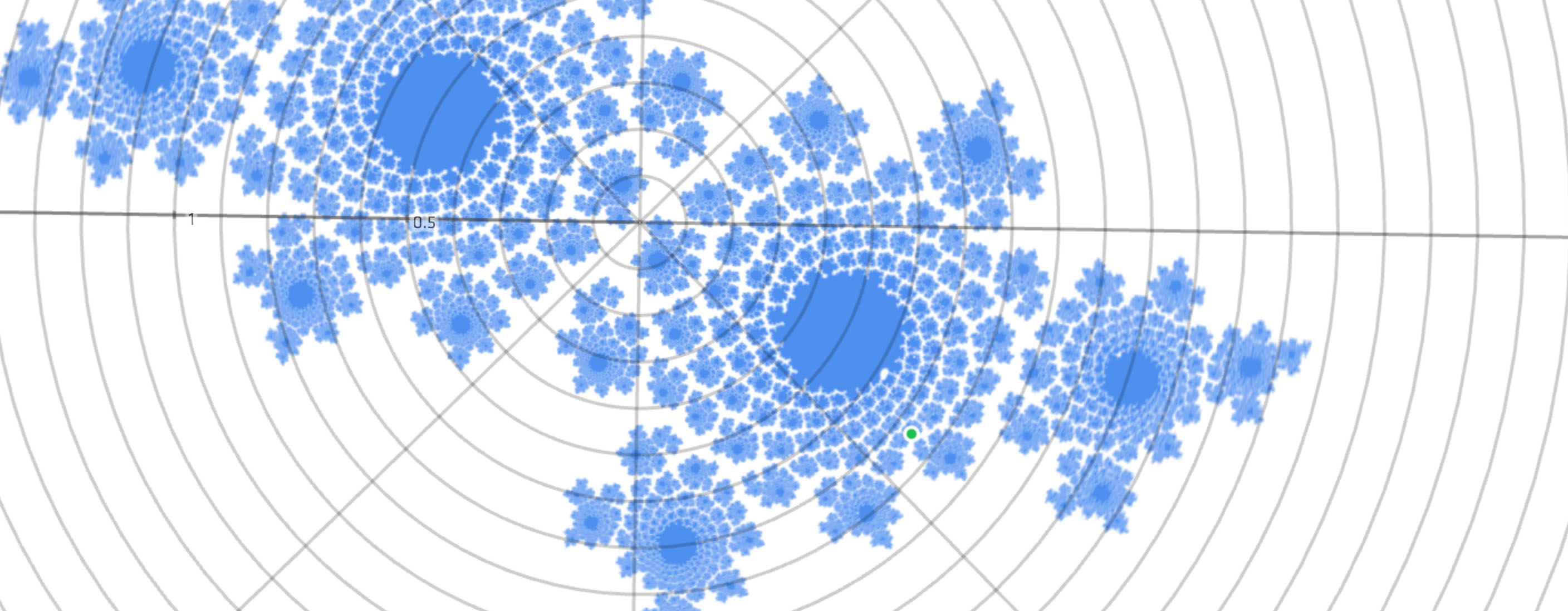
      </p>
    </div>
    
  </div>

</div>

<div class="g8 i2"><div class="pad">

<p>So that's quaternions, the magical rotation vectors. Every serious 3D engine supports them, and if you've played any sort of 3D game within the last 15 years, you were most likely controlling a quaternion camera. Whether it's head-tracking on an Oculus Rift, or the attitude control of a spacecraft (a real one), these problems become much simpler when we give up our silly three dimensional notions and accept 3D rotation as the four dimensional curly beast that it is.</p>

<p>Ultimately though, quaternions can be treated as just vectors with a special difference and interpolation operator. We can apply all our usual linear filtering tricks, and can create sophisticated motions on the hypersphere. Combine that with smooth path-based animation with controllable velocities, and you have everything you need to build carefully tracked shots from any angle.</p>

<h2>Meaning from Motion</h2>

<p>It's useful to see where we actually are with animation tools, especially on the web. Unfortunately, it doesn't look that great. For most, animation means calling an <code>.animate()</code> method or defining a transition in CSS with a generic easing curve, fire-and-forget style. Keyframe animation is restricted to clunky CSS Animations, where we only get a single cubic bezier curve to control motion. We can't bounce, can't use real friction, can't set velocities or apply forces. We can't blend animations or use feedback. By now you know how ridiculously limiting this is.</p>

<p>In an ideal world, we'd have a perfect animation framework with all the goodies, which runs natively and handles all the math for us while still giving direct control. Until then, consider inserting a little bit of custom animation magic from time to time. Writing a simple animation loop is easy, and offers you fine grained control. Upgrades can be added later when the need presents itself. Your audience might not notice directly, but you can be sure they will remark on how pleasant it is to use, when everything seems alive.</p>

<p>But <em>buyer beware</em>: we need to be thinking as much about what isn't changing, as what is. Just like we use grids and alignment to keep layouts tidy, so should we use animation consistently to bring a rhythm and voice to our interactions.</p>

<p>In what you just saw, little was left to chance. Color, size, proportion, direction, orientation, speed, timing… they're used consistently throughout, there to reinforce the connections that are expressed. I try to hash ideas into memorable qualia, while avoiding optical illusions or accidental resemblances. If it's not the same, it should look, act or speak differently. Even if it's just a <span class="slate">slightly</span> <span class="royal">different</span> <span class="cyan">shade</span> of <span class="blue">blue</span>, or a 300ms difference in timing.</p>

<p>Though MathBox is a simple script-based animator (for now), it exposes some interesting knobs to play with and can handle arbitrary motion through custom expressions. It also supports slowable time and maintains per-slide clocks. If you map bullet time to a remote control, you can manipulate time mid-sentence: you don't need to follow your slides, your slides follow you. It feels ridiculously empowering when you're doing it. When properly applied, you can build up a huge amount of context and carry it along for extended periods of time at the forefront of people's attention.</p>

<p>Many of these slides are based on live systems that run in the background, advancing at their own pace. The entire diagram reflows, maintaining the mathematical laws and relations that are represented. Often, I use periodic or pseudo-random motion to animate the source data. While it may just seem like a cool trick at first, I think it's actually the main feature. It changes every slide from one example into many different ones. It shows them one after the other, streaming into your brain at 60 frames per second. It maximizes the use of visual bandwidth, yet cause and effect can still be read directly from any freeze frame.</p>

<p>Additionally, looping creates a continuous reinforcement of the depicted mechanisms. In my experience, our intuition can absorb math this way through mere exposure, slowly internalizing models of abstract spaces, as well as the relations and algorithms that operate within. Even if we don't notice right away, it anchors our understanding for later when it's finally expressed formally and verbally.</p>

<p>That's the theory anyway: put the murder weapon on the mantelpiece in the opening scene, and work your way towards revealing it. Only the weapon could be complex exponentials, and the mantelpiece the <a href="/blog/how-to-fold-a-julia-fractal/">real number line</a>. I'm not an education specialist or neuroscientist, though I did devour <a href="http://en.wikipedia.org/wiki/David_Marr_(neuroscientist)">David Marr</a>'s seminal work on the human visual system. I just know that whenever I manage to pour a complicated concept into a concise and correct visual representation, it instantly begins to make more sense.</p>

<p>Bret Victor has talked about media as thinking tools, about needing a better way to examine and build dynamical systems, a <a href="http://worrydream.com/MediaForThinkingTheUnthinkable/">new medium for thinking the unthinkable</a>. In that context, MathBox is an attempt at <em>viewing the unviewable</em>. To borrow a term, it's <a href="http://www.youtube.com/watch?v=4niz8TfY794#t=20m38s">qualiscopic</a>. It's about creating graphical representations that obey certain laws, and in doing so, making abstract things tangible. It encourages you to smoothly explore the space of all possible diagrams, and find paths that are meaningful.</p>

<p>By carefully crafting living dioramas of space and time this way, we can honestly say: nothing will appear, change or disappear without explanation.</p>

<p class="m3"><em>Comments, feedback and corrections are welcome on <a href="https://plus.google.com/112457107445031703644/posts/bxLbxsAu161">Google Plus</a>. Diagrams powered by <a href="/blog/making-mathbox/">MathBox</a>.</em></p>

</div></div>
]]></content>
  </entry>
  
  <entry>
    <title type="html"><![CDATA[Making MathBox]]></title>
    <link href="https://acko.net/blog/making-mathbox/"/>
    <updated>2012-11-14T00:00:00+01:00</updated>
    <id>https://acko.net/blog/making-mathbox</id>
    <content type="html"><![CDATA[<div class="g8 i2 first"><div class="pad">

  <h2 class="sub">Presentation-Quality Math with Three.js and WebGL</h2>

</div></div>

<div class="c"></div>

<aside class="g4"><div class="pad tc">
  <iframe class="mathbox" src="/files/mathbox/MathBox.js/examples/ProjectiveLine.html?c3d6624d" height="600"></iframe>
  A fun little graph involving rational functions on the <a href="http://en.wikipedia.org/wiki/Real_projective_line">real projective line</a>.
</div></aside>

<div class="g8"><div class="pad">

  <p>For most of my life, I've found math to be a visual experience. My math scores went from crap to great once I started playing with graphics code, found some demoscene tutorials, and realized I could reason about formulas by picturing the graphs they create. I could apply operators by learning how they morph, shift, turn and fold those graphs and create symmetries. I could remember equations and formulas more easily when I could layer on top the visual relationships they embody. I was less likely to make mistakes when I could augment the boring symbolic manipulation with a mental set of visual cross-checks.</p>

  <p>So, when tasked with holding a conference talk on <a href="http://www.youtube.com/watch?v=Zkx1aKv2z8o">how to make things out of math</a> at <a href="http://www.full-frontal.org">Full Frontal</a>—later redone at <a href="http://www.webdirections.org/">Web Directions Code</a>—I knew the resulting presentation would have to consist of intricate visualizations as the main draw, with whatever I had to say as mere glue to hold it together.</p>

  <p>The problem was, I didn't know of a good tool to do so, and creating animations by hand would probably be too time consuming. With the writings of <a href="http://www.maa.org/devlin/LockhartsLament.pdf">Paul Lockhart</a> and <a href="http://worrydream.com/KillMath/">Bret Victor</a> firmly in mind, I also knew I wanted to start blogging more about mathematical concepts in a non-traditional way, showing the principles of calculus, analysis and algebra the way I learnt to see them in my head, rather than through the obscure symbols served up in engineering school.</p>

  <p>So I set out to create that tool, keeping in mind the most important lesson I've picked up as a web developer: one cannot overstate the value in being able to send someone a link and have it just work, right there. It was obvious it would have to be browser-based.</p>

  <p><em>2015 Update: MathBox has evolved, <a href="/blog/mathbox2">version 2 is now available</a></em>.</p>

</div></div>

<aside class="g4 i2 c"><div class="pad">
  <p class="tc">
    <a href="http://www.youtube.com/watch?v=Zkx1aKv2z8o">
    <img style="top: 0" src="/files/fullfrontal/video2.jpg" alt="Video" />
    Presentation Video<br />(updated)
    </a>
  </p>
</div></aside>

<aside class="g4"><div class="pad">
  <p class="tc">
    <a href="http://acko.net/files/fullfrontal/fullfrontal/wdcode/online.html">
    <img style="top: 0; -webkit-box-shadow: 0 2px 10px rgba(0, 0, 0, .3); -moz-box-shadow: 0 2px 10px rgba(0, 0, 0, .3); box-shadow: 0 2px 10px rgba(0, 0, 0, .3);" src="/files/fullfrontal/slides.png" alt="Slides" />
    Slide Deck<br />
    (updated)
    </a>
  </p>
</div></aside>

<div class="g8 i2 c"><div class="pad">

  <h2>Choose your Poison</h2>

  <p>Now, when people think of graphs in a browser, the natural thought is vector graphics and SVG, which quickly leads to <a href="http://d3js.org">visualization powerhouse d3.js</a>. It really is an amazing piece of tech with a vast library of useful code to accompany it. When I wrapped my head around how d3's enter/exit selections are implemented and how little it actually does to achieve so much, I was blown away. It's just so elegant and simple.</p>

  <p>Unfortunately, d3's core is intricately tied to the DOM through SVG and CSS. And that means ironically that d3 is not really capable of 3D. Additionally, d3 is a power tool that makes no assumptions: it is up to you to choose which visual elements and techniques to use to make your diagrams, and as such it is more like assembly language for graphs than a drop-in tool. These two were show stoppers.</p>

  <p>For one, manually designing layouts, grids, axes, etc. every time is tedious. You should be able to drop in a mathematical expression with as little fanfare as possible and have it come out looking right. This includes sane defaults for transitions and animations.</p>

</div></div>

<div class="g12">
  <iframe class="mathbox" src="/files/mathbox/MathBox.js/examples/Intersections.html?c3d6624d" width="960" height="500"></iframe>
</div>

<div class="g7"><div class="pad">

  <p>For another, I've found that, when in doubt, adding an extra dimension always helps. The moment I finally realized that every implicit graph in N dimensions is really just a slice of an explicit one in N+1 dimensions, a ridiculous amount of things clicked together. And it took until years after studying signal processing to at long last discover the 4D picture of complex exponentiation that tied the entire thing together (projected into 3D below): it revealed the famous "magic formula" involving e, i and π to be a meaningless symbological distraction, a pinhole view of a much larger, much more beautiful structure, underpinning every Fourier and Z transform I'd ever encountered.</p>

</div></div>

<aside class="g5 m1"><div class="pad">
  <p class="tc"><big>
    e<sup>iπ</sup> = -1
  </big></p>
  <p class="tc">This particular formula is not that important.</p>

  <p class="tc"><big>
    e<sup>x+iy</sup> = e<sup>x</sup> &middot; e<sup>iy</sup> = e<sup>x</sup> ∠ y
    
  </big></p>
  <p class="tc">This one is (∠ = rotate by).<br />Unfortunately it has a four dimensional graph.</p>
  
</div></aside>

<div class="g12">
  <iframe class="mathbox" src="/files/mathbox/MathBox.js/examples/ComplexExponentiation.html?c3d6624d" width="960" height="500"></iframe>
</div>

<div class="g8 i2"><div class="pad">

  <p>So, WebGL it was, because I needed 3D. Unfortunately that meant the promise of having it just work everywhere was tempered by a lack of browser support, but I would certainly hope that's something we can overcome sooner than later. Dear Apple and Microsoft: get your shit together already. Dear Firefox and Opera: your WebGL performance could be a lot better.</p>

  <h2>Shady Dealings</h2>

  <p>These days I don't really touch WebGL without going through <a href="http://mrdoob.github.com/three.js/">Three.js</a> first. Three.js is a wonderful, mature engine that contains tons of useful high-level components. At the same time, it also does a great job in just handling the boilerplate of WebGL while not getting in the way of doing some heavy lifting yourself.</p>

  <p>Rendering vector-style graphics with WebGL is not hard, certainly easier than photorealistic 3D. Primitives like lines and points are sized in absolute pixels by default, and with hardware multisampling for anti-aliasing, you get somewhat decent image quality out of it. Though, as is typical for a Web API, we're treated like children and can only cross our fingers and <em>request</em> anti-aliasing politely, hoping it will be available. Meanwhile native developers <a href="http://www.nvidia.com/object/coverage-sampled-aa.html">have full control</a> over speed and quality and can adjust their strategy to the specific hardware's capabilities. The more things change... And then <a href="http://code.google.com/p/chromium/issues/detail?id=159275">Chrome decided to disable anti-aliasing altogether</a> due to esoteric security issues with buggy drivers. Bah.</p>

  <p>Now, when rendering with WebGL, you really have two options. One is to just treat it as a dumb output layer, loading or generating all your geometry in JavaScript and rendering it directly in 3D. With the speed of JS engines today, this can get you pretty far.</p>

</div></div>

<div class="g7"><div class="pad">
  <p>The second option is to leverage the GPU's own capabilities as much as possible, doing computations in GLSL through so-called vertex and fragment shader programs. These are run for every vertex in a mesh, every pixel being drawn, and have been the main force driving innovation in real-time graphics for the past decade. With the goal of butter-smooth 60fps graphical goodness, this seemed like the better choice.</p>

  <p>Unfortunately, GLSL shaders are rather monolithic things. While you do have the ability to create subroutines, every shader still has to be a stand-alone program with its own main() function. This means you either need to include a shader for every possible combination of operations, or generate shader code dynamically by concatenating pre-made snippets or using #ifdef switches to knock them out. This is the approach taken by Three.js, which results in some <a href="https://github.com/mrdoob/three.js/blob/master/src/renderers/WebGLShaders.js">very hairy code</a> that is neither easy to read nor easy to maintain.</p>

  <p>Having made a prototype, I knew I wanted to show continuous transitions between various coordinate systems (e.g. polar and spherical), knew I needed to render shaded and unshaded geometry, and knew I would need to slot in specific snippets for things like point sprites, bezier curves/surfaces, dynamic tick marks, and more. Sorting this all out Three.js-style would be a nightmare.</p>

</div></div>

<aside class="g5">
<p class="codeblock">
<code>uniform sampler2D texture;
varying vec2 vUV;

void main() {
  gl_FragColor = texture2D(texture, vUV);
}
</code></p>
<p>
A pixel or fragment shader that looks up a pixel's color in a texture.
</p>
<p class="codeblock">
<code>uniform mat4 projectionMatrix;
uniform mat4 modelViewMatrix;
attribute vec4 position;
attribute vec2 uv;
varying vec2 vUV;

void main() {
  vUV = uv;

  gl_Position = projectionMatrix
              * modelViewMatrix
              * position;
}
</code>
</p>
<p>
A vertex shader that projects a 3D position into 2D by applying two matrices. It also provides UV coordinates for the texture look up.
</p>
</aside>

<aside class="g4 c">
<p style="top: 0;"><img src="/files/mathbox/shadergraph.png" style="width: 93%" /></p>
<p class="codeblock">
<code>var graph =
  factory
    .snippet('split')
    .group()
      .snippet('top')
    .next()
      .snippet('middle')
    .next()
      .snippet('bottom')
    .combine()
    .snippet('join')
    .end();
</code></p>
<p>
ShaderGraph's factory API lets you build shader chains with very little hassle. In this case, the names refer to IDs of &lt;<strong>script</strong>&gt; tags in the source.
</p>
</aside>

<div class="g8"><div class="pad">

  <p>So I wrote a library to solve that problem, called <a href="https://github.com/unconed/ShaderGraph.js">ShaderGraph.js</a>. It is best described as a smart code-concatenator, a few steps short of writing a full blown compiler. You feed it snippets of GLSL code, each with one or more inputs and outputs, and these get parsed and turned into lego-like building blocks. Each input/output becomes an outlet, and outlets are wired up in a typical dataflow style. Given a graph of connected snippets, it can be compiled back into a program by assembling the subroutines, assigning intermediate variables and constructing an appropriate main() function to invoke them. It also exports a list of all external variables, i.e. GLSL uniforms and attributes, so you can control the program's behavior easily.</p>

  <p>If I'd stopped there however, I'd have just replaced the act of manual code writing with that of manually wiring graphs. So I applied the principle of convention-over-configuration instead: you tell ShaderGraph to connect two snippets, and it will automatically match up outlets by name and type. This is augmented by a chainable factory API, which allows you to pass a partially built graph around. It allows different classes to work together to build shaders, each inserting their own snippets into the processing chain.</p>
  
<p>For example, to render a Bezier surface, the vertex shader is composed of: cubic interpolation, viewport transform (position + tangents), normal calculation and lighting. When transforming to e.g. a polar viewport, the surface normals are seamlessly recalculated. It really works like magic and I can't wait to use this in my next WebGL projects.</p>

</div></div>

<div class="g8 i2"><div class="pad">
  
  <h2>Viewports, Primitives and Renderables</h2>

  <p>At its core, Three.js matches pretty directly with WebGL. You can insert objects such as a Mesh, Line or ParticleSystem into your scene, which invokes a specific GL drawing command with high efficiency. As such, I certainly didn't want to reinvent the wheel.</p>

  <p>Hence, MathBox is set up as a sort of scene-manager-within-a-scene-manager. It's a little sandbox that speaks the language of math, allowing you to insert various <em>primitives</em> like curves, vectors, axes and grids. Each of these primitives then instantiates one or more <em>renderables</em>, which simply wrap a native Three.js object and its associated ShaderGraph material. Thus, once instantiated, MathBox gets out of the way and Three.js does the heavy lifting as normal. You can even insert multiple mathboxen into a Three.js scene if you like, mixed in with other objects.</p>

<p><img src="/files/mathbox/MathBox.js/resources/architecture.png" alt="MathBox Architecture" class="squeeze" style="margin-left: -10px;" /></p>

  <p>For example, a vector primitive is rendered as an arrow: it consists of a shaft and an arrowhead, realized as a line segment and a cone. An axis primitive is an arrow as well, but it also has tick marks (specially transformed line segments), and is positioned implicitly just by specifying the axis' direction rather than a start and end point.</p>

  <p>To render curves and surfaces, you can either specify an array of data points or a live expression to be evaluated at every point. This turned out to be essential for the kinds of intricate visualizations I wanted to show, my slides being driven by timed clocks, shared arrays of data points, and live formulas and interpolations. I even fed in data from a physics engine, and it worked perfectly.</p>

  <p>This is all tied together through Viewport objects, which define a specific mapping from a mathematical coordinate space into the 3D world space of Three.js. For example, the default cartesian viewport has the range [–1, 1] in the X, Y and Z directions. Altering the viewport's extents will shift and scale anything rendered within, as well as reflow grids and tick marks on each axis.</p>

  <p>There are two more sophisticated viewport types, polar and spherical, which each apply the relevant coordinate transform, and can transition smoothly to and from cartesian. More viewport types can be added, all that is required is to define an appropriate transformation in JavaScript and GLSL. That said, defining a seamless transition to and from cartesian space is not always easy, particularly if you want to preserve the aspect-ratio through the entire process.</p>

  <h2>Interpolate all the things!</h2>

  <p>Finally, I had to tackle the problem of animation, keeping in mind a tip I learnt from the <a href="http://www.youtube.com/watch?v=4gZ5rsAHMl4">ever so mindbending Vihart</a>: "If I can draw the point of a sentence, I don't actually need to say the sentence." This applies doubly so for animation: every time you replace a "before" and "after" with a smooth transition, your audience implicitly understands the change rather than having to go look for it.</p>

  <p>Hence, each primitive can be fully animated. Each has a set of options (controlling behavior) and styles (controlling GLSL shaders), and there is a universal animator that can interpolate between arbitrary data types in a smart fashion.</p>

  <p>For example, given a viewport with the XYZ range [[–1, 1], [–1, 1], [–1, 1]], you can tell it to animate to [[0, 2], [0, 1], [–3, 3]], and it just works. The animator will recursively animate each subarray's elements, and any dependent objects like grids and axes will reflow to match the intermediate values. This works for colors, vectors and matrices too. In case of live curves with custom expressions, the animator will invoke both the old and the new, and interpolate between the results.</p>

</div></div>

<div class="g8 i2">
  <div class="slideshow compact" data-skip="1">
    <div class="iframe">
      <iframe class="mathbox paged" src="/files/mathbox/MathBox.js/examples/BezierSurface.html?c3d6624d" width="640" height="400"></iframe>
    </div>
    <div class="steps">
      <div class="step"></div>
      <div class="step"></div>
      <div class="step"></div>
      <div class="step"></div>
      <div class="step"></div>
      <div class="step"></div>
      <div class="step"></div>
    </div>
  </div>
</div>

<div class="g8 i2"><div class="pad">
  <p>However, executing animations manually in code is tedious, particularly in a presentation, where you want to be able to step forward and backward. So I added a Director class whose job it is to coordinate things. All you do is feed it a script of steps (add this object, animate that object). Then, as it applies them, it remembers the previous state of each object and generates an automatic rollback script. It also contains logic to detect rapid navigation, and will hurry up animations appropriately. This avoids that agonizing situation of watching someone skip through their slide deck, playing the same cheesy PowerPoint transitions over and over again.</p>

  <h2>Presenting Naturally</h2>
  
  <p>With MathBox's core working, it was time to build my slides for the conference. After a quick survey, I quickly settled on <a href="http://imakewebthings.com/deck.js/">deck.js</a> as an HTML5 slidedeck solution that was clean and flexible enough for my purposes. However, while MathBox can be spawned inside any DOM element, it wouldn't work to insert a dozen live WebGL canvases into the presentation. The entire thing would grind to a halt or at least become very choppy.</p>
  
  <p>So instead, I integrated each MathBox graphic as an IFRAME, and added some logic that only loads each IFRAME one slide before it's needed, and unloads it one slide after it's gone off screen. To sync up with the main presentation, all deck.js navigation events were forwarded into each active IFRAME using <em>window.postMessage</em>. With the MathBox Director running inside, this was very easy to do, and meant that I could skip around freely during the talk, without any worries of desynchronization between MathBox and the associated HTML5 overlays.</p>
  
  <p>In fact, I applied a similar principle to this post. To avoid rendering all diagrams simultaneously and spinning up laptop fans more than necessary, each MathBox IFRAME is started as it scrolls into view and stopped once it's gone.</p>
  
  <p>I've also found that having a handheld clicker makes a huge difference while speaking—as it allows you to gesture freely and move around. So, I grabbed the infrared remote code from VLC and built a <a href="https://github.com/unconed/iremotepipe/">simple bridge</a> from to Cocoa to Node.js to WebSocket to allow the remote to work in a browser. It's a shame Apple's decided to discontinue IR ports on their laptops. I guess I'll have to come up with a BlueTooth-based solution when I upgrade my hardware.</p>

  <h2>Towards MathBox 1.0</h2>

  <p>In its current state, MathBox is still a bit rough. The selection of primitives and viewports is limited, and only includes the ones I needed for my presentation. That said, it is obvious you can already do quite a lot with it, and I couldn't have been happier to hear that all this effort had the desired response at the conference. I wasn't 100% sure whether other people would have the same a-ha moments that I've had, but I'm convinced more than ever that seeing math in motion is essential for honing our intuition about it. MathBox not only makes animated diagrams much easier to make and share, but it also opens the door to making them interactive in the future.</p>

  <p>I plan to continue to evolve MathBox as needed by using it on this site and addressing gaps that come up, though I've already identified a couple of sore points:</p>

  <ul>
  <li><span class="strike"><span>I used tQuery as a boilerplate and because I liked the idea of having a chainable API for this. However, this also means it's currently running off an outdated version of Three.js. I need to look into updating and/or dropping tQuery.</span></span><br />MathBox has been updated to Three.js r53.</li>
  <li><span class="strike"><span>Numeric or text labels are completely unsupported. It should be possible to use my CSS3D renderer for Three.js to layer on beautifully typeset <a href="http://www.mathjax.org">MathJax</a> formulas, positioning them correctly in 3D on top of the WebGL render.</span></span><br />I've added labeling for axes. I've integrated MathJax, but it's tricky because the typesetting is painfully slow in the middle of a 60fps render. But it's automatically used if MathJax is present.</li>
  <li>All styles have to be specified on a per-object basis. Some form of stylesheet, default styles or class mechanism to allow re-use seems like an obvious next step.</li>
  <li>There are undoubtedly memory leaks, as I was focused first and foremost on getting it to work.</li>
  <li>Expressions that don't change frame-to-frame are still continuously re-evaluated, which is wasteful. There is a <code>live: false</code> flag you can set on objects, but it triggers a few bugs here and there.</li>
  <li><span class="strike"><span>There needs to be a predictable, built-in way of running a clock per slide to sync custom expressions off of. In my presentation I used a hack of clocks that start once first invoked, but this lacks repeatability.</span></span><br />I added a <code>director.clock()</code> method that gives you a clock per slide.</li> 
  </ul>

  <p>Finally, it doesn't take much imagination to imagine a MathBox Editor that would allow you to build diagrams visually rather than having to use code like I did. However, that's a can of worms I'm not going to open by myself, especially because the API is already quite straightforward to use, and the library itself is still a bit in flux. Perhaps this could be done as an extension of the <a href="http://mrdoob.github.com/three.js/editor/">Three.js editor</a>.</p>

  <p>You can see what MathBox is really capable of in the <a href="http://www.youtube.com/watch?v=Zkx1aKv2z8o">conference video</a>. I invite you to <a href="https://github.com/unconed/MathBox.js">play around with MathBox</a> and see what you can make it do. Contributions are welcome, and the architecture is modular enough to allow its functionality to grow for quite some time.</p>

</div></div>
]]></content>
  </entry>
  
</feed>