<?xml version="1.0" encoding="utf-8"?>
<feed xmlns="http://www.w3.org/2005/Atom">

  <title><![CDATA[Acko.net]]></title>
  <link href="https://acko.net/atom.xml" rel="self"/>
  <link href="https://acko.net/"/>
  <updated>2026-03-05T12:10:39+01:00</updated>
  <id>https://acko.net</id>
  <author>
    <name><![CDATA[Steven Wittens]]></name>
    
  </author>

  
  <entry>
    <title type="html"><![CDATA[Making Love to WebKit]]></title>
    <link href="https://acko.net/blog/making-love-to-webkit/"/>
    <updated>2012-01-09T00:00:00+01:00</updated>
    <id>https://acko.net/blog/making-love-to-webkit</id>
    <content type="html"><![CDATA[<div class="g8 i2 first"><div class="pad">
  <h2 class="sub">Parallax, GPUs and Technofetishism</h2>

  <p>
    If the world is going to end in 2012, Acko.net will at least go out in style: I've redesigned. Those of you reading through RSS readers will want to <a href="http://acko.net/">enter through the front door</a> in a WebKit-browser like Chrome, Safari or even an iPad.
  </p>

  <p class="bubble">
    The last design was meant to feel spacious, the new design <em>is</em> spacious, thanks to generous use of CSS 3D transforms.
  </p>

  <h3>CSS 3D vs. WebGL</h3>
  
  <p>
    This idea started with an accidental discovery: if you put a CSS perspective on a scrollable &lt;DIV&gt;, then 3D elements inside that &lt;DIV&gt; will retain their perspective while you scroll. This results in smooth, native parallax effects, and makes objects jump out of the page, particularly when using an analog input device with inertial scrolling.
  </p>

  <p>
    This raises the obvious question: how far can you take it? Of course, this only works on WebKit browsers, who currently have the only CSS 3D implementation out of beta, so it's not a viable strategy by itself yet. IE10 and Firefox will be the next browsers to offer it. There's WebGL in Chrome and Firefox that can be used to do similar things, but WebGL is its own sandbox: you can't put DOM elements in there, or use native interaction. And any amount of WebGL rendering in response to e.g. scrolling is going to involve some amount of lag. Still, I wasn't going put a lot of effort into making a CSS 3D-only design without some backup.
  </p>

  <p>
    That's why I actually built the whole thing on top of <a href="https://github.com/mrdoob/three.js/">Three.js</a>, mrdoob's excellent JavaScript 3D engine. Aside from providing a comprehensive standard library for 3D manipulation, it also lets you swap out the rendering component. Out of the box, it can render to a 2D canvas, a WebGL canvas, or SVG.
  </p>

</div></div>
<div class="g7"><div class="pad">

  <h3>The DOM Scenegraph</h3>
  
  <p>
    So I augmented it with a CSS 3D renderer (<a href="https://github.com/unconed/CSS3D.js">GitHub</a>). It reads out the scene and renders each object using DOM elements, shaped and transformed into the right 3D position, orientation and appearance. They sit ‘in’ the page, and the browser projects and composits them for you. Of course, this only works for simple geometric shapes like lines or rectangles, but luckily that's all I need.
  </p>
  
  <p>
    It would be too slow to have to render out new elements for every frame, so the CSS 3D renderer's elements persist. Moving or rotating an object involves just changing a CSS property. Same for the camera: the entire scene is wrapped in a &lt;DIV&gt; that has its own 3D transform.
  </p>

  <p>
    So it's VRML all over again, but this time, it actually sort of performs. With our browsers being actual 3D engines, it's not a huge leap from here to having a &lt;MESH&gt; tag in HTML6, can-of-worms-factor not withstanding.
  </p>

  <p>
    Having built a quick prototype, I was satisfied with how well it worked, particularly in Safari on OS X, where the cross-pollination from the iPhone's mature tile-based GPU renderer has clearly paid off and there is no lag at all.
  </p>

</div></div>

<aside class="g5">
  <p class="m3"><img src="/files/making-love-to-webkit/dom.png" alt="CSS 3D DOM" />The DOM tree of this page. Yup, nasty.</p>
</aside>

<div class="c"></div>

<aside class="g5">
  <p class="m3"><img src="/files/making-love-to-webkit/old-acko.png" alt="Acko.net old design" />Previous design (<a href="/tag/acko.net">Archive</a>)</p>
  <p><img src="/files/making-love-to-webkit/sketch.jpg" alt="Initial sketch" />Initial sketch</p>
  <p><img src="/files/making-love-to-webkit/editor.png" alt="Initial sketch" />Scene editor</p>
</aside>

<div class="g7"><div class="pad">

  <h3>
    Design Process
  </h3>

  <p>
    Now all that was needed was a design. Last time I drew out a manual perspective drawing in Illustrator, which was tedious, but still basically came down to designing a flat image. This time, it would have to work in 3D. I started with a quick sketch to get a feel for the perspective, now that it no longer needed to double as a flat frame for the site's content.
  </p>
  
  <p>
    Simple geometric shapes, parallel lines, consistent angles. Simple enough. But if real perspective was involved, I would have to place items so they would look good from multiple angles, and each would need convincing depth and shading. To do this all by hand, typing out coordinates and perpetually refreshing the page, would take forever.
  </p>
  
  <p>
    So instead I built a simple editor to speed up the process. It's super ghetto, and basically just exists to manipulate the colors, positions and orientations of objects in a Three.js scene. It spits out a JSON object describing them, which can then be unserialized again into a scene.
  </p>

  <p>
    This also helped maintain a consistent palette. The colors are built from a few base tints, brightened or darked in linear RGB—i.e. before gamma correction. This ensures even tones and allowed for easy color adjustments.
  </p>

  <p>
    The editor is almost entirely keyboard operated, but with its minimum amount of features I was at least able to place items in 3D, copy/paste objects and see it from any angle or position I wanted. To 'save', I just copied the output into a .JS file, where I could make manual tweaks too if necessary.
  </p>

  <p>
    As for the actual site and content, I wanted to keep it much more sober. Like many others these days, I want to treat blogging more like publishing. That way I can focus on crafting each post more like an article with illustrations and asides rather than just a text blog.
  </p>
    
  <p>
    Hence, while there's a big party upstairs, it's all <a href="http://www.amazon.com/Elements-Typographic-Style-Robert-Bringhurst/dp/0881791326">typography</a> down below. The font of choice is <a href="http://processtypefoundry.com/fonts/klavika/">Klavika</a>, a humanist/geometric sans-serif with just the right kind of “Dutch Art Museum Signage” meets “Cyberpunk” I was looking for. The layout is a responsive multi-column grid that collapses down for smaller screens and devices. Finally, a strict vertical rhythm is enforced in the lines to keep everything nice and tidy.
  </p>
  
</div></div>

<div class="g9"><div class="pad">
  <h4>Editor</h4>
  <iframe frameborder="0" src="/files/slacko/load.html" width="680" height="580"></iframe>
  <p class="m0 l0">
    <a href="http://acko.net/files/slacko/editor.html" target="_blank" class="editor-open">Open editor in new window</a>
  </p>
</div></div>

<div class="g3"><div class="pad">
  <h4>Controls</h4>
  <ul class="flat">
    <li><kbd>Click</kbd>+<kbd>Drag</kbd> — Orbit camera</li>

    <li><kbd>Enter</kbd> — New object</li>
    <li><kbd>Space</kbd> — Clone object</li>
    <li><kbd>Backspace</kbd> — Delete object</li>
    <li><kbd>Tab</kbd> / <kbd>Shift</kbd>+<kbd>Tab</kbd><br />Cycle through objects</li>

    <li><kbd>W</kbd><kbd>A</kbd><kbd>S</kbd><kbd>D</kbd>&nbsp; <kbd>Q</kbd><kbd>E</kbd><br />Move object</li>
    <li><kbd>Shift</kbd>+<kbd>W</kbd><kbd>A</kbd><kbd>S</kbd><kbd>D</kbd> &nbsp; <kbd>Q</kbd><kbd>E</kbd><br />Resize object</li>
    <li><kbd>Ctrl</kbd>+<kbd>W</kbd><kbd>A</kbd><kbd>S</kbd><kbd>D</kbd> &nbsp; <kbd>Q</kbd><kbd>E</kbd><br />Move camera</li>

    <li><kbd>[</kbd><kbd>]</kbd> — Lower/raise units</li>
    <li><kbd>Z</kbd><kbd>X</kbd><br />Orbit distance</li>
    <li><kbd>T</kbd>/<kbd>T</kbd>/<kbd>U</kbd><br />Tag/untag/untag all</li>
  </ul>
</div></div>

<div class="g8 i2"><div class="pad">
  <h3>She cannae take the power cap'n!</h3>
  <p>
    307 objects later it was finished, and not a single image was used. Unfortunately, as you can see there are tons of glitches in the editor—though some objects only have one side by design, and it works a lot better in a separate window. CSS 3D was never meant to do this, and you often see incorrect depth layering and flickering. Luckily most of these are caused by the floating grid markers and aren't a problem in the final view. The rest was resolved by splitting up objects or dual layering problematic surfaces, but some minor problems remain. Also for some reason, the background &lt;DIV&gt;'s click areas extend beyond their visible area, causing some click layering issues that I had to work around. Text resizing in the browser also leads to breakage, though multi-touch zoom works in Safari.
  </p>
  
  <p>
    Performance in Safari is wonderfully smooth too, but Chrome OS X starts to lag a bit. Luckily the effects are turned off as soon as they go off screen, so any lag should be confined to the top of the page. Finally, there's also a random bug where sometimes the page will refuse to scroll if the mouse is over a 3D object, which is unfortunate, but also near-impossible to reproduce reliably.
  </p>
  
  <p>
    In theory the iPad would perform second, but it has its own issues. The use of page-in-page scrolling disables inertia, but this is entirely beyond my control. The other issue is that sometimes, the iPad will decide to render the page content at lower resolution, making it hard to read. I guess the CSS wizardry confuses its GPU texture management. A refresh usually fixes this.
  </p>
  
  <p>
    I also discovered some funny ways of abusing CSS 3D for weird effects. If you have a WebKit browser, scroll to the top and enter the Konami code for an impressionistic version of the same thing.
  </p>
    
  <p>
    I guess I'm now the proud owner of the first unofficial CSS 3D ‘ACID’ test. I'm eager to see how the next browser handles it. If it ends up being a silly idea in the long run, I can always just switch the output to WebGL, but for now I'm willing to run with it. I put in a universal CSS 3D detector and prefixes for all the major browsers.
  </p>
  
  <p>
    For non-CSS 3D browsers, I simply rendered the header into a static image. It's not as fun without the shifting perspective, but it adds its own kind of optical illusion as you scroll down.
  </p>
  
  <h3>
    Putting it all together
  </h3>
  
  <p>
    To power the site, I got rid of Drupal and replaced it with the nimble <a href="http://jekyllrb.com/">Jekyll</a>. Hat tip to <a href="http://walkah.net/">James Walker</a>, who did the same thing just a few days earlier and put all the code on GitHub to learn from.
  </p>
    
  <p>
    I've been really impressed with Jekyll's simple workflow, and though it's all static HTML, it's a refreshing change of pace. And thanks to client-side JS, it doesn't preclude adding interactive elements at all. I can treat my site as just a database of documents retrievable over HTTP, and wrap the logic around that.
  </p>
  
  <p>
    So I created a nice client-side navigator that transitions between pages, using 2D transforms, which also work on Firefox. It uses the HTML5 pushState API and replaces regular links with AJAX requests. Aside from being a faster way to navigate around, it also lets me link up multiple articles in a series elegantly. When you go back to a previous screen, it literally presses the browser's back button, thus avoiding creating a long, useless history trail. You go back exactly the way you came, scrolling back to where you were, just like the real back/forward buttons do. For example, click over to my <a href="/blog/making-worlds-introduction/">Making Worlds</a> series of posts. You can come back right away.
  </p>
  
  <p>
    I didn't use any libraries or router frameworks for this, simply because I wanted to have done it all myself at least once. As it now says on my <a href="/about">About page</a>, quoting Feynman: <em>"What I cannot create, I do not understand"</em>. The only way to grok the intricacies of something like browser history state, which we all use every day, is to dive in and replicate it. Otherwise, you'll just take carefully choreographed behavior for granted and your mental model will be incomplete.
  </p>

  <p>
    To keep code size down, I compiled a custom build of Three.js with only the parts I need. I also used YUI compressor to minify the CSS and JS. However, I don't mean to obfuscate the code: the important bits will make their way onto Github soon enough.
  </p>
  
  <p><em>Update: The CSS 3D renderer and editor are now <a href="https://github.com/unconed/CSS3D.js">available on GitHub</a>.</em></p>
  
  <h3>
    And Done?
  </h3>

  <p>
    I migrated over most of the content and did some house cleaning while I was at it. Most things should be back, but further fixes will be made. I also haven't implemented any commenting solution so far, but I'll be adding it back somehow as soon as I figure something out. In the mean time, there's <a href="https://plus.google.com/112457107445031703644/posts/HDJMgpDRAey">a Google Plus thread</a>.
  </p>

  <p>
    The final result looks like something that would perhaps once unironically be labeled <strong>The Information Superhighway</strong> in a magazine from the 90s, though with less neon green. I like it.
  </p>

</div></div>
]]></content>
  </entry>
  
  <entry>
    <title type="html"><![CDATA[Welcome to the World of Tomorrow!]]></title>
    <link href="https://acko.net/blog/welcome-to-the-world-of-tomorrow/"/>
    <updated>2008-07-20T00:00:00+02:00</updated>
    <id>https://acko.net/blog/welcome-to-the-world-of-tomorrow</id>
    <content type="html"><![CDATA[<div class="g8 i2 first"><div class="pad"><p><small>(with apologies to <a href="http://en.wikipedia.org/wiki/Futurama">Matt Groening</a>)</small>
</p>

<p>
After about <a href="/blog/new-design-for-acko-net">two years</a>, it's time for another make-over of my site.
</p>

<p>
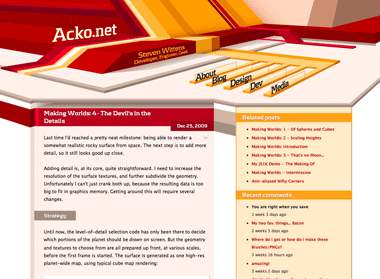
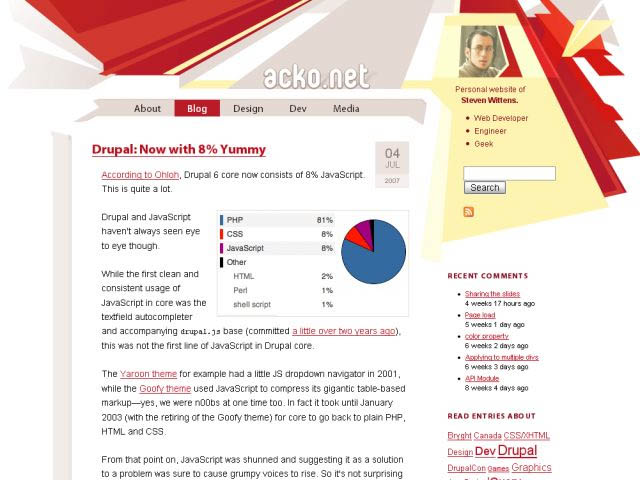
My last design had a relatively quirky look, with a bold red/yellow theme built from various irregular vector shapes. The idea was to step away from the typical mold of rectangular aligned frames on a page. I tried to incorporate some elements of perspective into the page composition, but it ended up being a relatively flat, geometrical theme.
</p>

<p>
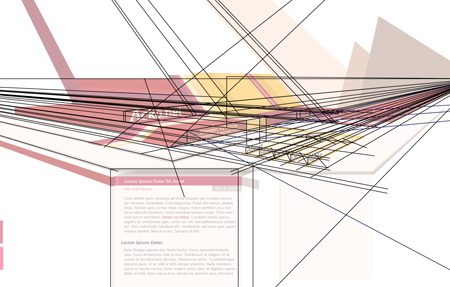
This time I wanted to work on the depth aspect and try to create something that feels spacious. To do this, I based the entire redesign on a two-point perspective. While the content itself is normal 2D markup, it sits in a 3D frame.
</p>

<p>
<img class="natural" src="/files/redesign-2008/wirepron.png" title="Some of the guide lines used in the construction process." alt="" /></p>

<p>
<img class="natural" src="/files/making-love-to-webkit/old-acko.png" alt="" /></p>

<p>
The header image is a regular illustration file (which is 100% manual vector work) and the content is typical HTML/CSS. However there is a twist: the perspective from the header is continued into the content with some simple 3D decorations, created on-demand with Canvas tags and JavaScript (<a href="javascript:void(0);" onclick="highlightCanvases();return false;">highlight canvases</a>, check out the footer).
</p>

<p>
While this perspective works perfectly near the top, the further down you go, the more vertically stretched the shapes get and it ends up looking weird. To compromise, the projection actually gets more and more isometric the further down you go. This creates an interesting effect when scrolling down.
</p>

<p>
The design also uses various CSS3 methods (@font-face, text-shadow, box-shadow) throughout, and uses sIFR 3 as a fallback for the headline font. Unfortunately CSS3 is still mostly unsupported in the browserscape, so only Safari 3.1 users get the luxury combo of <em>pretty, fast and no Flash</em>. Everyone else will have to suffer through hacks.
</p>

<p>
As a total surprise, the canvas-rocket-science trickery even works in IE6 thanks to Google's <a href="http://excanvas.sourceforge.net/">ExplorerCanvas</a> library.
</p>

<p>
I'll probably be tweaking it a bit more in the days to come, but feedback is appreciated.
</p>

</div></div>
]]></content>
  </entry>
  
  <entry>
    <title type="html"><![CDATA[New Design for Acko.net]]></title>
    <link href="https://acko.net/blog/new-design-for-acko-net/"/>
    <updated>2006-07-13T00:00:00+02:00</updated>
    <id>https://acko.net/blog/new-design-for-acko-net</id>
    <content type="html"><![CDATA[<div class="g8 i2 first"><div class="pad"><p>If you're not reading this through an aggregator, you will have already noticed: I've redesigned my website.
</p>

<p>
The last theme <a href="/blog/redesign">lasted about 2.5 years</a>, so it was time for something new and fresh.
</p>

<p>
Now, I don't know about you, but honestly I'm a bit tired of all the pastelly rounded corners and soft shadows that are all the rage today. Sure, it looks nice and neutral, but I'd prefer something with a little more <em>oomph</em>. So, after a day of fun with vectors tools, a highly saturated color palette and some browser-fighting, my geometric theme (uncreatively called <em>Acko8</em>) is completed.
</p>

<p><img class="natural" src="/files/redesign-2008/previous-acko-large.jpg" alt="" /></p>

<p>
The result is, as you'd expect, tableless and semantic XHTML/CSS. The theme should work from 800x600 up without scrolling (though at higher resolutions, more eye candy sticks out on the sides). Whether it is aesthetically pleasing depends of course on your own tastes. But I sure love the way it turned out!
</p>

<p>
What's cool is that I specifically crafted the underlying CSS skeleton to allow images to 'break out' of the text flow. The previous design tried this as well, but had several nasty issues with it. The effect is quite nice.
</p>

<p>
Aside from the looks I already reorganised the site a bit. The front door page was removed in favor of a more direct approach. I put my side projects a bit more in the spotlight as well. Finally, I emphasised the personal aspect, with a clear explanation of the site's purpose in the upper-right corner on every page.
</p>

<p>
Comments welcome!</p></div></div>
]]></content>
  </entry>
  
  <entry>
    <title type="html"><![CDATA[Redesign]]></title>
    <link href="https://acko.net/blog/redesign/"/>
    <updated>2004-02-01T00:00:00+01:00</updated>
    <id>https://acko.net/blog/redesign</id>
    <content type="html"><![CDATA[<div class="g8 i2 first"><div class="pad"><p>Finally got around to redesigning the site. I didn't really like the previous red one anyway. However, aside from cosmetics I've also reorganised things quite a bit. The site is now divided in 3+1 parts (Art, Blog, Coding and 'everything else'). I hope things will be easier to find for everyone.
Oh and note the spiffy Clean URLs too.
</p>

<p>
I've had to pull some tricks to get the menu to work, and it doesn't yet cascade down for subsections. I hope the menu-system changes in <a href="http://www.drupal.org/">Drupal</a> will be finalized soon.
</p>

<p>
Comments are welcome as always. The forum is stuck under <a href="/dump">Dump</a> if you've got something else to talk about. Old accounts will still work, and Drupal authentication is enabled too.</p></div></div>
]]></content>
  </entry>
  
</feed>